
HPS-01 - Surveillance Camera Lorex - Free user manual and instructions
Find the device manual for free HPS-01 Lorex in PDF.


| Product Type | Surveillance Camera |
| Brand | Lorex |
| Model | HPS-01 |
| Video Resolution | 1080p Full HD |
| Lens | Fixed, 110° field of view |
| Night Vision | Up to 30 ft (9 m) infrared |
| Motion Detection | Adjustable sensitivity, push notification |
| Audio | Built-in microphone and speaker (two-way) |
| Power Supply | 12V DC adapter or PoE (Power over Ethernet) |
| Dimensions | 2.8 x 2.8 x 4.5 in (71 x 71 x 114 mm) |
| Weight | 0.5 lb (227 g) |
| Weather Rating | IP65 (indoor/outdoor) |
| Storage | MicroSD card up to 128 GB, NVR compatible |
| Connectivity | Wi-Fi 802.11 b/g/n, Ethernet |
| Mobile App | Lorex Home (iOS/Android) |
| Maintenance | Clean lens with microfiber cloth; check connections |
| Safety | Overcurrent protection, tamper alarm |
| Spare Parts | Mounting kit, power adapter, Ethernet cable |
| Repairability | Professional repair recommended; DIY replacement of cables |
Frequently Asked Questions - HPS-01 Lorex
User questions about HPS-01 Lorex
0 question about this device. Answer the ones you know or ask your own.
Ask a new question about this device
Download the instructions for your Surveillance Camera in PDF format for free! Find your manual HPS-01 - Lorex and take your electronic device back in hand. On this page are published all the documents necessary for the use of your device. HPS-01 by Lorex.
USER MANUAL HPS-01 Lorex
Please read carefully the instruction manual before use. Contents of this manual are subject to change without prior notice for reasons such as functionality enhancements.
Package


HPS-01 Bracket Quick Start Guide
Features
- 1 input 2 output design (Possible to connect 2 network devices using 1 cable)
- Extended Ethernet transmission distance up to 200m (Configured with the Hybrid PoE Switch Series)
- 10/100 Base-T Ethernet (Full Duplex)
- Power Status LED indication
- PoE input
- DC48\~57V power input
- Cascade configuration
• Over current protection for secured power supply - Surge Protection
Installation Guide
- Product Image
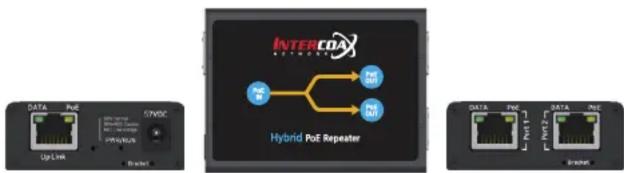
- HPS-01 is powered by power supply or PSE (Power Sourcing Equipment) such as PoE Switch or Injector.
- Connect UTP cable from PSE to "PoE IN" port. Data/PoE LED indicates working status.

- Connect UTP cable from Camera to "PoE OUT" port and Data/PoE LED indicates working status. Also, applying additional HPS-01s on the one of "PoE OUT" port, it is possible to connect multiple network devices in a cascade configuration.

flowchart
graph LR
    A["Data Port 1"] --> B["Data Port 2"]
    C["Bracket"] --> D["POE OUT"]
LED Indicators
Indicator Color Function
| DATA | Blinking : Ethernet Data Act | |
| PoE | ON : PoE Powered | |
| PWR/RUN | Normal (48VDC and more) | |
| Caution | ||
| Power Shortage (38VDC and below) |
Applications
57V DC/1.2A Power Supply (optional)

flowchart
graph TD
    A["User"] -->|PoE Data Max. 130m| B["HPS-01"]
    B -->|Cat.5e or Better Max. 200m| C["HPS-01"]
    C -->|Max. 100m| D["User"]
    B -->|Data Max. 130m| E["HPS-01"]
    E -->|Data Max. 130m| F["User"]
    E -->|Data Max. 100m| G["NVR"]
    G --> H["User"]
    C -->|Data Max. 100m| I["User"]
    I -->|Data Max. 100m| J["User"]
    style A fill:#f9f,stroke:#333
    style B fill:#ccf,stroke:#333
    style C fill:#ccf,stroke:#333
    style D fill:#f9f,stroke:#333
    style E fill:#ccf,stroke:#333
    style F fill:#ccf,stroke:#333
    style G fill:#cfc,stroke:#333
    style H fill:#fcc,stroke:#333
    style I fill:#fcc,stroke:#333
    style J fill:#fcc,stroke:#333
→ Transmission distance may vary depending on the type and quality of cable.
Specification
Model HPS-01: 2 Port Hybrid PoE Switch
| Interface | Downlink 2 x RJ-45 | |
| Uplink 1 x RJ-45 - 10/100 Base-T with Auto-detect MDIX | ||
| Transmission Rate 100 Mbps Full Duplex | ||
| Transmission distance | Ethernet / PoE | Up to 100m - 1000 Base-TUp to 200m between devices - 10/100 Base-T |
| LED Indication | Data 3 x Data Link (Green) | |
| PoE 3 x PoE Link (Amber) | ||
| PWR | 1 x Input Power Quality(Green: Normal/48VDC and more, Green+Red:Caution, Red : Power Shortage/38VDC and below | |
| Power Input | PoE IEEE802.3af, IEEE802.3at | |
| DC DC48V ~ 57V | ||
| Power Output | PoE IEEE802.3af, IEEE802.3at | |
| Mechanical | Dimension 80.4(L) x 61.6(W) x 24(H) mm | |
| Weight 102g | ||
| Environment | Operating Temp. - 20 ~ 60 °C | |
| Storage Temp. - 30 ~ 80 °C | ||
| Relative Humidity 10% ~ 90% | ||
| Compliance | Certification FCC, CE, KC, RoHS | |
| Surge Protection | IEC 61000-4-5 4kV(1.2 / 50us), 2kV(8 / 20us) | |
| Optional Accessories | 57VDC / 1.2A External Power Supply | |
Caution
- Please install the device following the installation guide.
- Do not touch the device and cable with wet hands.
- Keep away from moisture and shock.
- Do not install near any heat sources such as radiators, heat registers, stoves or other apparatus that produce heat.
- Indoor use only.
- Do not use for other purposes.
- Do not disassemble or modify this device.
- Do not put any sticker or paint on it.
- If this device is defective or malfunctioning, please unplug the power adapter immediately and contact dealer or service center.
Warranty
- This device has passed the quality control and product inspection.
- Please install and use according to the installation guide.
- The warranty period for this product is 24 months from the date of purchase.
- If this device is defective or malfunctioning, please unplug the power adapter immediately and contact dealer or service center.
- Any damages or breakage from user's abuse, accident, modification or natural disasters will not be covered manufacturer's warranty.


Please visit below website for more detailed information.
Intercoax Co., Ltd.
Web : http://www.intercoax.com
Tel: 031.365.3133\~4
E-mail : info@intercoax.com
Fax: 031.365.3135
This device complies with part 15 of the fcc rules. Operation is subject to the following two conditions:
(1) This device may not cause harmful interference, and
(2) This device must accept any interference received including interference that may cause undesired operation

Brand : Lorex
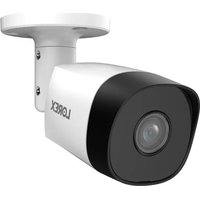
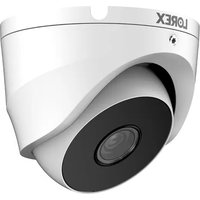
Model : HPS-01
Category : Surveillance Camera