U100 - Home Automation Aqara - Free user manual and instructions
Find the device manual for free U100 Aqara in PDF.


| Product Type | Smart Lock |
| Dimensions | 70 x 160 x 85 mm (exterior); 70 x 160 x 65 mm (interior) |
| Weight | 1.5 kg (including interior and exterior assemblies) |
| Power Supply | 4 x AA alkaline batteries (not included) |
| Battery Life | Approximately 12 months under normal usage |
| Unlocking Methods | Fingerprint, PIN code, NFC card, mechanical key, and app via Bluetooth |
| Fingerprint Sensor | Semiconductor capacitive, 360° recognition |
| User Capacity | Up to 100 fingerprints, 50 PIN codes, and 50 NFC cards |
| Connectivity | Bluetooth 5.0; compatible with Aqara Hub (Zigbee) via app |
| Smart Home Integration | Works with Apple HomeKit, Amazon Alexa, Google Assistant, and IFTTT |
| Safety Features | Anti-peep password, false code input, auto-lock after 10 seconds |
| Emergency Power | Micro-USB port for emergency power supply |
| Material | Zinc alloy body, tempered glass touch panel |
| Weather Resistance | IP54 rated (exterior unit) |
| Installation | Fits most standard doors (35-55 mm thickness); easy DIY with included screws and template |
| Maintenance | Clean with a soft, dry cloth; avoid solvents and abrasive cleaners |
| Spare Parts | Batteries, mechanical keys, and mounting screws available from Aqara |
| Repairability | Replaceable batteries and mechanical key cylinder; user-serviceable |
Frequently Asked Questions - U100 Aqara
User questions about U100 Aqara
0 question about this device. Answer the ones you know or ask your own.
Ask a new question about this device
Download the instructions for your Home Automation in PDF format for free! Find your manual U100 - Aqara and take your electronic device back in hand. On this page are published all the documents necessary for the use of your device. U100 by Aqara.
USER MANUAL U100 Aqara
U100 is an IoT-enabled smart lock that supports multiple unlocking methods, such as fingerprint, password, NFC card and Apple Home Key, etc. Through in-depth customization of the fingerprint module and deep optimization algorithm, it provides a smooth experience of unlocking the door through fingerprints. The door lock can be configured through the Aqara Home app. Along with other Aqara smart devices, it can realize various smart automation for your connected home, and provide you with a convenient and safe experience.
* An Aqara Hub is required. Some functions require specific models of the Aqara Hub. Please visit www.aqara.com/en/support.html for more details.
What's in the Box
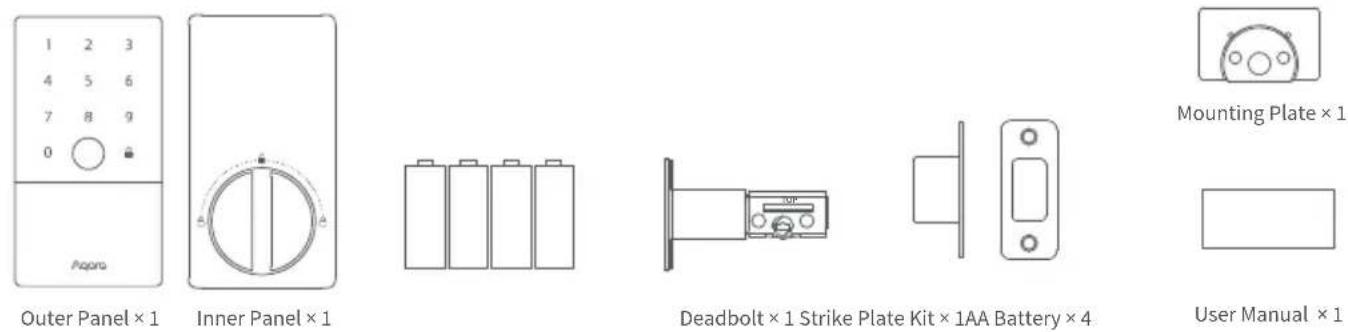
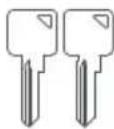
Mechanical Key × 2
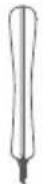
Knob Removal
Tool × 1

Installation Diagram ×1
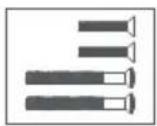
Opposite-Pull
Screw Kit × 1
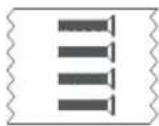
Bolt & Strike Plate
Screw Kit × 1
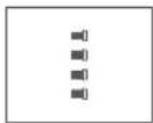
Mounting Plate
Screw Kit × 1
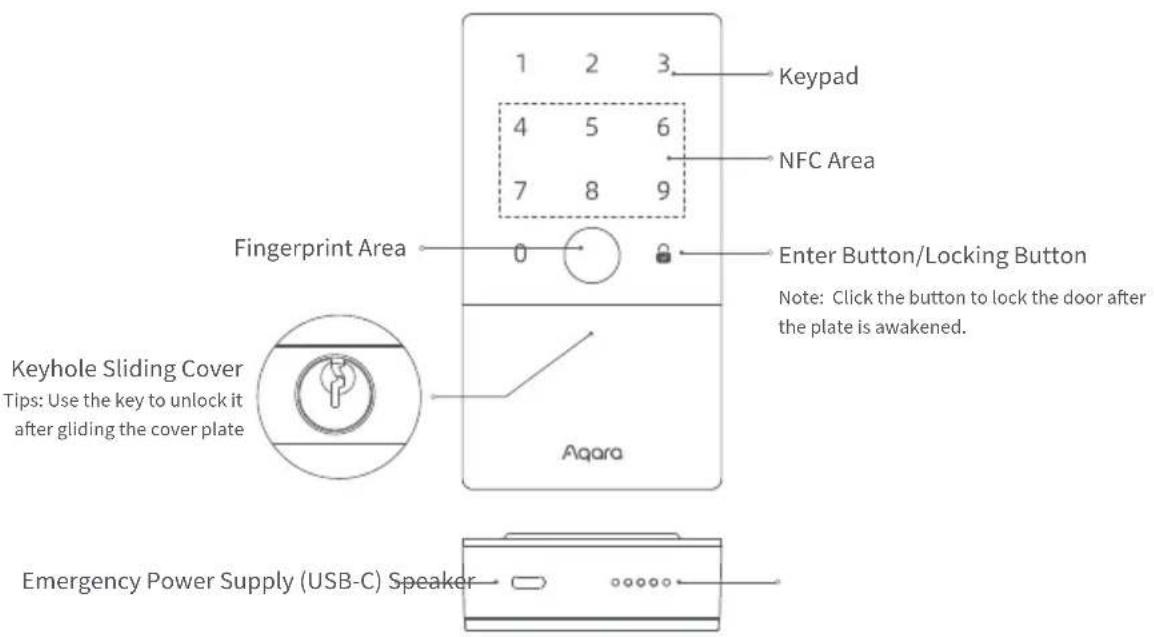
text_image
1 2 3 Keypad 4 5 6 NFC Area 7 8 9 Fingerprint Area 0 Enter Button/Locking Button Note: Click the button to lock the door after the plate is awakened. Keyhole Sliding Cover Tips: Use the key to unlock it after gliding the cover plate Aqara Emergency Power Supply (USB-C) Speaker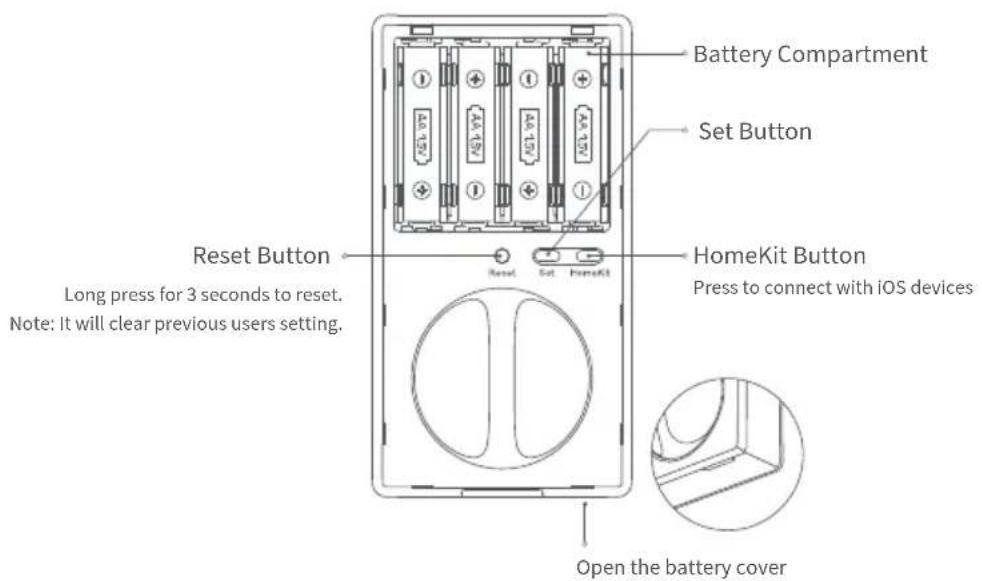
text_image
Battery Compartment Set Button Reset Button Reset Set HomeKit HomeKit Button Press to connect with iOS devices Long press for 3 seconds to reset. Note: It will clear previous users setting. Open the battery coverInstructions before Installation
Before using this product, you need to download the Aqara Home app and register an account. No such operations are required if you directly connect this product with the Apple Home app, however, unique features such as fingerprint recognition, auto-lock, and others will not be able to be experienced.
Aqara Home Installation Videos
Sign up for Aqara Home account, then add Smart Lock U100 and follow the app installation tutorial to install.
Or scan the following QR code to check the installation video.
A PH1 standard Phillips head screwdriver is required for installation.

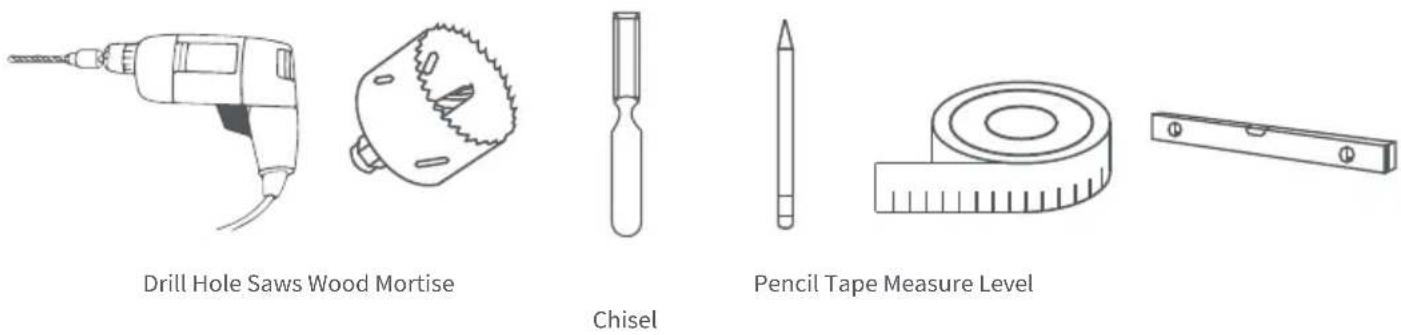
Tools necessary only for new doors or adjusting existing door holes: Drill, Hole Saws, Wood Mortise Chisel, Pencil, Tape Measure, Level
Device Installation
- Measure the backset: the distance from the edge of the door to the center of the deadbolt hole. It should be 238 in (60 mm) or 234 in (70 mm).
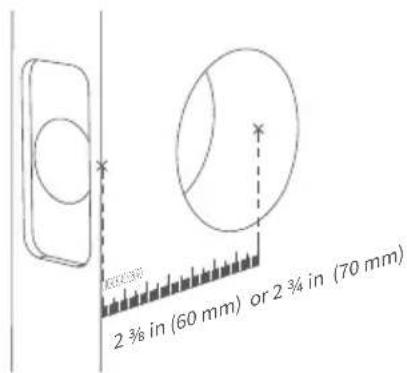
text_image
2 ¾ in (60 mm) or 2 ¾ in (70 mm)- Fix the latch. Make sure that the "TOP" is facing up.
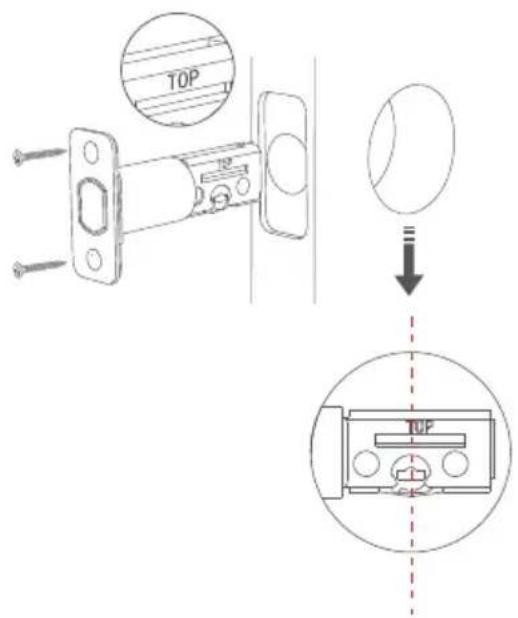
text_image
TOP TOP- Adjust the latch according to the measurements.
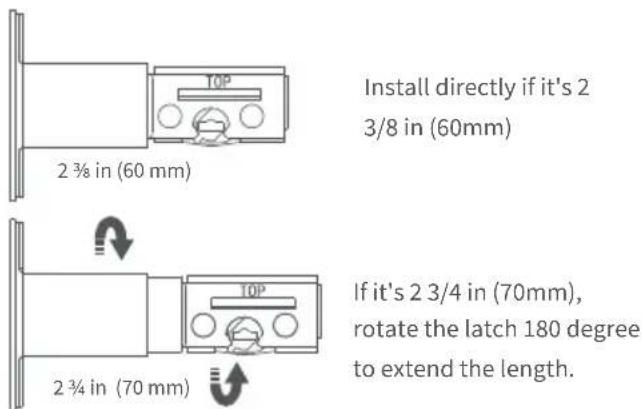
text_image
Install directly if it's 2 3/8 in (60mm) 2 ¾ in (60 mm) If it's 2 3/4 in (70mm), rotate the latch 180 degree to extend the length. 2 ¾ in (70 mm)- Install the strike plate to the door frame.
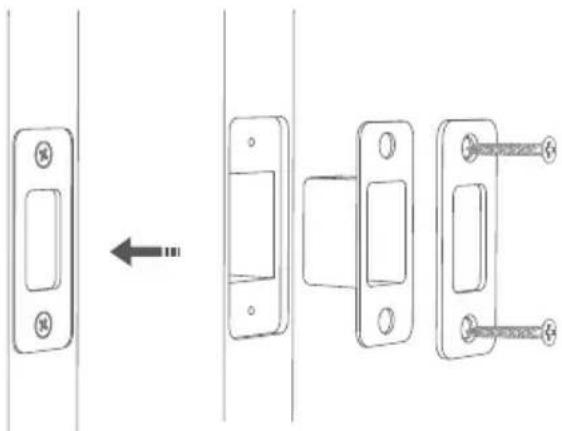
natural_image
Diagram showing a door lock mechanism with three sequential steps (no text or symbols)- Pass the outer panel connector cable through the deadbolt inside the door and strengthen the outer panel with the mounting plate and opposite-pull screw.
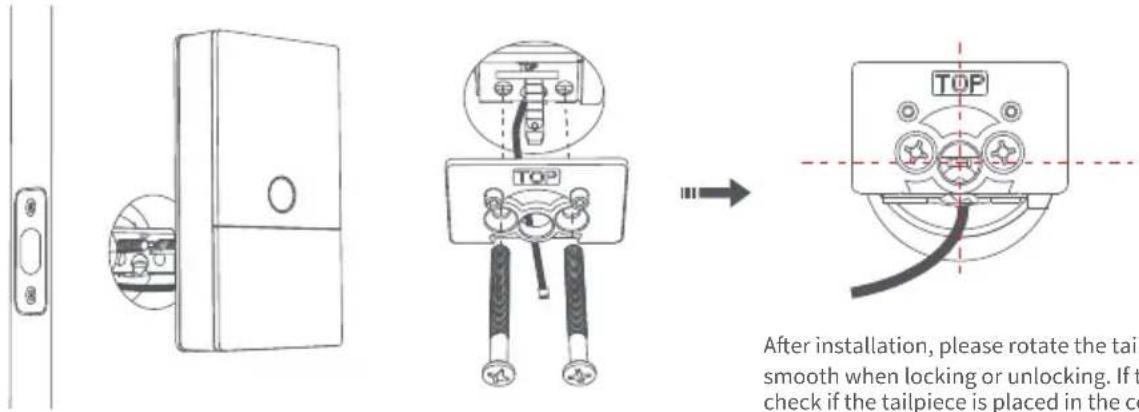
text_image
After installation, please rotate the tail smooth when locking or unlocking. If t check if the tailpiece is placed in the coAfter installation, please rotate the tailpiece to check if it is smooth when locking or unlocking. If there is a jam, please check if the tailpiece is placed in the center of the mounting plate opening and if there is no interference with other parts.
-
Remove the battery cover, then take off the knob cover with the removal tool.
-
Fix the connector cable of the outer panel to the inner panel.
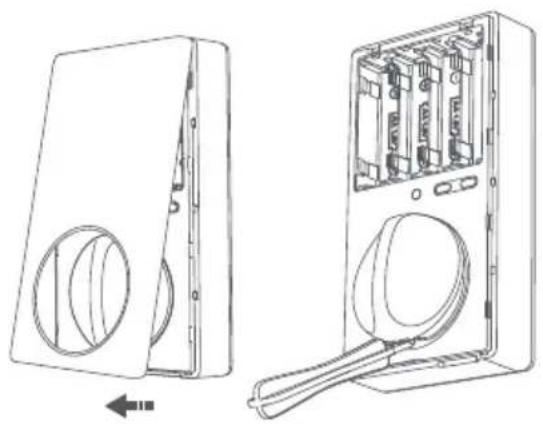
natural_image
Technical line drawing of a device showing front and side views of a device casing with internal components (no text or symbols)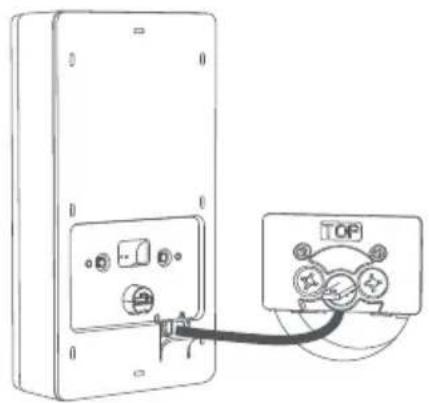
natural_image
Diagram of a device with two connectors and a cable, showing electrical connections (no text or symbols)-
Fix the inner panel to the mounting plate indoors and cover the knob.
-
Once the battery installed successfully, a voice prompt will be played to indicate the installation is completed.
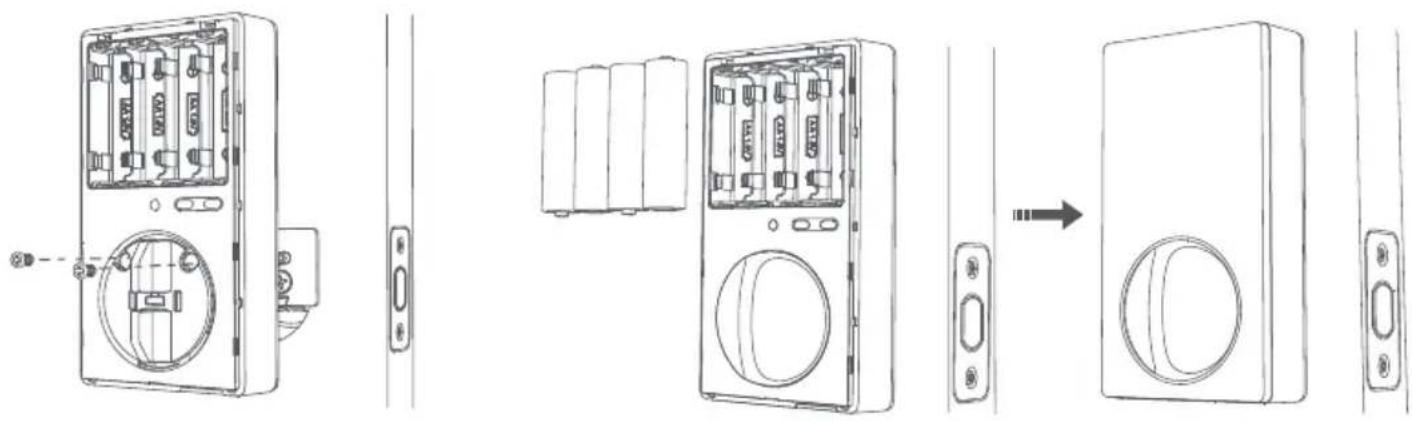
natural_image
Line drawing of a wall-mounted electronic device showing internal components and assembly steps (no text or symbols)Preparation before Use
- A smartphone or tablet that supports Wi-Fi or a cellular network (with iOS or Android system) is required.
- Please make sure that there is a 2.4G Wi-Fi connection and your internet connection is stable.
- Please open the battery cover and put in 4 AA batteries
Note: It is recommended to use original batteries or alkaline batteries, as others may leak and thus cause damage to the product when used for a long time. [Warning] Please replace the battery when it is low. Otherwise, verification and door opening will fail when the battery runs out. In this case, you can charge the lock with USB-C emergency power supply or unlock with the key.
4. Long press the "Reset" button for 3 seconds, and release the button after you hear the voice prompt. Then the reset completes.
Notes: The door lock cannot be locked normally as the user information will be cleared after reset. Please set the door lock by following instructions as soon as possible.
Device Binding & Initialization
Download the Aqara Home app: Search for "Aqara Home" in the Apple App Store or Google Play. Or scan the following QR code to download the Aqara Home app.
Open the app, tap "+" in the upper right corner of the homepage to enter the page of "Add the device". Choose "Smart Lock U100" and then install the door lock device according to the instructions.
The actual operations are subject to change due to the updates of the Aqara Home app. Please following the instructions of the app.
Add the User
Enter the page of the door lock device and add the door lock owner according to the instructions on the app. Notes: The door lock cannot be locked normally without adding users.
Add the Device to HomeKit (for iOS users)
After the door lock is powered on for the first time, click "+" at the upper right corner of the Apple Home app in the iOS, select "Add Accessory" or open Aqara Home app. Tap "Bind HomeKit" in the "General Settings" column of the setting on the detail page of the door lock. Scan or manually input the HomeKit code as prompted (HomeKit code can be found when you open the battery cover of the indoor door lock). Then add users according to the instructions. HomeKit only supports the lock and unlock, smart automation setting and Apple Home Key.
Add to Apple Home Key (for iOS users)
After it is connected with HomeKit, one virtual door card will be automatically generated in the Apple "Wallet" app. You can use an iPhone or Apple Watch, which supports the Apple Home Key function to unlock by holding it close to the door lock.
Product Instructions
- To control this HomeKit-enabled accessory, the latest version of iOS or iPadOS is recommended. Controlling this HomeKit-enabled accessory automatically and away from home requires a HomePod, HomePod mini, or Apple TV set up as a home hub. It is recommended that you update to the latest software and operating system.
- To use home keys, iPhone XS or later with iOS 15 or later and Apple Watch Series 4 or later with watchOS 8 or later are required.
- Use of the Works with Apple badge means that an accessory has been designed to work specifically with the technology identified in the badge and has been certified by the developer to meet Apple performance standards. Apple is not responsible for the operation of this device or its compliance with safety and regulatory standards.
Connect Google or Alexa app
To unlock via Google or Alexa, please first, buy and bind the Aqara hub. For details, please scan the code and learn how to bind.
Product Specifications
Smart Lock U100
Model: SDL-D01 / DL-D01D
Wireless Protocols: Zigbee, Bluetooth 5.0, NFC
Powering Modes: 4 AA Batteries (6V---); USB-C Emergency Port (5V---)
Dimensions: 5.3 × 2.9 × 3.5 in. (135.8 × 74.8 × 88.4 mm)
Operating Temperature: -35°C \~ 66°C (-31°F \~ 150.8°F)
Operating Humidity: 0 \~ 93% RH, no condensation
FCC ID: 2AKIT-SDLD01
Federal Communications Commission (FCC) compliance statement:
- This device complies with part 15 of the FCC Rules. Operation is subject to the following two conditions:
(1) This device may not cause harmful interference, and
(2) this device must accept any interference received, including interference that may cause undesired operation.
- Changes or modifications not expressly approved by the party responsible for compliance could void the user's authority to operate the equipment.
Note: This equipment has been tested and found to comply with the limits for a Class B digital device, pursuant to part 15 of the
FCC Rules. These limits are designed to provide reasonable protection against harmful interference in a residential installation. This equipment generates, uses and can radiate radio frequency energy and, if not installed and used in accordance with the instructions, may cause harmful interference to radio communications. However, there is no guarantee that interference will not occur in a particular installation. If this equipment does cause harmful interference to radio or television reception, which can be determined by turning the equipment off and on, the user is encouraged to try to correct the interference by one or more of the following measures:
—Reorient or relocate the receiving antenna.
—Increase the separation between the equipment and receiver.
—Connect the equipment into an outlet on a circuit different from that to which the receiver is connected.
—Consult the dealer or an experienced radio/TV technician for help.
RF Exposure statement:
This equipment complies with FCC radiation exposure limits set forth for an uncontrolled environment. This equipment should be installed and operated with minimum distance of 20 cm between the radiator and your body. This transmitter must not be co-located or operating in conjunction with any other antenna or transmitter.
IC:22635-SDLD01
IC:22635-DLD01D
IC NOTICE TO CANADIAN USERS
This device contains licence-exempt transmitter(s)/receiver(s) that comply with Innovation, Science and Economic Development Canada's licence-exempt RSS(s). Operation is subject to the following two conditions:
(1) This device may not cause interference.
(2) This device must accept any interference, including interference that may cause undesired operation of the device.
This Class B digital apparatus complies with Canadian ICES - 003.
This device complies with RSS - 247 of Industry Canada. Operation is subject to the condition that this device does not cause harmful interference.
This equipment complies with IC radiation exposure limits set forth for an uncontrolled environment. This equipment should be installed and operated with minimum distance of 20 cm between the radiator and your body. This transmitter must not be co-located or operating in conjunction with any other antenna or transmitter.
Manufacturer: Lumi United Technology Co., Ltd.
Address: Room 801-804, Building 1, Chongwen Park, Nanshan iPark, No. 3370, Liuxian Avenue, Fuguang Community, Taoyuan Residential District, Nanshan District, Shenzhen, China
Email: support@aqara.com