DS6025 - Uncategorized KENMORE - Free user manual and instructions
Find the device manual for free DS6025 KENMORE in PDF.


| Product Type | Dehumidifier |
| Model | DS6025 |
| Brand | Kenmore |
| Capacity (Pints/Day) | 60 |
| Coverage Area (sq ft) | Up to 3,000 |
| Water Tank Capacity | 1.8 gallons |
| Dimensions (W x D x H) | 15.4 x 11.0 x 24.6 inches |
| Weight | 48 lbs |
| Power Supply | 120V, 60Hz |
| Power Consumption | 780W |
| Air Filter | Washable, reusable |
| Noise Level | 52 dB |
| Functions | Auto defrost, continuous drainage, adjustable humidistat, timer |
| Safety Features | Automatic shut-off when bucket full, overheat protection |
| Maintenance | Clean filter every 30 days; empty bucket when full |
| Parts and Repairability | Replacement filters and drain hose available; DIY-friendly design |
| Warranty | 1 year limited warranty |
Frequently Asked Questions - DS6025 KENMORE
User questions about DS6025 KENMORE
0 question about this device. Answer the ones you know or ask your own.
Ask a new question about this device
Download the instructions for your Uncategorized in PDF format for free! Find your manual DS6025 - KENMORE and take your electronic device back in hand. On this page are published all the documents necessary for the use of your device. DS6025 by KENMORE.
USER MANUAL DS6025 KENMORE
Vacuum Cleaner Help Line:
1-877-531-7321
8:00am-5:00pm EST, M-F
www.kenmore.com
Kenmore and the Kenmore logo are registered
trademarks of KCD IP, LLC and/or Sears Brands, LLC
and are used under license by Cleva North America, Inc.
All Rights Reserved.

TABLE OF CONTENTS
Before Using Your New Vacuum Cleaner .... 2
Packing List 2
Important Safety Instructions....3-5
Warranty 6
Parts and Features....7-9
Assembly Instructions....10-11
Operating Instructions 12-13
Vacuum Maintenance and Care....14-15
Troubleshooting ....16
BEFORE USING YOUR NEW VACUUM CLEANER
Read this Use & Care Guide. It will help you assemble and operate your new Kenmore Elite vacuum cleaner in the safest and most effective way.
For more information about vacuum cleaner care and operation, call the Vacuum Cleaner Help Line at 1-877-531-7321. You will need the complete model and serial numbers when requesting information.
Your vacuum cleaner's model and serial numbers are located on the Model and Serial Number Plate. Use the space below to record the model number and serial number of your new Kenmore Elite vacuum cleaner.
Model No.
Serial No. ____
Date of Purchase
Keep this book and your sales check (receipt) in a safe place for future reference.
PACKING LIST
Your KENMORE ELITE CORDLESS VACUUM CLEANER is packaged with the following parts and components assembled separately in the carton:
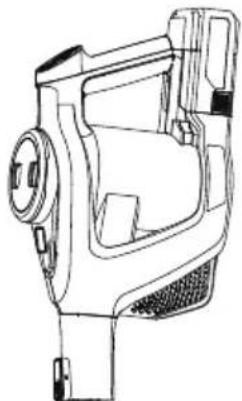
1 Hand Vacuum
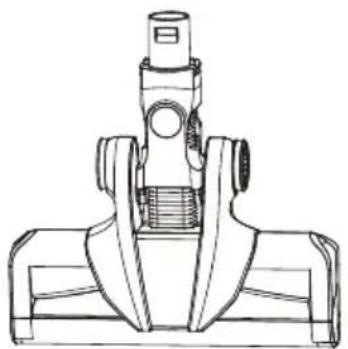
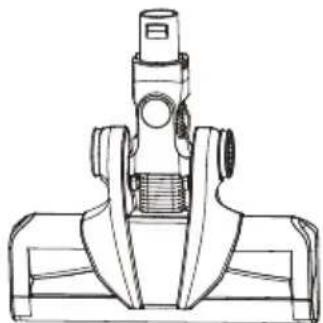
1 Bare Floor Motorized Nozzle
1 Combination Brush
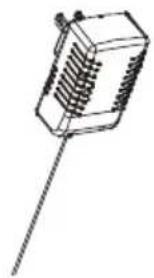
1 Charging Adapter
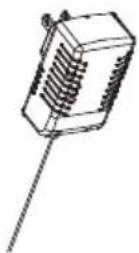
1 Battery Pack
1 Wand
1 Manual
1 Pet PowerMate™
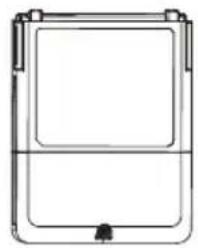
1 Wall Mountable Charging Dock
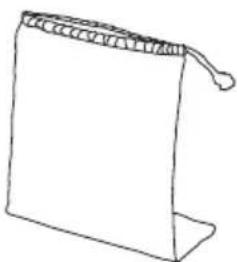
1 Accessory Bag
1 Battery Charger Base
2 Screws
WARNING!
READ ALL INSTRUCTIONS IN THIS GUIDE BEFORE ASSEMBLING OR USING YOUR VACUUM CLEANER. To reduce the risk of fire, electrical shock, injury to persons or damage when using your vacuum cleaner, follow all safety precautions listed below.
- Use your vacuum only as described in this Use & Care Guide.
- Do not use or charge outdoors or on wet surfaces.
- Do not allow to be used as a toy. Close attention is necessary when used by or near children, pets or plants.
- Use only manufacturer's recommended attachments. Do not use attachments other than those supplied with this vacuum.
- Do not handle charger, including charger plug, and charger terminals with wet hands.
- Do not put any object into openings. Do not use with any opening blocked; keep free of dust, lint, hair, and anything that may reduce air flow.
- Keep hair, loose clothing, fingers, and all parts of body away from openings and moving parts.
- Use extra care when cleaning on stairs.
- Do not use to pick up flammable or combustible liquids, such as gasoline, or use in areas where they may be present.
- Switch off the appliance before connecting the accessories.
- Do not pick up anything that is burning or smoking, such as cigarettes, matches, or hot ashes.
- Do not pick toxic solution such as chlorine bleach, ammonia or drain cleaner.
- Do not use without dust cup and HEPA filter in place.
-
Do not charge the unit outdoors.
-
Prevent unintentional starting. Ensure the switch is in the off position before connecting to battery pack, picking up or carrying the appliance.
- Do not carry the appliance with your finger on the switch or energizing appliances that have the switch on.
- Disconnect the battery pack from the appliance before making any adjustments, changing accessories, or storing appliance. Such preventive safety measures reduce the risk of starting the appliance accidentally.
- Do not attempt to use this charging adapter with any other product nor attempt to charge this product with another charging adapter.
- To recharge vacuum, use only Kenmore model 561025120 charging adapter.
- Use appliances only with specifically designated 561025119 battery packs. Use of any other battery packs may create a risk. Do not dispose of battery pack in a fire or trash can.
- When battery pack is not in use, keep it away from other metal objects, like paper clips, coins, keys, nails, screws or other small metal objects that can make a connection from one terminal to another. Shorting the battery terminals together may cause burns or a fire.
- Do not use a battery pack or appliance that is damaged or modified. Damaged or modified batteries may exhibit unpredictable behavior resulting in fire, explosion or risk of injury.
IMPORTANT SAFETY INSTRUCTIONS
- Do not attempt to disassemble battery pack.
- Do not immerse vacuum cleaner, or charging adapter in water or other liquids.
• Always turn the vacuum off before connecting or disconnecting the motorized carpet and bare floor nozzles. - Store the cordless vacuum indoors. Put the cordless vacuum away after use to prevent accidents.
- Keep your work area well lit.
- Keep the vacuum moving over the carpet surface at all times to avoid damaging the carpet fibers.
- Do not vacuum up any liquids.
- Do not use in an enclosed space where vapors are present from paint, paint thinner, moth-proofing substances, flammable dust or other explosive or toxic materials.
- Do not vacuum up hard or sharp objects such as glass, nail, screws or coins that could damage the vacuum cleaner.
- To avoid excessive heat and damage to unit or batteries, do not operate the vacuum while charging.
- Do not use extension cords or outlets with inadequate current carrying capacity.
- DO NOT MUTILATE OR INCINERATE BATTERIES AS THEY WILL EXPLODE AT HIGH TEMPERATURE.
- Do not expose a battery pack or appliance to fire or excessive temperature. Exposure to fire or temperature above 265°F (130°C) may cause explosion.
-
Leaks from battery cells can occur under extreme usage or temperature conditions. If the liquid gets on skin, wash quickly with water. If liquid gets into the eyes, flush them immediately with clean water for a minimum of 10 minutes. Seek medical attention.
-
While there is no shock hazard from electrical terminals located on the vacuum, a burn could result from metal objects being inserted into the terminal areas. Vacuum cleaner terminals should always be kept free of objects.
- Store charger indoors in a cool, dry area, not exposed to weather to avoid electrical shock and/or damage to the vacuum cleaner.
- Changes or modifications to this unit not expressly approved by the party responsible for compliance could void the user's authority to operate the equipment.
- Charging improperly or at temperatures outside of the specified range may damage the battery and increase the risk of fire.
- You are responsible for making sure that your vacuum cleaner is not used by anyone who is unable to operate it properly.
- Have servicing performed by a qualified repair person using only identical replacement parts. This will ensure that the safety of the product is maintained.
- Do not modify or attempt to repair the appliance or the battery pack (as applicable) except as indicated in the instructions for use and care.
- This appliance is designed for household use only!
NOTICE
This device complies with part 15 of the FCC Rules. Operation is subject to the following two conditions.
- This device may not cause harmful interference.
- This device must accept any interference received, including interference that may cause undesired operation.
IMPORTANT SAFETY INSTRUCTIONS
Disposal
This product contains a detachable Lithium-ion battery pack formulated from environmentally sensitive materials. This product must be disposed of properly with due care for the environment. Do not dispose of product with household garbage.
Consult your local waste authority for information regarding available recycling or disposal options.
SAVE THESE INSTRUCTIONS
Household use only.
WARRANTY
KENMORE LIMITED WARRANTY
FOR ONE YEAR from the date of sale this product is warranted against defects in material or workmanship.
WITH PROOF OF SALE a defective product will be replaced free of charge.
The Kenmore brand is used under license. Direct all claims for warranty service to: Cleva North America, Inc., 1-877-531-7321
This warranty does not cover filters or belts, which are expendable parts that can wear out from normal use within the warranty period.
This warranty applies for only 90 days from the date of sale if this product is ever used for other than private household purposes.
This warranty gives you specific legal rights, and you may also have other rights which vary from state to state.
Cleva North America, Inc., Greenville SC 29607
PARTS AND FEATURES
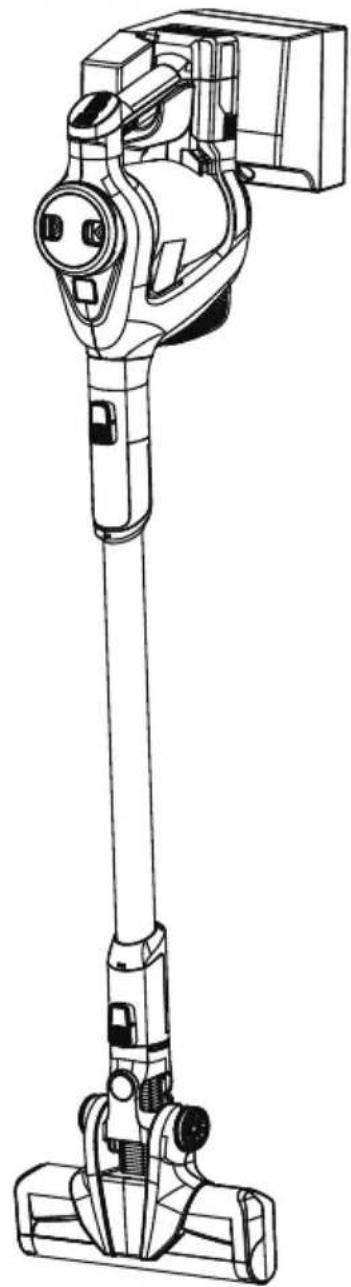
It is important to know your vacuum cleaners parts and features to assure its proper and safe use. Review these before using your vacuum.
REPLACEMENT PARTS
| Item Part No. | |
| HEPA Filter+Two Foam Filters 5610 | 25105 |
| Charging Adapter 561025120 | |
| 25V Battery Pack 561025119 | |
| Battery Charger Base 561030101 | |
| Wall Mountable Charging Dock 56 | 1026107 |
| Bare Floor Nozzle Brush Roll | 561030102 |
| To order a replacement part call 1-844-202-9924 | |
natural_image
Line drawing of a vacuum cleaner with attached housing (no text or symbols)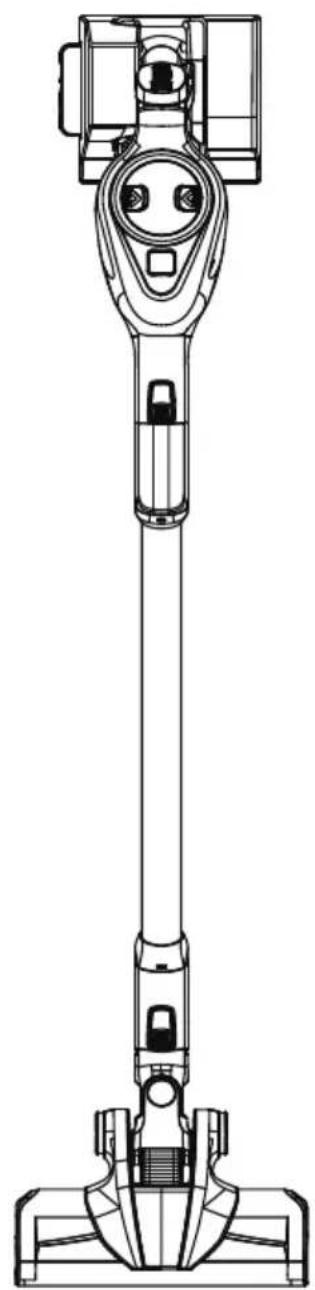
natural_image
Technical line drawing of a vacuum cleaner (no text or symbols)PARTS AND FEATURES
natural_image
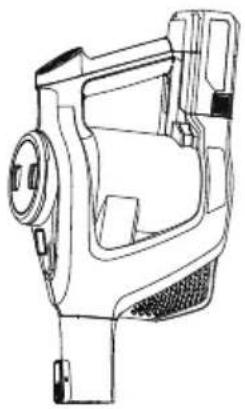
Technical line drawing of a mechanical device with no visible text or symbolsHand Vacuum with Battery Inserted
natural_image
Line drawing of a mechanical component with a rod and internal grooves (no text or symbols)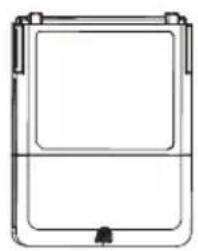
natural_image
Simple line drawing of a rectangular device with a central panel and mounting feet (no text or symbols)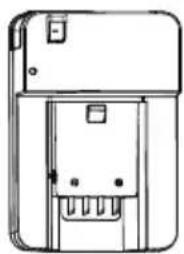
natural_image
Technical line drawing of a mechanical device with no visible text or symbolsBattery Charger Base Battery Pa
natural_image
Technical line drawing of a mechanical clamp or bracket assembly (no text or symbols)Bare Floor Motorized Nozzle Pet PowerMate™ Accessory Bag
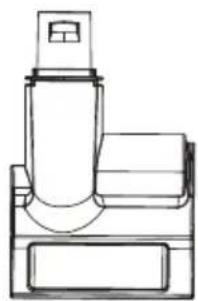
natural_image
Line drawing of a mechanical device with cylindrical components and a base (no text or symbols)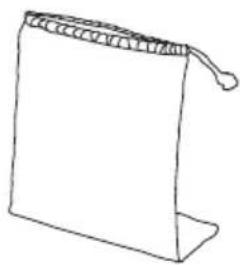
natural_image
Simple line drawing of a folded paper or bag with a loop handle (no text or symbols)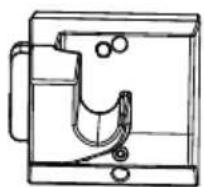
Wall Mountable
Charging Dock

natural_image
Technical line drawing of a vertical cylindrical device with internal components (no text or symbols)Wand
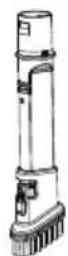
Combination Tool
PARTS AND FEATURES
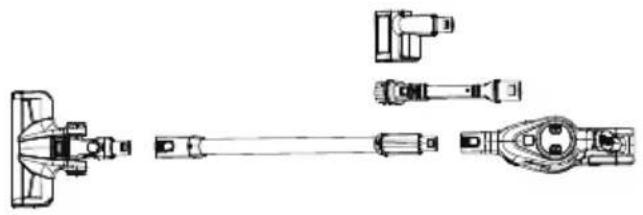
All included accessory tools can be inserted into either the hand vacuum or wand. You will hear a click if inserted correctly.
natural_image
Technical line drawing of mechanical components including a bracket, shaft, and housing (no text or labels)Pet PowerMate™
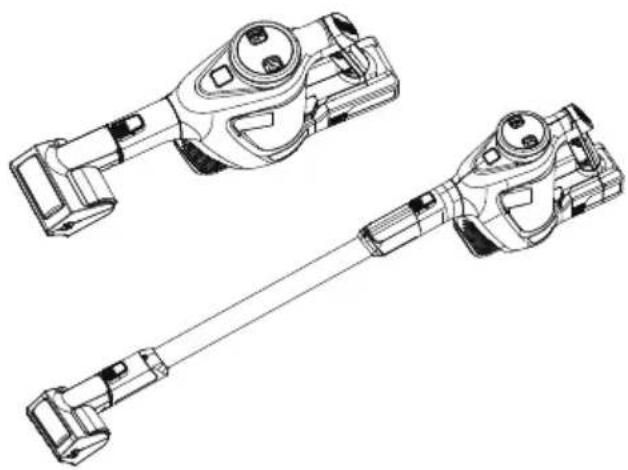
Suggested use for optimal control is with Pet PowerMate inserted into the hand vacuum.
Hold at an angle so rotating brush sits flush to cleaning surface.
natural_image
Technical line drawing of two mechanical components with no visible text or symbolsCombination Tool
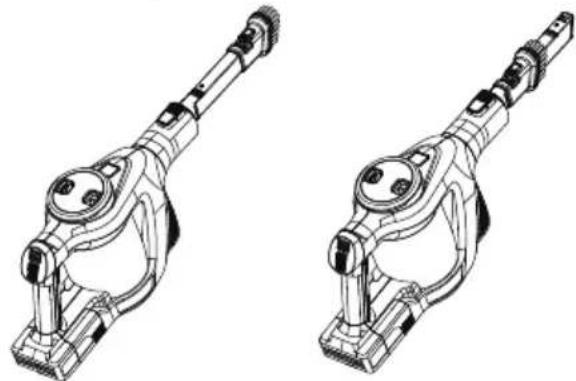
The combination brush can be used as a crevice tool or as a dusting brush. To use as a dusting brush, simply squeeze the buttons on the side of the tool and shift brush to expose the bristles as shown.
natural_image
Technical line drawing of two mechanical linkage components (no text or symbols)NOTE: Always be sure that contact surfaces of accessory tools are clean before use.
ASSEMBLY INSTRUCTIONS
Before assembling the vacuum cleaner, check the PACKING LIST (Page 2). Use this list to verify that you have received all the components of your new Kenmore Elite SSV QuickClean Cyclonic Multi-Vac.
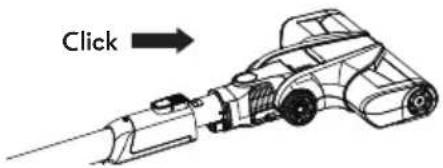
- Insert the wand into the hand vacuum until you hear a click.
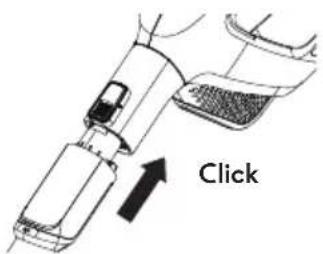
- Insert the motorized nozzle into the wand until you hear a click.
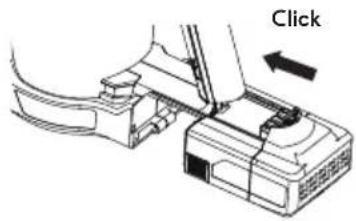
- Slide the battery pack along the slots under the hand vacuum handle into the vacuum.
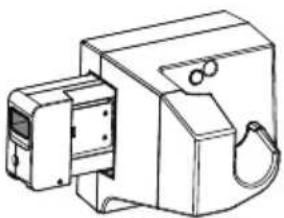
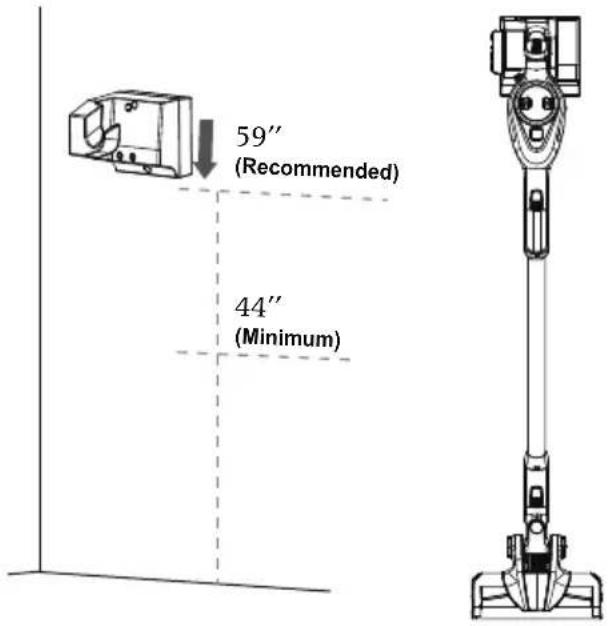
- Use the 2 screws provided to mount the charging dock on the wall, but not to drywall only. Secure the screws to a stud. Mount at a recommended height of 59" and no less than 44" above the floor. Ensure that no plumbing or electrical cables, wires or ductwork are located directly behind the mounting area.
natural_image
Technical line drawing of a mechanical component with no visible text or symbols-
Insert the battery charger base into the charging dock.
-
Charge the unit for 3.5 hours before using the vacuum for the first time.
CHARGING

WARNING
Before charging make sure unit is in the OFF position.
This vacuum cleaner has two charging options.
It can be charged on the wall mountable charging dock while the unit is hung OR the removable battery pack can be charged in the detachable battery charger base.
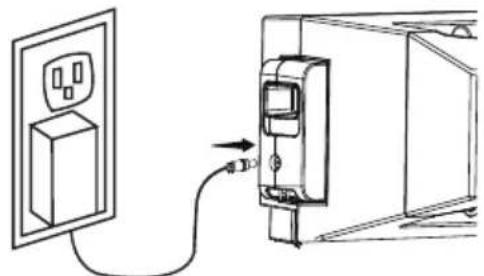
Charging on Wall Mountable Charging Dock. The charger adapter output plug will fit into the battery charger base port only one way. Insert the charging adapter plug into the port on the side of the charging base.
natural_image
Diagram showing a wall-mounted power outlet connected to a device via cable, with an arrow indicating connection (no text or symbols present)Plug the adapter into a wall outlet.
Place the vacuum on the hook of the charging dock until the blue LED battery indicator starts to flash.
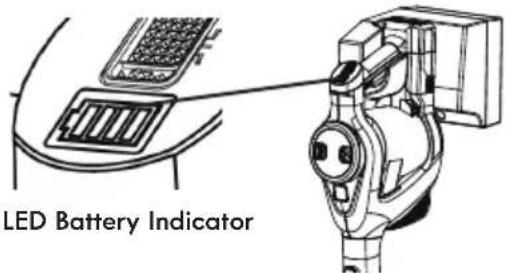
The battery requires approximately 3.5 hours of charging to regain full capacity. While the unit is charging, the first bar of the battery indicator starts to flash. When the first bar is fully charged, the second one will start to flash while the first bar stays illuminated. The sequence continues repeating while the vacuum is charging. When battery is fully charged, all four power level bars will flash 10 times, then turn off.
NOTE: If the LED does not illuminate when charging, ensure that the charging
adapter is plugged in properly to the wall outlet and port on battery charger base.
Also, ensure that the unit is properly seated in the charger dock with the pins contacting the charging plates of the vacuum head.
For better battery performance, always store the unit on the charging dock when it is not in use.
Charging on Battery Charger Base
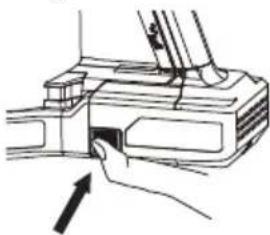
Remove battery pack from hand vacuum by pressing the two release buttons on the sides of the battery pack while sliding backwards.
natural_image
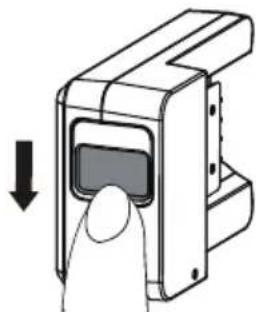
Line drawing of a hand inserting a component into a device (no text or symbols)If inserted, remove battery charger base from the charging dock by pressing down on release button and sliding outwards.
natural_image
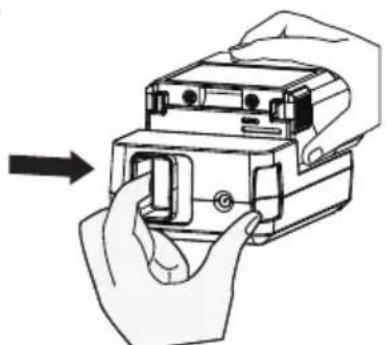
Diagram of a hand inserting a device into a rectangular frame, with no visible text or symbolsInsert the battery pack along the slots on the charger base until you hear a click.
Ensure the charging adapter is plugged into a wall outlet. The blue LED will start blinking indicating the battery is charging.
The battery requires approximately 3.5 hours of charging to regain full capacity.
Once the LED indicator shows a continuous blue light, the battery is fully charged.
Detach the battery pack from the charger base by holding down the release button and sliding the battery outwards. Insert pack back into vacuum.
natural_image
Illustration of hands installing or adjusting a device component (no text or symbols visible)OPERATING INSTRUCTIONS

CAUTION
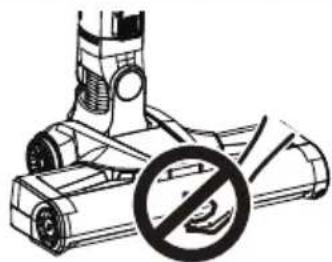
Moving parts! To reduce the risk of personal injury, DO NOT touch the brush roll when vacuum is on. Contacting the brush roll while it is rotating can cut, bruise or cause other injuries. Always turn off before servicing. Use caution when operating near children or pets.
natural_image
Diagram of a vacuum cleaner with a prohibition symbol (no text or labels present)CONTROL BUTTONS
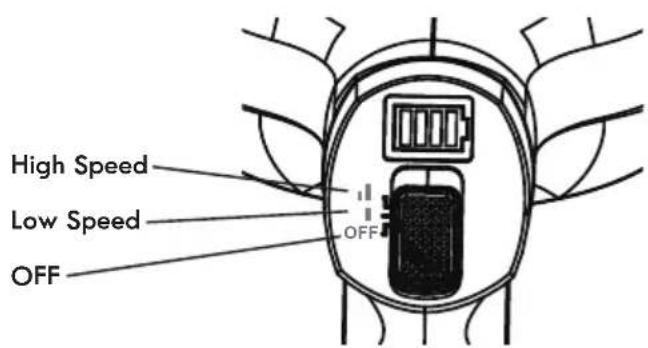
The power slider button is located above the handle of the hand vacuum. The SSV has two-speed controls, low and high.
Battery Power Level Indicators

25%

50%

75%

100%
The Battery Power Level indicators light up blue to give you an idea of how much battery power remains at any given time.
VACUUM OPERATION

CAUTION
Operate appliance at room temperature 39.2 - 104°F (4 - 40°C) in order to ensure its safety and normal function.
Before cleaning, connect the bare floor nozzle to the wand. Then connect the hand vacuum to the wand.
Slide the power switch to the desired power level (Low or High). Once turned on, the battery level indicator will be lit.
To turn the vacuum off, slide the power switch down to the bottom.
To turn the vacuum off, slide the power switch down to the bottom.
NOTE: When battery power decreases to about 10% remaining, the last bar of the battery level indicator will start flashing. The flashing will continue until the unit is placed on the charging dock or is completely out of battery power.
CLEANING WITH THE HAND VACUUM
Easily clean messes on furniture, upholstery, stairs, and other hard-to-reach areas with one of the two included accessory tools.
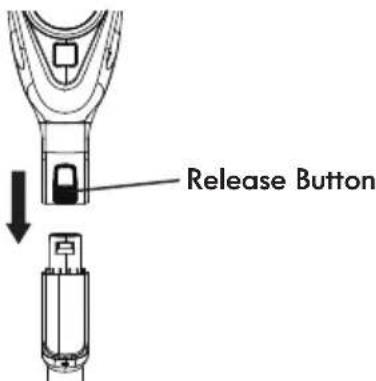
- To detach the hand vacuum, press the release button and pull the hand vacuum from the wand.
-
Insert an accessory tool into the end of the hand vacuum until you hear a click.
-
When finished cleaning, turn power OFF and press release button to remove tool. If desired, place the tool into the accessory bag for easy storage.
VACUUM MAINTENANCE AND CARE

CAUTION
To reduce the risk of electric shock, turn power off and remove the unit from the charging dock before any maintenance.
EMPTYING DUST CUP AND FILTER CLEANING
For best performance, empty dust cup after every use or once dust reaches max fill line. Never operate vacuum cleaner without dust cup and filter in place.
Before emptying the dust cup, ensure the vacuum is turned off.
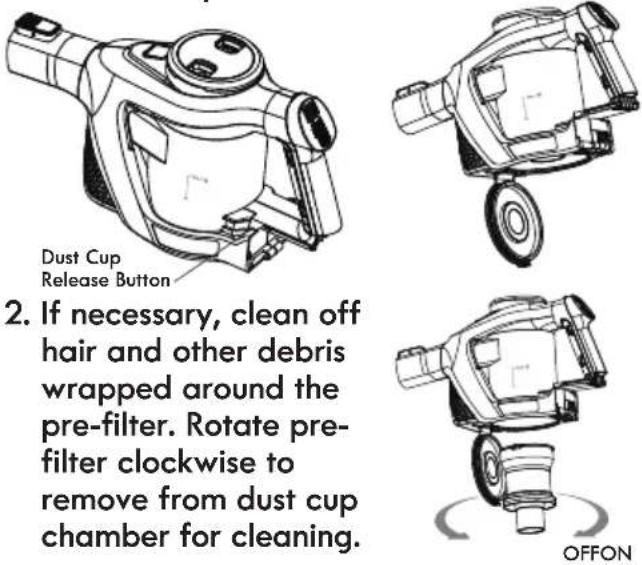
- Position dust cup area of vacuum over a waste receptacle. Press down on the dust cup release button to open dust cup lid and allow cup contents to drop into waste receptacle.
-
If necessary, clean off hair and other debris wrapped around the pre-filter. Rotate pre-filter clockwise to remove from dust cup chamber for cleaning.
-
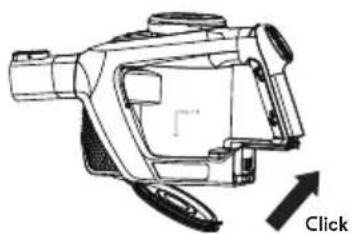
Insert pre-filter back into chamber and rotate as shown below to lock. Close dust cup lid until you hear a click.
natural_image
Technical line drawing of a mechanical device with an arrow labeled 'Click' indicating action or operation (no other text or symbols)After repeated use, it is necessary to wash the HEPA filter and 2 foam filters clean of accumulated dust.
WARNING: Do not operate vacuum cleaner without filters in place.
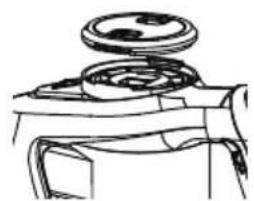
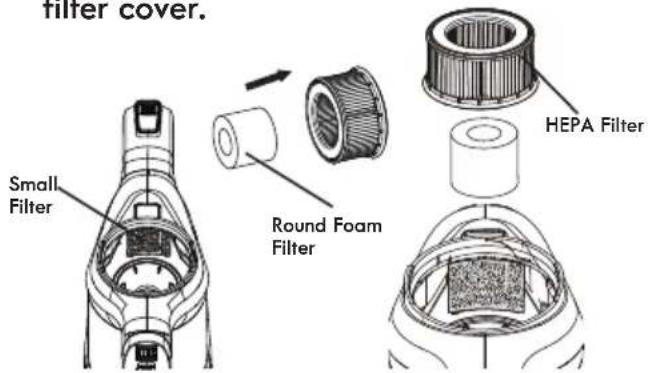
- Open the filter cover on top of hand vacuum by squeezing the two release buttons inward and lifting off. Remove HEPA filter and small foam filter from forward area of filter chamber. Remove round foam filter from inside of HEPA.
natural_image
Line drawing of a mechanical component with a circular top and cylindrical base (no text or symbols)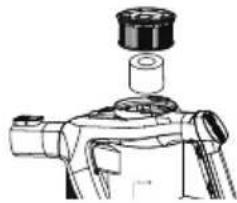
natural_image
Technical line drawing of a mechanical device with a cylindrical component inserted (no text or symbols)- Brush loose debris from HEPA filter and then rinse with
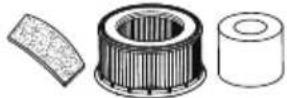
warm water. Rinse and gently squeeze dry the foam filters. Set all filters aside and allow to air dry.
IMPORTANT: The HEPA and 2 foam filters must dry completely before reuse.
- Place the small foam filter back into the front of the filter chamber.
Place the round foam filter into the center of the HEPA filter. Insert the HEPA filter into filter chamber and reattach filter cover.
VACUUM MAINTENANCE AND CARE
To Remove and Re-assemble Brush Roll for Manual Cleaning:
- Ensure the vacuum is OFF.
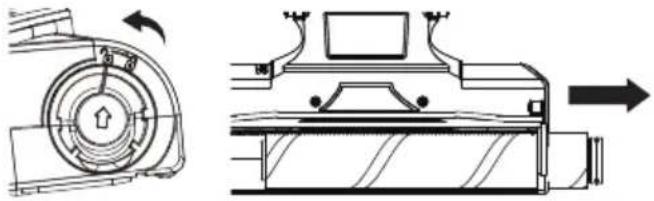
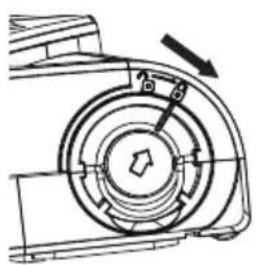
- Turn unit to the side to access the brush roll. To unlock brush roll, grab metal ring and rotate the arrow to the unlocked symbol position. With nozzle facing down, pull out the brush roll from the housing.
natural_image
Technical line drawing of a mechanical device with internal components and directional arrows (no text or symbols)- Clean off debris and anything wrapped around the brush. Use a screwdriver wrapped with a clean cloth to clean the left and right surface of the inner air-path.
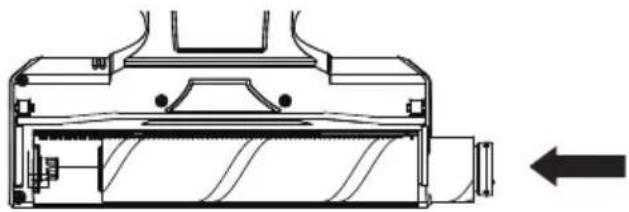
- Align the brush roll to the brush drive and slide the brush roll into the housing. You may need to rotate the roll slowly to make sure the roll matches the drive gear, then the roll can be completely inserted. Rotate the brush to ensure it turns easily before turning vacuum ON.
natural_image
Technical line drawing of a mechanical component with an arrow indicating direction (no text or symbols present)- Lock the brush roll in place by rotating the arrow using the metal ring from the unlocked symbol position to the locked position.
natural_image
Mechanical component diagram showing a rotating fan or impeller assembly with an arrow indicating rotation direction (no text or symbols present)- Place the metal ring in the slot.
Brush Roll Reset
If the brush roll is blocked or overloaded, the unit will automatically stop power. Switch the unit to the OFF position and remove the obstruction.
Hose Blockage Removal
- To clean out the hose, press the release button on the wand, and pull the motorized nozzle away from the wand.
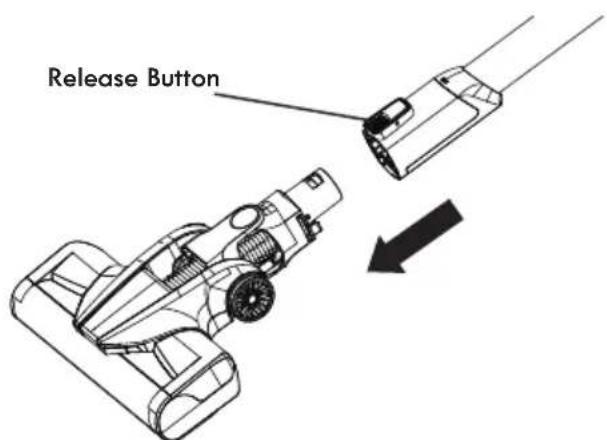
- Carefully remove any debris or blockage from the inside of the hose. Reattach the motorized nozzle onto the wand.
- Once the blockage is removed, start the vacuum to ensure air flow through the hose.
CAUTION! Do not use scissors or other sharp objects to remove a blockage from the hose.
TROUBLESHOOTING
Review the table for solutions to minor performance problems. Any service needed, other than maintenance described in this Use & Care Guide, should be performed by a qualified service dealer.

WARNING
Disconnect electrical supply before performing maintenance to the vacuum cleaner. Failure to do so could result in electrical shock or personal injury.
| PROBLEM PO | SSIBLE CAUSE SOLUTION | |
| A. Vacuum will not turn on. | 1. Battery may be depleted.2. Wrong charger being used.3. The motorized brush roll is jammed.4. Battery not installed completely. | 1. Charge the battery as instructed on page 11.2. Be sure to use only the charger supplied with your product.3. Remove obstruction. Follow instructions on page 15.4. Be sure battery is correctly aligned and completely installed into hand vacuum. |
| B. Battery charge indicator does not illuminate. | 1. Battery may be depleted.2. Charge adapter is not plugged in.3. The battery charger base is not fully inserted into charging dock.4. Debris accumulated on the metal charger contacts on hand vacuum, main body, or battery contacts.5. The electrical outlet is not working.6. The temperature of cell surface is overheated. | 1. Charge the battery as instructed on page 11.2. Be sure the charger adapter is plugged completely into the outlet and the charging base port.3. Be sure the battery charger base is completely inserted into charging dock.4. Be sure the metal pins on the dock are accurately lined up with the metal charging contacts on the hand vacuum and no debris has accumulated.5. Ensure that the outlet is supplying power to the charger.6. Charge the battery after the battery has cooled down to the normal temperature (45 minutes). |
| C. Motorized nozzle brushroll not turning. | 1. Brush roll is jammed.2. Brush roll is not installed properly.3. Nozzle motor is spinning, but the brush roll is not rotating. | 1. Remove obstruction. Follow instructions on page 15.2. Remove and reinstall brush roll. See instructions on page 15.3. Belt is broken. |
| D. Vacuum not picking up or suction power is weak. | 1. Dust cup is full.2. Filter needs cleaning.3. Filter needs to be replaced.4. Battery may be depleted. | 1. Empty dust cup.2. Follow filter cleaning instructions on page 14.3. To purchase parts call 1-844-202-9924.4. Charge the battery as instructed on page 11. |
| E. Dust escapes from vacuum. | 1. Filter is missing or installed incorrectly.2. Filter is damaged and needs to be replaced.3. Pre-filter is missing or is installed incorrectly. | 1. Check filter for correct installation. See page 14.2. To purchase filter call 1-844-202-9924.3. Reinstall correctly as instructed on page 14. |
| F. Vacuum turns off on its own. | 1. Battery may be depleted.2. The battery is overheated.3. The brush motor is overloaded or brush roll is blocked.4. The suction inlet or hose is blocked or sealed.5. Excessive loading on brush roll brush. | 1. Charge the battery as instructed on page 11.2. Charge the battery after the battery has cooled down to the normal temperature (45 minutes).3. Remove obstruction from brush, cool down the unit to ambient temperature, then re-start. Follow instructions on page 15.4. Remove obstruction then re-start.5. Turn vacuum off and re-start. |
TABLA DE CONTENIDOS
Cleva North America, Inc., Greenville SC 29607
PIEZAS Y CARACTERÍSTICAS
natural_image
Technical line drawing of a vacuum cleaner (no text or symbols present)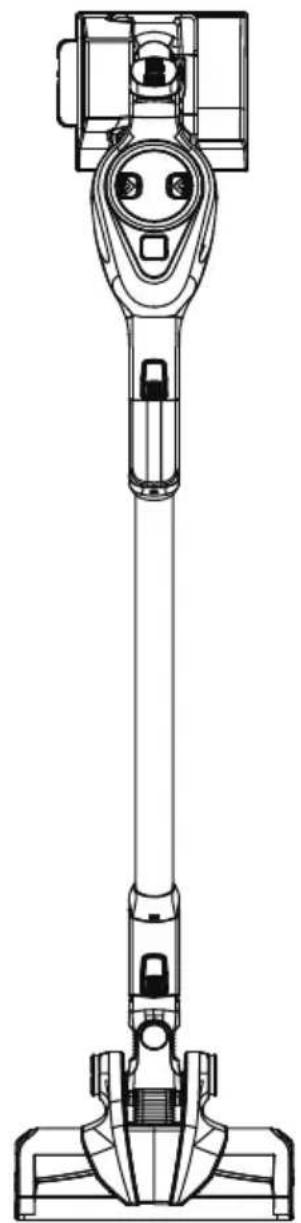
natural_image
Technical line drawing of a vacuum cleaner (no text or symbols)PIEZAS Y CARACTERÍSTICAS
natural_image
Technical line drawing of a mechanical device (no text or symbols visible)Aspiradora de mano
carga
natural_image
Simple line drawing of a rectangular device with a central screen and mounting bracket (no text or symbols)natural_image
Line drawing of a mobile phone rear panel with buttons and ports (no text or symbols)para la batería
natural_image
Technical line drawing of a mechanical clamp or bracket assembly (no text or symbols)natural_image
Line drawing of a mechanical device with cylindrical components and a base plate (no text or symbols)Pet PowerMate™
natural_image
Simple line drawing of a folded paper or bag with a loop (no text or symbols)Bolsa de accesorios
natural_image
Technical line drawing of a vertical cylindrical device with internal components (no text or symbols)Vara
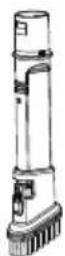
Cepillo combinado
PARTS AND FEATURES
natural_image
Technical line drawing of mechanical components including a bracket, shafts, and housing (no text or labels)Pet PowerMate™
natural_image
Technical line drawing of two mechanical components with no visible text or symbolsCepillo combinado
natural_image
Technical line drawing of two mechanical linkage components (no text or symbols)natural_image
Technical line drawing of a mechanical device with no visible text or symbolsnatural_image
Diagram showing a wall-mounted electrical outlet connected to a wall-mounted device via cable (no text or symbols present)natural_image
Line drawing of a hand inserting a component into a device (no text or symbols)natural_image
Diagram of a hand inserting a device into a device with an arrow indicating direction (no text or symbols present)natural_image
Illustration of hands holding a device with arrows indicating motion (no text or symbols)INSTRUCCIONES DE USO

CUIDADO
natural_image
Diagram of a vacuum cleaner with a prohibition symbol (no text or labels present)BOTONES DE CONTROL
natural_image
Technical line drawing of a mechanical device with a wheel and mounting bracket (no text or symbols)natural_image
Technical line drawing of a mechanical device with no visible text or symbolsnatural_image
Technical line drawing of a mechanical device with directional arrow and label 'Clic' (no readable text or symbols)natural_image
Technical line drawings of a mechanical component with no visible text or symbolsTo Remove and Re-assemble Brush Roll for Manual Cleaning:
natural_image
Technical line drawing of a mechanical device with internal components and directional arrows (no text or symbols)natural_image
Technical line drawing of a mechanical component with an arrow indicating direction (no text or symbols present)natural_image
Technical line drawing of a mechanical component with no visible text or symbolsVacuum Cleaner Help Line
1-877-531-7321
8:00 am - 5:00 pm ET M-F
Refer to the Troubleshooting section of the Use & Care Guide.
For additional assistance, call the Vacuum Cleaner Help Line.

- TABLE OF CONTENTS
- BEFORE USING YOUR NEW VACUUM CLEANER
- PACKING LIST
- WARNING!
- IMPORTANT SAFETY INSTRUCTIONS
- NOTICE
- Disposal
- SAVE THESE INSTRUCTIONS
- WARRANTY
- KENMORE LIMITED WARRANTY
- PARTS AND FEATURES
- Pet PowerMate™
- Combination Tool
- ASSEMBLY INSTRUCTIONS
- CHARGING
- WARNING
- Charging on Battery Charger Base
- OPERATING INSTRUCTIONS
- CAUTION
- CONTROL BUTTONS
- VACUUM OPERATION
- CLEANING WITH THE HAND VACUUM
- VACUUM MAINTENANCE AND CARE
- EMPTYING DUST CUP AND FILTER CLEANING
- To Remove and Re-assemble Brush Roll for Manual Cleaning:
- Brush Roll Reset
- Hose Blockage Removal
- TROUBLESHOOTING
- TABLA DE CONTENIDOS
- PIEZAS Y CARACTERÍSTICAS
- Cepillo combinado
- INSTRUCCIONES DE USO
- CUIDADO
- BOTONES DE CONTROL
- Vacuum Cleaner Help Line
- 1-877-531-7321
Brand : KENMORE
Model : DS6025
Category : Uncategorized