Simon Phillips Vintage Drums - Musical instrument STEINBERG - Free user manual and instructions
Find the device manual for free Simon Phillips Vintage Drums STEINBERG in PDF.


| Brand | Steinberg |
| Model | Simon Phillips Vintage Drums |
| Product Type | Virtual Instrument (Sample Library) |
| Format | VST 3, AU, AAX |
| Platform Compatibility | Windows 10 or later, macOS 10.13 or later |
| Required Hard Drive Space | 15 GB |
| RAM Requirement | 4 GB (8 GB recommended) |
| CPU Requirement | Multi-core processor, 2 GHz or faster |
| Bit Depth | 24-bit |
| Sample Rate | Up to 48 kHz |
| Number of Kits | 10 vintage drum kits |
| Number of Sounds | Over 3,000 samples |
| Articulations | Multiple round robins and velocity layers |
| License Type | Perpetual |
| Authorization Method | Steinberg eLicenser or Soft-eLicenser |
| Product Activation | Online activation required |
| Documentation | User manual in PDF (included) |
| Package Contents | Download link, license file |
| Manufacturer | Steinberg Media Technologies GmbH |
Frequently Asked Questions - Simon Phillips Vintage Drums STEINBERG
User questions about Simon Phillips Vintage Drums STEINBERG
0 question about this device. Answer the ones you know or ask your own.
Ask a new question about this device
Download the instructions for your Musical instrument in PDF format for free! Find your manual Simon Phillips Vintage Drums - STEINBERG and take your electronic device back in hand. On this page are published all the documents necessary for the use of your device. Simon Phillips Vintage Drums by STEINBERG.
USER MANUAL Simon Phillips Vintage Drums STEINBERG
natural_image
Abstract white circular graphic with a triangular shape and shadow, no text or symbols present.Steinberg Documentation Team: Cristina Bachmann, Martina Becker, Heiko Bischoff, Lillie Harris, Christina Kaboth, Dennis Martinez, Insa Mingers, Matthias Obrecht, Sabine Pfeifer
Translation: Ability InterBusiness Solutions (AIBS), Moon Chen, Jérémie Dal Santo, Rosa Freitag, GiEmme Solutions, Josep Llodra Grimalt, Vadim Kupriianov, Roland Münchow, Boris Rogowski, Sergey Tamarovsky
This document provides improved access for people who are blind or have low vision. Please note that due to the complexity and number of images in this document, it is not possible to include text descriptions of images.
The information in this document is subject to change without notice and does not represent a commitment on the part of Steinberg Media Technologies GmbH. The software described by this document is subject to a License Agreement and may not be copied to other media except as specifically allowed in the License Agreement. No part of this publication may be copied, reproduced, or otherwise transmitted or recorded, for any purpose, without prior written permission by Steinberg Media Technologies GmbH. Registered licensees of the product described herein may print one copy of this document for their personal use.
All product and company names are ™ or ® trademarks of their respective owners. For more information, please visit www.steinberg.net/trademarks.
© Steinberg Media Technologies GmbH, 2024.
All rights reserved.
Simon Phillips Vintage Drums_1.0.0_en-US_2024-01-18
Table of Contents
4 Simon Phillips Vintage Drums
4 Edit Page Parameters
9 Mixer Page Parameters
Simon Phillips Vintage Drums
Simon Phillips Vintage Drums is a content set for Groove Agent and Groove Agent SE.
This documentation describes the Edit page and Agent mixer parameters that are unique to the content set.
For a complete list of the available parameters, refer to the documentation for Groove Agent or Groove Agent SE.
Edit Page Parameters
The toms, kick drums, and snare drums feature a Resonance control. This microphone channel delivers the sound of the resonating kit that is produced when a kick drum, snare drum, or one of the toms is triggered. In addition, a Reverb control allows you to add a digital reverb to the instruments.
Kick Drums
You can play two kick drums simultaneously.

text_image
MAIN MIDI FX 16 BIT 24 BIT KICK A ROOM OVERHEAD RESONANCE REVERB TUNE ATTACK HOLD DECAY| Note | Kick |
| C1 | A |
| B0 | B |
Snare Drums
You can play two snare drums simultaneously. The Snare Type pop-up menu allows you to choose from six different snare drums, both for the Main and for the Side snare.

text_image
MAIN MIDI FX 16 BIT 24 BIT SIDE ON Snare B ROOM Snare A ✓ Snare B Snare C Snare D Snare E Snare F SINCE REVERB TUNE ATTACK HOLD DECAYNoteSnareArticulation
C#1 Main Snare Sidestick
D1 Main Snare Hit
E1 Main Snare Rimshot
C#0 Side Snare Sidestick
D0 Side Snare Hit
E0 Side Snare Rimshot
Hi-hat
The hi-hat comes with a closed and with five open variations that can be played either dynamically using the mod wheel, or triggered as individual articulations on dedicated keys. The hi-hat can be played with tip and shank.

text_image
MAIN MIDI FX 16BIT 24 BIT MENAT ROOM OVERHEAD TIP SHANK FOOT CTRL FILTER HINAT OPEN MW MAX FOOT MINNoteArticulationComment
A-1 Foot
F#0 Shank Closed
G#0 Pedal
A0 Foot
A#0 Shank Dynamic - Mod wheel
F#1 Tip Closed
G#1 Pedal
A#1 Tip Dynamic - Mod wheel
C3 Pedal
C#3 Foot
D3 Shank Closed
E3 Shank Open 1
F3 Shank Open 2
G3 Shank Open 3
A3 Shank Open 4
B4 Shank Open 5
NoteArticulationComment
C4 Pedal
C#4 Foot
D4 Tip Closed
E4 Tip Open 1
F4 Tip Open 2
G4 Tip Open 3
A4 Tip Open 4
B4 Tip Open 5
E5 Foot Splash
Toms
You can use up to eight toms (6",8",10",12",13",14",15", and 16"), plus an 18" floor tom.
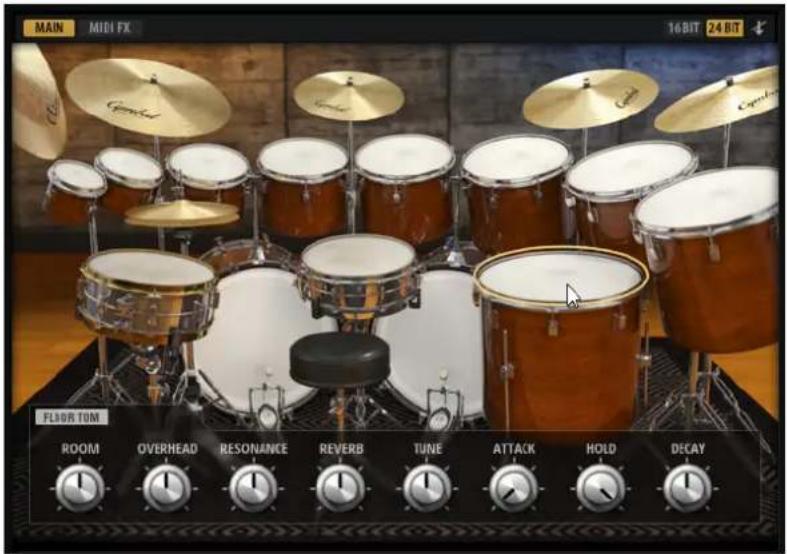
text_image
MAIN MIDI FX 16 BIT 24 BIT Floor Tom ROOM OVERHEAD RESONANCE REVERB TUNE ATTACK HOLD DECAYNote
G5
B1
D2
C2
Tom
A
B
C
D
NoteTom
| B1 | E |
| A1 | F |
| G1 | G |
| F1 | H |
B-1, C0 Floor
Cymbals
The cymbal set contains three crash cymbals, a china cymbal, and a ride cymbal. You can choke the three crash cymbals.
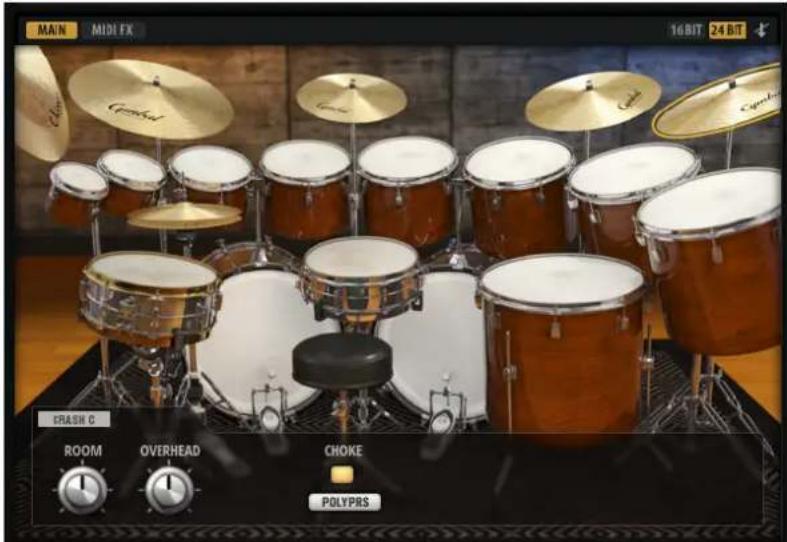
text_image
MAIN MIDI FX 16 BIT 24 BIT CRAI SH C ROOM OVERHEAD CHoke POLYPRSNote
CymbalArticulation
C#2 Crash A Hit + Choke
F#2 Crash B Hit + Choke
A2 Crash C Hit + Choke
E2 China Crash
D#2 Ride Bow
F2 Ride Bell
B2 Ride Edge
Mixer Page Parameters
The Agent mixer provides dedicated channels for all instrument groups as well as for the individual instruments.

text_image
AGENT AUX KITS MASTER GROUPS KICKS SNAES TOMS 1 TOMS 2 CYMBOLS ROOM / OK RES/MIX Kit Mix -11.4 AUX 1 -12.7 AUX 1 -21.1 AUX 1 -18.7 AUX 2 -25.9 AUX 1 -19.5 AUX 2 -41.6 AUX 3 -7.8 PAN AUX 3 PAN AUX 3 PAN AUX 3 PAN AUX 3 PAN AUX 3 WINDR AUX 3 WINDR AUX 3 0.0 - 2 0.0 - 2 0.0 - 2 0.0 - 2 0.0 - 2 0.0 - 2 0.0 - 2 0.0 - 2 0.0 - 2 0.0 - 2 0.0 - 2 0.0 - 2 0.0 - 2 0.0 - 2 0.0 - 2 S M S M S M S M S M S M S M L/R Kicks Snares Hihat Toms Cymbals RevRoom Resonance Kit MixThe RES/MIX tab contains a dedicated channel for the resonance signals and the Mix master channel. The controls for the Resonance channel are the same as for the Room and Overheads channels on the ROOM/OH tab.
Reverb Channel
text_image
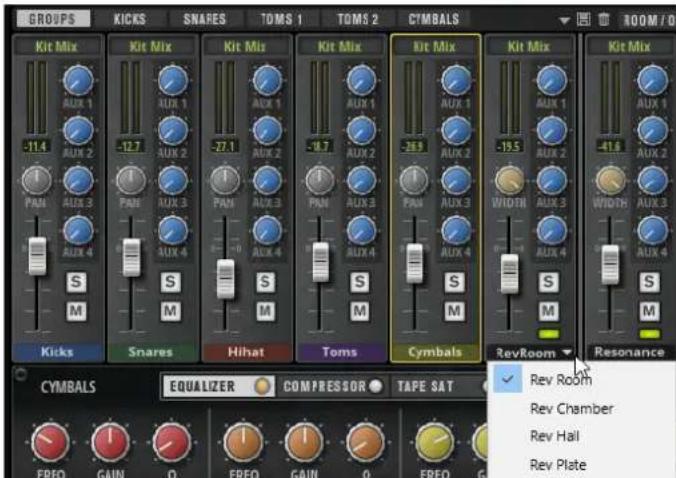
GROUPS KIT Mix -11.4 PAN S M Kicks Kit Mix -12.7 PAN S M Snares Kit Mix -27.1 PAN S M Hihat Kit Mix -38.7 PAN S M Toms Kit Mix -39.5 PAN S M Cymbals Kit Mix -19.5 WIDTH S M RevRoom Resonance CYMBOLS EQUALIZER COMPRESSOR TAPE SAT Rev Room Rev Chamber Rev Hall Rev PlateThe Reverb channel on the Groups page provides the same controls as all other group channels. To select the reverb type, click on the channel name to open the Select Reverb Type pop-up menu, and select an option. You can choose from Room, Chamber, Hall, and Plate.
RAM Usage and Voices
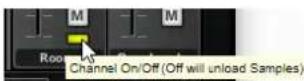
The Room, Resonance, and Reverb channels provide an additional activation button below the Mute button.
Click the Channel On/Off button to deactivate the corresponding channel entirely. All samples of the channel are unloaded from RAM. This reduces the amount of memory required and the number of samples that are played simultaneously.