
Vertigo Cello - Musical instrument STEINBERG - Free user manual and instructions
Find the device manual for free Vertigo Cello STEINBERG in PDF.


| Product Type | String Instrument - Cello |
| Brand | Steinberg |
| Model | Vertigo Cello |
| Overall Length | Approx. 125 cm (49 inches) |
| Body Length | Approx. 75 cm (29.5 inches) |
| Weight | Approx. 2.5 kg (5.5 lbs) |
| Power Source | None (acoustic instrument) |
| Sound | Rich warm tones with full resonance |
| Materials | Spruce top, maple back and sides, ebony fingerboard and fittings |
| Strings | 4 strings (C, G, D, A) – steel core with synthetic or silver winding |
| Bow | Included brazilwood or pernambuco bow with horsehair |
| Case | Padded or hard case included for transport and storage |
| Accessories | Rosin, tuning fork or electronic tuner, cleaning cloth |
| Care Instructions | Wipe rosin dust after playing; use a humidifier in dry environments; avoid direct sunlight and extreme temperatures |
| Safety Warnings | Keep away from heat sources; do not place heavy objects on the instrument; supervise children during use |
| Spare Parts | Replacement strings, bridge, tailpiece, pegs, endpin, bow rehair available |
| Repairability | Professional luthier recommended for repairs and adjustments |
| Warranty | Limited manufacturer warranty against defects (check documentation for details) |
| Intended Use | Solo, ensemble, and orchestral performances; student to intermediate level |
Frequently Asked Questions - Vertigo Cello STEINBERG
User questions about Vertigo Cello STEINBERG
0 question about this device. Answer the ones you know or ask your own.
Ask a new question about this device
Download the instructions for your Musical instrument in PDF format for free! Find your manual Vertigo Cello - STEINBERG and take your electronic device back in hand. On this page are published all the documents necessary for the use of your device. Vertigo Cello by STEINBERG.
USER MANUAL Vertigo Cello STEINBERG
Thank you for buying the Vertigo Cello
How to install?
In order to properly install your HALion library please follow the instructions given on the Steinberg website or watch the „How to install“ HALion instruments video.
For any kind of questions concerning the installation or registration of HALion instruments please contact Steinberg – in terms of the instrument please contact us at : support@cinematique-instruments.com
Vertigo Cello
Vertigo Cello is another addition to our symphonic range.
As a further member of our Vertigo series it inherits similar sonic characteristics, namely the warm and gritty tones of the Vertigo instruments. We put a lot of effort into creating a diverse range of articulations allowing the user to blend from subtle tones to more experimental soundscapes. The effects section of our Vertigo engine enables you to tweak sounds to create anything from cozy warm pads to rougher sounds.
All in all, the Vertigo Cello is a versatile and easy to use tool for sculpting textures fitting for film but feeling equally at home with producers looking for organic, rough and unique timbres.
Overview and Concept
Essentially Vertigo Cello is a melange of 15 meticulously selected cello articulations.
Vertigo Cello is packed with an electrifying range of many different appealing articulations of a solo cello as well as playing techniques of a trio.
All sounds can be mixed, tuned and panned individually.
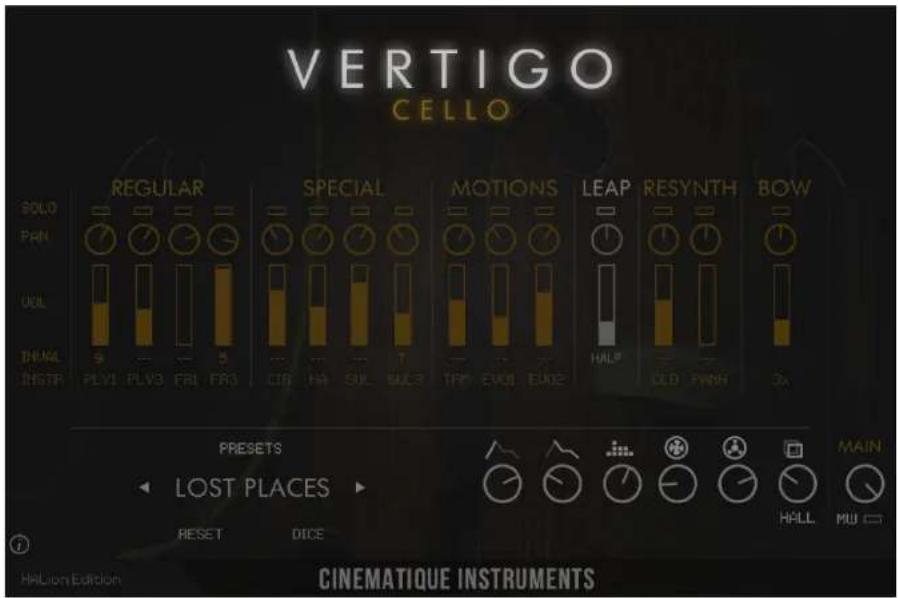
Vertigo Cello provides 15 different sound sources:
| Regular | Played in normal mannerSingle & Ensemble |
| Fragile | Played as quite as possibleSingle & Ensemble |
| Special | CIR: circulating the bowHA: playing harmonicsSUL: solo playing sul pontSUL3: ensemble playing sul pont |
| Motions | TRM: playing tremoloEVO1: mixing short articulationsEVO2: same but different |
| Leap | short notes |
| Resynth | CLD: send thru cloudsPANH: send thru a resynthesizer |
| Bow | Just the bowSingle & Ensemble |
Vertigo Cello in detail
All of these sounds are equipped with a separate volume slider, a pitch slider covering a range from -12 to 12 semitones, a pan-pot and a solo button.
Solo lets the corresponding
instrument play in solo
mode
Panning lets the corresponding
instrument pan from left
to right
Volume controls the volume
of the corresponding
instrument
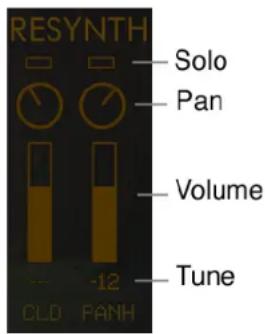
Tuning sets the specific interval (pitch) of the corresponding
instrument in relation to the played key(s)
Interval Lock on the left of the instrument slots you can click onto INVALID in order to lock the
Interval Section so preset changes won't have an effect on this section
The controls of the master section:

Reset sets the entire instrument back to the default values
Dice sets all(!) parameters randomly
Presets a click on the name will open the preset menu
Previous/ Next by clicking on these arrows you will get to the previous/ next preset
Attack controls the attack of all instruments
Decay controls the decay/ release of all instruments
Tone This EQ is a kind of low/high bell EQ. Turning counterclockwise will boost the low and reduce the high frequencies. Turning the knob clockwise will achieve the opposite.
Swirl lets you play the entire sound through a slow running rotary speaker simulation (100% is pure wet)
Tape lets you play the entire sound through an old tape echo (100% is pure wet)
Reverb controls the amount of reverb. By clicking on the name below the slider you can select the type of reverb out of 6 different variations. There are six different types: Room, Wood, Chamber, Hall, Church and Infinite
Main controls the overall volume level of a tape saturation (Gain and Output)
MW by activating this function, Vertigo Cello will be volume controlled by the mod wheel.
The mod wheel controls the main volume as well as slightly changes the tone (from low to high). Furthermore the engine activates the dynamic layer of all corresponding instruments. The maximum boundary of the mod wheel is set by the value when the MW is turned off.
VERTIGO
CELLO
Vertigo Cello is a wonderful tool to easily achieve inspiring as well as unique string ensemble sounds. It gives you a rich and deep sonic experience.
Thanks to Katrin, René, Jumpel, Urban, Till and Jonas at Cinematique Instruments and Florian, Matthias, Michael and Frank at Steinberg.
Copyright © September, 2021 by Cinematique Instruments, Cologne, Germany
Brand : STEINBERG
Model : Vertigo Cello
Category : Musical instrument