
B127U-111-PDPD - AV Extender Tripp Lite - Free user manual and instructions
Find the device manual for free B127U-111-PDPD Tripp Lite in PDF.


| Product Type | DisplayPort Extender Kit |
| Brand | Tripp Lite |
| Model | B127U-111-PDPD |
| Dimensions (Transmitter) | 2.4 x 1.0 x 0.5 in (61 x 25 x 13 mm) |
| Dimensions (Receiver) | 2.4 x 1.0 x 0.5 in (61 x 25 x 13 mm) |
| Weight (each unit) | 0.4 lb (181 g) |
| Power Supply | Input: 100-240V AC, 50/60Hz; Output: 5V DC, 2A (included) |
| Power Consumption | 2.5W (max) per unit |
| Video Input | 1 x DisplayPort (male) on transmitter |
| Video Output | 1 x DisplayPort (female) on receiver |
| Max Resolution | 3840 x 2160 at 60 Hz (4K@60Hz) |
| Max Transmission Distance | 150 ft (45 m) over Cat6/7 cable |
| Cable Type | Cat6 or Cat7 solid or stranded UTP/STP |
| Supported Features | HDCP 2.2, EDID passthrough, PoC (Power over Cable) |
| Operating Temperature | 32°F to 122°F (0°C to 50°C) |
| Storage Temperature | -4°F to 140°F (-20°C to 60°C) |
| Humidity | 10% to 85% RH (non-condensing) |
| Warranty | 3-year limited warranty |
| Included Accessories | Transmitter unit, receiver unit, power supply, mounting hardware, quick start guide |
| Regulatory Approvals | FCC, CE, RoHS |
Frequently Asked Questions - B127U-111-PDPD Tripp Lite
User questions about B127U-111-PDPD Tripp Lite
0 question about this device. Answer the ones you know or ask your own.
Ask a new question about this device
Download the instructions for your AV Extender in PDF format for free! Find your manual B127U-111-PDPD - Tripp Lite and take your electronic device back in hand. On this page are published all the documents necessary for the use of your device. B127U-111-PDPD by Tripp Lite.
USER MANUAL B127U-111-PDPD Tripp Lite
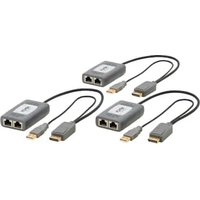
DisplayPort Over Cat6 Pigtail Extender Kits and Receiver with Repeater, 4K/60 Hz
Extender Kit: B127U-111-PDPD
2-Port Splitter Kit: B127U-002-PDPD2
Receiver with Repeater: B127U-110-PD
Register your product today and be automatically entered to win an ISOBAR® surge protector in our monthly drawing!
tripplite.com/warranty

1111 W. 35th Street, Chicago, IL 60609 USA • tripplite.com/support
Copyright © 2023 Tripp Lite. All rights reserved.
Product Features
B127U-111-PDPD
- DisplayPort over Cat6 Pigtail Transmitter and Receiver with Repeater Kit
- Extends a 4K x 2K (3840 x 2160) @ 60 Hz DisplayPort 1.2 A/V signal up to 230 ft. (70 m) from the source over 24 AWG Cat6 cabling
- Transmitter and receiver units can be powered by the built-in 1 ft. USB-A cables for connecting to the USB port on a display or to a USB power adapter, or by the Micro-USB ports on each unit
- 1 ft. DisplayPort connectors on transmitter and receiver units connect to the source and display
• View the transmitted video content on a local display via the 4K/60 Hz HDMI port on the transmitter unit - Daisychainable up to 4 layers, with each additional B127U-110-PD receiver unit (sold separately) providing an additional 230 ft., up to a total of 920 ft. (280 m)
• Supports passthrough audio formats up to 7.1-channel surround sound
• Real-time video compression and decompression technology - Compatible with HDCP 2.2 and 1.4 and High Dynamic Range (HDR)
Product Features
B127U-002-PDPD2
- 2-Port DisplayPort over Cat6 Pigtail Splitter and Receivers Kit
- Extends a 4K x 2K (3840 x 2160) @ 60 Hz DisplayPort A/V signal to two displays up to 230 ft. (70 m) from the source over 24 AWG Cat6 cabling
- Transmitter and receiver units are powered by built-in 1 ft. USB-A cables for connecting to the USB port on a display or to a USB power adapter, or via the Micro USB ports on each unit
- Multi-Resolution technology allows the receivers to connect to any 1080p, 4K/30 Hz or 4K/60 Hz display without affecting the resolution of the other displays connected to the splitter
- 1 ft. DisplayPort connectors on transmitter and receiver units connect to the source and display
• Supports passthrough audio formats up to 7.1-channel surround sound
• Real-time video compression and decompression technology - Compatible with HDCP 2.2 and 1.4 and High Dynamic Range (HDR)
- Compatible with DisplayPort (B127U-110-PD) and HDMI (B127U-110-PH) receivers to create flexible daisychain installations with multiple video outputs. Each port on the splitter can extend up to four connected receivers, for a total of eight receivers and 920 ft. (280 m) per daisychain (sold separately).
Product Features
B127U-110-PD
- DisplayPort over Cat6 Pigtail Receiver with Repeater
- Extends a 4K x 2K (3840 x 2160) @ 60 Hz A/V signal up to 230 ft. (70 m) from the source when connected to a B127U-Series transmitter or splitter unit over 24 AWG Cat6 cabling
- Powered by built-in 1 ft. USB-A cable for connecting to the USB port on a display or to a USB power adapter, or via the unit's Micro-USB port
- 1 ft. DisplayPort pigtail connector is used to connect to the display
• Supports passthrough audio formats up to 7.1-channel surround sound
• Real-time video compression and decompression technology - Compatible with HDCP 2.2 and 1.4 and High Dynamic Range (HDR)
- Compatible with any B127U-Series transmitter or splitter to create flexible DisplayPort and HDMI video installations
- Daisychainable up to 4 layers, with each additional B127U-110-PD or B127U-110-PH receiver unit (sold separately) providing an additional 230 ft., up to a total of 920 ft. (280 m)
Optional Accessories
• N202-Series Cat6 24 AWG Solid Wire Patch Cables
• U280-W01-QC3-1 USB-A Wall Adapter, 18 Watts
• B127U-110-PH HDMI over Cat6 Receiver with Repeater
Installation
Standard Extender Kit Installation
Notes:
- Test to ensure the entire installation works properly before pulling cables through ceilings/walls.
- To achieve maximum distance and performance, use 24 AWG solid wire Cat6 cable. Using stranded wire Cat6 cable or cable with a gauge (AWG) size higher than 24 AWG will result in shorter extension distance. Higher-gauge cabling, such as 26 AWG, has a more limited transmission capability than lower-gauge cabling. All Tripp Lite N202-Series Cat6 cables are made with 24 AWG solid wire cabling.
- The installation diagram shows a B127U-111-PDPD extender kit.
- The diagram shows additional B127U-110-PD receiver units (sold separately, see tripplite.com) in a daisy-chain installation.
- The B127U-Series of transmitter/receiver units can be mixed and matched as desired with either HDMI or DisplayPort video outputs within one installation. The B127U-Series HDMI transmitter products can be used with the B127U-110-PD DisplayPort receiver (and vice-versa) with the B127U-Series DisplayPort transmitter and B127U-110-PH HDMI receiver. Up to four receivers can be daisychained at once.
Installation

flowchart
graph LR
    A["USB Power Adapter"] --> B["Displayport Transmitter"]
    B --> C["4K/60Hz Source"]
    B --> D["HDMI 2.0 Cable"]
    D --> E["4K/60 Hz Only HDMI Local Port"]
    E --> F["USB Power Adapter"]
    F --> G["Displayport Transceiver"]
    G --> H["4K or 1080p TV"]
    G --> I["4K or 7080p TV"]
    G --> J["4K or 3080p TV"]
    G --> K["4K or 1080p TV"]
    G --> L["4K or 7080p TV"]
    G --> M["4K or 3080p TV"]
    F --> N["up to 230"]
    G --> O["up to 230"]
    H --> P["up to 230"]
    I --> Q["up to 230"]
    J --> R["up to 230"]
    K --> S["up to 230"]
    L --> T["up to 230"]
    M --> U["up to 230"]
    N --> V["24AWG Cat6 Cable"]
    O --> W["24AWG Cat6 Cable"]
    P --> X["24AWG Cat6 Cable"]
    Q --> Y["24AWG Cat6 Cable"]
    R --> Z["24AWG Cat6 Cable"]
    S --> AA["24AWG Cat6 Cable"]
    T --> AB["24AWG Cat6 Cable"]
    U --> AC["24AWG Cat6 Cable"]
    V --> AD["24AWG Cat6 Cable"]
    W --> AE["24AWG Cat6 Cable"]
    X --> AF["24AWG Cat6 Cable"]
    Y --> AG["24AWG Cat6 Cable"]
    Z --> AH["24AWG Cat6 Cable"]
    AA --> AI["24AWG Cat6 Cable"]
    AB --> AJ["24AWG Cat6 Cable"]
    AC --> AK["24AWG Cat6 Cable"]
    AD --> AL["24AWG Cat6 Cable"]
    AE --> AM["24AWG Cat6 Cable"]
    AF --> AN["24AWG Cat6 Cable"]
    AG --> AO["24AWG Cat6 Cable"]
    AH --> AP["24AWG Cat6 Cable"]
    AI --> AQ["24AWG Cat6 Cable"]
    AJ --> AR["24AWG Cat6 Cable"]
    AK --> AS["24AWG Cat6 Cable"]
    AL --> AT["24AWG Cat6 Cable"]
    AM --> AU["24AWG Cat6 Cable"]
    AN --> AV["24AWG Cat6 Cable"]
    AO --> AW["24AWG Cat6 Cable"]
    AP --> AX["24AWG Cat6 Cable"]
    AQ --> AY["24AWG Cat6 Cable"]
    AR --> AZ["24AWG Cat6 Cable"]
    AS --> BA["24AWG Cat6 Cable"]
    AT --> BB["24AWG Cat6 Cable"]
    AU --> BC["24AWG Cat6 Cable"]
    AV --> BD["24AWG Cat6 Cable"]
    AW --> BE["24AWG Cat6 Cable"]
    AX --> BF["24AWG Cat6 Cable"]
    AY --> BG["24AWG Cat6 Cable"]
- Make sure all equipment in the installation – such as TVs, Blu-ray players and the transmitter – is powered off.
- Connect the pigtail DisplayPort connector on the transmitter unit to the DisplayPort input on the source.
Optional: Using an HDMI 2.0 cable (such as Tripp Lite's P569-XXX-CERT or P568-XXX-2A Series cables), connect a display to the LOCAL port on the transmitter unit.
-
Using 24 AWG solid wire Cat6 cable, connect the RJ45 port on the local transmitter unit to the RJ45 input port on the remote receiver unit.
-
Connect the pigtail DisplayPort connector on the remote receiver unit to the DisplayPort port on the display.
-
Connect the pigtail USB-A connector on the local transmitter unit to a USB 3.0 port or a USB power adapter (5V/1A) and into a wall power outlet. The LED next to the RJ45 port will illuminate solid green to indicate the unit is receiving power.
Installation
- Connect the pigtail USB-A connector on the remote receiver unit to a USB power adapter (5V/1A) or a USB 3.0 port on the display. The LEDs next to the RJ45 connectors will illuminate orange to indicate the ports are receiving power.
Optional: The transmitter and receiver units can be charged via the Micro-USB ports on each unit by connecting a Micro-USB to USB-A cable between each unit and a USB power adapter. - Turn on the power to your connected TVs/monitors.
- Turn on the power to the DisplayPort source. The LEDs on both the transmitter and receiver units should begin to flash to indicate video is being transmitted and the video should now display on the connected monitor(s).
Note: If a daisy-chain installation is desired, repeat steps 4-7 with up to 3 additional B127U-110-PD or B127U-110-PH units (sold separately).
Installation
Standard Splitter Kit Installation
Notes:
- Test to ensure the entire installation works properly before pulling cables through ceilings/walls.
- To achieve maximum distance and performance, use 24 AWG solid wire Cat6 cable. Using stranded wire Cat6 cable or cable with a gauge (AWG) size higher than 24 AWG will result in shorter extension distance. Higher-gauge cabling, such as 26 AWG, has a more limited transmission capability than lower-gauge cabling. All Tripp Lite N202-Series Cat6 cables are made with 24 AWG solid wire cabling.
- The installation diagram shows a B127U-002-PDPD2 splitter kit.
- The diagram shows additional B127U-110-PD and B127U-110-PH receiver units (sold separately, see tripplite.com) in a daisy chain installation.
- The B127U-Series of transmitter/receiver units can be mixed and matched as desired with either HDMI or DisplayPort video outputs within one installation. The B127U-Series HDMI transmitter products can be used with the B127U-110-PD DisplayPort receiver (and vice-versa) with the B127U-Series DisplayPort transmitter and B127U-110-PH HDMI receiver. Up to four receivers can be daisychained at once.
Installation

flowchart
graph TD
    A["4K/60Hz Source"] --> B["1x2 DisplayPort Splitter"]
    B --> C["USB Power Adapter"]
    B --> D["DisplayPort Transceiver"]
    D --> E["4K or 1080 TV"]
    D --> F["DisplayPort Transceiver HDMI Transceiver"]
    F --> G["4K or 1080 TV"]
    F --> H["4K or 1080 TV"]
    B --> I["up to 230ft 24AWG Cat6 Cable"]
    D --> J["up to 230ft 24AWG Cat6 Cable"]
    F --> K["up to 230ft 24AWG Cat6 Cable"]
    H --> L["up to 230ft 24AWG Cat6 Cable"]
    I --> M["DisplayPort Transceiver HDMI Transceiver DisplayPort Transceiver"]
    J --> M
    K --> M
    L --> M
    M --> N["4K or 1080 TV"]
    M --> O["4K or 1080 TV"]
    M --> P["4K or 1080 TV"]
    N --> Q["4K or 1080 TV"]
    O --> R["4K or 1080 TV"]
    P --> S["4K or 1080 TV"]
    Q --> T["4K or 1080 TV"]
    R --> U["4K or 1080 TV"]
    S --> V["4K or 1080 TV"]
- Make sure all equipment in the installation – such as TVs, Blu-ray players and the transmitter – is powered off.
- Connect the pigtail DisplayPort connector on the transmitter unit to the DisplayPort input on the source.
- Using Cat6 cable, connect the RJ45 ports on the local transmitter unit to the RJ45 input ports of each remote receiver unit.
- Connect the pigtail DisplayPort connector on the remote receiver units to the DisplayPort input ports of each display.
- Connect the pigtail USB-A connector on the local transmitter unit to a USB power adapter and into a wall power outlet. The LED next to the RJ45 port should illuminate to indicate the unit is receiving power.
Installation
- Connect the pigtail USB-A connector on the remote receiver units to USB power adapters or a USB port on the displays. The LEDs next to the RJ45 ports should illuminate to indicate the units are receiving power.
Optional: The transmitter and receiver units can be charged via the Micro-USB ports on each unit by connecting a Micro-USB to USB-A cable between each unit and a USB power adapter. - Turn on the power to your connected TVs/monitors.
- Turn on the power to the DisplayPort source. The LEDs on the transmitter and receiver units should begin to flash to indicate video is being transmitted and the video should now display on the connected monitor(s).
Warranty and Product Registration
1-Year Limited Warranty
TRIPP LITE warrants its products to be free from defects in materials and workmanship for a period of one (1) year from the date of initial purchase.
TRIPP LITE's obligation under this warranty is limited to repairing or replacing (at its sole option) any such defective products. To obtain service under this warranty, you must obtain a Returned Material Authorization (RMA) number from TRIPP LITE or an authorized TRIPP LITE service center. Products must be returned to TRIPP LITE or an authorized TRIPP LITE service center with transportation charges prepaid and must be accompanied by a brief description of the problem encountered and proof of date and place of purchase. This warranty does not apply to equipment which has been damaged by accident, negligence or misapplication or has been altered or modified in any way.
EXCEPT AS PROVIDED HEREIN, TRIPP LITE MAKES NO WARRANTIES, EXPRESS OR IMPLIED, INCLUDING WARRANTIES OF MERCHANTABILITY AND FITNESS FOR A PARTICULAR PURPOSE. Some states do not permit limitation or exclusion of implied warranties; therefore, the aforesaid limitation(s) or exclusion(s) may not apply to the purchaser.
EXCEPT AS PROVIDED ABOVE, IN NO EVENT WILL TRIPP LITE BE LIABLE FOR DIRECT, INDIRECT, SPECIAL, INCIDENTAL OR CONSEQUENTIAL DAMAGES ARISING OUT OF THE USE OF THIS PRODUCT, EVEN IF ADVISED OF THE POSSIBILITY OF SUCH DAMAGE. Specifically, TRIPP LITE is not liable for any costs, such as lost profits or revenue, loss of equipment, loss of use of equipment, loss of software, loss of data, costs of substitutes, claims by third parties, or otherwise.
PRODUCT REGISTRATION
Visit tripplite.com/warranty today to register your new Tripp Lite product. You'll be automatically entered into a drawing for a chance to win a FREE Tripp Lite product!*
* No purchase necessary. Void where prohibited. Some restrictions apply. See website for details.
Warranty and Product Registration
WEEE Compliance Information for Tripp Lite Customers and Recyclers (European Union)

Under the Waste Electrical and Electronic Equipment (WEEE) Directive and implementing regulations, when customers buy new electrical and electronic equipment from Tripp Lite they are entitled to:
- Send old equipment for recycling on a one-for-one, like-for-like basis (this varies depending on the country)
- Send the new equipment back for recycling when this ultimately becomes waste
WARNING
Use of this equipment in life support applications where failure of this equipment can reasonably be expected to cause the failure of the life support equipment or to significantly affect its safety or effectiveness is not recommended.
Tripp Lite has a policy of continuous improvement. Specifications are subject to change without notice. Photos and illustrations may differ slightly from actual products.

1111 W. 35th Street, Chicago, IL 60609 USA • tripplite.com/support


- DisplayPort Over Cat6 Pigtail Extender Kits and Receiver with Repeater, 4K/60 Hz
- Product Features
- B127U-111-PDPD
- B127U-002-PDPD2
- B127U-110-PD
- Optional Accessories
- Installation
- Standard Extender Kit Installation
- Notes:
- Standard Splitter Kit Installation
- Warranty and Product Registration
- 1-Year Limited Warranty
- PRODUCT REGISTRATION
- WEEE Compliance Information for Tripp Lite Customers and Recyclers (European Union)
- WARNING
Brand : Tripp Lite
Model : B127U-111-PDPD
Category : AV Extender