PLHRDVD101KT - Media player Pyle - Free user manual and instructions
Find the device manual for free PLHRDVD101KT Pyle in PDF.


| Product Type | Portable DVD Player |
| Display Size | 10.1 inches |
| Display Resolution | 1024 x 600 pixels |
| Supported Disc Formats | DVD, DVD±R/RW, CD, CD-R/RW, VCD, MP3, JPEG |
| Video Output | HDMI, Composite AV |
| Audio Output | Built-in speakers, Headphone jack, AV out |
| Input Ports | USB 2.0, SD/MMC card slot, AV input |
| Battery Type | Rechargeable lithium-ion |
| Battery Life | Approximately 3-4 hours |
| Power Supply | AC/DC adapter (100-240V, 50/60Hz) |
| Dimensions (W x H x D) | 10.3 x 7.6 x 1.5 inches |
| Weight | 2.2 lbs |
| Region Code | Region 1 (NTSC) or multi-region |
| Remote Control | Included infrared remote |
| Car Adapter | Included |
| Maintenance | Clean disc lens with soft dry cloth; keep away from dust and moisture |
| Safety | Do not expose to water or extreme temperatures; use only supplied adapter |
| Spare Parts | Remote, AC adapter, car adapter available from Pyle |
| General Info | Brand: Pyle, Model: PLHRDVD101KT, Color: Black |
Frequently Asked Questions - PLHRDVD101KT Pyle
User questions about PLHRDVD101KT Pyle
0 question about this device. Answer the ones you know or ask your own.
Ask a new question about this device
Download the instructions for your Media player in PDF format for free! Find your manual PLHRDVD101KT - Pyle and take your electronic device back in hand. On this page are published all the documents necessary for the use of your device. PLHRDVD101KT by Pyle.
USER MANUAL PLHRDVD101KT Pyle
Need service or repair?
Want to leave a comment?
PyleUSA.com/ContactUs
PYLE
PyleUSA.com
natural_image
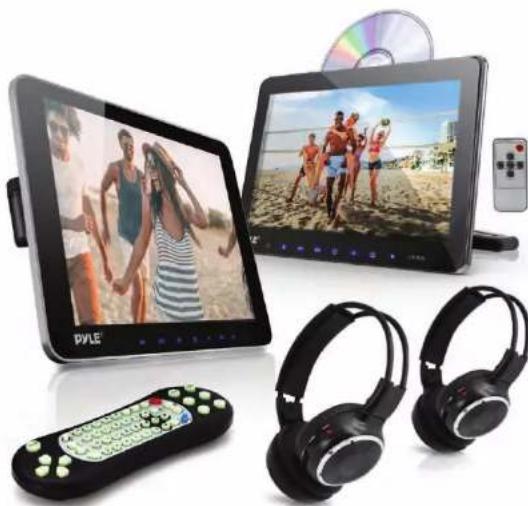
Product display of PYLE and two rear headphones with beach-themed screens (no visible text or symbols)


Car Video Entertainment Display Monitors with Wireless Headphones (10.5" -inch)
USER MANUAL
FRONT PANEL
MULTIMEDIA PLAYER
- LCD Panel
- Open
- Pre/Rewind Forward
- Next/Fast
- Power
6.- - Menu
8.+ - DC 12V
- DC Jacket
- HDMI Read Port
- AV2 IN jack
- Earphone jack
- USB Read Port
- SD Read Port
SIDE PANEL
- Power
- Earphone/AV2 jack
- USB.SD
- DC 12V Jacket
5.2.5.HDMI PORT
Only on selected unit models
-- Review product specs & features for detailed info


natural_image
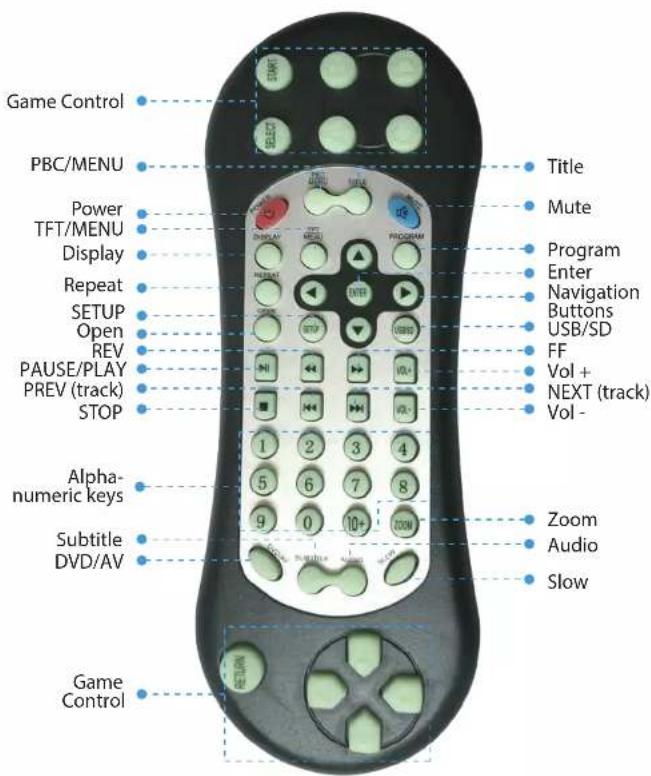
Close-up of a black electronic device with ports and connectors (no visible text or symbols)REMOTE CONTROL
INSTALLATION
- Remove the screws from bracket like below picture to install the bracket on iron tube.


natural_image
Interior view of a car showing rear seat, dashboard, and seatbelt with a magnified inset highlighting the seat structure (no text or symbols visible)
- Put the plastic bracket parts in between two metal poles, at the same time, push 2 screws to fix up bracket.
natural_image
Close-up of a car seatbelt buckle being adjusted for a hand (no text or symbols visible)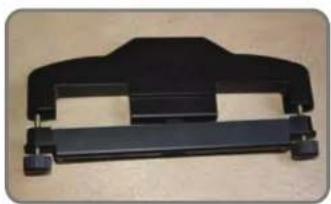
natural_image
Black plastic mechanical component with mounting brackets (no text or symbols visible)4
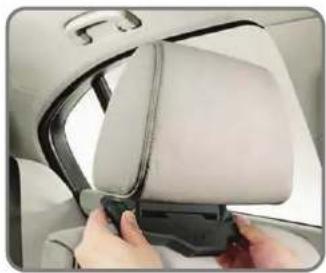
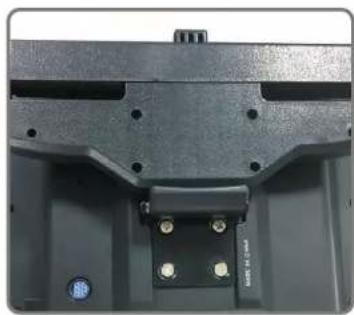
- Hold up unit, insert the metal plate at the back of the unit into plastic bracket parts, then adjust it to the right angle and fix it tightly, at last lower the original car headrest to the appropriate position.

natural_image
Close-up of a medical or rehabilitation device with a highlighted inset showing mechanical components (no visible text or symbols)
WIRING DIAGRAM
natural_image
Close-up of a mechanical component with mounting holes and mounting screws (no visible text or symbols)
natural_image
Close-up of a black electronic device component with four gold pins and a cable (no visible text or symbols)Mini Din Connector Attach power cable to connect
5
WIRING DIAGRAM

flowchart
graph TD
    A["Master Monitor"] -->|Audio Video Inputs| B["Central Display"]
    C["Slave Monitor"] -->|Red, Power, 12V DC| B
    B --> D["Black Ground"]
    style A fill:#f9f,stroke:#333
    style C fill:#f9f,stroke:#333
    style B fill:#ccf,stroke:#333
    style D fill:#cff,stroke:#333
Attention
- Do not put the machine in the rain or damp environment lest outbreak of fire or any damage to machine.
- Do not repair the machine by yourself. Please turn off the machine and inform us if any problem found, the factory or the agent will arrange specialized personnel to disassemble and repair the machine for you.
-
Please keep the machine away from dampness, dust, oil and straight sunlight.
-
Do not use diluents or other chemical cleaner when cleaning the machine. Please clean the machine by soft cloth with special cleaner.
- Please keep the machine in a good environment. The storage temperature for this machine is from -4^ F to 140^ F.
- This machine only supports DIVX/MPEG4/DVD/DVDR+/SVCD/VCD/DVCD/CD/MP3/WMA/CD-R/RW/HDCD+-R/JPEG or CD-ROM7.
- Please prevent the machine from the influence of other equipment.
- For your safety, please do not turn or operate this machine when driving as it may be illegal in some countries and regions.
- Safe power supply: DC12V (voltage range: 10V-14V)
Attention
There may be some small and bright spots on the screen. This is a common technical matter and does not indicate any quality problem of this machine.
TROUBLESHOOTING
| Troubles Solution | |
| No sound & image | Power is disconnected; the machine is not turned ON |
| No image | Disc is scratched; signal wire is disconnected |
| No sound | Volume too low or the volume setup is not workable |
| Black Screen | Incorrect setup of image luminance and contrast; Undervoltage |
| Blurring and Unstable Image | Disc is scratched |
| Color cast | Function menu setup is incorrect; weak signal |
| No power | Voltage is not accurate: check inter connect circuit; Fuse is disconnected: change fuse specification |
| No image after loading the disc | Only audio frequency for the disc; disc is scratched; disc for format is not supported |
| Unstable sound caused by vibration | DVD is dirty or seriously damaged |
| Unstable sound even with no vibration | Disc is dirty or scratched clean or replace the disc |
PLHRDVD101KT
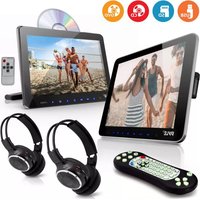
Dual Vehicle Headrest Mount Multimedia Disc Player System
Car Video Entertainment Display Monitors
with Wireless Headphones (10.5" -inch)
Features:
• Universal Vehicle Headrest Mount Displays
• Top-Loading CD/DVD Player
- Includes Secondary Display Screen
• Audio & Video Entertainment System
• Hi-Res Digital LCD Wide-Screen Video
• Built-in Stereo Speakers
• Headphone Jack, 3.5mm
• USB Flash & SD Memory Card Readers
- Convenient Removable Leather Screen Cover
- Easily Attaches to Front-Seat & Back-Seat Headrests
• HDMI Input Port & AV Connector
- Connect Additional Device via RCA (Audio/Video) Wiring Harness
• Built-in IR Transmitter for Wireless IR Headphone Use
• Front Panel Button Controls
• Integrated FM Transmitter
- Includes All Necessary Hardware & Cables for Installation
- *Can be Hard-Wired or Powered via Included Plug-in Cigarette Lighter Power Cable
What's in the Box:
• 10.5" -inch CD/DVD Player Display
• 10.5" -inch Secondary Monitor Display
• (2) Wireless Headphones
• Headrest Mounting Brackets
- Remote Control
• Power Wiring Harness Cable
• Cigarette Lighter Power Cable
Technical Specifications:
• Screen Size: 10.5 inches (x2)
• Video System: PAL / NTSC Compatible Auto Switching
- Aspect Ratio: 16:9
• Screen Resolution: 1024 x 600 Pixels
- Contrast Ratio: 300:1
- Brightness: 350 cd/m2
- English OSD Menu
• Maximum USB/SD Card Size: 32GB
• CD/DVD Player Support: DVD/VCD/MP3/JPG/MP4/CD-R/CD-RW
• Digital File Compatibility: MP3, MP4, MP5, JPG, MPEG4, WMA, AVI
- *Secondary Display Features RCA Video Inputs, IR Transmitter, Built-in Speaker
- Battery Operated Headphones, Requires (2) x 'AA' Batteries, Not Included
• Power Supply: DC 12V
- CD/DVD Player Dimensions (L x W x H): 10.2" x 6.7" x 2.0"-inches
- Secondary Display Dimensions (L x W x H): 10.2" x 6.7" x 1.4"-inches


Brand : Pyle
Model : PLHRDVD101KT
Category : Media player