
F-PXM55M - Air purifier PANASONIC - Free user manual and instructions
Find the device manual for free F-PXM55M PANASONIC in PDF.


| Product Type | Air Purifier |
| Brand | Panasonic |
| Model | F-PXM55M |
| Dimensions (W x D x H) | 567 mm x 410 mm x 245 mm |
| Weight | Approx. 10.0 kg |
| Power Supply | AC 220-240 V, 50 Hz |
| Power Consumption | 50 W (max) |
| Coverage Area | Up to 40 m² |
| CADR (Clean Air Delivery Rate) | 150 m³/h (approx.) |
| Filter Type | HEPA + Deodorizing Filter |
| Filtration Technology | nanoe™ X (Hydroxyl Radicals) |
| Air Quality Sensor | Yes (PM2.5, Odor) |
| Display | Touch panel with air quality indicator |
| Fan Speeds | 4 (Quiet, Low, Medium, High) + Turbo |
| Timer | 2/4/8 hours |
| Auto Mode | Yes (based on sensor) |
| Night Mode | Yes (quiet operation, dimmed lights) |
| Child Lock | Yes |
| Noise Level | 19 – 48 dB(A) |
| Filter Replacement Indicator | Yes |
| Filter Life | Approx. 2 years (in normal use) |
| Maintenance | Pre-filter washable every 2 weeks |
| Safety Features | Auto shut-off when front panel opened |
| Accessories | Replacement filters available separately |
| Country of Origin | Japan |
Frequently Asked Questions - F-PXM55M PANASONIC
User questions about F-PXM55M PANASONIC
0 question about this device. Answer the ones you know or ask your own.
Ask a new question about this device
Download the instructions for your Air purifier in PDF format for free! Find your manual F-PXM55M - PANASONIC and take your electronic device back in hand. On this page are published all the documents necessary for the use of your device. F-PXM55M by PANASONIC.
USER MANUAL F-PXM55M PANASONIC
This product is for indoor use only
- CLEANING METHOD 14
• FILTER REPLACEMENT 15
- WHEN IDLE FOR A LONG TIME …… 15
FURTHER INFORMATION.... 15\~18
FAQ 18
TROUBLESHOOTING 19
SPECIFICATIONS……BACK COVER
OPTIONAL ACCESSORIES…… BACK COVER
Thank you very much for purchasing this Panasonic product.
Please read these operating instructions carefully before operation and maintenance.
Also, be sure to read the "Safety precautions" section (P.4\~7) before use.
Failure to comply with instructions could result in injury or property damage.
Make sure that the correct informations is written on the warranty card, including the date of purchase and the name of the distributor. Keep the warranty card in a safe place along with the operating instructions for future reference.
"House Dust Catcher" and "nanoe™" give you clean and fresh air.
■ House Dust Catcher completely cleaning dust from the air near the floor
■ Equipped with nanoe™ technology
■ Low power consumption in the Econavi mode
With nanoe™ technology, the effects of sterilization ^ × 1 , allergens inhibition ^× 2 , fungi elimination ^× 3 and deodorization ^× 4 can be achieved, thereby creates a conducive environment for hydrated skin.

nanoe™
★
●Test method: directly expose and measure the fungi count collected in a test space of 25 m³
●Sterilization method: release nanoe™
- Target: airborne fungi
●Test outcome: eliminated 99% and above in 4 hours (Test number 24_0301_1)
< adhered bacteria >
البكتريا الملاتصة
● Test organization: Japan Food Research Laboratories
- Test method: measure the bacteria count adhered on the fabric in a test space of 23m^3
- Sterilization method: release nanoe™
● Target: bacteria adhered on the standard fabric
● Test outcome: eliminated 99% and above in 8 hours [Test number 13044083003-01] (With a variety of bacteria to test)
- Test method: measure the allergens adhered on the fabric in a test space of 23m^3 with ELISA method
●Inhibiting method: release nanoe™
●Test outcome: inhibited 88% and above in 8 hours [BAA33-130402-F01]
[BAA33-130402-F01] 88 % منها وأكثر خلال 8 Cubats
※3 ● Test organization: Japan Food Research Laboratories
- Test method: measure the fungi count adhered on the fabric in a test space of 23m^3
- Sterilization method: release nanoe™
- Target: adhered fungi
● Test outcome: confirmed the effect after 8 hours [Test number 13044083002-01]
※4 ● Test organization: Panasonic Corporation Analysis Center
- Test method: conduct verification by using 6-phase odor intensity in a test space of 23m^3
- Deodorizing method: release nanoe™
● Target: adhered cigarette odor
● Test outcome: odor intensity dropped to 1.2 after 2 hours [BAA33-130125-D01]
- This is nanoe™ device verification result, it is different from the verification of this product.
- The deodorizer effect differs according to the surrounding environment (temperature, humidity), operation time, type of odor or fiber.
● This product is not a medical equipment.
Note: nanoe ^™ and the nanoe ^™ mark are trademarks of Panasonic Corporation.
The safety precautions should be strictly followed in order to prevent injury or damage to properties.
■ The following symbols differentiate the levels of danger or injury that may result if the product is not used correctly as instructed.
Those things shown in this column indicate that there is possibility of causing death or severe injury.
Those things shown in this column indicate that there is possibility of causing minor injury or damage to properties.
■ The following symbols are used to indicate the type of instructions that need to be followed.
(The symbols given below are examples)
This symbol indicates an action that must not be performed.
This symbol indicates an action that must be performed.
■ Do not pull the power cord when carrying or storing the product.
(Otherwise, the power cord may be damaged with the possibility of fire or electric shock.)
■ Do not damage the power cord or power plug.
- Do not cut, modify, excessive distort, twist, squeeze the power cord, and do not place it near heat sources, place heavy weight on it, etc.
(Otherwise, the power cord may be damaged with the possibility of fire or electric shock.)
■ Do not insert your fingers, metallic objects or others into the air inlet, air outlet or gaps.
(Otherwise, you may be hurt by the inner units with the possibility of electric shock or injury.)
■Do not let the product get wet.
(Otherwise, the product may short circuit with the possibility of fire or electric shock.)
■ Do not use power other than the rated voltage (back cover).
(Otherwise, the power cord may overheat and induce fire.)
■ Do not touch the power plug with wet hands.
(Otherwise, electric shock may occur.)
■ Do not disassemble or modify the product.
(Otherwise, the product may malfunction with the possibility of fire or electric shock.)
→ Contact the dealer for repair.
■ Clean the power plug regularly.
قم بتنظيف سلاك الإتيار علاي فترة منظمة. (If dust is found on the power plug, insulation maybe damaged by humidity and fire may occur.)
- Disconnect the power plug and wipe it with dry cloth.
- When the product will not be used for a long period, disconnect the power plug.
■ Make sure to disconnect the power plug before cleaning the product.
(Otherwise, the product might operate with the possibility of electric shock or injury.)
■ Insert the power plug completely.
(Otherwise, the power cord may overheat with the possibility of fire or electric shock.)
- Do not use damaged power plug or loosen power socket.
■ If the supply cord is damaged, it must be replaced by the manufacturer, its service agent or similarly qualified persons in order to avoid a hazard.
(Otherwise, fire or electric shock may occur.)
■ In case of any abnormality or malfunction, stop using the product immediately and disconnect the power plug.
(Otherwise, electric shock, fire or smoke may occur.)
- The product stops operating when moving the power cord.
- If any switches do not work.
- If the circuit breaker is tripped or when fuse blows.
- If the power cord or power plug becomes abnormally hot.
- If there is any other abnormalities or malfunction.
→ Please stop using the product immediately and disconnect the power plug, and contact the dealer to check and repair.
■ Do not place the product in the following places.
• Incline and unstable place.
(Otherwise, the product may fall over and injury may occur or damage the product.)
- Where the temperature or humidity is extremely high, or watery area, such as bathroom.
(Otherwise, current may leak with the possibility of fire or electric shock.)
- Where oil fume is emitted, such as in kitchens.
(Otherwise, the product may crack and injury may occur.)
- Where oil or inflammable gas is present and may be leaked.
- Where the air outlet faces animals or plants directly.
(Otherwise, it may cause discomfort to the animals and dry out the plant.)
■ Do not place the product near combustible materials such as lighted cigarette, incense, etc.
(Otherwise, these may be absorbed into the product with possibility of fire.)
■ When disconnecting the power plug, hold the power plug instead of the power cord.
(Otherwise, the power cord may damage with the possibility of fire or electric shock.
■ Do not clean the product with gasoline or other volatile mixture solvents, and avoid contacting with spray insecticides.
(Otherwise, the product may crack or short circuit with the possibility of injury, fire or electric shock.)
■ Do not operate this product in places where indoor fumigation type insecticides are being used.
(Chemical residue may build up inside the product and discharge from the air outlet, and cause damage to health.)
→ Ventilate the room with fresh air thoroughly after using insecticides before operating the product.
■ Do not sit on or lean against this product.
(Otherwise, the product may fall over. Injury may be cuased and the product may be damaged.)
- Families with children should pay more attention.
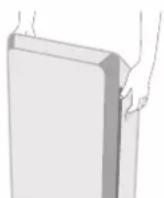
■When carrying the product, please hold the left and right handles, but not the louver or front panel.
(Otherwise, the product may fall off, injury may occur.)
(Jeila qu ysecpt alamntj mسبيا إサービス.

CAUTION


- Keep the room well-ventilated when using the product together with a burner.
- This product cannot remove carbon monoxide.
This product is not intended for use by persons (including children) with reduced physical, sensory or mental capabilities, or lack of experience and knowledge, unless they have been given supervision or instruction concerning use of the product by a person responsible for the safety. Children should be supervised to ensure that they do not play with the product.
Area that can enhance the effectiveness!
■ Way to against sand dust and indoor dust, etc.
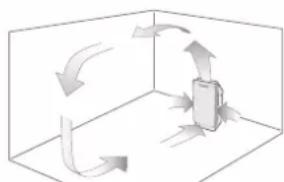
Since sand dust, indoor dust, etc are likely to float in the air near the floor, we recommend you to place the product on flat floor in the room.
■ Way to circulate air more effectively.
Place the product with its left, right and top about 30 cm or more away from walls, furniture or curtains, etc, otherwise, the pollutants are difficult to be cleared.
To ensure effectiveness of this product, keep its back at least 1 cm away from the wall.
■If the product is used in the same place for a long period.
Using the product continuously at the same location may result in dirty surrounding walls or floor. You are recommended to move the product away from where it is placed when maintenance it.
■ Do not use the same power socket with TV, radio, etc.
→ In this case, insert the power plug into another power socket.
■ Do not set the product in the following places.
- Where the product will be exposed directly to sunlight, outlet air of air conditioner or heat, etc.
(Otherwise, deformation, degeneration, discolor or malfunction may be occurred.)
- Near equipment such as TV and radio.
→ Keep the product 1 m or above away from such devices.
■ Dirt sensor and Odor sensor
Dirt sensor can detect air pollutants such as sand dust, etc.
Odor senor can detect odor such as smoke, etc. The sensitivity of sensor can be adjusted. (P.17)
Show the air pollution levels detected by dirt sensor and odor sensor. The clean sign can be turned off. (P.18)
Blue: indicates clean
Red (small): indicates slight dirty
Red (large): indicates dirty
Filter replacement indicator Timer button/indicator
Econavi button/indicator
Econavi مؤشر/ازر
The indicator lights on indicates you need to replace HEPA composite filter. (P.15)
The indicator lights on indicates nanoe ^™ is being generated. nanoe ^™ will be generated in all operation modes except you switch off it. (P.15)
The indicator lights on indicates sand dust pollution reaches a certain level. You can use sandstorm mode at this moment to remove sand dust quickly. (P.12)
Detects the indoor brightness by the light sensor, the product can automatically adjust the brightness of indicators and the air volume. After you go to bed, it becomes dark in the room, then the product will switch to the "Sleep Mode Auto Operation". (P.18)
1 Fill in the label with the first date of use.
natural_image
Line drawing of a rectangular electronic device with a handle and internal panel (no text or symbols)■HEPA composite filter replacement
• About once per 10 years
Replacement filter Part No. F-ZXMP55Z
Date installed:
■Deodorizing filter replacement
- Replace a new one when the deodorizing function becomes less effective(About once per 10 years).
Replacement filter Part No. F-ZXHD55Z
Date installed:
Notice ملاحظة
Be sure to read "SAFETY PRECAUTIONS" and "SETTING AND OPERATING REQUIREMENTS" before setup. (P.4\~7)
2 Remove the deodorizing filter from the poly bag.
① Remove the front panel.
② Toggle the filter hook upward, and remove filters (2 types).
③ Remove the deodorizing filter from the poly bag.
Please don't remove the black net of a deodorizing filter.
3 Install the filters (2 types) and front panel.
natural_image
Technical diagram of a mechanical component with a downward arrow indicating a force or direction (no text or symbols present)natural_image
Illustration of a device being opened into a tray, showing hand placement and close-up details (no text or symbols)Be sure to install front panel before use.
natural_image
Hand inserting a plug into an electrical socket (no text or symbols visible)■ Press button, then the clean sign blinks for about 5 seconds.
flowchart
graph LR
    A["Child Lock"] --> B["Filter Replace (Press 3 Sec.)"]
    B --> C["Child lock button/indicator"]
    C --> D["Timer"]
    D --> E["Sleep (8h) 2 4 (Hours)"]
    E --> F["Sandstorm"]
    F --> G["Sandstorm"]
    G --> H["Econavi"]
    H --> I["Econavi"]
    I --> J["Air Volume"]
    J --> K["Air volume button/indicator"]
    K --> L["Air volume button/ indicator"]
    L --> M["Air volume button/ indicator"]
    M --> N["Air volume button/ indicator"]
    N --> O["Air volume button/ indicator"]
    O --> P["Air volume button/ indicator"]
    P --> Q["Air volume button/ indicator"]
    Q --> R["Air volume button/ indicator"]
    R --> S["Air volume button/ indicator"]
    S --> T["Air volume button/ indicator"]
    T --> U["Air volume button/ indicator"]
    U --> V["Air volume button/ indicator"]
    V --> W["Air volume button/ indicator"]
    W --> X["Air volume button/ indicator"]
    X --> Y["Air volume button/ indicator"]
    Y --> Z["Air volume button/ indicator"]
    Z --> AA["Air volume button/ indicator"]
    AA --> AB["Air volume button/ indicator"]
    AB --> AC["Air volume button/ indicator"]
    AC --> AD["Air volume button/ indicator"]
    AD --> AE["Air volume button/ indicator"]
    AE --> AF["Air volume button/ indicator"]
    AF --> AG["Air volume button/ indicator"]
    AG --> AH["Air volume button/ indicator"]
    AH --> AI["Air volume button/ indicator"]
    AI --> AJ["Air volume button/ indicator"]
    AJ --> AK["Air volume button/ indicator"]
    AK --> AL["Air volume button/ indicator"]
    AL --> AM["Air volume button/ indicator"]
    AM --> AN["Air volume button/ indicator"]
    AN --> AO["Air volume button/ indicator"]
    AO --> AP["Air volume button/ indicator"]
    AP --> AQ["Air volume button/ indicator"]
    AQ --> AR["Air volume button/ indicator"]
    AR --> AS["Air volume button/ indicator"]
    AS --> AT["Air volume button/ indicator"]
    AT --> AU["Air volume button/ indicator"]
    AU --> AV["Air volume button/ indicator"]
    AV --> AW["Air volume button/ indicator"]
    AW --> AX["Air volume button/ indicator"]
    AX --> AY["Air volume button/ indicator"]
    AY --> AZ["Air volume button/ indicator"]
    AZ --> BA["Air volume button/ indicator"]
    BA --> BB["Air volume button/ indicator"]
    BB --> BC["Air volume button/ indicator"]
    BC --> BD["Air volume button/ indicator"]
    BD --> BE["Air volume button/ indicator"]
    BE --> BF["Air volume button/ indicator"]
    BF --> BG["Air volume button/ indicator"]
    BG --> BH["Air volume button/ indicator"]
    BH --> BI["Air volume button/ indicator"]
    BI --> BJ["Air volume button/ indicator"]
    BJ --> BK["Air volume button/ indicator"]
    BK --> BL["Air volume button/ indicator"]
    BL --> BM["Air volume button/ indicator"]
    BM --> BN["Air volume button/ indicator"]
    BN --> BO["Air volume button/ indicator"]
    BO --> BP["Air volume button/ indicator"]
    BP --> BQ["Air volume button/ indicator"]
    BQ --> BR["Air volume button/ indicator"]
    BR --> BS["Air volume button/ indicator"]
    BS --> BT["Air volume button/ indicator"]
    BT --> BU["Air volume button/ indicator"]
    BU --> BV["Air volume button/ indicator"]
    BV --> BW["Air volume button/ indicator"]
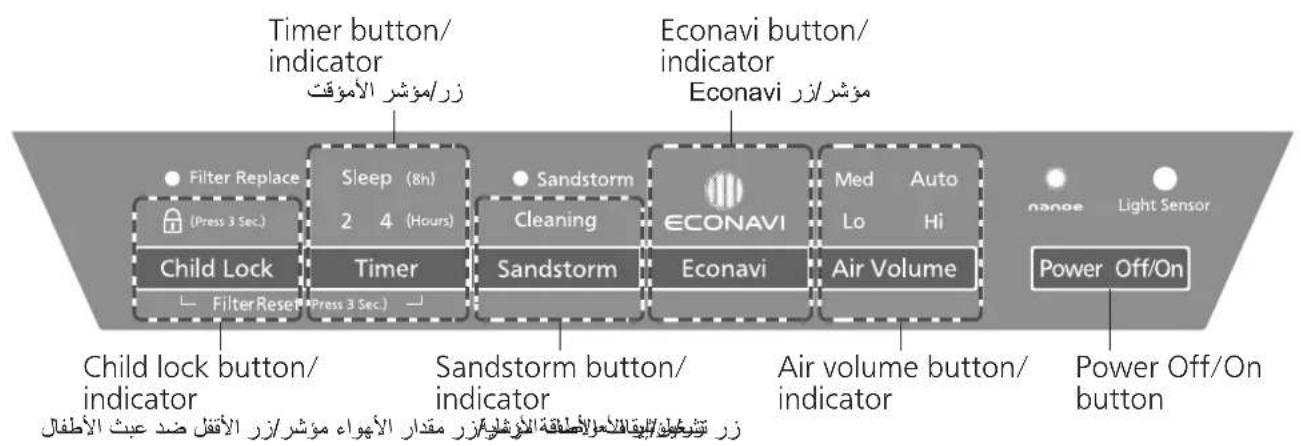
Turn on or off the product.
Press the button to operate.
The product operates in auto air volume mode when it is used for the first time, then operates in the last mode when it was stopped.
■ Press the button again, the product stops operating.
Select appropriate air volume for purifying air.
The indicator will be changed sequentially as figure below.
Automatically adjust the air volume according to the air pollution detected by sensor, and use appropriate air volume to purify air.
Purify air quietly in low speed.
Purify air in medium speed.
Econavi is a smart power-saving operation combined by the "patrol mode" and "learning mode", and it adjusts the air volume automatically. (P.16)
■ Press the button again to cancel. ( ECONAVI indicator lights off)
(Can also be canceled by pressing Air Volume button)
Remove sand dust quickly.
When ●Sandstorm indicator is on, you can press the button to remove sand dust quickly, until the ●Sandstorm indicator lights off. (At this moment the sandstorm mode will stop, then product will switch to the previous mode and continue.) But, If you press the button when ●Sandstorm indicator is off, the sandstorm mode only will operate in 1 min, then product will switch to the previous mode and continue.
■ Press the button again to cancel. ( Cleaning indicator lights off)
The indicator will be changed sequentially as figure below.
The product will stop operating after 2 hours.
The product will stop operating after 4 hours.
8 hours timer (sleep mode)
Clean sign and air volume indicator light off, indicators on control panel dim, and the product operates at low speed, then stops operating after 8 hours.
(Indicator lights on)
(يضىء المؤشر)
To prevent child from wrong operating.
Long press the button for 3 seconds, then the child lock is set.
With this setting, other buttons are disabled when you press them, with sound "BI-BI-".
( indicator lights off)
■ Do not shake the louver with hands during operation.
(Otherwise, the angle and action range may change accordingly.)
→Please stop operating the product immediately if it is shaken. (The product will restore to the normal status after it restarts.)
If power failure occurs when product is operating, the product will restart automatically when power on again.
■ For installation and removal methods of front panel and filters, please read P.9\~10.
■ When cleaning, do not leave the removed parts unattended.
(Otherwise, it may cause tripping or damage.)
■ Do not operate the product when the HEPA composite filter is removed.
(Dust will be inhaled into product inner parts, and causes the product breakdown. The HEPA composite filter cannot function while it is removed.)
■ Do not operate the product when the deodorizing filter is removed.
(The deodorizing filter cannot function while it is removed.)
■ When using chemically treated cloth, be sure to follow the instructions carefully.
Make sure to disconnect the power plug before cleaning the product.
تحفقى من فصل قابس التيار قبل تنظيف الجهاز. (Otherwise, the product might operate with the possibility of electric shock or injury.)
Free from maintenance
خال من الصيانة
■ When there is dust around the deodorizing filter, remove the dust with a vacuum cleaner, etc.
■ Do not wash the filter with water.
Wipe the dirt off the lens with a dry cotton swab
① Remove the external cover of dirt sensor.
② Wipe the lens with a dry cotton swab as shown below.
natural_image
Hand inserting a card into a device (no text or symbols visible)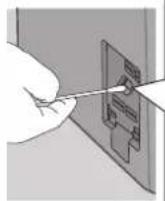
■ Do not insert a cotton swab in other parts.
■ Be sure to disconnect the power before cleaning.
■ You can use a light in order to see lens clearly.
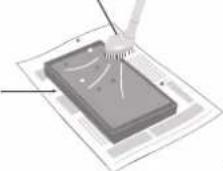
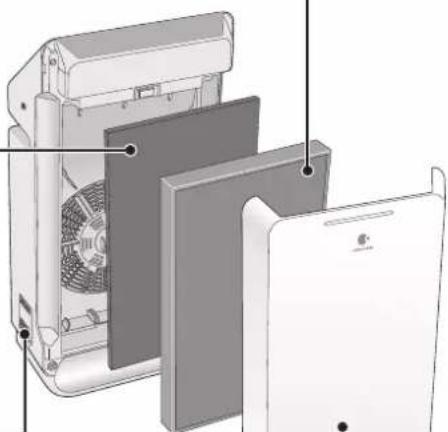
HEPA composite filter
< about once every 2 weeks >
Clean the black side (front side) with a vacuum cleaner, etc.
■ Please do not punch too much, otherwise the filter may be damaged.
■ Maintenance is unnecessary for the white
side (back side).
Dusting brush nozzle
or gap suction nozzle
■ Do not wash the filter with water.
Lay with newspapers, etc.
ضع الجراند وما شابه
natural_image
Exploded view diagram of a device showing internal components like fan, panel, and casing (no text or symbols)Body and front panel
Wipe off any dust and dirt using a well wrung-out cloth
■ Do not wipe it with a hard cloth or hardly. Otherwise, the surface may be damaged.
■ Wipe the power plug with a dry cloth.
(Optional accessories: back cover)
※ Filter replacement period may be shorten, depending on the environment (such as where smoking is frequent).
Please replace it when ineffective.
① After replacement, please connect power plug, then press Child Lock and Timer buttons at the same time for about 3 seconds until the filter exchange indicator turns off, then the reset is completed.
② Fill in installation date on the label in filter case, then stick it on product to cover the old date. (P.9)
■ The filter which needs to exchange cannot be used again even is cleaned, please dispose it as non-flammable garbage.
① Disconnect power after turning off the product. (The product still consumes power even at rest.)
② Maintain the product as usual.
③ Cover the product with a poly bag, and keep it in a dry place. (If you overturn it or keep it flat,
product malfunctions may occur.)
■ nanoe™ can be switched off.
During operation, press Econavi and Sandstorm buttons at the same time for about 3 seconds.
(nanoe™ indicator lights off)
Please press the buttons for about 3 seconds again to restart the nanoe™.
■ Conditions for nanoe™ generation
nanoe ^™ is generated by using the air in the room. Therefore, due to the differences in temperature and humidity nanoe ^™ may not be generated stably.
Room temperature: about 5 °C\~35 °C (dew-point temperature: 2 °C or above)
Relative humidity: about 30%\~85%
■ When nanoe™ is generated, small amount of ozone will be released. However, the quantity will be far less than the level in natural environment such as forest, and not be harmful to human beings.
The HEPA composite filter which with the Bio-sterilization and Super Allergy-buster can inhibit allergens (pollen, dead mites and feces), bacteria, mold.
■ Super Allergy-buster: inhibits the activity of allergic substances (pollen, dead mites and feces).
Testing authority: Osaka Municipal Technical Research Institute
Test method: check the decrease of refined house dust mite allergen, by using enzyme immune measuring method.
Inhibiting method: contact with Super Allergy-buster
Target: allergens trapped by the filter (mites, pollen)
Test result: inhibited 99% and above. (Daikou research report No. 2127)
■ The HEPA composite filter might emit unique and harmless smell of "Green Tea Catechin", "Bio-sterilization" and "Super Allergy-buster".
Econavi mode refers to the automatic operation combined by the “patrol mode” in which the product detects the dirt in the air in the room every hour and the “learning mode” in which the product can forecast the dirt generation by mastering the generation time of dirt every day.
It saves power by stopping operation automatically when the air is clean. Meanwhile, it will operate in advance to eliminate the dirt effectively before spreading, thus reducing the operation time.
The product will stop operating automatically after the air is cleaned. After the operation is paused for 50 min, the product will operate for 10 min with air volume set to "Med" in the patrol mode. While the operation is paused in the patrol mode, the product will operate with the suitable air volume corresponding to the dirtiness detected.
natural_image
Diagram of a 3D cube with arrows indicating rotational or directional movement around a central object (no text or symbols)ستتLocalهههههههههههههههههههههههههههههههههههههههههههههههههههههههههههههههههههههههههههههههههههههههههههههه.
The product records the time and dirtiness of air during operation, and takes the preventive operation 5 min before the recorded dirt is generated in the next day.
(Although the records are updated every day, the previous records will be lost once the power plug is disconnected.)
The sensor can detect the pollution of the air, and show the pollution level by indicator. The product can optimize the air volume automatically in auto operation according to the air quality.
■The sensor's operation may vary depending on the indoor airflow condition if a heater is placed near the product in a room.
■ The sensor is not designed to detect bacteria and viruses.
■ The sensitivity of the sensor can be adjusted. (The default setting is "medium sensitivity".)
① Stop operating the product, then press Econavi and Air Volume buttons at the same time for about 3 seconds. The indicator will light on in sequence as illustrated below.
② Please release the buttons, when the sensitivity is set as required.
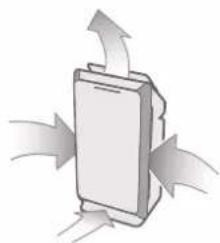
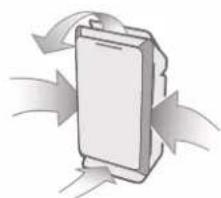
The louver move to the best position according to the air quality to clean the air.
natural_image
Diagram of a device with directional arrows indicating flow or movement (no text or symbols)B
natural_image
Diagram of a mechanical component with directional arrows indicating flow or movement (no text or symbols)©
natural_image
Illustration of a battery with airflow arrows indicating electron flow (no text or symbols)Detects the indoor brightness by the light sensor, and automatically adjusts the brightness of indicators and the air volume. When sleeping, the room becomes dark, the indicators will be dimmed or light off and the air volume becomes low.
■ "Sleep Mode Auto Operation" can be adjusted. (The default setting is "Sleep Mode Auto 1".)
① Stop operating the product, then press Timer and Econavi buttons at the same time for about 3 seconds. The indicator will light on in sequence as illustrated below.
② Please release the buttons, when the sensitivity is set as required.
When the air volume is set to "Hi", "Med" or "Lo", the air volume cannot adjust automatically.
Please confirm the following before you put questions forward or send the product for repair.
There is a slight sound when nanoe™ is being generated. Depends on the environment and operation mode, the sound may be a bit loud or inaudible but it is not abnormal.
Q3 Why does the clean sign remain unchanged?
A Such problems are easy to occur when the sensitivity of the sensor is low. You can adjust the sensor with a specified sensitivity. (P.17)
Why does the clean sign turn off during operation?
The product detects the indoor brightness, and adjusts the brightness of the clean sign automatically with the "Sleep Mode Auto operation" function. (P.18)
How to turn off the clean sign?
■ Please press Sandstorm and Air Volume buttons at the same time for about 3 seconds during operation.
■ Please press the buttons for about 3 seconds again to relight clean sign.
يرجي الضغط على
If a problem is encountered, please investigate it by going through the following items.
If the problem still persists, please disconnect the power and contact the dealer for repair.
If any of the following cases occur, please contact the dealer immediately for repair.
● Replacement HEPA composite filter Replacement deodorizing filter
- All the air volume indicators are blinking.
Product may be out of order. Please disconnect the power and contact the dealer for repair.
©Panasonic Corporation 2016
- "House Dust Catcher" and "nanoe™" give you clean and fresh air.
- ■ Clean the power plug regularly.
- ■ Make sure to disconnect the power plug before cleaning the product.
- ■ Insert the power plug completely.
- ■ If the supply cord is damaged, it must be replaced by the manufacturer, its service agent or similarly qualified persons in order to avoid a hazard.
- ■ In case of any abnormality or malfunction, stop using the product immediately and disconnect the power plug.
- CAUTION
- Area that can enhance the effectiveness!
- ■ Dirt sensor and Odor sensor
- Fill in the label with the first date of use.
- Notice ملاحظة
- Remove the deodorizing filter from the poly bag.
- Install the filters (2 types) and front panel.
- Turn on or off the product.
- Select appropriate air volume for purifying air.
- Remove sand dust quickly.
- hours timer (sleep mode)
- To prevent child from wrong operating.
- Make sure to disconnect the power plug before cleaning the product.
- Free from maintenance
- Wipe the dirt off the lens with a dry cotton swab
- HEPA composite filter
- Clean the black side (front side) with a vacuum cleaner, etc.
- Body and front panel
- Wipe off any dust and dirt using a well wrung-out cloth
Brand : PANASONIC
Model : F-PXM55M
Category : Air purifier