
F-VXR50M - Air purifier PANASONIC - Free user manual and instructions
Find the device manual for free F-VXR50M PANASONIC in PDF.


| Product Type | Air Purifier |
| Brand | Panasonic |
| Model | F-VXR50M |
| Dimensions (H x W x D) | 560 x 400 x 200 mm |
| Weight | 8.0 kg |
| Power Supply | AC 220-240V, 50/60Hz |
| Power Consumption | 50 W (max) |
| Recommended Room Size | Up to 40 m² |
| Filtration System | Pre-filter + HEPA filter + Activated carbon filter |
| Technology | nanoe™ X |
| Fan Speeds | Auto, Quiet, Medium, High, Turbo |
| Airflow (max) | 200 m³/h |
| Noise Level (min/max) | 20 dB / 48 dB |
| Control Type | Touch panel + Remote control |
| Display | PM2.5, dust, odor sensors indicators |
| Timer | 1-7 hours |
| Sleep Mode | Yes (dimmed lights, low noise) |
| Filter Life (HEPA) | 10 years |
| Filter Life (Deodorizing) | 5 years |
| Maintenance | Pre-filter washable every month; replace filters as indicated |
| Safety Features | Auto shut-off when cover opened, tip-over protection |
| Spare Parts | HEPA filter (F-ZXMP50), Deodorizing filter (F-ZXFD50) |
| Warranty | 2 years from date of purchase |
Frequently Asked Questions - F-VXR50M PANASONIC
User questions about F-VXR50M PANASONIC
0 question about this device. Answer the ones you know or ask your own.
Ask a new question about this device
Download the instructions for your Air purifier in PDF format for free! Find your manual F-VXR50M - PANASONIC and take your electronic device back in hand. On this page are published all the documents necessary for the use of your device. F-VXR50M by PANASONIC.
USER MANUAL F-VXR50M PANASONIC
natural_image
Line drawing of a white electronic device with ventilation slots and control panel (no text or symbols)OPERATING INSTRUCTIONS
تعليمات التشفيل
Humidifying Air Purifier
منقي الهواء الرطب
This product is for indoor use only
PRODUCT FEATURES 7\~8
MAIN PARTS IDENTIFICATION 8
SETUP....9\~10
OPERATION....11\~13
•CONTROL PANEL/FRONT INDICATION...... 11
- SELECT OPERATION MODE, CHILD LOCK, TIMER.... 12
- SELECT AIRFLOW, AIR VOLUME, ECONAVI, AND SPOT AIR.MODE....13
MAINTENANCE....14\~17
- WHEN IDLE FOR LONG TIME ....16
FURTHER INFORMATION ......17\~20
- REFERENCE TIME FOR FILTER REPLACEMENT .... 17\~18
FAQ....22
TROUBLESHOOTING.... 24,26
SPECIFICATIONS/ OPTIONAL ACCESSORIES ..... BACK COVER
Warranty card attached
المحتويات
Thank you very much for purchasing this Panasonic product.
Please read these operating instructions carefully before operating or maintaining the product.
Also, be sure to read the "SAFETY PRECAUTIONS" (P.2\~5) section before operation.
Failure to comply with instructions could result in injury or property damage.
Keep the operating instructions in a safe place for future reference.
■ Disconnect power supply before maintenance and filling water.
■ For cleaning and descaling see "maintenance" and regarding filling (water supply) see "SETUP"
If the supply cord is damaged, it must be replaced by the manufacturer, its service agent or similarly qualified persons in order to avoid a hazard.
This product is not intended for use by persons (including children) with reduced physical, sensory or mental capabilities, or lack of experience and knowledge, unless they have been given supervision or instruction concerning use of the product by a person responsible for the safety. Children should be supervised to ensure that they do not play with the product.
The safety precautions should be strictly followed in order to prevent injury or damage to properties.
■ The following symbols differentiate the levels of danger or injury that may result if the product is not used correctly as instructed.
Those things shown in this column indicate that there is possibility of causing death or severe injury.
Those things shown in this column indicate that there is possibility of causing minor injury or damage to properties.
■ The following symbols are used to indicate the type of instructions that need to be followed. (The symbols given below are examples)
This symbol indicates an action that must not be performed.
This symbol indicates an action that must be performed.
■ Do not pull the power cord when carrying or storing the product.
■ Do not use chloric or acid detergents.
(Toxic gases given off by the detergent may be harmful to your health.)
■ Do not touch the power plug with wet hands.
(Otherwise, electric shock may occur.)
■ Do not use power other than the rated voltage
(240 V \~ 50 Hz).
(Otherwise, the power cord may overheat and induce fire.)
■ Do not damage the power cord or power plug.
- Do not cut, modify, excessive distort, twist, squeeze the power cord, and do not place it near heat sources, place heavy weight on it, etc.
(Otherwise, the power cord may be damaged with the possibility of fire or electric shock.)
■ Do not let the product get wet.
(Otherwise, the product may short circuit with the
possibility of fire or electric shock.)
■ Do not insert your fingers, metallic objects or others into the air inlet, air outlet or gaps.
(Otherwise, you may be hurt by the inner units with the possibility of electric shock or injury.)
■ Do not disassemble or modify the product.
(Otherwise, the product may malfunction with the possibility of fire or electric shock.)
→ Contact the dealer for repair.
■ Insert the power plug completely.
(Otherwise, the power cord may overheat with the possibility of fire or electric shock.)
- Do not use damaged power plug or loose power socket.
In case of any abnormality or malfunction, stop using the product immediately and disconnect the power plug.
(Otherwise, electric shock, fire or smoke may occur.)
- The product stops operating when moving the power cord.
- If any switches do not work.
- If the circuit breaker is tripped or when fuse blows.
- If the power cord or power plug becomes abnormally hot.
- If there is any other abnormalities or malfunction.
→ Please stop using the product immediately and disconnect the power plug, and contact the dealer to check and repair.
■ Clean the power plug regularly.
(If dust is found on the power plug, humidity may cause damage to insulation, causing fire.)
- Disconnect the power plug and wipe it with dry cloth.
- When the product has not been used for long period, disconnect the power plug.
■ Do not place the product in the following places.
• Incline and unstable place.
(Otherwise, the product may fall over and injury may occur, the water may spill out and fire, electric shock may occur or wet furniture, etc.)
- Where the temperature or humidity is extremely high, or watery area, such as bathroom.
(Otherwise, current may leak with the possibility of fire or electric shock.)
- Where oil fume is emitted, such as in kitchens.
(Otherwise, the product may crack and injury may occur.)
- Where oil or inflammable gas is present and may be leaked.
(Otherwise, a fire may occur due to ignition in the product.)
- Where the air outlet faces animals or plants directly.
(Otherwise, it may cause discomfort to animals and dry out plant.)
■ Do not sit on or lean against this product.
(Otherwise, the product may fall over and injury may occur, the water may spill out and fire, electric shock may occur or wet furniture, etc.)
- Families with children should pay more attention.
(Otherwise, the water may spill out and fire, electric shock may occur or wet furniture, etc.)
- Keep the room well-ventilated when using the product together with a burner.
ب compartments مشعل.
(Otherwise, carbon monoxide poisoning may occur.)
- This product cannot remove carbon monoxide.
■ Make sure to always keep the water in the tank and interior of the product clean.
- Replace the water in the tank with new tap water every day.
- Maintain the interior of the product periodically.
(If the interior is contaminated by dirt or incrustation, a foul odor may occur due to mildew and miscellaneous bacterium breed, and thus do harm to your health, depending on individual constitution.)
→ When you feel uncomfortable, please consult a doctor at once.
■ When carrying the product.
عند حمل الوحدة.
- Turn off the product and disconnect the power plug, take out the tank, and pour water out of the tray.
(Otherwise, the water may spill out and fire, electric shock may occur or wet furniture, etc.)
- Hold the left and right handles, but not the louver or front panel or tank handle to carry the product.
(Otherwise, the product may slip out injury may occur.)
■ Do not use the following water.
• Water mixed with chemicals, air fresheners, alcohol and essential oil. (Otherwise, tank malfunction may be caused and may wet furniture, etc.)
• Water from a water purifier, alkaline ion water, mineral water and well water (where the mildew and miscellaneous bacterium multiply fast).
→ When you feel uncomfortable, please consult a doctor at once.
■ Do not clean the product with gasoline or other volatile mixture solvents, and avoid contacting with spray insecticides.
(Otherwise, the product may crack or short circuit with the possibility of injury, fire or electric shock.)
■ Do not operate this product in places where indoor fumigation type insecticides are being used.
(Chemical residue may build up inside the product and discharge from the air outlet, and cause damage to health.)
→ Ventilate the room with fresh air thoroughly after using insecticides before operating the product.
■ Do not place the product near combustible materials such as lighted cigarette, incense, etc.
(Otherwise, these may be absorbed into the product with possibility of fire.)
■ Do not use a punctured or damaged tank.
(Otherwise, the water spill out and may wet furniture, etc.)
■ Please pull out the tray slowly.
(If pull out quickly, the water may spill out and wet furniture, etc.)
■ Discharge water after removing the tray, and do not discharge water from the product directly.
(Otherwise, fire or electric shock may be caused due to short circuit.)
■connecting the power plug, hold the power plug instead of the power cord.
(Otherwise, the power cord may be damaged with the possibility of fire or electric shock.)
Area that can enhance the effectiveness!
natural_image
Interior layout illustration of a modern living room with sofa, TV, and wall-mounted appliances (no text or symbols)- Place it on the floor as a countermeasure against pollen.
Since pollen or dust is likely to float in the air near the floor, we recommend you to put the product on the flat floor in the room.
■ Way to circulate air more effectively.
Install the equipment with its left, right and top about 30 cm or more away from walls, furniture or curtains, etc, otherwise the dirty air is difficult to be cleared. To ensure effectiveness of this product, keep its back at least 1 cm away from the wall.
■ Do not set the product in the following places.
- Where the product will be exposed directly to sunlight, outlet of air conditioner or heat, etc.
(Otherwise, deformation, degeneration, discolor or malfunction may be occurred.)
- Near equipment such as TV and radio.
→ Keep the product 1 m or above away from such devices.
■ When there may be freezing, please empty the tank and tray.
(If the product operates in the frozen status, malfunction may be caused.)
■ If the product is used in the same place for a long period.
Using the product continuously at the same location may result in dirty surrounding walls or floor. You are recommended to move the product away from where it is placed when maintenance it.
- Where window or other objects may obstruct the humidity sensor.
(Otherwise, the humidity sensor may not work normally.)
■ Do not use the same power socket with TV, radio, etc.
→ In this case, insert the power plug into another power socket.
■ Do not place any object on the product, such as magnet or metal objects.
The "Mega Catcher" and "nanoe™" give you moist and clean air.
If the sensor detects dirt in the air, the front panel opens wide and the "Mega catcher" with strong absorption capability is enabled.
■ Equipped with "nanoe™" technology.
■ Low power consumption in the Econavi mode.
"nanoe™" و "Mega Catcher" تمن하게
nanoe™ is a microparticle ion wrapped in water by the latest technology.
With nanoe™ technology, the effects of sterilization ^ 1 , allergens inhibition ^ 2 , fungi elimination ^ 3 and deodorization ^ 4 can be achieved, thereby creates a conducive environment for hydrated skin.
★
★
★ application space.
*1< airborne fungi > < ---------->
●Test organization: Kitasato Research Center of Environmental Sciences
●Test method: directly expose and measure the fungi count collected in a test space of 25 m ^3
- Sterilization method: release nanoe™
●Target: airborne fungi
- Test outcome: eliminated 99% and above in 4 hours (Test number 24_0301_1)
< adhered bacteria >
● Test organization: Japan Food Research Laboratories
● Test method: measure the bacteria count adhered on the fabric in a test space of 23 m ^4
- Sterilization method: release nanoe™
● Target: bacteria adhered on the standard fabric
● Test outcome: eliminated 99% and above in 8 hours [Test number 13044083003-01] (With one type in variety of bacteria to test)
- Test method: measure the allergens adhered on the fabric in a test space of 23m^3 with ELISA method
●Inhibiting method: release nanoe™
●Test outcome: inhibited 88% and above in 8 hours [BAA33-130402-F01]
※3 ● Test organization: Japan Food Research Laboratories
- Sterilization method: release nanoe™
- Target: adhered fungi
● Test outcome: confirmed the effect after 8 hours [Test number 13044083002-01]
※4 ● Test organization: Panasonic Corporation Analysis Center
● Test method: conduct verification by using 6-phase odor intensity in a test space of 23 m³
- Deodorizing method: release nanoe™
● Target: adhered cigarette odor
● Test outcome: odor intensity dropped to 1.2 after 2 hours [BAA33-130125-D01]
- This is nanoe™ device verification result, it is different from the verification of this product.
- The deodorizer effect differs according to the surrounding environment (temperature, humidity), operation time, type of odor or fiber.
● This product is not a medical equipment.
Note: nanoe™ and the nanoe™ mark are trademarks of Panasonic Corporation.
About "Mega catcher"
When the sensor (P.20) detects dirt in the air, the front panel opens wide according to the type and degree of the dirtiness to absorb the dirt by the best airflow. (P.20 Type of airflow)
حول "الماسك الفائق"
natural_image
Line drawing of a device with a handle and control panel (no text or symbols)■ HEPA composite filter replacement
● About once every 10 years
Replacement filter Part No. F-ZXMP55Z
Date installed:
■ Deodorizing filter replacement
- Replace a new one when the deodorizing function become less effective (About once every 10 years)
Replacement filter Part No. F-ZXHD55Z
Date installed:
■ Humidifying filter replacement
● About once every 10 years (based on operation of 8 hours every day)
Replacement humidifying filter Part No. F-ZXHE50Z Date installed:
General timetable for humidifying filter replacement About once every 10 years (based on operation of 8 hours every day)
Notice ملاحظة
Be sure to read P.2\~6 before setting up the product.
2 Remove the deodorizing filter from poly bag.
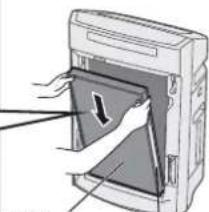
(1) Remove the front panel.
(2) Toggle the filter hook upward to remove the filters (2 types).
HEPA composite filter Deodorizing filter
ال Erkeb HEPA (wrapped in a black net)
(3) Remove the deodorizing filter from the poly bag.
Please do not remove the black net of the deodorizing filter.
3 Install the filter (2 types) and the front panel.
قم burdensibles merشحات (نوعان) واللوحة农业大学.
(1) Install the deodorizing filter. (No distinction between the inside and outside, upper and lower.)
(2) Install the HEPA composite filter
HEPA (There is distinction between inside and outside, no distinction between upper and lower)
With the black side (front side) towards you and the label side right, fit it into the concave part of the main unit.
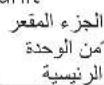
Concave part of the main unit
natural_image
Illustration of a hand inserting a card into a device (no text or symbols visible)HEPA composite filter Label
(3) Toggle the filter hook downwards, and secure the filter.
Install the front panel.
قم بتركيب اللوحة
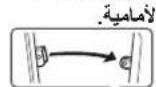
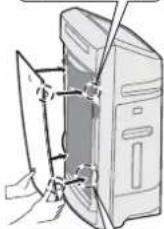
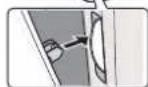
※ Be sure to attach the front panel for use.
Fill water into tank
4 Remove the tank, fill it with water, then install it back.
(Not required if the product operates in the mode of "Clean Air.")
■ Be sure to disconnect the power plug.
(1)Press the hook, remove the tank, then unscrew the tank cover.
(2) Fill the tank with water.
The tank can stand by the auto-rotatable bracket.
- Hold the tank to avoid tilting.
(4) Put the tank back.
ضع الخزان مرة أخرى.
• Overturn the tank and install it with the tank cover down.
Push at the tank handle until hear a click sound.
■ Make sure to use the tap water.
(Because chlorination has been performed generally for tap water and hence the miscellaneous bacterium is difficult to breed.)
■ Do not use the followin water.
• Water above 40 °C, or water mixed with detergents.
• Water mixed with chemicals, air fresheners, alcohol and essential oil.
(Otherwise, tank malfunction may be caused and may wet furniture, etc.)
• Water from a water purifier, alkaline ion water, mineral water and well water (where the mildew and miscellaneous bacterium multiply fast).
- When you feel uncomfortable, please consult a doctor at once.
If you have to use the well water (drinkable), please maintain and clean the tray, humidifying filter assembly and anti-fungus assembly more frequently.
A tank of water can operate for about 4.6 hours. (Under the condition of room temperature 20^ and humidity 30% when the product operates in high speed.)
5 Connect the power plug.
توصيل قابس الطاقة.
(Wipe the water off power plug and your hands before connecting the power plug.)
natural_image
Hand inserting a plug into an electrical socket (no text or symbols visible)When inserting the power plug, as the odor sensor uses the degree of cleanliness at this time as the standard, we recommend that you plug it in when the air is fresh (such as when there is no cigarette smoke). (The standard of the odor sensor automatically updates itself according to the indoor cleanliness.)
■ After Power Off/On the button is pressed, the clean sign (P.11) illuminates blue or red, with blinking time about 5 seconds.
Detects the indoor brightness by the light sensor, and automatically adjusts the brightness of control panel indicators and the front indication and the air volume. After you go to bed, it will become dark in the room and product enters the "Sleep Mode Auto Operation" mode. (P.18)(When the air volume is set to "Hi", "Med" and "Lo", the air volume keeps unchanged)
■ The "nanoe™" indicator indicates generation of nanoe™
● The indicator lights up in all operation modes.
- "nanoe™" can be closed.
The clean sign indicates the level of air pollution
The sensor detects air pollution and notifies with the sign (indicator).
The sensitivity of the sensor can be changed. (P.22, Q8)
When the water fill indicator blinks or lights on indicate that you need add water. If you want to humidify, please add water (P.10) After adding water, the water fill indicator will off and product will restart to humidify automatically.
The indicator lights on indicates you need to replace HEPA composite filter. (P.17)
■ When the check indicator is on (P.26)
- Press and hold the Econavi and Clean-Humid. at the same time for about 3 seconds during operation. (The "nanoe™" indicator turns off)
- To allow the "nanoe™" to take place again, press and hold them again for about 3 seconds. (The "nanoe™" indicator lights up)
● Do not shake the front panel or louver with hands.
(The angle and action range may change accordingly)
→Please stop operating the product immediately if it was shaken.
(The product will restore to the normal status after it restarts.)
The humidity sign indicates humidity
or less Humidity or more
indicator(%)
Low Humidity
(The red indicator is on)
منخفض الرطوبة
(The red indicator is on)
مرتفع الرطوبة
Appropriate Humidity
(The green indicator is on)
الرطوبةísticas
To change the airflow and air volume
(The indicator is on)
Press the button to switch.
To change the airflow according to the dirt type
● The unit will generate various airflows by the front panel and louver.(P.20)
The hypersensitive substances such as pollen are removed.
(The indicator is on)
Press the button to switch.
The air volume will switch automatically.
Humidifying speeds up. The pollen and dust in the air are removed quickly.
Operate quietly in a low speed, and purify air or humidify slowly.
To operate in the Econavi mode
(The indicator is on)
To save the electricity fees
- Press the Econavi button, "Econavi operation" will start. The "Econavi operation" is the auto operation in the power-saving mode by combining the "patrol mode" and "learning mode". The air volume is controlled automatically (P 20)
● After you go to bed, it will become dark in the room, and the product enters the "Sleep Mode Auto Operation" mode, operating with reduced air volume.
Press it again (the indicator is off)
(The settings of "Clean Air" and "Clean/Humid."
can also be cancelled by clicking the Air Volume button)
Press the button to switch.
اضغط على زر التبديل
Swing
Spot
The indicator is on
المؤشر قيد التشغيل
BIBI
Swing
To blow in the "Swing" mode.
To blow in the "Spot" mode.
■ Exit the "Spot Air" mode
Press the Air Volume or Airflow Dir. button
Notice
- Do not use the detergents shown on the right.
The oxygenic bleach can be used only for the humidifying filter. - When using chemically treated cloth, be sure to follow the instructions carefully.
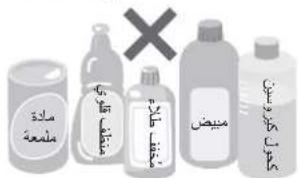
● The deodorizing filter is free of maintenance.
● Wipe the product and the front panel with a well wrung-out soft cloth.
- Do not wipe it with a hard cloth or too much force. Otherwise, the surface may be damaged. Do wipe the power plug with a dry cloth.
- Do not operate the product when the HEPA composite filter is removed. (Dust will be inhaled into unit inner parts, and cause the unit breakdown. The composite air filter can not function while it is removed.)
- Do not operate the product when the deodorizing filter is removed. (The deodorizing filter can not function while it is removed.)
Make sure to disconnect the power plug before cleaning the product.
(Otherwise, the product might operate with the possibility of electric shock or injury.)
Discharge water after removing the tray, and do not discharge water from the product directly.
(Otherwise, fire or electric shock may be caused due to short circuit.)
● There are both thick and fine filter shafts.
Please be cautious when installing the water tray back.
- Remove the tank, and pull the tray out.
- When cleaning, do not leave the removed parts unattended. (parts left unattended may be cause of tripping or they may be damaged)
- When there is dust around the deodorizing filter, remove the dust with a vacuum cleaner, etc.
- Do not wash the filter with water.
HEPA composite filter
Clean the black side (front side) with a vacuum cleaner, etc.
(Installation and removal methods→P.9)
Dusting brush nozzle or gap suction nozzle
Lay with newspapers, etc to avoid dust messing floor.
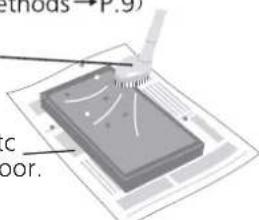
- Please do not apply too much pressure, Otherwise the filter may be damaged.
● Maintenance is unnecessary for the white side (back side). - Do not wash the filter with water.
Dirt sensor
< about once every 3 months >
Wipe the dirt off the lens with a dry cotton swab.
● Wipe the lens periodically.
(The sensor may not function normally after being contaminated by the moisture and smoke from the cigarette.)
① Remove the external cover of the dirt sensor.
② Wipe the lens with a dry cotton swab as shown in the figure.
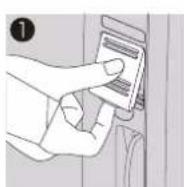
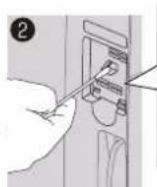
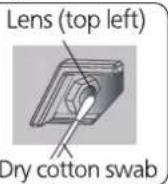
- Do not insert a cotton swab anywhere other than the lens.
- Be sure to disconnect the power plug from the outlet prior to this operation.
● You can use a light when seeing it not clearly.
Tank
< every day >
Wash it with water
● Hard stains
→ Wipe away the hard stains with a soft cloth moistened in warm water or water containing neutral detergent for kitchen purpose.
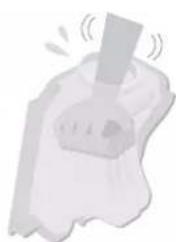
natural_image
Illustration of a person holding a large object with motion lines indicating speed (no text or symbols)natural_image
3D diagram of a microchip with a pipette inserted, showing internal structure (no text or symbols)natural_image
Illustration of a stylized object resembling a hammer or plunger with motion lines, no text or symbols present.Tray
Remove the anti-fungus assembly
Wash it with water
● Wipe the dirt with a swab, or use the toothbrush to scrub it.
● Do not remove the floater (expanded polystyrene)
● Hard stains
→ Wipe away the hard stains with a soft cloth moistened in warm water or water containing neutral detergent for kitchen purpose.
الصنية
Anti-fungus assembly
Immerse it in kitchen-purpose neutral detergent solution and rinse it with water.
- Please soak it in warm water containing the neutral detergent for kitchen purpose about 30 minutes, then wash it 2 to 3 times with clean water.
- Do not scrub it with a brush, and do not disassemble it.
● Please keep it level when installing, and fit into the concave part of the tray.
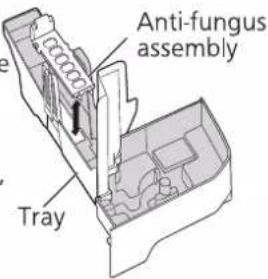
■ Functions of the anti-fungus assembly
Inhibit the enzyme with the anti-fungus agent.
Testing authority: Boken Quality Evaluation Institute Testing method: Verify the method to prevent mold bacteria (Halo method)
Method and place: Install the anti-fungus assembly in the tray. Testing result: Verify the effectiveness of preventing mold bacteria.
Notice
● The anti-fungus assembly may have powder sometimes. This is normal and not a problem with use.
● The anti-fungus agent will be small along with the use. This is not a problem with the anti-fungus performance.
● The anti-fungus agent has its own special smell, harmless.
① Disconnect the power plug. (The product still consumes power even at rest.)
② Please empty the tank and tray, and maintain them.
③ Dry their interiors completely. (Otherwise, the product may be failed due to rust.)
- Dry the humidifying filter assembly in a cool place. (Anti -fungus)
④ Cover them with a poly bag, and keep them in a place with little moisture. (If you keep them flat and then overturn them, malfunction may be caused.)
- Do not operate the product when the humidifying filter is removed. (The humidifying filter cannot function while it is removed.)
- Do not operate the product when the anti-fungus assembly is removed. (The anti-fungus assembly cannot function while it is removed.
Humidifying filter assembly م grandmother رمشح الترطيب
1 Removal
Remove the six hooks from the filter frame.
القى
● Humidifying filter
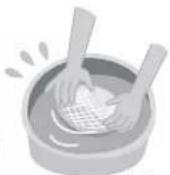
Press and wash it with clean warm water.
- Do not scrub it with a brush or wash it with a washing machine.
- Do not dry it with a drier. (Doing this may cause shrinkage)
● Wash the filter frame and filter plate with water
● Hard stains
→If it is hard to remove the scale, please soak it in warm water containing the neutral detergent for kitchen purpose about 30 minutes, then wash it 2 to 3 times with clean water.
→The proportion of citric acid and warm water is 20 g:3 L.
- Be sure to use the neutral detergent
If the alkaline detergent or the like is used, deformation and performance degradation may be caused
الغسيل
مرشح الترطيب
① Attach the humidifying filter onto the filter frame. (No distinction between the inside and outside for the humidifying filter)
- Do not make the humidifying filter protrude from the filter frame, or rumple it. (Otherwise, the humidifying amount may be reduced)
② Embed the filter plate into the six hooks by aligning it with the filter frame.
(The protrusions of the triangle align with its indentions)
إعادة التجميع
※ 1 As the dirtiness varies with the water quality, maintenance may be required even within one month after the last maintenance if there is unpleasant odor or the water in the tank is reduced in slow speed.
※2 Filter replacement period may be shorter than normal, depending on the using environment and method. (For example, in household where smoking is frequent.) Please replace whenever the unit is ineffective.
● After replacement, press and hold Child Lock Timer for 3 seconds product the filter exchange indicator turns off when the reset is complete. Then, fill in the date installed on the label and stick it on the back of the product.
- Please dispose the used filter as non-inflammable garbage.
- After maintaining it, its odor is still not removed. The water in the tank is not reduced I is seriously damaged.
● After replacement, please fill in the date installed on the label and stick it on the back of the product.
- Please dispose the used filter as non-inflammable garbage. Do not discard the filter frame and filter plate when replacing the humidifying filter.
- nanoe ^TM is generated using the air in the room and hence, depending on the temperature and humidity, there can be incidences whereby nanoe ^TM is not stably generated.
- When nanoe™ ion is generated, small amount of ozone will be released. However, the quantity will be like the usual lever in forest or natural environment, and not harmful to human beings.
● Conditions for generations
Room temperature: About 5°C-35°C (dew-point temperature: more than 2) Relative humidity: About 30% to 85%
شروط التوليد
With the bio-sterilization and super allergy buster functions of the HEPA composite filter, allergic substances (pollen, annoying dung of dead mites), fungus, mold bacteria can be inhibited.
※4 Testing authority:(Foundation)Japan Food Research Laboratory.
Testing method: Confirmation by using Halo method.
Inhibiting method: Contact with bio-sterilization.
Target: Bacteria trapped in the filter.
Testing result: More than 99% inhibition. No 204051292-002
※5 Testing authority:(Foundation)Japan Food Research Laboratory.
Testing method: Verify the method to prevent mold bacteria(Halo method).
Inhibiting method: Contact with bio-sterilization.
Target: Mold bacteria trapped in the filter.
Testing result: Verify the effectiveness of preventing mold bacteria using the Halo Test No 207060074-002
● Super Anti-bacterial: inhibits the activity of allergens (pollen, house-dust mites and their waste products).
Testing authority:Osaka Municipal Technical Research Institute
Testing method: Check the decrease of refined house dust mite allergen, by using enzyme immune measuring method.
Inhibiting method: Contact with Super allergy buster.
Target : Allergy substances trapped by the filter (mites, pollen)
Testing result: More than 99% inhibition. Daiku research report No.2127
- The HEPA composite filter can give off unique and harmless smell of "Green Tea Catechin", "Anti-bacterial Enzymes" and "Super Alleru-buster".
Detects the indoor brightness by the light sensor, and automatically adjusts the brightness of control panel indicators and the front indication and the air volume.
● The brightness of front indication in the
"Sleep Mode Auto Operation" can be changed.
① Stop operation, then press and hold Timer
and Econavi buttons at the same time.
(The air flow indicators light up in turn)
② Release them when the required setting status is reached
(The default setting is "Sleep Mode Auto 1" when the product is used for the first time)
- When the air volume is set to "Hi", "Med" and "Lo", the air volume is kept unchanged.
The sensor can detect the dirtiness of the air, and then indicate the dirtiness through clean sign. The product can optimize the air volume automatically in automatic operation according to the type of dirt.
The sensor's operation may vary with the indoor airflow condition if a heater is placed near the product in a room.
The louver and front panel move to the best position according to the type and degree of dirt, and thus the product will operate.
The product uses the airflow function separately according to the type of dirt in the air, to achieve a good dirt-removal effect.
■ Status of air dirt and functions of the louver and front panel.
The whole front panel absorbs odor and smoke floating in the air effectively. When people smoke or cook, the odor and smoke are removed together. (Figure B)
The lower part of the front panel absorbs the house dust such as pollens easy to accumulate around the floor. In the pollen season, especially when there is house dust.
- When the air volume is set to "Hi", the product will operate with the front panel open.
● The product will operate with the front panel open for 10 minutes after starting operation.
It refers to the automatic operation by combining the "patrol mode" in which the product checks the dirt in the air in the room every hour. With the "learning mode" in which the product can forecast the dirt generation by mastering the generation time of dirt every day.
It saves power by stopping operation automatically when the air is clean. Meanwhile, the product will operate in advance to eliminate the dirt effectively before spreading, thus reducing the operation time.
The product will stop operating automatically after the air is cleaned. After the operation is paused for 50 min, the product will operate for 10 min with Air volume set to "Med" in the patrol mode.
● While the operation is paused and in the patrol mode, if the dirt is detected, the product will operate with the air volume corresponding to the dirtiness.
- If "Full Auto" or "Clean/Humid." are set, the product will also operate according to the indoor humidity even if the indoor air is clean.
natural_image
Diagram showing a 3D cube with arrows indicating rotational motion around a central object (no text or symbols)Learning mode
وضع التعرف
Records the "time and dirtiness of air dirt" during operating, and takes the preventive operation within 5 min before the recorded dirt is generated.
(Although the records are updated every day, the previous records will be lost once the power plug is disconnected.) يُسْجَل "وَقْتِ وَمْقَدَارِ الْأَرَّيَةِ فِيِ الْهُوَاءِ" أَنْنَاءِ التُشْغِيلِ، وَاتُخَادِ التُشْغِيلِ الْوَقَانِي خَلَال 5 دَقَائِق قَيْل إِطْلَاقِ الْأَرَّيَةِ المُسْجَلَةٍ. (عَلَى الرَّرْمَ عِنْ تَحَدِيَّّ السُجَلَات كَلْ يُوم، فِسُوف يُتم فَقدَانِ السُجَلَات السُابِقِ بِمجرُد فُصل قَابِسِ الطَاقَةٍ).
FAQ
الأستلة الم Breakرة
Please confirm the following before you put questions forward or send the product for repair.
The wind is cold during humidifying?
The humidifying amount is reduced?
In the rainy season with high humidity or in the cold weather, the humidifying amount may change, depending on the room temperature and humidity, just as the washed clothes are difficult to dry. The humidifying amount will increase when the weather is warm and dry.
There is no steam during humidifying?
This product is just to make the humidifying filter containing water generate moisture when encountering wind and not boil the water, and hence not generate the steam.
The humidity sign remains "red"?
The indicator 70 or more is always on
The product may not sense the humidity properly depending on the installation place. → Change the installation place. (P.6)
■ The indicator 30 or less is always on
The room size is too large for the product? → Refer to the applicable room size. (Back cover)
Q5 Is there a "jee" sound from the emission outlet?
There is a slight sound when nanoe™ is taking pace. Depending on the usage environment and operation mode, the sound may seem to be loud or inaudible but these are not abnormalities.
Q6 The humidifying filter changes in color?
The filter may change in color depending on the water quality. This is not a performance problem.
Q7 There is dewing on the window and wall?
A
Even if the humidity in the room is moderate, there may be dewing on a cold window or wall.
The clean sign does not change. The front panel is always opened.
(Change the sensitivity of the sensor)
Such problems are easy to occur when the sensitivity of the sensor is high/low. You can adjust the sensor with a specified sensitivity. (The default setting is "Med" when the product is used for the first time)
① Stop operating the product, and press and hold the Econavi and Air Volume buttons at the same time. (The Air volume indicators will light up in turn)
② After the sensitivity is set as required, release the buttons.
Medium: Sets the medium sensitivit Medium: Sets the high sensitivity Medium: Sets the high sensitivity Medium: Sets the high sensitivity Medium: Sets the high sensitivity Medium: Sets the high sensitivity Medium: Sets the high sensitivity
Low: Sets the low sensitivity (Air volume indicator) (موشر مقدار الهواء)
Q9
To turn off the front indication.
• To turn off the front indication During running, long press Air Volume and Clean-Humid for about 3 seconds at the same time.
A
(The front indication is off) (المؤشر fidامي منظفي)
• To make the front indication light up again, long press them for about 3 seconds again.
Q10 During operation, the front indication disappears.
A
- Detects the indoor brightness, and switches the brightness of the front indication automatically with the "Sleep Mode Auto Operation" function. (P.18)
If a problem is encountered, investigate it by referring first to the table below. If the problem still persists, please disconnect power plug and contact the dealer for repairs.
If a problem is encountered, investigate it by referring first to the table below. If the problem still persists, please disconnect power plug and contact the dealer for repairs.
If any of the following conditions occur, please contact the dealer immediately.
●Replacement HEPA composite filter
●Replacement deodorizing filter
● Replacement humidifying filter
استبadal مرشح_TRطيب
Without filter frame and filter plate
The check indicator is on and all the air volume indicators are blinking.
Product may be out of order. Please disconnect the power plug and contact the dealer for repair.
- OPERATING INSTRUCTIONS
- Humidifying Air Purifier
- Warranty card attached
- ■ Do not damage the power cord or power plug.
- ■ Do not let the product get wet.
- ■ Do not insert your fingers, metallic objects or others into the air inlet, air outlet or gaps.
- ■ Do not disassemble or modify the product.
- ■ Insert the power plug completely.
- In case of any abnormality or malfunction, stop using the product immediately and disconnect the power plug.
- ■ Clean the power plug regularly.
- ■ Do not place the product in the following places.
- ■ Do not sit on or lean against this product.
- - Keep the room well-ventilated when using the product together with a burner.
- ■ Make sure to always keep the water in the tank and interior of the product clean.
- ■ When carrying the product.
- ■ Do not use the following water.
- ■ Please pull out the tray slowly.
- Area that can enhance the effectiveness!
- The "Mega Catcher" and "nanoe™" give you moist and clean air.
- About "Mega catcher"
- Notice ملاحظة
- Fill water into tank
- Remove the tank, fill it with water, then install it back.
- ■ Be sure to disconnect the power plug.
- ■ Make sure to use the tap water.
- ■ Do not use the followin water.
- Connect the power plug.
- ■ The "nanoe™" indicator indicates generation of nanoe™
- The clean sign indicates the level of air pollution
- ■ When the check indicator is on (P.26)
- ● Do not shake the front panel or louver with hands.
- The humidity sign indicates humidity
- To change the airflow and air volume
- To change the airflow according to the dirt type
- To operate in the Econavi mode
- To save the electricity fees
- Notice
- HEPA composite filter
- Clean the black side (front side) with a vacuum cleaner, etc.
- Dirt sensor
- Wipe the dirt off the lens with a dry cotton swab.
- Tank
- Wash it with water
- Tray
- Remove the anti-fungus assembly
- الصنية
- Anti-fungus assembly
- Immerse it in kitchen-purpose neutral detergent solution and rinse it with water.
- ■ Functions of the anti-fungus assembly
- Humidifying filter assembly م grandmother رمشح الترطيب
- Removal
- Press and wash it with clean warm water.
- Learning mode
- FAQ
- The wind is cold during humidifying?
- The humidifying amount is reduced?
- There is no steam during humidifying?
Brand : PANASONIC
Model : F-VXR50M
Category : Air purifier