
BerTTi - Receiver Chord - Free user manual and instructions
Find the device manual for free BerTTi Chord in PDF.


| Product Type | Stereo Receiver |
| Brand | Chord |
| Model | BerTTi |
| Dimensions (W x H x D) | 430 x 115 x 340 mm |
| Weight | 8.5 kg |
| Power Output | 100 W per channel (8 ohms) |
| Frequency Response | 20 Hz - 20 kHz |
| Total Harmonic Distortion | < 0.05% |
| Inputs | 4x RCA, 1x Phono (MM), 1x Optical, 1x Coaxial |
| Outputs | Speaker terminals, Pre-out, Headphone jack |
| Power Supply | AC 230V, 50/60 Hz |
| Power Consumption | 400 W (max), < 0.5 W standby |
| Supported Audio Formats | MP3, WMA, WAV, FLAC, AAC |
| Radio Tuner | FM/AM with RDS |
| Remote Control | Included |
| Display | Blue LED display |
| Material | Aluminum front panel, steel chassis |
| Cleaning | Wipe with a soft, dry cloth; avoid solvents |
| Safety | Overload protection, short circuit protection |
| Spare Parts Availability | Contact authorized service center |
| Repair Service | Refer to local dealer or Chord support |
Frequently Asked Questions - BerTTi Chord
User questions about BerTTi Chord
0 question about this device. Answer the ones you know or ask your own.
Ask a new question about this device
Download the instructions for your Receiver in PDF format for free! Find your manual BerTTi - Chord and take your electronic device back in hand. On this page are published all the documents necessary for the use of your device. BerTTi by Chord.
USER MANUAL BerTTi Chord
Chord Electronics Ltd.

1 Contents
Introduction 2
Support and warranty 3
Connections and controls 4
Power and earthing connection 5
Inputs 6
Connecting to loudspeakers 7
Power on/off 8
12 V trigger 9
Placement 10
Technical specifications 11
2 Introduction
The BerTTi is a next-generation 75-watt stereo power amplifier containing the very latest ULTIMA circuit topology. This manual provides all the information required to set up and operate the BerTTi. Further details can be found online at: chordelectronics.co.uk/product/bertti.
2.1 Safety and care
- Do not allow the device to come into contact with water or liquids.
- Do not spray cleaning products onto the device. Use a clean microfibre cloth to clean the casework.
- A further safety document is included in the box.
- The device does not contain any user-serviceable components. Do not attempt to open, dismantle or apply internal third-party devices to it. Doing so will void the warranty.
3 Support and warranty
For support, please contact the supplying retailer before contacting Chord Electronics. Further help can be found at chordelectronics.co.uk/get-support

THREE YEAR WARRANTY
At the point of sale, Chord Electronics Ltd. provides the BerTTi with a comprehensive three-year warranty, which covers defects in materials and workmanship through fair usage.
The warranty is transferable with proof of purchase, however, the warranty on ex-demonstration units begins from the retailer's date of purchase. Warranty claims must be made via the supplying retailer.
For the best possible support and service, please register your purchase with Chord Electronics at: chordelectronics.co.uk/register-product/
4 Connections and controls
4.1 Rear and front panels

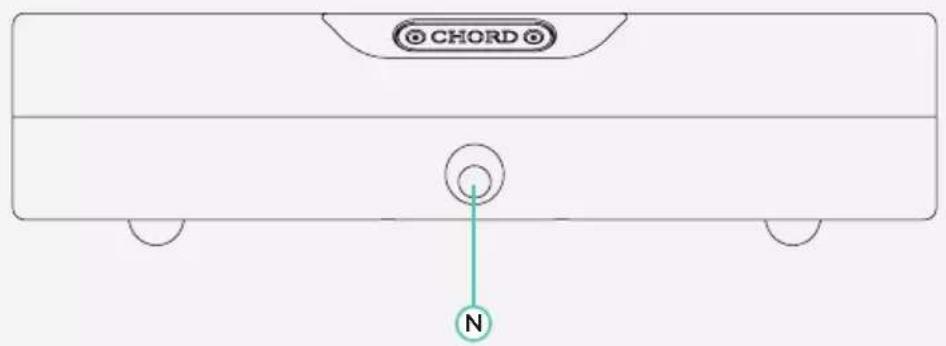
| A Power on/off switch F Right channel speaker negative terminal | L Left channel line level RCA input | ||
| B 10 A IEC AC inlet | G 12 V trigger connection | M Left channel speaker positive terminal | |
| C Right channel speaker positive terminal | H Grounding post N Power/standby switch and status LED | ||
| D Right channel line level RCA input | J Left channel speaker negative terminal | ||
| E Right channel balanced XLR input | K Left channel balanced XLR input | ||
5 Power and earthing connection
The BerTTi has been designed to connect to power with the supplied 10 A power cable. If hum or buzz occurs, try either a good-quality earthed power distribution block, or the rear panel ground terminal and connect to an available earth point.

6 Inputs
Connect the BerTTi to any preamp output using good-quality standard RCA cables, or connect using balanced XLR cables. Note only one input type can be used at once: the BerTTi does not support 'switching' between the input connection types.

WARNING: Please DO NOT attempt to use both the RCA and XLR inputs simultaneously. Any subsequent damage to connected equipment will not be covered by Chord Electronics.
7 Connecting to loudspeakers
Connect the BerTTi to loudspeakers using good-quality loudspeaker cable, terminated with 4 mm banana plugs. Unscrew BerTTi's loudspeaker terminals to use spade-plug-terminated cable. Although bare wire can be used, it is not recommended.

8 Power on/off
With all cable connections successfully made and the volume on connected preamps set to zero, switch the rear-panel power button to 'on' and depress the front panel button to switch the unit from standby mode to 'on'. The front panel LED will turn from green (standby) to cyan (on), once the BerTTi has performed its safety check. BerTTi is ready for use and the preamp volume can now be carefully increased for playback.
The BerTTi consumes very little energy in standby mode and if desired, can be left switched 'on' at all times.

9 12 V trigger
The BerTTi includes a 12 V trigger input. Partnering devices with a compatible 12 V trigger output can be connected for simultaneous power on/off from standby mode. When connected the front panel button LED will turn yellow and once triggered the LED will change to purple.

10 Placement
The BerTTi benefits from extensive casework ventilation, plus a cooling fan for more demanding environments. Always ensure the BerTTi is used in a well-ventilated setting, away from direct sunlight and heat sources, with sufficient space (at least 10 cm) around the unit.
The BerTTi has internal thermal protection which increases the speed of the cooling fans if excessive temperatures are reached. Should this occur, check the BerTTi has adequate ventilation and/or reduce the volume level until the unit has cooled and the fans have slowed. It is normal for the unit to become warm when operating.
If stacking the BerTTi with other units, it is advisable to place the unit on top of others.
11 Technical Specifications
Please go online for the most recent specifications: www.chordelectronics.co.uk
| Dimensions 59 mm (H) 235 mm (W) 256 mm (D) |
| Weight 3.75 kg |
| Output power 75 W into 8 Ω |
| Frequency range 5 Hz-100 kHz +/- 0.5 dB |
| THD 0.008 % |
| Signal-to-noise ratio 87 dB (A-weighted) |
| Input impedance 100 kΩ unbalanced/balanced |
| Input sensitivity 0.78 V |
| Gain 30 dB |

Chord Electronics Ltd.


Made in BRITAIN
established 1989
Brand : Chord
Model : BerTTi
Category : Receiver