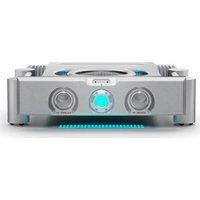
CG-15 - Receiver Chord - Free user manual and instructions
Find the device manual for free CG-15 Chord in PDF.


Pick your language and provide your email: we'll send you a specifically translated version.
| Product type | Audio/Video Receiver |
| Brand | Chord |
| Model | CG-15 |
| Dimensions (W x H x D) | 430 x 150 x 320 mm |
| Weight | 7.5 kg |
| Power supply | AC 100-240 V, 50/60 Hz |
| Power consumption | 300 W (standby <0.5 W) |
| Main functions | AM/FM tuner, stereo amplification, multiple audio inputs (RCA, optical, coaxial), headphone output, speaker outputs for 2 channels |
| Control | Front panel buttons and included remote control |
| Display | Front panel LED display |
| Connectivity | RCA inputs, digital optical/coaxial, FM/AM antenna terminals, speaker binding posts |
| Frequency range | FM: 87.5-108 MHz; AM: 530-1710 kHz |
| Output power | 100 W per channel (8 ohms, THD 0.1%) |
| Signal-to-noise ratio | >90 dB |
| Total harmonic distortion | <0.1% |
| Care and cleaning | Wipe with a dry, soft cloth; do not use any liquids or chemicals |
| Safety | Keep good ventilation around the unit; do not block the vents; do not expose to moisture |
| Spare parts and repairability | Contact authorized Chord service center; no user-serviceable parts inside |
| In the box | Receiver, remote control, batteries, FM antenna, AM loop antenna, power cord, user manual |
| General information | Designed for home audio entertainment; supports multiple sound modes |
Frequently Asked Questions - CG-15 Chord
How do I connect speakers to the CG-15 receiver?
Connect the speaker wires to the binding posts on the back panel. Ensure correct polarity (red to positive, black to negative). Use at least 16 AWG speaker wire.
How do I reset the receiver to factory settings?
Press and hold the Power button while the unit is on until the display shows 'RESET'. Alternatively, unplug the unit for 10 minutes.
Why is there no sound coming from the speakers?
Check that the speakers are selected (speaker A/B buttons), volume is turned up, and the correct input source is chosen. Also ensure the mute function is off.
How do I tune AM/FM radio stations?
Press the Tuner input button, then use the Tuning knob or remote control to scan frequencies. For preset stations, use the Memory button.
What is the recommended way to clean the receiver?
Use a dry, soft cloth to wipe the exterior. Do not use any liquids, sprays, or abrasive cleaners. Clean the ventilation grills gently to avoid dust buildup.
Can I connect my TV to this receiver?
Yes, you can connect your TV via optical digital audio or RCA analog audio outputs to the corresponding inputs on the receiver.
Does the receiver have a headphone output?
Yes, there is a headphone jack on the front panel. When headphones are plugged in, the speaker outputs are automatically muted.
How do I replace the remote control batteries?
Slide the battery compartment cover on the back of the remote open; insert two AA batteries with correct polarity, and close the cover.
What is the power consumption in standby mode?
The standby power consumption is less than 0.5 W, making it energy efficient when not in use.
How can I obtain spare parts or repair service?
Contact an authorized Chord service center. Do not attempt to open or repair the unit yourself as it contains high voltage parts.
User questions about CG-15 Chord
0 question about this device. Answer the ones you know or ask your own.
Ask a new question about this device
No questions yet. Be the first to ask one.
Download the instructions for your Receiver in PDF format for free! Find your manual CG-15 - Chord and take your electronic device back in hand. On this page are published all the documents necessary for the use of your device. CG-15 by Chord.
USER MANUAL CG-15 Chord

Manual assistant
Powered by Anthropic
Waiting for your message
Product information
Brand : Chord
Model : CG-15
Category : Receiver