PS 1300D - Lighting Astora - Free user manual and instructions
Find the device manual for free PS 1300D Astora in PDF.


| Product Type | LED Desk Lamp |
| Brand | Astora |
| Model | PS 1300D |
| Dimensions (L x W x H) | 40 x 15 x 50 cm |
| Weight | 1.2 kg |
| Power Supply | AC 100-240V, 50/60Hz |
| Power Consumption | 12 W |
| Light Source | LED (non-replaceable) |
| Color Temperature | 3000K - 6500K adjustable |
| Brightness Levels | 3 levels (low, medium, high) |
| Adjustable Arm | Yes, flexible gooseneck |
| Material | Aluminum and ABS plastic |
| Cable Length | 1.5 m |
| Protection Class | Class II (double insulation) |
| Maintenance | Wipe with a soft, dry cloth. Do not use water or solvents. |
| Safety Note | Do not cover the lamp during operation. Keep away from flammable materials. |
| Spare Parts Available | Power cord (replaceable) |
| Repairability | LED module is non-replaceable; power cord can be replaced by a qualified technician. |
| Certifications | CE, RoHS |
| Package Contents | Lamp, power adapter, user manual |
Frequently Asked Questions - PS 1300D Astora
User questions about PS 1300D Astora
0 question about this device. Answer the ones you know or ask your own.
Ask a new question about this device
Download the instructions for your Lighting in PDF format for free! Find your manual PS 1300D - Astora and take your electronic device back in hand. On this page are published all the documents necessary for the use of your device. PS 1300D by Astora.
USER MANUAL PS 1300D Astora
natural_image
Two black studio lighting fixtures with red-lit covers and black stands, no visible text or symbolsSETTING UP 1
Mounting
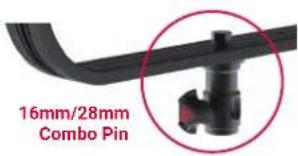
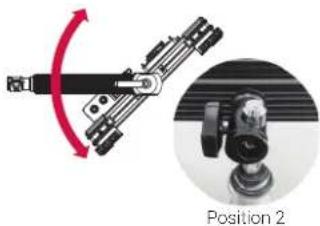
Mount the light on a light stand with the installed TVMP receptacle. The receptacle offers two ways to mount the light to a light stand.
text_image
16mm/28mm Combo Pin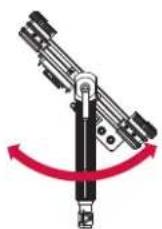

natural_image
Mechanical assembly diagram showing a lever mechanism with rotation arrow and magnified view of position 2 (no text or symbols)Tilting
The tilt position of the light can be adjusted by the high strength tilt lock lever, which can be repositioned by pulling and turning it (lift & lock).

natural_image
Close-up of a black mechanical latch attached to a wall-mounted panel, with a red circle highlighting the handle (no text or symbols visible)Powering
The light can be powered by:
2×NP-F batteries / 1×V-Mount battery / AC adapter through XLR-4 connector.
| Power Switch | II | II | II | I |
| [6XX4] |  |  | [YY26] | |
| 2×NP-F V-Mount | 3-stud Mount | AC/adapter through XLR-4 | ||
| WS 840D | ● | 14.8 V DC | 14.4 V DC | 12 -24 V DC |
| WS 840B | ● | 14.8 V DC | 14.4 V DC | 12 -24 V DC |
| PS 1300D | — | 14.8 V DC | 14.4 V DC | 12 -24 V DC |
| PS 1300B | — | 14.8 V DC | 14.4 V DC | 12 -24 V DC |
| SF 100 | — | 14.8 V DC | 14.4 V DC | 12 -24 V DC |
| SF 120 | — | 14.8 V DC | 14.4 V DC | 12 -24 V DC |
| SF 200 | — | 29.6 V DC | — | 24 -36 V DC |
DMX (only models including DMX)
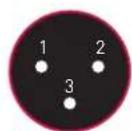
Connect a standard DMX console by the XLR 3-pin connector.
Male Female
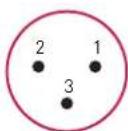
Pin 1: Ground Pin 2: Data 1- Pin 3: Data 1+
DMX IN
DMX OUT

text_image
Close-up of a black electronic device with labeled buttons and a circular dial indicatorFUNCTIONS2
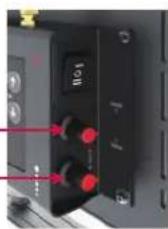
Intensity |
Turn the
Color Temperature |
Turn the
CCT Knob
Intensity Knob
Presets |
Save: To save the current state of the light to a preset press
Recall: To recall a saved state press the Preset number button that you used to save the state.
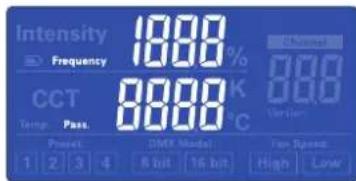
Wireless Settings |
Frequency: To set the Frequency for wireless control hold the
Password: To set the password for wireless control hold the
DMX |
Hold the
To set the DMX channel between 1 and 512 use the Channel
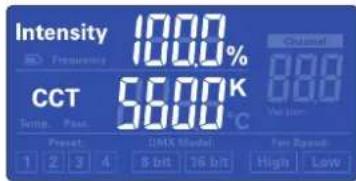
Display View
To toggle between different display views you can press the
text_image
Intensity 1000% Frequency CCT 56.00 K Temp. Peak 56.00 °C Channel 000 000 Version Preset DMX Model Fan Speed 1 2 3 4 8 b/t 16 b/t High LowIntensity / Color temperature
text_image
Intensity Frequency CCT Temp. Pass. 1 2 3 4 1800 8000 8000 8000 8000 8000 8000 8000 8000 8000 8000 8000 8000 8000 8000 8000 8000 8000 8000 8000 8000 85 bit 16 bit High Low Fan Speed High | LowFrequency / Password
text_image
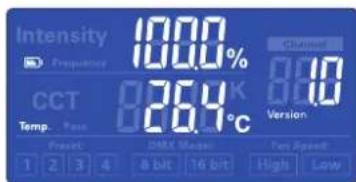
Intensity Frequency 1000% Channel CCT 26.9 K 80 26.9°C Version Temp. Pase DMX Mode Fast Speed 1 2 3 4 8 bit 16 bit High LowPower / Software Version / (Temperature)* *Soft series only.
WHAT IS IN THE BOX3
| MODEL | ASTORA WS 840D | ASTORA WS 840B | ASTORA PS 1300D | ASTORA PS 1300B | ASTORA SF 100 | ASTORA SF 120 | ASTORA SF 200 |
| Light Body | ● | ● | ● | ● | ● | ● | ● |
| Barndoors | ● | ● | ● | ● | ● | ● | ● |
| Remote Controller | ● | ● | ● | ● | ● | ● | ● |
| AC Adapter & Cable | ○ | ○ | ● | ● | ● | ● | ● |
- Standard ○ Optional — Not available
Technical data and offerings are subject to change without notice.

Fan-Less, Silent Operation
Note: Fan Speed function is not active with current models and reserved for future products with a built-in fan.