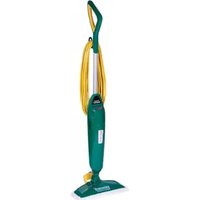
BGST1566 - Steam cleaner BISSELL - Free user manual and instructions
Find the device manual for free BGST1566 BISSELL in PDF.


| Product Type | Steam Cleaner |
| Brand | BISSELL |
| Model | BGST1566 |
| Dimensions (L x W x H) | 12 x 10 x 45 inches |
| Weight | 10.5 lbs |
| Power Supply | 120V, 60Hz |
| Power Consumption | 1500 Watts |
| Water Tank Capacity | 48 oz |
| Heating Time | 30 seconds |
| Steam Temperature | Up to 212°F (100°C) |
| Cord Length | 20 feet |
| Attachments Included | Mop head, scrubbing brush, squeegee, detail tool |
| Floor Types | Tile, vinyl, hardwood, laminate, sealed stone |
| Safety Features | Auto shut-off, trigger lock |
| Maintenance | Descaling every 3 months, washable pads |
| Cleaning Pads | Machine-washable, reusable |
| Water Type | Tap water (distilled recommended for hard water) |
| Warranty | 2-year limited |
| Repairability | Replacement parts available (pads, tanks, nozzles) |
| User Manual Included | Yes (PDF free download) |
Frequently Asked Questions - BGST1566 BISSELL
User questions about BGST1566 BISSELL
0 question about this device. Answer the ones you know or ask your own.
Ask a new question about this device
Download the instructions for your Steam cleaner in PDF format for free! Find your manual BGST1566 - BISSELL and take your electronic device back in hand. On this page are published all the documents necessary for the use of your device. BGST1566 by BISSELL.
USER MANUAL BGST1566 BISSELL
POWERSTEAMER™ USER GUIDE
BGST1566 SERIES
IMPORTANT SAFETY INSTRUCTIONS
READ ALL INSTRUCTIONS BEFORE USING YOUR STEAM MOP.
When using an electrical appliance, basic precautions should be observed, including the following:
Always connect to a polarized outlet (left slot is wider than right). Unplug from outlet when not in use and before conducting maintenance.
WARNING
TO REDUCE THE RISK OF FIRE, ELECTRIC SHOCK, OR INJURY:
» Do not direct steam at people, animals, or at electrical outlets.
» Do not expose to rain.
»Storeindoors.
» Unplug from outlet when not in use and before conducting maintenance or troubleshooting.
» Do not leave steam cleaner unattended.
» Do not expose hair, loose clothing, fingers or body parts to openings or moving parts.
» Do not service steam cleaner when it is plugged in.
» Do not handle steam cleaner with wet hands.
» Do not use steam cleaner if it has been dropped, damaged, left outdoors or dropped into water, return it to a service center.
» Do not pull or carry by cord, use cord as a handle, close door on cord, pull cord around sharp corners or edges, or expose cord to heated surfaces.
» Do not unplug by pulling on cord.
» Do not use appliance in an enclosed space filled with vapor given off by oil-base paint, paint thinner, some moth proofing substances, flammable dust, or other explosive or toxic vapors.
» Do not allow to be used as a toy.
» Do not use on leather, wax polished furniture or floors, synthetic fabrics, velvet or other delicate, steam-sensitive materials.
» Do not immerse.
» Not for space heating purposes
» Do not use for any purpose other than described in this User's Guide.
» Use only manufacturer's recommended attachments - use of attachments not provided or sold by BISSELL may cause fire, electric shock or injury.
» Never put descaling, aromatic, alcoholic or detergent products into the steam cleaner, as this may damage it or make it unsafe for use.
» Unplug by grasping the plug, not the cord.
» Close attention is necessary when used by or near children.
SAVE THESE INSTRUCTIONS FOR FUTURE USE
This model is for commercial use only.
THIS APPLIANCE HAS A POLARIZED PLUG
To reduce the risk of electric shock, this appliance has a polarized plug (one blade is wider than the other). This plug will fit in a polarized outlet only one way. If the plug does not fit fully in the outlet, reverse the plug. If it still does not fit, contact a qualified electrician to install a proper outlet. Do not change the plug in any way.
Thanks for buying a BISSELL BigGreen Commercial Steam Mop
We're glad you purchased a BISSELL hard floor cleaner. Everything we know about floor care went into the design and construction of this complete, high-tech home cleaning system.
Your BISSELL hard floor cleaner is well made, and we back it with a limited one-year warranty. We also stand behind it with a knowledgeable, dedicated Consumer Care department, so, should you ever have a problem, you'll receive fast, considerate assistance.
My great-grandfather invented the floor sweeper in 1876. Today, BISSELL is a global leader in the design, manufacture, and service of high quality homecare products like your BISSELL hard floor cleaner.
Thanks again, from all of us at BISSELL.
man 1.7mee0
Mark J. Bissell Chairman & CEO
Safety Instructions.....2
Product View.....4
Assembly 5
Operations 6-8
Maintenance & Care ..... 9
Troubleshooting ..... 10
Accessories ..... 10
Warranty 11
Service 11
Consumer Care.....12
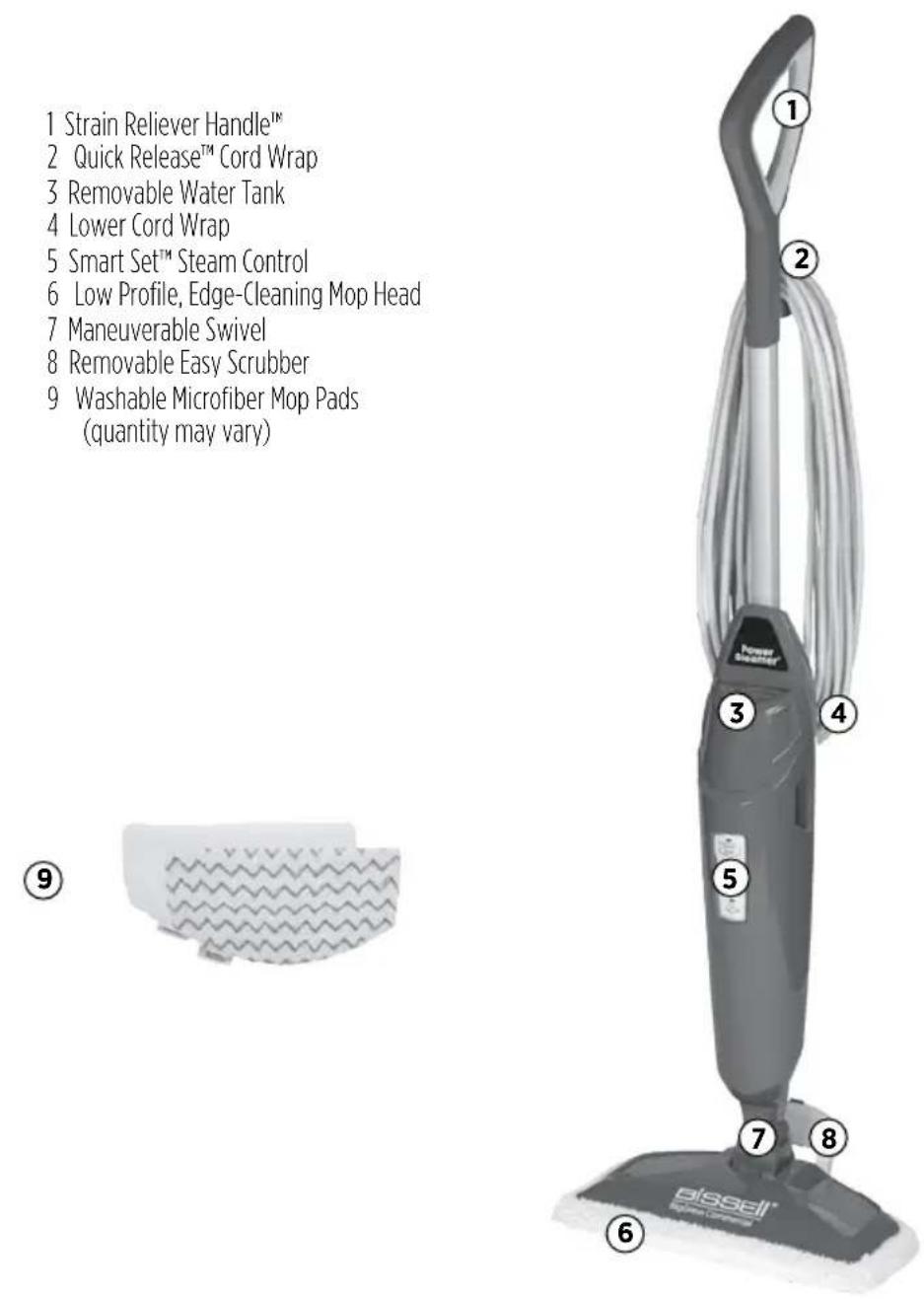
Product View

WARNING
Plastic film can be dangerous. To avoid danger of suffocation, keep away from babies and children.

WARNING
Do not plug in your hard floor cleaner until you are familiar with all instructions and operating procedures.

WARNING
To reduce the risk of electric shock, turn power switch off and disconnect polarized plug from electrical outlet before performing maintenance or troubleshooting checks.
Assembly
Your steam mop assembles quickly and easily. It is packaged with the following items:
Handle Assembly with one screw
Lower Body
Maneuverable Mop Head
Removable Water Tank
Removable Easy Scrubber
(attached to mop head)
Mop Pads (quantity may vary)
- Attach lower body to mop head by snapping it into place.
- Slide handle assembly down and screw until tightened.
Steam mop assembly is now complete.

WARNING
Exercise extreme care when using your steam mop on hardwood floors. Prolonged application of steam in one area increases the risk of damage to the surface treatment on timber floors. Test steam mop in an inconspicuous area before mopping a large area. The steam mop generates hot steam, so move the unit continuously when depressing the trigger. The trigger does not need to be depressed at all times. Regular foot traffic and direct sunlight will wear down timber floor surface treatment, making it more susceptible to steam damage. Check with your timber floor treatment and application specialist prior to steam mop operation.

WARNING
Do not plug in your hard floor cleaner until you are familiar with all instructions and operating procedures.

Removable Water Tank
1.2.


Operations
Special Features
Removable water tank
The water tank is located on the top of the steam mop. It can be refilled with water any time during use. Distilled or demineralized water is recommended in place of tap water. Do not use chemicals in the water tank of your steam mop.
SmartSet™ Steam Control
(Low, Medium, High) SmartSet™ Steam Control indicator light will stop blinking when steam mop is ready to use. Then press the Steam Level button to choose the level of steam you desire.
Microfiber Mop Pads
Reusable microfiber mop pads are machine washable and safe for virtually all hard floor surfaces. Your steam mop may have come with two different pads. The white microfiber pad is best for everyday use on delicate flooring like sealed hardwoods and laminate. The gray and white striped pad can be used for scrubbing heavily soiled floors and cleaning tougher messes.
Removable Easy Scrubber
Quickly clean sticky messes by pressing the Easy Scrubber with your foot and locking it into position. Clean grout and crevices easily with this effective tool.
WARNING
Do not attempt to use your steam mop without water in the tank. You may hear a knocking sound indicating there is no water.
Operations
Getting ready
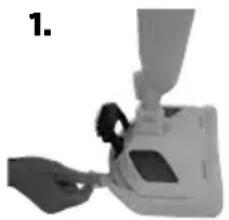
The mop pad may have already come attached to the mop head, if not follow step 1a below.
- Set mop head in mop pad, making sure quick-grip release tab is located on the back.
- Fill the water tank
a. Remove tank by lifting straight up and away from unit.
b. Unscrew cap at bottom of water tank.
c. Fill water tank with water. For best results, water should be at room temperature.
d. Replace the cap, tighten until snug.
e. Replace water tank by gently sliding tank into place and press down firmly.
- Twist the Quick Release™ cord wrap clockwise to unwrap the power cord completely and plug into a 120-Volt outlet as described on the Important Safety Instructions, page 3.
- SmartSet™ Steam Select Indicator light will glow when steam mop is ready to use. Press the Steam Level button to choose the level of steam you desire.
NOTE: Upon first use of the steam mop or first use after refilling the water tank, the pump may make a "knocking" sound. This is normal and should only last a few seconds.
WARNING
Never put descaling, alcoholic, or detergent products into the steam cleaner, as this may damage it or make it unsafe for use.

Operations
Before you clean
Thoroughly sweep or vacuum floor prior to cleaning with the steam mop.
Cleaning hard floors
Your steam mop is designed to clean hard flooring such as ceramic tile, vinyl, laminate, marble, stone and sealed hard wood floors. Use of your steam mop on waxed or some unwaxed floors may result in a diminished glossiness. The steam mop is not for use on unsealed wood floors. For best results test in an inconspicuous area and check the care instructions from your flooring manufacturer.
- Plug the unit in and wait 30 seconds for it to heat up. Choose the level of steam to clean your floor: Low (delicate floors), Medium (regular cleaning), High (durable floors or sticky messes). Begin cleaning by slowly passing the unit over the floor surface.
- To sanitize an area of your floor, (attack invisible germs and bacteria) place the steam mop over the spot for a minimum 15 seconds using continuous steam, but no longer than 20 seconds using continuous steam. For larger areas, overlap swivel head placement.
- To thoroughly clean dried-on sticky spots place the scrubby pad on the steam mop. Then press and lock the Easy Scrubber brush into place and slowly move the brush over the sticky spot to remove.
- To turn off the steam mop, continue to press the Steam Level button until the blue light is illuminated above the Steam Level button.
- When the steam mop stops emitting steam, unplug the unit. Simply remove the water tank, refill, and continue steaming.
WARNING
Never put descaling, alcoholic, or detergent products into the steam cleaner, as this may damage it or make it unsafe for use.
WARNING
Tinted plates on foot may get hot while steam mop is in use. Do not touch while hot.
Maintenance & Care
When you're done
- Unplug power cord from outlet.
- Carefully remove the mop pad using the Quick Release ™ tab from the mop head. The mop pad and lower assembly may be hot.
- Any water remaining in the water tank should be emptied prior to machine storage.
- Mop pad can be machine washed in warm water. Use only liquid detergents. Do not use fabric softeners or bleach. For best results, air dry.
- Wrap power cord around quick release cord wrap on back of steam mop.
- Wipe all surfaces of steam mop with a soft cloth. Store upright in a protected, dry area.
WARNING
To reduce the risk of electric shock, turn power switch off and disconnect polarized plug from electrical outlet before performing maintenance or troubleshooting checks.
CAUTION
Upright storage of the cleaner with a wet mop pad may result in the formation of white marks on your floor. To remove the white marks, clean area with vinegar.
Troubleshooting
WARNING
To reduce the risk of electric shock, turn power switch off and disconnect polarized plug from electrical outlet before performing maintenance or troubleshooting checks.
| Problem Possible causes Remedies | ||
| Reduced steam or no steam | Water tank empty Fill tank | |
| Steam level not selected Select steam level by pushing steam level button | ||
Please do not return this product tothestore.
Other maintenance or service not included in the manual should be performed by an authorized service representative.
Thank you for selecting a BISSELL BigGreen Commercial product.
For any questions or concerns, BISSELL BigGreen Commercial is happy to be of service. Contact us directly at 1-800-242-1378.
Accessories
These items are available for your BISSELL steam mop.
Call 1-800-242-1378 or visit www.bissellcommercial.com
| PART # | PART NAME | PART # | PART NAME | |||
| 2032633-PK3 | Steam Mop Pads - 3 pack |  | 2032634-PK3 | Steam Mop Scrubby Pads - 3 pack |  | |
Warranty
This warranty gives you specific legal rights, and you may also have other rights which may vary from state to state. If you need additional instructions regarding this warranty or have questions regarding what it may cover, please contact BISSELL BigGreen Commercial Consumer Care by E-mail, telephone, or regular mail as described below.
Limited 1-Year Warranty
Subject to the *EXCEPTIONS AND EXCLUSIONS identified below, upon receipt of the product BISSELL will repair or replace (with new or remanufactured components or products), at BISSELL's option, free of charge from the date of purchase by the original purchaser, for one year any defective or malfunctioning part.
See information below on "If your BISSELL product should require service".
This warranty does not apply to fans or routine maintenance components such as filters, belts, or brushes. Damage or malfunction caused by negligence, abuse, neglect, unauthorized repair, or any other use not in accordance with the user's guide is not covered.
BISSELL IS NOT LIABLE FOR INCIDENTAL OR CONSEQUENTIAL DAMAGES OF ANY NATURE ASSOCIATED WITH THE USE OF THIS PRODUCT. BISSELL'S LIABILITY WILL NOT EXCEED THE PURCHASE PRICE OF THE PRODUCT.
Some states do not allow the exclusion or limitation of incidental or consequential damages, so the above limitation or exclusion may not apply to you.
*EXCEPTIONS AND EXCLUSIONS FROM THE TERMS OF THE LIMITED WARRANTY
THIS WARRANTY IS EXCLUSIVE AND IN LIEU OF ANY OTHER WARRANTIES EITHER ORAL OR WRITTEN. ANY IMPLIED WARRANTIES WHICH MAY ARISE BY OPERATION OF LAW, INCLUDING THE IMPLIED WARRANTIES OF MERCHANTABILITY AND FITNESS FOR A PARTICULAR PURPOSE, ARE LIMITED TO THE TWO YEAR DURATION FROM THE DATE OF PURCHASE AS DESCRIBED ABOVE.
Some states do not allow limitations on how long an implied warranty last so the above limitation may not apply to you.
NOTE: Please keep your original sales receipt. It provides proof of date of purchase in the event of a warranty claim.
Service
If your BISSELL product should require service:
Visit BISSELL.com or contact BISSELL BigGreen Commercial Consumer Care to locate a BISSELL Authorized Service Center in your area.
If you need information about repairs or replacement parts, or if you have questions about your warranty, contact BISSELL BigGreen Commercial Consumer Care.
Website or E-mail:
www.bissellcommercial.com
Or Call:
BISSELL Big Green Commercial Consumer Care
1-800-242-1378
Monday - Friday 8am - 6pm ET
Saturday 8am - 4pm ET
BISSELL BigGreen Commercial Consumer Care
For information about repairs or replacement parts, or questions about your warranty:
Call:
BISSELL BigGreen Commercial Consumer Care 1-800-242-1378
Monday - Friday 8 am - 4 pm ET
Saturday 9 am - 8 pm ET
Email:
www.bissellcommercial.com/contact.html
Visit the BISSELL BigGreen Commercial Consumer Care website: www.BISSELLcommercial.com
When contacting BISSELL BigGreen Commercial Consumer Care, have model number of cleaner available.
Please record your Model Number: ____
Please record your Purchase Date: ____
NOTE: Please keep your original sales receipt. It provides proof of purchase date in the event of a warranty claim. See Warranty on page 11 for details.
- POWERSTEAMER™ USER GUIDE
- IMPORTANT SAFETY INSTRUCTIONS
- READ ALL INSTRUCTIONS BEFORE USING YOUR STEAM MOP
- WARNING
- TO REDUCE THE RISK OF FIRE, ELECTRIC SHOCK, OR INJURY
- SAVE THESE INSTRUCTIONS FOR FUTURE USE
- THIS APPLIANCE HAS A POLARIZED PLUG
- THANKS FOR BUYING A BISSELL BIGGREEN COMMERCIAL STEAM MOP
- PRODUCT VIEW
- ASSEMBLY
- OPERATIONS
- SPECIAL FEATURES
- REMOVABLE WATER TANK
- SMARTSET™ STEAM CONTROL
- MICROFIBER MOP PADS
- REMOVABLE EASY SCRUBBER
- GETTING READY
- BEFORE YOU CLEAN
- CLEANING HARD FLOORS
- MAINTENANCE & CARE
- WHEN YOU'RE DONE
- CAUTION
- TROUBLESHOOTING
- ACCESSORIES
- WARRANTY
- LIMITED 1-YEAR WARRANTY
- EXCEPTIONS AND EXCLUSIONS FROM THE TERMS OF THE LIMITED WARRANTY
- SERVICE
- IF YOUR BISSELL PRODUCT SHOULD REQUIRE SERVICE
- WEBSITE OR E-MAIL
- OR CALL
- BISSELL BIGGREEN COMMERCIAL CONSUMER CARE
- CALL
- VISIT THE BISSELL BIGGREEN COMMERCIAL CONSUMER CARE WEBSITE: WWW.BISSELLCOMMERCIAL.COM
Brand : BISSELL
Model : BGST1566
Category : Steam cleaner