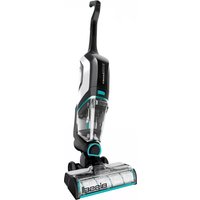
CrossWave Max 2765F - Steam cleaner BISSELL - Free user manual and instructions
Find the device manual for free CrossWave Max 2765F BISSELL in PDF.


| Product Type | Wet/Dry Vacuum and Steam Mop |
| Brand | Bissell |
| Model | CrossWave Max 2765F |
| Color | White/Blue |
| Dimensions (L x W x H) | Approx. 11.5 x 10.5 x 45 inches |
| Weight | Approx. 12.8 lbs |
| Power Cord Length | Approx. 25 feet |
| Voltage | 120V / 60Hz |
| Wattage | Approx. 1000W |
| Water Tank Capacity | Clean: 32 oz; Dirty: 28 oz |
| Cleaning Modes | Wash, Dry, or Wash & Dry simultaneously |
| Surface Types | Hard floors (tile, hardwood, vinyl, laminate, area rugs) |
| Self-Cleaning Cycle | Yes |
| Brush Roll Type | Multi-surface brush roll (included) |
| Accessories Included | Multi-surface brush roll, cleaning solution sample, storage tray |
| Filter Type | Washable foam filter |
| Nozzle Type | Edge-licking nozzle for corners and edges |
| Warranty | 2-year limited warranty |
Frequently Asked Questions - CrossWave Max 2765F BISSELL
User questions about CrossWave Max 2765F BISSELL
0 question about this device. Answer the ones you know or ask your own.
Ask a new question about this device
Download the instructions for your Steam cleaner in PDF format for free! Find your manual CrossWave Max 2765F - BISSELL and take your electronic device back in hand. On this page are published all the documents necessary for the use of your device. CrossWave Max 2765F by BISSELL.
USER MANUAL CrossWave Max 2765F BISSELL
natural_image
Family scene with a person cleaning a kitchen appliance, a woman and a child nearby, and a dog in the foreground (no visible text or symbols)
Go online for a comprehensive walkthrough of your new purchase!
This guide features everything you need to get ready for first use, including setting up, using and maintaining your machine, but join us online for a comprehensive walkthrough. Our online support includes tips and troubleshooting, videos, product registration, parts, and more. Go to global.BISSELL.com.
IMPORTANT SAFETY INSTRUCTIONS
READ ALL INSTRUCTIONS BEFORE USING YOUR APPLIANCE. When using an electrical appliance, basic precautions should be observed, including the following:
WARNING
TO REDUCE THE RISK OF FIRE, ELECTRIC SHOCK OR INJURY:
- This appliance is not intended for use by persons (including children) with reduced physical, sensory or mental capabilities, or lack of experience and knowledge, unless they have been given supervision or instruction concerning use of the appliance by a person responsible for their safety.
• Children should be supervised to ensure that they do not play with the appliance. - Unplug from electrical socket when not in use, before cleaning, maintaining, or servicing the appliance, and if your appliance has an accessory tool with a moving brush, before connecting or disconnecting the tool.
- Do not immerse in water or liquid.
- Keep hair, loose clothing, fingers, and all parts of body away from openings and moving parts of the appliance and its accessories.
- If the charger supply cable is damaged, it must be replaced by the manufacturer, its service agent or similarly qualified person in order to avoid a hazard.
- Do not incinerate the appliance even if it is severely damaged. The batteries can explode in a fire.
• The battery is to be disposed of safely.
- This appliance contains batteries that are only replaceable by skilled persons.
- Under abusive conditions, liquid may be ejected from the battery; avoid contact. If contact accidentally occurs, flush with water. If liquid contacts eyes, additionally seek medical help. Liquid ejected from the battery may cause irritation or burns.
- Use only with charger provided by manufacturer SIL, Model SSC-420085AU.
- Recharge only with the charger specified by the manufacturer. A charger that is suitable for one type of battery pack may create a risk of fire when used with another battery pack.
- Unplug charger from electrical socket when not in use, before cleaning, maintaining or servicing the appliance, and if your appliance has an accessory tool with a moving brush, before connecting or disconnecting the tool.
- The battery must be removed from the appliance before it is scrapped.
- Do not use with damaged cable or charger. If appliance is not working as it should, has been
dropped, damaged, left outdoors, or dropped into water, return it to a service center.
- Do not immerse. Use only on surfaces moistened by the cleaning process. Use only BISSELL® cleaning products intended for use with this machine.
- Use only the type and amount of liquids specified under the operations section of this guide.
- Use only on carpet moistened by the cleaning process.
- Liquid must not be directed towards equipment containing electrical components.
- Always connect to a properly earthed electrical socket. Do not modify earthed plug.
• Always install float before any wet pick-up operation. - Turn OFF all controls before unplugging.
- Do not pull or carry charger by cable, use cable as a handle, close door on cable, or pull cable around sharp edges or corners.
- Keep charger cable away from heated surfaces.
• To unplug, grasp the charger plug, not the cable. - Do not handle charger plug or appliance with wet hands.
- Battery pack and charger base output terminals are not to be short-circuited.
- Do not charge the machine outdoors.
- The appliance must be disconnected from the supply mains when removing the battery.
- Do not recharge, disassemble, heat above 60^ , or incinerate.
- Keep batteries out of reach of children.
- Dispose of used batteries promptly.
- Never put batteries in mouth. If swallowed, contact your physician or local poison control.
- Prevent unintentional starting. Ensure the switch is in the OFF-position before picking up or carrying the appliance. Carrying the appliance with your finger on the switch or energising appliance that have the switch on invites accidents.
- Do not use appliance that is damaged or modified. Damaged or modified batteries may exhibit unpredictable behavior resulting in fire, explosion or risk of injury.
- Do not expose appliance to fire or excessive temperature. Exposure to fire or temperature above 130^ may cause explosion.
- Follow all charging instructions and do not charge the appliance outside of the temperature range specified in the instructions. Charging improperly or at temperatures outside of the specified range may damage the battery and increase the risk of fire.
- Have servicing performed by a qualified repair person using only identical replacement parts. This will ensure that the safety of the product is maintained.
- Do not modify or attempt to repair the appliance except as indicated in the instructions for use and care.
- Keep the temperature range of between 4-40°C when charging battery, storing machine or during use.
- Make sure the power switch is OFF and the battery pack removed from the appliance before making any adjustments, changing accessories, or storing appliance. Such preventive safety measures reduce the risk of starting the appliance accidentally.
- Use appliances only with specifically designated battery packs. Use of any other battery packs may create a risk of injury and fire.
- When battery pack is not in use, keep it away from other metal objects, like paper clips, coins, keys, nails, screws, or other small metal objects, that can make a connection from one terminal to another. Shorting the battery terminals together may cause burns or a fire.
- Plastic film can be dangerous. To avoid danger of suffocation, keep away from children.
- Use only as described in this user guide.
- Use only manufacturer's recommended attachments.
- If appliance is not working as it should, has been dropped,
damaged, left outdoors, or dropped into water; do not attempt to operate it and have it repaired at an authorised service center.
- Do not put any object into openings.
- Do not use with any opening blocked; keep free of dust, lint, hair, and anything that may reduce air flow.
- Use extra care when cleaning on stairs.
- Do not use to pick up flammable or combustible liquids, such as petroleum, or use in areas where they may be present.
- Do not pick up toxic material (chlorine bleach, ammonia, drain cleaner, etc.).
- Do not use appliance in an enclosed space filled with vapours given off by oil-based paint, paint thinner, some moth-proofing substances, flammable dust, or other explosive or toxic vapours.
- Do not pick up hard or sharp objects such as glass, nails, screws, coins, etc.
- Do not pick up anything that is burning or smoking, such as cigarettes, matches or hot ashes.
- Do not use without filters in place.
- Use indoors only.
IMPORTANT INFORMATION
- Keep appliance on a level surface.
- If your appliance has a motorised Brush Roll, do not leave machine running in the same spot without the handle fully upright.
- To reduce the risk of a leaking condition, do not store machine where freezing may occur. Damage to internal components may result.
SYMBOL EXPLANATION
| Caution. | |
| Read operator's manual. | |
| Risk of fire. | |
| Risk of electric shock. | |
| For indoor use only. | |
| Protection against moving parts. | |
| Risk of automatic start-up. | |
| Use warm water, temperature up to 60°C. | |
| Do not overwet carpet. Use only on carpet moistened by the cleaning process. | |
| Use only BISSELL® cleaning formulas intended for use with this machine. | |
| Class III appliance. |
SAVE THESE INSTRUCTIONS
ORIGINAL INSTRUCTIONS. FOR OPERATION ON A 220-240 VOLT A.C. 50-60 HZ POWER SUPPLY ONLY.
THIS MODEL IS FOR HOUSEHOLD USE ONLY.

natural_image
Woman standing beside a Bissell vacuum cleaner on a patterned rug in a modern living room with large windows and a coffee table (no visible text or symbols)We're so happy you chose the CrossWave® Cordless Max. We put this guide together to help you set up, use and maintain your cordless hard surface cleaner. We've also included some tips we think will come in handy when you first start using it, so let's get started!
For a complete guide to your purchase, go to global.BISSELL.com.
What's in the Box? 4
Product View 4
Assembly 5
Charging the Battery 5
Cleaning Formulas 6
Filling the Clean Water Tank ..... 6
Cleaning Your Floors 7
Emptying the Dirty Water Tank ..... 8
Using the 3-in-1 Docking Station ..... 9
Storing Your Machine. 10
Disposing of the Battery....10
Troubleshooting....11
What's in the Box?
 |  |  |  | 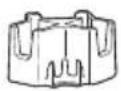 |  |
| Handle & Body | Multi-Surface Pet Brush Roll | Multi-Surface Pet Formula with Ambipur Freshness | Hard Surface Sanitise Formula | Brush Roll Drying Tray | 3-in-1 Docking Station |
Product View
For additional support videos and information, visit global.BISSELL.com.
Product View
- Upper Handle
- Mode Button
- Power Button
- Clean Cycle Button
- Dirty Water Tank
- Strainer
- Brush Roll Window
- Solution Spray Trigger
- Carry Handle
- Clean Water Tank
- 3-in-1 Docking Station

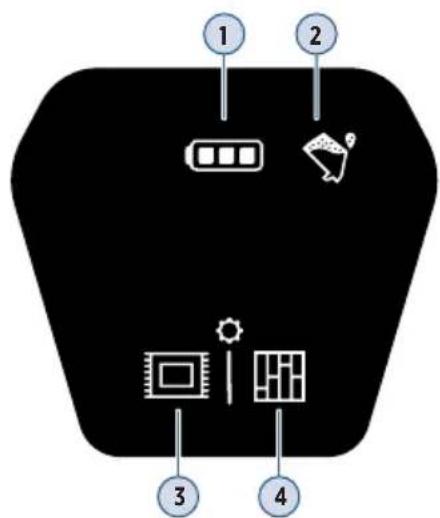
Digital Display
- Battery Status
- Dirty Water Tank Full
- Area Rug Mode
- Hard Floor Mode

natural_image
Interior kitchen scene with a person using a vacuum cleaner near a table with food and a plate of bread (no visible text or symbols)Assembly
Go to global.BISSELL.com for assembly videos.
 | 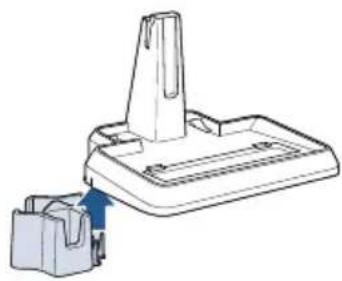 | |
| 1. Insert handle into body of machine until you hear a “click”. | 2. Slide the Brush Roll Drying Tray into place on the side of the 3-in-1 Docking Station. | |
Charging the Battery
For helpful how-to videos, check out global.BISSELL.com.
Make sure machine is fully charged before first use. To check the battery status, remove the machine from the dock and turn it ON by pressing the Power Button. You'll know the battery is fully charged when all three white status lights are illuminated.
 |  |  |
| 1. Place your CrossWave®Cordless Max onto the 3-in-1 Docking Station to charge. | 2. Plug the adapter into a suitable wall outlet. The Battery Status light will illuminate when charging. | 3. For maximum run time,charge the machine for 4 hours. |
Cleaning Formulas
Find more formulas at global.BISSELL.com.
Keep plenty of CrossWave® formulas on hand so you can clean whenever it fits your schedule.
Note: Always use CrossWave® formulas in your machine. Other formulas may harm the machine and void the guarantee. Do not use Hard Floor Sanitise Formula on area rugs or carpet.
| Multi-Surface FormulaGreat for cleaning all sealed floors and area rugs. | Wood Floor FormulaRestores your wood floors' natural shine. | Area Rug FormulaRemoves stuck-on and embedded dirt from area rugs. | Multi-Surface Pet with Ambipur® FormulaRemoves pet odors to clean and refresh. | Hard Floor Sanitise FormulaKills 99.9% of germs & bacteria on your hard floors.* |
Certain trademarks are used under license from The Procter & Gamble Company or its affiliates.
*When used as directed.
Filling the Clean Water Tank
Go to global.BISSELL.com for additional how-to videos.
| 1. The Clean Water Tank is located on the back of the machine. To remove, use the finger groove at the top of the tank to grab and pivot the tank backwards. | 2. Unscrew the cap from the bottom of the Clean Water Tank. | 3. Choose the right BISSELL® formula from the ‘Cleaning Formulas’ section above. |
| Large Area | |
| 4. The Clean Water Tank has a Large Area volume and a Small Area volume. Pick one of the measuring volumes that best suits the space that you would like to clean.TheLarge Areafill lines are for areas up to 100 sq meters.TheSmall Areafill lines are for areas under 50 sq meters.Use warm (140°F/60°C max) tap water and add the appropriate BISSELL formula. Tap water with hardness greater than 35 ppm is recommended for use in machine to ensure the Dirty Water Tank full detection sensor works properly. | 5. Screw the cap back on the Clean Water Tank. On the back of the machine, align the bottom of the Clean Water Tank with the grooves and pivot the tank until it “clicks” into place. |
⚠ WARNING To reduce the risk of fire and electric shock due to internal component damage, use only BISSELL cleaning formula intended for use with the hard floor device.
Cleaning Your Floors
Go to global.BISSELL.com for how-to videos and tips for cleaning stuck-on messes, excessively dirty or muddy floors, and more!
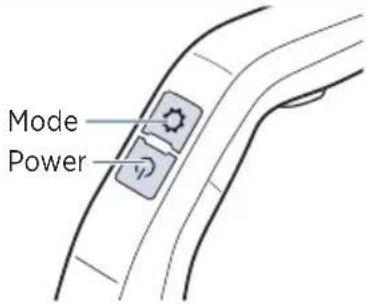 |  |  |
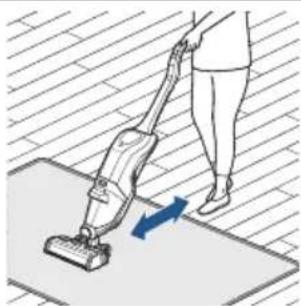
| 1. To clean hard floors, turn machine ON by pressing the Power Button. Press the Mode Button to switch between the Hard Floor and Area Rug Modes.Area Rug Mode dispenses twice as much solution as Hard Floor Mode. Before cleaning area rugs, check the manufacturer's tag and test an inconspicuous spot on the rug for colorfastness. Don't use on silk or delicate rugs. | 2. Recline the machine to start the Brush Roll spinning. Stand the machine upright to stop the Brush Roll spinning. | 3. Before each use, hold the Solution Spray Trigger for 10 seconds to prime the system with cleaning solution.LED lights illuminate when holding the trigger. Bubbles will appear in the Brush Roll window when the solution is flowing. |
natural_image
Illustration of a person using a vacuum cleaner on a mat, with a blue arrow indicating motion (no text or symbols)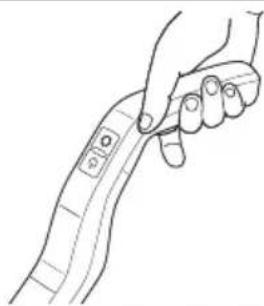
natural_image
Line drawing of a hand holding a flexible bandage (no text or symbols)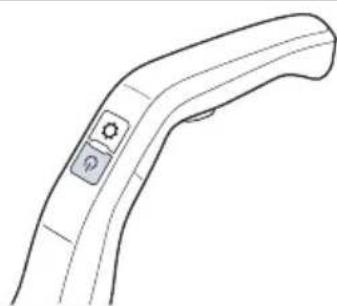
natural_image
Line drawing of a handheld electronic device with a control knob (no text or symbols)-
To clean, hold the Solution Spray Trigger to apply solution on forward and backward passes.
-
To dry floors faster, release the trigger and make a second pass without dispensing solution.
-
Turn OFF the machine by pressing the Power Button ( ⏻ ).
ATTENTION
Do not overwet carpet. Be careful not to run over loose objects or edges of area rugs. Stalling the re belt failure.
Emptying the Dirty Water Tank
Go to global.BISSELL.com for a full list of how-to videos.
When the Dirty Water Tank is full, your machine will turn OFF, beep and the Dirty Water Tank Full icon will blink orange on the Digital Display.
 | 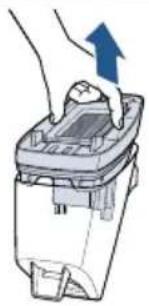 |  |
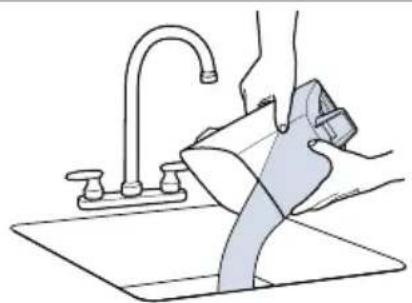
| 1. To remove the Dirty Water Tank, press the button on top of the tank, grab the front handle and pull the tank out. | 2. Remove the top of the Dirty Water Tank by grasping the recessed areas on each side of the filter and pulling up. | 3. Separate the hair and debris from the dirty water by grasping the strainer tab and pulling up. Throw the debris into the trash. |
natural_image
Line drawing of a hand washing a shower from a sink (no text or symbols)
natural_image
Illustration of a hand pressing down on a small mechanical component with an upward arrow indicating motion (no text or symbols)
natural_image
Illustration of two hands operating a mechanical clamp or clamp device (no text or symbols present)- Pour the dirty water into the sink and rinse the Dirty Water Tank.
- Remove the filter from the top of the Dirty Water Tank by pulling it up.
- Hand wash the filter and screen with warm water and mild detergent.
Rinse the bottom of the Dirty Water Tank cover.

natural_image
Illustration of various household appliances and a solar panel under sunlight (no text or symbols)
natural_image
Three-step illustration showing hand positioning of a small container with a handle, no text or symbols present
natural_image
Illustration of a hand inserting a plug into a container with a blue arrow indicating direction (no text or symbols)- Leave the parts out to dry before reassembling.
- Once all parts are dry, reassemble the filter and the Dirty Water Tank cover.
- Angle the Dirty Water tank back into the body of the machine. Insert the bottom of the tank first, then pivot the top toward the machine until it "clicks" into place.
WARNING
To reduce the risk of electrical shock, turn Power Button OFF before performing maintenance or
troubleshooting checks.
Using the 3-in-1 Docking Station
Go to global.BISSELL.com for feature videos of your machine.
Charging starts once the machine is placed onto the plugged-in dock. Charging stops once the Clean Out Cycle runs, then resumes once the cycle completes.
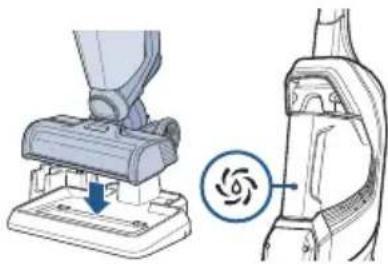 | 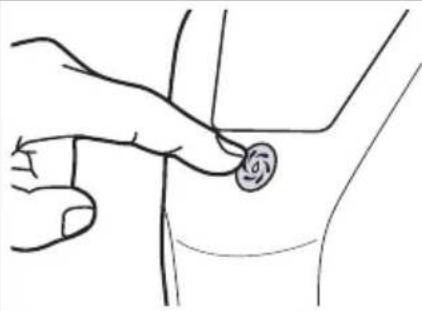 |  |
| 1. Place the machine on the 3-in-1 Docking Station. Ensure there is enough solution in the Clean Water Tank to run the Clean Out Cycle. The level of the solution should reach the Clean Out Cycle line. If the level of solution does not reach the line, then fill with water to that line. | 2. Push the Clean Out Cycle Button to start the 40-second cycle. After the cycle is complete, empty the Dirty Water Tank. See page 8 for detailed instructions. | 3. Remove the Brush Roll so it can dry. Grab the front of the Brush Roll window and pull up to remove. Pull up on the Brush Roll tab to remove. Put the Brush Roll in the drying tray. The Brush Roll and window can be hand washed. |

natural_image
Illustration of a robotic arm gripping a mechanical component, with a hand holding the tool (no text or symbols present)
natural_image
Mechanical assembly diagram showing two steps of a mechanical component with blue arrows indicating motion direction (no text or symbols)
natural_image
Illustration of a robotic vacuum cleaner performing maintenance, showing mechanical components and tool path (no text or symbols)-
Remove the machine from the dock and wipe out the tray. Do NOT rinse directly under faucet. This keeps water out of the charging plug.
-
Once the Brush Roll is dry, place the end of the roll into the right side of the foot of the machine. Press the tab of the Brush Roll down to lock into place.
-
Replace the Brush Roll Window by lining up the window tabs with the edges of the foot. Then, press the window back into place until you hear a "click".
⚠ WARNING To reduce the risk of fire, electric shock or injury, turn power OFF and disconnect plug from electrical outlet before performing maintenance or troubleshooting on the dock.
Storing Your Machine
Visit global.BISSELL.com for additional maintenance tips for your machine.
Store CrossWave® Cordless Max in a protected, dry area. Since this product uses water, it must not be stored where there is danger of freezing. Freezing will damage internal components and may void the guarantee.
Disposing of the Battery
Go to global.BISSELL.com for resources on battery disposal.
Before disposing the battery, make sure:
- The machine is disconnected from the 3-in-1 Docking Station.
• The Clean and Dirty Water Tanks are empty or removed from the machine. - A Phillips-head screwdriver, electrical tape and rubber handled wire cutters are available for disassembly.
 | 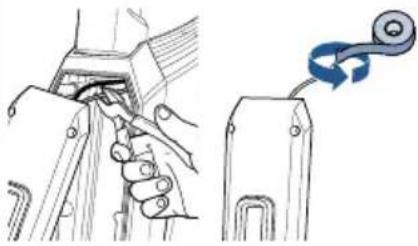 | 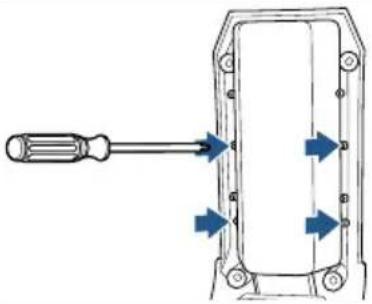 |
| 1. With a Phillips-head screwdriver, remove the 4 screws on the back of the machine. Lift off the back cover. | 2. Cut the yellow positive (+) battery wire with wire cutters and wrap with electrical tape. Disconnect the connector with four wires. Lastly, cut the black wire and wrap with electrical tape. | 3. Using a Phillips-head screwdriver, remove the 4 screws located on the sides of the battery pack and remove it from the back cover. |
NOTICE To reduce the risk of a leaking condition, do not store machine where freezing may occur. Damage to internal components may result.
NOTICE Disconnecting the battery will destroy the appliance and void the guarantee.
Troubleshooting
For troubleshooting videos visit global.BISSELL.com.
This guide features everything you need to get ready for first use, including setting up, using and maintaining your machine, but join us online for a comprehensive walkthrough. Our online support includes tips and troubleshooting, videos, product registration, parts, and more.
Guarantee
This guarantee gives you specific legal rights, in addition to rights you may have under the Australian Consumer Law. If you need additional instruction regarding this guarantee or have questions regarding what it may cover, please contact your local BISSELL® Consumer Care on the details set out below.
BISSELL Two Year Guarantee
Subject to the *conditions identified below, BISSELL will repair or replace (with new, refurbished, lightly used, or remanufactured components or products), at BISSELL's option, free of charge from the date of purchase by the original purchaser, for two years any defective or malfunctioning part due to manufacturer defect. This guarantee applies to product used for personal purposes, and not commercial or rental service. This guarantee does not apply to fans or routine maintenance or consumable components such as filters, belts, brush rolls, etc., damage or malfunction caused by negligence, abuse, neglect, unauthorised repair, or any other use not in accordance with the user guide. BISSELL recommends that the original packaging be kept for the duration of the guarantee period in case such need arises within the guarantee period that the item needs re-packing and transportation.
\*Conditions of Guarantee
Subject to whether such loss is reasonably foreseeable, BISSELL and its in-country distributors are not liable for incidental or consequential damages of any nature associated with the use of this product.
For Australian Consumers Only: Our goods come with guarantees that cannot be excluded under the Australian Consumer Law. You are entitled to a replacement or refund for a major failure and for compensation for any other reasonably foreseeable loss or damage. You are also entitled to have the goods repaired or replaced if the goods fail to be of acceptable quality and the failure does not amount to a major failure.
This guarantee is in addition to other rights or remedies under law. Nothing in this guarantee excludes, limits or modifies any liability of BISSELL which is imposed by law, or limits or modifies any remedy available to the consumer which is granted by law. To make a claim under this guarantee contact BISSELL Australia PTY LTD (details above). Contact BISSELL prior to returning any goods. Where agreed, BISSELL will reimburse reasonable postage / handling costs (if any) for returning goods to BISSELL. To claim expenses incurred in making a claim under this guarantee please provide BISSELL with a copy of the receipt of the expenses by email or post.
Consumer Care
Australia
Telephone: 1300 247 735
Website: www.BISSELL.com.au
New Zealand
Telephone: 0800 247 735
Website: www.BISSELL.co.nz
natural_image
Interior scene of a modern kitchen with a man sweeping, a woman holding a bag, and a child cleaning the table near a dog (no visible text or symbols)
We're Waggin' Our Tails!
BISSELL ^® proudly supports BISSELL Pet Foundation ^® and its mission to help save homeless pets. When you buy a BISSELL product, you help save pets, too. We're proud to design products that help make pet messes, odors and pet homelessness disappear. Visit BISSELLsavespets.com to learn more.
But wait, there's more!
Join us online for a comprehensive walkthrough of your new product, including troubleshooting, product registration, parts and more. Go to global.BISSELL.com.





VIDEOSINFOREGISTERPARTSSUPPORT

- Go online for a comprehensive walkthrough of your new purchase!
- IMPORTANT SAFETY INSTRUCTIONS
- WARNING
- TO REDUCE THE RISK OF FIRE, ELECTRIC SHOCK OR INJURY:
- IMPORTANT INFORMATION
- SAVE THESE INSTRUCTIONS
- What's in the Box?
- Product View
- Digital Display
- Assembly
- Charging the Battery
- Cleaning Formulas
- Find more formulas at global.BISSELL.com.
- Filling the Clean Water Tank
- Go to global.BISSELL.com for additional how-to videos.
- Cleaning Your Floors
- ATTENTION
- Emptying the Dirty Water Tank
- Go to global.BISSELL.com for a full list of how-to videos.
- Using the 3-in-1 Docking Station
- Storing Your Machine
- Disposing of the Battery
- Troubleshooting
- Guarantee
- BISSELL Two Year Guarantee
- \*Conditions of Guarantee
- Consumer Care
- Australia
- New Zealand
- We're Waggin' Our Tails!
- But wait, there's more!
Brand : BISSELL
Model : CrossWave Max 2765F
Category : Steam cleaner