Tremvelope - Effect pedal Pigtronix - Free user manual and instructions
Find the device manual for free Tremvelope Pigtronix in PDF.


| Product Type | Guitar Effect Pedal |
| Brand | Pigtronix |
| Model | Tremvelope |
| Effect Type | Tremolo with Envelope Control |
| Dimensions | 4.5 x 2.5 x 1.5 inches (114 x 64 x 38 mm) |
| Weight | 0.6 lbs (272 g) |
| Power Supply | 9V DC center negative (2.1mm barrel) |
| Current Draw | ~50 mA |
| Battery Option | 9V battery (not included) |
| Controls | Depth, Speed, Envelope Sensitivity, Level |
| Input Impedance | 1 MΩ |
| Output Impedance | 100 Ω |
| True Bypass | Yes |
| LED Indicator | Bypass/active status |
| Chassis Material | Aluminum casing |
| Audio Connectors | 1/4" mono input and output |
| Frequency Response | 20 Hz - 20 kHz |
| Signal-to-Noise Ratio | > 90 dB |
| Cleaning Instructions | Wipe with a dry cloth; avoid solvents |
| Operating Temperature | 0°C to 40°C (32°F to 104°F) |
| Warranty | 1 year limited warranty |
| Included Accessories | User manual, sticker |
Frequently Asked Questions - Tremvelope Pigtronix
User questions about Tremvelope Pigtronix
0 question about this device. Answer the ones you know or ask your own.
Ask a new question about this device
Download the instructions for your Effect pedal in PDF format for free! Find your manual Tremvelope - Pigtronix and take your electronic device back in hand. On this page are published all the documents necessary for the use of your device. Tremvelope by Pigtronix.
USER MANUAL Tremvelope Pigtronix
All contents © Absara Audio LLC 2010
INDEX:
Welcome....
Anatomy of the Tremvelope......
Getting Started....
Guided Tour....
Limited Warranty....
Safety Precautions....
WELCOME!
Thank you for entering the realm of Pigtronix.
The Tremvelope you now possess is a stereo optical tremolo and panning effect with a unique "envelope" mode that causes the tremolo to react to what you play.
With the envelope kicked on, both speed and depth can be independently assigned to increase or decrease in response to your playing dynamics. This unique functionality puts the tremolo into a state of constant flux, creating a satisfying aural phenomenon reminiscent of a thoughtfully controlled rotating speaker cabinet.
When used in Stereo (highly recommended) the Tremvelope pans your sound between two amplifiers for a truly mesmerizing acoustic experience. Add a little phasing from the Pigtronix EP2 (or another distinguished phaser) to get completely psychedelic effects dripping with creative modulation.
The Tremvelope should be placed at or near the end of a pedal system. 18VDC power supply provides serious headroom to gracefully handle loud distortion pedals and other effects placed before it. Tremvelope accepts instrument or line level signals, so use it with any axe or even on a full mix.
In keeping with Pigtronix tradition, the controls on your Tremvelope have been tuned to provide the fattest possible tone and the widest range of musical possibilities. Tremvelope was born out of a passion for versatile, expressive musical effects; it is built to last and designed to inspire.
We hope that the Tremvelope will provide you with years of creative satisfaction.
PigIronix

natural_image
Cartoon illustration of a smiling pig wearing glasses, enclosed in a blue dome (no text or symbols)ANATOMY OF THE TREMVELOPE:
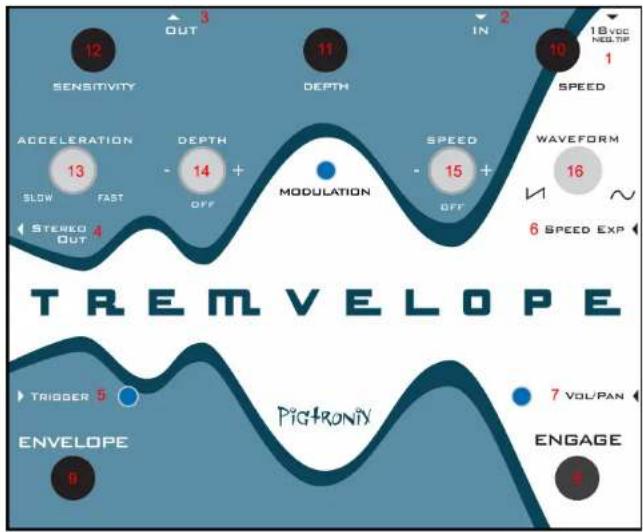
flowchart
graph TD
    A["SENSITIVITY"] --> B["3 OUT"]
    B --> C["12"]
    C --> D["DEPTH"]
    D --> E["11"]
    E --> F["2 IN"]
    F --> G["10"]
    G --> H["18Vcc NEG-TIF"]
    H --> I["1 SPEED"]
    I --> J["WAVEFORM"]
    J --> K["16"]
    K --> L["6 SPEED EXP"]
    L --> M["5 TRIGGER"]
    M --> N["7 VOL/PAN"]
    N --> O["6 ENGAGE"]
    O --> P["5 ENVELOPE"]
    P --> Q["4 STEREO OUT"]
    Q --> R["13 ACCELERATION"]
    R --> S["14 DEPTH"]
    S --> T["15 MODULATION"]
    T --> U["OFF"]
    U --> V["3 OUT"]
Jacks:
- DC POWER 18-VOLTS - Use only the 18-Volt, 300mA , negative tip power supply that came with your Pigtronix Tremvelope. Using the wrong power supply is likely to result in a damaged pedal.
- IN - Effect input, Plug in your instrument here.
- OUT - Effect output, ¼ TS cable. Amp, mixer, or DI goes here.
- STEREO OUT - Effect output, ¼ TS cable. Amp, mixer, or DI goes here.
- TRIGGER - This audio input connects directly to the envelope follower. Any signal plugged into this jack will override the input signal as the source for the envelope modulation.
- SPEED PEDAL - This is the TRS expression pedal input for controlling the rate of the LFO. When an expression pedal is plugged into this jack, the onboard speed knob is bypassed.
- VOL / PAN - This is the TRS expression pedal input for using the Tremvelope as a manually controlled active volume pedal (in mono) or panning device (in stereo).
Footswitches:
-
ENGAGE – This footswitch turns the entire TREMVELOPE on and off. When the engage light is turned off, the TREMVELOPE is bypassed.
-
ENVELOPE – This footswitch turns on Envelope control of the Tremolo effect. If both the SPEED and DEPTH toggle switches are set to OFF, the envelope mode will cause no change.
Knobs:
-
SENSITIVITY – This dial determines the amount of signal it takes to trigger the envelope. It should be used to determine how much the tremolo changes in response to picking dynamics. This control has a wide range of adjustment to accommodate signal levels ranging from wimpy single coil pickups up through active basses and line level recording equipment.
-
DEPTH - This controls the amount of LFO modulation.
-
SPEED – This dial controls the rate of the LFO
Toggle Switches:
-
ACCELERATION – Determines how quickly the tremolo will change depth and speed based on your playing.
-
DEPTH (MINUS / OFF / PLUS) – Determines how the tremolo depth will change when the envelope mode is selected
-
SPEED (MINUS / OFF / PLUS) - Determines how the tremolo speed will change when the envelope mode is selected
-
WAVEFORM – Selects Sine wave or Ramp wave shapes for the LFO
GETTING STARTED:
Basic Hook Up
-
Unpack your TREMVELOPE and place it on a flat, stable surface.
-
Make sure you are using the 18-Volt DC (negative center) power supply that came with your Pigtronix TREMVELOPE.
-
Plug the power cord into the 18VDC jack on the back of the TREMVELOPE and then plug the power adaptor into an electrical socket. The TREMVELOPE is now powered up. To turn the device off, unplug it from the wall or turn off the power going to the 18VDC supply. We recommend that you do not leave your TREMVELOPE powered up for long periods of time when it is not in use.
-
Plug your instrument into the "IN" jack and plug your Amplifier into the "OUT" jack. If you have a second amp, plug it into the Stereo Out jack.
GUIDED TOUR:
The following steps guide you through the sonic palette of the TREMVELOPE and show you how to get at the full range of tones it has to offer.
Tremolo Controls
- Set all of the controls fully counter-clockwise and set all of the toggle switches to the right. All the LEDs should be off. The TREMVELOPE is in bypass mode. Be sure to turn the volume knob on your guitar all the way up. Play your instrument and make sure a clean sound is passing through.
- Push the right footswitch to turn on the effect. Now turn the DEPTH and SPEED knobs up to 12:00. You will hear the amplitude of your sound being modulated. Explore the range of the DEPTH and SPEED controls to get a feel for the sounds available with the basic tremolo.
- Switch between Ramp and Sine waves. Ramp wave mode creates a gradual rise in amplitude followed by a quick transition back down to quiet. The Sine wave creates a smooth change from loud to soft.
Envelope Controls
- Push the left footswitch to turn on the Envelope. The LED should now come on. Turn the SENSITIVITY control all the way up and set the DEPTH and SPEED controls to 12:00.
- Play your instrument and notice how the speed and depth both increase from the current position of the knobs, as you play harder.
- Turn down the SENSITIVITY to 12:00. The envelope will now have less impact on the depth and speed of the tremolo. Explore the full range of the SENSITIVITY control.
- Turn the SPEED knob up close to maximum and put the SPEED toggle switch in the Minus position. Now when you play, the speed will slow down while the depth increases... a very cool effect!
- Switch the ACCELERATION control to SLOW mode to hear the lagging change like ramping a Leslie cabinet up or down.
Note: It is important to remember that the envelope will cause the SPEED and DEPTH to change in the direction selected by the SPEED and DEPTH toggle switches. This change will occur starting from the position of the corresponding knob. If both switches are in the middle (off) position, then there will be no change in the SPEED and DEPTH.
Similarly, if both knobs are at maximum (fully clockwise) and you select the PLUS option for both SPEED and DEPTH toggle switches, there will be no change since the unit cannot go any faster or deeper then maximum.
-
Push the left footswitch to bring you back to pure Tremolo mode.
-
ENJOY!!!
Limited Warranty:
Your Pigtronix effect pedal comes with a 1 year limited warranty on parts and workmanship. During the warranty period we will repair or replace, at our option, defective parts or pedals free of charge, and return them to the owner. Warranty service does not include damaged, modified, or misused pedals and such pedals will be subject to a standard repair charge.
What you must do: First, contact us directly via email and describe the problem to us. If the problem cannot be resolved we will have you send your pedal directly to us for servicing.
How to contact us for warranty service:
Email: tech@pigtronix.com
Warranty Limitations: This warranty does not cover defects resulting from improper or unreasonable use, accident, unauthorized tampering or modifications; and, warranty shall be considered void if TREMVELOPE chassis has been opened. Please consult the instructions and warnings in this manual for proper use. Warranty is only valid if your TREMVELOPE has been properly registered within 30 days of original purchase date, and upon warranty registration, will be valid for 12 months from original purchase.
To validate your 1-year, limited warranty, please register your TREMVELOPE, within 30 days of purchase, on the web at:
www.pigtronix.com/warranty
SAFETY PRECAUTIONS:
The safety precautions listed below are intended to ensure your safety whenever you use the TREMVELOPE.
NEVER OPEN THE CASE – Never try to separate the two pieces of the chassis from one another and/or modify the equipment. Opening this device will effectively void the warranty.
STOP USE IN CASE OF PROBLEM – Stop using the equipment if ever you should notice smoke or a strange odor coming from it.
Contact Koltai@pigtronix.com for service.
AVOID HIGH TEMPERATURES & HEAT BUILD UP – Never cover the power supply with cloth or other objects. Built up heat creates a danger of equipment deformation and fire. Do not expose the TREMVELOPE to direct sunlight, heating devices, or other extreme temperatures.
USE SPECIFIED POWER ADAPTOR ONLY – Be sure to use only the 18-Volt DC 300mA Adapter that came with your Pigtronix TREMVELOPE.
DO NOT EXPOSE TO WATER/BEER – To reduce the risk of fire or electric shock, do not expose your TREMVELOPE to rain or moisture. If water gets inside the unit, turn off the power.
Final Notes:
Years of work have gone into making the TREMVELOPE Pedal possible. We would like to thank the following people for their help along the way:
Howard Davis, Lisa Rickmers, the Bethke and Koltai families, Paul Schwartz at Peekamoose Guitars, Jody at ANSIR music, Soulive & Lettuce, Greg Tobler, Dave Burnett, Aaron Reed, Jer Coons, Dan Pavone, Ben Artes, Steve Turnidge, Craig Anderton and B-Dawg.
Howard "Mick" Davis and David Koltai designed the Pigtronix TREMVELOPE during 2010 in Brooklyn and Port Jefferson, NY.
We hope you enjoy your new TREMVELOPE pedal! Please check our website, www.pigtronix.com or contact us at (631) 331-PIGS (7447) for the latest information on new Pigtronix gear.
Dave Koltai & Brian Bethke
Pigtronix