
Bang - Docking Station SPC - Free user manual and instructions
Find the device manual for free Bang SPC in PDF.


| Product Type | Portable Bluetooth Speaker / Docking Station |
| Brand | SPC |
| Model | Bang |
| Speaker Configuration | 2 x 4W |
| Bluetooth Version | 2.1 |
| Battery Type | Lithium-ion, 1500mAh |
| Power Input | Micro USB (5V DC) |
| Audio Input | 3.5mm aux jack |
| Hands-free Calling | Yes (built-in microphone) |
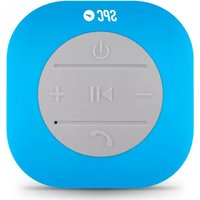
| Controls | Volume +/-, Previous/Next track, Play/Pause, On/Off switch |
| Indicators | Red LED for charging, Blue LED for Bluetooth connection |
| Box Contents | SPC Bang speaker, 3.5mm aux cable, Micro USB cable, User Manual, Warranty sheet |
| Wireless Range | Approximately 10 meters (typical) |
| Charging Time | Approximately 2-3 hours (via USB port) |
| Care & Cleaning | Wipe with a soft, dry cloth. Do not use harsh chemicals or immerse in water. |
| Safety Warnings | Do not expose to extreme heat or moisture. Use only the supplied charger. Keep away from children. |
| Spare Parts & Repairability | Contact SPC support for service. No user-serviceable parts inside. |
| General Information | Designed for indoor use. May require account registration at www.spc-universe.com for extended warranty and offers. |
Frequently Asked Questions - Bang SPC
User questions about Bang SPC
0 question about this device. Answer the ones you know or ask your own.
Ask a new question about this device
Download the instructions for your Docking Station in PDF format for free! Find your manual Bang - SPC and take your electronic device back in hand. On this page are published all the documents necessary for the use of your device. Bang by SPC.
USER MANUAL Bang SPC
natural_image
Silhouette of a rocket inside a circular frame (no text or symbols)Bluetooth Speaker
BANG
MANUAL DE USUARIO / USER MANUAL / GUIA DO UTILIZADOR
¡ BIENVENIDO !

This guide includes all the information to make the most out of your SPC BANG.
GET AN SPC ACCOUNT
Free advantages just one click away.
Before going on reading this manual, we strongly recommend you visiting www.spc-universe.com, SO YOU CAN CREATE AN SPC ACCOUNT AND REGISTER YOUR PRODUCT.
By doing this, you will be able to get into SPC universe: an exclusive club where our clients can get incredible offers and discounts and also upgrade or renew their products.
Moreover, having an account means free access to SPC services: tablet and smartphone apps, technical support...
This is SPC. A universe in technology.
BOX CONTENTS
SPC Bang
■ 3.5mm auxiliar cable
■ Micro USB cable
User Manual
Warranty sheet
FEATURES
2 x 4 W Speaker
2.1 Bluetooth
Auxiliar Mode
Hands-free Mode
■ 1500mAh lithium battery
CONTROLS LOCALIZATIONS
EN


- Speaker/Microphone
- -button: Decreases the volume
- +button: Increases the volume
- ◀ button: Previous song
- ▶ button: Next song
- ▶ button: Pauses/Continues the reproduction. Disconnects from the Bluetooth device
- 3.5mm auxiliar cable input
- Power supplier input
- Battery indicator LED
- ON/OFF switch
BLUETOOTH MODE
- Slide the switcher to the ON position.
- Switch on the Bluetooth in your device to find "SPC BANG" in the Bluetooth detected devices list and press on it to connect. The light of the speaker will be permanent now.
- Start the reproduction in the connected Bluetooth device.
- Press the button to decrease the volume.
- Press the +button to increase the volume.
- Press the button to go a song backwards.
-
Press the to go a song forwards.
-
Press the ▶button to pause or continue the reproduction. Keep it press to disconnect the speaker from the connected Bluetooth device.
AUXILIAR MODE
- Slide the switcher to the ON position.
- Connect the device to the speaker with the 3.5mm auxiliar cable included.
- Start the reproduction in the connected device.
- Press the ▶ button to mute the speaker. Press it again to reactivate the sound.
- Press the button to decrease the volume.
- Press the +button to increase the volume.
- Keep pressed the ▶ button to cancel the connection with the device. Keep it pressed to reconnect it again.
NOTES: With the device muted, the reproduction doesn't stop. You will be able to control the reproduction volume with the connected device.
HANDS-FREE MODE
- Slide the switcher to the ON position.
- Switch on the Bluetooth in your device to find "SPC BANG" in the Bluetooth detected devices list and press on it to connect. The light of the speaker will be permanent now.
- When you receive a phone call, the bluetooth speaker will emit the call sound. To answer, press the ▶ button. To finish the phone call, press again the ▶ button.
CHARGING THE BATTERY
The device contents an internal rechargeable battery, before using the device, make a full charge with the USB cable. To make this battery recharging you will have to connect the micro USB cable, included in the box, to a USB port. You can connect it to a USB in a PC or a power adaptor. During the charge, the red LED will be on. Once the charge is fully made it will switch off.
The information that this guide contains cannot be transmitted, played or distributed in any case without the written authorization of SPC.
COMERCIAL BRANDNAMES
SPC is a registered brandname of Smart Products Connection S.A.
NOTE: SPC reserves the right to modify the information of this guide in any moment. All the information and recommendations that we can find here do not guarantee anything.
BEM-VINDO
Fabricante/Manufacturer/Fabricante: Smart Products Connection S.A.
Marca/Brand/Marca: SPC
Director General/General Manager/Diretor-geral
Esta declaración de conformidad está de acuerdo con la Directiva Europea 2014/53/EU. This declaration of conformity is in compliance with the European Directive 2014/53/EU. Esta declaração de conformidade respeita as normas da Diretiva Europeia 2014/53/EU.



Brand : SPC
Model : Bang
Category : Docking Station