MDR-RF875RK - Headphones SONY - Free user manual and instructions
Find the device manual for free MDR-RF875RK SONY in PDF.


| Product Type | Wireless RF Stereo Headphones |
| Model | Sony MDR-RF875RK |
| Transmission Type | Radio Frequency (RF) - 900 MHz |
| Driver Unit | 40 mm, dome type |
| Frequency Response | 20 - 20,000 Hz |
| Impedance | 40 Ω at 1 kHz |
| Sensitivity | 100 dB/mW |
| Operating Range | Up to 100 m (line of sight) |
| Battery Type | Rechargeable Ni-MH (included) |
| Battery Life | Approx. 20 hours (depending on usage) |
| Charging Time | Approx. 16 hours |
| Power Source | AC adapter (for base station) or batteries |
| Dimensions (Headphones) | Approx. 200 x 180 x 60 mm (without cable) |
| Weight (Headphones) | Approx. 290 g (including batteries) |
| Base Station Dimensions | Approx. 130 x 100 x 120 mm |
| Base Station Weight | Approx. 400 g |
| Controls | Volume, power on/off, tuning |
| Cable Length (to base) | 1.5 m (audio input cable) |
| Accessories Included | Base station, AC adapter, audio cable, rechargeable batteries |
| Cleaning | Wipe with a soft dry cloth; do not use solvents |
| Repair | Refer to authorized service center; no user-serviceable parts |
Frequently Asked Questions - MDR-RF875RK SONY
User questions about MDR-RF875RK SONY
0 question about this device. Answer the ones you know or ask your own.
Ask a new question about this device
Download the instructions for your Headphones in PDF format for free! Find your manual MDR-RF875RK - SONY and take your electronic device back in hand. On this page are published all the documents necessary for the use of your device. MDR-RF875RK by SONY.
USER MANUAL MDR-RF875RK SONY
Wireless Stereo Headphone System
Operating Instructions
MDR-RF875RK
WARNING
To prevent fire or shock hazard, do not expose the unit to rain or moisture.
To prevent fire or shock hazard, do not place objects filled with liquids, such as vases, on the apparatus.
To avoid electrical shock, do not open the cabinet. Refer servicing to qualified personnel only.
Do not install the appliance in a confined space, such as a bookcase or built-in cabinet.
CE!
Hereby, Sony Corp., declares that this equipment is in compliance with the essential requirements and other relevant provisions of Directive 1999/5/EC.
For details, please access the following URL: http://www.compliance.sony.de/
This product is intended to be used in the following countries.
CEK version: United Kingdom
CED version: Germany, Sweden, Denmark, Finland, Norway, Belgium, Switzerland, Austria, Netherlands, France
To check for version, please refer to the barcode label located on the top of the box.
Welcome!
Thank you for purchasing the Sony MDR-RF875RK Wireless Stereo Headphone System. Before operating the unit, please read this manual thoroughly and retain it for future reference.
Some features are:
- Wireless system that allows you to listen to a program free from the restriction of a cord
• High fidelity sound reproduction - A compact transmitter with an AC power adaptor (supplied) enables simple charging of the headphone battery. Just by placing the headphones on the transmitter, headphone battery can be charged.
- Comfortable Circum-aural headphones with self-adjusting head band
• Automatic ON/OFF function on headphones to preserve battery power
Notes on receiving performance
The system for this equipment utilizes very high frequency signals in the 800 MHz band so the receiving performance may deteriorate due to the surroundings. The following examples illustrate conditions that may reduce the possible receiving range or cause interference with reception.
- Inside a building with walls containing steel beams.
- Area with many steel file cabinets, etc.
- Area with many electrical appliances capable of generating electromagnetic noise.
- Transmitter is placed on a metal instrument.
- Area facing a roadway.
- Noise or interfering signals exist in the surroundings due to radio transceivers in trucks, etc.
- Noise or interfering signals exist in the surroundings owing to wireless communication systems installed along roadways.
Table of contents
Getting started
Unpacking 4
Setting up the transmitter ....4
Charging the headphone battery .... 6
Operating the system
Listening to a program 7
The effective areas of the transmitter ..... 9
Replacing the ear pads 9
Additional information
Precautions ......10
Troubleshooting 10
Specifications 11

Getting started
Unpacking
Check that you have the following items:
• The headphones
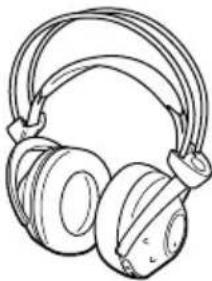
natural_image
Line drawing of a pair of headphones with coiled cable (no text or symbols)- The transmitter
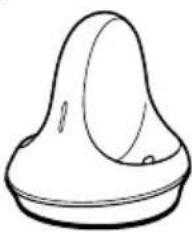
natural_image
Simple line drawing of a bulb-shaped object with a pointed tip and rounded base (no text or symbols)- AC power adaptor
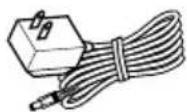
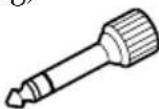
- Unimatch plug adaptor (stereo mini jack stereo phone plug)
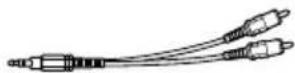
- Connecting cord (phono plugs stereo mini plug), 1 m
Setting up the transmitter
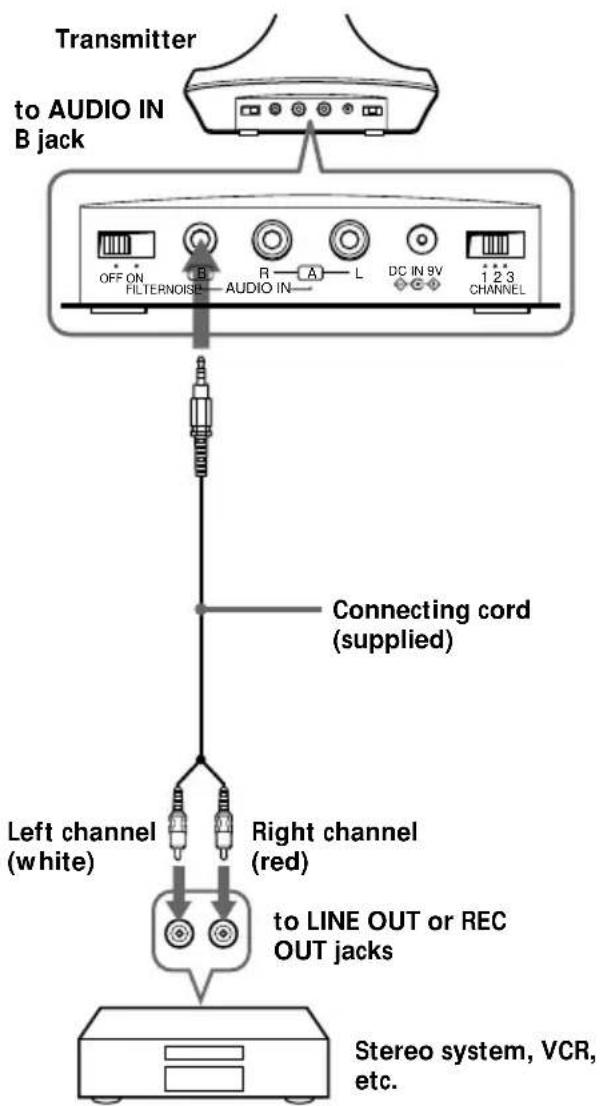
1 Connect the transmitter to audio/video equipment. Select one of the hookups below depending on the jack type:
ⒶTo connect to a headphone jack
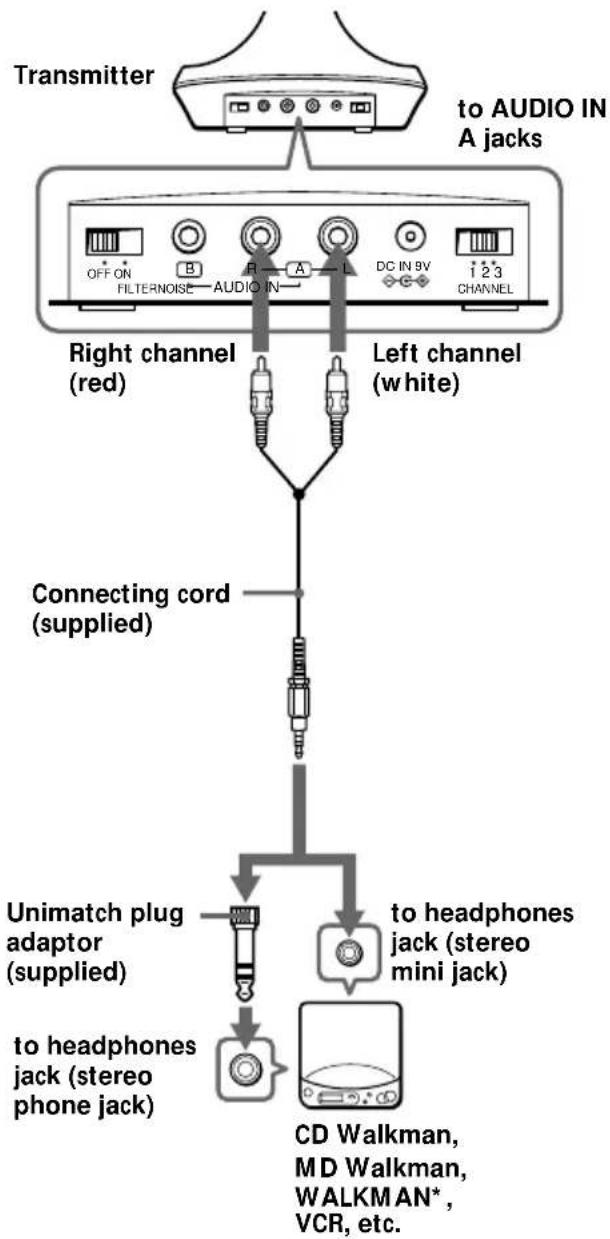
flowchart
graph TD
    A["Transmitter"] --> B["to AUDIO IN A jacks"]
    B --> C["Right channel (red)"]
    B --> D["Left channel (white)"]
    C --> E["Connecting cord (supplied)"]
    D --> E
    E --> F["Unimatch plug adaptor (supplied)"]
    E --> G["to headphones jack (stereo mini jack)"]
    F --> H["to headphones jack (stereo phone jack)"]
    G --> I["CD Walkman, MD Walkman, WALKMAN*, VCR, etc."]
⑧To connect to LINE OUT or REC OUT jacks
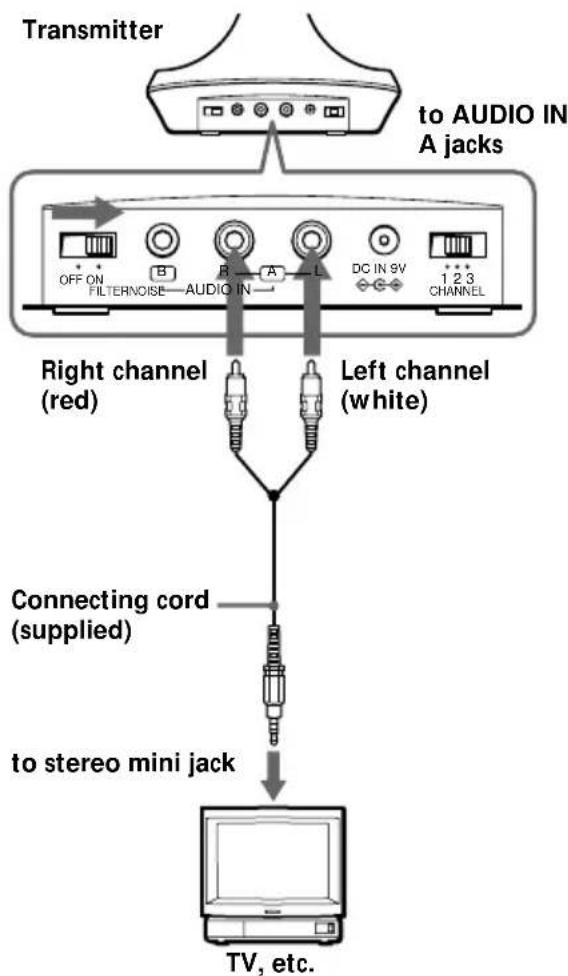
©To connect to a headphone jack of a TV or VCR.
Set the NOISE FILTER switch to ON if noise is heard.
Notes
- If you connect the transmitter to LINE OUT or REC OUT jack of an audio reproducer such as an MD player or CD player, do not set the NOISE FILTER switch to ON. Otherwise, the volume will be limited.
- When the transmitter is placed on or near a TV, it may pick up noise. In such case, place the transmitter away from the TV.
2 Connect the transmitter to an AC outlet using the supplied AC power adaptor.
Notes
- Use only the supplied AC power adaptor. Do not use any other AC power adaptor.
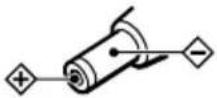
Polarity of the plug
- When you connect the transmitter directly to a monaural earphone jack, the audio signal will not be output through the right channel. In such a case, use the separately sold PC-236HG plug adaptor.
- If the connected equipment has the AVLS (Automatic Volume Limiter System) function, be sure to turn the function off when using the transmitter. Otherwise, you will have to turn up the volume of the headphones, and that may cause noise.
* WALKMAN is a registered trademark of Sony Corporation.
Charging the headphone battery
Using the headphones for the first time
When you use the headphones for the first time, charge the battery in the following manner.
1 Connect the transmitter to a power source.
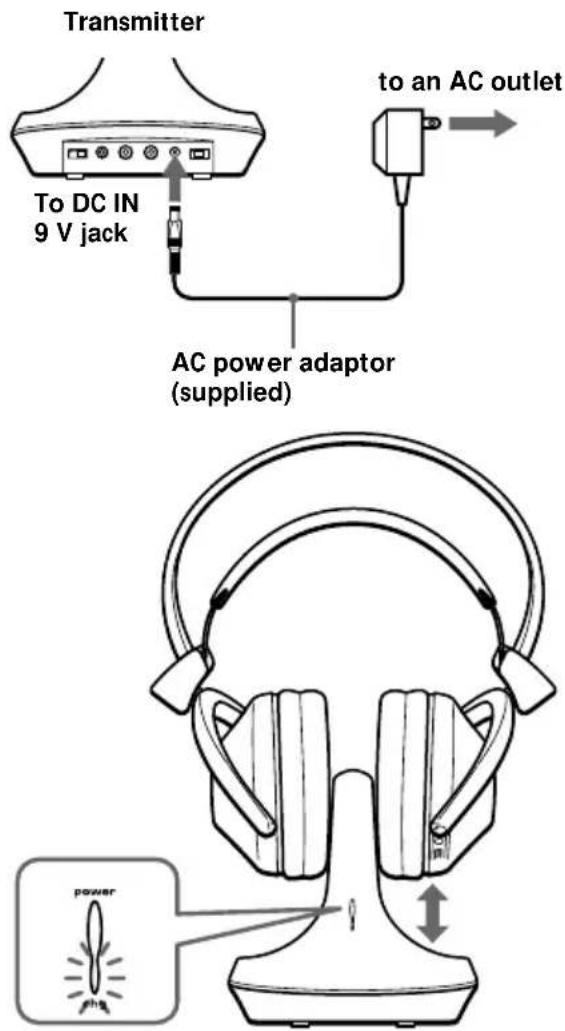
Place the headphones on the transmitter such that the charging pins on the transmitter engage the charging contacts on the bottom of the housing.
The charge indicator on the transmitter will light in green to indicate that the battery is being charged.
Once 24 hours have elapsed since the start of battery charging, the charger automatically shuts off, and the green indicator goes out.
To recharge the headphone battery after use
Since the charger shuts itself off in response to its internal timer after 24 hours, there is no need to worry about overcharing.
Charging and using hours
| Approx. charging hours | Approx. using time* |
| 1 | 60 minutes |
| 24** | 25 hours |
* at 1 kHz, 1 mW + 1 mW output
** The hours required to fully charge empty batteries
Listening to a program
1 First turn on the audio/video equipment and start playing.
2 Remove the headphones from the transmitter. The transmitter's power indicator will light in red.
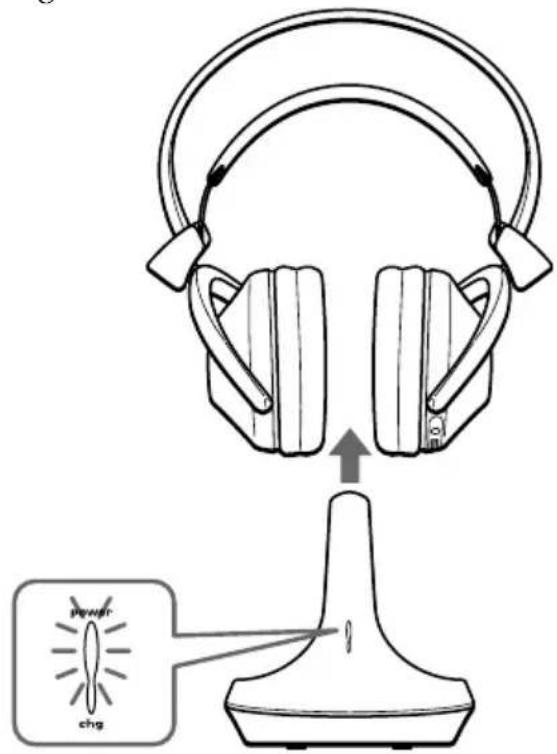
3 Select the radio frequency with the CHANNEL selector switch.
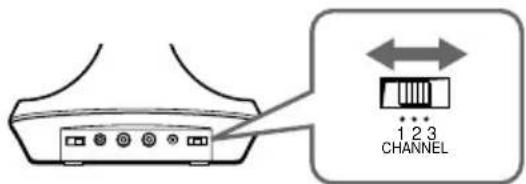
Continued
4 When you put on the headphones the headphone power turns on automatically.

natural_image
Line drawing of a person wearing headphones (no text or symbols)5 Turn up the volume to a moderate level with the VOL control. Press the TUNING button briefly for automatic tuning of the headphones. If you do not receive a clear audio signal, press it again.
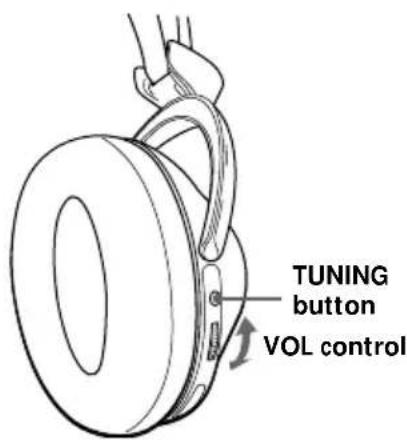
Try the above steps 3 and 5 until the receiving performance becomes better.
Sending RF signals from the Transmitter
The transmitter starts sending the RF signals automatically, when it detects audio signals from the equipment connected.
If it does not detect an audio signal for more than approximately four minutes, the transmitter will stop sending RF signals, and the power indicator turns off.
When the transmitter receives an audio signal again, it starts sending the RF signals, and the power indicator will light in red again. If the audio signal is very weak, the transmitter does not send RF signals. If the transmitter is connected to a headphone jack, make sure the volume of the equipment connected is set to 5 – 6 or higher.
You may not hear the beginning of the sound from the headphones until the transmitter starts sending the RF signals after detecting an audio signal.
Auto power on/off function
When you remove the headphones from your head, the power turns off automatically. Do not allow the self adjusting band to be pulled up, otherwise the headphones will be switched on.
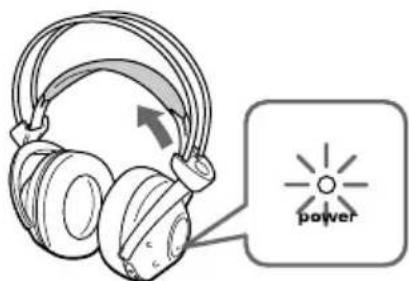
The power turns on.
Note
If a hissing noise is heard move closer to the transmitter.
The effective areas of the transmitter
The optimum distance is up to approximately 100 m without the system picking up some interference. However, the distance may vary according to the surroundings and environment. If the system picks up noise, reduce the distance between the transmitter unit and the headphones, or select the other channel.
Notes
- When you use the headphones inside the effective areas of the transmitter, the transmitter can be placed in any direction from the listener.
- Even within the signal reception area, there are some spots (dead spot) where the RF signal can not be received. This characteristics is inherent to RF signals, and does not indicate malfunction. By slightly moving the transmitter, location of the dead spot can be changed.
Replacing the ear pads
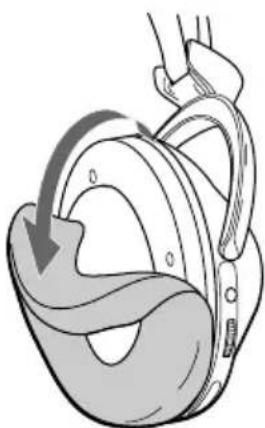
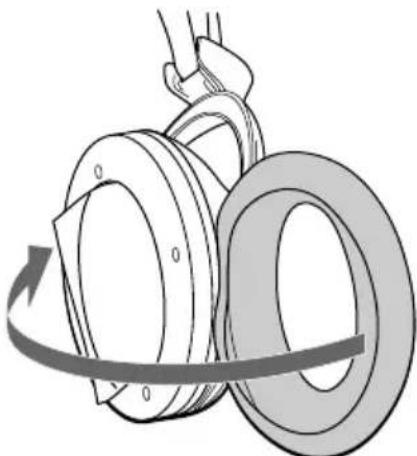
When the ear pads become dirty or damaged, you can get replacements from your Sony dealer. Replace them as illustrated below.
1 Remove the old ear pad by pulling it out of the groove on the housing.
natural_image
Anatomical illustration of a human heart with a hand placement, showing the navel and diaphragm (no text or labels)2 Place the new ear pad on the driver unit and insert the edge of the pad into the groove as illustrated.
natural_image
Diagram of a mechanical lifting or rolling operation with rotating components (no text or symbols)Make sure that the entire edge of the ear pad is securely inserted into the groove.
Precautions
- When the transmitter is not to be used for a long period of time, disconnect the AC power adaptor from the AC outlet holding the plug. Do not pull on the cord.
- Do not leave the wireless stereo headphone system in a location subject to direct sunlight, heat or moisture.
Notes on headphones
Preventing hearing damage
Avoid using headphones at high volume. Hearing experts advise against continuous, loud and extended play. If you experience a ringing in your ears, reduce the volume or discontinue use.
Caring for others
Keep the volume at a moderate level. This will allow you to hear outside sounds and to be considerate to the people around you.
If you have any questions or problems concerning the system that are not covered in this manual, please consult the nearest Sony dealer.
Be sure to bring the headphones and the transmitter to the Sony dealer when requiring repair work.
Disposing of the headphones
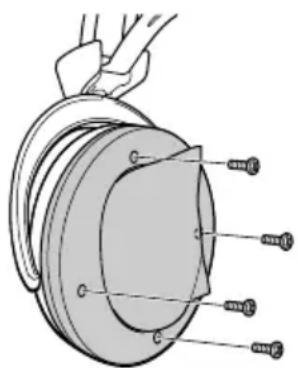
Be sure to remove the built-in rechargeable batteries from the headphones before you dispose of the headphones. First remove the left headphone's ear pad. You will see four screws. Remove the four screws and open the housing.
natural_image
Technical diagram of a mechanical component with threaded fasteners and a curved housing (no text or symbols)Troubleshooting
| Problem | Solution |
| No sound/Muffled sound | Check the connection of the audio/video equipment or the AC power adaptor. |
| Check that the audio/video equipment is turned on. | |
| Turn up the volume on the connected audio/video equipment, if the transmitter is connected to a headphone jack. | |
| Change the radio frequency with the CHANNEL selector on the transmitter, then press the TUNING button again. | |
| The mute function is activated.Use the headphones near the transmitter. | |
| The headphones' POWER indicator light is weak or turned off.•Charge the built-in rechargeable battery or if the POWER indicator is still off after charging the built-in rechargeable battery, take the headphones to a Sony dealer for replacement of the rechargeable battery. | |
| If you connect the transmitter to the LINE OUT or REC OUT jack of an audio reproducer, make sure that the NOISE FILTER switch is set to OFF. | |
| Make sure that the NOISE FILTER switch is set to either ON or OFF (If the switch gets stuck between ON and OFF, the sound will be cut off). | |
| Distortion | If the transmitter is connected to a headphone jack, turn down the volume of the connected audio/video equipment. |
| Change the radio frequency with the CHANNEL selector on the transmitter. | |
| The headphones' POWER indicator light is weak or turned off.•Charge the built-in rechargeable battery or if the POWER indicator is still off after charging the built-in rechargeable battery, take the headphones to a Sony dealer for replacement of the rechargeable battery. | |
| If you connect the transmitter to LINE OUT or REC OUT jack of an audio reproducer, make sure that the NOISE FILTER switch is set to OFF. | |
| Loud background noise | Move closer to the transmitter. As you move away from the transmitter, more noise is likely to be heard. |
| If the transmitter is connected to a headphone jack, turn up the volume of the connected audio/video equipment. | |
| Change the radio frequency with the CHANNEL selector on the transmitter, then press the TUNING button again. | |
| The headphones' POWER indicator light is weak or turned off.•Charge the built-in rechargeable battery or if the POWER indicator is still off after charging the built-in rechargeable battery, take the headphones to a Sony dealer for replacement of the rechargeable battery. | |
| If you connect the transmitter to the LINE OUT or REC OUT jack of an audio reproducer, make sure that the NOISE FILTER switch is set to OFF. |
Specifications
General
Carrier frequency
$$ 8 6 3. 5 - 8 6 4. 5 \mathrm{MHz} $$
Channel Ch1, Ch2, Ch3
Modulation FM stereo
Frequency response
$$ 1 8 - 2 2, 0 0 0 \mathrm{Hz} $$
Transmitter TMR-RF875R
Power source DC 9 V: supplied AC power adaptor
Audio input phono jacks/stereo mini jack
Power source DC 2.4 V: Built-in rechargeable battery
Mass Approx. 350 g (12.3 oz.) incl.
$$ \text { built - in rechargeable battery } $$
Built-in Ni-MH rechargeable battery
Model name NH-AAC
Voltage 1.2 V
Capacity 1,000 mAh
Optional accessory
Design and specifications are subject to change without notice.