PPA80BT - Pregnant PEAQ - Free user manual and instructions
Find the device manual for free PPA80BT PEAQ in PDF.


| Product Type | Portable Bluetooth Speaker |
| Brand | PEAQ |
| Model | PPA80BT |
| Dimensions (W x H x D) | 200 x 100 x 100 mm |
| Weight | 0.5 kg |
| Power Source | Built-in rechargeable Li-ion battery (2000mAh) |
| Battery Playtime | Up to 10 hours |
| Charging Time | Approx. 2-3 hours |
| Bluetooth Version | 5.0 |
| Bluetooth Range | Up to 10 meters |
| Audio Inputs | Bluetooth, AUX (3.5mm), microSD |
| Speaker Output | 2 x 5W stereo |
| Frequency Response | 80 Hz - 20 kHz |
| Water Resistance | IPX5 (splash-proof) |
| Hands-free Calling | Yes (built-in microphone) |
| Controls | Play/Pause, Volume +/-, Track Skip, Power, Pairing |
| Indicator Lights | Battery level, Bluetooth pairing status |
| Material | Plastic with fabric grille |
| Color Options | Black, Grey |
| Package Contents | Speaker, USB Charging Cable, AUX Cable, User Manual |
Frequently Asked Questions - PPA80BT PEAQ
User questions about PPA80BT PEAQ
0 question about this device. Answer the ones you know or ask your own.
Ask a new question about this device
Download the instructions for your Pregnant in PDF format for free! Find your manual PPA80BT - PEAQ and take your electronic device back in hand. On this page are published all the documents necessary for the use of your device. PPA80BT by PEAQ.
USER MANUAL PPA80BT PEAQ
natural_image
Two white rectangular devices with diamond patterns, one black and one white, displayed against a reflective surface (no visible text or symbols)Portable Bluetooth Speaker PPA80BT-B/W
natural_image
Simple line drawing of a trash bin with crossed lines indicating no waste or plastic (no text or symbols)natural_image
Symbol of a trash bin with no text or numbers presentImportant safety advice
- Follow all safety instructions in order to prevent damage being caused by incorrect use!
- Keep the user manual for further use. If you pass this appliance on to third parties, you must also deliver this user manual with it.
- Never use an appliance that is damaged!
Disconnect the USB connection and contact your supplier if the appliance is damaged. - Never try to repair the appliance yourself. In the event of any malfunction, repairs are to be conducted by qualified personnel only.
- Do not open the appliance casing under any circumstances. Do not insert any foreign objects into the inside of the casing.
-
Warning! During cleaning or operation do not immerse the electrical parts of the appliance in water or other liquids. Never hold the appliance under running water.
-
Do not operate the appliance with wet hands or while standing on a wet floor.
- The appliance should not be used near water – for example, near a bathtub, wash bowl, kitchen sink, in a wet basement, or near a swimming pool.
- Never use accessories which are not recommended by the manufacturer. They could pose a safety risk to the user and might damage the appliance. You must therefore use original accessories only.
- The appliance is only suitable for use at moderate degrees of latitude. Do not use in the tropics or in particularly humid climates.
- Keep the appliance away from any hot surfaces and open flames. Always operate the appliance on a level, stable, clean and dry surface. Protect the appliance against heat and cold, dust, direct sunlight, moisture, dripping and splashing water.
English
- Do not place heavy objects on top of the appliance. Do not place objects with open flames, e.g. candles, on top or beside the appliance. Do not place objects filled with water, e.g. vases, on or near the appliance.
- Never pull on the cord to disconnect the appliance from the USB port and never wind the cord around the appliance.
- Prior to each cleaning, disconnect the USB plug from the USB port.
- Important! The USB port is intended only for appliances equipped with an USB connection. Other devices cannot be used with this USB connection. Only use provided USB cable.
- In case of malfunction based on electrostatic discharge and electrical fluctuations, reset the appliance by disconnecting it from the USB port, wait a few seconds and then reconnect the appliance to the USB port.
Intended use
- The product serves as an audio output device and features wireless or wired connection. It can also be used as a hands-free device in connection with a suitable mobile phone.
- No liability for any damage that occurs can be accepted in the event of improper use or incorrect handling.
- Use the appliance for the intended use only. The appliance is not suitable for commercial use. This appliance has been designed exclusively for household use. Do not use the appliance outdoors or in a bathroom.
- The USB port can be used for charging the appliance and for wired audio-in function.
English
Disposal
The crossed-out wheeled bin logo requires the separate collection of waste electric and electronic equipment (WEEE). Electric and electronic equipment may contain dangerous and hazardous substances.
Do not dispose of this appliance as unsorted municipal waste. Return it to a designated collection point for the recycling of WEEE. By doing so, you will help to conserve resources and protect the environment. Contact your retailer or local authorities for more information.
natural_image
Simple line drawing of a trash bin with crossed lines indicating no waste or discharge (no text or symbols)Do not dispose of in the household waste, as the appliance contains batteries.
Components
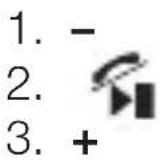
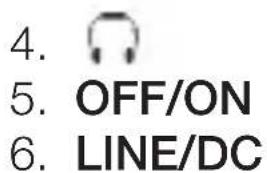
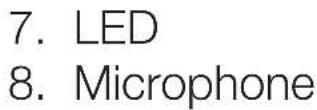
The product may be available in different colours.
Charging battery
• Charge battery completely before first use.
• Partial charging does not impair battery lifetime.
- Charging and audio playback possible at the same time.
- Connect Micro-USB plug to LINE/DC socket.
- Connect USB-A plug to USB power source (e.g. computer, power adaptor with USB output socket [not included]).
English
- Charging starts automatically and takes approx. 2 hours. Meanwhile LED lights red and goes out when charging is complete.
- Low battery indicator: LED flashes.
Setting up Bluetooth connection
- On/off switch in ON position. A signal sounds. LED flashes rapidly. Speaker ready for connection.
- Activate Bluetooth on audio source (e.g. mobile phone). Browse for devices and select "PPA80BT". Establish connection. If necessary, enter password 0000.
- If necessary, select "PPA80BT" as audio output device. LED lights up: connection established, playback paused. LED flashes slowly: connection established, playback continued.
Wired connection
- Connect Micro-USB plug to LINE/DC socket.
- Connect jack plug to audio source's headphone socket.
- On/off switch in ON position. A signal sounds. LED remains on.
- Start audio source playback.
Select playback mode
- Bluetooth takes priority over wired playback. To switch to wired playback you must stop or pause playback from the audio source.
- Press and hold ▶ button to switch between Bluetooth and wired playback.
- Switching to Bluetooth takes approx. 5 seconds.
English
Hands-free function
- Pair the appliance with a mobile phone (→ Setting up Bluetooth connection). Place the speaker in a convenient distance.
- Incoming phone call: Press /. Outgoing phone call: Dial the number on your mobile phone.
- Speak towards the built-in microphone (on top of the appliance).
- Ending phone call: Press / again (or press the End Call button on your phone).
Button/switch functions
| Button/switch | Function |
| OFF/ON | On/off switch |
 | Bluetooth: continue/pause playback |
| (cont.) | Wired: mute ( playback continues) |
| Press and hold: toggle between Bluetooth and wired playback | |
| Hands-free: accept/end call | |
| - | Press 1x: restart current track (Bluetooth mode only) |
| Press 2x: previous track (Bluetooth mode only) | |
| Press and hold: decrease volume | |
| + | Press 1x: next track (Bluetooth mode only) |
| Press and hold: increase volume |
English
Switching off
- On/off switch in OFF position.
- To avoid a complete discharge of the built-in battery, always switch off the appliance when not in use.
Headphone socket
For connecting headphones or loudspeakers with
3.5 mm jack plug.
Cleaning
- Switch off first and disconnect cable.
• Use a dry, soft cloth. - Avoid contact with water.
- Do not use aggressive cleaning agents.
Technical data
Input: 5 V, 500 mA (via USB)

Battery voltage: 3.7 V

Battery capacity: 750 mAh
Battery run-time: approx. 2 hours
Output power: 2 x 3 Watts RMS
Impedance: 4
Frequency response: 60 Hz – 18 kHz
Signal-to-noise ratio: >80 dB
Speaker ∅: 40 mm
Dimensions (W x H x D): 160 x 60 x 45 mm

Bluetooth is a registered trademark of Bluetooth SIG, Inc.
Español
natural_image
Simple line drawing of a trash bin with crossed lines indicating no waste or plastic (no text or symbols)EC Declaration of conformity
Imtron GmbH declares under our responsibility
that this product is / Imtron GmbH erklärt in alleiniger
is in conformity with the following directives: /
Radio Equipment and Telecommunications Terminal
Equipment Directive 1999/5/EC / Richtlinie 1999/5/EG über