
Nova freshbrew FT - Coffee maker ETNA - Free user manual and instructions
Find the device manual for free Nova freshbrew FT ETNA in PDF.


| Product Type | Coffee Maker |
| Brand | Etna |
| Model | Nova freshbrew FT |
| Dimensions (W x D x H) | Approx. 25 x 20 x 33 cm |
| Weight | Approx. 1.5 kg |
| Power Supply | 220-240 V, 50/60 Hz |
| Power Consumption | 900 W |
| Water Tank Capacity | 1.2 L (approx. 8 cups) |
| Brewing Type | Drip coffee maker |
| Permanent Filter | Yes, reusable |
| Keep Warm Function | Automatic, hot plate |
| Water Level Indicator | Yes, transparent tank |
| Anti-Drip System | Yes |
| Auto Shut-Off | After 2 hours |
| Carafe Material | Glass |
| Number of Cups | Up to 8 cups |
| Cleaning | Descaling recommended every 3 months |
| Safety Features | Auto shut-off, overheat protection |
| Spare Parts Availability | Carafe, filters available |
| Warranty | 2 years |
Frequently Asked Questions - Nova freshbrew FT ETNA
User questions about Nova freshbrew FT ETNA
0 question about this device. Answer the ones you know or ask your own.
Ask a new question about this device
Download the instructions for your Coffee maker in PDF format for free! Find your manual Nova freshbrew FT - ETNA and take your electronic device back in hand. On this page are published all the documents necessary for the use of your device. Nova freshbrew FT by ETNA.
USER MANUAL Nova freshbrew FT ETNA
Instruction for use Nova freshbrew FT
CE
Instruction for use Nova freshbrew FT
Manufacturer: ETNA Coffee Technologies b.v.
P.O. Box 200
Articlecode: 000868641001
Status: Publish
Revision: 1
CONTENTS
1 INTRODUCTION 5
1.1 This user manual .... 5
1.2 Pictograms and safety symbols on the machine 5
1.3 Pictograms and safety symbols in the manual 6
1.4 Conventions and definitions....6
1.5 Service and technical support....6
1.6 Machine identification on the exterior of the machine 7
1.7 Machine identification inside the machine....7
1.8 Used machines and the environment....8
1.9 General safety instructions and restrictions 8
1.9.1 Operating and cleaning instructions 8
1.9.2 Icons and instructions 8
1.9.3 Users....9
1.9.4 Technical specifications 9
1.9.5 Modifications 9
1.9.6 Intended use 9
1.10 Available documentation....9
2 DESCRIPTION OF MACHINE 10
2.1 General description 10
2.2 Main components....10
2.2.1 Front view 10
2.2.2 Interior view....11
2.3 Container lay-out 12
2.4 Principle of operation....13
2.5 Switching ON and OFF....13
2.6 Service key 13
2.7 Operating the machine....14
2.7.1 Strength control.... 14
2.7.2 Selecting jug function 14
2.7.3 Stand by 14
3 USE 15
3.1 Safety instructions - use 15
3.2 Refilling containers 16
3.2.1 Filling the container inside the machine 16
3.2.2 Filling the ingredient containers outside the machine 16
3.3 Digital photo frame....17
4 MAINTENANCE AND CLEANING 18
4.1 Safety instructions - maintenance and cleaning 18
4.2 Perishables.... 18
4.3 Service panel 19
4.4 Maintenance.... 19
4.5 Daily maintenance....19
4.5.1 Checking the ingredient containers 20
4.5.2 Empty waste bucket 20
4.5.3 Cleaning drip tray 20
4.5.4 Cleaning mixers and brewer....21
4.5.5 Cleaning the brewing group automatically 21
4.5.6 Cleaning valves 21
4.5.7 Clean the exterior 22
4.6 Weekly maintenance....22
4.6.1 Cleaning mixer components....22
4.6.2 Cleaning the brewing group 23
4.6.3 Cleaning the espresso mixer 26
4.7 Monthly maintenance 27
4.7.1 Cleaning the brewing group monthly 27
4.8 Maintenance overview.... 27
5 RESOLVING PROBLEMS 29
5.1 LCD display on the selection panel.... 29
5.1.1 Fault messages 29
5.1.2 Selection panel in programming mode.... 30
5.1.3 User menu (Operator) 30
6 TECHNICAL SPECIFICATIONS.... 31
6.1 Electrical system 31
6.2 Water system 31
6.3 Sound level.... 31
6.4 Ambient conditions.... 32
6.5 Dimensions and weight.... 32
1 INTRODUCTION
1.1 This user manual
Congratulations on the purchase of yourNova freshbrew FT. This machine has been developed and produced using state-of-the-art technology. This, combined with the ISO 9001 certification that applies to all our products, means you can rest assured that you are the owner of a high quality product.
This manual is intended for authorised and trained users and contains all the information required to operate the machine safely and to carry out regular maintenance and cleaning tasks. Read the relevant user manual carefully before using your machine.
Ensure that the user manual is kept with the machine to ensure that all procedures are carried out correctly.

Figure 1-1
1.2 Pictograms and safety symbols on the machine
The following pictograms are used on the Nova freshbrew FT:
- Electrical hazard
- Risk of fingers being trapped
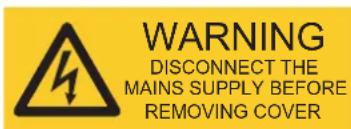
Figure 1-2
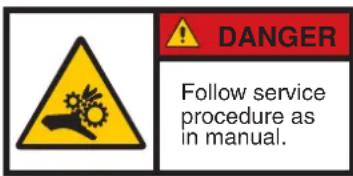
Figure 1-3
1.3 Pictograms and safety symbols in the manual
These pictograms are used in the manual:

General warning or caution. Damage to the machine or personal injury can occur.
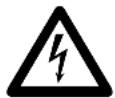
Electrical hazard
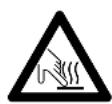
Burning hazard
Remarks, suggestions and advice
1.4 Conventions and definitions
Throughout the document, reference is made to the "left", "right", "front" and "rear" of the machine. Where a component or specific part of the machine is referred to, this is described from the user's viewpoint facing the selection panel.
1.5 Service and technical support
Please contact your dealer for further information on settings, maintenance and/or repair activities that are not dealt with in this manual. Your dealer will be pleased to assist you.
If you contact your dealer, always have the following information at hand:
- model number
- serial number
- software versions
1.6 Machine identification on the exterior of the machine
- Model number
- Voltage
- Frequency
- Power rating
- Serial number
- Water pressure
The identification plate is on the rear of the machine.
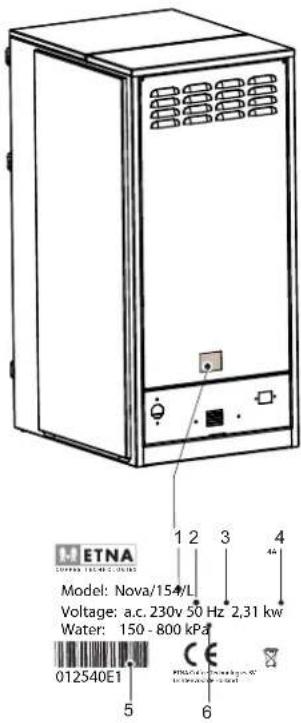
Figure 1-4
1.7 Machine identification inside the machine
- Model number
- Voltage
- Frequency
- Power rating
- Serial number
- Water pressure
The identification plate is on the inside on the left-hand frame plate.
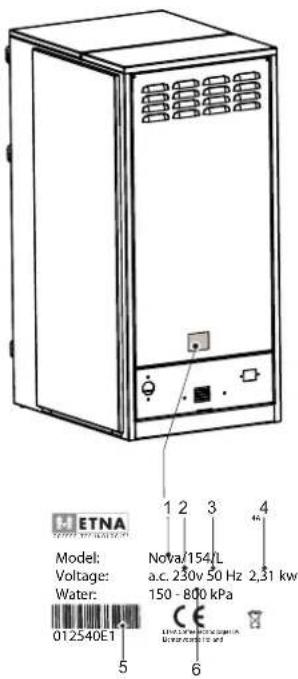
Figure 1-5
1.8 Used machines and the environment

Ask your local authority for information on ways to recycle materials safely and in an environmentally friendly manner.
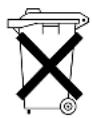
Ask your local authority for information on ways to dispose of materials safely and in an environmentally friendly manner.
1.9 General safety instructions and restrictions
The manufacturer does not accept liability for any damage caused by not (strictly) observing the safety instructions or by carelessness during use and cleaning of the machine and any accessories.
Depending on the specific operating conditions or accessories used, additional safety instructions may apply. Please contact your dealer immediately if you encounter any hazards when using the machine.

The user of the machine is fully responsible at all times for observing locally applicable safety regulations and guidelines.
1.9.1 Operating and cleaning instructions
- All those using and/or cleaning the machine must be familiar with and follow the operating and cleaning instructions closely. The owner must ensure that personnel are informed of the operating and cleaning instructions contained in this manual and that they comply with these regulations and instructions.
- Never change the order in which activities are carried out.
- Always keep the operating and cleaning instructions in the vicinity of the machine.
1.9.2 Icons and instructions
The icons, symbols and instructions attached to the machine form part of the safety instructions. Therefore, they must not be covered or removed. They must be kept within reach and be clearly legible throughout the entire service life of the machine.
- If icons, symbols or instructions are illegible, ring your supplier straightaway to rectify this.
1.9.3 Users
The daily, weekly and monthly maintenance and cleaning activities may only be carried out by users who have received training from the installer or owner of the machine. These individuals will be familiar with the potential risks of opening the machine. Staff who are still in training must be supervised when carrying out cleaning activities. This must be under the responsibility of an authorised user.
1.9.4 Technical specifications
- The technical specifications may not be modified.
1.9.5 Modifications
- Modifications may not be made to the machine (or parts of the machine).
1.9.6 Intended use
The intended use ^1 of the machine is designed exclusively for dispensing beverages as indicated on the selection panel. Use of the machine for any other purpose falls outside the terms of conditions of use. The manufacturer does not accept responsibility for any damage or injury that may result from improper use.
The machine meets current standards and directives.
- The machine may only be used in perfect technical condition for the purposes indicated above.
1.10 Available documentation
The following documentation is available for this machine:
- User manual
- Technical manual
- Parts book
2 DESCRIPTION OF MACHINE
2.1 General description
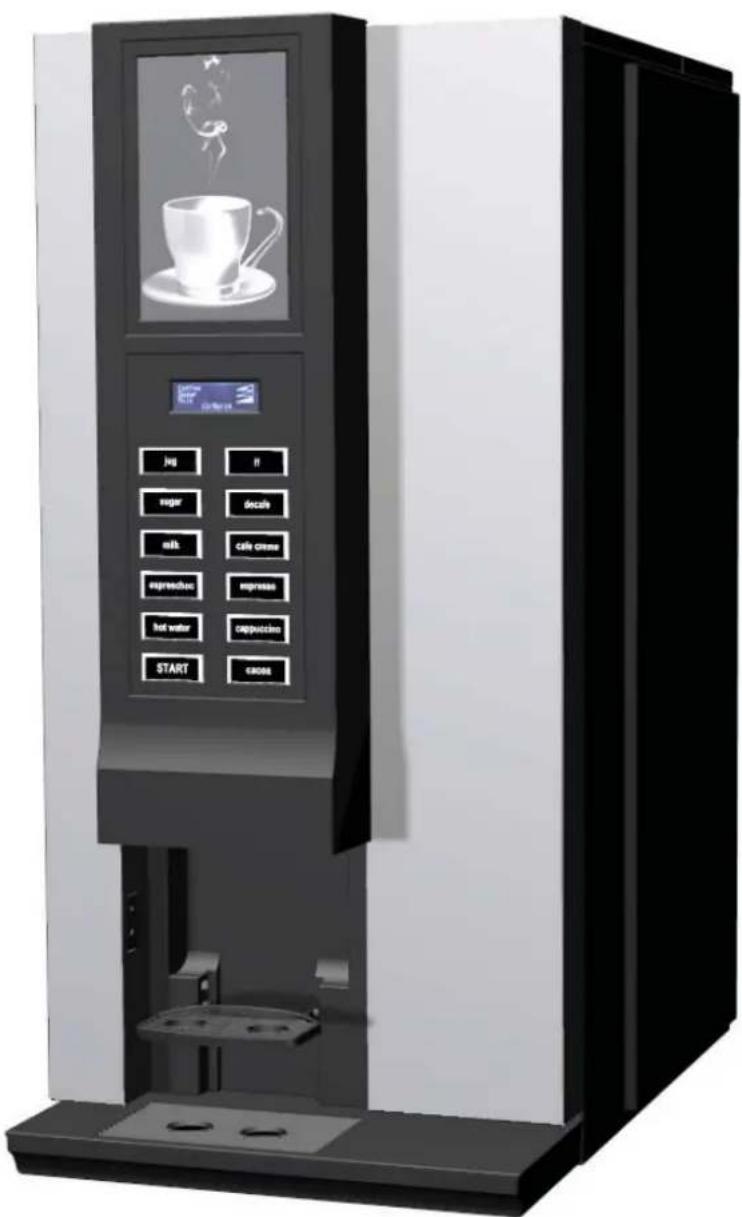
This machine prepares and dispenses various hot drinks.
The drinks are dispensed in the cups intended for this purpose and that are placed on the machine cup stand. The cups must be placed on the cup stand manually.
The display on the machine indicates that:
• a drink can be selected
• a drink is being prepared
- a fault has occurred.
2.2 Main components
2.2.1 Front view
- Window (optional: photo frame)
- Display
- Selection panel
- Cup sensor
- Cup stand (two-sided)
- Drip tray
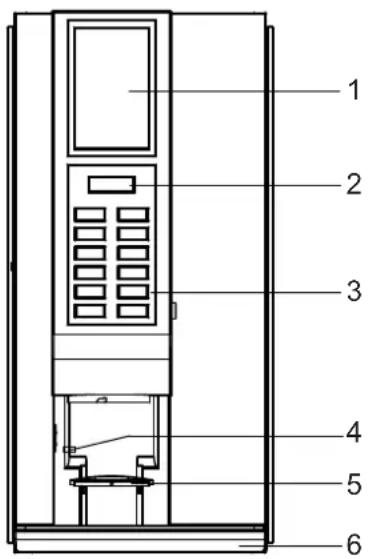
Figure 2-1
2.2.2 Interior view
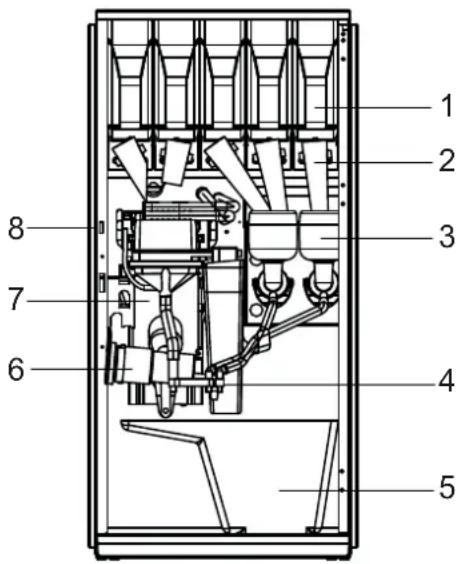
Figure 2-2
- Ingredient containers
- Dispenser nozzle
- Mixer components
- Dispensing holder
- Waste bucket
- Espresso mixer (optional)
- Zuma brewer/tea brewer (brewing group)
- Service switch
2.3 Container lay-out
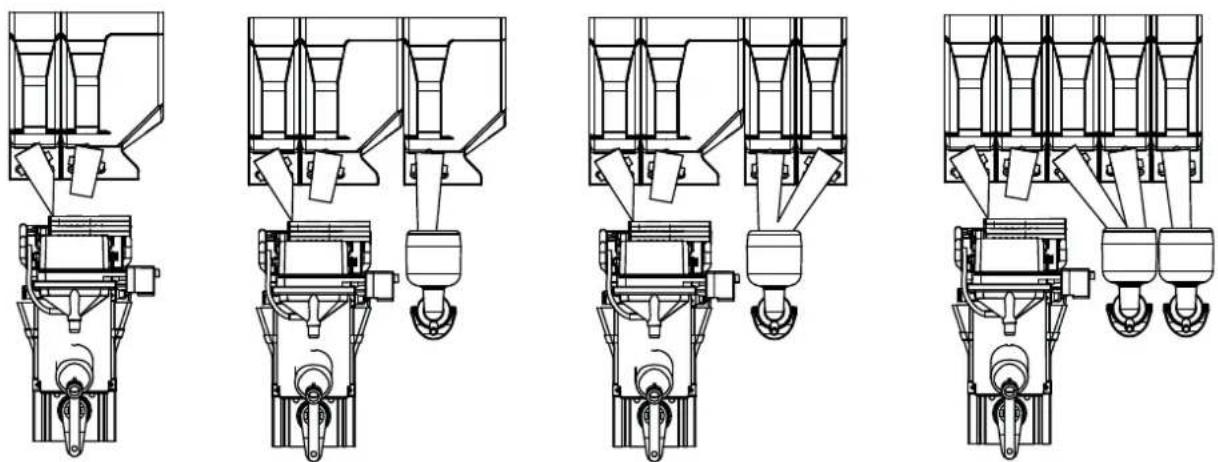
natural_image
Technical line drawings of five different mechanical assembly configurations (no text or symbols)Figure 2-3
The different types are fitted with the following containers.
| Machine Freshbrew container | Instant container |
| Nova FT200 1x 1.8 L1x 3.9 L | |
| Nova FT211 1x 1.8 L1x 3.9 L | 1x 3.9 L |
| Nova FT221 1x 1.8 L1x 3.9 L | 2x 1.8 L |
| Nova FT232 2x 1.8 L 3x 1.8 L |
2.4 Principle of operation
After a selection is made, the drink is prepared and dispensed.
- The water is supplied via the boiler (heated).
- Instant products are dosed from the containers into the mixer and/or the ground coffee is dosed into the brewing group.
- The water and the ingredients are mixed in the mixer or compressed by the brewing group.
- The drink is dispensed through the dispensing pipe into the cup placed on the cup stand.
- The cup stand has two sides; hot water on the left, drinks on the right.
- The start button can be used when a drink has been selected and a cup has been placed.
2.5 Switching ON and OFF
The machine does not have a manual on/off switch. The key switch used to open the door incorporates the on/off switch:
- When the door is opened the machine switches itself off.
- When the door is closed the machine switches itself back on.
2.6 Service key
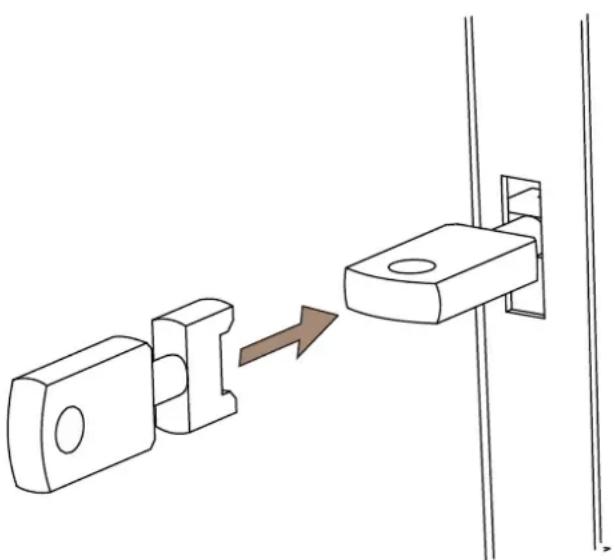
natural_image
Diagram showing a mechanical component being inserted into a bracket, with an arrow indicating the process (no text or symbols present)Figure 2-4
Once the service key has been inserted and turned a quarter turn, the machine is operational for repair and test purposes.

The machine contains rotating and moving parts. Ensure that your fingers do not become trapped when work is carried out.
2.7 Operating the machine
Although the standard model does not include a payment mechanism, the option exists for the machine to be equipped with a coin mechanism (for instructions on how to install the payment mechanism, see the operating instructions included with the mechanism).
2.7.1 Strength control
Select the drink by pressing the button.
The strength can be changed by pressing the selected drink again.
This is also an option when adding items such as sugar and milk, if the machine allows for this.
2.7.2 Selecting jug function

If the jug function is switched on the cup sensor is switched off.
The jug function allows you to select more than one cup at once. This button operates with all available drinks. The procedure for selecting more than one cup is described below.
- Push the cup stand up and put a jug under the dispensing nozzle.
- Use the jug function button and press the desired selection button several times.
- Now operate the MILK and/or SUGAR buttons to obtain the required combination.
- Press the START selection button for the required drink. The jug is filled. Ensure that the jug is large enough for the number of cups selected.
To reduce the number of cups while the machine is dispensing, press the jug function button several times until the required number appears. The machine will stop after the current cup is dispensed.
If the machine is equipped with a coin mechanism and key switch for the jug function, the free dispensing mode is activated by inserting the key in the lock (switch) and turning it to the right.
2.7.3 Stand by
Stand by mode is indicated by the following:
- The buttons are not illuminated.
- The illumination panel or photo frame (optional) is on.
- The Shift button flashes green.
Press any button to bring the machine out of stand by.
3 USE
3.1 Safety instructions - use
- Inspect the machine before use and check for any damage and defects.
Please contact your supplier if there is any damage to the machine. - Please keep all packaging out of reach of children.
- Place the machine in a horizontal position.
- Place the machine somewhere where it can be supervised by trained personnel.
- The machine is not intended for use by people (including children) with a physical, mental or sensory handicap, or with insufficient knowledge and experience to use it without supervision or instruction, until they are monitored by someone who is responsible for their safety.
- Children must be supervised to ensure that they do not play with the machine.
- Protect the machine from water and/or moisture.
- Do not clean the machine using a high pressure water jet.
- Keep the buttons free from dirt and grease, clean them regularly.
- Only use the machine if the lids on the top are closed and all plating has been fitted.
- Never use sharp objects to operate the buttons.
- Only use the cups or jugs that are available at the counter.
- Ensure that the wall socket (with earth connection) and the water connection point remain accessible during use. In case of emergency, the mains plug can then be removed quickly and the water supply can be shut off immediately.
- If the machine is not going to be used for some time, remove the containers, clean the hoses, clean the machine manually, thoroughly clean the mixing chamber, empty the boiler, shut off the water supply and remove the plug from the wall socket. There must not be any water in the machine and components.
- To use the machine after a long period of non-use, first clean the mixing chamber and brewing group thoroughly. Replace the mixing chamber and run the cleaning programme at least three times and prime all the containers before operating the machine.
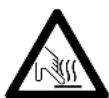
The drink dispensed by the machine is very hot. You may cause burns in the event of spillage.
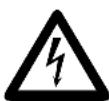
Remove the plug from the wall socket in the event of any danger. Do not pull the plug from the wall socket using the cable.

Disregarding the above instructions can jeopardise the safe use of the machine.
3.2 Refilling containers
The containers hold the ingredients required to prepare drinks. The containers can be refilled as follows (2 methods):
- Open the upper lid and fill the container inside the machine
- Remove the container from the machine and fill.
3.2.1 Filling the container inside the machine
- Open the door of the machine.
- Open the lid on the container that needs refilling. Refill the container with the correct ingredients.
- Close the upper lid.
- If the container was completely empty, the supply will need refilling.
- Hold the container above the waste bucket. Turn the spindle of the container until the ingredient runs out of it.
3.2.2 Filling the ingredient containers outside the machine
The containers hold the ingredients required to prepare drinks.

Ensure that no fingers are trapped when filling the containers.
Make sure that the right ingredient is put in the correct container.

See the label on the inside of the door for an overview of the maintenance functions.
- Open the door of the machine.
- Open the upper lid.
- Lift the container to be filled off the holder and pull it towards you.
- Fill with the desired ingredient.
- Replace the container in the same place in the machine. Ensure that the container's coupling falls into the gear.
- Repeat this procedure for the other ingredient containers.
- Close the upper lid.
- Place a 0.5 L cup under the dispensing nozzle.
- Insert the service key and turn it a quarter turn.
- Press button 0 on the service panel; clean valves, the valves are rinsed with water. Repeat this if necessary.
- Press button 7 on the service panel; reset ingredient counters.
- Turn the service key a quarter turn and remove it.
- Close the machine door.
3.3 Digital photo frame

Please refer to the manuals enclosed for the correct use of the remote control and the digital photo frame.
The USB connection can be seen on the inside of the door on the door plate when the door is opened.
Operating the photo frame
The photo display is operated with the remote control.
The photos can be stored on a memory card (SD, MS, MMC, XD). The photos must be in JPG format.
1 Select Photo in the main menu and press Enter or OK.
The photo browser is shown.
2 Select the directory with the photos that are to be shown.
3 Press Enter or OK.
4 The photos are shown automatically.
Changing photos
1 Select Edit in the main menu and press Enter or OK.
2 The Edit menu is shown.
Select from Copy, Delete or Edit
3 Press the arrow to scroll through the menu.
Press Enter or OK to confirm your selection.
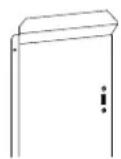
Figure 3-1
4 MAINTENANCE AND CLEANING
Accurate maintenance and in particular careful cleaning are basic conditions for good product quality and smooth operation.
This machine has been developed to enable the owner or licensee to thoroughly clean and maintain it in a relatively short time and at low cost.
First read par. 4.1 before carrying out any maintenance activities on the machine. The maintenance activities described may only be carried out by trained, authorised users under the supervision of trained personnel or the owner.
4.1 Safety instructions - maintenance and cleaning
• See also par. 3.1.
- Carry out the procedures taking into account the hygiene regulations.
• Repairs may only be carried out on the machine by trained service engineers.
- Maintenance work on the electrical system may only be carried out by trained service engineers with a background in electrical engineering.
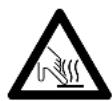
Warning with respect to burns: parts within the machine can be very hot.
- After cleaning or maintenance activities, the machine must not be used until all the removed parts have been correctly reinstalled.
Then inspect and check the inside of the machine:
- The dispenser holder must be aimed at the middle of the cup.
- The ingredient containers must be correctly placed.
- The mixer components must be in the correct position. The waste container must be in the correct position.
- The brewer group must be in the correct position.
4.2 Perishables

The products have been supplied with a use by date. Therefore, the following should be taken into account:
- Comply with the use by date printed on the product packaging.
- Do not use products that are nearing their use by date.
- Replace products whose use by date is past.
- Do not use opened products for longer than the indicated use by date.
- Replace the products when the use by date is up.
- Only use the cleaning agents referred to in the cleaning schedule and follow the instructions on the packaging. See also par. 4.4.
4.3 Service panel
The service panel can be seen when the door is opened. From the service panel you can carry out the following maintenance tasks (if available):
| Button Function | |||||
| 1 Rinse brewing group | |||||
| 2 | R | i | n | s | e |
| 3 | R | i | n | s | e |
| 4 | R | i | n | s | e |
| 5 Open/close brewing group | |||||
| 6 Free/paid drink | |||||
| 7 Reset container counters | |||||
| 8 Read counters | |||||
| 9 Reset waste counter | |||||
| 0 Cleaning valves | |||||
m
m
m
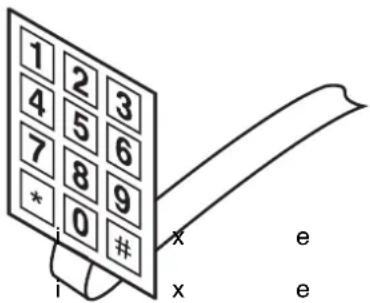
Figure 4-1
e r
e r
e r
4.4 Maintenance
The quality of this product is only guaranteed if the machine receives thorough maintenance on a regular basis. A few vital machine parts are very sensitive to dirt. Use of this machine requires both daily and weekly maintenance.
4.5 Daily maintenance
Carry out the following operations on a daily basis:
- Check the contents of the ingredient containers and refill them if necessary.
- Clean and empty the waste bucket underneath the brewing group.
- Clean and empty the drip tray.
- Rinse the mixers, brewer and valves (at least twice a day).
- Clean the outside of the machine, including the selection panel.
When cleaning, pay attention to the following:
- Clean the machine and parts with a damp, clean cloth or paper tissue.
- Put the cleaned parts straight back in the machine.
- Clean the machine more frequently than specified if necessary; more frequent cleaning will be required when the machine is subject to heavy use.
4.5.1 Checking the ingredient containers
- Open the door.
- Check whether the ingredient containers still contain sufficient ingredients.
- If necessary refill the containers as described in Chapter 3
- Close the door.
4.5.2 Empty waste bucket
- Open the door.
- Remove the waste bucket from the machine and empty it.
- Clean the waste bucket with water.
- Put the waste bucket back again.
- Insert the service key and turn it a quarter turn.
- Press button 9 on the service panel to reset the waste counter to 0.
- Turn the service key a quarter turn and remove it.
- Close the machine door.

Use plastic bags in the waste bucket for hygiene reasons.
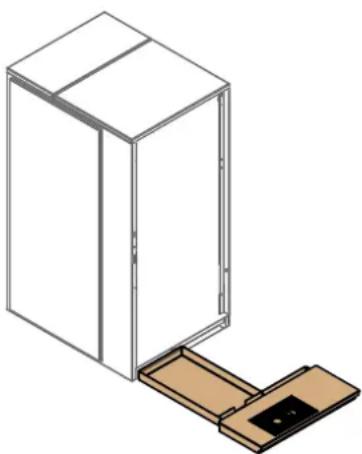
4.5.3 Cleaning drip tray

The drip tray must not be washed in a dishwasher.
- Take the drip tray out of the machine carefully.
- Empty the drip tray and clean it using water.
- Put the drip tray back in the machine.
natural_image
Isometric line drawing of a cabinet with an open door and wooden base (no text or symbols)Figure 4-2
4.5.4 Cleaning mixers and brewer
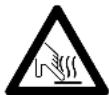
The drink dispensed by the machine is very hot and may cause burns.
- Open the door and insert the service key.
- Place a cup or jug of at least 1.5 L under the dispensing nozzle.
-
Press button 1 on the service panel; rinse brewing group.
-
Select "Daily", press Start.
-
To only rinse the mixers, press button 2, 3 or 4.
-
To rinse the brewing group and/or the mixer(s) several times:
-
Press the jug button (selection panel) to set the number of rinses;
- Press button 1 to rinse the brewing group or buttons 2, 3 or 4 to rinse the relevant mixer(s);
-
The brewing group or mixer(s) is/are now rinsed the required number of times.
-
Turn the service key a quarter turn and remove it.
-
Close the machine door.

Note: ensure that the jug or container is large enough to collect the rinsing water.
4.5.5 Cleaning the brewing group automatically
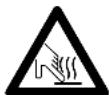
The drink dispensed by the machine is very hot and may cause burns.
- Open the door and insert the service key.
- Place a jug of at least 1.5 L under the dispensing holder.
- Press button 1 on the service panel; rinse brewing group.
- Select "Daily", press Start.
- Turn the service key a quarter turn and remove it.
- Close the machine door.
4.5.6 Cleaning valves

The drink dispensed by the machine is very hot and may cause burns.
- Open the door and insert the service key.
- Place a cup of at least 1.5 L under the dispensing holder.
- Press button 0 on the service panel; clean valves.
- All valves are cleaned.
- Remove the cup.
- Turn the service key a quarter turn and remove it.
- Close the machine door.
- Empty the cup.
4.5.7 Clean the exterior
Clean the outside of the machine. Pay special attention to:
• The selection panel
- The area around the drink dispenser unit.
• The bottom of the door.
4.6 Weekly maintenance
Carry out the following operations on a weekly basis:
- Clean the mixer components (take apart)
- Manually clean the brewer (take apart)
- Clean the espresso mixer (take apart), if available.
4.6.1 Cleaning mixer components
Clean the following components during weekly maintenance:
- Extractors
- Mixing bowls
- Hoses
- Extraction lid

Wash your hands before continuing with this procedure.
- Open the door.
- Remove the closed ingredient containers from the machine. Keep them in a clean and dry place.
- Detach the hoses from the mixing chambers.
- Detach the hoses from the dispensing pipes.
- Remove the dispensing pipes from the dispensing holder.
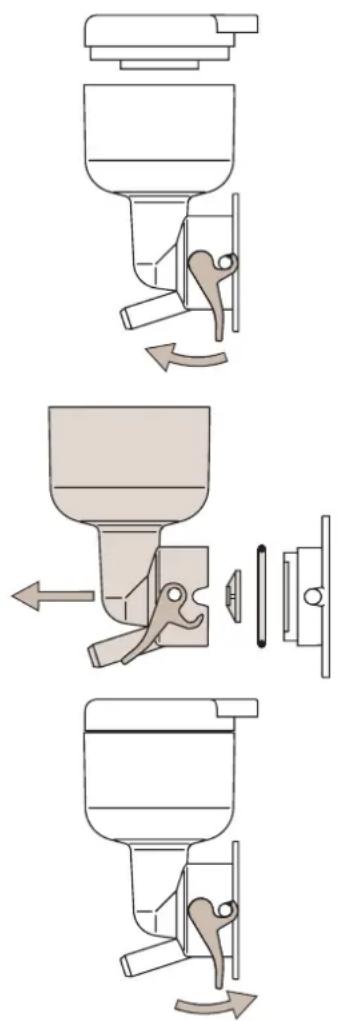
- Release the mixing chamber by pulling the green catch below it forwards.
- Take the mixing chamber out of the machine by carefully pulling the bottom of the chamber towards you.
- Remove the extraction lid from the machine.
- Remove the mixer blade from the axle of the mixer motor. Use the mixing chamber as a hoist to do so.
- Clean all parts in hot water and dry them carefully.
- Clean the immediate vicinity of the mixer in the machine with a damp cloth.
flowchart
graph TD
    A["Top Section"] --> B["Leftmost Column"]
    B --> C["Rightmost Column"]
    C --> D["Bottom Section"]
    D --> E["Leftmost Column"]
    E --> F["Rightmost Column"]
    F --> G["Bottom Section"]
Figure 4-3
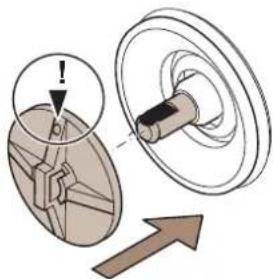
- Put the mixer blade back. Ensure that the marking point on the mixer blade is lined up with the flat section on the engine axle.
- Put the other cleaned parts back and connect the hoses.
The mixing chamber must latch securely in place to prevent leaks. Ensure that the green catch snaps back into place.
- Insert the service key and turn it a quarter turn.
- Place a 1.5 L cup under the dispensing nozzle.
- Press button 0 on the service panel; cleaning valves.
- Check the system for leaks.
- Turn the service key a quarter turn and remove it.
- Close the machine door.
natural_image
Diagram showing a mechanical component with an arrow indicating direction, no text or symbols presentFigure 4-4
natural_image
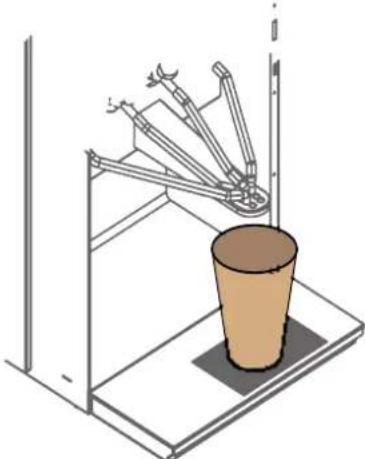
Diagram of a robotic arm handling a cup on a platform, no text or symbols presentFigure 4-5
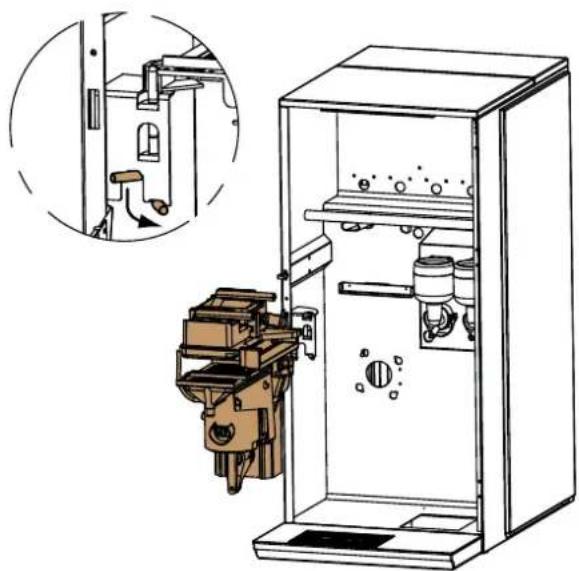
4.6.2 Cleaning the brewing group
Remove the brewing group from the machine:
- Open the door and insert the service key.
- Detach the water supply to the coffee brewing group.
- Detach the water supply to the tea brewing group.
- Press button 5 on the service panel; the brewing group opens.
- Remove the service key.
- Remove the dispensing holder.
- Remove the espresso mixer holder (if available).
- Remove the dispensing nozzle of the coffee brewing group.
- Remove the dispensing nozzle of the tea brewing group.
10.Pull and turn the lock pin downwards. - Lift the brewing group slightly and remove it from the suspension bracket.
- Clean the brewing group.
natural_image
Technical line drawing of a mechanical device inside a cabinet, showing internal components and a close-up inset (no text or symbols)Figure 4-6 Removing the brewing group.
Cleaning the brewing group:

The brewing group must not be washed in a dishwasher.

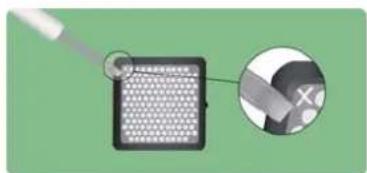
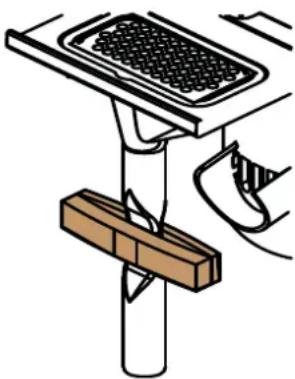
The filter may be cleaned and re-used a maximum of three times. After that it must be thrown away. Mark the filter with a cross on the rear each time it is re-used.
natural_image
Illustration of a device with a magnified inset showing a close-up of its screen (no text or symbols)Figure 4-7 Cross (on the rear)
natural_image
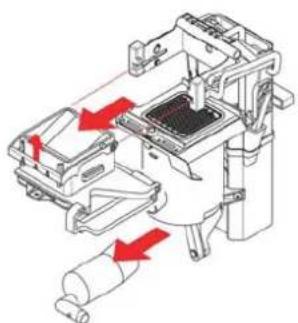
Mechanical assembly diagram showing internal components with red arrows indicating motion or force directions (no text or symbols present)Figure 4-8
natural_image
Technical line drawing of a mechanical device with a central grid component and red directional arrows indicating motion (no text or symbols)Figure 4-9
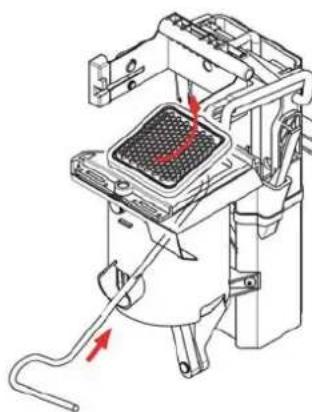
- Remove the mixing funnel for coffee and tea.
- Clean the mixing funnel using hot water.
- Remove the filters from the brewing group; put the tool in the cylinder and push the filter up.
- Clean the filters with cleaning agent and hot water, this takes at least 30 min.
- Clean the other parts of the brewing group with a damp cloth if they are dirty.
- Put the filters back.
- Put the brewing group back together again. Ensure that the wiper arm is between the drive arms.
Replace the brewing group in the machine:
- Hang the brewing group in the suspension bracket.
- Pull and turn the lock pin upwards so that the brewing group is disabled.
- Fit the dispensing nozzle of the coffee brewing group.
- Fit the dispensing nozzle of the tea brewing group.
- Insert the espresso mixer holder (if available).
- Insert the dispensing holder.
- Insert the service key.
- Press button 5; repeat until the brewing group is completely closed.
- Attach the water supply to the coffee brewing group.
- Attach the water supply to the tea brewing group.
- Remove the service key.
- Close the door.

The brewing group will only be fully in position when the brewing group is closed.
4.6.3 Cleaning the espresso mixer
natural_image
Technical line drawing of a mechanical device with internal components and directional arrows indicating motion (no text or symbols)Figure 4-10 Removing the espresso mixer
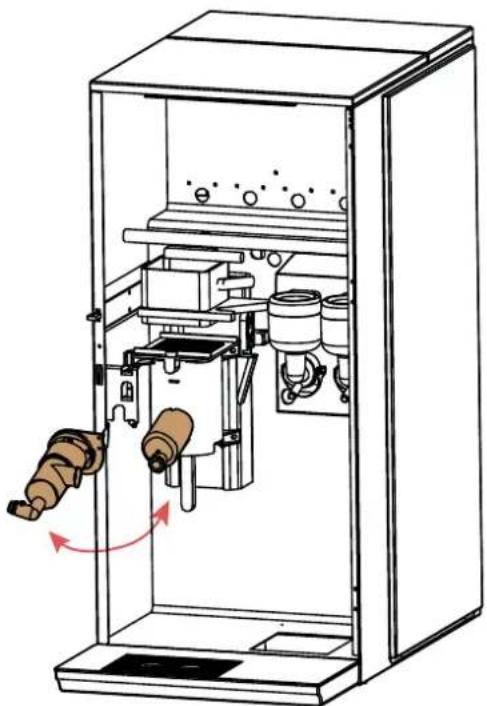
- Open the door.
- Remove the dispensing holder from the espresso mixer.
- Disconnect the espresso mixer from the brewing group outlet.
- Detach the mixer chamber from the holder by rotating it towards you.
- Clean the parts in hot water and dry them carefully.
- Fit the cleaned parts and connect the hose.
- Switch on the supply with the service key and rinse by pressing button 1 on the service panel. Check for leaks. (The funnel can be cleaned in a dishwasher.)
4.7 Monthly maintenance
Carry out the following operations on a monthly basis:
- Clean the brewer manually (with prescribed cleaning agent)
4.7.1 Cleaning the brewing group monthly

Only use the sachets specified by ETNA. Other cleaning agents can affect the brewing group construction.
- Open the door and insert the service key.
- Place a jug (of at least 1.5 L) under the dispensing holder.
- Press button 1 on the service panel; rinse brewing group.
- Select "Monthly", press Start.
- Empty a cleaning sachet into the mixing funnel for the coffee as well as the tea.
- Fit a clip on the discharge pipe of the tea mixing funnel.
- Press START.
- Once you hear the audio signal (after 5 min.), remove the clip from the discharge pipe.
- Press START.
- Turn the service key a quarter turn and remove it.
- Close the machine door.
- Wait until the machine is ready.
- Clean the mixer components; see para. 4.6.1.
natural_image
Illustration of a grater with a wooden handle and a foot, no text or symbols present4.8 Maintenance overview
The labels with an overview of the maintenance to be carried out have been stuck to the inside of the door.
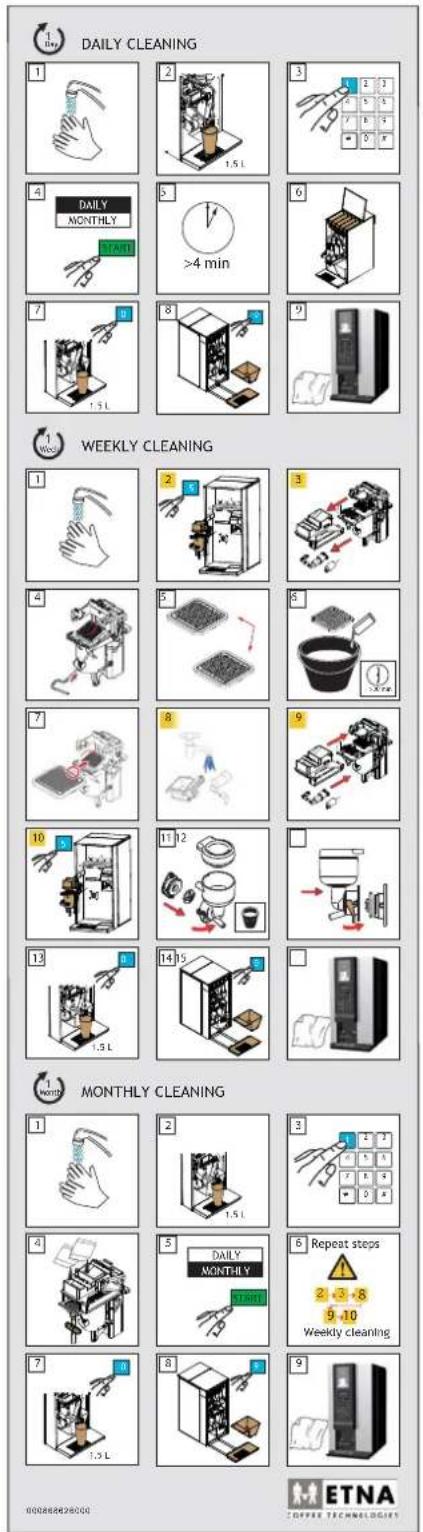
Figure 4-11
5 RESOLVING PROBLEMS
5.1 LCD display on the selection panel
If faults occur in the machine, the LCD display on the selection panel will display a fault message.
5.1.1 Fault messages
Despite taking all precautionary measures, faults may occur in the machine. In this case, a fault message is displayed. The table below shows a number of faults that could occur and their causes and remedies.
| Fault message Cause Remedy | ||
| Fill container x Container x is empty | Fill the container and reset the | fault message, see Filling containers |
| Empty waste bucket The waste bucket | bucket is full Empty waste bucket and clean it, see Emptying waste bucket | |
| Rinse brewing group Rinse the brewing group, see | Cleaning the brewing group automatically | |
| Cleaning the brewing group Cleaning the brewing group | manually, see Cleaning the brewing group | |
| Empty drip tray The drip tray is full | Empty drip tray, see Cleaning drip tray | |
| Exact change | Not enough change in money changer | Pay with exact change |
| Drink switched off | Selected drink not available | Contact your supplier |
| Replace lime scale filter | Filter has exceeded its service life | Replace the filter |
| Boiler is heating up | Boiler temperature is too low | Wait until the boiler has heated up |
| No water | Water level too low | Check the machine's water supply |
5.1.2 Selection panel in programming mode
When the programming mode is used, the selection panel has the following functions:
-
- or -, these buttons are used to navigate the menu, or to increase or decrease values.
- START, this button confirms the value that is set.
-
, (on the service panel) this button is used to navigate back through the menu.
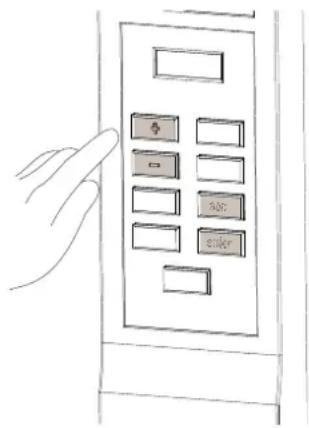
Figure 5-1
5.1.3 User menu (Operator)
Press # on the service panel and enter the PIN code.
The standard PIN code for the user menu is 4321.
| Menu subject Description | |
| Beverage counters - | reading the counter settings per drink- resetting the counter settings |
| Time & date - changing time | |
| Temperature - changing temperature (set water default 100°C, coffee water default 90°C, range 80-100°C) | |
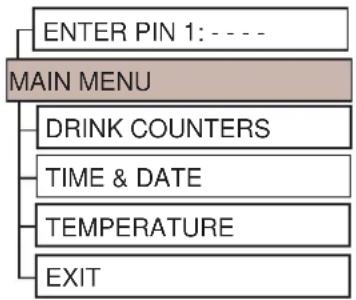
flowchart
graph TD
    A["ENTER PIN 1: ----"] --> B["MAIN MENU"]
    B --> C["DRINK COUNTERS"]
    C --> D["TIME & DATE"]
    D --> E["TEMPERATURE"]
    E --> F["EXIT"]
Figure 5-2
6 TECHNICAL SPECIFICATIONS
6.1 Electrical system
Refer to the machine type place for the correct configuration of your machine, see Chapter 1: Machine Identification.
| Description Value | |
| Main voltage 230 V | |
| Frequency 50 Hz | |
| Capacity 2.31 kW | |
| Fuse 16 A |
6.2 Water system
| Description | Value |
| Water connection G 3/4" - outer ring | |
| Minimum water pressure 1.5 bar (150 kPa) | |
| Maximum permitted water pressure | 8 bar (800 kPa) ^1 |
- It the pressure is higher, a pressure reducer must be installed.
6.3 Sound level
| Description Value | |
| In operation max. 70 dB(A) |
Measurements according to DIN 45635, with normal use.
6.4 Ambient conditions
| Description | Value |
| Ambient temperature 5 - 40 °C |

Never place the machine in a room in which the temperature may drop below 0 °C. This is to keep the water in the machine from freezing.
6.5 Dimensions and weight
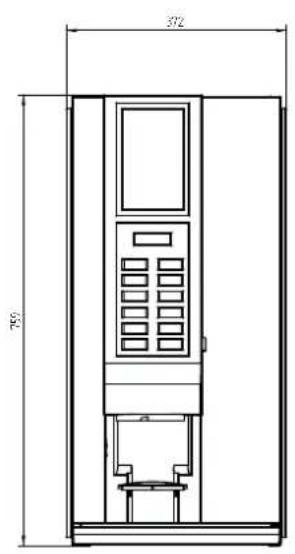
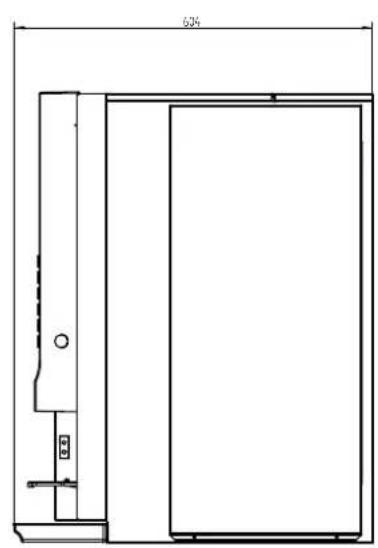
natural_image
Technical line drawing of a door frame with a 634mm height dimension (no text or symbols)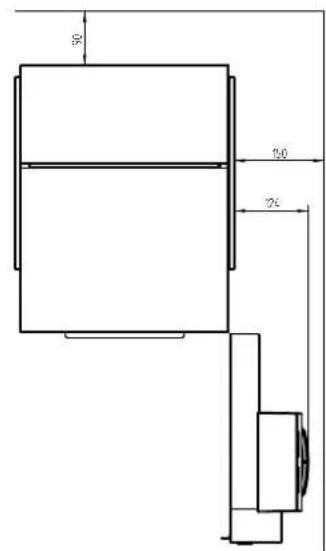
Figure 6-1
| Description | Value |
| Height | 759 |
| Width | 372 |
| Depth 604 mm | |
| Weight when empty 38 kg | |
| Weight when full 42.5 kg |
- Instruction for use Nova freshbrew FT
- CE
- CONTENTS
- INTRODUCTION 5
- DESCRIPTION OF MACHINE 10
- USE 15
- Digital photo frame....17
- MAINTENANCE AND CLEANING 18
- RESOLVING PROBLEMS 29
- TECHNICAL SPECIFICATIONS.... 31
- INTRODUCTION
- This user manual
- Pictograms and safety symbols on the machine
- Pictograms and safety symbols in the manual
- Conventions and definitions
- Service and technical support
- Machine identification on the exterior of the machine
- Machine identification inside the machine
- Used machines and the environment
- General safety instructions and restrictions
- Operating and cleaning instructions
- Icons and instructions
- Users
- Technical specifications
- Modifications
- Intended use
- Available documentation
- DESCRIPTION OF MACHINE
- General description
- Main components
- Front view
- Interior view
- Principle of operation
- Switching ON and OFF
- Service key
- Operating the machine
- Strength control
- Selecting jug function
- Stand by
- USE
- Safety instructions - use
- Refilling containers
- Filling the container inside the machine
- Filling the ingredient containers outside the machine
- Digital photo frame
- Operating the photo frame
- Changing photos
- MAINTENANCE AND CLEANING
- Safety instructions - maintenance and cleaning
- Perishables
- Service panel
- Maintenance
- Daily maintenance
- Checking the ingredient containers
- Empty waste bucket
- Cleaning drip tray
- Cleaning mixers and brewer
- Cleaning the brewing group automatically
- Cleaning valves
- Clean the exterior
- Weekly maintenance
- Cleaning mixer components
- Cleaning the brewing group
- Cleaning the espresso mixer
- Monthly maintenance
- Cleaning the brewing group monthly
- Maintenance overview
- RESOLVING PROBLEMS
- LCD display on the selection panel
- Fault messages
- Selection panel in programming mode
- , (on the service panel) this button is used to navigate back through the menu.
- User menu (Operator)
- TECHNICAL SPECIFICATIONS
- Electrical system
- Water system
- Sound level
- Ambient conditions
- Dimensions and weight
Brand : ETNA
Model : Nova freshbrew FT
Category : Coffee maker