ABUS

FUMO50025 - Wi-Fi repeater ABUS - Free user manual and instructions

Find the device manual for free FUMO50025 ABUS in PDF.

📄 16 pages English EN Download 💬 AI Question ⚙️ Specs
Notice ABUS FUMO50025 - page 11
View the manual : Deutsch DE English EN
Pick your language and provide your email: we'll send you a specifically translated version.
Product TypeWi-Fi Repeater
BrandABUS
ModelFUMO50025
Dimensions (approx)100 x 60 x 30 mm
Weight (approx)100 g
Power Supply100-240 V AC, 50/60 Hz, direct plug-in
Power Consumption< 10 W
Wi-Fi StandardsIEEE 802.11 b/g/n/ac
Frequency Bands2.4 GHz & 5 GHz
Maximum Data RateUp to 1200 Mbps (2.4 GHz: 300 Mbps, 5 GHz: 867 Mbps)
FunctionsRange extension, WPS push-button, WPA2 security, LED indicators
Antenna TypeInternal antennas
Interface1x Gigabit Ethernet port (for wired connection)
Operating Temperature0°C to 40°C
Operating Humidity< 90% (non-condensing)
MaintenanceClean with a soft, dry cloth; do not use liquids
SafetyUse in dry indoor environment only; do not cover; ensure adequate ventilation
Spare Parts & RepairabilityNot user-serviceable; for repair contact ABUS support
Package ContentsWi-Fi Repeater, Quick Start Guide

Frequently Asked Questions - FUMO50025 ABUS

How do I set up my ABUS FUMO50025 Wi-Fi Repeater?
What is the default SSID and password for the FUMO50025?
Can I use the FUMO50025 with any router?
How do I reset the ABUS FUMO50025 to factory settings?
Why is my Wi-Fi connection slow after installing the repeater?
How do I update the firmware on my FUMO50025?
What is the effective range of the FUMO50025?
Does the FUMO50025 support WPA3 encryption?
How do I know if the repeater is working properly?
Can I use the FUMO50025 as an access point instead of a repeater?

User questions about FUMO50025 ABUS

0 question about this device. Answer the ones you know or ask your own.

Ask a new question about this device

The email remains private: it is only used to notify you if someone responds to your question.

No questions yet. Be the first to ask one.

Download the instructions for your Wi-Fi repeater in PDF format for free! Find your manual FUMO50025 - ABUS and take your electronic device back in hand. On this page are published all the documents necessary for the use of your device. FUMO50025 by ABUS.

USER MANUAL FUMO50025 ABUS

natural_image Line drawing of a hand inserting a component into a device panel (no text or symbols)
natural_image Line drawing of a hand inserting a device into a washing machine (no text or symbols)
natural_image Front view of a mobile phone with keypad and display screen (no text or symbols)

VARIANTE 1

natural_image Diagram of an electronic device showing internal circuitry and a labeled panel (no readable text or symbols)
text_image Add User to the Home Add User to the Home

Wählen Sie „Start“.

4

ABUS FUMO50025 - VARIANTE 1 - 1

text_image File Edit File Edit View File Edit View File Edit View File Edit View File Edit View File Edit View File Edit View File Edit View File Edit View File Edit View File Edit View File Edit View File Edit View File Edit View File Edit View File Edit View File Edit View File Edit View File Edit View File Edit View File Edit View File Edit View File Edit View File Edit View File Edit View File Edit Review File Edit Review File Edit Review File Edit Review File Edit Review File Edit Review File Edit Review File Edit Review File Edit Review File Edit Review File Edit Review File Edit Review File Edit Review File Edit Review File Edit Review File Edit Review File Edit Review File Edit Review File Edit Review File Edit Review File Edit Review File Edit Review File Edit Review File Edit Review File Edit Review File Edit View
text_image COMPLIANCE | LCK | LAM | Name: LAM-01 Page: Recovery Mode: Default Characterize Edit User Abus

7

ABUS FUMO50025 - VARIANTE 1 - 2

natural_image Diagram of an electronic device showing internal circuit board and labeled components (no readable text or symbols)

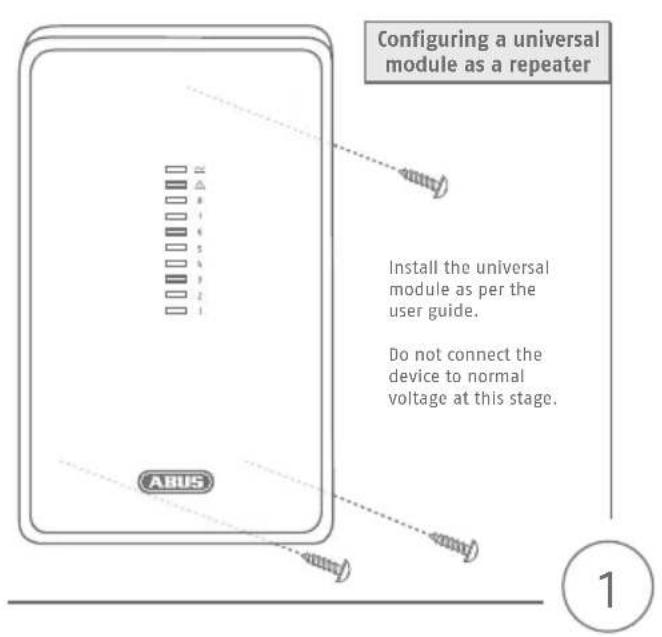
Configuring a universal module as a repeater

abus.com
ABUS FUMO50025 - Configuring a universal module as a repeater - 1

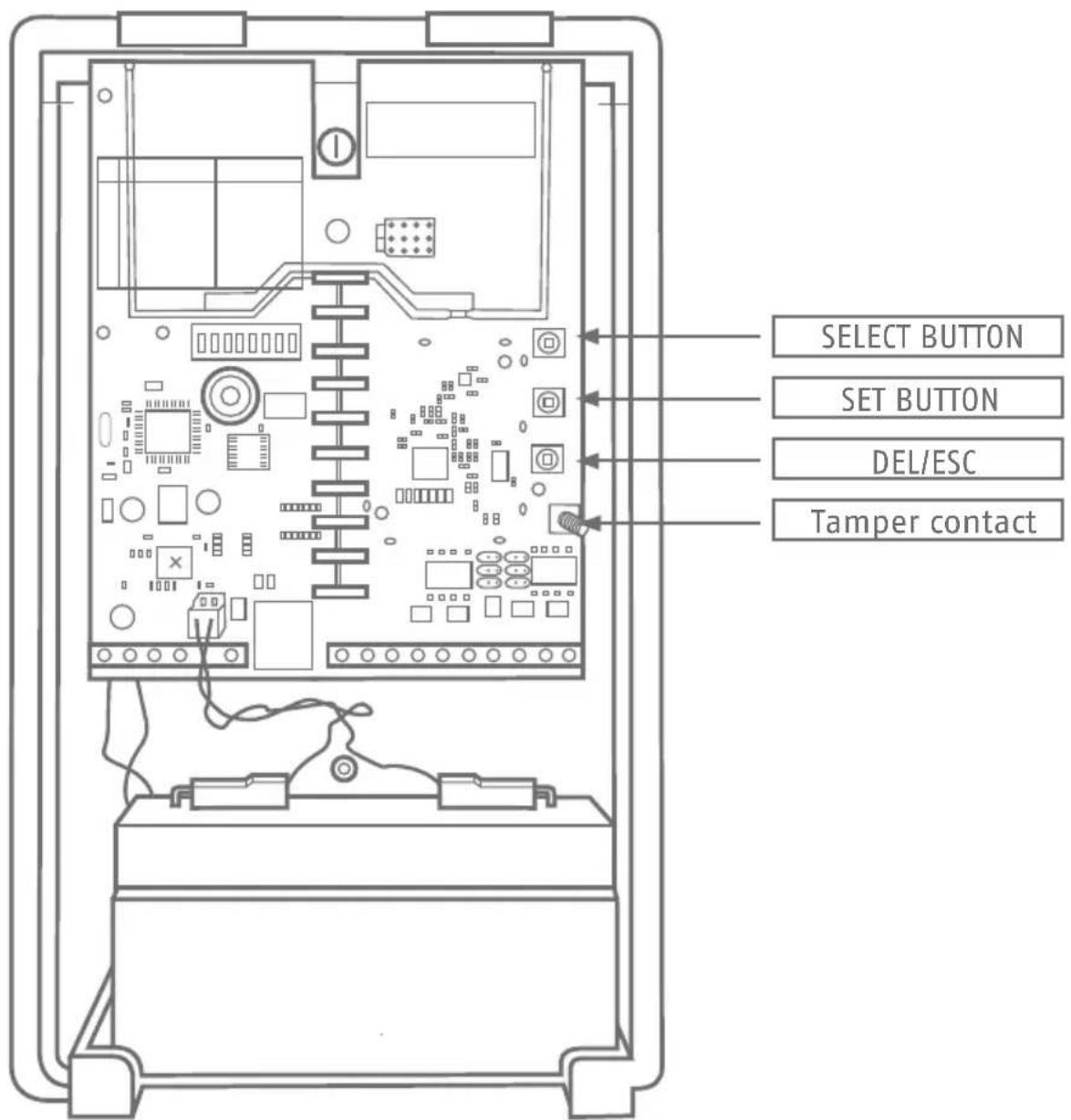
text_image SELECT BUTTON SET BUTTON DEL/ESC Tamper contact

ABUS FUMO50025 - Configuring a universal module as a repeater - 2

text_image Configuring a universal module as a repeater Install the universal module as per the user guide. Do not connect the device to normal voltage at this stage. ABUS 1

ABUS FUMO50025 - Configuring a universal module as a repeater - 3

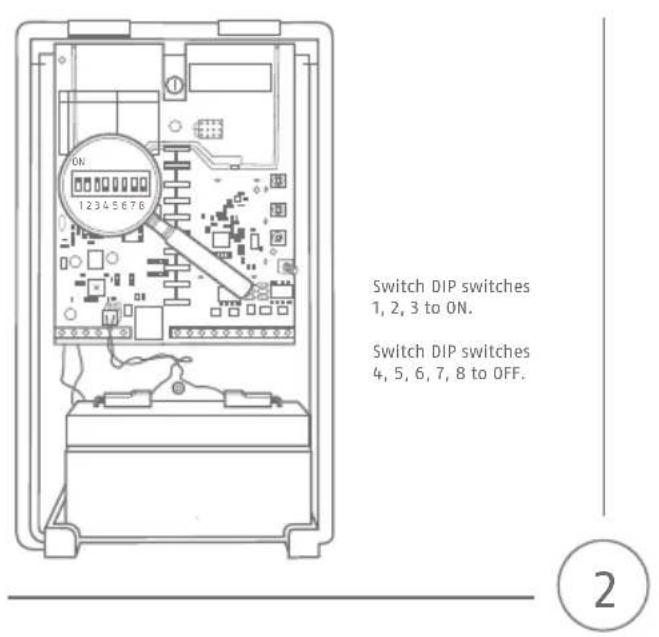
text_image ON 1 2 3 4 5 6 7 8 Switch DIP switches 1, 2, 3 to ON. Switch DIP switches 4, 5, 6, 7, 8 to OFF.

ABUS FUMO50025 - Configuring a universal module as a repeater - 4

text_image Connect the device to normal voltage. The red and green LEDs will light up.

ABUS FUMO50025 - Configuring a universal module as a repeater - 5

text_image Press the 'SELECT' button until the 7th LED from below lights up.

ABUS FUMO50025 - Configuring a universal module as a repeater - 6

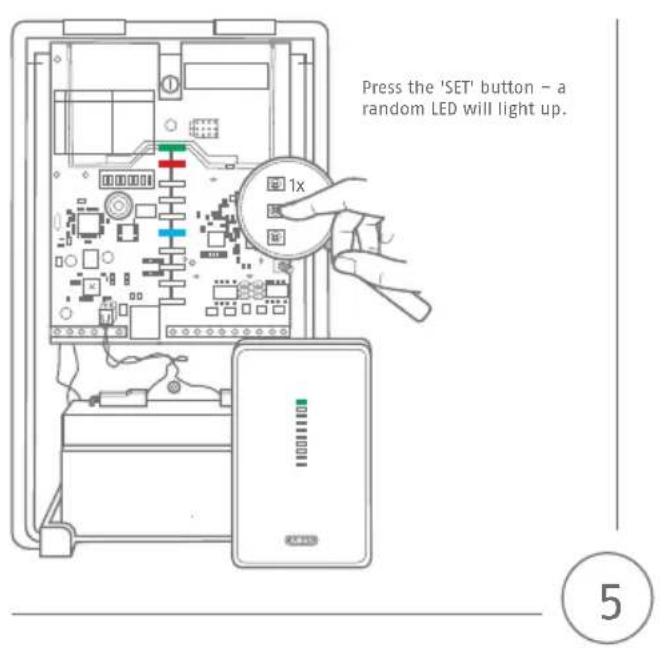
text_image Press the 'SET' button - a random LED will light up. 1x 5

ABUS FUMO50025 - Configuring a universal module as a repeater - 7

text_image Press the 'SELECT' button until the fi rst LED from below lights up. 6

ABUS FUMO50025 - Configuring a universal module as a repeater - 8

text_image Press the 'SET' button - two beeps will be heard and the 7th LED from below lights up. 1x 2x BEEP! BEEP!

7

ABUS FUMO50025 - Configuring a universal module as a repeater - 9

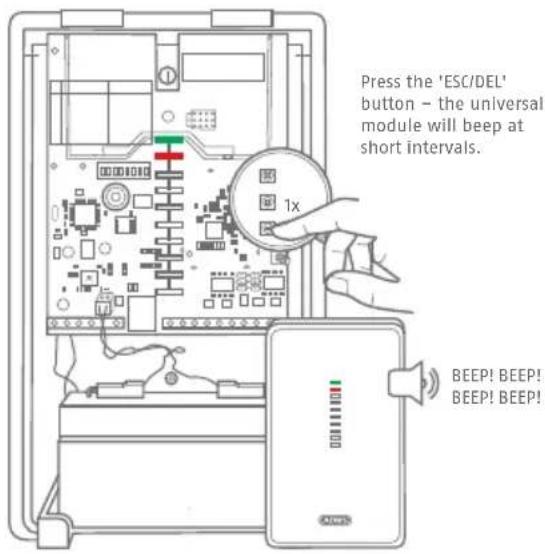
text_image Press the 'ESC/DEL' button – the universal module will beep at short intervals. 1x BEEP! BEEP! BEEP! BEEP!

8

ABUS FUMO50025 - Configuring a universal module as a repeater - 10

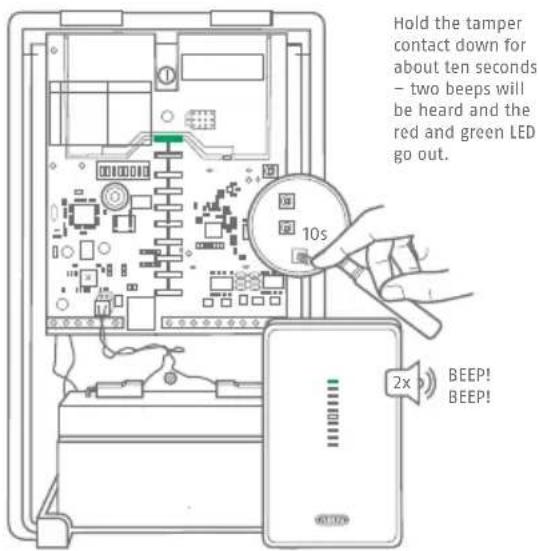
text_image Hold the tamper contact down for about ten seconds – two beeps will be heard and the red and green LED go out. 10s 2x BEEP! BEEP!

Hold the tamper contact down for about ten seconds – two beeps will be heard and the red and green LED go out.
ABUS FUMO50025 - Configuring a universal module as a repeater - 11

text_image Technical diagram of an electrical enclosure with labeled components and a warning label in Chinese.

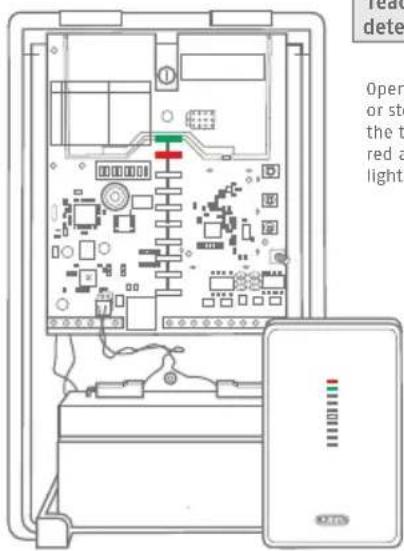
Teaching-in the wireless detector on the repeater
Open the housing cover or stop holding down the tamper contact. The red and green LEDs will light up.

9
ABUS FUMO50025 - Configuring a universal module as a repeater - 12

text_image Press the "SELECT" button until the first LED from below lights up

Press the 'SELECT' button until the first LED from below lights up

ABUS FUMO50025 - Configuring a universal module as a repeater - 13

text_image Diagram of an electrical enclosure with labeled components and a magnified circular component showing 1x voltage measurement.

Press the 'SET' button. If a wireless detector has yet to be taught-in, none of the LEDs will light up.
If wireless detectors have already been taught-in, this will be indicated by the flashing of the LED corresponding to the relevant channel (1-8).

2

3
ABUS FUMO50025 - Configuring a universal module as a repeater - 14

natural_image Line drawing of a hand inserting a component into a device panel (no text or symbols)

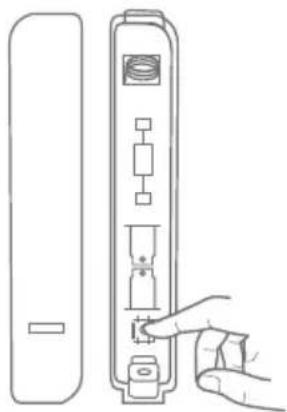
Trigger the tamper contact of the detector or send a signal from the detector.

Once the signal has been received, the universal module will assign a new channel to the detector in question.

The LED corresponding to that channel will start to flash. Once the detector has been taught-in successfully, the universal module will beep twice.

Repeat step 2.4 to teach-in additional detectors.

ABUS FUMO50025 - Configuring a universal module as a repeater - 15

natural_image Line drawing of a hand inserting a device into a machine (no text or symbols)

Please note that the detectors, which you have learned in the WAM, have also to be taught in the Secvest.

4
ABUS FUMO50025 - Configuring a universal module as a repeater - 16

text_image Once all detected have been tau press the 'ESC button twice a universal mod will beep at si intervals. BEEP! BEEP!

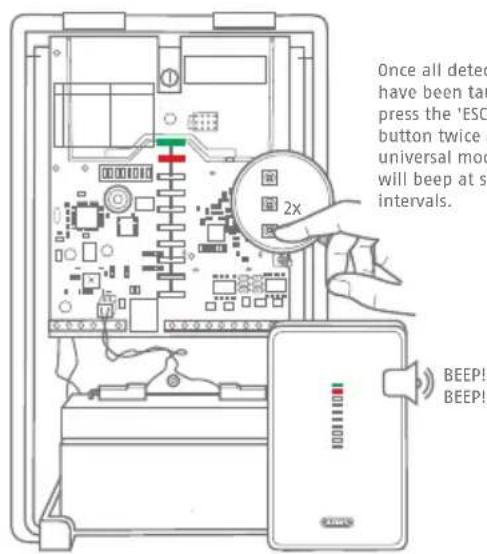
Once all detectors have been taught-in, press the 'ESC/DEL' button twice and the universal module will beep at short intervals.

6
ABUS FUMO50025 - Configuring a universal module as a repeater - 17

text_image Hold the tamper contact down for about ten seconds - two beeps will be heard. 10s 2x BEEP! BEEP!

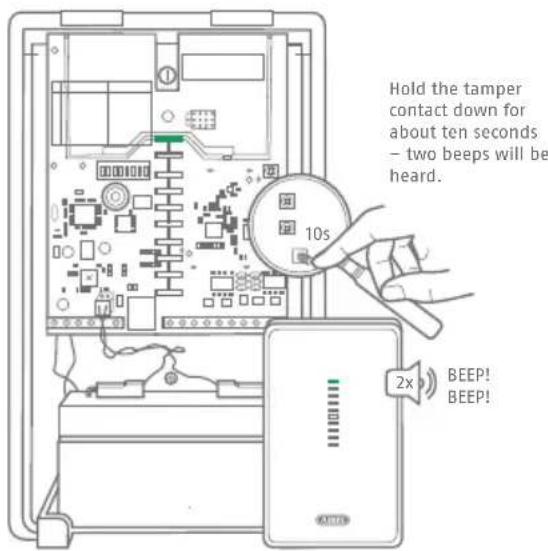
Hold the tamper contact down for about ten seconds – two beeps will be heard.

5

7

Teaching-in the universal module on the SECVEST alarm panel

ABUS FUMO50025 - Configuring a universal module as a repeater - 18

natural_image Front view of a mobile phone control panel with keypad and display (no text or symbols)

OPTION 1

Teaching-in on the SECVEST panel:

Select a storage location with available space and confirm your choice by pressing 'Select'.

Trigger the tamper contact of the universal module – the alarm panel will audibly confirm receipt of the message.
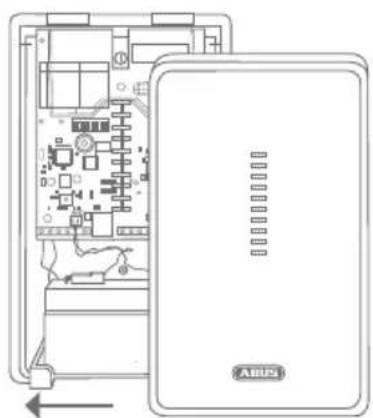
ABUS FUMO50025 - OPTION 1 - 1

natural_image Diagram of an electronic device showing internal circuitry and a labeled panel (no text or symbols beyond label)

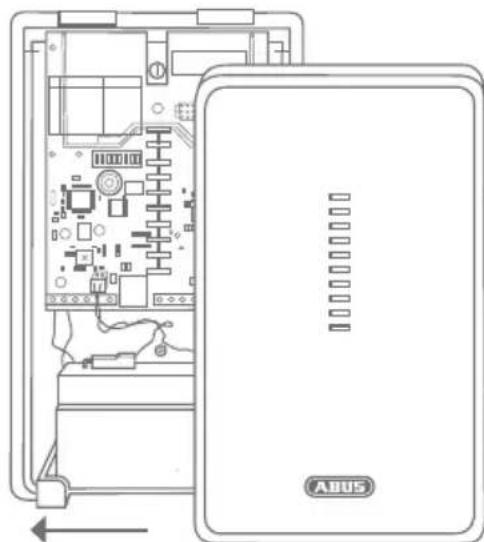
Close the universal module housing and exit installer mode.

1

2

OPTION 2

Teaching-in via the SECVEST web interface (FW Version 2.00.00 or higher)
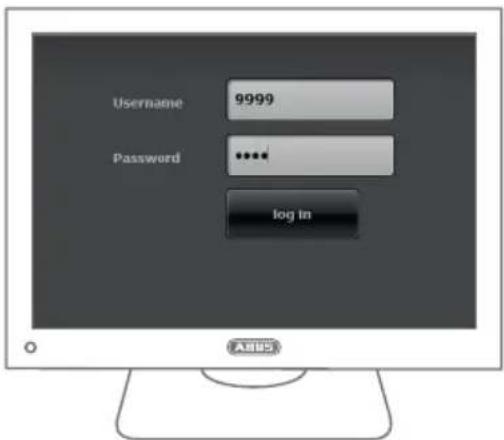
ABUS FUMO50025 - OPTION 2 - 1

text_image Username 9999 Password ***** log in ABSS

Access the SECVEST alarm panel web interface and log in using the installer login details.

ABUS FUMO50025 - OPTION 2 - 2

text_image File Edit IP Address Software Devices Word Address Control Devices Language Manager Smart Desktop Phone Web Server Module Cloud Links Logic and Access Windows Desktop PlayUp PlayDown PlayUp PlayDown PlayUp PlayDown PlayUp ASUS

Select -> Components -> Universal Module

2

ABUS FUMO50025 - OPTION 2 - 3

text_image TRE Design & Accessory Modems Member 1 Member 2 Member 3 Member 4 Member 5 Member 6 Member 7 Member 8 Abus

find a storage location with available space and click on it to select it.
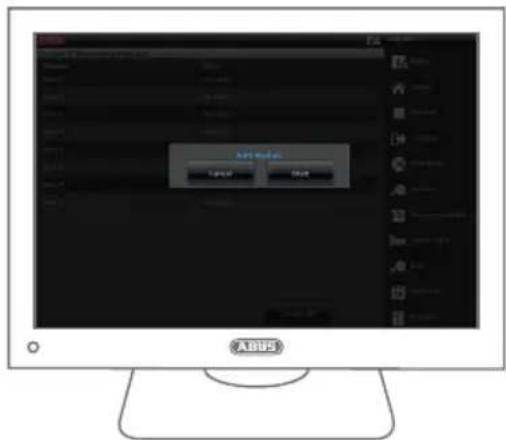
ABUS FUMO50025 - OPTION 2 - 4

text_image Add Model Cancel Cancel

Select 'Start'.

4

ABUS FUMO50025 - OPTION 2 - 5

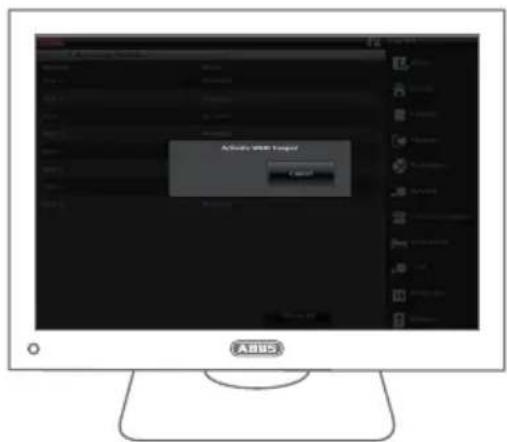
text_image Active User Support Cancel

Trigger the tamper contact of the universal module.
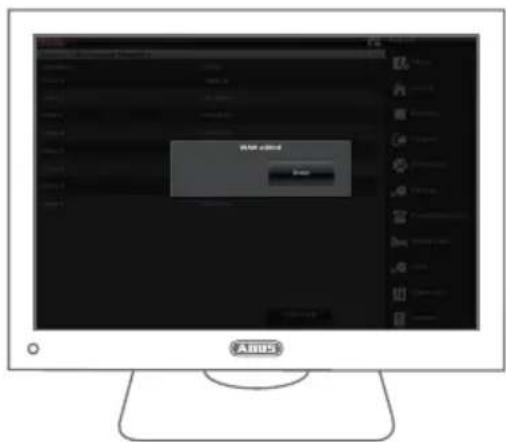
ABUS FUMO50025 - OPTION 2 - 6

text_image MOS installed USB

Once the teaching In has been completed successfully, the message 'Universal Module Added' will appear. Confirm by pressing 'Finish'.

6
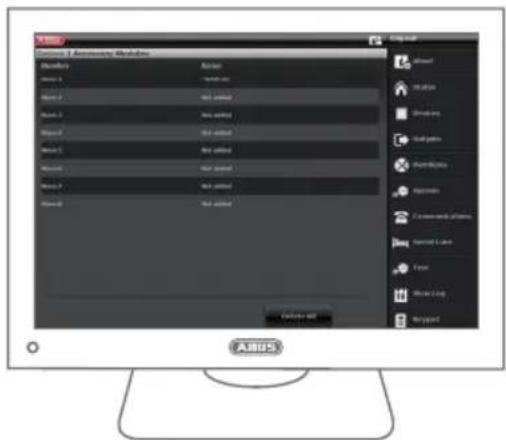
ABUS FUMO50025 - OPTION 2 - 7

text_image ARIUS Options 2 Accessing Modules Arius Name 1 Name 2 Name 3 Name 4 Name 5 Name 6 Name 7 Name 8 Name 9 Name 10 Name 11 Name 12 Name 13 Name 14 Name 15 Name 16 Name 17 Name 18 Name 19 Name 20 Name 21 Name 22 Name 23 Name 24 Name 25 Name 26 Name 27 Name 28 Name 29 Name 30 Name 31 Name 32 Name 33 Name 34 Name 35 Name 36 Name 37 Name 38 Name 39 Name 40 Name 41 Name 42 Name 43 Name 44 Name 45 Name 46 Name 47 Name 48 Name 49 Name 50 Name 51 Name 52 Name 53 Name 54 Name 55 Name 56 Name 57 Name 58 Name 59 Name 60 Name 61 Name 62 Name 63 Name 64 Name 65 Name 66 Name 67 Name 68 Name 69 Name 70 Name 71 Name 72 Name 73 Name 74 Name 75 Name 76 Name 77 Name 78 Name 79 Name 80 Name 81 Name 82 Name 83 Name 84 Name 85 Name 86 Name 87 Name 88 Name 89 Name 90 Name 91 Name 92 Name 93 Name 94 Name 95 Name 96 Name 97 Name 98 Name 99 None

The universal module that has been taught in successfully will appear as 'Universal Module 01'
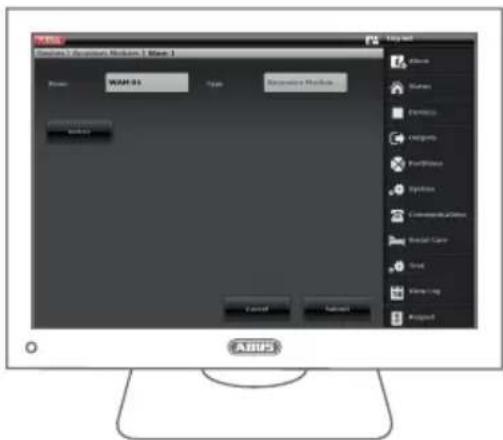
ABUS FUMO50025 - OPTION 2 - 8

text_image WARI Award 01 Award 02 Power Type Executive Module Launch Cancel Send Event Log link Alkara Status Performance Comptors Port/Winbox Systems Commercial Digital Medical Center Craft Inter-Link Proposed ASRS

Manage the universal module type by clicking on the universal module that you just added. The universal module name can also be changed in this way.

8

ABUS FUMO50025 - OPTION 2 - 9

text_image Accessories Modules - Windows Access: 100% 75% Access: 100% 75% Accessories Modules Cancel Access Accessories Modules Accessories Modules Accessories Modules Accessories Modules Accessories Modules Accessories Modules Accessories Modules Accessories Modules Accessories Modules Accessories Modules Accessories Modules Accessories Modules Accessories Modules Accessories Modules Accessories Modules Accessories Modules Accessories Modules Accessories Modules Accessories Modules Accessories Modules Accessories Modules Accessories Modules Accessories Modules Accessories Modules Accessories Modules Accessories Module

7

ABUS FUMO50025 - OPTION 2 - 10

natural_image Diagram of an electronic device showing internal circuit board and labeled components (no readable text or symbols)

Close the universal module housing.Select 'Apply'.

10
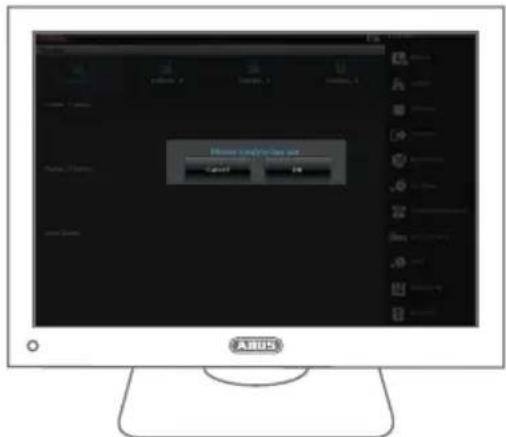
ABUS FUMO50025 - OPTION 2 - 11

text_image Add to the new user Cancel OK

Select 'Log out' to exit installer mode.

Notes:

The universal module is not compatible with components from the Secvest portfolio that are capable of rolling code.

This concerns:

  • Secvest Wireless Remote Control
  • Secvest Wireless Control Device
  • Secvest Wireless Key Switch
  • Secvest Key
  • Secvest Wireless Additional Door Lock

11

abus.com

ABUS FUMO50025 - This concerns: - 1

Security Tech Germany

Manual assistant
Powered by Anthropic
Waiting for your message
Product information

Brand : ABUS

Model : FUMO50025

Category : Wi-Fi repeater