MDR-RF960RK - Headphones SONY - Free user manual and instructions
Find the device manual for free MDR-RF960RK SONY in PDF.



| Product Type | Wireless Stereo Headphone |
| Brand | Sony |
| Model | MDR-RF960RK |
| Transmitter Dimensions | 133 × 124 × 136 mm (w/h/d) |
| Headphone Weight (including batteries) | Approximately 270 g |
| Power Supply | Ni-MH rechargeable batteries BP-HP550 (supplied) or AAA batteries (not supplied) |
| Charging Time | Approximately 16 hours |
| Operating Time (rechargeable batteries) | Approximately 15 hours |
| Maximum Range | Approximately 46 m (150 feet) |
| Frequency Response | 10 – 22 000 Hz |
| Carrier Frequency | 913.5 – 914.5 MHz (3 channels) |
| Modulation | FM Stereo |
| Main Functions | Wireless system, auto power on/off, charging on transmitter, self-adjusting headband, channel selection (3 channels), noise filter |
| Maintenance and Cleaning | Clean with a soft, dry cloth. Do not use solvents. |
| Safety | Do not expose to moisture. Use only the supplied AC adapter. Do not recharge dry batteries. |
| Spare Parts and Repairability | Replacement earpads available from authorized Sony dealers. |
Frequently Asked Questions - MDR-RF960RK SONY
User questions about MDR-RF960RK SONY
0 question about this device. Answer the ones you know or ask your own.
Ask a new question about this device
Download the instructions for your Headphones in PDF format for free! Find your manual MDR-RF960RK - SONY and take your electronic device back in hand. On this page are published all the documents necessary for the use of your device. MDR-RF960RK by SONY.
USER MANUAL MDR-RF960RK SONY
Wireless Stereo Headphone System
Operating Instructions ____ GB
Mode d'emploi FR
To avoid electrical shock, do not open the cabinet. Refer servicing to qualified personnel only.
Information
You are cautioned that any changes or modifications not expressly approved in this manual could void your authority to operate this equipment.
If you have any questions about this product, you may call:
Sony Customer Information Services Center 1-800-222-7669 or http://www.sony.com/
Declaration of Conformity
| Trade Name: | SONY |
| Model No.: | MDR-RF920RMDR-RF960R(Headphones Unit) |
| Responsible Party: | Sony Electronics Inc. |
| Address: | 16450 W. Bernardo Dr,San Diego, CA 92127USA |
| Telephone No.: | 858-942-2230 |
This device complies with Part 15 of the FCC Rules. Operation is subject to the following two conditions: (1) This device may not cause harmful interference, and (2) this device must accept any interference received, including interference that may cause undesired operation.
Note :
This equipment has been tested and found to comply with the limits for a Class B digital device, pursuant to Part 15 of the FCC Rules. These limits are designed to provide reasonable protection against harmful interference in a residential installation. This equipment generates, uses and can radiate radio frequency energy and, if not installed and used in accordance with the instructions, may cause
harmful interference to radio communications. However, there is no guarantee that interference will not occur in a particular installation. If this equipment does cause harmful interference to radio or television reception, which can be determined by turning the equipment off and on, the user is encouraged to try to correct the interference by one or more of the following measures:
– Reorient or relocate the receiving antenna.
- Increase the separation between the equipment and receiver.
- Connect the equipment into an outlet on a circuit different from that to which the receiver is connected.
- Consult the dealer or an experienced radio/TV technician for help.
For the customers in the Canada
Operation is subject to the following two conditions: (1) this device may not cause interference, and (2) this device must accept any interference, including interference that may cause undesired operation of the device.
For the customers in the USA and Canada
RECYCLING NICKEL METAL HYDRIDE BATTERIES
Nickel Metal Hydride batteries are recyclable.
You can help preserve our environment by returning your used rechargeable batteries to the collection and recycling location near
For more information regarding recycling of rechargeable batteries, call toll free 1-800-822-8837, or visit http://www.rbrc.org/
Caution:
Do not handle damaged or leaking Nickel Metal Hydride batteries.
Welcome!
Thank you for purchasing the Sony MDR-RF920RK/RF960RK Wireless Stereo Headphone System. Before operating the unit, please read this manual thoroughly and retain it for future reference.
Some features are:
- Wireless system that allows you to listen to a program free from the restriction of a cord
• High fidelity sound reproduction - A compact transmitter with an AC power adaptor (supplied) enables simple charging of the headphone batteries. Just by placing the headphones on the transmitter, headphone batteries can be charged.
- Comfortable Circum-aural headphones with self adjusting head band
• Automatic ON/OFF function on headphones to preserve battery power - As a power saving feature, the transmitter automatically turns ON when the audio signal is detected and OFF when the signal is not received.
Notes on receiving performance
The system for this equipment utilizes very high frequency signals in the 900 MHz band so the receiving performance may deteriorate due to the surroundings. The following examples illustrate conditions that may reduce the possible receiving range or cause interference with reception.
- Inside a building with walls containing steel beams.
- Area with many steel file cabinets, etc.
- Area with many electrical appliances capable of generating electromagnetic noise.
- Transmitter is placed on a metal instrument.
• Area facing roadways. - Noise or interfering signals exist in the surroundings due to radio transceivers in trucks, etc.
- Noise or interfering signals exist in the surroundings due to wireless communication systems installed along roadways.
Table of contents
Getting started
Unpacking 4
Charging the supplied rechargeable batteries .... 4
Setting up the transmitter 7
Operating the system
Listening to a program.... 9
The effective areas of the transmitter .. 11
Replacing the ear pads 11
Additional information
Precautions 12
Troubleshooting 12
Specifications 13
Unpacking
Check that you have the following items:
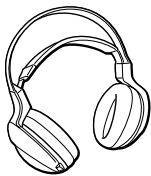
• The headphones (1)
• The transmitter (1)
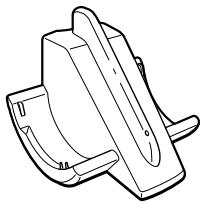
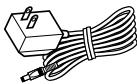
- AC power adaptor (1)
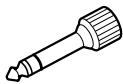
- Unimatch plug adaptor (1) (stereo mini jack stereo phone plug)
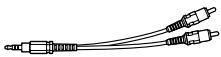
- Connecting cord (1) (phono plugs stereo mini plug), 1 m (3.3 ft.)
- Rechargeable nickel-metal hydride batteries (2)
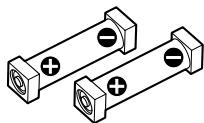
Charging the supplied rechargeable batteries
The supplied rechargeable nickel-metal hydride batteries are not charged from the first time you use them. Be sure to charge them before use. To charge the headphones, place them on the transmitter.
1 Press the button of the left housing to open the battery compartment lid.
The battery compartment lid comes off.
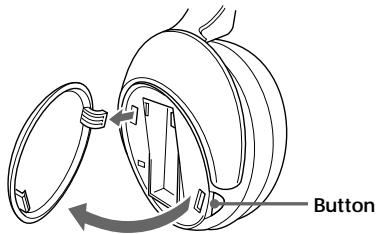
2 Insert the supplied rechargeable nickel-metal hydride batteries into the battery compartment matching the ⊕ terminals on the batteries to the ⊕ marks in the compartment.
Do not use rechargeable batteries other than the supplied ones.
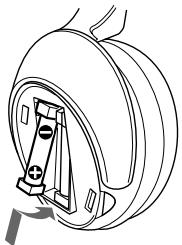
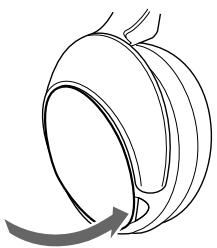
3 Close the battery compartment lid.
4 Connect the supplied AC power adaptor to the transmitter.
Transmitter
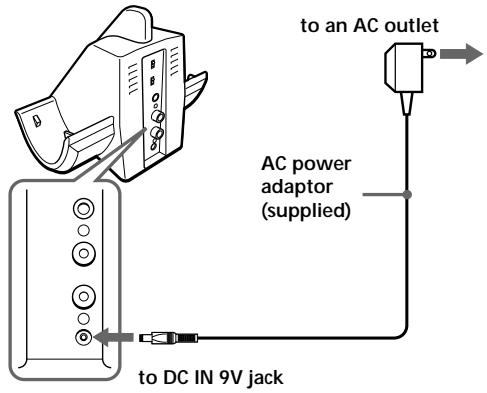
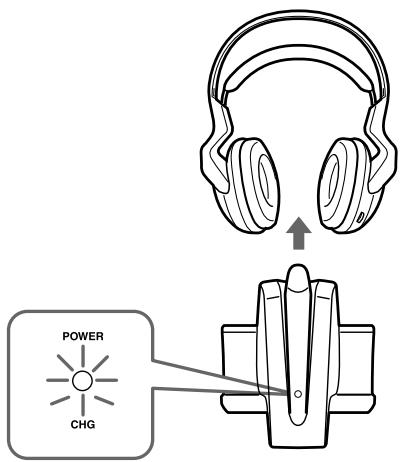
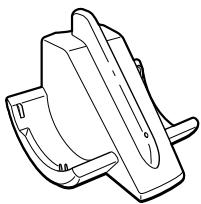
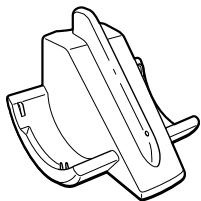
5 Rest the headphones on the transmitter so that the headphones' contact point meets the transmitter's contact pin while making sure that the charging indicator lights in green.
Charging is completed in about 16 hours and the charging indicator goes off.
When placing the headphones on the transmitter, be sure to hold them level with both hands and that the right and left housings are placed straight down on the transmitter, and then tilt them back as illustrated above.
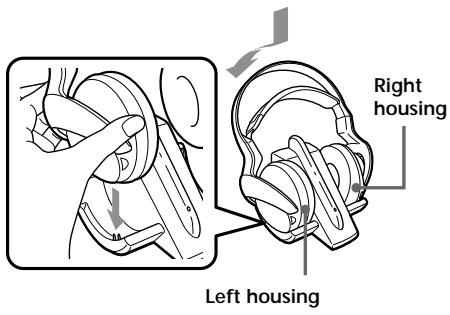
When the indicator does not light in green
Check if the right and left headphones are rested on the transmitter correctly. The indicator will not light up if the headphones' contact point does not meet the transmitter's contact pin. Remove the headphones and replace them on the transmitter again so that the indicator lights in green.
To recharge the headphone battery after use
Place the headphones on the transmitter after use. Since the built-in timer recognizes when charging is complete, there is no need to remove the headphones from the transmitter after charging.
Notes
- The transmitter automatically turns off while charging the batteries.
- This system is designed to charge only the supplied rechargeable batteries type BP-HP550 for safety. Note that other types of rechargeable batteries cannot be charged with this system.
- If dry batteries are installed, they cannot be charged.
- Do not attempt to use the supplied BP-HP550 rechargeable batteries for other components. They are for use with this system only.
- Charge in an environmental temperature of between 0°C and 40°C (between 32°F and 104°F ).
Charging and usage hours
| Approx. changing hours | Approx. usage time*1 | |
| MDR-RF920RK | MDR-RF960RK | |
| 1 hour | 80 minutes*3 | 75 minutes*3 |
| 16 hours*2 | 18 hours*3 | 15 hours*3 |
*1 at 1kHz, 1mW+1mW output
*2 hours required to fully charge empty batteries
*3 Time stated above may vary, depending on the temperature or conditions of use.
Using the headphones with dry batteries (sold separately)
Commercially available (size AAA) dry batteries can also be used to power the headphones. Install the batteries in the same manner as described in steps 1 through 3 of “Charging the supplied rechargeable batteries.” When dry batteries are installed, the battery charge function is not activated.
Battery life
(Using Sony alkaline battery LR03/AM-4(N))
| Battery | Approx. hours*1 |
| MDR-RF920RK | 28 hours*2 |
| MDR-RF960RK | 24 hours*2 |
*1 at 1kHz, 1mW+1mW output
*2 Time stated above may vary, depending on the temperature or conditions of use.
Notes on Batteries
- Do not charge a dry battery.
- Do not carry a dry battery together with coins or other metallic objects. It can generate heat if the positive and negative terminals of the battery accidentally come into contact with metallic objects.
- If you are not going to use the unit for a long time, remove the battery to avoid damage from battery leakage or corrosion.
Checking the remaining battery power
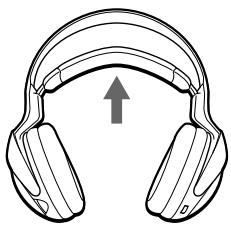
Pull up the self-adjusting band and check the power indicator located on the upper part of the right housing. The batteries are still serviceable when the indicator lights in red.
Charge the rechargeable batteries or install new dry batteries if the power indicator light dims, flashes, or the sound becomes distorted or noisy.
Note
The rechargeable nickel-metal hydride batteries should be replaced with new ones when they last only half the expected time after a proper recharging. The rechargeable batteries type BP-HP550 are not commercially available. You can order the batteries from the store where you purchased this system, or at your nearest Sony dealer.
Setting up the transmitter
1 Connect the transmitter to audio/video equipment.
Select one of the hookups below depending on the jack type:
Ⓐ To connect to a headphones jack
![graph TD A["Transmitter"] --> B["to INPUT B jacks"] B --> C["Connecting cord (supplied)"] C --> D["Unimatch plug adaptor (supplied)"] C --> E["to headphones jack (stereo mini jack)"] C --> F["WALKMAN*, TV, VCR, etc."] B --> G["TO: CHANNEL ON OFF"] B --> H["TO: INPUT L R"] B --> I["TO: INPUT R DC IN…](/content/2019/08/103192/images/5aa180e05eb9fb5fd89850f31387a77eb7095688d68819803c0ebbf1af70f630.jpg)
* WALKMAN is a registered trademark of Sony Corporation to represent Headphone Stereo products.
⑧ To connect to LINE OUT or REC OUT jacks
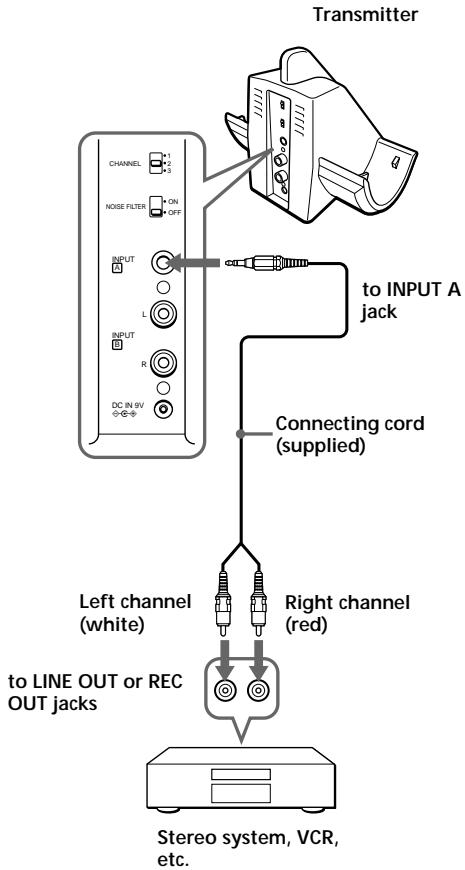
© To connect to TV, etc.
If noise occurs when the transmitter is connected to your TV or VCR, set the NOISE FILTER switch to ON.

Notes
- If you connect the transmitter to LINE OUT or REC OUT jacks of an audio reproducer such as an MD player or CD player, do not set the NOISE FILTER switch to ON. Otherwise, volume will be limited.
- The NOISE FILTER switch is active only in the case of the connection shown in diagram A on page 7 and C. In diagram B, the switch has no effect.
- When the transmitter is placed on or near a TV, it may pick up a noise.
In such case, place the transmitter away from the TV.
2 Connect the supplied AC power adaptor to the transmitter.
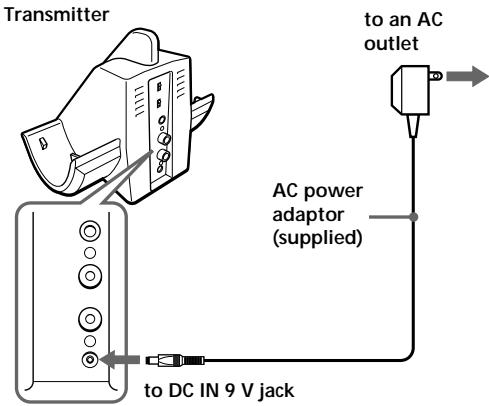
Notes
- Use only the supplied AC power adaptor. Do not use any other AC power adaptor.
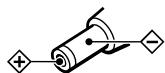
Polarity of the plug
- If the connected equipment has the AVLS (Automatic Volume Limiter System) function, be sure to turn the function off when using the transmitter. Otherwise, you will have to turn up the volume of the headphones, and that may cause noise.
- Do not place the transmitter near a fluorescent lamp, etc. when using the system.
Listening to a program
Before listening
To prevent your ears from being damaged, first lower the volume.
1 Turn on the audio/video equipment connected to the transmitter.
If the transmitter is connected to the headphone jack, set the volume control of the audio source equipment as high as possible but not so high that the audio signal becomes distorted.
2 Remove the headphones from the transmitter.
The transmitter's power indicator will light in red.
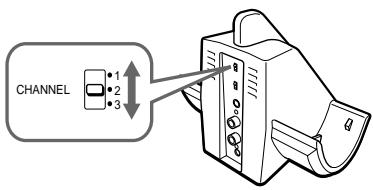
3 Select the radio frequency with the CHANNEL selector switch.
4 Put on the headphones.
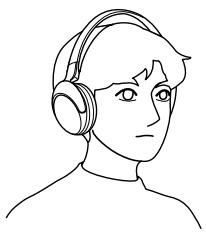
The power indicator on the upper part of the right housing glows red. Be sure to put the right housing (R) on your right ear and the left housing (L) on your left ear. Wear the headphones vertically on your head so that auto power on function is properly activated.
5 Turn up the volume to a moderate level with the VOL control.
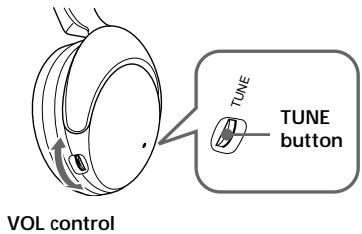
Ⓐ MDR-RF960RK
Press the TUNE button briefly for automatic tuning of the headphones. If you do not receive a clear audio signal, press it again.
© MDR-RF920RK
Tune the headphones into the frequency of the transmitter with the TUNE control until you can hear the audio signal loud and clear.
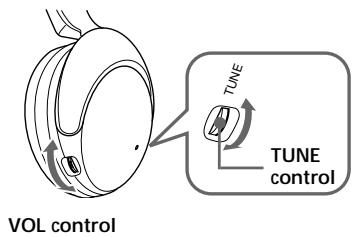
Follow steps 3 and 5 above until the receiving performance becomes better.
Bad reception conditions
If you use the unit near a cordless telephone, it may cause radio interference. If poor reception occurs, try another channel using the CHANNEL selector.
Sending RF signals from the Transmitter
The transmitter starts sending the RF signals automatically, when it detects audio signals from the equipment connected.
If it does not detect an audio signal for more than approximately 10 minutes, the transmitter will stop sending RF signals, and the power indicator turns off.
When the transmitter receives an audio signal again, it starts sending the RF signals, and the power indicator will light in red again.
If the audio signal is very weak, the transmitter does not send RF signals. If the transmitter is connected to a headphone jack, make sure the volume of the equipment connected is set to 5 – 6 or higher.
You may not hear the beginning of the sound from the headphones until the transmitter starts sending the RF signals after detecting an audio signal.
Note
If the transmitter is connected to the headphones jack of the source equipment, set the volume of that equipment as high as possible without distorting the audio signal.
The headphones automatically turn off when they are taken off
- Auto power on/off function
Do not pull up the self-adjusting band when not in use, as this will consume the battery power.
Notes
- If hiss is hear, move closer to the transmitter.
- You may hear some noise when you disconnect the AC power adaptor from the transmitter before taking off the headphones.
After listening to a program
Take the headphones off and rest them away on the transmitter, and recharge them.
Note
Do not hang the headphones by the self adjusting band, otherwise, the self adjusting band will be pulled up and the headphones will be switched on.
The effective areas of the transmitter
The optimum distance is up to approximately 46 m (150 feet) without the system picking up some interference. However, the distance may vary according to the surroundings and environment. If the system picks up some noise while using it within the above mentioned distance, reduce the distance between the transmitter unit and the headphones, or select the other channel.
Notes
- When you use the headphones inside the effective areas of the transmitter, the transmitter can be placed in any direction from the listener.
- Even within the signal reception area, there are some spots (dead spot) where the RF signal can not be received. This is a characteristic inherent to RF signals, and does not indicate malfunction. By slightly moving the transmitter, location of the dead spot can be changed.
Replacing the ear pads
The ear pads are replaceable. If the ear pads become dirty or worn out, replace them as illustrated below.
The ear pad is not commercially available. You can order replacements from the store where you purchased this system, or at your nearest Sony dealer.
1 Remove the old ear pad by pulling it out of the groove on the housing.
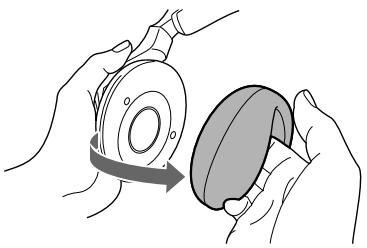
2 Place the new ear pad on the driver unit and insert the edge of the pad into the groove as illustrated.
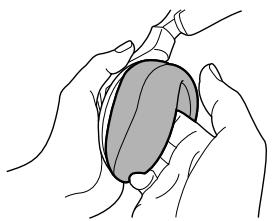
Make sure that the entire edge of the ear pad is securely inserted into the groove.
Precautions
- When the transmitter is not to be used for a long period of time, disconnect the AC power adaptor from the AC outlet holding the plug. Do not pull on the cord.
- Do not leave the wireless stereo headphone system in a location subject to direct sunlight, heat or moisture.
Notes on headphones
Preventing hearing damage
Avoid using headphones at high volume. Hearing experts advise against continuous, loud and extended play. If you experience a ringing in your ears, reduce the volume or discontinue use.
Caring for others
Keep the volume at a moderate level. This will allow you to hear outside sounds and to be considerate to the people around you.
If you have any questions or problems concerning the system that are not covered in this manual, please consult the nearest Sony dealer.
Be sure to bring the headphones and the transmitter to the Sony dealer when requiring repair work.
Troubleshooting
| Problem | Solution |
| No sound/Muffled sound | Turn on the transmitter first, then put on the headphones. |
| Check the connection of the audio/video equipment or the AC power adaptor. | |
| Check that the audio/video equipment is turned on. | |
| Turn up the volume on the connected audio/video equipment, if the transmitter is connected to the headphones jack. | |
| MDR-RF920RK:Change the radio frequency with the CHANNEL selector on the transmitter, then tune the headphones with the TUNE control.MDR-RF960RK:Change the radio frequency with the CHANNEL selector on the transmitter, then press the TUNE button again. | |
| The mute function is activated.Use the headphones near the transmitter. | |
| The headphones' POWER indicator light is weak or turned off.• Charge the supplied rechargeable batteries or if the POWER indicator is still off after charging the supplied rechargeable batteries, take the headphones to a Sony dealer for replacement of the rechargeable battery. | |
| If you connect the transmitter to the LINE OUT or REC OUT jacks of an audio reproducer, make sure that the NOISE FILTER switch is set to OFF. | |
| Make sure that the NOISE FILTER switch is set to either ON or OFF (If the switch gets stuck between ON and OFF, the sound will be cut off). | |
| Distortion | If the transmitter is connected to the headphone jack, volume of the connected audio/video equipment. |
| Change the radio frequency with the CHANNEL selector on the transmitter. | |
| The headphones' POWER indicator light is weak or turned off.• Charge the supplied rechargeable batteries or if the POWER indicator is still off after charging the supplied rechargeable batteries, take the headphones to a Sony dealer for replacement of the rechargeable battery. | |
| If you connect the transmitter to the LINE OUT or REC OUT jacks of an audio reproducer, make sure that the NOISE FILTER switch is set to OFF. | |
| Loud background noise | Move closer to the transmitter. As you move away from the transmitter, more noise is likely to be heard. |
| If the transmitter is connected to the headphones jack, turn up the volume of the connected audio/video equipment. | |
| MDR-RF920RK:Change the radio frequency with the CHANNEL selector on the transmitter, then tune the headphones with the TUNE control.MDR-RF960RK:Change the radio frequency with the CHANNEL selector on the transmitter, then press the TUNE button again. | |
| The headphones' POWER indicator light is weak or turned off.• Charge the supplied rechargeable batteries or if the POWER indicator is still off after charging the supplied rechargeable batteries, take the headphones to a Sony dealer for replacement of the rechargeable battery. | |
| If you connect the transmitter to the LINE OUT or REC OUT jacks of an audio reproducer, make sure that the NOISE FILTER switch is set to OFF. |
Specifications
General
Carrier frequency
913.5 - 914.5 MHz
Channel
Ch1, Ch2, Ch3
Modulation
FM stereo
Frequency response
MDR-RF920R : 20 - 20,000 Hz
MDR-RF960R : 10 - 22,000 Hz
Transmitter TMR-RF960R
Power source
DC 9 V: supplied AC power adaptor
Audio input
Supplied rechargeable nickel-metal hydride batteries BP-HP550 or commercially available (size AAA) dry batteries
Mass
Approx. 270 g (9.6 oz.) incl. batteries
Optional accessories
Audio cable
Design and specifications are subject to change without notice.
AVERTISSEMENT
Charge des piles rechargeables fournies .... 4
- Transmetteur (1)
Charge des piles rechargeables fournies
Remarques
Canaux CHANNEL (canal)
- Transmisor (1)
Notas



- WIRELESS STEREO HEADPHONE SYSTEM
- TO AVOID ELECTRICAL SHOCK, DO NOT OPEN THE CABINET. REFER SERVICING TO QUALIFIED PERSONNEL ONLY
- INFORMATION
- NOTE
- FOR THE CUSTOMERS IN THE CANADA
- FOR THE CUSTOMERS IN THE USA AND CANADA
- RECYCLING NICKEL METAL HYDRIDE BATTERIES
- WELCOME
- NOTES ON RECEIVING PERFORMANCE
- TABLE OF CONTENTS
- GETTING STARTED
- OPERATING THE SYSTEM
- ADDITIONAL INFORMATION
- UNPACKING
- CHARGING THE SUPPLIED RECHARGEABLE BATTERIES
- 3 CLOSE THE BATTERY COMPARTMENT LID
- 4 CONNECT THE SUPPLIED AC POWER ADAPTOR TO THE TRANSMITTER
- 5 REST THE HEADPHONES ON THE TRANSMITTER SO THAT THE HEADPHONES' CONTACT POINT MEETS THE TRANSMITTER'S CONTACT PIN WHILE MAKING SURE THAT THE CHARGING INDICATOR LIGHTS IN GREEN
- WHEN THE INDICATOR DOES NOT LIGHT IN GREEN
- TO RECHARGE THE HEADPHONE BATTERY AFTER USE
- NOTES
- USING THE HEADPHONES WITH DRY BATTERIES (SOLD SEPARATELY)
- BATTERY LIFE
- NOTES ON BATTERIES
- CHECKING THE REMAINING BATTERY POWER
- SETTING UP THE TRANSMITTER
- 1 CONNECT THE TRANSMITTER TO AUDIO/VIDEO EQUIPMENT
- 2 CONNECT THE SUPPLIED AC POWER ADAPTOR TO THE TRANSMITTER
- POLARITY OF THE PLUG
- LISTENING TO A PROGRAM
- BEFORE LISTENING
- 1 TURN ON THE AUDIO/VIDEO EQUIPMENT CONNECTED TO THE TRANSMITTER
- 2 REMOVE THE HEADPHONES FROM THE TRANSMITTER
- 4 PUT ON THE HEADPHONES
- 5 TURN UP THE VOLUME TO A MODERATE LEVEL WITH THE VOL CONTROL
- Ⓐ MDR-RF960RK
- © MDR-RF920RK
- BAD RECEPTION CONDITIONS
- SENDING RF SIGNALS FROM THE TRANSMITTER
- THE HEADPHONES AUTOMATICALLY TURN OFF WHEN THEY ARE TAKEN OFF
- AUTO POWER ON/OFF FUNCTION
- AFTER LISTENING TO A PROGRAM
- THE EFFECTIVE AREAS OF THE TRANSMITTER
- REPLACING THE EAR PADS
- PRECAUTIONS
- NOTES ON HEADPHONES
- PREVENTING HEARING DAMAGE
- CARING FOR OTHERS
- TROUBLESHOOTING
- SPECIFICATIONS
- GENERAL
- TRANSMITTER TMR-RF960R
- OPTIONAL ACCESSORIES
- AVERTISSEMENT
- CHARGE DES PILES RECHARGEABLES FOURNIES
- REMARQUES
- NOTAS
Brand : SONY
Model : MDR-RF960RK
Category : Headphones