
HANDYCAM HDR-TD10 - Camcorder SONY - Free user manual and instructions
Find the device manual for free HANDYCAM HDR-TD10 SONY in PDF.



| Product type | 3D Camcorder |
| Brand | Sony |
| Model | Handycam HDR-TD10 |
| Recording resolution | Full HD 1920 x 1080 (3D) |
| Sensor | Dual Exmor R CMOS sensor |
| Lens | Dual lens 10x optical zoom |
| LCD screen | 3.5 inches (glasses-free 3D viewing) |
| Image stabilizer | Optical SteadyShot |
| Shooting modes | 3D, 2D |
| Internal storage | None (records to memory card) |
| Storage media | Memory Stick PRO Duo, SD/SDHC |
| Connectivity | USB, HDMI, AV output |
| Power supply | Rechargeable battery NP-FV50 |
| Dimensions (W x H x D) | Approx. 80 x 90 x 150 mm |
| Weight | Approx. 500 g (with battery) |
| 3D function | Glasses-free 3D recording and playback |
| Included software | PMB (Picture Motion Browser) |
| Included accessories | USB cable, AC adapter, battery |
| Repairability | Spare parts available (estimate) |
Frequently Asked Questions - HANDYCAM HDR-TD10 SONY
User questions about HANDYCAM HDR-TD10 SONY
0 question about this device. Answer the ones you know or ask your own.
Ask a new question about this device
Download the instructions for your Camcorder in PDF format for free! Find your manual HANDYCAM HDR-TD10 - SONY and take your electronic device back in hand. On this page are published all the documents necessary for the use of your device. HANDYCAM HDR-TD10 by SONY.
USER MANUAL HANDYCAM HDR-TD10 SONY
3D Digital HD Video Camera Recorder
How To Enjoy 3D
HDR-TD10/TD10E
HANDYCAM
| Enjoy 3D! | GB |
| Profitez de la 3D! | FR |
| Disfrute de 3D! | ES |
| Desfrute de 3D! | PT |
| Erleben Sie die Welt in 3D! | DE |
| Divertiti con il 3D! | IT |
| Geniet in 3D! | NL |
| 3D'nin Keyfini Çıkartin! | TR |
| Ánoλαύσε 3D! | GR |
| Vyuzijte 3D! | CZ |
| Élvezze a 3D előnyeit! | HU |
| Vychutnajte si formát 3D! | SK |
| Radość z 3D! | PL |
| Njut av 3D! | SE |
| Prøv 3D! | DK |
| Nauti3D:stål! | FI |
| Bucură-te de 3D! | RO |
| Hacráduțeșb 3D! | RU |
| Hacolodîțbțe 3D! | UA |
| 享受3D! | CT |
| 欣赏3D! | CS |
| 3DșlululululululululululululululululululululululululululululululululululululululululululululululululululululululululululululululululululululululululululululululululululululululululululululululululululululalulululululululululululululululululululululululululululululululululululululululululululululululululululululululululululululululululululululululululululululululululululululululululululululululululululUL | KR |
| Menikmati 3D! | MY |
| Selamat menikmati 3D! | ID |
| şunululululululululululululululululululululululululululululululululululululululululululululululululululululululululululululululululululululululululululululululululululululululululululululululululululul | TH |
Enjoy 3D!
Keep your memories fresh with 3D movies. Tips for using your new HDR-TD10/TD10E "Handycam".

GB
Shooting
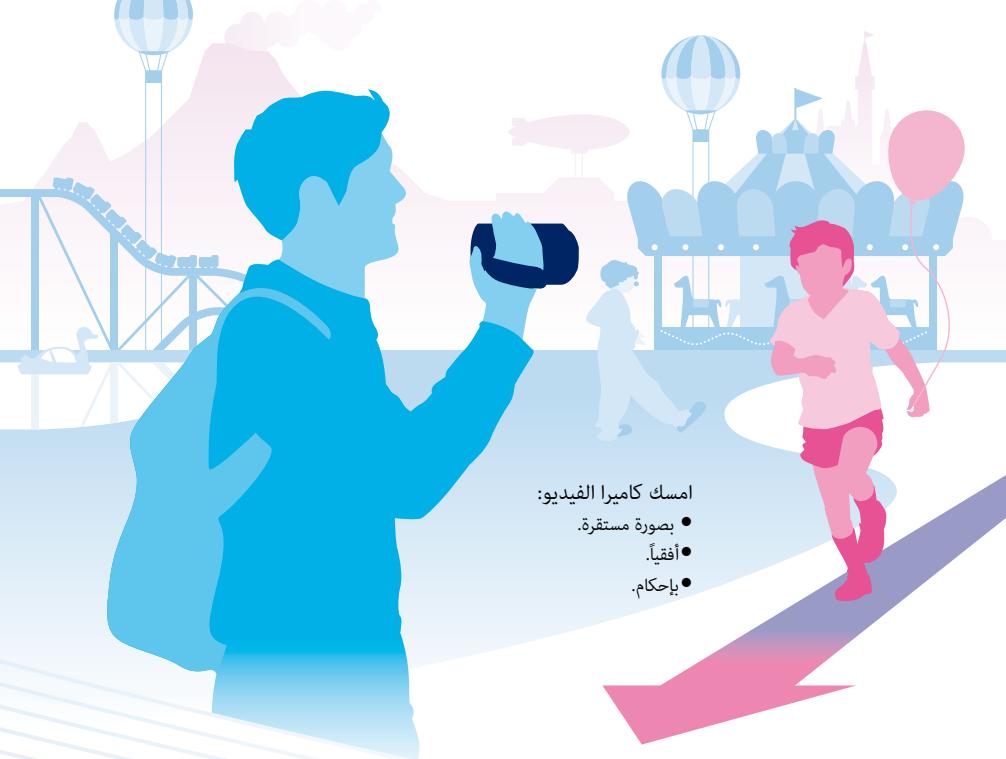
Hold your camcorder: stably, horizontally, firmly.
You can shoot your own 3D movies.
To shoot movies that seem three-dimensional and realistic, it is important to vary the magnification based on the distance from the subject.
To shoot movies that seem three-dimensional and realistic,
It is important to vary the magnification based on the distance from the subject.
Consult the chart below to learn the optimum balance between the distance and magnification.
The zoom scale appears on the LCD screen.
W T
W T
W T
Distance from the subject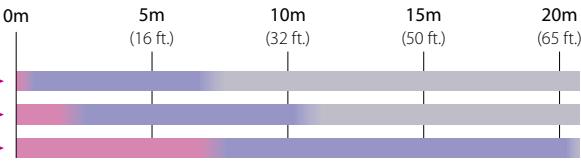
Not recommended. The movie will be blurred.
The movie will seem three-dimensional and realistic.
The movie will seem flat without a sense of depth.
Playback on a TV
At home, enjoy your movies on the large screen of your TV.


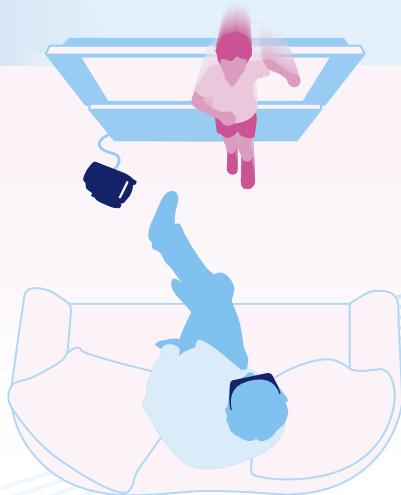
InstantPlayback
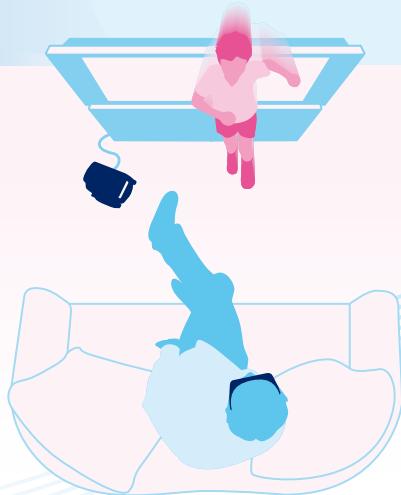
You can watch your 3D movie in 3D on the LCD screen of your camcorder without wearing 3D glasses.
- Face directly towards the LCD screen when watching movies.
- Keep your eyes at least 30cm (11 7/8 in.) away from the screen.

Any discomfort watching 3D movies?
(2D/3D DISP)
If you feel any discomfort while watching 3D movies on the LCD screen for a long time, press the 2D/3D DISP button to switch to 2D playback. The movie will still be recorded in 3D.
2D/3D DISP


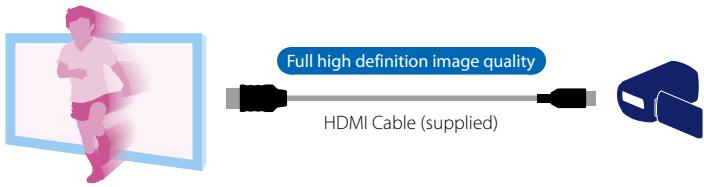
Watching 3D movies on your TV
Watching on a 3D TV
The movies are played in 3D.
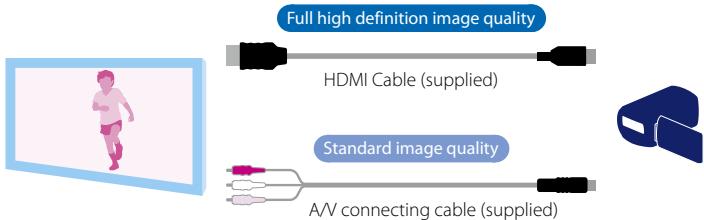
Watching on a non-3D TV
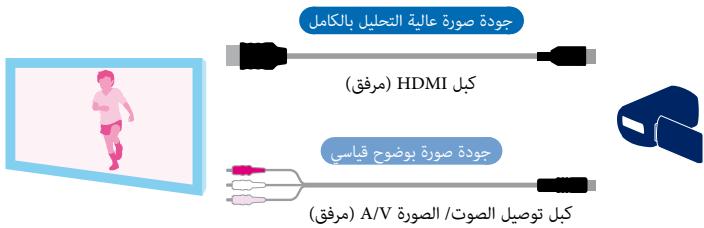
The movies are played in 2D. Choose any of the connections below.
Saving your 3D movies
You can save your movies in 3D on external media (USB storage devices) or on a computer by using the supplied software, "PMB."
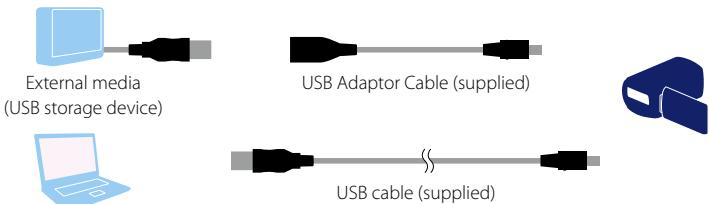
The movies that are exported to your computer or saved on external media (USB storage devices) can be saved on Blu-ray/DVD discs in 2D. You cannot save movies on a disc in 3D.

Enjoy 3D!
Movies are played in 3D.

High-definition images

Watching on a TV that does not support 3D format
View realistic 3D images

Video playback, without any interruptions.
Playback
On the TV screen
Enjoy playing videos on the big screen of your home TV.


3D playback
3D video can be played in 3D format on the PC screen of the camcorder without 3D glasses.
- Play videos and watch them on the PC screen. - Position the screen at a distance of at least 30 cm from your eyes.

Do you feel discomfort while playing 3D video? (2D/3D DISP)
If you feel discomfort during 3D video playback on the PC screen, press the 2D/3D DISP button to switch to 2D playback. Videos recorded earlier will be played in 3D format.

3D



(USB)

(3) USB

(2D/3D DISP)
Connect the Blu-ray/DVD player to the USB port.
3D glasses are required for 3D viewing.

y
.3D
a 100





2D/3D DISP 2D
"Handycam" HDR-TD10/TD10E

3D Digital HD Video Camera Recorder
How To Enjoy 3D

- HOW TO ENJOY 3D
- ENJOY 3D
- SHOOTING
- PLAYBACK ON A TV
- INSTANTPLAYBACK
- WATCHING 3D MOVIES ON YOUR TV
- WATCHING ON A 3D TV
- WATCHING ON A NON-3D TV
- SAVING YOUR 3D MOVIES
- WATCHING ON A TV THAT DOES NOT SUPPORT 3D FORMAT
- PLAYBACK
- D PLAYBACK
- DO YOU FEEL DISCOMFORT WHILE PLAYING 3D VIDEO? (2D/3D DISP)
- D
- Y
- D DIGITAL HD VIDEO CAMERA RECORDER
Brand : SONY
Model : HANDYCAM HDR-TD10
Category : Camcorder