
Roller Flash - Car Mount NGS - Free user manual and instructions
Find the device manual for free Roller Flash NGS in PDF.


| Product type | Bluetooth speaker |
| Brand | NGS |
| Model | Roller Flash |
| Category | Car support |
| Power supply | Rechargeable battery via micro USB port |
| Connectivity | Bluetooth |
| Playback modes | Bluetooth, USB, FM radio, Micro SD card |
| Functions | MP3 playback, Hands-free, Volume and track control |
| Inputs | Micro USB port (charging), USB port (flash drive), Micro SD slot |
| LED indicators | 3 modes: rhythmic, fixed, off (switchable by button) |
| FM search | Automatic, antenna via micro USB cable |
| Hands-free function | Answer/hang up by pressing button for 2 seconds |
| Battery warranty | 12 months (consumable) |
| Manual available | Free PDF download, multiple languages |
Frequently Asked Questions - Roller Flash NGS
User questions about Roller Flash NGS
0 question about this device. Answer the ones you know or ask your own.
Ask a new question about this device
Download the instructions for your Car Mount in PDF format for free! Find your manual Roller Flash - NGS and take your electronic device back in hand. On this page are published all the documents necessary for the use of your device. Roller Flash by NGS.
USER MANUAL Roller Flash NGS
natural_image
Blank rectangular frame with rounded corners and a small corner detail (no text or symbols)ROLLER FLASH
USER'S MANUAL
ENGLISH | FRANÇAIS | ESPAÑOL | DEUTSCH | ITALIANO | PORTUGUÊS | POLSKI | EΛΛΗΝΙΚΑ
WWW.NGS.EU


ROLLER FLASH
BLUETOOTH STEREO SPEAKER WITH LED LIGHTS

OVERVIEW
1 Mode/lights button 6 Micro SD card slot
2 Volume - / REW 7 USB port
3 Volume + / FWD 8 On/Off
4 Button 9 Connection point for charging via micro USB


natural_image
Simple line drawing of a rectangular device with three labeled ports (no text or symbols)USER'S MANUAL
CHARGING THE BLUETOOTH SPEAKER
- Connect the Bluetooth speaker's micro USB socket with the computer's USB port through USB cable.
- The charging LED will turn ON in red light; the rechargeable battery is in charging.
- The charging LED red light will turn OFF when the rechargeable battery is fully charged.
- Disconnect the USB cable, and close the rubber seal cover when it is done.
BLUETOOTH SPEAKER PAIRING / RECONNECTING
- Turn on the power, a message sound; "beep" will announce from speaker and the mode LED will blinking in blue; the device is turned ON and goes into searching / paring / reconnect mode for pair.
- Now, turn ON the Bluetooth function on your mobile phone.
- Search for "NGS ROLLER FLASH" and select it to pair (for first time pairing or pairing a new mobile device).
- The Bluetooth speaker will be reconnecting automatically if your mobile phone has been paired (Depend on the of mobile phone's type and configuration, manual reconnection may require on some devices).
- If pairing is successful, a message sound; "beep" will announce from speaker and the mode LED light will keep turn on.
MODES
BLUETOOTH / USB / FM RADIO / MICRO SD CARD
To switch between modes, press the "M" key. If the device is not connected to a micro SD card or USB memory, it will skip these modes when the "M" key is pressed.
BLUETOOTH SPEAKER CONTROL FUNCTION
- In playing music, press button to pause music, press it once again to play.
- Press and hold the button to increase the volume level.
- Press and hold the ↑button to decreases the volume level.
- Press the button to play next music file.
- Press the ↑button to play previous music file.
HAND FREE FUNCTION BLUETOOTH MODE ONLY
When there is an incoming call;
- The ringing sound will up and the playing music will pause automatically.
- Press /button to pick up the call if you want.
- Now you have hand free function with the Bluetooth speaker.
- Hold down the /button for 2 seconds to hand up the call when finished. And,
- The paused music will start to play automatically.
USER'S MANUAL
MICRO SD CARD MODE
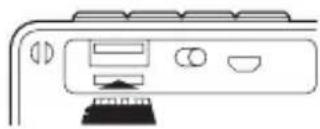
- Insert the micro SD card into the slot.
natural_image
Line drawing of a kitchen appliance with buttons and a stand (no text or symbols)- The device will automatically play any music in MP3 format on the card.
FM MODE
- Hold down the "M" button until you hear "Radio mode".
- Press the button to start an automatic channel search. Channels are remembered automatically.
- To skip between channels, simply press the ↑ and ↓ buttons.
Note: For better radio reception, connect the charging cable (which also acts as an antenna) into the micro USB slot.
USB MODE
- Insert a USB flash drive into the slot.
- The device will automatically play any music in MP3 format on the flash drive.
LIGHTS
The LED lights have 3 settings.
- Change in time with the bass of the song playing.
- Fixed light. Always follow the same pattern.
- Off. No light.
To move between these modes, simply hold down the button for 3 seconds.
Battery warranty: The battery is a consumer product, and as such it is under warranty for 12 months.
If at any time in the future you should need to dispose of this product please note that:
Waste electrical products should not be disposed of with household waste. Please recycle where facilities exist.
Check with your Local Authority or retailer for recycling advice.
(Waste Electrical and Electronic Equipment Directive)

HEREBY, LURBE GRUP S.A, DECLARES THAT THIS SPEAKER IS IN COMPLIANCE WITH THE ESSENTIAL REQUIREMENTS AND OTHER RELEVANT PROVISIONS OF DIRECTIVE 1999/5/EC.

ROLLER FLASH
HAUT-PARLEUR BLUETOOTH STÉRÉO AVEC ÉCLAIRAGE LED

APERÇU GENERAL
natural_image
Simple line drawing of a rectangular device with three labeled ports (no text or symbols)CHARGEMENT DU HAUT-PARLEUR BLUETOOTH
natural_image
Line drawing of a computer monitor with ports and buttons (no text or symbols)MODE USB
natural_image
Simple line drawing of a rectangular device with three labeled ports (no text or symbols)CARGA DEL ALTAVOZ BLUETOOTH
natural_image
Line drawing of a computer monitor with ports and buttons (no text or symbols)natural_image
Simple line drawing of a rectangular device with three labeled ports (no text or symbols)AUFLADEN DES BLUETOOTH LAUTSPRECHERS
natural_image
Line drawing of a computer monitor with ports and buttons (no text or symbols)MODUS USB
natural_image
Simple line drawing of a rectangular device with three labeled ports (no text or symbols)INSTRUZIONI D'USO
RICARICA DELL'ALTOPARLANTE BLUETOOTH
natural_image
Line drawing of a computer monitor with ports and buttons (no text or symbols)natural_image
Simple line drawing of a rectangular device with three labeled ports (no text or symbols)natural_image
Line drawing of a computer monitor with ports and buttons (no text or symbols)natural_image
Simple line drawing of a rectangular device with three labeled ports (no text or symbols)natural_image
Line drawing of a computer monitor with ports and buttons (no text or symbols)TRYB USB
natural_image
Simple line drawing of a rectangular device with three labeled ports (no text or symbols)natural_image
Line drawing of a computer monitor with ports and buttons (no text or symbols)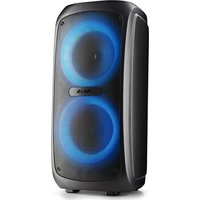
- ROLLER FLASH
- OVERVIEW
- USER'S MANUAL
- CHARGING THE BLUETOOTH SPEAKER
- BLUETOOTH SPEAKER PAIRING / RECONNECTING
- MODES
- BLUETOOTH SPEAKER CONTROL FUNCTION
- HAND FREE FUNCTION BLUETOOTH MODE ONLY
- MICRO SD CARD MODE
- FM MODE
- USB MODE
- LIGHTS
- APERÇU GENERAL
- CHARGEMENT DU HAUT-PARLEUR BLUETOOTH
- MODE USB
- CARGA DEL ALTAVOZ BLUETOOTH
- AUFLADEN DES BLUETOOTH LAUTSPRECHERS
- MODUS USB
- INSTRUZIONI D'USO
- RICARICA DELL'ALTOPARLANTE BLUETOOTH
- TRYB USB
Brand : NGS
Model : Roller Flash
Category : Car Mount