BioniQ 8008 - Tablet A-Rival - Free user manual and instructions
Find the device manual for free BioniQ 8008 A-Rival in PDF.


| Product Type | Tablet |
| Brand | A-Rival |
| Model | BioniQ 8008 |
| Display Size | 8 inches |
| Display Resolution | 1024 x 768 pixels |
| Dimensions | 200 x 120 x 8 mm |
| Weight | 300 g |
| Processor | Quad-core 1.2 GHz |
| RAM | 1 GB |
| Internal Storage | 8 GB |
| Battery Capacity | 4000 mAh |
| Operating System | Android 4.4 |
| Connectivity | Wi-Fi 802.11 b/g/n, Bluetooth 4.0 |
| Rear Camera | 2 MP |
| Front Camera | 0.3 MP |
| Expandable Storage | MicroSD up to 32 GB |
| Power Input | 5V 2A |
| Audio | 3.5 mm headphone jack, built-in speaker |
| Maintenance | Clean with a soft, dry cloth |
| Safety Precautions | Avoid exposure to water, heat, and direct sunlight |
| Spare Parts | Contact A-Rival customer service |
Frequently Asked Questions - BioniQ 8008 A-Rival
User questions about BioniQ 8008 A-Rival
0 question about this device. Answer the ones you know or ask your own.
Ask a new question about this device
Download the instructions for your Tablet in PDF format for free! Find your manual BioniQ 8008 - A-Rival and take your electronic device back in hand. On this page are published all the documents necessary for the use of your device. BioniQ 8008 by A-Rival.
USER MANUAL BioniQ 8008 A-Rival
support@first-servicecenter.de
Thank you for choosing an a-rival product.
A good choice. We hope you'll enjoy using your new a-rival Tablet PC.
Just in case that you are facing any problems with your Device, please call our support/service hotline +49 (0)511 / 270 496 90 or send us an e-mail to support@first-servicecenter.de
Do you need additional accessory like a home-charger? Please use the shop on our website www.a-rival.de for your order and more information.
You'll find there additional manuals in other languages too.
For detailed Manuals, Updates and technical information please visit our website www.a-rival.de
Contents
BioniQ....
Contents 2
1 Introduction....3
1.1 Acknowledgements....3
1.2 Precautions....3
1.3 Safety Notice....4
1.4 Abbreviation/term....5
2 Brief introduction for MID product....5
2.1 Diagram for MID complete machine.... 5
2.2 Use and preparation of MID 7
3 Troubleshooting....7
4 Specification....8
1 Introduction
1.1 Acknowledgements
Thank you for choosing this product. The product belongs to MID (Mobile Internet Device), which is a kind of mobile Internet device, delicate, small and exquisite, and also portable. It is also equipped with a piece of touch LCD of high definition, which can be used to watch videos and pictures of high definition. It supports installation of multiple application programs on office and entertainment. The fantastic operation interface will give you a brand-new user experience.
This manual systematically introduces diversified functions, using skills and matters needing attention of this MID, please read this manual carefully before using it.
1.2 Precautions
Maintenance and Caring
- Please keep the device dry. Please don't let the device, battery and charger contact water and water vapor or operate device or charger with wet hand, so as not to result in short circuit of the device, breakdown caused by corrosion and electric shock of personnel.
- Please don't let the device, battery and charger receive strong impact or shock, for fear of bringing about breakdown, catching fire or explosion of device, battery and charger.
- Please don't place the device, battery and charger in regions with too high or too low temperature, otherwise, breakdown, catching fire or explosion of device, battery and charger may be led to.
- Please don't strike, throw or pinprick the MID, and falling, extrusion and bending of MID must be avoided.
- Please don't dismantle the device and its accessories on yourself, otherwise, the device and its accessories will be out of warranty scope by our company.
1.3 Safety Notice
Before using MID, please read information in this section, and make your children learn about the information. About more detailed information, please refer to safety instructions and matters needing attention.
- Please don't use MID when you are driving, for fear of hindering safe driving.
- In medical places, please observe relevant stipulations and regulations. And in regions near the medical devices, please shut down MID.
- Please shut down MID or enable the airplane mode when boarding, so that the wireless signals will not interfere control signal of the airplane.
- Please shut down MID neighboring electronic equipments with high accuracy, otherwise, breakdown of electronic equipments may be brought about.
- Please don't dismantle the MID and its accessories on yourself, and only the authorized agency can maintain this MID.
- Please keep MID far away from magnetic equipment, radiation from MID will erase information stored on the magnetic equipment.
- Please don't use MID in places with high temperature and inflammable gas (such as nearby gas station).
- Please put MID and its accessories in places beyond children's touch, please don't let children use MID without supervision.
- During using of this MID, please observe related laws and regulations, respect privacy and legitimate rights of others.
- Please strictly abide by relevant explanations in this manual when using USB data line, otherwise, MID or personal computer may be damaged.
- Please don't use the MID in humid environment such as bathroom, etc., and the MID being soaked or rinsed by liquid must be avoided.
1.4 Abbreviations / terms
| Abbreviation/term | Full name | Explanations |
| MID | Mobile Internet Device | Mobile internet device |
| WIFI | Wireless Fidelity | Wireless Local Area Network based on IEEE 802.11b standard |
| TF | TransFlash | Alternate name Micro SD, superminiature storage card |
| HDMI | High Definition Multimedia Interface | High definition multi-media interface |
2 Brief introduction for MID product
3.1 2.1 Diagram for MID complete machine
BioniQ front view:
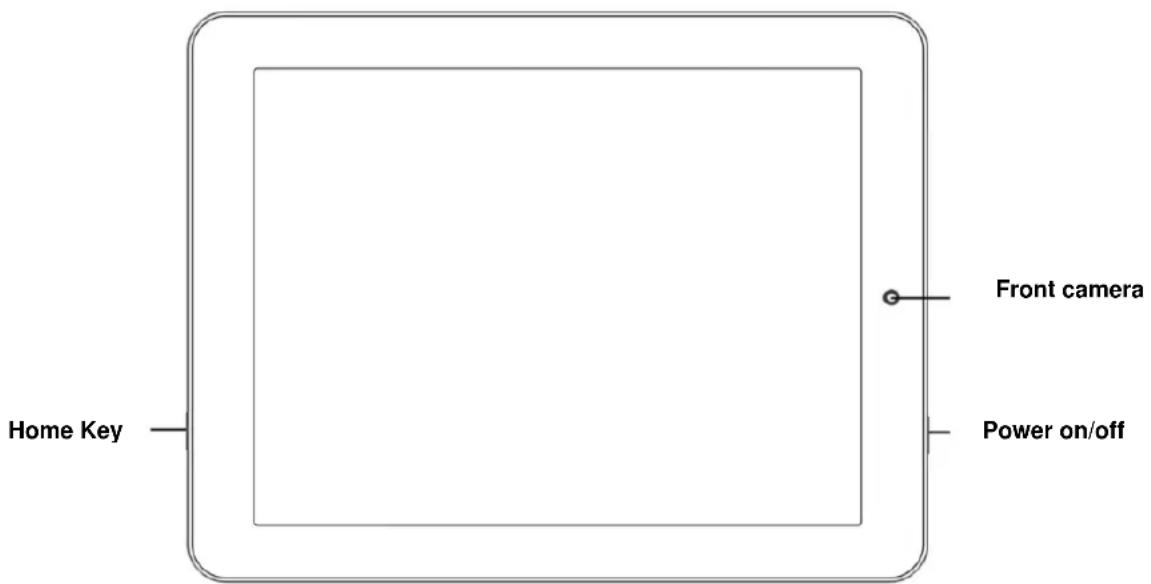
Figure 2-1
BioniQ side view left:
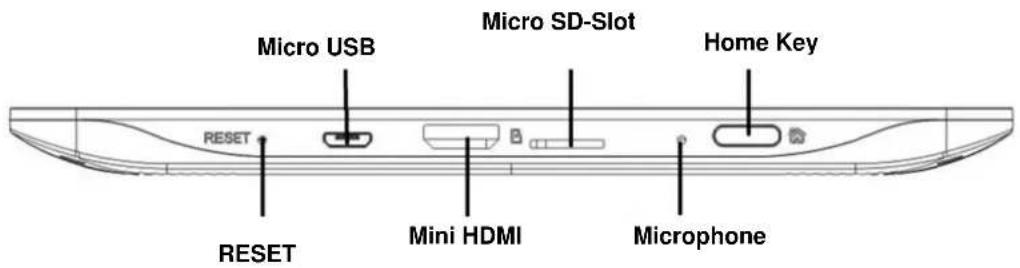
Figure 2-2
BioniQ side view right:

Figure 2-3
BioniQ rear side view:

Figure 2-4
2.2 Use and preparation of MID
Battery charging
Before using MID for the first time, the battery must be charged firstly.
Use power adaptor to charge MID.
In order to guarantee full battery, please charge for over 4 hours.
3 Troubleshooting
Slow initial boot for MID
After system upgrade of MID, initial boot needs installation of the pre-installed software applications, and for about 2-3 minutes, it runs faster.
Poor 3G network signal for MID (ONLY when an external 3G dongle is used)
Ensure the MID built-in antenna of the external 3G dongle is not blocked.
It might be in unsignalized status when the signal is weak or is of poor reception.
MID can not be connected to WIFI
Ensure that the wireless router providing the network services works properly.
Ensure the MID and the wireless router are kept with certain distance, and between which no wall or other obstacles exist.
Ensure the user name and the password are correct
MID feels hot
When multiple applications are running at the same time, or the screen is adjusted to the brightest, or it is recharging, this situation is normal.
System is disordered and does not work properly
Installation of some third-party applications may lead to system failure, and you can press the reset button (next to the power HDMI port) to reset the system.
Unable to create e-mail or register applications
Ensure your network is properly connected to the Internet.
Ensure the e-mail is set up correctly.
Ensure your system time and the local time are consistent.
4 Specification
Product Parameter
| Type | Details | Descriptions |
| Basical-parameter | MID-Model | BioniQ 8008 |
| CPU-type | Amlogic AML8726-MXL, Dual Cortex-A9 | |
| CPU-speed | Dual 1,5 GHz | |
| DDR3 | 512 MB DDR3 | |
| NAND FLASH | 8 GB | |
| Operating system version | Android 4.1.1 | |
| Network connections | WIFI802.11b/g/noptional 3G-USB (WCDMA/EVDO/TD-SCDMA) | |
| USB- interface | Micro-USB | |
| HDMI- interface | HDMI 1.4a | |
| Battery | Lithium-ion polymer battery, 3,7 V/4400 mAh | |
| Power adapter | Input: AC 100V-240V; Output: DC 5 V, 2 A | |
| External memory card | Support SDHC/SD | |
| Camera | Front: 0,3 MegapixelRear: 2 Megapixel | |
| Product-appearance | LCD | 8.0 inch 20,3 cm / (4:3), 1024*768 |
| Dimensions | 199 * 153 * 9 mm (approx.) | |
| Weight | 420 g (approx.) | |
| Video | Support MPEG,H.263/H.264, MVC,etc.(UP TO 1080P) | |
| Application | Audio | Support MP3,WMA,WAV,OGG,APE, etc. |
| Games | Support to third party programs | |
| Input method | Android-keyboard | |
| photos | Support browsing BMP, JPG, GIF, PNG,etc. |
Hotline: +49 (0)5 11-270 496 90
Address/Contact:
First Service
Kleine Düwelstr. 21
DE-30171 Hannover
Fax: +49 (0)5 11-161 25 36
support@first-servicecenter.de

- Contents
- BioniQ....
- Introduction....3
- Brief introduction for MID product....5
- Troubleshooting....7
- Specification....8
- Introduction
- Acknowledgements
- Precautions
- Maintenance and Caring
- Safety Notice
- Abbreviations / terms
- Brief introduction for MID product
- 2.1 Diagram for MID complete machine
- Use and preparation of MID
- Battery charging
- Troubleshooting
- Slow initial boot for MID
- Poor 3G network signal for MID (ONLY when an external 3G dongle is used)
- MID can not be connected to WIFI
- MID feels hot
- System is disordered and does not work properly
- Unable to create e-mail or register applications
- Specification
- Address/Contact:
Brand : A-Rival
Model : BioniQ 8008
Category : Tablet