HM-CFG-LAN - Network card / adapter EQ-3 - Free user manual and instructions
Find the device manual for free HM-CFG-LAN EQ-3 in PDF.


| Product Type | Network card / adapter |
| Brand | eQ-3 |
| Model | HM-CFG-LAN |
| Dimensions (approx.) | 100 x 70 x 25 mm |
| Weight (approx.) | 100 g |
| Power Supply | USB 5V DC (cable included) |
| Interface | Ethernet 10/100 Mbps, RJ45 |
| Protocol Support | HomeMatic (RFD) wireless communication |
| Max Wireless Range | 100 m (open field) |
| Operating Frequency | 868.3 MHz (Europe) |
| Operating Temperature | 0 °C to 40 °C |
| LED Indicators | Power, Link, Activity |
| Configuration | Web interface (browser-based) |
| Compatibility | HomeMatic system devices |
| Cleaning Instructions | Wipe with dry cloth; no liquids |
| Safety | Use only indoors; avoid moisture |
| Spare Parts | Power adapter, RJ45 cable (standard parts) |
| Repairability | No user-serviceable parts; contact support |
| General Info | Central configuration unit for HomeMatic |
Frequently Asked Questions - HM-CFG-LAN EQ-3
User questions about HM-CFG-LAN EQ-3
0 question about this device. Answer the ones you know or ask your own.
Ask a new question about this device
Download the instructions for your Network card / adapter in PDF format for free! Find your manual HM-CFG-LAN - EQ-3 and take your electronic device back in hand. On this page are published all the documents necessary for the use of your device. HM-CFG-LAN by EQ-3.
USER MANUAL HM-CFG-LAN EQ-3
text_image
HomeMaticPrinted in Hong Kong
1st English edition 05/2009
Documentation © 2009 eQ-3 Ltd., Hong Kong
All rights reserved. This manual may not be reproduced in any format, either in whole or in part, nor may it be duplicated or edited by electronic, mechanical or chemical means, without the written consent of the publisher.
Typographical and printing errors cannot be excluded. However, the information contained in this manual is reviewed on a regular basis and any necessary corrections will be implemented in the next edition. We accept no liability for technical or typographical errors or the consequences thereof.
All trademarks and industrial property rights are acknowledged.
Printed in Hong Kong.
Changes may be made without prior notice as a result of technical advances.
Translation of the original version in German.
85139/V2.1
Table of contents
1 Information about this manual....20
2 Hazard information....20
3 Function....23
4 General information about the HomeMatic system....23
5 General information about radio operation .....24
6 Start-up and installation 25
6.1 System prerequisites ....25
6.2 Installation....25
7 Program operation....28
8 Teaching-out components / using a different CCU....28
9 Status messages ......29
10 Maintenance and cleaning 30
11 Technical specifications ....30
1 Information about this manual
Read this manual carefully before starting to use your HomeMatic components. Keep the manual so you can refer to it at a later date if you need to. If you hand over the device to other persons for use, please hand over the operating manual as well.
Symbols used:

Attention!
This indicates a hazard.

Note. This section contains important additional information.
Information about the use of open source software:
The software has been created using open source software. The corresponding license texts can be found in the download area under www.homematic.com
2 Hazard information

We do not assume any liability for damage to property or personal injury caused by improper
use or the failure to observe the safety instructions. In such cases any claim under guarantee is extinguished! For consequential damages, we assume no liability!

Do not open the device. It does not contain any parts that can be maintained by the user. In the event of an error, please return the device to our service department.

Do not use the device if there are signs of damage to the housing, control elements or connecting sockets, for example, or if it demonstrates a malfunction. If you have any doubts, have the device checked by an expert or by our service department.

For safety and licensing reasons (CE), unauthorized change and/or modification of the product is not permitted.

The device may only be operated indoors and must be protected from the effects of moisture, vibrations, solar or other methods of heat radiation, cold and mechanical loads.

The device is not a toy; do not allow children to play with it. Do not leave packaging material lying around, plastic films/bags, pieces of polystyrene etc., can be dangerous in the hands of a child.

The device may only be connected to an easily accessible power socket outlet. The mains plug must be pulled out if a hazard occurs.

Use a dry linen cloth to clean the device. If the device is particularly dirty, you can slightly dampen the cloth to clean it. Do not use any detergents containing solvents for cleaning purposes. Make sure that no moisture will ingress into the housing.

Using the device for any purpose other than that described in this operating manual does not fall within the scope of intended use and shall invalidate any warranty or liability. This also applies to any conversion or modification work. The device is intended for private use only.
3 Function
The HomeMatic Configuration Adapter LAN enables the functions of up to 1000 HomeMatic components to be configured from a PC, without having to use a HomeMatic Central Control Unit.
The configuration adapter is connected via a network (LAN), whilst the HomeMatic components are accessed via the wireless connection that is standard in the HomeMatic system.
Components are configured and the configuration adapter is connected by means of PC software. It can also be used to extend the range of a HomeMatic Central Control Unit (CCU1). This feature is supported as of firmware version 1.500 of the Central Control Unit.
4 General information about the HomeMatic system
This device is part of the HomeMatic home control system and works with the bidirectional BidCoS ^® wireless protocol. All current technical documents and updates are provided under www.homematic.com.
5 General information about radio operation
Radio transmission is performed on a non-exclusive transmission path, which means that there is a possibility of interference occurring. Switching operations, electrical motors or defective electrical devices can also cause interference.

The range of transmission within buildings can differ greatly from that available in the open air. Besides the transmitting power and the reception characteristics of the receiver, environmental factors such as humidity in the vicinity have an important role to play, as do on-site structural/screening conditions.
eQ-3 Entwicklung GmbH hereby declares that this device complies with the essential requirements and other relevant regulations of Directive 1999/5/EC. You can find the full declaration of conformity at www.homematic.com.
6 Start-up and installation
6.1 System prerequisites
The configuration software has only minimal system prerequisites. To run the software you will need a PC with MS Windows XP/Vista/7/8 that has Microsoft® Internet Explorer 8 or higher installed on it.
6.2 Installation
- Enter the URL www.homematic.com into your browser to open the website.
- At the bottom of the page, please click on "Downloads" (you will be re-directed to the download area of eQ-3 AG).
- You can search for the most current software version of the HomeMatic Configuration Adapter by entering the keyword "HM-CFG-LAN" into the search field and selecting "HomeMatic" and "Software". Then click on "Start search".
- In the result list below please select the most current software version and click on the "Download" button. Start the software download and install the software.
- After the installation files have been downloaded, the zip file has to be unziped.
- Now connect the configuration adapter to the 230 V mains via the supplied power supply unit. The
"Status" indicator light comes on for a few seconds (during initialisation).
- Now use the network cable supplied to connect the configuration adapter to your network router or network switch. If the "Link" indicator light comes on or flashes with an irregular frequency, this shows that the configuration adapter has been connected correctly.
- Start the installation of the software via the file "Setup_HMCFG.exe" and follow the instructions to install the program "HomeMatic Configurator".
- When the software is started for the first time the connection type will be requested automatically. (The connection type can be selected also afterwards in the program menu under "File", "Settings" and there in the window "Select connection".) Select the option "HomeMatic LAN interface".
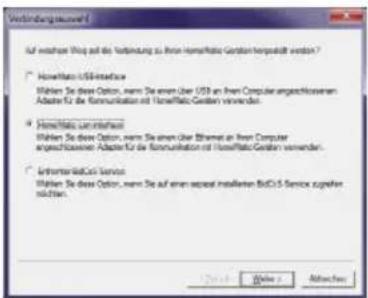
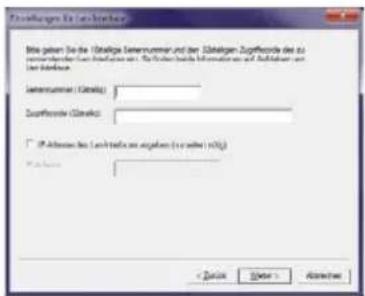
- In the "Settings for LAN interface" window enter the serial number and the access code printed on the label underneath the configuration adapter:
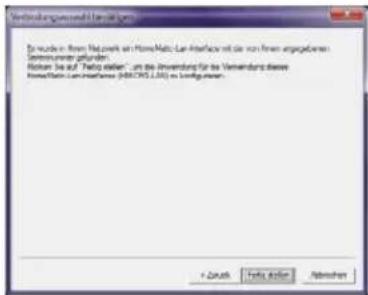
- In the "Confirm connection selection" window click "Finish". The configuration adapter has now been registered:
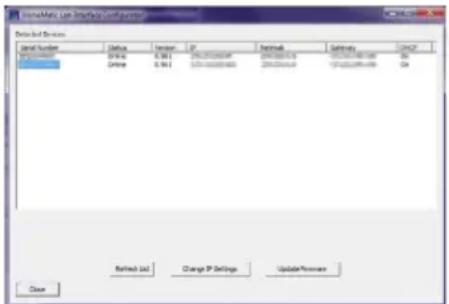
- You can use the "HomeMatic LAN Interface Configurator" utility program to check the configuration
adapter's network settings and to modify them, if necessary:
text_image
Details and Services Serial Number Status Order IP Network Settings CHCP 0123487 Online 0.961 100-00000000 200-00000000 100-00000000 50 Online 0.961 100-00000000 200-00000000 100-00000000 50 Retired List Change IP Settings Update Provider Close7 Programoperation
A detailed description of the user interface can be found in the WebUI Manual, available for download in the download area at www.homematic.com.
8 Teaching-out components / using a different CCU
If you want to remove a taught-in HomeMatic component from the system, pass it on to other users or use the HomeMatic Central Control Unit instead, all the HomeMatic components concerned must be taught-
out from the configuration adapter. For information about this procedure, refer to the description of the WebUI manual.
If a system security key has been assigned, the taught-in HomeMatic components must be reset to their initial state. For information about this procedure, refer to the description of the WebUI Manual.
9 Status messages
The indicator lights of the configuration adapter can represent the following states:
| Indication of device LED | Meaning |
| LINK flashing indicates LAN data transmission | |
| STATUS flashing indicates HomeMatic wireless transmission | |
| POWER flashing device is connected to the network and has been assigned an ID by it; no connection has been established with the program | |
| POWER permanently lit | program connection is active |
10 Maintenance and cleaning
The product does not require any maintenance. Enlist the help of an expert to carry out any repairs. Clean the product using a soft, lint-free cloth that is clean and dry. You may dampen the cloth a little with lukewarm water in order to remove more stubborn marks. Do not use any detergents containing solvents, as they could corrode the plastic housing and the label.
11 Technical specifications
Device short description: HM-CFG-LAN
Supply voltage: 7.5 V DC
Current consumption: 200 mA max.
Degree of protection: IP20
Ambient temperature: 5 to 35 °C
Dimensions ( x H): 100 x 30 mm
Weight: 90 g
Radio frequency: 868.3 MHz
Receiver class: SRD Class 2
Typ. open area RF range: > 100 m
Duty cycle: < 1 % per h
Protocol: BidCoS®
Network: Ethernet, 10/100 Base-T
Devices that can be taught-in: 1000
Subject to technical changes.
Instructions for disposal:
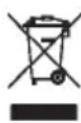
Do not dispose of the device with regular domestic waste. Electronic equipment must be disposed of at local collection points for waste electronic equipment in compliance with the Waste Electrical and Electronic Equipment Directive.

The CE sign is a free trading sign addressed exclusively to the authorities and does not include any warranty of any properties.
Manufacturer's authorised representative: