
VTV35 - Media player VIEWSONIC - Free user manual and instructions
Find the device manual for free VTV35 VIEWSONIC in PDF.


| Type of Product | Media Player |
| Brand | ViewSonic |
| Model | VTV35 |
| Dimensions (Approx) | 4.5 x 0.9 x 4.5 inches (115 x 23 x 115 mm) |
| Weight (Approx) | 0.5 lbs (220 g) |
| Power Supply | 5V DC via USB port |
| Video Output | HDMI 1.4 |
| Audio Output | 3.5 mm headphone jack |
| Storage Expansion | USB 2.0 port, SD/MMC card slot |
| Supported Video Formats | MP4, AVI, MKV, MOV, WMV |
| Supported Audio Formats | MP3, WMA, AAC, WAV |
| Supported Image Formats | JPEG, BMP, PNG |
| Max Video Resolution | 1080p Full HD |
| Remote Control | Infrared remote included |
| File System | FAT32, NTFS |
| Main Functions | Video playback, music playback, photo viewer, file browser |
| Maintenance & Cleaning | Wipe with a soft, dry cloth; avoid liquids |
| Safety Precautions | Keep away from moisture and heat sources; do not disassemble |
| Spare Parts & Repairability | Contact ViewSonic support for spare parts; repair by qualified personnel only |
| General Information | Compact media player for home entertainment |
Frequently Asked Questions - VTV35 VIEWSONIC
User questions about VTV35 VIEWSONIC
0 question about this device. Answer the ones you know or ask your own.
Ask a new question about this device
Download the instructions for your Media player in PDF format for free! Find your manual VTV35 - VIEWSONIC and take your electronic device back in hand. On this page are published all the documents necessary for the use of your device. VTV35 by VIEWSONIC.
USER MANUAL VTV35 VIEWSONIC
Declaration of RoHS Compliance
This product has been designed and manufactured in compliance with Directive 2002/95/EC of the European Parliament and the Council on restriction of the use of certain hazardous substances in electrical and electronic equipment (RoHS Directive) and is deemed to comply with the maximum concentration values issued by the European Technical Adaptation Committee (TAC) as shown below:
| Substance | Proposed Maximum Concentration | Actual Concentration |
| Lead (Pb) 0.1% < 0.1% | ||
| Mercury (Hg) 0.1% < 0.1% | ||
| Cadmium (Cd) 0.01% < 0.01% | ||
| Hexavalent Chromium ( Cr^6+ ) 0.1% < 0.1% | ||
| Polybrominated biphenyls (PBB) 0.1% < 0.1% | ||
| Polybrominated diphenyl ethers (PBDE) 0.1% < 0.1% |
Certain components of products as stated above are exempted under the Annex of the RoHS Directives as noted below:
Examples of exempted components are:
- Mercury in compact fluorescent lamps not exceeding 5 mg per lamp and in other lamps not specifically mentioned in the Annex of RoHS Directive.
- Lead in glass of cathode ray tubes, electronic components, fluorescent tubes, and electronic ceramic parts (e.g. piezoelectronic devices).
- Lead in high temperature type solders (i.e. lead-based alloys containing 85% by weight or more lead).
- Lead as an allotting element in steel containing up to 0.35% lead by weight, aluminium containing up to 0.4% lead by weight and as a cooper alloy containing up to 4% lead by weight.
Copyright Information
Copyright © ViewSonic Corporation, 2009. All rights reserved.
ViewSonic, the three birds logo, OnView, ViewMatch, and ViewMeter are registered trademarks of ViewSonic Corporation.
Disclaimer: ViewSonic Corporation shall not be liable for technical or editorial errors or omissions contained herein; nor for incidental or consequential damages resulting from furnishing this material, or the performance or use of this product.
In the interest of continuing product improvement, ViewSonic Corporation reserves the right to change product specifications without notice. Information in this document may change without notice.
No part of this document may be copied, reproduced, or transmitted by any means, for any purpose without prior written permission from ViewSonic Corporation.
For Your Records
Product Name: VTV35
ViewSonic Pocket TV
Model Number: VS12801
Document Number: VTV35_UG_ENG Rev. 1A 06-17-09
Serial Number:
Purchase Date:
Product disposal at end of product life
ViewSonic is concerned about the preservation of our environment. Please dispose of this product properly at the end of its useful life. Your local waste disposal company may provide information about proper disposal.
The lamp in this product contains mercury. Please dispose of properly in accordance with environmental laws of your location.
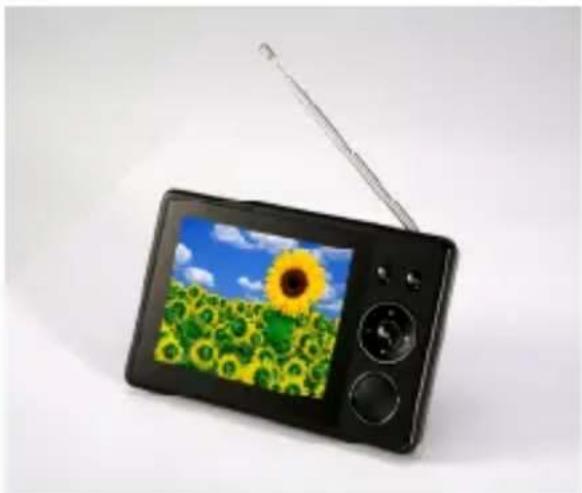
1. Picture of the Portable TV
natural_image
Black digital camera with a sunflower screen and antenna, isolated on white background (no text or symbols visible) | Menu Button |
 | Power Button / Return Button |
| [X7H0] | Channel up |
| [0Y27] | Channel down |
| [KBCX] | Vol + (increase volume) |
 | Vol – (decrease volume) |
 | Confirm Button |
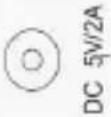 | DC Jack for power adaptor |
 | Earphone Jack |
2. BASIC OPERATION
2.1 Power On/Off
Power On: Press ☐ button and hold for 3 seconds, the system will start up. Power Off: Press ☐ button and hold for 3 seconds, the system will pop up a dialog box as follow:
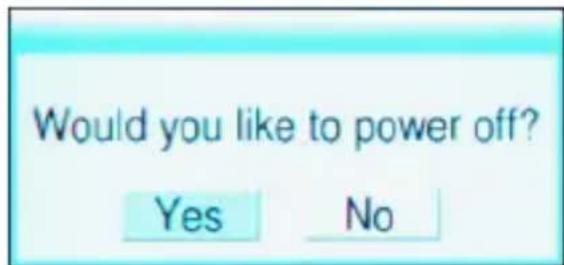
Press OK to turn off the player.
2.2 Channel button
Press ▲/▼ to move channel up/down.
2.3 Volume Control
Press +/- to increase or decrease the volume.
2.4 Program list
Press under TV/Radio playback mode to show the program list and press ▲▼ to select the TV/Radio channel, then press OK to confirm.
2.5 Sub-menu
Press OK under TV/Radio playback mode to enter the sub-menu as follow:
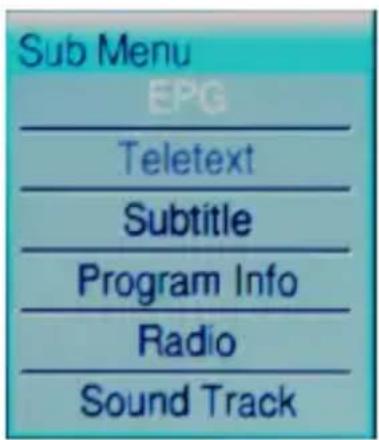
Move the cursor and press OK to enter these functions, and then you can press the Direction Key to select different option, press 🔍 to return and exit this sub-menu.
2.6 Reset
If the player suspend hanged up, please insert a sharp stick into the reset hole and press lightly, the system will clear all settings and power off.
3. System Setup
Press to enter the system setup menu as follow:
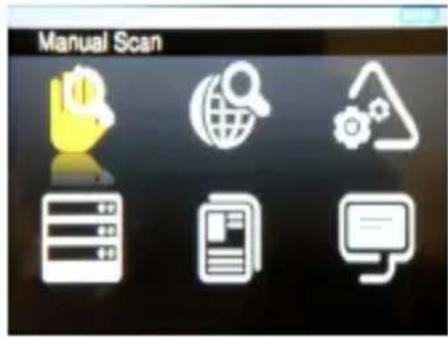
3.1 Country Scan
Move the cursor to 📋 and press OK to start COUNTRY SCAN base on the Country setting.
3.2 Manual Scan
Move the cursor to 📋 and press OK to start MANUAL SCAN; you can set the start frequency, end frequency and Band width manually.
3.3 System setting
Move the cursor to 🙏 and press OK to enter system setting menu, you can set Area, Time Zone, OSD Language and LCN option.
3.4 Display setting
Move the cursor to ☐ and press OK to enter Display Setting menu, you can set LCD Brightness, Contrast, Hue and Aspect Ratio option.
3.5 Factory Default
Move the cursor to [icon] and press OK to load Factory Default setting.
3.6 Version
Move the cursor to 📋 and press OK to show the Hardware and Software version information.
4. Use of battery
Precautions
Please fully charge the battery when use the unit for the first time, at least 8 hours charging is necessary for first 3 time charge to extend the life of the battery. The unit will be warmer when the unit is in use. It's normal. Please turn off when the unit is not used for a long time. The unit will be automatically turned off when the battery is low.

flowchart
graph LR
    A["Stage 1"] --> B["Stage 2"]
    B --> C["Stage 3"]
    C --> D["Stage 4"]
Warning
- Don’t use the battery which does not match the unit. Danger of explosion will be caused if battery is incorrectly replaced. Replace only with batteries in the same or equivalent type.
- For charging the battery, the power switch should be turned off.
- Charge the battery with AC/DC adapter after switch off the unit.
- The adapter is AC type, the input voltage is 100V-240V, and the output voltage is 5V/2A. Danger of burning the unit may be resulted if the AC/DC adapter does not match the unit.
5. Specifications
| Specifications | |
| Digital TV tuner DV | B-T module |
| Antenna | Built-in elastic antenna to receive the digital TV programs with sound signals |
| Panel | 3.5" TFT-LCD Display with the resolution of 320*240 |
| IO | - Earphone jack- DC-in Jack |
| Buttons | - Reset Hole- Volume key- Navigation key- Menu key- Esc key /power on/off |
| Battery | Lithium-ion rechargeable battery (2400mAh, 3.7V)- Watch DTV 4 hours (Earphone Mode) |
| Dimensions 117 x 75 x 16.1 mm | |
| Weight 165g with battery | |
| Regulations BSMI, | CE, RoHS |
| Software Specification | |
| Watch DVB-T programs | Support digital teletext, EPG, Subtitle. |
| Language | Traditional Chinese, English, French, Spanish, Italian, Swedish, Finnish, Norwegian, Danish, German |
| Channel Scan Country scan / Manual scan | |
Customer Support
For technical support or product service, see the table below or contact your reseller.
Note: You will need the product serial number.
ViewSonic Corporation
World Headquarters
381 Brea Canyon Road
Walnut, CA 91789-0708
Tel: 909-444-8888
Fax: 909-468-1240
ViewSonic Latin America / Miami
8201 Peters Road, Suite 1000
Plantation, FL 33324
ViewSonic Canada
100 Mural Street, Suite 202
Richmond Hill, Ontario L4B 1J3
Canada
Tel: 905-709-9774
Fax: 905-709-0685
Europe
ViewSonic United Kingdom
ViewSonic Europe Ltd.
Riverside House, 7th Floor
2a Southwark Bridge Road
London
SE1 9HA
United Kingdom
Tel: +44-(0)207-921-2200
Fax: +44-(0)207-921-2201
ViewSonic Italy
Email: sales-it@viewsoniceurope.com
ViewSonic Belux
Teleport Towers
Kingsfordweg 151
1043 GR Amsterdam
Email: sales_be@viewsoniceurope.com
Tel: +31 (0)20 491 9254
FAX: +31 (0)20 491 9090
ViewSonic Poland
Email: Sales-pl@viewsoniceurope.com
Service and support:
Tel: +48 61 879 89 93;
Email: info@arconet.pl
ViewSonic Norway
PO.box :Postboks 62 Bryn 0611 Oslo Norway
Email: sales_no@viewsoniceurope.com
ViewSonic 9 VTV35
ViewSonic Russia
Radio 24
Business Centre "Jauza Tower"
105005 Moscow
Russia
Email: For Information
Email: For Customer Care & Quality
Tel: +7 495 258 5670
Fax: +7 495 258 0625
ViewSonic Ukraine
1, Dorohozhytska Str., office
1025-B, Kiev, 04119, Ukraine
Tel./fax: +380 44 537 48 47
ViewSonic Finland
Lars Sonckin Kaari 12 02600 Espoo, Finland
Email: sales-fi@viewsoniceurope.com
TEL +358-(0)20 7120 861
FAX: +358-(0)20 7120 869
ViewSonic Spain & Portugal
Tel: +34 916305339
Email: sales_es@viewsoniceurope.com
ViewSonic France
ViewSonic SARL
Le Parc Barbanniers
1 Allée Des Bas Tilliers
92230 Gennevilliers
France
Email: sales_fr@viewsoniceurope.com
Tel: +33(0)1 41474-900
Fax: +33(0)1 41474-910
ViewSonic Sweden
TEL +46(0)8 507 13000
FAX +46(0)8 626 20 30
SERVICE and SUPPORT:
Tel: +46 (0)8 579 290 45
Info-Mail: sales-se@viewsoniceurope.com
9F, No. 192, Lien Chen Road
Chung Ho 235 Taipei
Taiwan
Tel: 011-886-2-2246-3456 (operator)
Fax: 011-886-2-8242-3666 (9th fl. / exec. office)
ViewSonic Singapore
221 Henderson Road
04-08 Henderson Building
Singapore 159557
Tel: 011-65-6273-4018
Fax: 011-65-6273-1566
ViewSonic Korea Office
2110, 21F, Renaissance Tower Bldg.
Gongdeok 2-dong
Mapo-gu, Seoul, 121-706
Korea
Tel: 82-2-798-2132
Fax: 82-2-798-2136
ViewSonic India Pvt Ltd.
M-28, Commercial Complex (M-Block Market)
3rd floor, Greater Kailash-II
N Delhi - 110 048
India
Tel: 91-11-4053-6556
Fax: 91-11-4053-6557
ViewSonic Thailand [Rep. Office]
246 Time Square Building,
12-02, Room no. 1550B,
Sukhumvit Rd.
Klong Tuery, Bangkok 10110
Thailand
Tel: +662 253 7189
China
ViewSonic China Head Office (Shanghai)
Room 3608, 36F United Plaza
No. 1468 Nan Jing
Shanghai
20040
Tel: 86-21-6237-5252
Fax: 86-21-6237-5373
or 86-21-6237-5590 ViewSonic Guangzhou
Room 1305, Renfeng Tower, No. 490 Tianhe Rd,
Tianhe Dist., Guangzhou PRC
510630
Tel: 86-20-3878-1858
Fax: 86-20-3878-1766
ViewSonic Beijing
Room 902, 9F Union Plaza
No. 20, Chao Wai Ave
Chaoyang Dist.
Beijing PRC
100020
Tel: 86-10-6588-5301
Fax: 86-10-6588-4288
ViewSonic Hong Kong
Unit 3, 15/F, Greenfield Tower,
Concordia Plaza, 1 Science Museum Road,
TST East Kowloon, Hong Kong
Tel: (852) 3690 1398
Fax: (852) 3690 1399
Australia
ViewSonic Australia Pty. Ltd.
Unit 4, 44 Dickson Ave, Artarmon
NSW 2064, Australia
Tel: 61-2-9906-6277
Fax: 61-2-9906-6377
Limited Warranty
VIEWSONIC Packet TV
What the warranty covers:
ViewSonic warrants its products to be free from defects in material and workmanship, under normal use, during the warranty period. If a product proves to be defective in material or workmanship during the warranty period, ViewSonic will, at its sole option, repair or replace the product with a like product. Replacement product or parts may include remanufactured or refurbished parts or components.
How long the warranty is effective:
ViewSonic Packet TV are warranted for 1 year for labor from the date of the first customer purchase.
Who the warranty protects:
This warranty is valid only for the first consumer purchaser.
What the warranty does not cover:
-
Any product on which the serial number has been defaced, modified or removed.
-
Damage, deterioration or malfunction resulting from:
a. Accident, misuse, neglect, fire, water, lightning, or other acts of nature, unauthorized product modification, or failure to follow instructions supplied with the product.
b. Repair or attempted repair by anyone not authorized by ViewSonic.
c. Causes external to the product, such as electric power fluctuations or failure.
d. Use of supplies or parts not meeting ViewSonic's specifications.
e. Normal wear and tear.
f. Any other cause which does not relate to a product defect.
- Any product exhibiting a condition commonly known as “image burn-in” which results when a static image is displayed on the product for an extended period of time.
How to get service:
-
For information about receiving service under warranty, contact ViewSonic Customer Support (please refer to Customer Support page). You will need to provide your product's serial number.
-
To obtain warranted service, you will be required to provide (a) the original dated sales slip, (b) your name, (c) your address, (d) a description of the problem, and (e) the serial number of the product.
-
Take or ship the product freight prepaid in the original container to an authorized ViewSonic service center or ViewSonic.
-
For additional information or the name of the nearest ViewSonic service center, contact ViewSonic.
Limitation of implied warranties:
There are no warranties, express or implied, which extend beyond the description contained herein including the implied warranty of merchantability and fitness for a particular purpose.
Exclusion of damages:
ViewSonic's liability is limited to the cost of repair or replacement of the product. ViewSonic shall not be liable for:
-
Damage to other property caused by any defects in the product, damages based upon inconvenience, loss of use of the product, loss of time, loss of profits, loss of business opportunity, loss of goodwill, interference with business relationships, or other commercial loss, even if advised of the possibility of such damages.
-
Any other damages, whether incidental, consequential or otherwise.
-
Any claim against the customer by any other party.
4.3: ViewSonic Pocket TV Warranty
PTV_LW01 Rev. 1A 06-20-08
- Declaration of RoHS Compliance
- Copyright Information
- For Your Records
- Product disposal at end of product life
- Picture of the Portable TV
- BASIC OPERATION
- Power On/Off
- Channel button
- Volume Control
- Program list
- Sub-menu
- Reset
- System Setup
- Country Scan
- Manual Scan
- System setting
- Display setting
- Factory Default
- Version
- Use of battery
- Precautions
- Warning
- Specifications
- Customer Support
- ViewSonic Corporation
- World Headquarters
- ViewSonic Latin America / Miami
- ViewSonic Canada
- Europe
- ViewSonic United Kingdom
- ViewSonic Italy
- ViewSonic Belux
- ViewSonic Poland
- ViewSonic Norway
- ViewSonic Russia
- ViewSonic Ukraine
- ViewSonic Finland
- ViewSonic Spain & Portugal
- ViewSonic France
- ViewSonic Sweden
- ViewSonic Singapore
- 04-08 Henderson Building
- ViewSonic Korea Office
- 2110, 21F, Renaissance Tower Bldg.
- ViewSonic India Pvt Ltd.
- ViewSonic Thailand [Rep. Office]
- China
- ViewSonic China Head Office (Shanghai)
- ViewSonic Beijing
- ViewSonic Hong Kong
- Australia
- ViewSonic Australia Pty. Ltd.
- Limited Warranty
- VIEWSONIC Packet TV
- What the warranty covers:
- How long the warranty is effective:
- Who the warranty protects:
- What the warranty does not cover:
- How to get service:
- Limitation of implied warranties:
- Exclusion of damages:
Brand : VIEWSONIC
Model : VTV35
Category : Media player