RX1000A - Car hands-free kit Renegade - Free user manual and instructions
Find the device manual for free RX1000A Renegade in PDF.


| Product Type | Car hands-free kit |
| Brand | Renegade |
| Model | RX1000A |
| Dimensions (L x W x H) | 10 x 5 x 2 cm |
| Weight | 50 g |
| Power Source | Rechargeable lithium-ion battery, 300 mAh |
| Charging Interface | Micro-USB |
| Bluetooth Version | 5.0 |
| Speaker Type | Integrated full-range speaker |
| Microphone Type | Built-in omnidirectional microphone |
| Main Functions | Hands-free calling, music streaming, voice assistant support |
| Battery Life (Talk Time) | Up to 10 hours |
| Standby Time | Up to 150 hours |
| Device Pairing | Up to 2 devices simultaneously |
| Mounting Method | Clip-on sun visor clip included |
| Operating Range | Up to 10 meters |
| Care and Cleaning | Wipe with a dry, soft cloth; avoid liquids |
| Safety Information | Do not use while driving; mount securely; keep away from moisture |
| Spare Parts Availability | Replacement batteries and clips available from manufacturer |
| Repairability | Device is not user-serviceable; contact support for repairs |
| General Information | Compatible with smartphones and tablets; supports A2DP, HFP, HSP profiles |
Frequently Asked Questions - RX1000A Renegade
User questions about RX1000A Renegade
0 question about this device. Answer the ones you know or ask your own.
Ask a new question about this device
Download the instructions for your Car hands-free kit in PDF format for free! Find your manual RX1000A - Renegade and take your electronic device back in hand. On this page are published all the documents necessary for the use of your device. RX1000A by Renegade.
USER MANUAL RX1000A Renegade
natural_image
Abstract gray flame-like graphic design with no text or symbolsRENEGADE
PURE CAR AUDIO ENGINES
natural_image
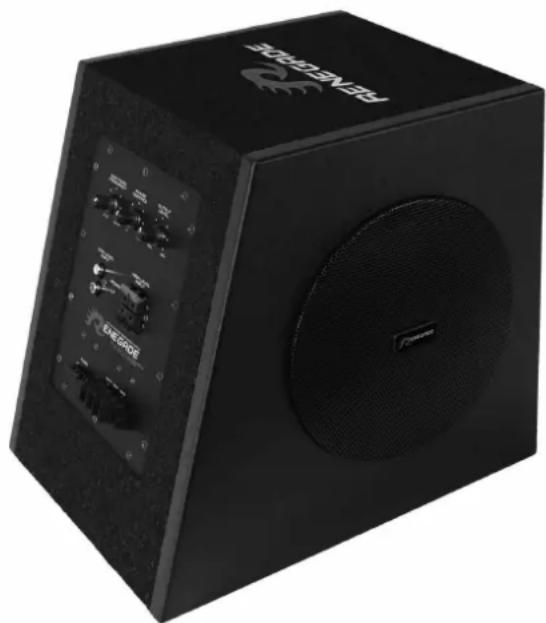
Black portable electronic device with speaker grille and control panel (no visible text or symbols)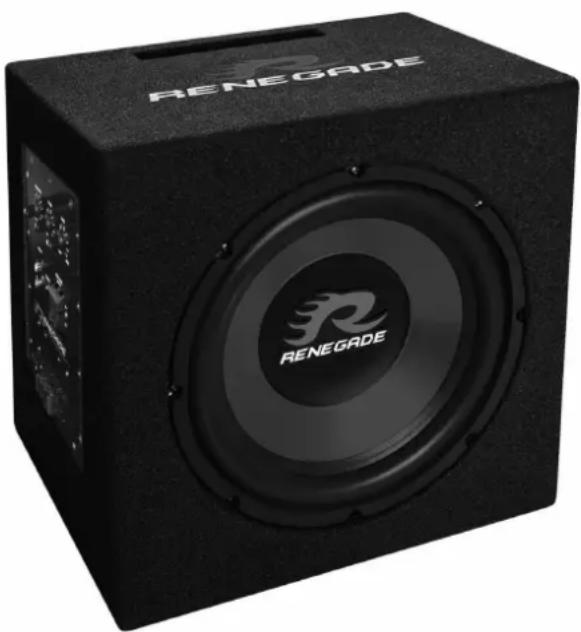
natural_image
Black box-shaped electronic device with 'RENEGADE' branding and speaker grille (no additional text or symbols visible)RX800A · RX 1000 A
ACTIVE POWERED SUBWOOFER SYSTEMS
DEU
SICHERHEITSHINWEISE
THE PURCHASED DEVICE IS ONLY SUITABLE FOR AN OPERATION WITH A 12V ON-BOARD ELECTRICAL SYSTEM OF A VEHICLE. Otherwise fire hazard, risk of injury and electric shock consists.
PLEASE DO NOT MAKE ANY OPERATION OF THE SOUNDSYSTEM, WHICH DISTRACT YOU FROM A SAFE DRIVING.
Do not make any procedures, which demand a longer attention. Perform these operations not until you have stopped the vehicle on a safe place. Otherwise the risk of accident consists.
ADJUST THE SOUND VOLUME TO AN APPROPRIATE LEVEL, THAT YOU ARE STILL ABLE TO HEAR EXTERIOR NOISES WHILE DRIVING. High performance sound systems in vehicles may generate the acoustic pressure of a live concert. The permanent listening to extrem loud music may cause the loss of your hearing abilities. The hearing of extreme loud music while driving may derogate your cognition of warning signals in the traffic. In the interests of the common safeness, we suggest to drive with a lower sound volume. Otherwise the risk of accident consists.
DO NOT COVER COOLING VENTS AND HEATSINKS. Otherwise this may cause heat accumulation in the device and fire hazard consists.
DO NOT OPEN THE DEVICE. Otherwise fire hazard, risk of injury and electric shock consists. Also this may cause a loss of the warranty.
REPLACE FUSES ONLY WITH FUSE WITH THE SAME RATING. Otherwise fire hazard and risk of electric shock consists.
DO NOT USE THE DEVICE ANY LONGER, IF A MALFUNCTION, WHICH REMAINS UNREMEDIED. Attend in this case the chapter TROUBLE SHOOTING. Otherwise risk of injury and the damage of the device consists. Commit the device to an authorized retailer.
THE INSTALLATION OF A POWER CAPACITOR WITH SUFFICIENT CAPACITY IS RECOMMENDED. High performance amplifiers cause high potential voltage drops and need a high power consumption at a high volume level. To relieve the vehicle's on-board system, it is recommended to install a power capacitor between the battery and the device which works as buffer. Consult your car audio retailer for the appropriate capacity.
INTERCONNECTION AND INSTALLATION SHOULD BE ACCOM- PLISHED BY SKILLED STAFF ONLY. The interconnection and installation of this device demands technical aptitude and experience. For your own safness, commit the interconnexion and installation to your car audio retailer, where you have purchased the device.
DISCONNECT THE GROUND CONNECTION FROM THE VEHICLE'S BATTERY BEFORE INSTALLATION. Before you start with the installation of the sound system, disconnect by any means the ground supply wire from the battery, to avoid any risk of electric shock and short circuits.
CHOOSE A APPROPRIATE LOCATION FOR THE INSTALLATION OF THE DEVICE. Look for a appropriate location for the device, which ensures a sufficient air circulation. The best places are spare wheel cavities, and open spaces in the trunk area. Less suitable are storage spaces behind the side coverings or under the car seats.
DO NOT INSTALL THE DEVICE AT LOCATIONS, WHERE IT WILL BE EXPOSED TO HIGH HUMIDITY AND DUST. Install the device at a location, where it will be protected from high humidity and dust. If humidity and dust attain inside the device, malfunctions may be caused.
MOUNT THE DEVICE AND OTHER COMPONENTS OF THE SOUND SYSTEM SUFFICIENTLY. Otherwise the device and components may get loose and act as dangerous objects, which could cause serious harm and damages in the passenger room.
ATTEND NOT TO DAMAGE COMPONENTS, WIRES AND CABLES OF THE VEHICLE WHEN YOU DRILL THE MOUNTING HOLES. If you drill the mounting holes for the installation into the vehicle's chassis, ensure by any means, not to damage, block or tangent the fuel pipe, the gas tank, other wires or electrical cables.
ENSURE CORRECT CONNECTION OF ALL TERMINALS. Faulty connections may could cause fire hazard and lead to damages of the device.
DO NOT INSTALL AUDIO CABLES AND POWER SUPPLY WIRES TOGETHER. Attend while installation not to lead the audio cables between the headunit and the amplifier together with the power supply wires on the same side of the vehicle. The best is a areal separated installation in the left and right cable channel of the vehicle. Therewith a overlap of interferences on the audio signal will be avoided. This stands also for the equipped bass-remote wire, which should be installed not together with the power supply wires, but rather with the audio signal cables.
ENSURE THAT CABLES MAY NOT CAUGHT UP IN CLOSE-BY OBJECTS. Install all the wires and cables like described on the following pages, therewith these may not hinder the driver. Cables and wires which are installed close-by the steering wheel, gear lever or the brake pedal, may caught up and cause highly dangerous situations.
DO NOT SPLICE ELECTRICAL WIRES. The electrical wires should not be bared, to provide power supply to other devices. Otherwise the load capacity of the wire may get overloaded. Use therefor a appropriate distribution block. Otherwise fire hazard and risk of electric shock consists.
DO NOT USE BOLTS AND SCREW NUTS OF THE BRAKE SYSTEM AS GROUND POINT. Never use for the installation or the ground point bolts and screw-nuts of the brake system, steering system or other security-relevant components. Otherwise fire hazard consists or the driving safety will be derogated.
ENSURE NOT TO BEND OR SQUEEZE CABLES AND WIRES BY SHARP OBJECTS. Do not install cables and wires not close-by movable objects like the seat rail or may be bended or harmed by sharp and barbed edges. If you lead a wire or cable through the hole in a metal sheet, protect the insulation with a rubber grommet.
KEEP AWAY SMALL PARTS AND JACKS FROM CHILDREN. If objects like these will be swallowed, a risk of serious injuries consists. Consult promptly a medical doctor, if a child swallowed a small object.

REFERENCE NOTE
Before you start with the installation of the sound system, disconnect by any means the GROUND connection wire from the battery, to avoid any risk of electric shock and short circuits.
BEFORE THE CONNECTION
For the professional installation of a sound system appropriate wiring kits are available in car audio retailer stores. Attend the sufficient profile section (at least 10 mm ^2 ), the suitable fuse rating and the conductivity of the cables when you purchase your wiring kit. Clean and remove rust-streaked and oxidized areas on the contact points of the battery and the ground connection. Make sure that all screws are fixed tight after the installation, because loosely connections may cause malfunctions, insufficient power supply or interferences. We recommend therefore the RENEGADE REN10KIT wirekit.

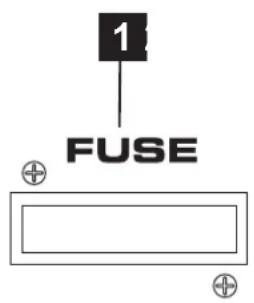
FUSE
The inserted fuse protects the amplifier from electrical shorts and capacity overload. If you need to replace the factory-provided fuse observe by any means to keep the same fuse rating (7.5 A).

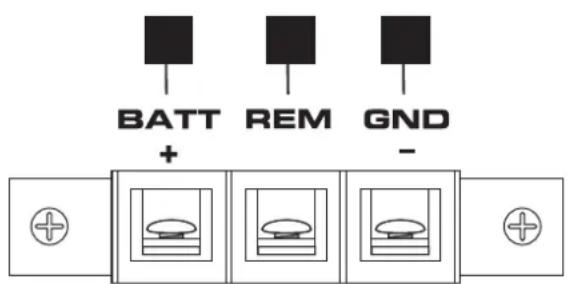
BATT+12V
Connect the BATT+12V-terminal with the +12V pole of the vehicle's battery. Use therefor a suitable cable with a sufficient cross section (min. 10 mm ^4 ) and install a additional in-line fuse. For safety reasons the distance between the fuseblock and the battery must be shorter than 30 cm. Do not install the fuse into the fuseblock until the installation is accomplished.

REM (TURN-ON SIGNAL)
Connect the turn-on signal (e.g. automatic antenna) or the turn-on remote signal of your headunit with the REM-terminal of the amplifier. Use therefor a suitable cable with a sufficient cross section (0,5 mm ^2 ). Thereby the amplifier will turn on or off automatically with your headunit.

GND
Connect this GROUND terminal with a suitable contact ground point on the vehicle's chassis. The ground wire must be as short as possible and must be connected to a blank metallic point at the vehicle's chassis. Ensure that this ground point has a stable and safe electric connection to the negative “-”pole of the battery. Check this ground wire from the battery to the ground point if possible and enforce it, if required. Use a ground wire with a sufficient cross section (at least 10 mm ^2 ) and the same size like the plus (+12V) power supply wire.

REFERENCE NOTE
Installation of RCA/Audio signal cables and power supply.
Attend while installation not to lead the audio cables between the headunit and the amplifier together with the power supply wires on the same side of the vehicle. The best is a areal separated installation in the left and right cable channel of the vehicle. Therewith a overlap of interferences on the audio signal will be avoided. This stands also for the equipped bass-remote wire, which should be installed not together with the power supply wires, but rather with the audio signal cables.
FUNCTIONS AND OPERATIONAL CONTROLS
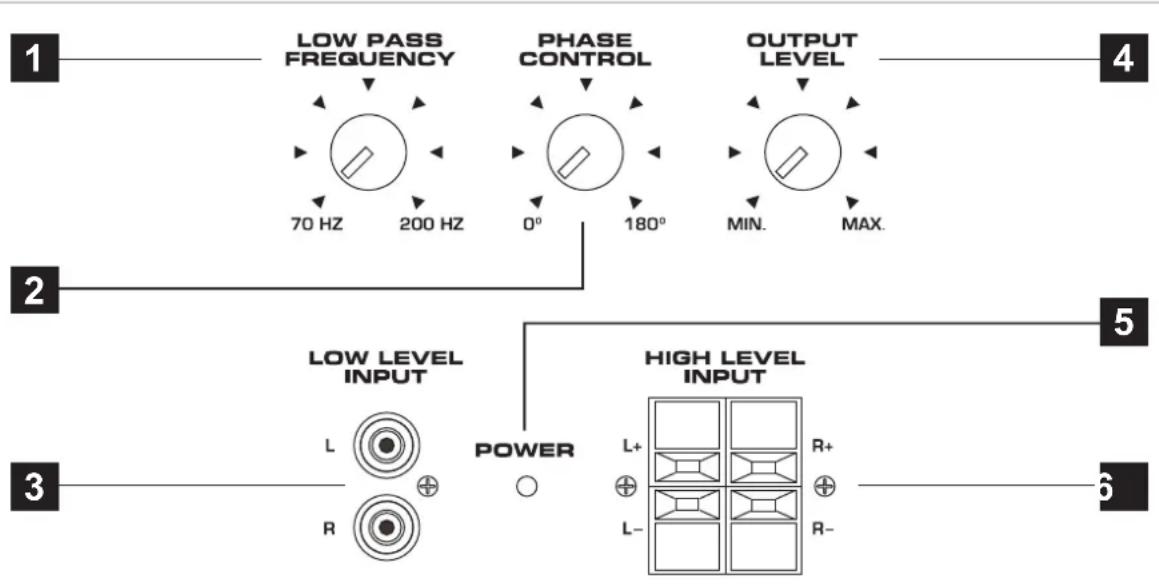
flowchart
graph TD
    A["1: LOW PASS FREQUENCY"] --> B["2: 70 Hz"]
    B --> C["200 Hz"]
    D["3: LOW LEVEL INPUT"] --> E["4: PHASE CONTROL"]
    E --> F["5: OUTPUT LEVEL"]
    G["6: HIGH LEVEL INPUT"] --> H["5: MAX."]
    I["POWER"] --> J["L+ R+ L- R-"]
1 The LOW PASS FREQUENCY controller adjusts the cut-off point of the frequency range to above. This means all mids and highs will be eliminated in the audio signal. The cut-off frequency is continuously adjustable from 70 Hz to 200 Hz.
2 The PHASE CONTROL allows to adjust the phase between 0^ to 180. By changing the acoustic phase you are able to adjust the subwoofer according to the louspeaker system and the vehicle's sound characteristics.
3 The LOW LEVEL INPUT RCA jacks must be connected with the RCA output jacks of the headunit. This input is only suited for low level signals.
The OUTPUT LEVEL controller adjusts the output level and allows to match the level of the subwoofer with the complete sound system.
The POWER LED lights up when the soundsystem is turned-on and ready for operation.
6 The HIGH LEVEL INPUT is suitable to connect the speaker outputs of the headunit, if no pre-amplifier RCA outputs are available. Please use the include wire harness for the connection. Please observe by any means the correct polarity of all connections. Never use the High Level Input and the RCA inputs at the same time. This may damage the amplifier seriously.

REFERENCE NOTE
Always ensure the correct polarity of all connections. The interchange of plus and minus cause total loss of bass playback and could damage the speakers.
Malfunction: no function
Reason: Remedy:
- The power supply connection of the device is not correct. Recheck
- The cables have no mechanical or electrical contact. Recheck
- The remote turn-on connection from the headunit to the amplifier is not correct. Recheck
- Defective Fuse. In case of replacing the fuses, attend by any means the correct fuse rating. Replace Fuse
Malfunction: no signal is audible, but power LED lights up
Reason: Remedy:
- The connection of the speakers or the RCA audio cables is not correct. Recheck
- The speaker cables or the RCA audio cables are defective. Replace cables
- No signal from headunit. Check headunit settings
Malfunction: distortions is audible
Reason: Remedy:
- The loudspeaker is overloaded. Turn down the level
Turn down the level on the headunit Switch off loudness on the headunit Reset bass EQ on headunit or amp
Malfunction: no bass is audible
Reason: Remedy:
- Interchange of loudspeaker cable polarity positive (+) and negative (-). Reconnect
- The RCA audio cables are loose or defective. Reconnect or replacing the cables
Malfunction: hiss or white noise is audible
Reason: Remedy:
- The level controllers are turned up. Turn down the level
- The speaker cables or the RCA audio cables are defective. Replacing the cables
- The hissing is caused by the headunit. Check the headunit
ENG
SPECIFICATIONS
RX800A
Active Powered Subwoofer-System with 20cm Subwoofer and Passive-Radiator
Amplifier Built-In: Output Power 200 Watt Max.
Variable Lowpass Filter 70 - 200 Hz
Variable Phase 0° to 180°
Low Level Input with RCA jacks
High Level Input
Fuse Rating 7.5 A
Subwoofer: Woofer Size 20cm (8")
Voice Coil 50mm (2")
Enclosure Dimensions: W 270 x H 330 x D 350/270 mm
RX1000A
Active Powered Bassreflex-Subwoofer-System with 25cm Subwoofer
Amplifier Built-In: Output Power 200 Watt Max.
Variable Lowpass Filter 70 - 200 Hz
Variable Phase 0° to 180°
Low Level Input with RCA jacks
High Level Input
Fuse Rating 7.5 A
Subwoofer: Woofer Size 25cm (10")
Voice Coil 50mm (2")
Enclosure Dimensions: W 330 x H 330 x D 320/250 mm
ENG
WARRANTY
The limited warranty comply with legal regulations.
Failures or damages caused by overload, improper use or by using the product for competitions are not covered by the warranty.
Please return the defective product only with a valid proof of purchase and a detailed malfunction description.

natural_image
Abstract gray flame-like graphic design on white background (no text or symbols)RENEGADE
PURE CAR AUDIO ENGINES

Audio Design GmbH · www.audiodesign.de
Am Breilingsweg 3 · D-76709 Kronau (Germany)
Tel. +49 (0)7253 - 9465-0 · Fax +49 (0)7253 - 946510
