
CMO2 - Microwave GORENJE - Free user manual and instructions
Find the device manual for free CMO2 GORENJE in PDF.


| Product Type | Microwave Oven |
| Brand | Gorenje |
| Model | CMO2 |
| Installation Type | Countertop |
| Capacity | 20 L |
| Microwave Power | 800 W |
| Power Levels | 5 levels |
| Display | LED digital |
| Control Type | Push buttons and rotary dial |
| Turntable | Yes, glass plate (25 cm) |
| Child Lock | Yes |
| Timer | Up to 95 minutes |
| Defrost Function | By weight and time |
| Auto Cook Programs | 8 preset menus |
| Interior Light | Yes |
| Clock | Yes |
| Door Opening | Push-button |
| Weight | 11.5 kg |
| Dimensions (H x W x D) | 262 x 452 x 350 mm |
| Power Consumption | 1050 W |
| Voltage / Frequency | 230 V / 50 Hz |
| Cable Length | 1.2 m |
| Cavity Material | Stainless steel |
| Color | White |
| Spare Parts Available | Door hinge, glass plate, roller ring, fuse, control board |
| Warranty | 2 years |
Frequently Asked Questions - CMO2 GORENJE
User questions about CMO2 GORENJE
0 question about this device. Answer the ones you know or ask your own.
Ask a new question about this device
Download the instructions for your Microwave in PDF format for free! Find your manual CMO2 - GORENJE and take your electronic device back in hand. On this page are published all the documents necessary for the use of your device. CMO2 by GORENJE.
USER MANUAL CMO2 GORENJE
natural_image
White microwave oven with digital display showing 245°F, no visible text or symbols on the device bodyDIGITALNA NADZORNA PLOŠČA

1 - Sigurnosni sistem za zatvaranje vrata
2 - Prozor pećnice
3 - Otvori za zračenje
4 - Ležajni obruč
5 - Stakleni pladanj
6 - Nadzorna ploča
Kompjutorska nadzorna ploča

1 - 10 Min (10 minuta)
2 - 1 Min (1 minuta)
3 - 10 Sec (10 sekundi)
4 - Ekran
5 - START-RESET (Uključenje-Ponovno podešavanje)
6 - MICRO/DEFROST (uključenje mikrovalne energije/ odmrzavanja)
Uputstva za upotrebu kompjutorske nadzorne ploče
Obično kuhanje
Jednostavno kuhanje aktivirate pritiskom na jednu samu tipku.
1 - Bezbednosni sistem za zatvaranje vrata
2 - Prozor rerne
3 - Otvori za zračenje
4 - Ležajni obruč
5 - Staklena tacna
6 - Kontrolna ploča
Kompjutorska kontrolna ploča

1 - 10 Min (10 minuta)
2 - 1 Min (1 minut)
3 - 10 Sec (10 sekundi)
4 - Ekran
5 - Start/Reset (uključenje/poništenje)
6 - Mikro rekidač
UPUTSTVA ZA UPRAVLJANJE NA KOMPJUTORSKOJ KONTROLNOJ TABLI
Uobičajeno kuvanje
Before operating this oven, please read these instructions completely.
SPECIFICATIONS
Power consumption: 230 V \~ 50 Hz, 1080W
Output: 700W
Operating Frequency: 2450 MHz
Outside Dimensions: 454 mm (L) x 330 mm (W) x 262 mm (H)
Oven Cavity Dimensions:....315 mm (L) x 296 mm (W) x 211 mm (H)
Oven Capacity: 20 litres
Cooking Uniformity:Turntable system (ø245 mm)
Uncrated Weight: ....Approx. 10.5 kg
This appliance is marked according to the European directive 2002/96/EC on Waste Electrical and Electronic Equipment (WEEE).
This guideline is the frame of a European-wide validity of return and recycling on Waste Electrical and Electronic Equipment.
BEFORE YOU CALL FOR SERVICE
- If the oven will not perform at all, the display does not appear or the display disappeared:
a) Check to ensure that the oven is plugged in securely. If it is not, remove the plug from the outlet, wait 10 seconds and plug it in again securely.
b) Check the premises for a blown circuit fuse or a tripped main circuit breaker. If these seem to be operating properly, test the outlet with another appliance.
- If the microwave power will not function:
a) Check to see whether the timer is set.
b) Check to make sure that the door is securely closed to engage the safety interlocks. Otherwise, the microwave energy will not flow into the oven.
IF NONE OF THE ABOVE RECTIFY THE SITUATION, THEN CONTACT THE NEAREST AUTHORIZED SERVICE AGENT.
RADIO INTERFERENCE
Microwave oven may cause interference to your radio, TV, or similar equipment. When interference occurs, it may be eliminated or reduced by the following procedures.
a) Clean the door and sealing surface of the oven.
b) Place the radio, TV, etc. as far away from your microwave oven as possible.
c) Use a properly installed antenna for your radio, TV, etc. to get a strong signal reception.
INSTALLATION
- Make sure all the packing materials are removed from the inside of the door.
-
Inspect the oven after unpacking for any visual damage such as:
-
Misaligned Door
- Damaged Door
- Dents or Holes in Door Window and Screen
- Dents in Cavity
-
If any of the above are visible, DO NOT use the oven.
-
This Microwave Oven weighs 10.5 kg and must be placed on a horizontal surface strong enough to support this weight.
- The oven must be placed away from high temperature and steam.
- DO NOT place anything on top of the oven.
- Keep the oven at least 8 cm away from both sidewalls and 10 cm away from rear wall to ensure the correct ventilation.
- DO NOT remove the turn -table drive shaft.
- As with any appliance, close supervision is necessary when used by children.
WARNING - THIS APPLIANCE MUST BE EARTHED.
The plug socket should be within easy reach of the power cord This oven requires 1.1 KVA for its input, consultation with service engineer is suggested when installing the oven.
CAUTION: This oven is protected internally by a 250V 8 Amp Fuse.
IMPORTANT - The wires in this mains lead are colored in accordance with the following code:
Green-and-yellow Earth
Blue Neutral
Brown Live
As the colors of the wires in the mains leads of the appliance may not correspond with the colored markings identifying the terminals in your plug, proceed as follows:
The wire which is colored green-and-yellow must be connected to the terminal in the plug which is marked with the letterE or by the earth symbol colored green of green-and-yellow.
The wire which is colored blue must be connected to the terminal which is marked with the letter N or colored black. The wire which is colored brown must be connected to the terminal which is marked with the letter L or colored red.
IMPORTANT INSTRUCTIONS
WARNING-To reduce the risk of burns, electric shock, fire, injury to persons or excessive microwave energy:
This appliance is not intended for use by persons (including children) with reduced physical, sensory or mental capabilities, or lack of experience and knowledge, unless they have been given supervision or instruction concerning use of the appliance by a person responsible for their safety. Children should be supervised to ensure that they do not play with the appliance.
- Read all instructions before using microwave oven.
- Some products such as whole eggs and sealed containers - (for example, closed glass jars and sealed baby bottles with teat) - may explode and should not be heated in microwave oven. Refer to cookbook for more details.
- Use this microwave oven only for its intended use as described in this manual.
- As with any appliance, close supervision is necessary when used by children.
-
Do not operate this microwave oven, if it is not working properly or if it has been damaged or dropped.
-
To reduce the risk of fire in the oven cavity:
a) Do not overcook food. Carefully attend microwave oven if paper, plastic, or other combustible materials are placed inside the oven to facilitate cooking.
b) Remove wire twist-ties from bags before placing bag in oven.
c) If materials inside the oven should ignite, keep oven door closed, turn the oven off at the wall switch, or shut off power at the fuse or circuit breaker panel.
SAFETY INSTRUCTIONS FOR GENERAL USE
Listed below are, as with all appliances, certain rules to follow and safeguards to assure top performance from this oven:
- Always have the glass tray, roller arms, coupling and roller track in place when operating the oven.
- Do not use the oven for any reason other than food preparation, such as for drying clothes, paper, or any other non-food items, or for sterilizing purposes.
- Do not operate the oven when empty. This could damage the oven.
- Do not use the oven cavity for any type of storage, such a papers, cookbooks, etc.
-
Do not use the oven for home canning, Microwave ovens are not designed to permit proper canning. Improperly canned food may spoil and be dangerous to consume.
-
Do not cook eggs in the shell, as they will burst. Occasionally a poached egg may burst during cooking. Be sure to cook covered and let stand one minute after cooking before removing the cover.
-
Do not cook any food surrounded by a membrane, such as egg yolks, potatoes, chichen livers, etc without first being pierced several times with a fork.
-
Do not insert any object into the openings on the outer case.
- Do not at any time remove parts from the oven such as the feet, coupling, screws, etc.
- Do not cook food directly on the glass tray. Place food in/on proper cooking utensil before placing in the oven.
IMPORTANT - COOKWARE NOT TO USE IN YOUR MICROWAVE OVEN
- Do not use metal pans or dishes with metal handles.
- Do not use anything with metal trim.
- Do not use paper covered wire twist-ties on plastic bags.
- Do not use melamine dishes as they contain a material which will absorb microwave energy. This may cause the dishes to crack or char and will slow down the cooking speed.
- Do not use Centura Tableware. The glaze is not suitable for microwave use. Corelle Living ware closed handle cups should not be used.
- Do not cook in a container with a restricted opening, such as a pop bottle or salad oil bottle, as they may explode if heated in a microwave oven.
-
Do not use conventional meat or candy thermometers. There are the thermometers available specifically for microwave cooking. These may be used.
-
Microwave utensils should be used only in accordance with manufacturer's instructions.
- Do not attempt to deep-fry foods in this oven.
- Please remember that a microwave oven only heats the liquid in a container rather than the container itself. Therefore, even though the lid of a container is not hot to the touch when removed from the oven, please remember that the food/liquid inside will be releasing the same amount of steam and/or spitting when the lid is removed as in conventional cooking.
- Always test the temperature of cooked food yourself especially if you are heating or cooking food/liquid for babies. It is advisable never to consume food/liquid straight from the oven but allow it to stand for a few minutes and stir food/liquid to distribute heat evenly.
- Food containing a mixture of fat and water, e.g. stock, should stand for 30-60 seconds in the oven after it has been turned off. This is to allow the mixture to settle and to prevent bubbling when a spoon is placed in the food/liquid or a stock cube is added.
- When preparing/cooking food/liquid and remember that there are certain foods, e.g. Christmas puddings, jam and mincemeat, which heat up very quickly.
When heating or cooking foods with a high fat or sugar content do not use plastic containers.
- Cooking utensil may become hot because of heat transferred from the heated food. This is especially true if plastic wrap has been covering the top and handles of the utensil. Potholders may be needed to handle the utensil.
FEATURE DIAGRAM

1 - Door Safety Lock System
2 - Oven Window
3 - Oven Air Vent
4 - Roller Ring
5 - Glass Tray
6 - Control Panel
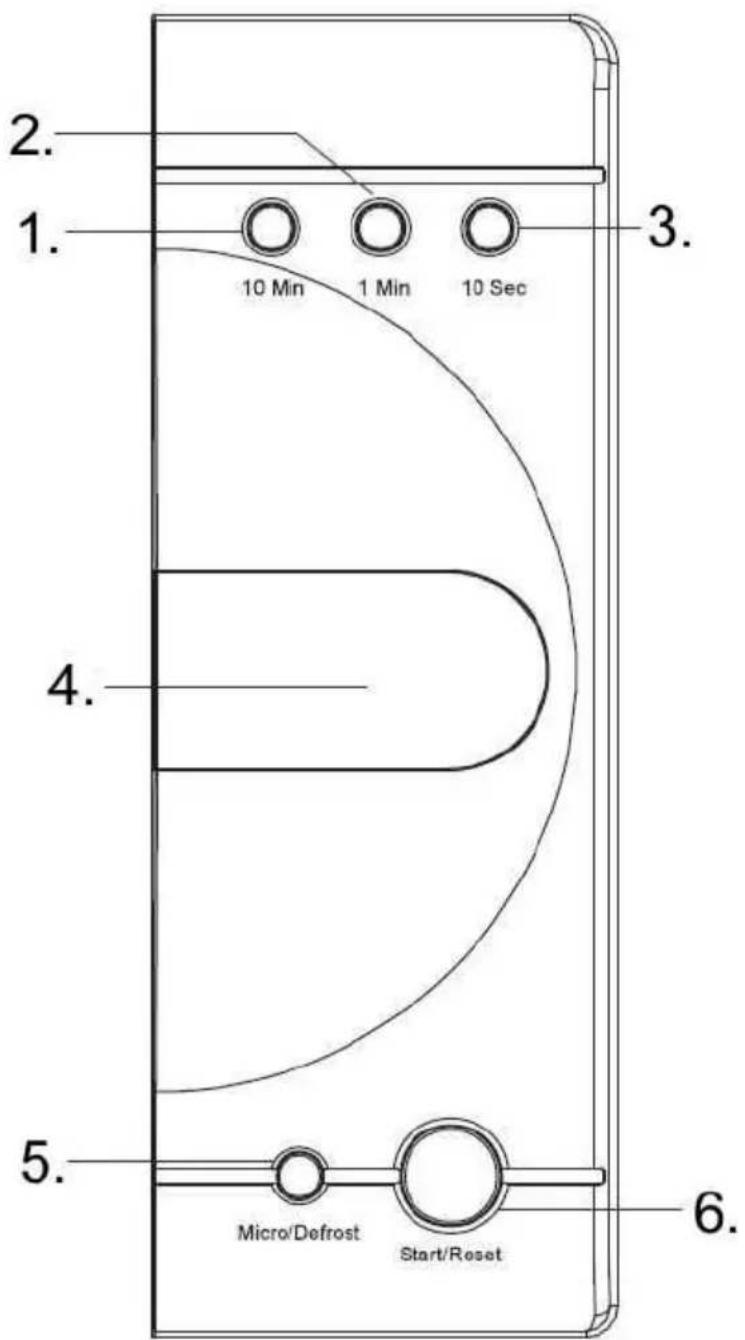
OPERATION INSTRUCTION ON COMPUTERIZED CONTROL PANEL
SIMPLE COOKING
You only need press one button for operating cooking 1 min with 100% microwave power, each pres one time means increase one min cooking time means increase one min cooking time, the maximum time is 30 min. After cooking finished you will sound five beeps for remind.
MICROWAVE COOKING
There are 10 power levels, and how to set each level is shown on the table below.
| Micro button Power setting Display shows | |
| Press one time 100% P10 | |
| Press two times 70% P7 | |
| Press three times 50% P5 | |
| Press four times 30% P3 | |
| Press five times 10% P1 | |
| Press six times -- DEF |
1. Fast cooking method
(For example: Select 100% power for cooking foods 5 minutes.)
a) Set the time "5:00"
b) Touch "START/RESET" button
2. Control by hand
(For example: select 70% power for heating foods 10 minutes)
a) Touch "MICRO/DEFROST" button select 70% power.
b) Touch time button to set cooking time "10:00"
c) Touch "START/RESET" button.
The oven will stop working when you press "START/RESET" button during the operation. You can press "MICRO/DEFROST" button to select power.
AUTO DEFROST FUNCTION
You need to press "1 Min" (1.0 kg) and "10 Sec" (0.1 kg) according to the weight of the food. The oven can select defrost program and auto start defrosting.
For example: defrost 0.4 kg frozen goods
- press "MICRO/DEFROST" to choose defrost function.
- set weight indicate "0.4 kg"
- press "START/RESET" button.
Remark: the maximum weight is 2 kg.
START and RESET
- Open the door status press "START/RESET" button to cancel setting or cooking program.
- close the door status
press "START/RESET" button to start cooking after setting cooking program. press "START/RESET" button to continue cooking when the cooking is in pause status.
press "START/RESET" button to stop working when the Microwave oven is operating.
CHILDREN SAFETY LOCK
To activate the child safety lock, press "1 Min" and "10 Sec" at the same time for 2 seconds. Press press "1 Min" and "10 Sec" at the same time for 2 seconds again, it will unlock the machine.
- Turn the oven off and remove the power plug from the wall socket before cleaning.
- Keep the inside of the oven clean. When food splatters of spilled liquids adhere to oven walls, wipe with a damp cloth. The use of harsh detergent or abrasives is not recommended.
- The outside oven surface should be cleaned with a damp cloth. To prevent damage to the operating parts inside the oven, water should not be allowed to seep into the ventilation openings.
- Do not allow the Control Panel to become wet. Clean with a soft, damp cloth, Do not use detergents, abrasives or spray-on cleaners on the control Panel.
- If steam accumulates inside or around the outside of the oven door, wipe with a soft cloth. This may occur when the microwave oven is operated under high humidity conditions and in no way indicates malfunction of the unit.
- It is occasionally necessary to remove the glass tray for cleaning. Wash the tray in warm sudsy water or in a dishwasher.
- The roller ring and oven cavity floor should be cleaned regularly to avoid excessive noise. Simply wipe the bottom surface of the oven with mild detergent, water or window cleaner and dry. The roller ring may be washed in mild sudsy water or sish washer. Cooking vapours collect during repeated use but in no way affect the bottom surface or roller ring wheels.
When removing the roller ring from cavity floor for cleaning, be sure to replace it in the proper position. - Remove odors from your oven by combining a cup of water with the juice and skin of one lemon in a deep microwaveable bowl. Microwave for 5 minutes, wipe thoroughly and dry with a soft cloth.
- When it becomes necessary to replace the oven light, please consult a dealer to have it replaced.
For personal use only!
Additional recommendations for cooking with microwave and useful advices can be found on web side:
http://microwave.gorenje.com
gorenje
WISHES YOU A LOT OF PLEASURE WHILE USING YOUR APPLIANCE
Greutate:....Aprox. 10.5 kg
ÎNAINTE DE A SUNA LA SERVICE
INSTRUCTIUNI GENERALE PENTRU SIGURANTA DVS.
1 - Sistem de blocare a uşii
2 - Geam cuptor
3 - Fante ventilare
4 - Inel
5 - Tavă de sticlă
6 - Panou de comnezi

1 - 10Min
2 - 1Min
3 - 10Sec
4 - Afişaj
5 - START/RESETARE
6 - Buton MICRO/DEFROST
UTILIZAREA PANOULUI DE COMENZI
GĂTIRE UȘOARĂ
WAARSCHUWING – DIT APPARAAT MOET WORDEN GEAARD.

- DIGITALNA NADZORNA PLOŠČA
- Kompjutorska nadzorna ploča
- Uputstva za upotrebu kompjutorske nadzorne ploče
- Obično kuhanje
- Kompjutorska kontrolna ploča
- UPUTSTVA ZA UPRAVLJANJE NA KOMPJUTORSKOJ KONTROLNOJ TABLI
- Uobičajeno kuvanje
- SPECIFICATIONS
- BEFORE YOU CALL FOR SERVICE
- RADIO INTERFERENCE
- INSTALLATION
- WARNING - THIS APPLIANCE MUST BE EARTHED.
- Green-and-yellow Earth
- Blue Neutral
- Brown Live
- IMPORTANT INSTRUCTIONS
- SAFETY INSTRUCTIONS FOR GENERAL USE
- IMPORTANT - COOKWARE NOT TO USE IN YOUR MICROWAVE OVEN
- FEATURE DIAGRAM
- OPERATION INSTRUCTION ON COMPUTERIZED CONTROL PANEL
- SIMPLE COOKING
- MICROWAVE COOKING
- Fast cooking method
- Control by hand
- AUTO DEFROST FUNCTION
- START and RESET
- CHILDREN SAFETY LOCK
- For personal use only!
- gorenje
- WISHES YOU A LOT OF PLEASURE WHILE USING YOUR APPLIANCE
- ÎNAINTE DE A SUNA LA SERVICE
- INSTRUCTIUNI GENERALE PENTRU SIGURANTA DVS.
- UTILIZAREA PANOULUI DE COMENZI
- GĂTIRE UȘOARĂ
- WAARSCHUWING – DIT APPARAAT MOET WORDEN GEAARD.
Brand : GORENJE
Model : CMO2
Category : Microwave