PurePlay - Support voiture MEMOREX - Free user manual and instructions
Find the device manual for free PurePlay MEMOREX in PDF.


User questions about PurePlay MEMOREX
0 question about this device. Answer the ones you know or ask your own.
Ask a new question about this device
Download the instructions for your Support voiture in PDF format for free! Find your manual PurePlay - MEMOREX and take your electronic device back in hand. On this page are published all the documents necessary for the use of your device. PurePlay by MEMOREX.
USER MANUAL PurePlay MEMOREX
natural_image
Black triangular warning symbol with a lightning bolt symbol (no text)CAUTION
RISK OF ELECTRIC SHOCK DO NOT OPEN

natural_image
Black triangular warning symbol with exclamation mark (no text or numbers)CAUTION: TO REDUCE THE RISK OF ELECTRIC SHOCK, DO NOT REMOVE COVER (OR BACK). NO USER-SERVICEABLE PARTS INSIDE. REFER SERVICING TO QUALIFIED SERVICE PERSONNEL.
text_image
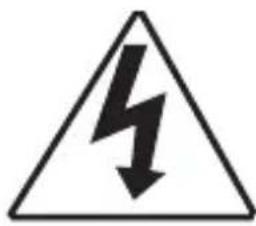
Warning sign depicting a lightning bolt symbol inside a triangleDANGEROUS VOLTAGE:
The lightning flash with arrowhead symbol within an equilateral triangle is intended to alert the user to the presence of uninsulated dangerous voltage within the product's enclosure that may be of sufficient magnitude to constitute a risk of electric shock to persons.

text_image
Warning symbol image with exclamation mark inside triangleATTENTION:
The exclamation point within an equilateral triangle is intended to alert the user to the presence of important operating and maintenance (servicing) instructions in the literature accompanying the appliance.
FCC WARNING:
This equipment may generate or use radio frequency energy. Changes or modifications to this equipment may cause harmful interference unless the modifications are expressly approved in the instruction manual. The user could lose the authority to operate this equipment if an unauthorized change or modification is made.
ATTENTION:
POUR ÉVITER LES CHOC ÉLECTRIQUES, INTRODUIRE LA LAME LA PLUS LARGE DE LA FICHE DANS LA BORNE CORRESPONDANTE DE LA PRISES ET POUSSER JUSQU'AU FOND.
iPod and iPhone are a trademark of Apple Inc., registered in the U.S. and other countries.
SAFETY PRECAUTIONS
NOTE: This equipment has been tested and found to comply with the limits for a Class B digital device, pursuant to part 15 of the FCC Rules. These limits are designed to provide reasonable protection against harmful interference in a residential installation.
This equipment generates, uses and can radiate radio frequency energy and, if not installed and used in accordance with the instructions, may cause harmful interference to radio communications. However, there is no guarantee that interference will not occur in a particular installation. If this equipment does cause harmful interference to radio or television reception, which can be determined by turning the equipment off and on, the user is encouraged to try to correct the interference by one or more of the following measures:
- Reorient or relocate the receiving antenna.
- Increase the separation between the equipment and receiver.
- Connect the equipment into an outlet on a circuit different from that to which the receiver is connected.
- Consult the dealer or an experienced radio/TV technician for help.
- The rating information is located at the bottom of the apparatus.
WARNING: TO PREVENT FIRE OR SHOCK HAZARD, DO NOT EXPOSE THIS UNIT TO RAIN OR MOISTURE.
SURGE PROTECTORS: It is recommended to use a surge protector for AC connection. Lightning and power surges ARE NOT covered under warranty for this product.
Only use attachments/accessories specified by the manufacturer.
To be completely disconnected from the power input, the main plug of the AC/DC adapter shall be disconnected from the electrical outlet. The main plug of the AC/DC adapter should not be obstructed OR should be easily accessed during intended use.
Do not expose the product to dripping or splashing. Do not place liquid filled objects such as vases on the product.
IMPORTANT SAFETY INSTRUCTIONS
- Read these Instructions.
- Keep these Instructions.
- Heed all Warnings.
- Follow all instructions.
- Do not use this apparatus near water.
-
Clean only with a dry cloth.
-
Do not block any of the ventilation openings. Install in accordance with the manufacturer's instructions.
-
Do not install near any heat sources such as radiators, heat registers, stoves, or other apparatus (including amplifiers) that produce heat.
-
Do not defeat the safety purpose of the polarized or grounding-type plug. A polarized plug has two blades with one wider than the other. A grounding-type plug has two blades and a third grounding prong. The wide blade or the third prong are provided for your safety. When the provided plug does not fit into your outlet, consult an electrician for replacement of the obsolete outlet.
-
Protect the power cord from being walked on or pinched particularly at plugs, convenience receptacles, and the point where they exit from the apparatus.
-
Only use attachments/accessories specified by the manufacturer.
-
Use only with a cart, stand, tripod, bracket, or table specified by the manufacturer, or sold with the apparatus. When a cart is used, use caution when moving the cart/apparatus combination to avoid injury from tip-over.
-
Unplug this apparatus during lightning storms or when unused for long periods of time.
PORTABLE CART WARNING (symbol provided by RETAG)

natural_image
Symbolic illustration of a person pushing a large object inside a circle (no text or symbols)-
Refer all servicing to qualified service personnel. Servicing is required when the apparatus has been damaged in any way, such as power-supply cord or plug is damaged, liquid has been spilled or objects have fallen into the apparatus, the apparatus has been exposed to rain or moisture, does not operate normally, or has been dropped.
-
Do not expose this product to dripping or splashing. Do not place objects filled with liquids, such as vases, on this product.
-
Main plug is used as disconnect device and it should remain readily operable during intended use. In order to disconnect the apparatus from the mains completely, the mains plug should be disconnected from the mains socket outlet completely.
-
CAUTION: To reduce the risk of fire or explosion, do not expose batteries to excessive heat such as sunshine, fire or other heat sources.
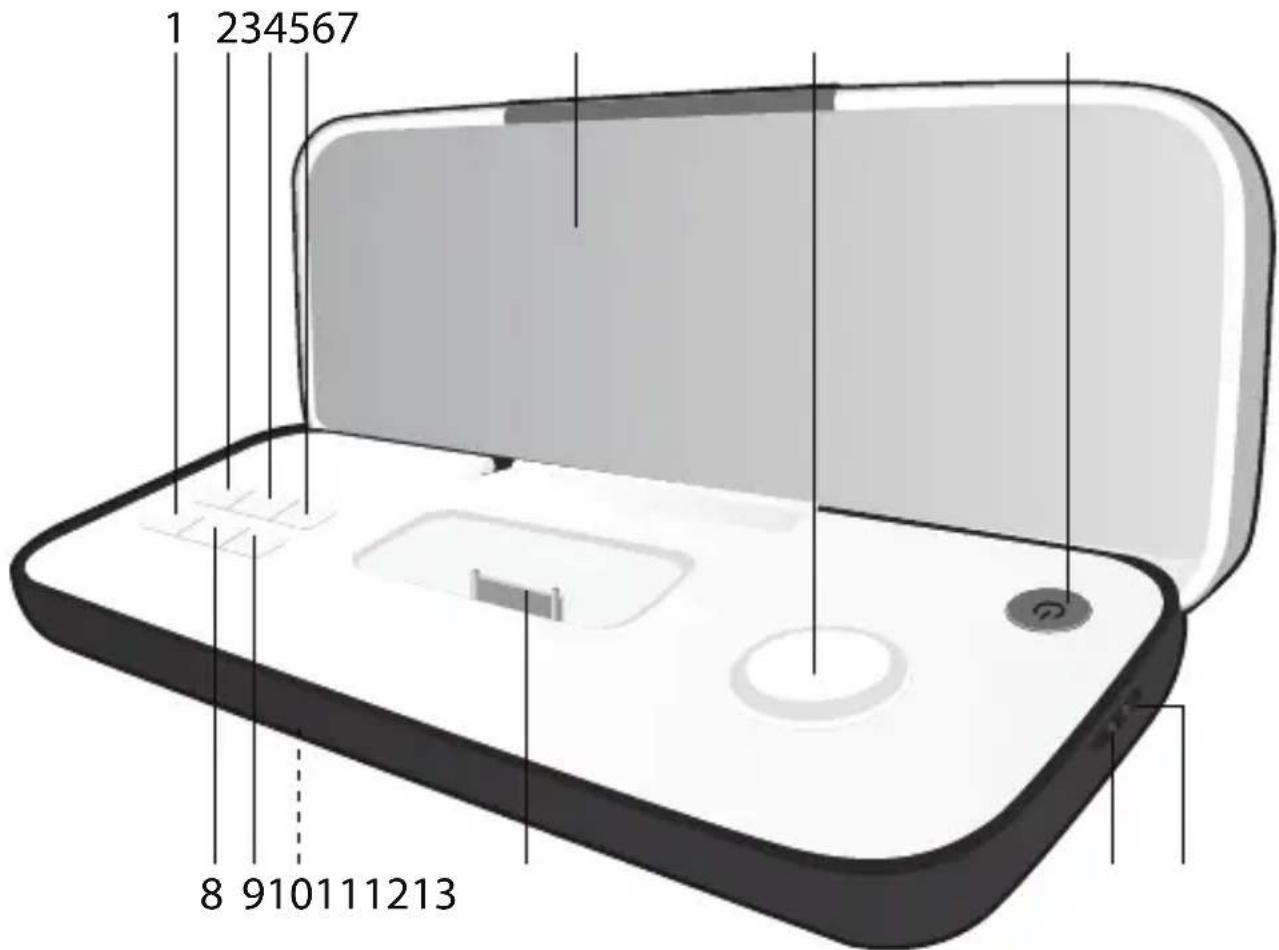
LOCATION OF CONTROLS
text_image
1 234567 8 910111213- Skip/Search Backward Button
- Repeat Button
- Random Button
- Line In Button
- Speaker
- Volume Control
- Power Button
- Play/Pause ▶II Button
- Skip/Search Forward ▶Button
- Battery Compartment (on bottom of unit)
(BATTERY COVER PART NO. MP-IM02F00500-B\*)
- iPod/iPhone Compartment with Connector (for use with Universal Docks)
- Line In Jack
- DC IN Jack (AC ADAPTER PART NO. WHITE: ET-A240V03900-B* BLACK: ET-A240V04100-B*)
*Consumer Replaceable Part (See page 12 to order.)
POWER SOURCES
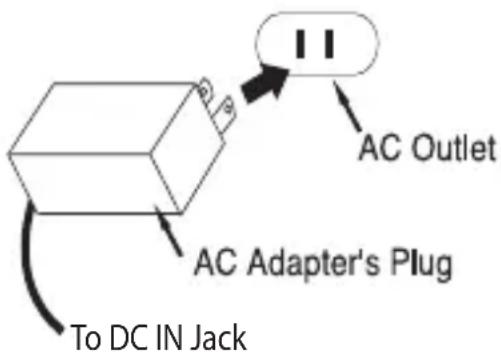
AC CONNECTION
Insert the small end of the AC adapter into the DC IN jack (located on the side of the unit). Connect the other end to a wall outlet having 120V AC, 60 Hz. AC Adapter, DC 5.9V ☑☐☐
NOTES:
text_image
AC Outlet AC Adapter's Plug To DC IN Jack- Remove both the DC plug and the AC IN plug to disconnect the AC adapter when not in use.
- Only use the supplied AC adapter which has the following specs: DC 5.9V ⊙⊕⊕
BATTERY INSTALLATION
Four (4) “AAA” size batteries can also be used to power this unit as follows:
-
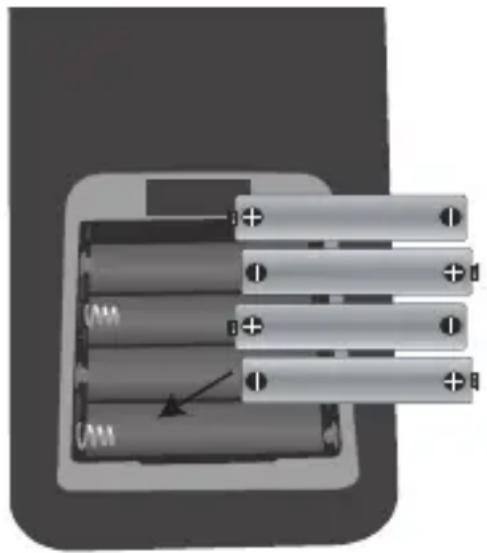
Open the Battery Compartment door by pressing in on the tab and then lifting it off.
-
Insert four “AAA” batteries into the Battery Compartment as shown. Be sure to observe the polarity markings which are engraved inside the battery compartment.
Alkaline batteries are recommended for the longest playing time.
natural_image
Diagram of a battery pack with four cylindrical cells and an arrow indicating a specific cell (no text or symbols present)- Place the battery door back on the compartment.
NOTE: The AC adapter must be disconnected from the DC IN jack (on the side of the unit) in order for the unit to operate on battery power. The batteries can play back for approximately six hours (actual playback time may vary).
IMPORTANT: SEE SAFETY PRECAUTIONS ON NEXT PAGE.
POWER SOURCES (CONTINUED)
BATTERY PRECAUTIONS
Follow these precautions when using batteries in this device:
- Warning – Danger of explosion if battery is incorrectly replaced. Replace only with the same or equivalent type.
- Use only the size and type of batteries specified.
- Be sure to follow the correct polarity when installing the batteries as indicated in the Battery Compartment. A reversed battery may cause damage to the device.
- Do not mix different types of batteries together (e.g. Alkaline, Rechargeable and Carbon-zinc) or old batteries with fresh ones.
- If the device is not to be used for a long period of time, remove the batteries to prevent damage or injury from possible battery leakage.
- Do not try to recharge a battery not intended to be recharged; it can overheat and rupture. (Follow battery manufacturer's directions.)
- Remove batteries promptly if consumed.
- Clean the battery contacts and also those of the device prior to battery installation.
OPTIONAL CONNECTION
LINE IN JACK (SIDE OF UNIT)
Insert one end of the audio cable (not included) into the LINE OUT jack on your external audio unit and the other end into the Line In jack on the side of this unit. To listen to the external audio unit, turn this unit on using the Power button, and turn on the external unit as well. Then press the Line In button; the Line In button will light and the external audio unit's output sound will be heard through this unit's speakers.
INSERTING AN iPod/iPhone
text_image
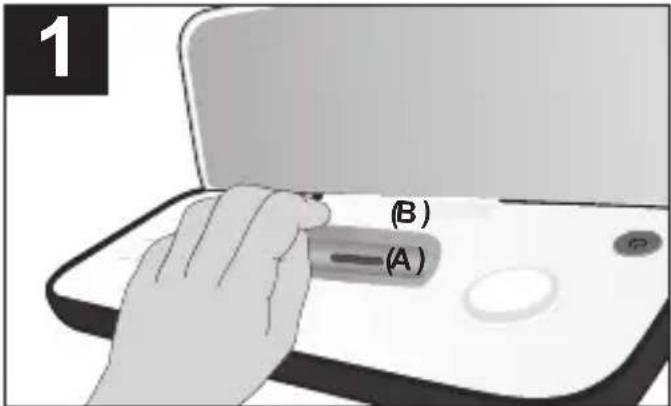
1 (B) (A)Insert the Universal Dock included with your iPod/iPhone (A) into the iPod/iPhone compartment (B) (as shown), making sure the tabs are facing front, and slip the tabs into place. Press the rear side of the Universal Dock until it is positioned inside the iPod/iPhone compartment.
natural_image
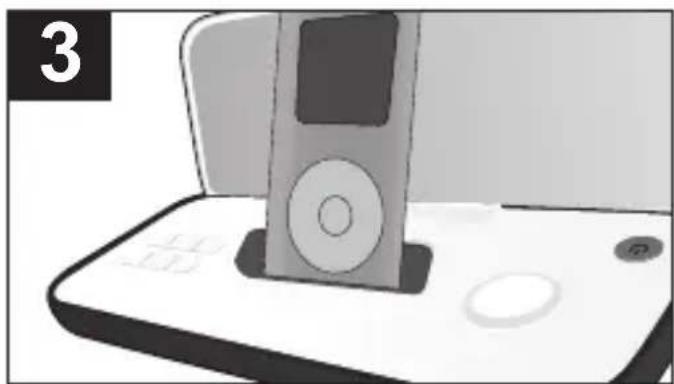
Illustration of a vintage electronic device with a CD and display, placed on a flat base (no text or symbols visible)The iPod/iPhone will charge as long as this unit is connected with the AC adapter.
Please see the next page for instructions on using an iPod/iPhone with this unit.
text_image
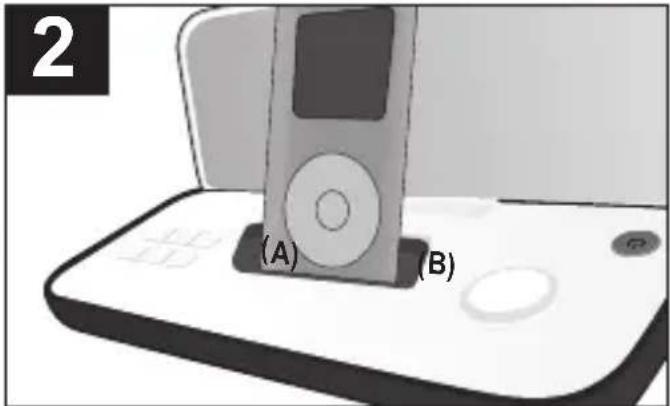
2 (A) (B)Slide the iPod/iPhone (A) into the Universal Dock (B) (as shown). Gently push down so the connector on the iPod/ iPhone slides onto the connector on this unit.
NOTES:
- When the iPod/iPhone is connected to this unit, and in iPod mode, it will be in the Pause mode.
• To remove the Universal Dock, insert your finger (or other object) into the gap in the Universal Dock, then gently pull the Universal Dock out to remove it. - CHARGING: (with AC adapter only) When the iPod/ iPhone is inserted into the dock, whether this unit is on or off, the iPod/iPhone's battery will charge until it is full.
- If the unit is in iPod mode and is not connected with the iPod/ iPhone, the unit will power off automatically after five minutes.
OPERATION
USING AN iPod/iPhone WITH THIS UNIT
natural_image
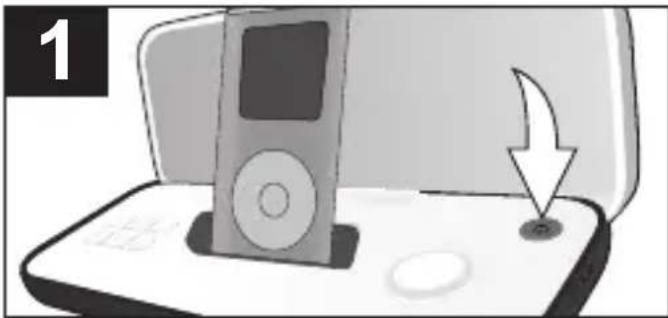
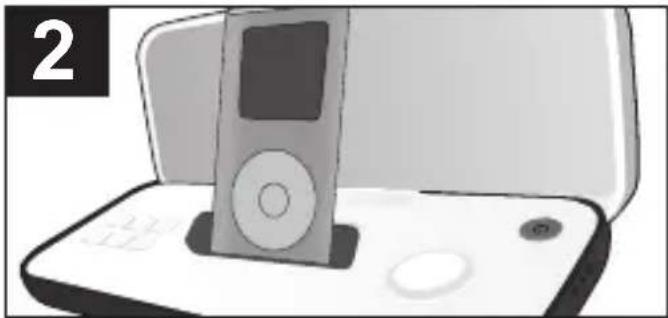
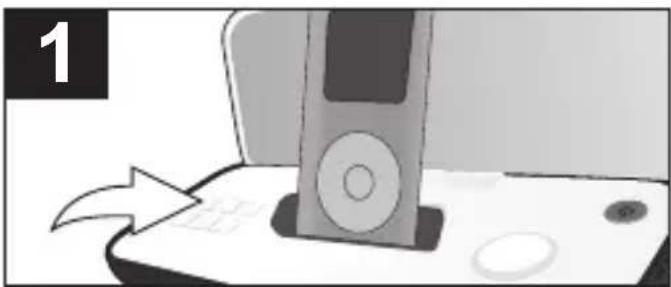
Illustration of a music player on a laptop with an arrow pointing to the screen (no text or symbols)Connect an iPod/iPhone (see previous page) and then press the Power button; the Power button will light and the unit will turn on.
natural_image
Illustration of a vintage electronic device with a handheld screen and keypad (no text or symbols visible)You can operate the iPod/iPhone using its own controls, as per its owner's manual, or you can use the controls on this unit to operate the iPod/iPhone.
text_image
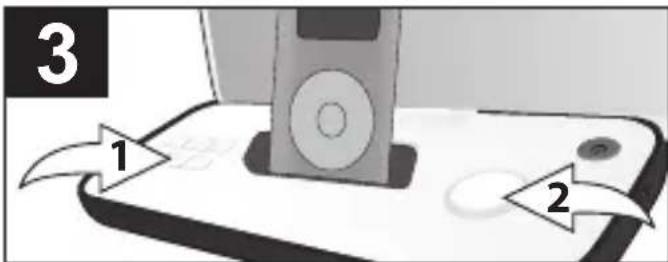
3 1 2Press the Play/Pause ▶■ button ① to start playback on your iPod/iPhone. Press again to pause playback and press yet again to resume playback.
To adjust the main volume:
Rotate the Volume control ② clockwise to increase the volume or counter-clockwise to decrease the volume.
text_image
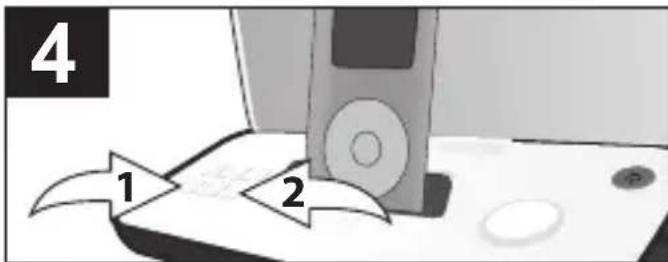
4 1 2To skip forward or backward on the iPod/iPhone: Press the Skip/Search ◀ ① or ▶ ② button to skip to the beginning of the current track/previous or next track.
To search forward or backward on the iPod/iPhone: Press and hold the Skip/Search ◀◀ ① or ▶▶ ② button to search within the currently-playing track.
NOTES:
• After you have adjusted the volume setting, if you turn the unit off and then on again, the volume level will be set to the level you selected prior to turning the unit off.
• TO TURN THE UNIT OFF, press the Power button; the Power button light will go out and the unit will turn off.
OPERATION (CONTINUED)
REPEAT PLAYBACK
natural_image
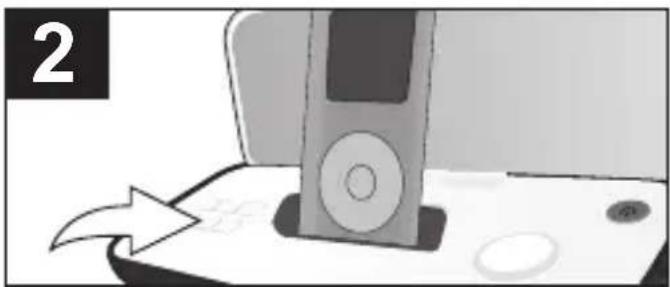
Illustration of a computer monitor with an open screen and a scroll, showing a button and scroll (no text or symbols)With an iPod inserted, press the REPEAT button to cycle through the following iPod Repeat modes: Repeat One (will playback the current track continuously), Repeat All (will playback all tracks on the iPod continuously) or Repeat Off.
natural_image
Illustration of a vintage electronic device with a scroll wheel and control panel, showing a cursor pointing at it (no text or symbols present)When the Repeat mode is selected, press the Play/Pause ▶■button.
NOTE:NTo cancel Repeat playback, press the REPEAT button until the Repeat indicator disappears from the iPod display.
RANDOM PLAYBACK
text_image
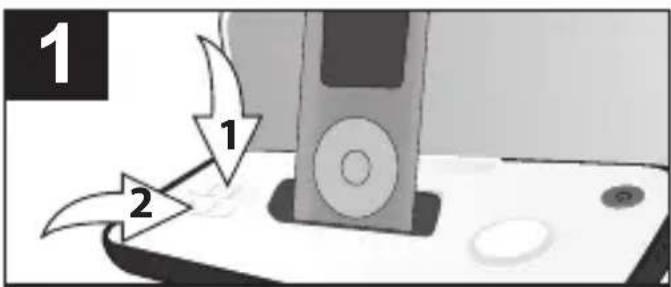
1 2 1 2To Nrandomly Nplay Nthe Ntracks albums Non Nthe NiPod, with an iF inserted, press the Random button ①; the Shuffle indicator will appear in the iPod's display. Press the Play/Pause ▶II button ② and random playback will begin.
natural_image
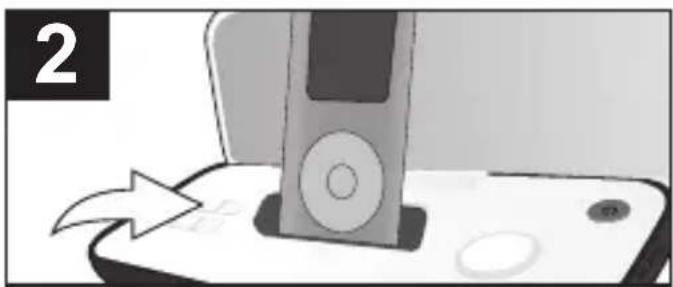
Illustration of a mobile phone with an apple and a CD, showing a screen with a mouse (no text or symbols)NoTo cancel Random playback, Pod press the Random ✦button until the Shuffle indicator disappears from the iPod's display.
NOTE: Some items on the iPhone screen may appear differently than those on the iPod.
OPERATION (CONTINUED)
iPhone UNIVERSAL DOCKS
Locate your iPhone in the chart below and select the respective Universal Dock (the Universal Dock No. is engraved at the front of the Universal Dock as shown below) to match with your iPhone. Insert the corresponding Universal Dock and your iPhone into the unit as described on page 7.
| iPhone Type Memory | Univ. Dock | No. | |
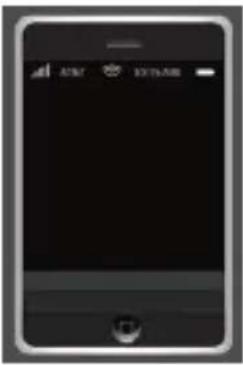 | iPhone 3G S/iPhone 3G | 8 to 32 GB | No. 15 (Part No.White:MP-IM02A00600-B*Black:MP-IM02A00800-B*) |
| iPhone | 4 to 16 GB | No. 12 (Part No.White:MP-IM02A00500-B*Black:MP-IM02A00700-B*) |
*Consumer Replaceable Part (See page 12 to order.)
IMPORTANT! The Universal Dock No. is engraved at the front of the dock. Please refer to the illustration below for the location of the Universal Dock No.
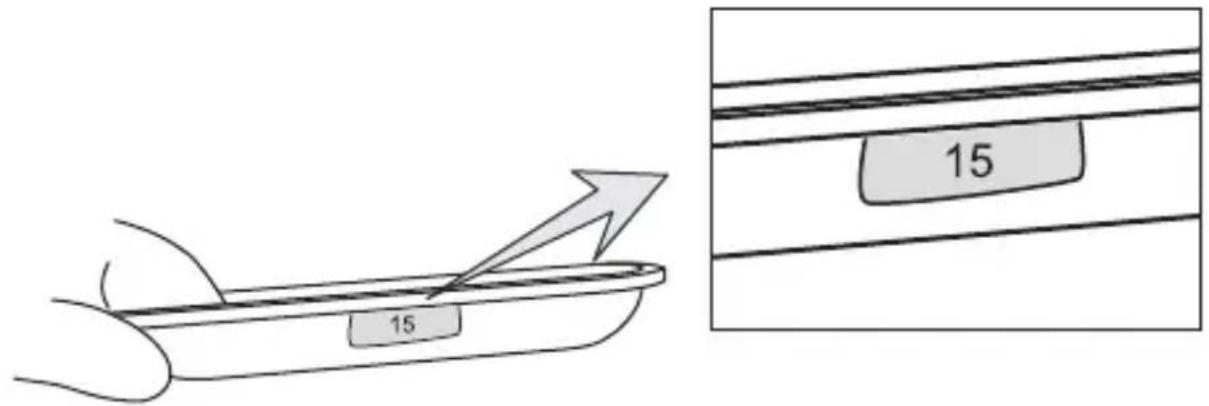
text_image
15 15The two holders provided with this unit are Universal Docks.
TROUBLESHOOTING GUIDE
If you experience a problem with this unit, check the chart below before calling for service.
| SYMPTOM CAUSE SOLUTION | ||
| No sound. Volume is set to Increase volume as minimum. shown on page 8. | ||
| Incorrectly connected. Check the connection (see page 7). | ||
| Line In button not set Press until it lights to listen properly. to the external unit or until it is not lit to listen to the iPod/iPhone. | ||
SPECIFICATIONS
GENERAL:
Power Source......DC 5.9V Adapter (Center Positive)
Battery....4 x "AAA" size batteries
Speaker....2 x 4 ohms
Output Power 2 x 3 W
Weight....1 lb
Dimensions 8.8 (L) x 3.4 (W) x 1.8 (H) inches
Specifications are subject to change without notice.
FOR ADDITIONAL SET-UP OR OPERATING ASSISTANCE, PLEASE VISIT OUR WEBSITE AT:
WWW.MEMOREX.COM
FOR CONSUMER REPLACEABLE PART(S), VERIFY PART NUMBER(S) ON PAGES 4 AND 10, AND THEN CONTACT OUR PARTS AND ACCESSORIES FULFILLMENT CENTER AT: 1-800-379-8439.
Imation Electronic Products
1 Imation Way, Oakdale, MN 55128-3414 USA • memorex.com
© Imation Corp.
Memorex and the Memorex logo are trademarks
of Imation Corp. and its affiliates.