
WP2STW850W - Toaster Witt - Free user manual and instructions
Find the device manual for free WP2STW850W Witt in PDF.


| Product Type | Toaster |
| Model | WP2STW850W |
| Brand | Witt |
| Dimensions (approx) | 30 cm x 20 cm x 20 cm |
| Weight (approx) | 1.5 kg |
| Power | 850 W |
| Number of Slices | 2 |
| Browning Settings | 6 levels |
| Functions | Cancel, Defrost, Reheat |
| Self-Centering Rack | Yes |
| Removable Crumb Tray | Yes |
| Power Cord Length | 1.2 m |
| Material | Stainless steel/Plastic |
| Color | White |
| Cleaning | Wipe exterior with damp cloth; empty crumb tray regularly |
| Safety Features | Auto shut-off, cool-touch housing |
| Repairability | Spare parts available; consult manual for disassembly |
Frequently Asked Questions - WP2STW850W Witt
User questions about WP2STW850W Witt
0 question about this device. Answer the ones you know or ask your own.
Ask a new question about this device
Download the instructions for your Toaster in PDF format for free! Find your manual WP2STW850W - Witt and take your electronic device back in hand. On this page are published all the documents necessary for the use of your device. WP2STW850W by Witt.
USER MANUAL WP2STW850W Witt
natural_image
Two Witt brand cookers with black and white designs, one black and one white, featuring a 3D keyboard and orange buttons (no visible text or symbols on the devices themselves)WP2STW850B / WP2STW850W
natural_image
Line drawing of a plug with two pins and a socket (no text or symbols)REKLAMATIONSRET
natural_image
Line drawing of a plug with two leads and a socket (no text or symbols)REKLAMASJON
NO
natural_image
Line drawing of a plug with two pins (no text or symbols)GARANTI
SAFETY INSTRUCTIONS....30
OVERVIEW OF THE DEVICE (black model).... 32
OVERVIEW OF THE DEVICE (white model)....33
USING THE DEVICE....34
CLEANING AND MAINTENANCE.... 35
STORAGE....35
SPECIFICATIONS....35
WARRANTY AND SERVICE 37
SAFETY INSTRUCTIONS
To prevent personal injury or damage to property, you must read and comply with all instructions and warnings.
When using electrical devices, fundamental safety measures should always be followed, which includes:
- Reading all instructions
- Never touching hot surfaces. Use the handles or buttons.
- To protect yourself against fires, electric shocks or personal injury, the cord, plug and other electrical components may never be lowered in water or other fluids.
- Close supervision is needed when this device is used by or near children.
- Always unplug the device when the device is not being used and before cleaning it. Let it cool down before adding or removing components and before cleaning it.
- Do not use the device if the power cord or plug are damaged, after the device has stopped working properly or if it has been damaged in any way. See the warranty section for service information.
- Using accessories which are not recommended by the manufacturer may cause fires, electric shocks or injuries/damage.
- Do not use this device outdoors.
- Never let the cord hang over the edge of the table or touch hot surfaces.
- Do not place the device on or near a hot gas or electrical hob plate or in a hot oven.
- Always plug the device into a wall socket. To disconnect the device, press "CANCEL" and then remove the plug from the wall socket.
- Do not use the device for anything other than its intended purpose.
- You must be extremely cautious when moving a device that contains hot oils or other hot fluids.
- Do not attempt to repair this device yourself.
- There is a short power cord included to reduce the risk of it being entangled or someone stumbling over a longer power cord.
- Longer extension cords are available, but you must be cautious when using them. It is not recommended to use an extension cord, but if you must, please ensure that the cord's voltage matches the voltage of the product. If the plug is grounded, the extension cord must be a 3-wire cable. To avoid pulling, stumbling on or getting entangled on the cord, the extension cord must be placed so that it does not hang over the table edge or other areas where it can be pulled by children or stumbled over.
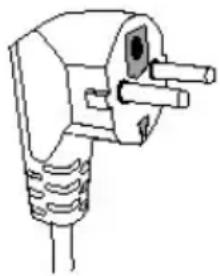
- This device has a polarising plug (one pole is broader than the other). To reduce the risk of electric shock, this plug is designed to only fit in a polarised socket in one way. If the plug does not fit completely into the socket, you must turn the plug. If it still does not it, contact a qualified electrician. Do not attempt to change or modify the plug in any way.
- Do not use a socket or extension cord if the plug is a loose fit or if the socket or extension cord are warm to the touch.
- Oversized foods, metal foil trays or metal tools may not be inserted into the toaster as they may pose a fire hazard or cause electric shocks.
- A fire may start if the device is covered or touching flammable materials, including curtains, drapes, walls, etc. when it is being used.
- Do not attempt to loosen food when the toaster is plugged in.
- Avoid toasting foods with glazing or fillings as these may drip and do not toast food made with open fillings. Glazing and fillings may ignite.
- Do not toast cakes, pies, etc. at other settings than the lowest or lightest one and never toast them twice as these types of foods may ignite if they are overheated and cause a fire.
- If you do not clean and empty the crumb tray after each use it may pose a fire hazard.
- Only for household use.
OVERVIEW OF THE DEVICE (black model)
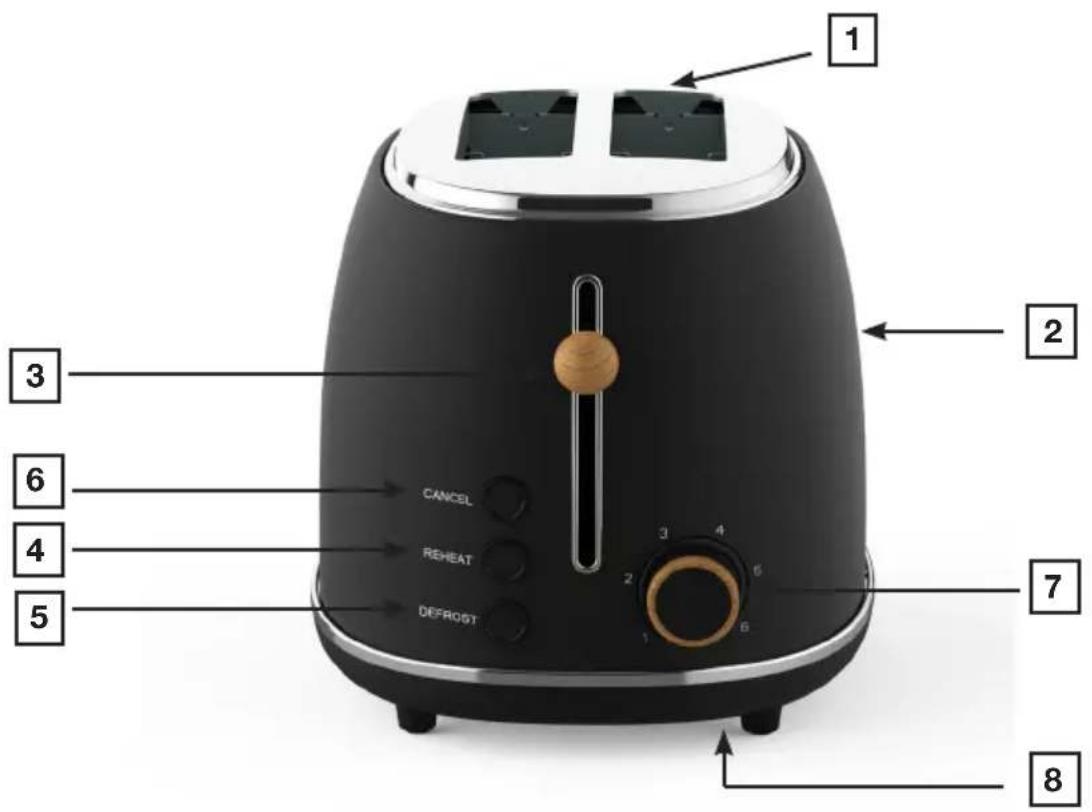
- Two broad slots for bread
- Exterior cabinet
- Toast lever
- REHEAT
- DEFROST
- CANCEL
- Dial button to adjust the browning control setting
- Crumb tray that pulls out (at the bottom of the device)
OVERVIEW OF THE DEVICE (white model):

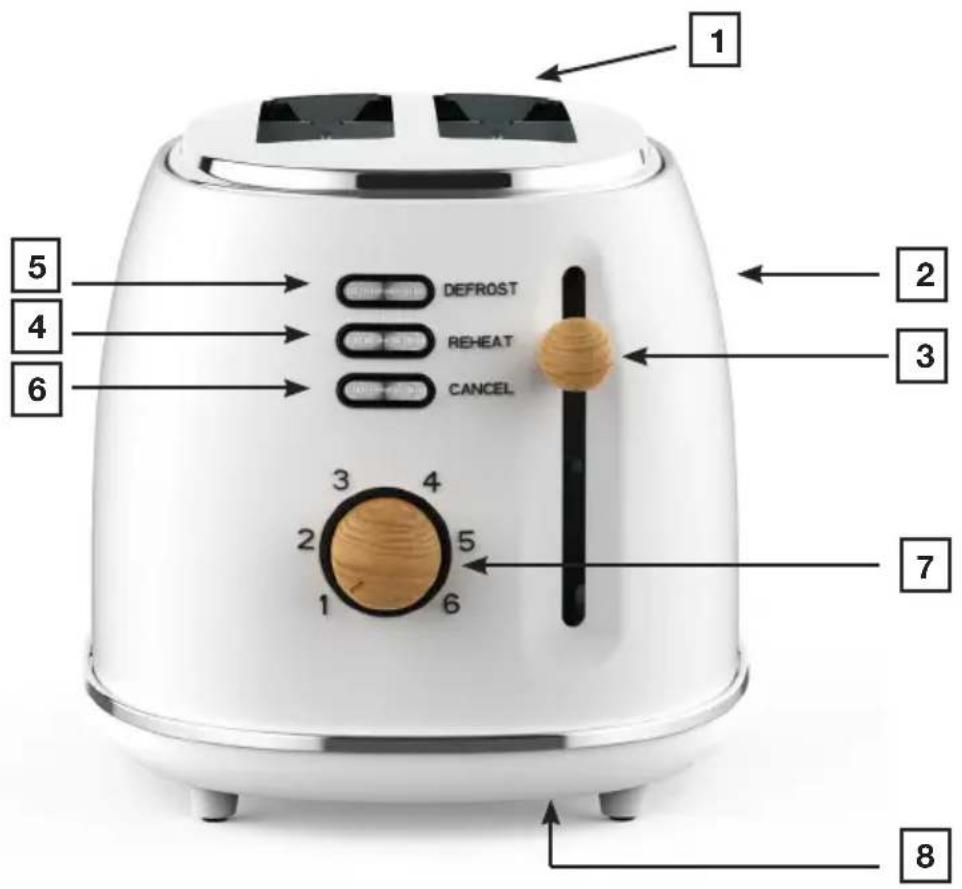
- Two broad slots for bread
- Exterior cabinet
- Toast lever
- REHEAT
- DEFROST
- CANCEL
- Dial button to adjust the browning control setting
- Crumb tray that pulls out (at the bottom of the device)
USING THE DEVICE
Before using the device for the first time: Inspect all packaging carefully before discarding it.. Accessories may be left in the packaging. Before using it, dry the exterior of the toaster with a moist rag and then dry it thoroughly. Place the toaster in a room with sufficient ventilation and select the highest browning level (6). Let the toaster run for three cycles without bread in it and with a three-minute break between each cycle. This will burn off any potential dust and remove unpleasant odours.
Please note: The toaster must be connected to a power source for the toast level to lock in position.
Using the device:
- Extend the cord to its maximum length.
- Connect the device to a correct socket (grounded if the device is Class I) to avoid hazards. Make sure that the voltage matches that of the product.
- Unplug the device before you clean it or install accessories.
- Place the device on a table or an even stable surface.
- The device must not be left unattended when it is connected to a power source.
- Do not use the device if it has been dropped r if there is visible damage or leaking.
- Do not modify the device in any way.
- The device is only intended for indoors use.
- Some parts of the device will become hot. Do not touch these parts as you may get burns on your skin.
- Place the slices of bread in the slots (for loafs of bread, cut a slice that is shorter than the slot and then cut the slice in two along its length). The device is designed to toast slices from loafs of white bread but also toast bread and other slices if their thickness and length are shorter than the slot.
- Press the toast lever down until it locks in position (the exterior grate will tighten around the bread to keep it away from the heating elements on the sides). Then let go and the toast lever will remain in the bottom position which also means that the heating process has begun. If the toast lever glides up immediately, check that the device is attached to a power source.
- You can adjust the degree of browning and have your bread toasted as little or as much as you like by changing the browning dial from positions 1 to 6. Just turn the dial clockwise to increase the intensity or clockwise to reduce it. The higher the number the more your bread will get toasted.
- When you are using the bread warmer function on the toaster, set the browning dial to 2.
Additional functions:
After pulling the toast lever down, you can press:
- REHEAT: this will allow you to reheat your bread without additional browning.
- DEFROST: this will allow you to toast frozen bread.
- If you are using the toaster and feel that the bread is toasted sufficiently or want to cancel the process or some other reason, press CANCEL.
• Always unplug the device after using it and let it cool off before handling or storing it.
CLEANING AND MAINTENANCE
EN
- Turn off the power to the device by turning off the wall socket and unplugging the power cord (pull on the plug itself, not the cord) and then let the device cool down completely before you start cleaning it.
- Clean the crumb tray. Pull it out from under the device. Empty the crumb tray and reinsert it before using the device again.
- Never use sharp tools to clean as this may damage the device.
- Clean the exterior of the device with a soft, moist rag. Then dry it off with a dry rag.
- Do not lower the device in water or any other fluids.
- Turn the bottom of the device upside down to shake remaining crumbs out over a bin or a sink.
Please note:
The crumb tray should be cleaned on a regular basis. Do not let crumbs pile up in the tray.
STORAGE
- Make sure that the device is completely cooled down and dry before you put it away for storage.
- Do not wrap the cord around the device as this will cause damage.
- Store the device in a cool and dry location.
SPECIFICATIONS
Power supply: 220-240V\~50/60Hz
Power: 1500W
Energy class: Class I
With reservations for changes without prior notice.
The device is equipped with a grounded plug and must be connected to a grounded socket.
Please note: If you have questions about grounding or how to connect to a power source, please consult qualified personnel. In the event of a short circuit, the grounding will reduce the risk of getting an electric shock by allowing the power to be diverted through the grounding wire.
CAREUL: To minimise the risk of electric shock, do not open the cabinet if the device is broken. Contact a qualified technician for repairs.
This device complies with the EC directives and has been controlled pursued to all applicable European directives such as for EM compatibility (EMC) and low voltage (LVD).
This device is designed and manufactured in accordance with the latest safety rules and technical specifications.
natural_image
Line drawing of a plug with two leads and a socket (no text or symbols)WARRANTY AND SERVICE
EN
There is a 2-year warranty period if your new product stops working due to manufacturing or material faults which begins from the documented date of purchase. The warranty covers materials and the cost of labour. When inquiring about service, please state the product name and serial number. You can find this information on the type plate. You can write down the information here in these instructions so that you have them at hand. This makes it easier for the service technician to find the correct spare parts.
The warranty does not cover:
- Faults and damage that are not due to manufacturing or material issues
- Damage caused by failure to properly maintain the device - including failing to clean it
- Fire and/or water damage or moisture damage on the product
- Damage caused during transport if the product was transported without proper packaging
- Damage caused by the use of unoriginal spare parts
- Damage resulting from failing to follow the instructions on how to use the device
- If the device has not been set up/assembled as specified in the instructions
- If non-professionals have installed or repaired the product
- Batteries or any other parts subject to normal wear and tear
Damage during transport
If the product is damaged during transport and this is discovered when the retailer delivers the product to the customer, this is exclusively a matter between the customer and the retailer. In cases where customers have handled the transport of the product themselves, the supplier shall not be liable for any potential damage during transport. Any damage caused during transport must be reported immediately and no later than 24 hours after the product has been delivered. If not, the customer's claim will be rejected.
Unnecessary service
If the product is sent in to be serviced and it turns out that the fault could have been fixed independently by following the product's instruction manual, the customer will need to pay the service fee.
Commercial purchases
Commercial purchases are all purchases of devices that are not intended to be used in private households but instead intended to be used for commercial purposes (in restaurants, cafés, canteens, etc.) or intended to be rented out or otherwise used by multiple users in turn.
There is no warranty offered for commercial purchases, as this product is only intended for regular household use.
SERVICE
For service and spare parts in England and Ireland please call below-mentioned number and you will be directed accordingly or send us an email.
Witt UK & Ireland Ltd.
(44) 148 351 6633 / info@witt.dk
We accept no liability for printing errors.
The manufacturer/distributor cannot be held liable for damage to products or individuals if the safety instructions were not followed. The warranty shall not cover cases where the instructions have not been followed.
SISÄLLYS
TURVAOHJEET 39
YLEISKATSAUS LAITTEESTA (musta malli) 41
REKLAMAATIO-OIKEUS JA HUOLTO....46
TURVALLISUUSOHJEET
natural_image
Line drawing of a plug with two pins and a socket (no text or symbols)TAKUU
- REKLAMATIONSRET
- REKLAMASJON
- GARANTI
- SAFETY INSTRUCTIONS
- To prevent personal injury or damage to property, you must read and comply with all instructions and warnings.
- OVERVIEW OF THE DEVICE (black model)
- OVERVIEW OF THE DEVICE (white model):
- USING THE DEVICE
- Using the device:
- Additional functions:
- CLEANING AND MAINTENANCE
- Please note:
- STORAGE
- SPECIFICATIONS
- WARRANTY AND SERVICE
- The warranty does not cover:
- Damage during transport
- Unnecessary service
- Commercial purchases
- SERVICE
- SISÄLLYS
- TURVALLISUUSOHJEET
- TAKUU
Brand : Witt
Model : WP2STW850W
Category : Toaster