
WCKS5BM - Kitchen scale Witt - Free user manual and instructions
Find the device manual for free WCKS5BM Witt in PDF.


| Product Type | Kitchen Scale |
| Brand | Witt |
| Model | WCKS5BM |
| Dimensions (L x W x H) | 20 x 15 x 2 cm |
| Weight | 300 g |
| Power Supply | 2 x AAA batteries (included) |
| Maximum Capacity | 5 kg / 11 lbs |
| Graduation / Precision | 1 g / 0.1 oz |
| Display Type | LCD screen with backlight |
| Platform Material | Tempered glass |
| Measurement Units | g, kg, lb:oz, ml (water), fl.oz |
| Functions | Tare (zero), auto-off, low battery indicator |
| Cleaning Instructions | Wipe with damp cloth; do not immerse in water |
| Safety Features | Overload protection, auto shut-off after 2 minutes |
| Spare Parts / Repairability | Replaceable batteries; no user-serviceable parts; contact support for issues |
Frequently Asked Questions - WCKS5BM Witt
User questions about WCKS5BM Witt
0 question about this device. Answer the ones you know or ask your own.
Ask a new question about this device
Download the instructions for your Kitchen scale in PDF format for free! Find your manual WCKS5BM - Witt and take your electronic device back in hand. On this page are published all the documents necessary for the use of your device. WCKS5BM by Witt.
USER MANUAL WCKS5BM Witt
natural_image
Close-up of a modern kitchen appliance with a black handle and digital display (no visible text or symbols)natural_image
Line drawing of a hand holding a small object over a smooth, curved surface (no text or symbols)Trin 1: Åbn batteridækslet.
Vektenhet
- Velg mellom g, oz, ml
Tare-funksjon (nullstilling) På/av
Vekten slås av
natural_image
Line drawing of a hand holding a small object over a smooth curved surface (no text or symbols)INNEHÅLLSFÖRTECKNING
SPECIFICATIONER....15
VIKTIGA SÄKERHETSANVISNINGAR....15
GENERELLT....15
HUVUDFUNKTION....16
INNAN FÖRSTA ANVÄNDNING....17
SÄTTA I BATTERIER ....17
ANVÄNDNING....17
FELMEDDELANDE ....18
RENGÖRING OCH UNDERHÅLL 18
REKLAMATION....19
SERVICE....19
SPECIFICATIONER
Viktenhet
• Välj mellan g., oz., ml.
natural_image
Line drawing of a hand holding a small object near a smooth curved surface (no text or symbols)natural_image
Line drawing of a hand holding a small object over a smooth curved surface (no text or symbols)SAFETY AND USAGE INFORMATION ....27
KEY FUNCTION....28
FIRST USE....28
INSERT THE BATTERI 29
OPERATING INSTRUCTIONS....29
ERROR INDICATION ....30
CLEANING AND MAINTENANCE....30
WARRANTY 31
SERVICE....31
For proper use and maintenance, please read this manual carefully
SPECIFICATIONS
● Equipped with high precision strain gauge sensor system
• Tare function/Manual on/Auto off /Manual off
● Power: 2 x 1.5V AAA batteries (Not included)
- White LED Display
• Capacity/Division: 5kg / 0.1g
- Unit: g, oz, ml
SAFETY AND USAGE INFORMATION
- For accurate results, place scale on a flat surface.
- Static pressure is effective, do not drop it or strike the scale, otherwise the scale is easy to be damaged.
- Please use wet cloth to clean the scale. Do not allow water to get inside the scale.
- Do not use chemicals to clean the scale.
- To ensure the life of the scale, do not put the scale under wet, subcooled, or superheated condition.
- Do not overload, otherwise the sensor will be damaged.
- Do not put heavy things on the scale when it leaves unused.
- Do not store the scale in an upright position.
- Due to the continuous improvements, this product is subject to change without notice.
- Please do not jump or stamp on the scale and avoid dropping it, as the scale is highly precise electronic instrument.
KEY FUNCTION
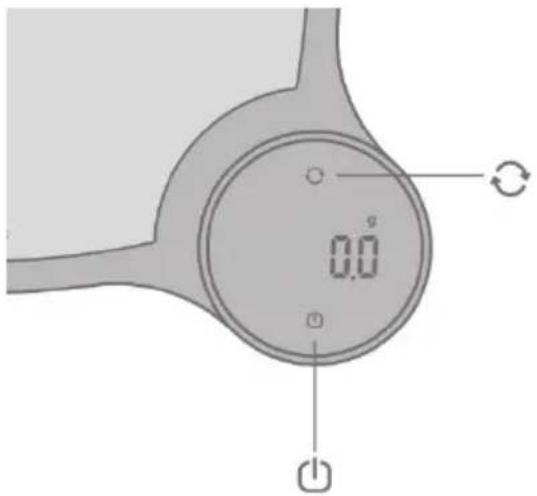
UNIT key:
Press to change the unit(g/oz/ml)
Tare Key:
On/O_function
Tare function
Switch off
- The scale will be switched off after pressing "💡" for 2 seconds.
- The scale will automatically switch off after approx. 120 seconds when no operation.
Unit changes (g/oz/ml)
Press “○” once, the unit will be exchanged among g/oz/ml.
FIRST USE
natural_image
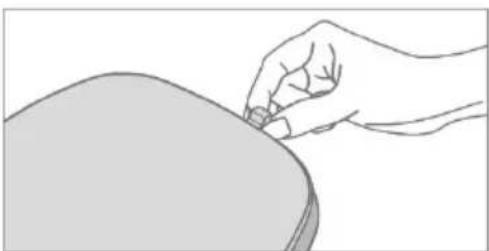
Line drawing of a hand holding a small object near a curved surface (no text or symbols)Before Use
Remove the EVA protective pad, Protective pad on the side of the scale body.
INSERT THE BATTERY

Step 1: Open the battery cover.
Step 2: Install 2 x 1.5V AAA batteries as shown.
Step 3: After installing the battery, put back the battery cover and push the cover backward.
WARNING! Please be aware that the incorrect polarity will cause the permanent impact on the electronic parts.
OPERATION
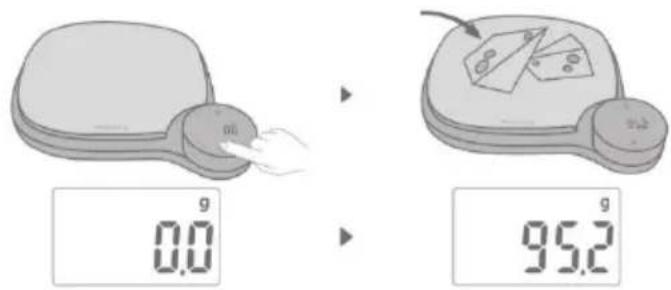
Weighing
Step 1: place the scale on a hard & flat surface.
Step 2: press" 🔊" once, the LED display will show zero and then press "○" to choose the unit you need.
Step 3: put the food on the platform, the weight will be displayed.
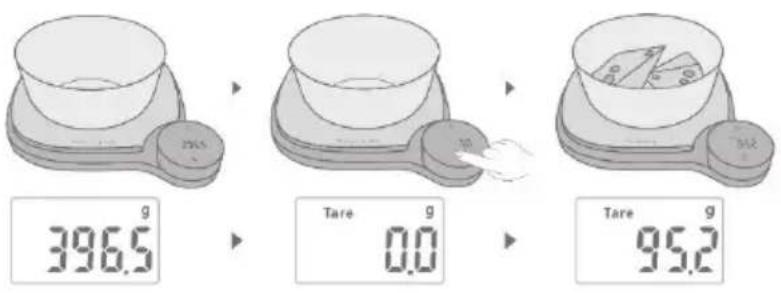
Tare function
Step 1: put the container on the platform, the LED display will show the weight of the container.
Step 2: Press “💡” to clear the weight of the container (reset to zero). Then put the food into the container, the LED display will show the weight of food only. Repeat press “💡” to weight more different foods.
Step 3: The LED display will show the negative value of container if you remove the food and container from the platform together. Please press “💡” again, the display will show zero in 2 seconds.
ERROR INDICATION
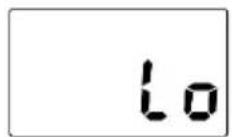
Low power
Please replace the battery.
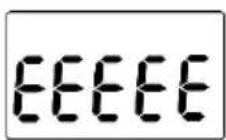
Over-load
The weight been put on the scale should not be more than 5kg.
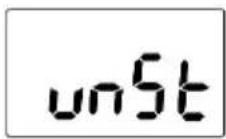
Unstable
Please make sure the scale is placed on flat and hard surface.
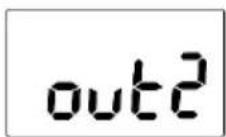
1) There is too much weight on the scale before it is turned on. Please remove the container/food and restart the scale.
2) The sensor has been damaged due to being exposed to too much weight or being used incorrectly. You will need to replace it.
CLEANING AND MAINTENANCE
- Please use a damp cloth to clean the scale. Do not allow water to get inside scale.
• Do not use chemicals to clean the scale.
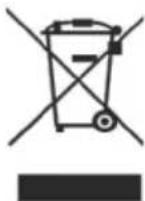
Please dispose of it at your local community waste collection / recycling center or contact your dealer for advice. Ensure that it presents no danger to children while being stored for disposal.
WARRANTY
A two-year guarantee on manufacture and material defects is granted on your new appliance valid from the documented purchase date. The guarantee includes materials, salary, and transport. When contacting service please state the appliance model and serial number.
The guarantee does not cover:
● Defects and damages which are not caused by manufacture and material defects.
- If original spare parts have not been used.
- If the instructions in the manual have not been carried out.
- If the installation has not been carried out according to this manual.
- If unauthorized personnel have carried out installation or repair word.
Transport damages
A transport damage observed when the dealer delivers the appliance at the customer is solely a matter between the customer and the dealer. If the customer has carried out the transport alone the manufacture / supplier cannot be held responsible for transport damages. All transport damages must be reported no later than 24 hours after delivery otherwise all claims will be rejected.
Unnecessary service visits
If a service technician is called out to a defect and the customer could have corrected the defect without help e.g., by following the instructions within this manual or by changing a fuse the customer will be charged all service costs – even under guarantee.
Commercial purchase
Commercial purchases are any purchase of appliances not used in a domestic household but instead are used for commercial purposes e.g., in a restaurant, café etc. or used to rent out or used for any other purpose including several users. In case of commercial purchase, no guarantee is granted on this appliance since this is only meant for domestic household use.
SERVICE
For service and spare parts in England and Ireland please call below-mentioned number and you will be directed accordingly or send us an email.
Witt UK & Ireland Ltd.
(44) 148 351 6633 / info@witt.dk
- Vektenhet
- Vekten slås av
- INNEHÅLLSFÖRTECKNING
- SPECIFICATIONER
- Viktenhet
- For proper use and maintenance, please read this manual carefully
- SPECIFICATIONS
- SAFETY AND USAGE INFORMATION
- KEY FUNCTION
- Switch off
- Unit changes (g/oz/ml)
- FIRST USE
- Before Use
- INSERT THE BATTERY
- OPERATION
- Weighing
- Tare function
- ERROR INDICATION
- CLEANING AND MAINTENANCE
- WARRANTY
- The guarantee does not cover:
- Transport damages
- Unnecessary service visits
- Commercial purchase
- SERVICE
Brand : Witt
Model : WCKS5BM
Category : Kitchen scale