
YOGA BOOK 10 - 2-in-1 Tablet LENOVO - Free user manual and instructions
Find the device manual for free YOGA BOOK 10 LENOVO in PDF.



| Product type | 2-in-1 tablet |
| Brand | Lenovo |
| Model | Yoga Book 10 (YB1-X91F / YB1-X91L) |
| Screen | 10.1-inch touchscreen |
| Processor | Intel Atom x5-Z8550 |
| RAM | 4 GB |
| Storage | 64 GB (expandable via microSD) |
| Connectivity | Wi-Fi 802.11 a/b/g/n/ac, Bluetooth 4.0, optional LTE (model YB1-X91L) |
| Ports | 1x micro USB, 1x micro HDMI, 1x 3.5 mm headphone jack |
| Camera | Front and main camera |
| Keyboard | Halo Keyboard / Create Pad |
| Stylus | Real Pen with refills |
| Battery | Integrated rechargeable lithium-ion battery, charges via USB cable |
| Battery life | Up to 13 hours |
| Dimensions | 256.6 x 170.8 x 9.6 mm |
| Weight | 694 g |
| Operating system | Windows 10 |
| Maintenance | Clean with a soft dry cloth; avoid liquids |
| Safety | Do not expose to moisture; avoid plastic bags; moderate volume |
| Spare parts | Stylus refills, paper for BOOK PAD, battery (factory replacement) |
| Warranty | Lenovo limited warranty (see terms per country) |
Frequently Asked Questions - YOGA BOOK 10 LENOVO
User questions about YOGA BOOK 10 LENOVO
0 question about this device. Answer the ones you know or ask your own.
Ask a new question about this device
Download the instructions for your 2-in-1 Tablet in PDF format for free! Find your manual YOGA BOOK 10 - LENOVO and take your electronic device back in hand. On this page are published all the documents necessary for the use of your device. YOGA BOOK 10 by LENOVO.
USER MANUAL YOGA BOOK 10 LENOVO
Safety, Warranty & Quick Start Guide
Contents
English 1
Francais 13
a 25
English
Read this guide carefully before using your tablet.
Reading first - regulatory information
Device models equipped with wireless communications comply with the radio frequency and safety standards of any country or region in which it has been approved for wireless use. In addition, if your product contains a telecom modem, it complies with the requirements for connection to the telephone network in your country.
Be sure to read the Regulatory Notice for your country or region before using the wireless devices contained in your device. To obtain a PDF version of the Regulatory Notice, refer to the "Downloading publications" section below.
Getting support
To get support on network services and billing, contact your wireless network operator.
To learn how to use your tablet and view its technical specifications, go to http://support.lenovo.com/.
Downloading publications
Electronic versions of your publications are available from http://support.lenovo.com. To download the publications for your tablet, go to http://support.lenovo.com and follow the instructions on the screen.
Accessing your User Guide
Your User Guide contains detailed information about your tablet. To access your User Guide, use one of the following methods:
- Go to http://support.lenovo.com and follow the instructions on the screen.
- Start your device and access the User Guide app.
Legal notices
Lenovo and the Lenovo logo are trademarks of Lenovo in the United States, other countries, or both.
Other company, product, or service names may be trademarks or service marks of others.
Manufactured under license from Dolby Laboratories. Dolby, Dolby Audio, Pro Logic, and the double-D symbol are trademarks of Dolby Laboratories.
LIMITED AND RESTRICTED RIGHTS NOTICE: If data or software is delivered pursuant to a General Services Administration "GSA" contract, use, reproduction, or disclosure is subject to restrictions set forth in Contract No. GS-35F-05925.
YOGA BOOK with Windows® overview
| Model | Version |
| Lenovo YB1-X91F | WLAN |
| Lenovo YB1-X91L | WLAN + LTE |
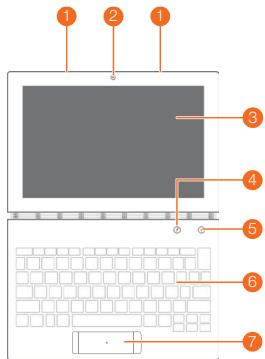

1 Microphone
4 Pen button
7 Touchpad
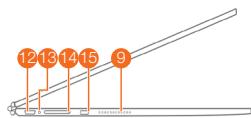
Volume buttons
Indicator
2 Front-facing camera
Main camera
8 On/Off button
11 Headset jack
14 Card tray
3 Touch screen
6 Halo Keyboard/Create Pad
9 Speakers
12 Micro USB connector
15 Micro HDMI connector
The WLAN model (Lenovo YB1-X91F) does not have a Nano-SIM card slot.
- Your keyboard layout may be different depending on your location and language.
Preparing your tablet
You can use cellular services with the WLAN + LTE model (Lenovo YB1-X91L) by inserting the Nano-SIM card provided by your carrier.
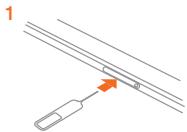
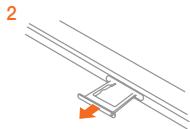
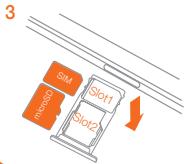
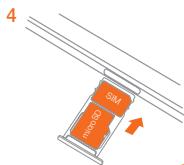
Install the Nano-SIM and microSD cards as shown.
- Insert the eject tool that comes with your tablet into the hole in the card tray.
2.Pull out the card tray. - Put a Nano-SIM card in Slot 1 and a microSD card in Slot 2.
- Carefully insert the tray with the installed cards back into the slot.
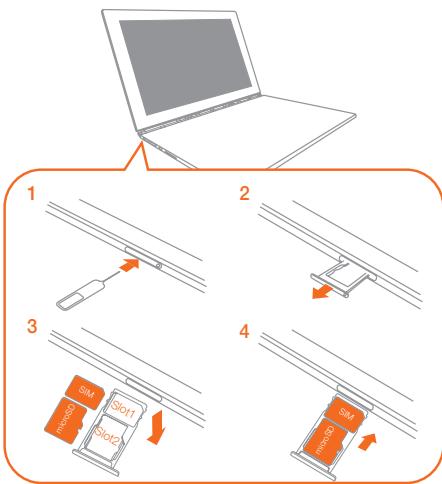
Only Nano-SIM cards work with your tablet.
- Turn off your tablet before you remove or insert the Nano-SIM card.
Starting to use your tablet
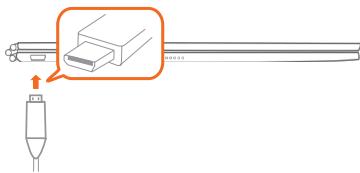
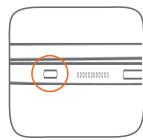
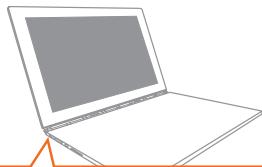
You might need to charge the battery before using your tablet.
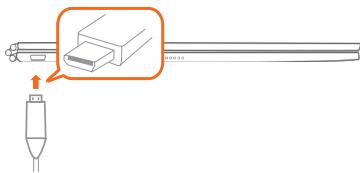
Charge the battery as shown.
The best way to charge your device is to connect your tablet to a power outlet using the included cable and USB power adapter.

Low battery

Fully charged

Charging
Turning on/off
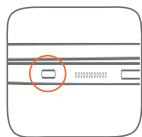
Turn on: Press and hold the On/Off button until the Lenovo logo appears.
Turn off: Tap > Power off.
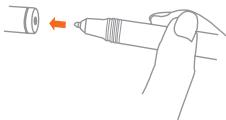
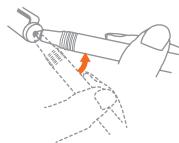
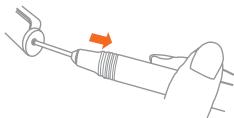
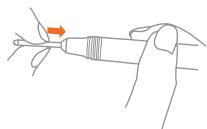
Replacing your Real Pen refill
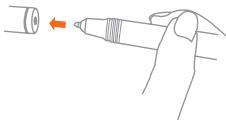
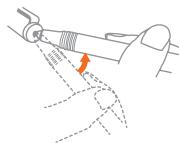
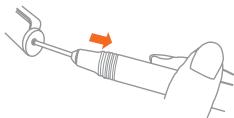
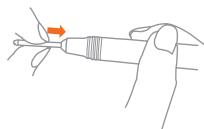
Your Real Pen refill kit contains refills for replacement. Choose a refill that suits your writing method and replace the refill as shown.
- Use the Real Pen cap as a refill remover. Insert the refill into the hole on the top of the cap.
- Tilt the pen until the refill is locked.
- Pull out the refill directly.
- Insert the refill into the pen until it is locked into place.
1
2
3
4
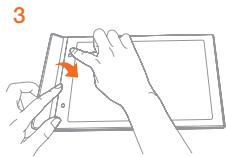
Replacing your BOOK Pad paper
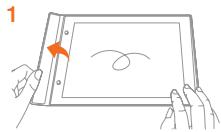
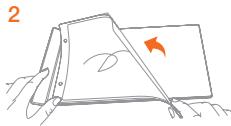
BOOK Pad is designed for use with the paper that fits your tablet.
When the paper is fully used up, change the paper as shown.
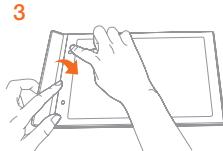
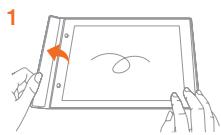
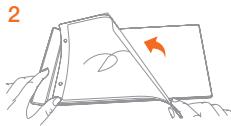
- Lift the BOOK Pad cover.
- Take out the used paper.
- Put the new paper into the pad and replace the cover.
Important safety and handling information
Plastic bag notice
Danger: Plastic bags can be dangerous. Keep plastic bags away from babies and children to avoid danger of suffocation.
Built-in rechargeable battery notice
Danger: Do not attempt to replace the internal rechargeable lithium ion battery. Contact Lenovo Support for factory replacement.
Caution about high volume usage
Warning: Exposure to loud noise from any source for extended periods of time may affect your hearing. The louder the sound, the less time is required before your hearing could be affected. To protect your hearing:
- Limit the amount of time you use headsets or headphones at high volume.
- Avoid turning up the volume to block out noisy surroundings.
- Turn the volume down if you can't hear people speaking near you.
If you experience hearing discomfort, including the sensation of pressure or fullness in your ears, ringing in your ears or muffled speech, you should stop listening to the device through your headset or headphones and have your hearing checked.
European Union compliance statement
European Union conformity
EU contact: Lenovo, Einsteinova 21, 851 01 Bratislava, Slovakia
C∈0560①
Compliance with the R&TTE Directive
This product is in compliance with the essential requirements and other relevant provisions of the EU Council Radio and Telecommunications Terminal Equipment (R&TTE) Directive, 1999/5/EC. The Declaration of Conformity information is located in the Regulatory Notices, which you can download from the Lenovo Support Web site. See "Downloading publications" in this document for additional information.
NOTE: R&TTE 1999/5/EC remains in force during the transition period of Radio Equipment Directive (RED) 2014/53/EU until 12 June, 2017. After then, RED 2014/53/EU will take the place of R&TTE 1999/5/EC.
Service and support information
The following information describes the technical support that is available for your product, during the warranty period or throughout the life of your product. Refer to the Lenovo Limited Warranty (LLW) for a full explanation of Lenovo warranty terms. See "Lenovo Limited Warranty notice" later in this document for details on accessing the full warranty.
Online technical support
Online technical support is available during the lifetime of a product at:
http://www.lenovo.com/support
Telephone technical support
You can get help and information from the Customer Support Center by telephone. Before contacting a Lenovo technical support representative, please have the following information available: model and serial number, the exact wording of any error message, and a description of the problem.
Your technical support representative might want to walk you through the problem while you are at your device during the call.
Worldwide Lenovo Support telephone list
Important: Telephone numbers are subject to change without notice. The most up-to-date telephone list for the Customer Support Center is always available at:
http://www.lenovo.com/support/phone
If the telephone number for your country or region is not listed, contact your Lenovo reseller or Lenovo marketing representative.
Warranty information
Lenovo Limited Warranty notice
This product is covered by the terms of the LLW, version L505-0010-02 08/2011. Read the LLW at http://www.lenovo.com/warranty/lw_02. You can read the LLW in a number of languages from this Web site. If you cannot view the LLW from the Web site, contact your local Lenovo office or reseller to obtain a printed version of the LLW.
Warranty period and type of warranty service
| Country or region | Warranty period | Type of warranty service |
| Germany, Italy, Austria, United Kingdom, Israel, Australia, New Zealand | Parts and Labor - 1 year Battery Pack - 1 year | 1,3 |
| Guatemala, Costa Rica, Venezuela, Peru, Uruguay, Ecuador, Colombia, Chile, Argentina, Indonesia, Vietnam, India, Malaysia, Thailand, Philippines, Singapore, Hong Kong, El Salvador, Taiwan | Parts and Labor - 1 year Battery Pack - 1 year | 1,4 |
| Russia, Ukraine, Egypt, Lebanon, Morocco, South Africa, Tunisia, Mauritius, Mozambique, United Arab Emirates, Jordan, Kenya, Nigeria, Uganda, Ghana, Oman, Tanzania, Namibia | Parts and Labor - 1 year Battery Pack - 1 year | 4 |
| United States of America, Canada, Mexico, Japan | Parts and Labor - 1 year Battery Pack - 1 year | 1,5 |
| Panama | Parts and Labor - 1 year Battery Pack - 1 year | 2,4 |
| South Korea | Parts and Labor - 1 year Battery Pack - 1 year | 3,4 |
| Brazil | Parts and Labor - 1 year Battery Pack - 1 year | 2,5 |
| Spain, Switzerland, Portugal, Netherlands, Belgium, Sweden, Denmark, Norway, Finland, Estonia, Latvia, Lithuania, Iceland, France | Parts and Labor - 2 years Battery Pack - 1 year | 1,3 |
| Czech Republic, Hungary, Romania, Bulgaria, Greece, Croatia, Slovenia, Slovakia, Cyprus, Poland | Parts and Labor - 2 years Battery Pack - 1 year | 1,5 |
| Turkey | Parts and Labor - 2 years Battery Pack - 1 year | 3,4 |
| Saudi Arabia | Parts and Labor - 2 years Battery Pack - 1 year | 4 |
| Serbia | Parts and Labor - 2 years Battery Pack - 1 year | 1,4 |
- Excludes some components. 90-day limited warranty for power adapters, keyboards, plastics, and hinges.
Type of warranty service
- Customer Replaceable Unit ("CRU") Service
- On-site Service
- Courier or Depot Service
- Customer Carry-In Service
- Mail-in Service
- Customer Two-Way Mail-in Service
- Product Exchange Service
For a full explanation of the types of warranty service, refer to the full warranty. See "Lenovo Limited Warranty notice" for details on accessing the full warranty.
EurAsia compliance mark
EAC
Environmental, recycling, and disposal information
General recycling statement
Lenovo encourages owners of information technology (IT) equipment to responsibly recycle their equipment when it is no longer needed. Lenovo offers a variety of programs and services to assist equipment owners in recycling their IT products. For information on recycling Lenovo products, go to http://www.lenovo.com/recycling.
Important battery and WEEE information

Batteries and electrical and electronic equipment marked with the symbol of a crossed-out wheeled bin may not be disposed as unsorted municipal waste. Batteries and waste of electrical and electronic equipment (WEEE) shall be treated separately using the collection framework available to customers for the return, recycling, and treatment of batteries and WEEE. When possible, remove and isolate batteries from WEEE prior to placing WEEE in the waste collection stream. Batteries are to be collected separately using the framework available for the return, recycling, and treatment of batteries and accumulators.
Country-specific information is available at: http://www.lenovo.com/recycling
Recycling information for Japan
Recycling and disposal information for Japan is available at: http://www.lenovo.com/recycling/japan
Additional recycling statements
Additional information about recycling device components and batteries is in your User Guide. See "Accessing your User Guide" for details.
Battery recycling marks
Battery recycling information for Taiwan

廢電池請回收
Battery recycling information for the United States and Canada

US & Canada Only
Battery recycling information for the European Union

Energy efficiency mark

Restriction of Hazardous Substances Directive (RoHS)
Turkey
The Lenovo product meets the requirements of the Republic of Turkey Directive on the Restriction of the Use of Certain Hazardous Substances in Waste Electrical and Electronic Equipment (WEEE).
RoHS compliant as per E-Waste (Management & Handling) Rules, 2011.
Vietnam
Lenovo products sold in Vietnam, on or after September 23, 2011, meet the requirements of the Vietnam Circular 30/2011/TT-BCT ("Vietnam RoHS").
European Union
Lenovo products sold in the European Union, on or after 3 January 2013 meet the requirements of Directive 2011/65/EU on the restriction of the use of certain hazardous substances in electrical and electronic equipment ("RoHS recast" or "RoHS 2"). For more information about Lenovo progress on RoHS, go to:
http://www.lenovo.com/socialresponsibility/us/en/RoHS_Communication.pdf
Français
Directive européenne RoHS (Restriction of Hazardous Substances)
Turquie
RoHS compliant as per E-Waste (Management & Handling) Rules, 2011.
Viet Nam
RoHS compliant as per E-Waste (Management & Handling) Rules, 2011.
plic
a 211 23 g a
("piaa a jaiy algal jia") 30/2011/TT-BCT
(20
2013 3 2014 2015 2016 2017 2018 2019 2020 2021 2022 2023 2024 2025 2026 2027 2028 2029 2030
http://www.lenovo.com/socialresponsibility/us/en/RoHS_Communication.pdf
Cilalil no yalil g yill ole! Cloglaog aaii ciaglal
y j 1
aalal al aie aag aalalal clll al aaii kki kaiil sll (IT) cllsall agi iia Leno 1e I aegell gglkci gni yse! I clll aai l aae ae gia ciaia gaiy Leno 1e gai gai.
http://www.lenovo.com/recycling
(WEEE)
Ccall call calll algl a j cclal gll gll gll calall qalll lalll y Ccalll calll calll algl a l lal y calll calll algl calll algl alal alal alal alal alal alal alal alal alal alal alal alal alal alal alal alal alal alal alal alal alal alal alal alal alal alal alal alal alal alal alal alal alal alal alal alal alal alal alal alal alal alal alal alal alal alal alal alal alal alal alall

gall gll gll gll gll gll gll gll gll gll gll gll
http://www.lenovo.com/recycling/japan
a#
aill lglgall glll 1. pailll gllg jyj yj s o!
Jusllle Jusll
- ai a ai 分母最小值为 k .
1gul 2yul yuul

廢電池請回收
1isgdoaal ciyNgl aeg yjbalnye ool Ciaagna

US & Canada Only
CduNllluljlllalllllllll 3
gall jai aia .4
2111 5
yall yie jiall lal yll
Eill Juaa 7
aagaa aaa aaa aa aaa aaa aaa aaa aaa aaa aaa aaa
Jzalal Jzalal jae yjai aai jy Jzalal all jayall Lenovo e jaj kay Jzai
jiai jia
| julian ala lal a lal g | julian ala lal a lal g | julian ala lal a lal g | |
| 1,3 | s.dal y ala - l.la tlllgl haliell s.dal y ala - a.ahjalllll kau jaz | l.lal y ala + l.lal y ala + l.lal y ala + l.lal y ala + l.lal y ala + l.lal y ala + l.lal y ala + l.lal y ala + l.lal y ala + l.lal y ala + l.lal y ala + l.lal y ala + l.lal y ala + l.lal y ala + l.lal y ala + l.la jaz | |
| 1,4 | s.dal y ala - l.la tlllgl haliell s.dal y ala - a.ahjalllll kau jaz | s.dal y ala + l.lal y ala + l.lal y ala + l.lal y ala + l.lal y ala + l.lal y ala + l.lal y ala + l.lal y ala + l.lal y ala + l.lal y ala + l.lal y ala + l.lal y ala + l.lal y ala + l.lal y ala + l.laly ala + l.lal y ala + l.lal y ala + l.lal y ala + l.lal y ala + l.lal y ala + l.lal y ala + l.lal y ala + l.lal y ala + l.lal y ala + l.lal y ala + l.lal y ala + l.lal y ala + l.lal y ala + l.lal y alala + l.lal y ala + l.lal y ala + l.lal y ala + l.lal y ala + l.lal y ala + l.lal y ala + l.lal y ala + l.lal y ala + l.lal y ala + l.lal y ala + l.lal y ala + l.lal y ala + l.lal y ala + l.lal y ala +l.lal y ala + l.lal y ala + l.lal y ala + l.lal y ala + l.lal y ala + l.lal y ala + l.lal y ala + l.lal y ala + l.lal y ala + l.lal y ala + l.lal y ala + l.lal y ala + l.lal y ala + l.lal y ala + l. lal y ala + l.lal y ala + l.lal y ala + l.lal y ala + l.lal y ala + l.lal y ala + l.lal y ala + l.lal y ala + l.lal y ala + l.lal y ala + l.lal y ala + l.lal y ala + l.lal y ala + l.lal y ala + l.lal 1234567890123456789012345678901234567890123456789012345678901234567890123456789012345678901234567890123456789123456789012345678901234567890123456789012345678901234567890123456789012345678901234567890123456789 | s.dal y ala + l.lal y ala + l.lal y ala + l.lal y ala + l.lal y ala + l.lal y ala + l.lal y ala + l.lal y ala + l.lal y ala + l.lal y ala + l.lal y ala + l.lal y ala + l.lal y ala + l.lal y ala +l.lal 123456789012345678901234567890123456789012345678901234567890123456789012345678901234567890123456678901234567890123456789012345678901234567890123456789012345678901234567890123456789012345678901234 5 |
| 4 | s.dal y ala - l.la tlllgl haliell s.dal y ala - a.ahjalllll kau jaz | s.dal y ala + l.lal y ala + l.lal y ala + l.lal y ala + l.lal y ala + l.lal y ala + l.lal y ala + l.lal y ala + l.lal y alala + l.lal y ala + l.lal y ala + l.lal y ala + l.lal y ala + l.lal y ala + l.lal 12345678901234567890123456789012345678901234567890123456789 | |
| 1,5 | s.dal y ala - l.lal y ala + l.lal y ala + l.lal y ala + l.lal y ala + l.lal y ala + l.lal y ala + l.lal y ala + l.lal y ala + l.lal y ala + l.lal y ala + l.lal y ala + l.lal y ala + l.lal y ala + l.lal y ala + l.123456789012345678901234567890123456789012345678901234567890123456789012345678901234567890123456789 | ||
| 2,4 | s.dal y ala - l.lal y ala + l.lal y ala + l.lal y ala + l.lal y ala + l.lal y ala + l.lal y ala + l.lal y ala + l.lal y ala + l.lal y ala + l.lal y ala + l.lal y ala + l.lal y ala + l.lal y ala +l.lal y ala + l.1234567890123456789012345678901234567890123456789012345678901234567890123456789012345678901 | ||
| 3,4 | s.dal y ala - l.lal y ala + l.lal y ala + l.lal y ala + l.lal y ala + l.lal y ala + l.lal y ala + l.lal y ala + l.lal y ala + l.lal y ala + l.lal y ala + l.lal y ala + l.lal y ala + l.lal y alala + l.lal y alala + l.lal y alala + l.lal y alala + l.lal y alala + l.lal y alala + l.lal y alala + l.lal y alala + l.lal y alala + l.lal y alala + l.lal y alala + l.lal y alala + l.lal y alala + l.lal y alala + l.lal y alala +l.lal y alala + l.lal y alala + l.lal y alala + l.lal y alala + l.lal y alala + l.lal y alala + l.lal y alala + l.lal y alala + l.lal y alala + l.lal y alala + l.lal y alala + l.lal y alala + l.lal y alala + l.lal y alala + l.lALy alala + l.lal y alala + l.lal y alala + l.lal y alala + l.lal y alala + l.lal y alala + l.lal y alala + l.lal y alala + l.lal y alala + l.lal y alala + l.lal y alala + l.lal y alala + l.lal y alala + l.lal y alala + l.lal y alALA + l.lal y alala + l.lal y alala + l.lal y alala + l.lal y alala + l.lal y alala + l.lal y alala + l.lal y alala + l.lal y alala + l.lal y alala + l.lal y alala + l.lal y alala + l.lal y alala + l.lal y alala + l.lal y alala + 12345678901234567890123456789012345678901234567890123456789012345678901234567890123456789012345678 901234567890123456789012345678901234567890123456789012345678901234567890123456789012345678901234567 890123456789012345678901234567890123456789012345678901234567890123456789012345678901234567890123456 789012345678901234567890123456789012345678901234567890123456789012345678901234567890123456789012345 678901234567890123456789012345678901234567890123456789012345678901234567890123456789012345678901234 \(5\)678901234567890123456789012345678901234567890123456789012345678901234567890123456789012345678901234\(5\)6789012345678901234567890123456789012345678901234567890123456789012345678901234567890123456789012.345678901234567890123456789012345678901234567890123456789012345678901234567890123456789012345678901 234567890123456789012345678901234567890123456789012345678901234567890123456789012345678901234567890 23456789012345678901234567890123456789012345678901234567890123456789012345678901234567890123456789 \(123456789012345678901234567890123456789012345678901234567890123456789012345678901234567890123456789 \(234567890123456789012345678901234567890123456789012345678901234567890123456789012345678901234567890 \(12345678901234567890123456789012345678901234567890123456789012345678901234567890123456789012345678 12345678901234567890123456789012345678901234567890123456789012345678901234567890123456789012345678 |
(R&TTE)
a 1111111111111111111111111111111
g aalll 1999/5/EC r (R&TTE)
g"calssll jz" gJ. Lenovo Jglll gall gall gall lglj jil kgl,
Aulioi Chglo 1juaill iuaill lss
aegil aaylll 1999/5/EC pR aegal llln ygaiy gag ygal jaa:
4444444444444444444444444444444444444444444444444444444444444444444444444444444444444444444444
.1999/5/EC 2014/53/EU
aeg
dikayaiial plisw jj yj jiaaiall s jy dvi jaiil gaii all qai ai iaii caiai
J. Lenovo Jauo a bdo jaoa Jauo a Jauo a (LLW) Jauo Jauo Jauo Jauo
Aenell 154
http://www.lenovo.com/support:gsgallglgglalglglglglglglglglglglglglglglglglglglglglglglglglglglglglglglglglglglglglglglglglglglglglglglglglglglglglglglglglglglglglglglglglglglglglglglglglglglglglglglglglglglglglglglglglglglglglglglglglglglglgl
gill aill Jann Jauai jj, xalal a jy jx ju jia cai g y jc cai kao xua 1
LenoVo
A
AolSall jll dlalil 1 klll Jcill Jgill aall qll
Plll plai j gJlenovo 2yj aal yia
gall 15000000000000000000000000000000000000000000000000
http://www.lenovo.com/support/phone
Lenoov 0y Jleno 0g y j 1aia aai iiaiaiaiaiaiaiaiaiaiaiaiaiaiaiaiaiaiaiaiaiaiaiaiaiaiaiaiaiaiaiaiaiaiaiaiaiaiaiaiaiaiaiaiaiaiaiaiaiaiaiaiaiaiaiaiaia
pLusunlgljuljiea
aannnnnnae
jibb jbi jbi jbi jbi jbi jbi jbi jbi jbi jbi jbi jbi jbi jbi jbi jbi jbi jbi jbi jbi jbi jbi jbi jbi jbi jbi jbi jbi jbi jbi jbi jbi jbi jbi jbi jbi jbi jbi jbi jbi jbi jbi jbi jbi jbi jbi jbi jbi jbi jbi j bi
j1i1i1j
jaiil 5y jaiil aiinai ai jaiil
Lolall Lenofo 1
sinall
gall cal gall alldal jy jiny
JSLaL,clalauuuegejjgctggln aolao cial jia jia jia jia jia jia jia jia jia jia jia jia jia jia
aal gall awlld algall gall wll jil jil qill qill
Aulalall giall gialll
di y jally uynn yll walsy lglaw slsly 12i gusall
j jdually jddyll kxlal ydl j ddi jg bdo yd yduyll dl lgyd g aay
j j j j j j j j j j j j j j j j j j j j j j j j j j j j j j j j j j j j j j j j j j j j j j j j j j j j j j j j j j j j
aal aal alal

y
(1) a4 = a1 + 2d a_4 = 32
Lenovo, Einsteinova 21, 851 01 Bratislava, Slovakia
C∈0560!
BOOK Pad
JLLI JLLI JLLI JLLI JLLI JLLI JLLI JLLI JLLI JLLI JLLI JLLI JLLI JLLI JLLI JLLI JLLI JLLI JLLI JLLI JLLI JLLI JLLI JLLI JLLI JLLI JLLI JLLI JLLI JLLI JLLI JLLI JLLI JLLI J
gaaasasasss
. BOOK Pad .
. jiswail 23
aaii 3
gall Jyssal yll s gdy lly Lgill yll Jyssal Uyssal yle d yll sall Real Pen yie pala y
S OBC = S BOC + S_ CBA
ealil gai jgagall aaii jia jia jia jia Real Pen 1
a. gall jia yu jia jiu liyue 2
jia 2 jiall gaii iuiu 3
4
1
2
3
4
gill 1jgl plil
y j 1
gaiy
a a a a a a a a a a a a a a a a a a a a a a a a a a a
山
Jolliy

jia 1y jll jai s

Jz
.Lenovo Jauo jyj yj Jauuill Jauuill Jauuill Jauuill Jauuill
jutill 1
JL WAN + LTE (Lenovo YB1-X91L) 2023
aiaaa aaii aaiiaaiaaa
sima SD, Nano-SIM
aalall 20 gaaal aalll jai jai jai jai jai jai jai
.2
.2 microSD 1 Nano-SIM
Aaill 8jai jaiyai jai jaii iiaai bai aai 4
Nan-SIM
Nan-SIM 1
YOGABOOKwithWindows 2015
Aa aee eae aee aee aee aee aee aee aee aee aee aee
1
aipiei i 100
. http://support.lenovo.com
aannnll jai jai jai jai jai jai jai
gill