
HW-A560 - Soundbar SAMSUNG - Free user manual and instructions
Find the device manual for free HW-A560 SAMSUNG in PDF.


| Product Type | Soundbar |
| Model | Samsung HW-A560 |
| Channels | 2.1 |
| Total Power Output | 320W |
| Wireless Subwoofer | Included |
| Dimensions (Soundbar) | 860 x 60 x 85 mm |
| Dimensions (Subwoofer) | 180 x 320 x 280 mm |
| Weight (Soundbar) | 2.5 kg |
| Weight (Subwoofer) | 4.0 kg |
| Power Consumption (Soundbar) | 25W |
| Power Consumption (Subwoofer) | 30W |
| Standby Power Consumption | <0.5W |
| Connectivity | HDMI ARC, Bluetooth 4.2, Optical, USB |
| Audio Features | Adaptive Sound, Game Mode, Dolby Audio, DTS Virtual:X |
| Remote Control | Included |
| Wall Mountable | Yes (brackets included) |
| Subwoofer Connection | Wireless (automatic pairing) |
| Color | Black |
| Bluetooth Version | 4.2 |
| Supported Audio Formats | MP3, WMA, AAC, FLAC, WAV |
| Cleaning Instructions | Wipe with dry cloth, avoid liquids |
| Safety | Do not expose to moisture, keep ventilation |
| Repairability | Contact Samsung service center |
Frequently Asked Questions - HW-A560 SAMSUNG
User questions about HW-A560 SAMSUNG
0 question about this device. Answer the ones you know or ask your own.
Ask a new question about this device
Download the instructions for your Soundbar in PDF format for free! Find your manual HW-A560 - SAMSUNG and take your electronic device back in hand. On this page are published all the documents necessary for the use of your device. HW-A560 by SAMSUNG.
USER MANUAL HW-A560 SAMSUNG
Thank you for purchasing this Samsung product.
To receive more complete service, please register
your product at www.samsung.com/register
SAFETY INFORMATION
SAFETY WARNINGS
TO REDUCE THE RISK OF ELECTRIC SHOCK, DO NOT REMOVE THE COVER (OR BACK).
NO USER-SERVICEABLE PARTS ARE INSIDE.
REFER SERVICING TO QUALIFIED SERVICE PERSONNEL.
Refer to the table below for an explanation of symbols which may be on your Samsung product.
 | CAUTIONRISK OF ELECTRIC SHOCK.DO NOT OPEN. |  |
 | This symbol indicates that high voltage is present inside. It is dangerous to make any kind of contact with any internal part of this product. | |
 | This symbol indicates that this product has included important literature concerning operation and maintenance. | |
 | Class II product: This symbol indicates that it does not require a safety connection to electrical earth (ground). If this symbol is not present on a product with a power cord, the product MUST have a reliable connection to protective earth (ground). | |
 | AC voltage: This symbol indicates that the rated voltage marked with the symbol is AC voltage. | |
 | DC voltage: This symbol indicates that the rated voltage marked with the symbol is DC voltage. | |
 | Caution, Consult instructions for use: This symbol instructs the user to consult the user manual for further safety related information. | |
CAUTION
WARNING
- To reduce the risk of fire or electric shock, do not expose this appliance to rain or moisture.
CAUTION
• TO PREVENT ELECTRIC SHOCK, MATCH WIDE BLADE OF PLUG TO WIDE SLOT, FULLY INSERT.
- This apparatus shall always be connected to a AC outlet with a protective grounding connection.
- To disconnect the apparatus from the mains, the plug must be pulled out from the mains socket, therefore the mains plug shall be readily operable.
- Do not expose this apparatus to dripping or splashing. Do not put objects filled with liquids, such as vases, on the apparatus.
- To turn this apparatus off completely, you must pull the power plug out of the wall socket. Consequently, the power plug must be easily and readily accessible at all times.
PRECAUTIONS
- Ensure that the AC power supply in your house complies with the power requirements listed on the identification sticker located on the bottom of your product. Install your product horizontally, on a suitable base (furniture), with enough space around it for ventilation (7-10 cm). Make sure the ventilation slots are not covered. Do not place the unit on amplifiers or other equipment which may become hot. This unit is designed for continuous use. To fully turn off the unit, disconnect the AC plug from the wall outlet. Unplug the unit if you intend to leave it unused for a long period of time.
- During thunderstorms, disconnect the AC plug from the wall outlet. Voltage peaks due to lightning could damage the unit.
- Do not expose the unit to direct sunlight or other heat sources. This could lead to overheating and cause the unit to malfunction.
- Protect the product from moisture (i.e., vases) and excess heat (e.g., a fireplace) or equipment creating strong magnetic or electric fields. Unplug the power cable from the AC wall socket if the unit malfunctions. Your product is not intended for industrial use. It is for personal use only. Condensation may occur if your product has been stored in cold temperatures. If transporting the unit during the winter, wait approximately 2 hours until the unit has reached room temperature before using.
- The battery used with this product contains chemicals that are harmful to the environment. Do not dispose of the battery in the general household trash. Do not expose the battery to excess heat, direct sunlight, or fire. Do not short circuit, disassemble, or overheat the battery.
CAUTION: Danger of explosion if the battery is replaced incorrectly. Replace only with the same or equivalent type.
ABOUT THIS MANUAL
The user manual has two parts: a simple paper USER MANUAL and a detailed FULL MANUAL you can download.

USER MANUAL
See this manual for safety instructions, product installation, components, connections, and product specifications.


FULL MANUAL
You can access the FULL MANUAL on Samsung's on-line customer support centre by scanning the QR code. To see the manual on your PC or mobile device, download the manual in document format from Samsung's website. (http://www.samsung.com/support)
Design and specifications are subject to change without prior notice.
CONTENTS
01 Checking the Components 2
Inserting Batteries before using the Remote Control (AA batteries X 2) ____ 2
02 Product Overview 3
Front Panel / Top Panel of the Soundbar 3
Bottom Panel of the Soundbar 4
03 Connecting the Soundbar 5
Connecting Electrical Power ____ 5
Connecting the Soundbar to the Subwoofer 6
- Automatic connection between the Subwoofer and the Soundbar 6
- Manually connecting the Subwoofer if automatic connection fails ____ 7
Connecting an SWA-9100S (Sold Separately) to your Soundbar 9
04 Connecting to your TV 11
Method 1. Connecting with a Cable ____ 11
- Connecting using an Optical Cable 11
- Connecting a TV using an HDMI Cable 12
Method 2. Connecting Wirelessly ____ 14
- Connecting a TV via Bluetooth 14
05 Connecting an External Device 16
Connecting using an Optical Cable 16
Connecting using an HDMI Cable 17
06 Connecting a USB Storage Device 18
07 Connecting a Mobile Device 19
Connecting via Bluetooth ____ 19
08 Using the Remote Control 23
How to Use the Remote Control ____ 23
Adjusting the Soundbar volume with a TV remote control 26
Using the Hidden Buttons (Buttons with more than one function) ____ 27
Output specifications for the different sound effect modes ____ 27
09 Installing the Wall Mount 28
Installation Precautions ____ 28
Wallmount Components ____ 28
10 Software Update 30
How to check the Firmware version ____ 30
Update Procedure 31
If UPDATE is not displayed ____ 31
11 Troubleshooting 32
12 Licence 34
13 Open Source Licence Notice 35
14 Important Notes About Service 35
15 Specifications and Guide 36
Specifications 36
01 CHECKING THE COMPONENTS


Wall Mount Guide Holder-Screw Screw Bracket-Wall Mount
- For more information about the power supply and power consumption, refer to the label attached to the product. (Label: Bottom of the Soundbar Main Unit)
- To purchase additional components or optional cables, contact a Samsung Service Centre or Samsung Customer Care.
- Depending on the region, the appearance of the AC plug may differ from the plug displayed above, or it may be supplied integrated with the AC/DC adapter.
- The appearance of the accessories may differ slightly from the illustrations above.
Inserting Batteries before using the Remote Control (AA batteries X 2)
Slide the back cover in the direction of the arrow until it is completely removed. Insert 2 AA batteries (1.5V) oriented so that their polarity is correct. Slide the back cover back into position.

02 PRODUCT OVERVIEW
Front Panel / Top Panel of the Soundbar
| 1 | DisplayDisplays the product's status and current mode. | |
| 2 | (Power) ButtonTurns the power on and off.Auto Power Down FunctionThe unit turns off automatically in the following situations:In D.IN / HDMI / BT / USB Mode : If there is no audio signal for 20 minutes. | |
| 3 | - + (Volume) ButtonAdjusts the volume.When adjusted, the volume level appears on the Soundbar's front display. | |
| 4 | (Source) ButtonSelects the source input mode. | |
| Input mode Display | ||
| Optical Digital input D.IN | ||
| ARC (HDMI OUT) input | D.IN → TV ARC (Auto conversion) | |
| HDMI input HDMI | ||
| BLUETOOTH mode BT | ||
| USB mode USB | ||
| • To turn on "BT PAIRING" mode, change the source to "BT" mode, and then press and hold the(Source) button for more than 5 seconds. | ||
- When you plug in the AC cord, the power button will begin working in 4 to 6 seconds.
- When you turn on this unit, there will be a 4 to 5 second delay before it produces sound.
- If you want to enjoy sound only from the Soundbar, you must turn off the TV's speakers in the Audio Setup menu of your TV. Refer to the owner's manual supplied with your TV.
Bottom Panel of the Soundbar

| 1 | DIGITAL AUDIO IN (OPTICAL)Connect to the digital (optical) output of an external device. |
| 2 | USB (5V 0.5A)Connect a USB device here to play music files stored on the USB device through the Soundbar. |
| 3 | HDMIInputs digital video and audio signals simultaneously using an HDMI cable.Connect to the HDMI output of an external device. |
| 4 | HDMI TO TV (ARC)Connect to the HDMI (ARC) jack on a TV. |
| 5 | DC 24V (Power Supply In)Connect the AC/DC power adapter. |
- When disconnecting the power cable of the AC/DC power adapter from a wall outlet, pull the plug. Do not pull the cable.
- Do not connect this unit or other components to an AC outlet until all connections between components are complete.
03 CONNECTING THE SOUNDBAR
Connecting Electrical Power
Use the power components to connect the Subwoofer and Soundbar to an electrical outlet in the following order:
- Connect the power cord to the Subwoofer.
- Connect the power output cable to the power adapter, and then to the Soundbar.
- Connect the power cord to a wall socket.
See the illustrations below.
- For more information about the required electrical power and power consumption, refer to the label attached to the product. (Label: Bottom of the Soundbar Main Unit)
![graph LR A["Power Cord"] --> B["Rear of Subwoofer"] B --> C["Connecting Electrical Power"] C --> D["DC 24V"] D --> E["Bottom of the Soundbar Main Unit"] E --> F["AC/DC Adapter"] F --> G["Power Cord"] G --> H["Connecting Electrical Power"]](/content/2026/05/1010716/images/0f36219f33369ae72f101269adc434b1f67acdc837f1a6c6d8f31732f94b4293.jpg)
- Make sure to rest the AC/DC Adapter flat on a table or the floor. If you place the AC/DC Adapter so that it is hanging with the AC cord input facing upwards, water or other foreign substances could enter the Adapter and cause the Adapter to malfunction.
Connecting the Soundbar to the Subwoofer
When the subwoofer is connected, you can enjoy rich bass sound.
Automatic connection between the Subwoofer and the Soundbar
When you turn the power on after connecting the power cables to the Soundbar and subwoofer, the subwoofer is automatically connected to the Soundbar.
- When auto pairing is complete, the blue indicator at the rear of the subwoofer turns on.
LED Indicator Lights on the Rear of Subwoofer
| LED Status Description Resolution | |||
| Blue | On | Successfully connected (normal operation) | - |
| Blinking Re | recovering the connection | Check if the power cable attached to the main Soundbar unit is connected properly or wait about 5 minutes. If blinking persists, try manually connecting the subwoofer. See page 7. | |
| Red On | Standby (with the Soundbar main unit turned off) | Check if the power cable attached to the main Soundbar unit is connected properly. | |
| Connection failed | Connect again. See the instructions for manual connection on page 7. | ||
| Red and blue | Blinking Malfunction | See the contact information for the Samsung Service Centre in this manual. | |
Manually connecting the Subwoofer if automatic connection fails
Before performing the manual connection procedure below:
- Check whether the power cables for the Soundbar and subwoofer are connected properly. • Make sure that the Soundbar is turned on.
- Press and hold ID SET on the rear of the subwoofer for at least 5 seconds.
- The red indicator on the rear of the subwoofer turns off and the blue indicator blinks.

Rear of Subwoofer
- Press and hold the Up button on the remote control for at least 5 seconds.
- The ID SET message appears on the display of the Soundbar for a moment, and then it disappears.
- The Soundbar will automatically power on when ID SET is complete.

- Check if the LINK LED is solid blue (connection complete).

The LINK LED indicator stops blinking and glows a solid blue when a connection is established between the Soundbar and the Wireless Subwoofer.
NOTES
- Do not connect the power cord of this product or your TV to a wall outlet until all connections between components are complete.
- Before moving or installing this product, be sure to turn off the power and disconnect the power cord.
- If the main unit is powered off, the wireless subwoofer will go into stand-by mode and the STANDBY LED on the rear of the sub-woofer will turn red after blinking blue several times.
- If you use a device that uses the same frequency (5.8GHz) as the Soundbar near the Soundbar, interference may cause some sound interruption.
- The maximum transmission distance of the main unit's wireless signal is about 10 meters, but may vary depending on your operating environment. If a steel-concrete or metallic wall is between the main unit and the wireless subwoofer, the system may not operate at all because the wireless signal cannot penetrate metal.
PRECAUTIONS
- Wireless receiving antennas are built into the wireless subwoofer. Keep the unit away from water and moisture.
- For optimal listening performance, make sure that the area around the wireless subwoofer and the Wireless Receiver Module (sold separately) is clear of any obstructions.
Connecting an SWA-9100S (Sold Separately) to your Soundbar
Expand to true wireless surround sound by connecting the Samsung Wireless Rear Speaker Kit (SWA-9100S, sold separately) to your Soundbar.
- Connect the Wireless Receiver Module to 2 Surround Speakers.
- When connecting the speaker cable, connect the core wire to the speaker.

- The speaker cables are colour coded.

- Check the standby status of the Wireless Receiver Module after plugging it into an electrical outlet.
- The LINK LED indicator (blue LED) on the Wireless Receiver Module blinks. If the LED does not blink, press the ID SET button on the back of the Wireless Receiver Module with a pen tip for 5~6 seconds until the LINK LED indicator blinks (in Blue). For more about the LED, please refer to the SWA-9100S user manual.
![graph LR A["Power Input"] --> B["Induction Switch"] B --> C["ID SET"] C --> D["Blue blinking"] D --> E["LINK Signal"] style A fill:#f9f,stroke:#333 style B fill:#ccf,stroke:#333 style C fill:#cfc,stroke:#333 style D fill:#fcc,stroke:#333 style E fill:#cff,stroke:#333](/content/2026/05/1010716/images/e47d9f1b607f034e7b093170eaa5323d72182f7734eb6a85716662d2ea2bff28.jpg)
- Press and hold the Up button on the remote control for at least 5 seconds.
- The ID SET message appears on the display of the Soundbar for a moment, and then it disappears. • The Soundbar will automatically power on when ID SET is complete.


CAUTION
- If your Soundbar was playing music when it connects to the SWA-9100S, you may hear some stuttering from the woofer as the connection finalises.
- Check if the LINK LED is solid blue (connection complete).

The LINK LED indicator stops blinking and glows a solid blue when a connection is established between the Soundbar and the Wireless Receiver Module.
- If the SWA-9100S is not connected, repeat the procedure from Step 2.
04 CONNECTING TO YOUR TV
Hear TV sound from your Soundbar through wired or wireless connections.
- When the Soundbar is connected to selected Samsung TVs, the Soundbar can be controlled using the TV's remote control.
- This feature is supported by 2017 and later Samsung Smart TVs that support Bluetooth when you connect the Soundbar to the TV using an optical cable.
- This function also allows you to use the TV menu to adjust the sound field and various settings as well as the volume and mute.
Method 1. Connecting with a Cable
Connecting using an Optical Cable
Pre-connection Checklist
- When both the HDMI cable and optical cable are connected, the HDMI signal is received first.
- When you use an optical cable and the terminals have covers, be sure to remove the covers.

![graph TD A["TV"] --> B["OPTICAL OUT"] B --> C["Optical Cable 1"] C --> D["Bottom of the Soundbar"] D --> E["D.IN"] F["Digital Audio IN (OPTICAL)"] --> D G["Top of the Soundbar"] --> H["2"]](/content/2026/05/1010716/images/2f90cedd35f50998c47c99c04157ebb4a360440ad2fcc052d88a1172718fa6fa.jpg)
- Connect the DIGITAL AUDIO IN (OPTICAL) port on the Soundbar to the OPTICAL OUT port of the TV with a digital Optical Cable.
- Press the → (Source) button on the top panel or remote control, and then select the "D.IN" mode.

CAUTION
- When both the HDMI cable and optical cable are connected, the HDMI signal is received first.
- To connect the HDMI cable between the TV and Soundbar, be sure to connect the terminals marked ARC. Otherwise, the TV sound may not be output.
- The recommended cable is High Speed HDMI Cable with Ethernet.
![graph TD A["TV"] --> B["Connect to the HDMI IN (ARC) port of your TV."] B --> C["HDMI IN (ARC)"] C --> D["1"] D --> E["HDMI Cable (not supplied)"] E --> F["Bottom of the Soundbar"] F --> G["HDMI TO TV (ARC)"] G --> H["Top of the Soundbar"] H --> I["2"] I --> J["TV ARC"]](/content/2026/05/1010716/images/f69c4a01f46a1d26343945f961b9905b1bc817f1c47d59a3e80cf43889eb46a6.jpg)
- With the Soundbar and TV turned on, connect the HDMI cable (not supplied) as shown in the figure.
- "TV ARC" appears in the display window of the Soundbar main unit and the Soundbar plays TV sound.
- If TV sound is inaudible, press the → (Source) button on the remote control or on the top of the Soundbar to switch to "D.IN" mode. The screen displays "D.IN" and "TV ARC" in sequence, and TV sound is played.
- If "TV ARC" does not appear in the display window of the Soundbar main unit, confirm that the HDMI cable (not supplied) is connected to the correct port.
- Use the volume buttons on the TV's remote control to change the volume on the Soundbar.
NOTES
- HDMI is an interface that enables the digital transmission of video and audio data with just a single connector.
- If the TV provides an ARC port, connect the HDMI cable to the HDMI IN (ARC) port.
- We recommend you use a coreless HDMI cable if possible. If you use a cored HDMI cable, use one whose diameter is less than 14 mm.
- This function is not available if the HDMI cable does not support ARC.
- When the audio in a broadcast is encoded in Dolby Digital and the “Digital Output Audio Format” on your TV is set to PCM, we recommend that you change the setting to Dolby Digital. When the setting on the TV is changed, you will experience better sound quality. (The TV menu may use different words for Dolby Digital and PCM depending on the TV manufacturer.)
Method 2. Connecting Wirelessly
Connecting a TV via Bluetooth
When a TV is connected using Bluetooth, you can hear stereo sound without the hassle of cabling.
- Only one TV can be connected at a time.

The initial connection
- Press the ✗ PAIR button on the remote control to enter the "BT PAIRING" mode.
(OR) a. Press the → (Source) button on the top panel and then select "BT".
"BT" changes to "BT PAIRING" in a few seconds automatically or changes to "BT READY" if there is a connect record.
b. When "BT READY" appears, press and hold the → (Source) button on the top panel of the Soundbar for more than 5 seconds to display "BT PAIRING".
- Select Bluetooth mode on the TV. (For more information, see the TV's manual.)
- Select "[AV] Samsung Soundbar A5-Series" from the list on TV's screen.
An available Soundbar is indicated with "Need Pairing" or "Paired" on the TV's Bluetooth device list. To connect the TV to the Soundbar, select the message, and then establish a connection.
- When the TV is connected, [TV Name] → "BT" appears on the Soundbar's front display.
- You can now hear TV sound from the Soundbar.
If the device fails to connect
- If a previously connected Soundbar listing (e.g. "[AV] Samsung Soundbar A5-Series") appears in the list, delete it.
- Then repeat steps 1 through 3.
NOTE
- After you have connected the Soundbar to your TV the first time, use the "BT READY" mode to reconnect.
Disconnecting the Soundbar from the TV
Press the → (Source) button on the top panel or on the remote control and switch to any mode but "BT".
- Disconnecting takes time because the TV must receive a response from the Soundbar. (The time required may differ, depending on the TV model.)
- To cancel the automatic Bluetooth connection between the Soundbar and TV, press the Left button on the remote control for 5 seconds with the Soundbar in "BT READY" status. (Toggle On → Off)
What is the difference between BT READY and BT PAIRING?
- BT READY : In this mode, you can search for previously connected TVs or connect a previously connected mobile device to the Soundbar.
- BT PAIRING : In this mode, you can connect a new device to the Soundbar. (Press the ✗PAIR button on the remote control or press and hold the ➞(Source) button on the top of the Soundbar for more than 5 seconds while the Soundbar is in "BT" mode.)
NOTES
- If asked for a PIN code when connecting a Bluetooth device, enter <0000>.
- In Bluetooth connection mode, the Bluetooth connection will be lost if the distance between the Soundbar and the Bluetooth device exceeds 10 meters.
- The Soundbar automatically turns off after 20 minutes in the Ready state.
- The Soundbar may not perform Bluetooth search or connection correctly under the following circumstances:
- If there is a strong electrical field around the Soundbar.
- If two or more Bluetooth devices are simultaneously paired with the Soundbar.
- If the Bluetooth device is turned off, not in place, or malfunctions.
- Electronic devices may cause radio interference. Devices that generate electromagnetic waves must be kept away from the Soundbar main unit - e.g., microwaves, wireless LAN devices, etc.
05 CONNECTING AN EXTERNAL DEVICE
Connect to an external device via a wired connection or Bluetooth connection to play the external device's sound through the Soundbar.
Connecting using an Optical Cable
![graph LR A["Game console"] --> B["Optical OUT"] B --> C["Optical Cable"] C --> D["Bottom of the Soundbar"] D --> E["Digital Audio IN (OPTICAL)"] E --> F["USB (5V 0.5A)"] G["D.IN"] --> H["Top of the Soundbar"]](/content/2026/05/1010716/images/8d305289ec6a02345f3abf20d1dcc1e6331c187b8215ae6d919bc08602c02172.jpg)
- Connect DIGITAL AUDIO IN (OPTICAL) on the main unit to the OPTICAL OUT port of the Source Device using a digital Optical Cable.
- Select "D.IN" mode by pressing the → (Source) button on the top panel or on the remote control.
Connecting using an HDMI Cable
![graph TD A["Top of the Soundbar"] --> B["3"] B --> C["HDMI"] C --> D["4"] D --> E["Bottom of the Soundbar"] E --> F["External Device"] F --> G["HDMI OUT"] G --> H["1"] H --> I["HDMI Cable (not supplied)"] I --> J["Bottom of the Soundbar"] J --> K["HDMI TO TV (ARC)"] K --> L["2"] L --> M["HDMI Cable…](/content/2026/05/1010716/images/e2caba0a73dc7206c07083096b26f8ea0cb22e8e4f4068100907180a0472d36c.jpg)
- Connect an HDMI cable (not supplied) from the HDMI port on the back of the product to the HDMI OUT port on your digital device.
- Connect an HDMI cable (not supplied) from the HDMI TO TV (ARC) port on the back of the product to the HDMI IN port on your TV.
- Press the → (Source) button on the top panel or on the remote control, and then select "HDMI".
- "HDMI" mode is displayed on the Soundbar display panel and sound plays.
06 CONNECTING A USB STORAGE DEVICE
You can play music files located on USB storage devices through the Soundbar.

- Connect the USB device to the USB port on the bottom of the product.
- Press the → (Source) button on the top panel or on the remote control, and then select "USB".
- "USB" appears in the display screen.
- Play music files from the USB storage device through the Soundbar.
- The Soundbar automatically turns off (Auto Power Down) if no USB device has been connected for more than 20 minutes.
File Format Type Compatibility list
| Extension Codec Sampling Rate Bitrate | |||
| *.mp3 MPEG 1 Layer2 | 6kHz ~ 48kHz 80kbps~320kbps | ||
| MPEG 1 Layer3 16kHz ~ 48kHz 80kbps~320kbps | |||
| MPEG 2 Layer3 16kHz ~ 48kHz 80kbps~320kbps | |||
| MPEG 2.5 Layer3 16kHz ~ 48kHz 80kbps~320kbps | |||
| *.wma | Wave_Format_MSAudio1 | 16kHz ~ 48kHz | 56kbps~128kbps |
| Wave_Format_MSAudio2 | 16kHz ~ 48kHz | 56kbps~128kbps | |
| *.aac | AAC | 16kHz ~ 96kHz | 48kbps~320kbps |
| AAC-LC | 16kHz ~ 96kHz | 128kbps~192kbps5.1ch 320kbps | |
| HE-AAC | 24kHz ~ 96kHz | 48kbps~64kbps5.1ch 160kbps | |
| *.wav | - | 16kHz ~ 48kHz | up to 3000kbps |
| *.flac | FLAC | 32kHz ~ 192kHz | 162kbps ~ 8,100kbps |
| *.aiff | AIFF | 32kHz ~ 192kHz | 1,024kbps ~ 9,216kbps |
| *.ogg | OGG 1.1.0 | 16kHz ~ 48kHz | 50kbps~500kbps |
- If there are too many folders (about 200) and files (about 2000) stored on the USB device, it may take the Soundbar some time to access and play files.
07 CONNECTING A MOBILE DEVICE
Connecting via Bluetooth
When a mobile device is connected using Bluetooth, you can hear stereo sound without the hassle of cabling.
- The connection is limited to one TV or two Bluetooth devices at the same time.

The initial connection
- Press the ✗PAIR button on the remote control to enter the "BT PAIRING" mode.
(OR)
a. Press the →(Source) button on the top panel and then select "BT". "BT" changes to "BT PAIRING" in a few seconds automatically or changes to "BT READY" if there is a connect record. b. When "BT READY" appears, press and hold the →(Source) button on the top panel of the Soundbar for more than 5 seconds to display "BT PAIRING".
- On your device, select "[AV] Samsung Soundbar A5-Series" from the list that appears.
- When the Soundbar is connected to the Bluetooth device, [Bluetooth Device Name] → "BT" appears in the front display.
- Play music files from the device connected via Bluetooth through the Soundbar.
If the device fails to connect
- If a previously connected Soundbar listing (e.g. "[AV] Samsung Soundbar A5-Series") appears in the list, delete it.
- Then repeat steps 1 and 2.
NOTE
- After you have connected the Soundbar to your mobile device the first time, use the "BT READY" mode to reconnect.
What is the difference between BT READY and BT PAIRING?
- BT READY : In this mode, you can search for previously connected TVs or connect a previously connected mobile device to the Soundbar.
- BT PAIRING : In this mode, you can connect a new device to the Soundbar. (Press the ✗ PAIR button on the remote control or press and hold the ➞ (Source) button on the top of the Soundbar for more than 5 seconds while the Soundbar is in "BT" mode.)
NOTES
- If asked for a PIN code when connecting a Bluetooth device, enter <0000>.
- In Bluetooth connection mode, the Bluetooth connection will be lost if the distance between the Soundbar and the Bluetooth device exceeds 10 meters. The Soundbar automatically turns off after 20 minutes in the Ready state.
- The Soundbar may not perform Bluetooth search or connection correctly under the following circumstances:
- If there is a strong electrical field around the Soundbar.
- If several Bluetooth devices are simultaneously paired with the Soundbar.
- If the Bluetooth device is turned off, not in place, or malfunctions.
- Electronic devices may cause radio interference. Devices that generate electromagnetic waves must be kept away from the Soundbar main unit - e.g., microwaves, wireless LAN devices, etc. The Soundbar supports SBC data (44.1kHz, 48kHz).
- Connect only to a Bluetooth device that supports the A2DP (AV) function.
- You cannot connect the Soundbar to a Bluetooth device that supports only the HF (Hands Free) function.
- Once you have paired the Soundbar to a Bluetooth device, selecting “[AV] Samsung Soundbar A5-Series” from the device’s scanned devices list will automatically change the Soundbar to “BT” mode.
- Available only if the Soundbar is listed among the Bluetooth device's paired devices.
(The Bluetooth device and the Soundbar must have been previously paired at least once.)
- The Soundbar will appear in the Bluetooth device's searched devices list only when the Soundbar is displaying "BT READY".
Bluetooth Power On (SOUND MODE)
If a previously paired Bluetooth device tries to pair with the Soundbar when the Bluetooth Power On function is on and the Soundbar is turned off, the Soundbar turns on automatically.
- Press and hold the SOUND MODE button for more than 5 seconds on the remote while the Soundbar is turned on.
- "ON-BLUETOOTH POWER" appears on the Soundbar's display.
Disconnecting the Bluetooth device from a Soundbar
You can disconnect a Bluetooth device from the Soundbar. For instructions, see the Bluetooth device's user manual.
• The Soundbar will be disconnected. - When the Soundbar is disconnected from the Bluetooth device, the Soundbar will display "BT DISCONNECTED" on the front display.
Disconnecting the Soundbar from the Bluetooth device
Press the → (Source) button on the top panel or on the remote control, and then change to any mode except "BT".
- Disconnecting takes time because the Bluetooth device must receive a response from the Soundbar. (Disconnection time may differ, depending on the Bluetooth device)
- When the Soundbar is disconnected from the Bluetooth device, the Soundbar will display "BT DISCONNECTED" on the front display.
NOTES
- In Bluetooth connection mode, the Bluetooth connection will be lost if the distance between the Soundbar and the Bluetooth device exceeds 10 meters.
- The Soundbar automatically turns off after 20 minutes in the Ready state.
More About Bluetooth
Bluetooth is a technology that enables Bluetooth-compliant devices to interconnect easily with each other using a short wireless connection.
- A Bluetooth device may cause noise or malfunction, depending on usage, if:
- A part of your body is in contact with the receiving/transmitting system of the Bluetooth device or the Soundbar.
- It is subject to electrical variation from obstructions caused by a wall, corner, or office partition.
- It is exposed to electrical interference from same frequency-band devices including medical equipment, microwave ovens, and wireless LANs.
- Pair the Soundbar with the Bluetooth device while they are close together.
- The further the distance between the Soundbar and Bluetooth device, the worse the quality is. If the distance exceeds the Bluetooth operational range, the connection is lost.
- In poor reception areas, the Bluetooth connection may not work properly.
- The Bluetooth connection only works when it is close to the unit. The connection will be automatically cut off if the Bluetooth device is out of range. Even within range, the sound quality may be degraded by obstacles such as walls or doors.
- This wireless device may cause electric interference during its operation.
Bluetooth Multi connection
The Soundbar can be connected to 2 Bluetooth devices at the same time.

Bluetooth device A Bluetooth device B
- Connect the Soundbar to up to two Bluetooth devices. (See page 19)
- Play music from one of the connected Bluetooth devices while two devices are connected.
- If music is played from the Bluetooth device "B" while playing from the device "A", the music is started playing on the device "B" and automatically being stopped/paused playback on the device "A".
- In versions prior to AVRCP V1.4, the switching time of the device playing music may be delayed.
Bluetooth Multi Pairing
How to pair multiple devices to the Soundbar
- Turn on the Soundbar.
- Only in "BT" mode, press and hold the (Source) button on the top of the Soundbar for more than 5 seconds for the Soundbar to go into "BT PAIRING" mode, then on the Bluetooth device side, switch Bluetooth on, and select the Soundbar from the list of available devices, the Soundbar will automatically connect to the Bluetooth device.
- A 2nd Bluetooth device can be paired and connected to the Soundbar using the same method. If you attempt to connect a 3rd device, a connected device that is not playing audio will lose its Bluetooth connection, but will still be paired with the Soundbar.
- Using the same method, you can pair up to 8 Bluetooth devices, but only the last 2 will stay connected to the Soundbar at the same time.
NOTES
- Only 1 Samsung TV, or 2 Bluetooth devices can be connected to the Soundbar at one time.
- The Soundbar will be disconnected from Bluetooth devices when it receives a connection request from a Samsung TV.
- The default of Soundbar is "ON-BT MULTI CONNECTION", but for restoration to non-multi connection mode from another mode, press and hold the ✗PAIR button on the remote control for more than 5 seconds in standby mode, until "OFF-BT MULTI CONNECTION" appears in the display.
08 USING THE REMOTE CONTROL
How to Use the Remote Control
| 1 |  Power Power | Turns the Soundbar on and off. |
| 2 |  Source Source | Press to select a source connected to the Soundbar. |
| 3 |  Mute Mute | Press the (Mute) button to mute the sound. Press it again to unmute the sound. |
| 4 |  SOUND MODE SOUND MODE | Press to cycle through the available sound modes: SURROUND SOUND, BASS BOOST, GAME, ADAPTIVE, DTS VIRTUAL:X, or STANDARD.- SURROUND SOUNDProvides a wider sound field than standard.-BASS BOOSTSound field mode with emphasis on bass sound.-GAMEProvides stereoscopic sound to immerse you in the action while gaming.-ADAPTIVEAnalyses the content in real time and automatically provides an optimal sound field based on the characteristics of the content.-DTS VIRTUAL:X Immersive 3D sound from any content.-STANDARDOutputs the original sound. |
| DRC (Dynamic Range Control)Lets you apply dynamic range control to Dolby Digital tracks. Press and hold the SOUND MODE button for more than 5 seconds while the Soundbar is powered off to turn DRC (Dynamic Range Control) on or off. With the DRC turned on, loud sound is reduced. (The sound may be distorted.)Bluetooth PowerThis feature automatically turns the Soundbar on when it receives a connection request from a previously connected TV or Bluetooth device. The setting is On by default.-Press and hold the SOUND MODE button for more than 5 seconds to turn off the Bluetooth Power function. | |||
| 5 |  BluetoothPAIR BluetoothPAIR | Press the ✝ PAIR button. “BT PAIRING” appears in the Soundbar’s display.You can connect the Soundbar to a new Bluetooth device in this mode by selecting the Soundbar from the Bluetooth device’s search list. | |
| 6 |  Play / Pause Play / Pause | Press the ▶II button to pause a music file temporarily.When you press the button again, the music file plays. | |
| 7 |  Up/Down/Left/Right Up/Down/Left/Right |  Press the indicated areas to select Up/Down/Left/Right.Press Up/Down/Left/Right on the button to select or set functions.RepeatTo use the Repeat function in “USB” mode, press the Up button.Music SkipPress the Right button to select the next music file. Press the Left button to select the previous music file.ID SETPress and hold the Up button for 5 seconds to complete ID SET (when connecting to a wireless subwoofer or wireless rear speakers). Press the indicated areas to select Up/Down/Left/Right.Press Up/Down/Left/Right on the button to select or set functions.RepeatTo use the Repeat function in “USB” mode, press the Up button.Music SkipPress the Right button to select the next music file. Press the Left button to select the previous music file.ID SETPress and hold the Up button for 5 seconds to complete ID SET (when connecting to a wireless subwoofer or wireless rear speakers). | |
| 8 |  Sound Control Sound Control | When pressed, the settings TREBLE, BASS, and AUDIO SYNC are displayed in sequence. The desired settings can be adjusted using the Up/Down buttons.To control the volume of the treble or bass sound, press the (Sound Control) button to select TREBLE or BASS and then adjust the volume between -6~+6 by using the Up/Down buttons.[10V7] ss and hold the [SB4K] (Sound Control) button for about 5 seconds to adjust the sound for each frequency band. 150Hz, 300Hz, 600Hz, 1.2kHz, 2.5kHz, 5kHz, and 10kHz are selectable using the Left/Right buttons and each can be adjusted to a setting between -6 to +6 using the Up/Down buttons. (Make sure the Sound mode is set to “STANDARD”.)If the video on the TV and audio from the Soundbar are not synchronised, press the  (Sound Contro [W75] button to select AUDIO SYNC and then set the audio delay between 0~300 milliseconds by using the Up/Down buttons. (Not available in “USB” or “BT” mode.)AUDIO SYNC is only supported for some functions. (Sound Contro [W75] button to select AUDIO SYNC and then set the audio delay between 0~300 milliseconds by using the Up/Down buttons. (Not available in “USB” or “BT” mode.)AUDIO SYNC is only supported for some functions. | |
| 9 | WOOFER(BASS) LEVEL |  | 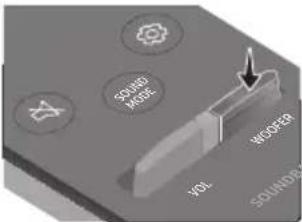 Push the button up or down to adjust the level of the woofer (bass) to -12 or between -6 to +6. To set the woofer (bass) volume level to 0 (Default), press the button. Push the button up or down to adjust the level of the woofer (bass) to -12 or between -6 to +6. To set the woofer (bass) volume level to 0 (Default), press the button. |
| 10 |  VOL(Volume) VOL(Volume) |  |  Push the button up or down to adjust the volume.MutePress the VOL button in to mute the sound. Press it in again to unmute the sound. Push the button up or down to adjust the volume.MutePress the VOL button in to mute the sound. Press it in again to unmute the sound. |
Adjusting the Soundbar volume with a TV remote control
Adjust the Soundbar volume using the TV's remote control.
- This function can be used with IR remote controls only. Bluetooth remote controls (remote controls that require pairing) are not supported.
- Set the TV speaker to External Speaker to use this function. • Manufacturers supporting this function: VIZIO, LG, Sony, Sharp, PHILIPS, PANASONIC, TOSHIBA, Hisense, RCA
- Turn Off the Soundbar.
- Push up and hold the WOOFER button for 5 seconds.
Each time you push the WOOFER button up and hold it for 5 seconds, the mode switches in the following order: "OFF-TV REMOTE" (Default mode), "SAMSUNG-TV REMOTE", "ALL-TV REMOTE".
| Remote Control Button Display Status | |||
 |  |  (Default mode) (Default mode) | Disable the TV remote control. |
 |  |  | Enable a Samsung TV's IR remote control. |
 |  |  | Enable a third-party TV's IR remote control. |
Using the Hidden Buttons (Buttons with more than one function)
| Hidden Button | Reference page | |
| Remote Control Button Function | ||
| WOOFER (Up) | TV remote control On/Off (Standby) | page 26 |
| Left | TV Auto connect On/Off (BT Ready) | page 15 |
| Up ID SET page 24 | ||
 (Sound Control) (Sound Control) | 7 Band EQ page 25 | |
| SOUND MODE | DRC ON/OFF (Standby) page 24 | |
| Bluetooth Power page 24 | ||
| [62TX] PAIR | Bluetooth Multi-connection On/Off (Standby) | page 22 |
Output specifications for the different sound effect modes
| Effect Input | Output | |||
| Without Wireless Rear Speaker Kit | With Wireless Rear Speaker Kit | |||
 SOUND MODE SOUND MODE | SURROUND SOUND | 2.0 ch | 2.1 ch 4.1 ch | |
| 5.1 ch | 2.1 ch 4.1 ch | |||
| BASS BOOST | 2.0 ch | 2.1 ch 4.1 ch | ||
| 5.1 ch | 2.1 ch 4.1 ch | |||
| GAME | 2.0 ch | 2.1 ch 4.1 ch | ||
| 5.1 ch | 2.1 ch 4.1 ch | |||
| ADAPTIVE | 2.0 ch | 2.1 ch 4.1 ch | ||
| 5.1 ch | 2.1 ch 4.1 ch | |||
| DTS VIRTUAL:X | 2.0 ch | 2.1 ch 4.1 ch | ||
| 5.1 ch | 2.1 ch 4.1 ch | |||
| STANDARD | 2.0 ch | 2.1 ch 2.1 ch | ||
| 5.1 ch | 2.1 ch 4.1 ch | |||
- The Samsung Wireless Rear Speaker Kit can be purchased separately. To purchase a Kit, contact the vendor you purchased the Soundbar from.
09 INSTALLING THE WALL MOUNT
Installation Precautions
• Install on a vertical wall only. - Do not install in a place with high temperature or humidity. - Verify whether the wall is strong enough to support the product's weight. If not, reinforce the wall or choose another installation point. • Purchase and use the fixing screws or anchors appropriate for the kind of wall you have (plaster board, iron board, wood, etc.). If possible, fix the support screws into wall studs.
• Purchase wall mounting screws according to the type and thickness of the wall you want to mount the Soundbar on.
- Diameter: M5
- Length: 35 mm or longer recommended.
- Connect cables from the unit to external devices before you install the Soundbar on the wall.
- Make sure the unit is turned off and unplugged from the power source before you install it. Otherwise, it may cause an electric shock.
Wallmount Components

Wall Mount Guide

Holder-Screw Screw
Bracket-Wall Mount
- Place the Wall Mount Guide against the wall surface.
• The Wall Mount Guide must be level. - If your TV is mounted on the wall, install the Soundbar at least 5 cm below the TV.

- Align the Wall Mount Guide's Centre Line with the centre of your TV (if you are mounting the Soundbar below your TV), and then fix the Wall Mount Guide to the wall using tape.
- If you are not mounting below a TV, place the Centre Line in the centre of the installation area.

- Push a pen tip or sharpened pencil tip through the centre of the B-TYPE images on each end of the Guide to mark the holes for the supporting screws, and then remove the Wall Mount Guide.

- Using an appropriately sized drill bit, drill a hole in the wall at each marking.
- If the markings do not correspond to the positions of studs, make sure you insert appropriate anchors into the holes before you insert the support screws. If you use anchors, make sure the holes you drill are large enough for the anchors you use.
- Push a screw (not supplied) through each Holder-Screw, and then screw each screw firmly into a support screw hole.

- Install the 2 Bracket-Wall Mounts in the correct orientation on the bottom of the Soundbar using 2 Screws.

- When assembling, make sure the hanger part of the Bracket-Wall Mounts are located behind the rear of the Soundbar.

- Install the Soundbar with the attached Bracket-Wall Mounts by hanging the Bracket-Wall Mounts on the Holder-Screws on the wall.

- Slide the Soundbar down as shown below so that the Bracket-Wall Mounts rest securely on the Holder-Screws.
- Insert the Holder-Screws into the wide (bottom) part of the Bracket-Wall Mounts, and then slide the Bracket-Wall Mounts down so that the Bracket-Wall Mounts rest securely on the Holder-Screws.
![graph TD A["Rectangular Block"] --> B["Downward Arrow"] B --> C["Single Rectangular Block"]](/content/2026/05/1010716/images/f59a2111130ac7712fa900fe7e3906cef7eb03dc8c1bfcebbbc4c7a617cee112.jpg)
10 SOFTWARE UPDATE
Samsung may offer updates for the Soundbar's system firmware in the future.

If an update is offered, you can update the firmware by connecting a USB device with the firmware update stored on it to the USB port on your Soundbar. For more information about how to download update files, go to the Samsung website at www.samsung.com →Support.
Then, select the product type or enter the model number of your Soundbar, select the Software & Apps option, and then Downloads. Note that the option names can vary.
How to check the Firmware version
- Turn off the Soundbar.
- Press and hold the ⚙️ (Sound Control) button for about 5 seconds on the remote control.
- Each version appears in the following order on the Soundbar display.
( Software version → HDMI → Tx → Rx )
- Tx: Wireless Tx module in the Soundbar.
- Rx: Wireless Rx module in the Subwoofer.
• R2 VERSION DISPLAY
- No connect rear R2---
- Connected rear R2xxx
Update Procedure
Important: The update function erases all user settings. We recommend you write down your settings so that you can easily reset them after the update. Note that updating the firmware resets the subwoofer connection too.
- Connect a USB thumb drive to the USB port on your computer. Important: Make sure there are no music files on the USB thumb drive. This may cause the firmware update to fail.
- Go to (samsung.com) → select Enter Model Number and enter the model of your Soundbar. Select manuals and downloads and download the latest software file.
- Save the downloaded software to a USB stick and select "Extract Here" to unzip the folder.
- Turn off the Soundbar and connect the USB stick containing the software update to the USB port.
- Turn on the Soundbar and change the source to "USB" mode. Within 3 minutes, "UPDATE" is displayed and the update begins. When the update is complete, the Soundbar turns off and then turns on automatically.
- Press the - + (Volume) button on the top panel for 5 seconds. "INIT" appears on the display and then the Soundbar turns off. The update is complete.
- This product has a DUAL BOOT function. If the firmware fails to update, you can update the firmware again.
- Restore your settings on the Soundbar.
If UPDATE is not displayed
- Turn off the Soundbar, disconnect and then reconnect the USB storage device that contains the update files to the Soundbar's USB port.
- Disconnect the Soundbar's power cord, reconnect it, and then turn on the Soundbar.
NOTES
- The firmware update may not work properly if audio files supported by the Soundbar are stored in the USB storage device.
- Do not disconnect the power or remove the USB device while updates are being applied. The main unit will turn off automatically after completing the firmware update.
- After the update is completed, the user setup in the Soundbar is initialised so you can reset your settings. We recommend you write down your settings so that you can easily reset them after the update. Note that updating firmware resets the subwoofer connection too.
If the connection to the subwoofer is not re-established automatically after the update, refer to page 6.
If the software update fails, check if the USB stick is defective.
- Mac OS users should use MS-DOS (FAT) as the USB format.
- Updating via USB may not be available, depending on the USB storage device manufacturer.
11 TROUBLESHOOTING
Before seeking assistance, check the following.
Soundbar does not turn on.
→Check whether the power cord of the Soundbar is correctly inserted into the outlet.
Soundbar works erratically.
→After removing the power cord, insert it again. →Remove the power cord from the external device and try again. →If there is no signal, the Soundbar automatically turns off after a certain period of time. Turn on the power. (See page 3.)
In case the remote control does not work.
→Point the remote directly at the Soundbar. →Replace the batteries with new ones.
Soundbar does not output any sound.
→The volume of the Soundbar is too low or muted. Adjust the volume. →When any external device (STB, Bluetooth device, mobile device, etc.) is connected, adjust the volume of the external device. →For sound output of the TV, select Soundbar. (Samsung TV: Home ( [icon] ) → Settings ( [icon] → Sound → Sound Output → Select Soundbar) →The cable connection to the Soundbar may not be loose. Remove the cable and connect again. →Remove the power cord completely, reconnect, and turn the power on. →Reset the product and try again. (See page 31.)
Subwoofer does not output any sound.
→Check whether the LED indicator on the rear of the Subwoofer is on in blue. Reconnect the Soundbar and Subwoofer if the indicator is blinking in blue or turned red. (See page 7.) →You may experience an issue if there is an obstacle between the Soundbar and Subwoofer. Move devices to an area away from obstacles. →Other devices sending radio frequency signals in proximity may interrupt the connection. Keep your speaker away from such devices. →Remove and reconnect the power plug.
The Subwoofer volume is too low.
→The original volume of the content you are playing may be low. Try adjusting the Subwoofer level. (See page 25.) →Bring the Subwoofer speaker closer to you.
In case the TV is not connected via HDMI TO TV (ARC).
→Check whether the HDMI cable is correctly connected to the ARC terminal. (See page 12.) →Connection may not be possible due to the connected external device (set-top box, game machine, etc.). Directly connect the Soundbar. →HDMI-CEC may not be activated on the TV. Turn on the CEC on the TV menu. (Samsung TV: Home (n) → Settings (♂ → General → External Device Manager → Anynet+ (HDMI-CEC) ON)
There is no sound when connecting to the TV in HDMI TO TV (ARC) mode.
→Your device is unable to play the input signal. Change the TV's audio output to PCM or Dolby Digital. (For a Samsung TV: Home ( ) → Settings (💡) → Sound → Expert Settings → Digital Output Audio Format)
Soundbar does not connect via Bluetooth.
→When connecting a new device, switch to "BT PAIRING" for connection. (Press the
* PAIR button on the remote control or press the → (Source) button on the body for at least 5 seconds.)
→If the Soundbar is connected to another device, disconnect that device first to switch the device.
→Reconnect it after removing the Bluetooth speaker list on the device to connect.
(Samsung TV: Home ( [n] ) → Settings ( ⚙️)
→ Sound → Sound Output → Bluetooth Speaker List)
→The automatic TV connection may be disabled. While the Soundbar is in "BT READY", press and hold the Left button on the Soundbar remote control for 5 seconds to select ON-TV CONNECT. If you see OFF-TV CONNECT, press and hold Left button again for 5 seconds to switch the selection.
→Remove and reconnect the power plug, then try again.
→ Reset the product and try again. (See page 31.)
Sound drops out when connected via Bluetooth.
→If your device that is connected via Bluetooth moves too far away from the Soundbar, it may cause the sound to drop out. Move the device closer to the Soundbar. →If a part of your body is in contact with the Bluetooth transceiver or the product is installed on metal furniture, sound may drop out. Check the installation environment and conditions for use.
Bluetooth multi connection does not work.
→When the TV is connected to the soundbar, Bluetooth multi connection may not operate. Disconnect the Soundbar from the TV and try again.
→Check whether the Bluetooth Multi connection setting is turned on. (Refer to the "Soundbar does not connect via Bluetooth." section.)
→Disconnect the device currently playing, pair with the device that you want to connect, and reconnect the previous device.
→If the sound is inaudible even after connecting properly, refer to the "Sound drops out when connected via Bluetooth." section.
Soundbar does not turn on automatically with the TV.
→When you turn off the Soundbar while watching TV, power synchronization with the TV is disabled. First turn off the TV.
12 LICENCE
Dolby
AUDIO
Manufactured under license from Dolby Laboratories. Dolby, Dolby Audio and the double-D symbol are trademarks of Dolby Laboratories Licensing Corporation.

dts®
2.0 Channel
dts
VIRTUAL

For DTS patents, see http://patents.dts.com. Manufactured under license from DTS Licensing Limited. DTS, the Symbol, DTS in combination with the Symbol, DTS and the Symbol together, Virtual:X, the DTS Virtual:X logo, and DTS 2.0 Channel are registered trademarks or trademarks of DTS, Inc. in the United States and/or other countries. © DTS, Inc. All Rights Reserved.

HIGH-DEFINITION MULTIMEDIA INTERFACE
The terms HDMI and HDMI High-Definition Multimedia Interface, and the HDMI Logo are trademarks or registered trademarks of HDMI Licensing Administrator, Inc. in the United States and other countries.

Bluetooth®
The Bluetooth® word mark and logos are registered trademarks owned by the Bluetooth SIG, Inc. and any use of such marks by Samsung Electronics Co., Ltd. is under license. Other trademarks and trade names are those of their respective owners.

[ENERGY STAR]
ENERGY STAR qualified model only
- Your Samsung product is ENERGY STAR qualified in its factory default setting. Change to certain features, settings and functionality in this product can change the power consumption, possibly beyond the limits required for ENERGY STAR qualification.
- Environmental Protection Agency and Department of Energy. ENERGY STAR is a joint program of the Government agencies, designed to promote energy efficient products and practices.
Refer to www.energystar.gov for more information of the ENERGY STAR Program.
ENERGY STAR qualified model only (Applicable to Thin Client models only)
As an ENERGY STAR® Partner, SAMSUNG has determined that this product meets the ENERGY STAR® guidelines for energy efficiency.
– The ENERGY STAR Program has been to reduced greenhouse gas emissions and save energy through voluntary labeling. - Power management setting of this product have been enabled by default, and have various timing setting from 1 minutes to 5 hours. - The product can wake with a button press on the chassis from sleep mode.
ENERGY STAR qualified model only (The other models)
- As an ENERGY STAR Partner, Samsung has determined that this product or product models meets the ENERGY STAR guideline for energy efficiency.
13 OPEN SOURCE LICENCE NOTICE
To send inquiries and requests for questions regarding open sources, contact Samsung Open Source (http://opensource.samsung.com)
14 IMPORTANT NOTES ABOUT SERVICE
- Figures and illustrations in this User Manual are provided for reference only and may differ from actual product appearance.
- An administration fee may be charged if either
(a) an engineer is called out at your request and there is no defect with the product (i.e. where the user manual has not been read).
(b) you bring the unit to a repair centre and there is no defect with the product (i.e. where the user manual has not been read).
- You will be informed of the administration fee amount before a technician visits.
15 SPECIFICATIONS AND GUIDE
Specifications
| Model Name HW-A560 | |
| USB 5V/0.5A | |
| Weight 2.1 kg | |
| Dimensions (W x H x D) 860.0 x 55.0 x 85.0 mm | |
| Operating Temperature Range +5°C to +35°C | |
| Operating Humidity Range 10 % ~ 75 % | |
| AMPLIFIER Rated Output power | 160W(40Wx4) |
| Supported play formats (DTS 2.0 and DTS Virtual:X sound are played in DTS format.) | LPCM 2ch, Dolby AudioTM (supporting Dolby® Digital), DTS, DTS Virtual:X |
| WIRELESS DEVICE OUTPUT POWER BT max transmitter power SRD max transmitter power | 100mW at 2.4GHz - 2.4835GHz 25mW at 5.725GHz - 5.825GHz |
| Subwoofer Name PS-WA55D | |
| Weight 5.3 kg | |
| Dimensions (W x H x D) 200.6 x 353.0 x 290.0 mm | |
| AMPLIFIER Rated Output power 250W | |
| WIRELESS DEVICE OUTPUT POWER SRD max transmitter power | 25mW at 5.725GHz - 5.825GHz |
| Overall Standby Power Consumption (W) 2.0W | |
| Bluetooth Port deactivation method | Press and hold the SOUND MODE button for more than 5 seconds to turn off Bluetooth Power function. |
NOTES
- Samsung Electronics Co., Ltd reserves the right to change the specifications without notice. • Weight and dimensions are approximate.
Hereby, Samsung declares that this radio equipment is in compliance with Directive 2014/53/EU and the relevant UK statutory requirements.
The full text of the declaration of conformity is available at the following internet address:
http://www.samsung.com go to Support and enter the model name.
This equipment may be operated in all EU countries and in the UK.

[Correct disposal of batteries in this product]
(Applicable in countries with separate collection systems)
This marking on the battery, manual or packaging indicates that the batteries in this product should not be disposed of with other household waste at the end of their working life. Where marked, the chemical symbols Hg, Cd or Pb indicate that the battery contains mercury, cadmium or lead above the reference levels in EC Directive 2006/66.
If batteries are not properly disposed of, these substances can cause harm to human health or the environment.
To protect natural resources and to promote material reuse, please separate batteries from other types of waste and recycle them through your local, free battery return system.

Correct Disposal of This Product
(Waste Electrical & Electronic Equipment)
(Applicable in countries with separate collection systems)
This marking on the product, accessories or literature indicates that the product and its electronic accessories (e.g. charger, headset, USB cable) should not be disposed of with other household waste at the end of their working life. To prevent possible harm to the environment or human health from uncontrolled waste disposal, please separate these items from other types of waste and recycle them responsibly to promote the sustainable reuse of material resources.
Household users should contact either the retailer where they purchased this product, or their local government office, for details of where and how they can take these items for environmentally safe recycling.
Business users should contact their supplier and check the terms and conditions of the purchase contract. This product and its electronic accessories should not be mixed with other commercial wastes for disposal.
For information on Samsung's environmental commitments and product specific regulatory obligations e.g. REACH, WEEE, Batteries, visit:
www.samsung.com/uk/aboutsamsung/sustainability/environment/our-commitment/data/
COMMISSION REGULATION (EU) 2019/1782
Ecodesign requirements for external power supplies :
www.samsung.com/global/ecodesign_component
SAFETY INFORMATION
SAFETY INFORMATION
TO REDUCE THE RISK OF ELECTRIC SHOCK, DO NOT REMOVE THE REAR COVER.
THE INTERNAL PARTS OF THE UNIT MUST ONLY
BE INSPECTED BY QUALIFIED PERSONNEL. LEAVE ALL REPAIR WORK TO AUTHORIZED SERVICE DEALERS.
USER MANUAL

COMPLETE USER MANUAL
02 PRODUCT OVERVIEW
Soundbar front panel/top panel
Subwoofer rear
04 CONNECTING TO YOUR TV
![graph TD A["TV"] --> B["OPTICAL OUT"] B --> C["Optisk kabel 1"] C --> D["Digital Audio IN (OPTICAL)"] D --> E["Soundbar underside"] F["D.IN"] --> G["2"] G --> H["Soundbaren set ovenfra"]](/content/2026/05/1010716/images/0513b0107085e51839e23389b251ec06561970f05497730048e8167be3819933.jpg)
- Connect the DIGITAL AUDIO IN (OPTICAL) jack on the Soundbar to the OPTICAL OUT jack on the TV using a digital optical cable.
- Press the → (Source) button on the top panel or on the remote control, and then select "D.IN" mode.

CAUTION
Bluetooth device A Bluetooth device B
Manufactured under license from Dolby Laboratories. Dolby, Dolby Audio and the double-D symbol are trademarks of Dolby Laboratories Licensing Corporation.


2.0 Channel


For DTS patents, see http://patents.dts.com. Manufactured under license from DTS Licensing Limited. DTS, the Symbol, DTS in combination with the Symbol, DTS and the Symbol together, Virtual:X, the DTS Virtual:X logo, and DTS 2.0 Channel are registered trademarks or trademarks of DTS, Inc. in the United States and/or other countries. © DTS, Inc. All Rights Reserved.

The terms HDMI and HDMI High-Definition Multimedia Interface, and the HDMI Logo are trademarks or registered trademarks of HDMI Licensing Administrator, Inc. in the United States and other countries.

Bluetooth®
The Bluetooth® word mark and logos are registered trademarks owned by the Bluetooth SIG, Inc. and any use of such marks by Samsung Electronics Co., Ltd. is under license. Other trademarks and trade names are those of their respective owners.

[ENERGY STAR]
ENERGY STAR qualified model only
- Your Samsung product is ENERGY STAR qualified in its factory default setting. Change to certain features, settings and functionality in this product can change the power consumption, possibly beyond the limits required for ENERGY STAR qualification.
- Environmental Protection Agency and Department of Energy. ENERGY STAR is a joint program of the Government agencies, designed to promote energy efficient products and practices.
Refer to www.energystar.gov for more information of the ENERGY STAR Program.
ENERGY STAR qualified model only (Applicable to Thin Client models only)
As an ENERGY STAR® Partner, SAMSUNG has determined that this product meets the ENERGY STAR® guidelines for energy efficiency.
– The ENERGY STAR Program has been to reduced greenhouse gas emissions and save energy through voluntary labeling. - Power management setting of this product have been enabled by default, and have various timing setting from 1 minutes to 5 hours. - The product can wake with a button press on the chassis from sleep mode.
ENERGY STAR qualified model only (The other models)
- As an ENERGY STAR Partner, Samsung has determined that this product or product models meets the ENERGY STAR guideline for energy efficiency.
13 NOTE REGARDING OPEN SOURCE LICENSE
www.samsung.com/uk/aboutsamsung/sustainability/environment/our-commitment/data/
COMMISSION REGULATION (EU) 2019/1782
USER MANUAL

FULL USER MANUAL
02 PRODUCT OVERVIEW
Soundbar front panel/top panel

![graph TD A["TV"] --> B["OPTICAL OUT"] B --> C["Optinen kaapeli"] C --> D["1"] D --> E["Digital Audio IN (OPTICAL)"] F["2"] --> G["D.IN"] G --> H["+"] H --> I["-"] I --> J["+"] J --> K["+"] K --> L["+"] L --> M["D.IN"]](/content/2026/05/1010716/images/26efcb5a1b5241ac392c1f379777fa58af7996dd6de72ae3b4df1f2bc98a90d2.jpg)
Bluetooth device A Bluetooth device B
Wall mount brackets
Manufactured under license from Dolby Laboratories. Dolby, Dolby Audio and the double-D symbol are trademarks of Dolby Laboratories Licensing Corporation.

dts®
2.0 Channel
dts
VIRTUAL

For DTS patents, see http://patents.dts.com. Manufactured under license from DTS Licensing Limited. DTS, the Symbol, DTS in combination with the Symbol, DTS and the Symbol together, Virtual:X, the DTS Virtual:X logo, and DTS 2.0 Channel are registered trademarks or trademarks of DTS, Inc. in the United States and/or other countries. © DTS, Inc. All Rights Reserved.

HIGH-DEFINITION MULTIMEDIA INTERFACE
The terms HDMI and HDMI High-Definition Multimedia Interface, and the HDMI Logo are trademarks or registered trademarks of HDMI Licensing Administrator, Inc. in the United States and other countries.

Bluetooth®
The Bluetooth® word mark and logos are registered trademarks owned by the Bluetooth SIG, Inc. and any use of such marks by Samsung Electronics Co., Ltd. is under license. Other trademarks and trade names are those of their respective owners.

[ENERGY STAR]
ENERGY STAR qualified model only
- Your Samsung product is ENERGY STAR qualified in its factory default setting. Change to certain features, settings and functionality in this product can change the power consumption, possibly beyond the limits required for ENERGY STAR qualification.
- Environmental Protection Agency and Department of Energy. ENERGY STAR is a joint program of the Government agencies, designed to promote energy efficient products and practices.
Refer to www.energystar.gov for more information of the ENERGY STAR Program.
ENERGY STAR qualified model only (Applicable to Thin Client models only)
As an ENERGY STAR® Partner, SAMSUNG has determined that this product meets the ENERGY STAR® guidelines for energy efficiency.
– The ENERGY STAR Program has been to reduced greenhouse gas emissions and save energy through voluntary labeling. - Power management setting of this product have been enabled by default, and have various timing setting from 1 minutes to 5 hours. - The product can wake with a button press on the chassis from sleep mode.
ENERGY STAR qualified model only (The other models)
- As an ENERGY STAR Partner, Samsung has determined that this product or product models meets the ENERGY STAR guideline for energy efficiency.
13 OPEN SOURCE LICENSING NOTICE
www.samsung.com/uk/aboutsamsung/sustainability/environment/our-commitment/data/
COMMISSION REGULATION (EU) 2019/1782
USER MANUAL

FULL USER MANUAL
02 PRODUCT OVERVIEW
03 CONNECT TO SOUNDBAR
Connect to power
- The speaker cables are color-coded.

![graph TD A["TV"] --> B["OPTICAL OUT"] B --> C["Optisk kabel"] C --> D["Nederst på Soundbar"] D --> E["Digital Audio IN (OPTICAL)"] E --> F["USB (5V 0.5A)"] G["D.IN"] --> H["Oversiden av Soundbar"]](/content/2026/05/1010716/images/3f6f86504f86af386d68dcfa5526a595a588ad053a7f7b0ebefccfd47e46e094.jpg)
- Connect the DIGITAL AUDIO IN (OPTICAL) jack on the Soundbar to the OPTICAL OUT jack on the TV using a digital optical cable.
- Press the (Source) button on the top panel or on the remote control, and then select "D.IN" mode.

CAUTION
Bluetooth multi-connection
The Soundbar can be connected to 2 Bluetooth devices at the same time.

Bluetooth device A Bluetooth device B
Wall mount bracket
- Place the wall mount control against the wall surface.
10 SOFTWARE UPDATE
Manufactured under license from Dolby Laboratories. Dolby, Dolby Audio and the double-D symbol are trademarks of Dolby Laboratories Licensing Corporation.

dts®
2.0 Channel
dts
VIRTUAL

For DTS patents, see http://patents.dts.com. Manufactured under license from DTS Licensing Limited. DTS, the Symbol, DTS in combination with the Symbol, DTS and the Symbol together, Virtual:X, the DTS Virtual:X logo, and DTS 2.0 Channel are registered trademarks or trademarks of DTS, Inc. in the United States and/or other countries. © DTS, Inc. All Rights Reserved.

HIGH-DEFINITION MULTIMEDIA INTERFACE
The terms HDMI and HDMI High-Definition Multimedia Interface, and the HDMI Logo are trademarks or registered trademarks of HDMI Licensing Administrator, Inc. in the United States and other countries.

Bluetooth®
The Bluetooth® word mark and logos are registered trademarks owned by the Bluetooth SIG, Inc. and any use of such marks by Samsung Electronics Co., Ltd. is under license. Other trademarks and trade names are those of their respective owners.

[ENERGY STAR]
ENERGY STAR qualified model only
- Your Samsung product is ENERGY STAR qualified in its factory default setting. Changing certain features, settings, and functionality in this product can alter the power consumption, possibly beyond the limits required for ENERGY STAR qualification.
- Environmental Protection Agency and Department of Energy. ENERGY STAR is a joint program of these government agencies, designed to promote energy efficient products and practices.
Refer to www.energystar.gov for more information about the ENERGY STAR Program.
ENERGY STAR qualified model only
(Applicable to Thin Client models only)
As an ENERGY STAR® Partner, SAMSUNG has determined that this product meets the ENERGY STAR® guidelines for energy efficiency.
– The ENERGY STAR Program has been designed to reduce greenhouse gas emissions and save energy through voluntary labeling. - Power management settings of this product have been enabled by default, and have various timing settings from 1 minute to 5 hours. - The product can wake with a button press on the chassis from sleep mode.
ENERGY STAR qualified model only (The other models)
- As an ENERGY STAR Partner, Samsung has determined that this product or product models meets the ENERGY STAR guideline for energy efficiency.
13 OPEN SOURCE LICENSING NOTICES
www.samsung.com/uk/aboutsamsung/sustainability/environment/our-commitment/data/
COMMISSION REGULATION (EU) 2019/1782
USER MANUAL

FULL MANUAL
TABLE OF CONTENTS
01 Check the components 2
02 PRODUCT OVERVIEW
![graph TD A["TV"] --> B["OPTICAL OUT"] B --> C["Optisk kabel 1"] C --> D["Undersidan av Soundbar"] D --> E["D. IN"] F["Digital Audio IN (OPTICAL)"] --> G["Översidan av Soundbar"] G --> H["2"]](/content/2026/05/1010716/images/f9e9f9e8a878024778d25ce4ec0400d86a34dc5f80cff55980f1c3b14c66738c.jpg)
Bluetooth device A Bluetooth device B
Wall mount
10 SOFTWARE UPDATE
Manufactured under license from Dolby Laboratories. Dolby, Dolby Audio and the double-D symbol are trademarks of Dolby Laboratories Licensing Corporation.

dts®
2.0 Channel
dts
VIRTUAL

For DTS patents, see http://patents.dts.com. Manufactured under license from DTS Licensing Limited. DTS, the Symbol, DTS in combination with the Symbol, DTS and the Symbol together, Virtual:X, the DTS Virtual:X logo, and DTS 2.0 Channel are registered trademarks or trademarks of DTS, Inc. in the United States and/or other countries. © DTS, Inc. All Rights Reserved.

HIGH-DEFINITION MULTIMEDIA INTERFACE
The terms HDMI and HDMI High-Definition Multimedia Interface, and the HDMI Logo are trademarks or registered trademarks of HDMI Licensing Administrator, Inc. in the United States and other countries.

Bluetooth®
The Bluetooth® word mark and logos are registered trademarks owned by the Bluetooth SIG, Inc. and any use of such marks by Samsung Electronics Co., Ltd. is under license. Other trademarks and trade names are those of their respective owners.

[ENERGY STAR]
ENERGY STAR qualified model only
- Your Samsung product is ENERGY STAR qualified in its factory default setting. Changing certain features, settings, and functionality in this product can change the power consumption, possibly beyond the limits required for ENERGY STAR qualification.
- Environmental Protection Agency and Department of Energy. ENERGY STAR is a joint program of the Government agencies, designed to promote energy efficient products and practices.
Refer to www.energystar.gov for more information on the ENERGY STAR Program.
ENERGY STAR qualified model only
(Applicable to Thin Client models only)
As an ENERGY STAR® Partner, SAMSUNG has determined that this product meets the ENERGY STAR® guidelines for energy efficiency.
- The ENERGY STAR Program has been designed to reduce greenhouse gas emissions and save energy through voluntary labeling.
- Power management settings of this product have been enabled by default, and have various timing settings from 1 minute to 5 hours.
- The product can wake with a button press on the chassis from sleep mode.
ENERGY STAR qualified model only (The other models)
- As an ENERGY STAR Partner, Samsung has determined that this product or product models meets the ENERGY STAR guideline for energy efficiency.
13 OPEN SOURCE LICENSE NOTICE
www.samsung.com/uk/aboutsamsung/sustainability/environment/our-commitment/data/
COMMISSION REGULATION (EU) 2019/1782
© 2021 Samsung Electronics Co., Ltd. All rights reserved.
Contact SAMSUNG WORLD WIDE
If you have any questions or comments relating to Samsung products, please contact the SAMSUNG customer care Centre.
| Country | Samsung Service Centre | Web Site |
| ■Europe | ||
| UK 0333 000 0353 | www.samsung.com/uk/support | |
| IRELAND (EIRE) 0818 717100 | www.samsung.com/ie/support | |
| GERMANY 06196 77 555 77 | www.samsung.com/de/support | |
| FRANCE 01 48 63 00 00 | www.samsung.com/fr/support | |
| ITALIA 800-SAMSUNG (800.7267864) | www.samsung.com/it/support | |
| SPAIN 91175 00 15 | www.samsung.com/es/support | |
| PORTUGAL 808 207 267 | www.samsung.com/pt/support | |
| LUXEMBURG 261 03 710 | www.samsung.com/be_fr/support | |
| NETHERLANDS 088 90 90 100 | www.samsung.com/nl/support | |
| BELGIUM 02-201-24-18 | www.samsung.com/be/support (Dutch)www.samsung.com/be_fr/support (French) | |
| NORWAY 21629099 | www.samsung.com/no/support | |
| DENMARK 707 019 70 | www.samsung.com/dk/support | |
| FINLAND 030-6227 515 | www.samsung.com/fi/support | |
| SWEDEN | 0771 726 786 | www.samsung.com/se/support |
| POLAND | 801-172-678* lub +48 22 607-93-33* Specjalistyczna infolinia do obstugi zapytań dotyczących telefonów komórkowych; 801-672-678** (opłata według taryfy operatora) | http://www.samsung.com/pl/support/ |
| HUNGARY | 0680SAMSUNG (0680-726-7864) | www.samsung.com/hu/support |
| AUSTRIA | 0800 72 67 864 (0800-SAMSUNG) | www.samsung.com/at/support |
| SWITZERLAND | 0800 726 786 | www.samsung.com/ch/support (German)www.samsung.com/ch_fr/support (French) |
| Country | Samsung Service Centre | Web Site |
| CZECH | 800 - SAMSUNG (800-726786) | www.samsung.com/cz/support |
| SLOVAKIA | 0800 - SAMSUNG (0800-726 786) | www.samsung.com/sk/support |
| CROATIA | 072 726 786 | www.samsung.com/hr/support |
| BOSNIA | 055 233 999 | www.samsung.com/support |
| NORTH MACEDONIA | 023 207 777 | www.samsung.com/mk/support |
| MONTENEGRO | 020 405 888 | www.samsung.com/support |
| SLOVENIA | 080 697 267 (brezplačna številka) | www.samsung.com/si/support |
| SERBIA | 011 321 6899 | www.samsung.com/rs/support |
| KOSOVO | 0800 10 10 1 | www.samsung.com/support |
| ALBANIA 045 620 202 | www.samsung.com/al/support | |
| BULGARIA | 0800 111 31 - Безплатен за всички оператори*3000 - Цена на един градски разговор или според тарифата на мобилният оператор09:00 до 18:00 - Понеделник до Петък | www.samsung.com/bg/support |
| ROMANIA | 0800872678 - Apel gratuit*8000 - Apel tarifat în rețea | www.samsung.com/ro/support |
| CYPRUS | 8009 4000 only from landline, toll free | www.samsung.com/gr/support |
| GREECE | 80111-SAMSUNG (80111 726 7864) only from land line(+30) 210 6897691 from mobile and land line | |
| LITHUANIA 8-800-77777 | www.samsung.com/lt/support | |
| LATVIA | 8000-7267 | www.samsung.com/lv/support |
| ESTONIA 800-7267 | www.samsung.com/ee/support | |
- SAFETY INFORMATION
- SAFETY WARNINGS
- CAUTION
- WARNING
- PRECAUTIONS
- ABOUT THIS MANUAL
- USER MANUAL
- FULL MANUAL
- CONTENTS
- CHECKING THE COMPONENTS
- PRODUCT OVERVIEW
- CONNECTING THE SOUNDBAR
- CONNECTING TO YOUR TV
- CONNECTING AN EXTERNAL DEVICE
- CONNECTING A USB STORAGE DEVICE
- CONNECTING A MOBILE DEVICE
- USING THE REMOTE CONTROL
- INSTALLING THE WALL MOUNT
- SOFTWARE UPDATE
- TROUBLESHOOTING
- LICENCE
- OPEN SOURCE LICENCE NOTICE
- IMPORTANT NOTES ABOUT SERVICE
- SPECIFICATIONS AND GUIDE
- INSERTING BATTERIES BEFORE USING THE REMOTE CONTROL (AA BATTERIES X 2)
- BOTTOM PANEL OF THE SOUNDBAR
- CONNECTING ELECTRICAL POWER
- CONNECTING THE SOUNDBAR TO THE SUBWOOFER
- AUTOMATIC CONNECTION BETWEEN THE SUBWOOFER AND THE SOUNDBAR
- MANUALLY CONNECTING THE SUBWOOFER IF AUTOMATIC CONNECTION FAILS
- BEFORE PERFORMING THE MANUAL CONNECTION PROCEDURE BELOW
- NOTES
- CONNECTING AN SWA-9100S (SOLD SEPARATELY) TO YOUR SOUNDBAR
- METHOD 1. CONNECTING WITH A CABLE
- CONNECTING USING AN OPTICAL CABLE
- PRE-CONNECTION CHECKLIST
- METHOD 2. CONNECTING WIRELESSLY
- CONNECTING A TV VIA BLUETOOTH
- THE INITIAL CONNECTION
- IF THE DEVICE FAILS TO CONNECT
- NOTE
- DISCONNECTING THE SOUNDBAR FROM THE TV
- WHAT IS THE DIFFERENCE BETWEEN BT READY AND BT PAIRING
- CONNECTING USING AN HDMI CABLE
- CONNECTING VIA BLUETOOTH
- BLUETOOTH POWER ON (SOUND MODE)
- DISCONNECTING THE BLUETOOTH DEVICE FROM A SOUNDBAR
- DISCONNECTING THE SOUNDBAR FROM THE BLUETOOTH DEVICE
- MORE ABOUT BLUETOOTH
- BLUETOOTH MULTI CONNECTION
- BLUETOOTH MULTI PAIRING
- HOW TO PAIR MULTIPLE DEVICES TO THE SOUNDBAR
- ADJUSTING THE SOUNDBAR VOLUME WITH A TV REMOTE CONTROL
- INSTALLATION PRECAUTIONS
- WALLMOUNT COMPONENTS
- HOW TO CHECK THE FIRMWARE VERSION
- UPDATE PROCEDURE
- IF UPDATE IS NOT DISPLAYED
- SOUNDBAR DOES NOT TURN ON
- SOUNDBAR WORKS ERRATICALLY
- IN CASE THE REMOTE CONTROL DOES NOT WORK
- SOUNDBAR DOES NOT OUTPUT ANY SOUND
- SUBWOOFER DOES NOT OUTPUT ANY SOUND
- THE SUBWOOFER VOLUME IS TOO LOW
- IN CASE THE TV IS NOT CONNECTED VIA HDMI TO TV (ARC)
- THERE IS NO SOUND WHEN CONNECTING TO THE TV IN HDMI TO TV (ARC) MODE
- SOUNDBAR DOES NOT CONNECT VIA BLUETOOTH
- SOUND DROPS OUT WHEN CONNECTED VIA BLUETOOTH
- BLUETOOTH MULTI CONNECTION DOES NOT WORK
- SOUNDBAR DOES NOT TURN ON AUTOMATICALLY WITH THE TV
- DOLBY
- BLUETOOTH®
- [ENERGY STAR]
- ENERGY STAR QUALIFIED MODEL ONLY
- ENERGY STAR QUALIFIED MODEL ONLY (APPLICABLE TO THIN CLIENT MODELS ONLY)
- ENERGY STAR QUALIFIED MODEL ONLY (THE OTHER MODELS)
- [CORRECT DISPOSAL OF BATTERIES IN THIS PRODUCT]
- (APPLICABLE IN COUNTRIES WITH SEPARATE COLLECTION SYSTEMS)
- CORRECT DISPOSAL OF THIS PRODUCT
- (WASTE ELECTRICAL & ELECTRONIC EQUIPMENT)
- COMMISSION REGULATION (EU)
- COMPLETE USER MANUAL
- NOTE REGARDING OPEN SOURCE LICENSE
- FULL USER MANUAL
- SOUNDBAR FRONT PANEL/TOP PANEL
- OPEN SOURCE LICENSING NOTICE
- CONNECT TO SOUNDBAR
- CONNECT TO POWER
- BLUETOOTH MULTI-CONNECTION
- (APPLICABLE TO THIN CLIENT MODELS ONLY)
- OPEN SOURCE LICENSING NOTICES
- TABLE OF CONTENTS
- CHECK THE COMPONENTS
- OPEN SOURCE LICENSE NOTICE
- CONTACT SAMSUNG WORLD WIDE
Brand : SAMSUNG
Model : HW-A560
Category : Soundbar