
25-5528 - Life jacket Biltema - Free user manual and instructions
Find the device manual for free 25-5528 Biltema in PDF.


| Product Type | Digital Multimeter |
| Brand | Biltema |
| Model | 25-5528 |
| Dimensions (W×H×D) | 150 × 70 × 30 mm |
| Weight | 200 g |
| Power Supply | 9V battery (6F22) |
| Display | LCD, 3½ digits, 1999 counts |
| DC Voltage Range | 200 mV – 600 V |
| AC Voltage Range | 200 V – 600 V |
| DC Current Range | 200 µA – 10 A |
| Resistance Range | 200 Ω – 2 MΩ |
| Continuity Test | Yes, with buzzer |
| Diode Test | Yes |
| Safety Rating | CAT II 600V |
| Accessories Included | Test leads, 9V battery, manual |
| Storage Temperature | -10°C to +50°C |
| Operating Temperature | 0°C to +40°C |
| Humidity | ≤80% RH |
| Maintenance | Clean with dry cloth; replace battery when low |
| Spare Parts Available | Test leads, battery cover |
| Repair Information | Contact Biltema service center |
Frequently Asked Questions - 25-5528 Biltema
User questions about 25-5528 Biltema
0 question about this device. Answer the ones you know or ask your own.
Ask a new question about this device
Download the instructions for your Life jacket in PDF format for free! Find your manual 25-5528 - Biltema and take your electronic device back in hand. On this page are published all the documents necessary for the use of your device. 25-5528 by Biltema.
USER MANUAL 25-5528 Biltema
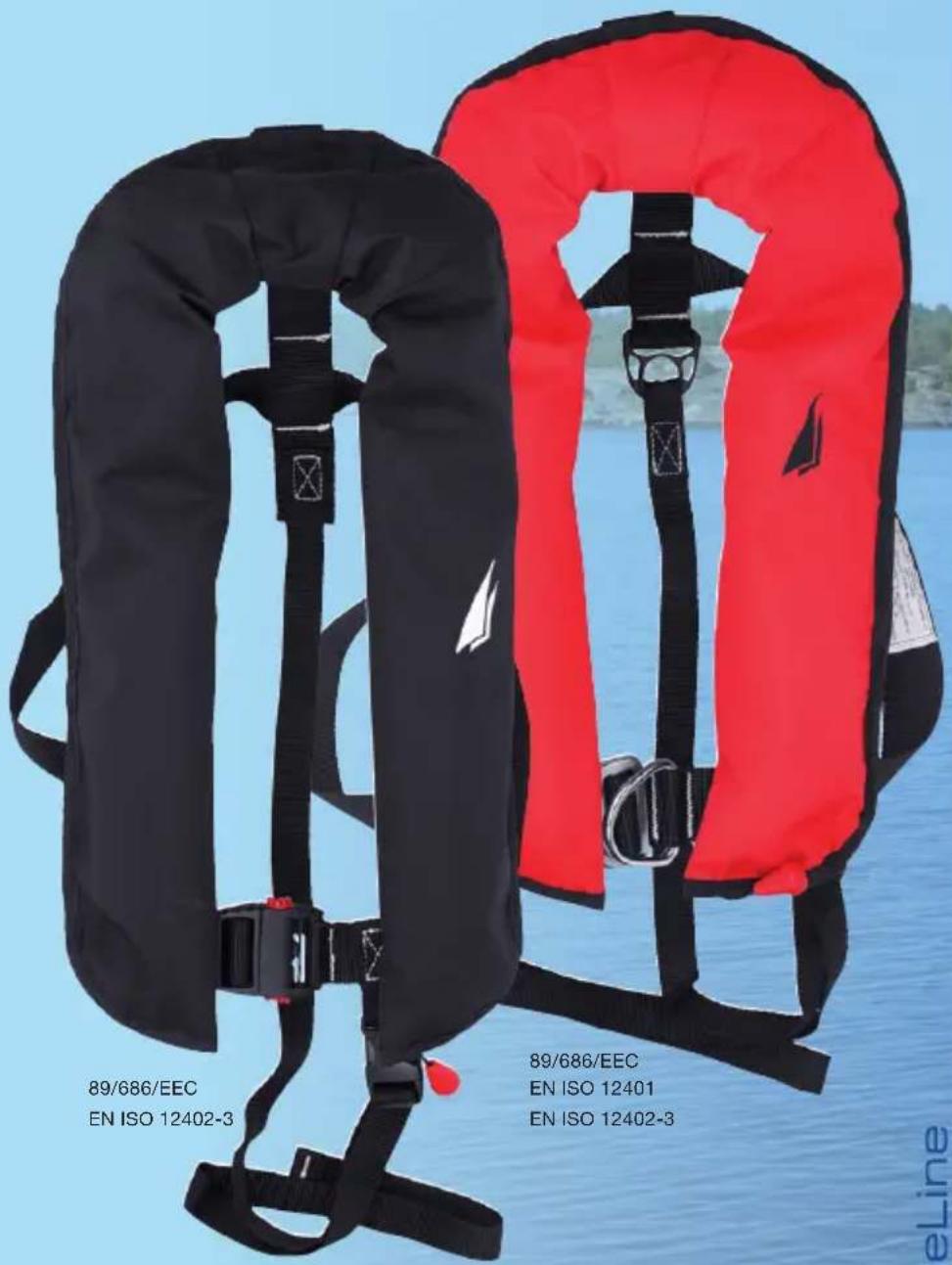
INFLATABLE LIFE JACKET 165 N
RÄDDNINGSVÄST UPPBLÅSBAR 165 N
REDNINGSVEST OPPBLÅSBAR 165 N
PELASTUSLIIVI ILMATÄYTTEINEN 165 N
REDNINGSVEST OPPUSTELIG 165 N

25-5528: Infl atable Life
Jacket 165 N

25-5529: Infl atable Life
Jacket 165 N Harness
BlueLine
CE
INFLATABLE LIFE JACKET 165 N
For users weighing more than 40 kg, with a chest width of 55-140 cm
CONTENTS
- INTRODUCTION
- IMPORTANT USER INFORMATION
- USE
- BUCKLING THE LIFE JACKET
- REPLACING THE CO, CYLINDER
- SERVICE AND MAINTENANCE
- PACKING AWAY THE LIFE JACKET
- LIFE JACKET WITHOUT SAFETY HARNESS
- LIFE JACKET WITH SAFETY HARNESS
- REFUSE
1. INTRODUCTION
CE
This life jacket, model ISO SURVIVOR 150 N, Infl atable Life Jacket, has been designed and manufactured in accordance with the following directives and standards:
LIFE JACKET (25-5528) CONFORMS TO THE FOLLOWING STANDARDS:
89/686/EEC
EN ISO 12402-3
LIFE JACKET WITH SAFETY HARNESS (25-5529) CONFORMS TO THE FOLLOWING STANDARDS:
89/686/EEC
EN ISO 12401
EN ISO 12402-3
The product is identical to personal protection equipment subjected to examination by the notified body:
NB No. 0514
Fleetwood Test House
Fleetwood Nautical Campus
Broadwater, Fleetwood
Lancashire, FY7 8JZ, Great Britain
Manufacturer:
Lade OÜ,
Kaluri 26, Haapsalu
For offshore and inshore sailing with sailing clothing. Not suitable for use when carrying heavy tools. Lifespan 10 years.
2. IMPORTANT USER INFORMATION
It is dangerous to use this life jacket if you have not read and understood the instructions and safety precautions in this manual. Read the manual before first use and save it for future use.
This life jacket inflates by means of a CO2 cylinder. It has no buoyancy itself. Buoyancy is only achieved once the life jacket has been inflated using the CO2 cylinder or once the user has inflated it manually. Buoyancy is at least 165 Newton when fully inflated and is suitable for users weighing 40kg or more.
IMPORTANT!
- Life jackets reduce the risk of drowning but do not guarantee rescue.
- Children under the age of six must only use automatically infl atable life jackets or vests which have innate buoyancy in their original form.
- Gas cylinders are dangerous products which must be handled with care and must be kept out of the reach of children.
- Low temperatures can affect the function of the carbon dioxide cylinder, which may require manual inflation supplementary to automatic inflation in order to achieve full buoyancy.
- Do not use the life jacket as a seat cushion or other cushioning support.
The life jacket can be inflated in the following ways:
Automatic Gas Inflation
An automatically infl atable life jacket uses carbon dioxide gas (CO 2 ) to infl ate. When the water-activated cartridge comes into contact with water, the automatic inflation mechanism is activated. If, for any reason, the life jacket does not infl ate, pull firmly on the black cord with red knob on the left side of the life jacket. This will activate the CO 2 cylinder manually to infl ate the life jacket. Automatically infl atable life jackets infl ate within five seconds after you are in the water.
Manual Gas Inflation
For manual inflation, pull the cord with red knob on the left side of the life jacket. This will activate the CO_2 cylinder which inflates the life jacket.
Blow to Infl ate
The manual infl ation nozzle can be used to blow additional air into the life jacket when needed. Remove the cap and blow into the nozzle. Never infl ate the life jacket manually and then activate automatic infl ation with the CO₂ cylinder; this can create excessive air pressure in the life jacket which may cause damage and may, in the worst case, explode. Do not use a pump to infl ate.
Whistle
The life jacket is equipped with a whistle which can be used to draw attention to your location.
3. USE
Check the following:
- Make sure the life jacket meets your requirements in terms of automatic or manual inflation, with or without safety harness.
- Make sure the inflation mechanism works as intended.
- Check that the gas cylinder is undamaged and does not have any holes, and make sure all the screws are tight.
Test the Life Jacket in the Water
Practise using the life jacket. Test the life jacket with full sailing clothing under controlled conditions and familiarise yourself with the equipment so that you feel comfortable and can handle the life jacket unencumbered in the water. Teach children to float in the life jacket.
IMPORTANT!
After you have tested the life jacket in the water, allow it to air dry thoroughly and remember to replace the CO _2 cylinder and water-activated cartridge with new parts (Biltema spare parts kit 25-5530). The product is not a life jacket until it has been inflated.
Prior to Use
Prior to each use, check that the life jacket is undamaged and make sure the fi ring mechanism is operational by checking the indicator. A green indicator on the water-activated cartridge indicates the CO_2 cylinder is loaded and has not been used. Also make sure the CO_2 cylinder is firmly screwed to the bracket.
IMPORTANT!
If the life jacket is not used for an extended period, the CO2 cylinder may become dislodged from the bracket. The life jacket may not inflate if the CO2 cylinder is loose. Check before each use that the CO_2 cylinder and water-activated cartridge are firmly tightened.
IMPORTANT!
The life jacket must always be worn over your clothing, as the outermost layer. Never wear the life jacket underneath clothing such as rain jackets, wind breakers or sailing gear. Full buoyancy will not be achieved when wearing waterproof clothing.

natural_image
Illustration of a person wearing a winter jacket with a black vest (no text or symbols)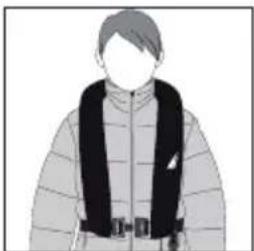
natural_image
Illustration of a person wearing a winter jacket with a black scarf (no text or symbols)4. BUCKLING THE LIFE JACKET
Putting on the Life Jacket
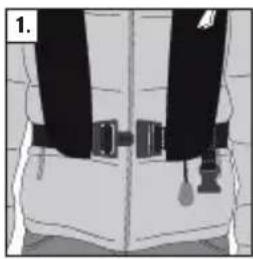
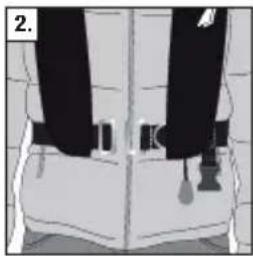
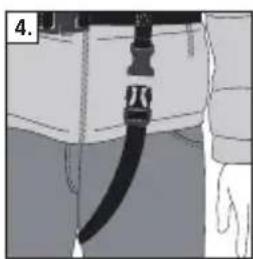
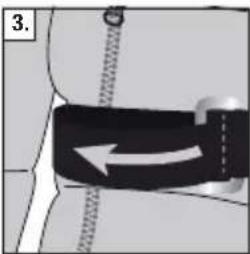
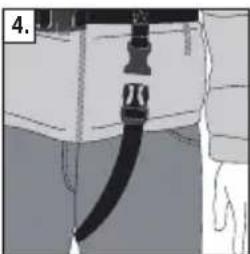
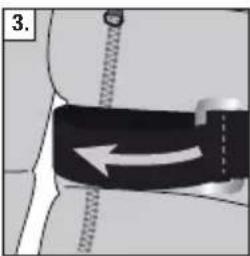
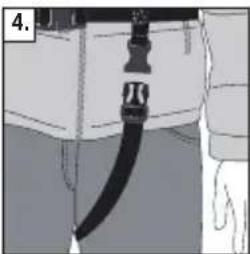
Fasten all buckles. Insert your arms into the openings between the waistband and the air chambers, then pull the life jacket over your head. Fasten the waist buckle (1 and 2). Adjust the jacket so that it fi ts securely (3). Pull the crotch strap between your legs and fasten the buckle. Adjust the length of the crotch strap so that it fi ts tightly (4).
Plastic Buckle
The buckle is fastened by connecting its parts. Open the belt by pressing in the two red buttons simultaneously.
natural_image
Diagram of a person wearing a belt and tassel, showing torso and torso positioning (no text or symbols)
natural_image
Back view of a person wearing a black safety harness and belt (no text or symbols visible)Metal Buckle with D-ring
The buckle is fastened by lacing the metal parts through each other (the small hoop is inserted into the large hoop). Open by unlacing the metal parts.
natural_image
Illustration of a person wearing a seatbelt with a tassel, no visible text or symbols
natural_image
Back view of a person wearing a black safety harness and belt (no text or symbols visible)Waist Belt

natural_image
Diagram of a human torso with a black belt and arrow indicating motion (no text or symbols)
natural_image
Diagram of a human torso with a black belt and arrow indicating motion (no text or symbols)Crotch Strap

natural_image
Diagram of a cable or hose assembly with a black strap, no visible text or symbols
natural_image
Close-up of a black cable or hose attached to a white cabinet or shelf, with no visible text or symbols.5. REPLACING THE CO _2 CYLINDER
When replacing the CO2 cylinder, use Biltema's 33 gram CO2 cylinder. Biltema's spare parts kit (Art. No. 25-5530, Firing mechanism UML MK5) contains a CO2 cylinder, water-activated cartridge and green retaining clip.
- Defl ate the life jacket by pressing down and holding in the inflation nozzle valve, use the nozzle cap to press by turning it upside down. Press and roll up the floatation material until all the air has been expelled. Repeat the process until fully deflated.
- If the CO _2 cylinder has been triggered (manually or automatically), replace the canister, water-activated cartridge and the green retaining clip. Reset the fi ring mechanism to its original position and close with the new retaining clip. Screw the parts securely.
IMPORTANT!
Follow the instructions for replacing the CO_2 cylinder carefully, otherwise the CO_2 cylinder may be triggered accidentally.
6. SERVICE AND MAINTENANCE
Annual servicing is recommended for life jackets used often and for professional sailing. For recreational use, servicing must be carried out every second year. The warranty becomes void if the servicing intervals are not adhered to. Contact Biltema's Customer Service Department for more information.
The overall condition of the life jacket must also be inspected at the same time as servicing. Check that all parts are intact and that the life jacket is not torn or damaged.
Check for any leaks by infl ating the life jacket manually (by blowing) and allow it to remain infl ated overnight. If the pressure has decreased by the following day, take the life jacket to Biltema. Do not attempt to repair the life jacket yourself.
Checking the CO₂ Cylinder
Check whether the CO_2 cylinder has been triggered by unscrewing the cylinder and making sure it has not been pierced by the safety pin. A pierced cylinder has been used and must be replaced.

Checking the Water-Activated Cartridge
If the green indicator is gone and red can be seen, the cartridge has come into contact with water and has been triggered. This means you must replace the indicator. As long as the indicator is green, you do not need to replace the cartridge. Check the date! The cartridge is marked with an expiry date. Replace expired cartridges!
Washing and Storage
Use tap water to wash the life jacket as required. NOTE! Unscrew the water-activated cartridge before washing the life jacket. Allow the life jacket to air dry until completely dry before reattaching the water-activated cartridge. Defl ate the life jacket fully before reinserting the fl oatation material. Store the life jacket in a well-ventilated area.
- Place the life jacket on a dry and level surface.
- Make sure the life jacket is completely emptied of air.
- Start by pressing together the hook-and-loop fasteners at the neck (A-A).
- Continue by rolling up the side with the fi ring mechanism (B). The cord that activates the CO_2 cylinder must hang out. Close using the hook-and-loop fasteners.
- Do the same on the side with the nozzle (C). This will allow you to expel any residual air. Make sure the pull ring ends up inside, then close with the hook-and-loop fasteners.
- Make sure the fi ring mechanism cord hangs out on the left side and is not entangled.

8. LIFE JACKET WITHOUT SAFETY HARNESS 25-5528
The life jacket without safety harness has a plastic buckle on the waistband and does not have a D-ring. The life jacket is designed for users weighing 40 kg or more.
A life jacket without a safety harness can be worn over a separate harness.
9. LIFE JACKET WITH SAFETY HARNESS 25-5529
Instructions for life jacket with safety harness in accordance with EN ISO 12401. Never use this life jacket without connecting a safety line.
This life jacket with safety harness is designed for users weighing 40 kg or more. The life jacket is designed to be used together with the safety harness and has a stainless steel D-ring sewn into the waistband to the left of the waist buckle. The life jacket must always be worn over your clothing.
The waistband must fit securely. NOTE! It is dangerous to wear the life jacket if it is too loose. The life jacket must fit tightly against your body to be used effectively with a harness. The safety harness and safety line will prevent the user from falling overboard. They are not designed to offer protection from falls from great height.
The safety harness and safety line are subjected to very strong forces. Only use the intended attachment points on the jacket and safety line. Rinse the safety harness with tap water after use and allow to air dry. Check the safety harness, D-ring, and seams in the belt and line regularly to identify any wear or damage.
IMPORTANT!
- If you are the least bit unsure about your life jacket's function or parts, you should not use it. Consult with Biltema for advice or to exchange the product.
• Always connect the safety line to the D-ring in the waistband.
10. DISPOSAL
Used CO_2 cylinders must be sorted as hazardous waste and must be handed in to a recycling station.
RÄDDNINGSVÄST UPPBLÅSBAR 165 N
Fleetwood Nautical Campus
Broadwater, Fleetwood
Lancashire, FY7 8JZ, Great Britain
Tillverkare:
Lade OÜ,
Kaluri 26, Haapsalu
natural_image
Illustration of a person wearing a winter jacket with a black scarf (no text or symbols)
natural_image
Illustration of a person wearing a winter jacket with a black belt (no text or symbols)4. KNÄPPA FLYTVÄSTEN
natural_image
Illustration of a person wearing a black safety belt with attached straps (no text or symbols)
natural_image
Person wearing a black safety harness and belt, standing in a patterned room (no text or symbols visible)Metallspänne med D-ring
natural_image
Illustration of a person's torso and legs with black and white clothing, no text or symbols present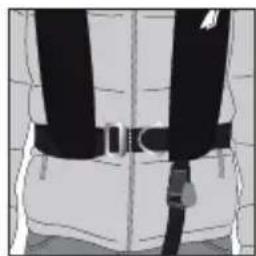
natural_image
Back view of a person wearing a full-body safety harness and belt (no text or symbols visible)Midjebälte

natural_image
Diagram of a belt drive mechanism with directional arrow (no text or symbols)
natural_image
Diagram of a human torso with a black belt and arrow indicating motion (no text or symbols)Grenband
natural_image
Diagram of a mechanical assembly with a black cable and attached component (no text or symbols)
natural_image
Illustration of a black cable or hose inserted into a white cabinet (no text or symbols visible)Fleetwood Nautical Campus
Broadwater, Fleetwood
Lancashire, FY7 8JZ, Great Britain
Produsent:
Lade OÜ,
Kaluri 26, Haapsalu
natural_image
Illustration of a person wearing a winter jacket with a black scarf (no text or symbols)
natural_image
Illustration of a person wearing a full-earning jacket with a black safety vest (no text or symbols)natural_image
Back view of a person wearing a black safety belt with a tassel, shown in profile view (no text or symbols visible)
natural_image
Back view of a person wearing a full-body safety harness and belt (no text or symbols visible)Metallspenne med D-ring
natural_image
Illustration of a person wearing a black safety belt and a white jacket, with no visible text or symbols.
natural_image
Back view of a person wearing a full-body safety harness and belt (no text or symbols visible)Midjebelte

natural_image
Diagram of a belt drive mechanism with directional arrow (no text or labels)Greinbelte
natural_image
Diagram of a car seatbelt with a black strap and blue trim, mounted on a cabinet (no text or symbols visible)
natural_image
Close-up of a black cable attached to a white cabinet or shelf (no visible text or symbols)5. BYTTE GASSPATRON
6. SERVICE OG VEDLIKEHOLD
Fleetwood Nautical Campus
Broadwater, Fleetwood
Lancashire, FY7 8JZ, Great Britain
Valmistaja:
Lade OÜ,
Kaluri 26, Haapsalu
natural_image
Illustration of a person wearing a winter jacket with a black scarf (no text or symbols)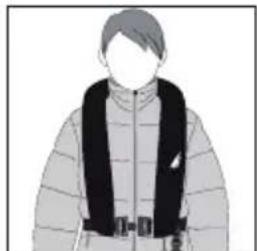
natural_image
Illustration of a person wearing a winter jacket with a black safety vest (no text or symbols)4. KELLUNTALIIVIN SULKEMINEN
natural_image
Illustration of a person wearing a black safety belt with a tassel, shown in profile view (no text or symbols)
natural_image
Back view of a person wearing a full-body safety harness and belt (no text or symbols visible)Metallisolki D-renkaalla
natural_image
Illustration of a person wearing a seatbelt with straps and a small object, no visible text or symbols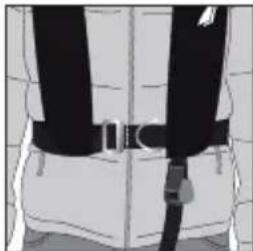
natural_image
Back view of a person wearing a full-body safety harness and belt (no text or symbols visible)Vyö


natural_image
Diagram of a mechanical belt or grip with a dashed line and arrow indicating direction (no text or symbols)Haarahihna

natural_image
Close-up of a black cable with a strap, partially enclosed in a white cabinet (no visible text or symbols)
natural_image
Illustration of a black cable or hose attached to a surface, with no visible text or symbols.5. KAASUPATRUUNAN VAIHTAMINEN
Fleetwood Nautical Campus
Broadwater, Fleetwood
Lancashire, FY7 8JZ, Great Britain
Producent:
Lade OÜ,
Kaluri 26, Haapsalu
natural_image
Illustration of a person wearing a winter jacket with a black scarf (no text or symbols)
natural_image
Illustration of a person wearing a winter jacket with a black safety vest (no text or symbols)4. LUKNING AF FLYDEVESTEN
natural_image
Illustration of a person wearing a black safety belt with tassels (no text or symbols)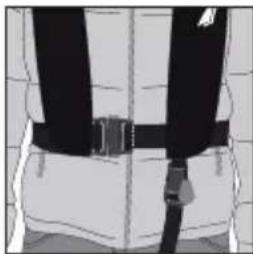
natural_image
Back view of a person wearing a full-body safety harness and belt (no text or symbols visible)natural_image
Illustration of a person wearing a black and white outfit with a belt buckle (no text or symbols)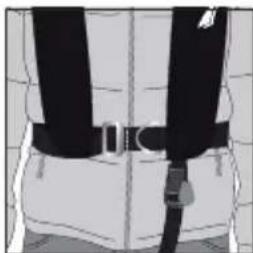
natural_image
Back view of a person wearing a full-body safety harness and belt (no text or symbols visible)Livrem
natural_image
Medical illustration showing a laparoscopic cable with an arrow indicating motion (no text or symbols present)
natural_image
Diagram of a belt drive mechanism with arrow indicating clockwise motion (no text or symbols)Skridtrem
natural_image
Close-up of a black cable with a strap, attached to a surface (no text or symbols visible)
natural_image
Illustration of a black cable or hose attached to a surface, with no visible text or symbols.5. UDSKIFTNING AF GASPATRON


- INFLATABLE LIFE JACKET 165 N
- RÄDDNINGSVÄST UPPBLÅSBAR 165 N
- REDNINGSVEST OPPBLÅSBAR 165 N
- PELASTUSLIIVI ILMATÄYTTEINEN 165 N
- REDNINGSVEST OPPUSTELIG 165 N
- CONTENTS
- INTRODUCTION
- CE
- LIFE JACKET (25-5528) CONFORMS TO THE FOLLOWING STANDARDS:
- LIFE JACKET WITH SAFETY HARNESS (25-5529) CONFORMS TO THE FOLLOWING STANDARDS:
- NB No. 0514
- Manufacturer:
- IMPORTANT USER INFORMATION
- IMPORTANT!
- The life jacket can be inflated in the following ways:
- Automatic Gas Inflation
- Manual Gas Inflation
- Blow to Infl ate
- Whistle
- USE
- Test the Life Jacket in the Water
- Prior to Use
- BUCKLING THE LIFE JACKET
- Putting on the Life Jacket
- Plastic Buckle
- Metal Buckle with D-ring
- REPLACING THE CO _2 CYLINDER
- SERVICE AND MAINTENANCE
- Checking the CO₂ Cylinder
- Checking the Water-Activated Cartridge
- Washing and Storage
- LIFE JACKET WITHOUT SAFETY HARNESS 25-5528
- LIFE JACKET WITH SAFETY HARNESS 25-5529
- DISPOSAL
- Tillverkare:
- KNÄPPA FLYTVÄSTEN
- Metallspänne med D-ring
- Produsent:
- Metallspenne med D-ring
- BYTTE GASSPATRON
- SERVICE OG VEDLIKEHOLD
- Valmistaja:
- KELLUNTALIIVIN SULKEMINEN
- Metallisolki D-renkaalla
- KAASUPATRUUNAN VAIHTAMINEN
- Producent:
- LUKNING AF FLYDEVESTEN
- Livrem
- Skridtrem
- UDSKIFTNING AF GASPATRON
Brand : Biltema
Model : 25-5528
Category : Life jacket