
MFB-TF20 - Uncategorized Planet - Free user manual and instructions
Find the device manual for free MFB-TF20 Planet in PDF.


| Product Type | Multifunction Electronic Device |
| Brand | Planet |
| Model | MFB-TF20 |
| Dimensions (approx.) | 150 x 80 x 20 mm |
| Weight | 150 g |
| Power Supply | 5V DC via USB (cable included) |
| Battery | Built-in rechargeable lithium-ion, 1000 mAh |
| Display | LED digital display |
| Control Type | Touch buttons |
| Main Functions | Temperature display, timer, alarm clock, backlight |
| Temperature Range | 0°C to 50°C (32°F to 122°F) |
| Accuracy | ±1°C |
| Material | ABS plastic |
| Cleaning | Wipe with a soft, dry cloth |
| Safety | Do not immerse in water; keep away from heat sources |
| Spare Parts | USB cable, instruction manual |
| Repairability | Not user-serviceable; contact customer support for issues |
| Warranty | 1 year limited warranty |
Frequently Asked Questions - MFB-TF20 Planet
User questions about MFB-TF20 Planet
0 question about this device. Answer the ones you know or ask your own.
Ask a new question about this device
Download the instructions for your Uncategorized in PDF format for free! Find your manual MFB-TF20 - Planet and take your electronic device back in hand. On this page are published all the documents necessary for the use of your device. MFB-TF20 by Planet.
USER MANUAL MFB-TF20 Planet
Thank you for purchasing PLANET MFB family SFP 100Base-FX Fast Ethernet module. The MFB family SFP Fast Ethernet module can install into PLANET Switch products with 100Base-FX SFP interface. The distance can be extended from 2km (MM) up to 60 kilometers (Single-mode, LC).
3. Check List
Your MFB carton should contain the following items:
• The MFB family SFP Fast Ethernet module
- This user's manual
If any item is missing or damaged, please consult the dealer from whom you purchased you MFB family SFP Fast Ethernet module.
4-2 1-Port 100Base-BX WDM SFP Modules - MFB-FA20 / MFB-FB20
Features:
■ Comply with IEEE 602.3u Fast Ethernet standard
- 1 x 100Mbps fiber port (Single LC fiber connectors)
- Plug and Play Installation
■ MFB-FA20 provides distance up to 20km over
9/125μm single mode fiber cable
- MFB-FB20 provides distance up to 20km over 9/125μm single mode fiber cable

The MFB series single mode SFP transceivers provide the optical power budget from 15 dB to 30dB. When shorter distance of single-mode fiber cables is used, you might need to insert an in-line optical attenuator in the link to avoid overloading the receiver:
5. Installing SFP Modules
5.1 Installing the SFP transceiver
The sections describe how to insert an SFP transceiver into an SFP slot.
The SFP transceivers are hot-pluggable and hot-swappable. You can plug-in and put the transceiver to/from any SFP port without having to power down the Switch/Media Converter. As the Figure -1 appears.
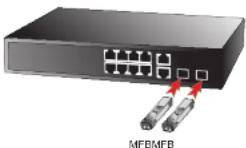
Figure 1 Plug-in the SFP transceiver
2. Model List
Your MFB family SFP Fast Ethernet module comes with one of the following models.
| Fast Ethernet SFP module List | ||
| Model Interface Fiber connector and distance | ||
| MFB-FX | SFP-Port100Base-FX Module | LC, Multi-Mode (1310nm) -2km |
| MFB-F20 | SFP-Port100Base-FX Module | LC, Single Mode (1310nm) - 20km |
| MFB-F40 | SFP-Port100Base-FX Module | LC, Single Mode (1310nm) - 40km |
| MFB-F60 | SFP-Port100Base-FX Module | LC, Single Mode (1310nm) - 60km |
| MFB-FA20 | SFP-Port100Base-BX Module | LC WDM, Single Mode(TX:1310nm, RX:1550nm) -20km |
| MFB-F820 | SFP-Port100Base-BX Module | LC WDM, Single Mode(TX:1550nm, RX:1310nm) -20km |
* Models with last two numbered characters indicate the maximum distance in km.
·2·
4. Introduction
4-1 1-Port 100Base-FX SFP Modules - MFB-FX / MFB-F20 / MFB-F40 / MFB-F60
Features:
- Comply with IEEE 802.3u Fast Ethernet standard
- 1 x 100Mbps fiber port
- Plug and Play Installation
- MFB-FX provides distance up to 2km over 62.5/125μm multi-mode fiber cable
- MFB-F20 provides distance up to 20km over 9/125μm single mode fiber cable
- MFB-F40 provides distance up to 40km over 9/125μm single mode fiber cable
- MFB-F60 provides distance up to 60km over 9/125μm single mode fiber cable
| SFP ModelIn-InfoOpticalAttenuator | NFB-F20 | NFB-F40 | NFB-F60 | NFB-FA20 | NFB-F620 |
| Optical power budget | 15 dB 24 dB | 30 dB | 20 dB | 20 dB | |
| Fiber Cable Length = 10 Km | 5 dB | 10 dB | 15 dB | 5 dB | 5 dB |
| 15Km x Fiber Cable Length < 50Km | 2 dB | 10 dB | -- | 2 dB | 2 dB |
-4-
-6-
Before connect the other switches, workstation or Media Converter.
- Make sure both side of the SFP transceiver are with the same modia type or WDM pair, for example: 100Base-FX to 100Base-FX, 100Base-BX20-U to 100Base-BX20-D.
-
Check the fiber-optic cable type match the SFP trans color model.
-
To connect to MFB-FX SFP transceiver, use the multi-mode fiber cable- with one side must be male duplex LC connector type.
- To connect to MFB-F20/F40/F60/FA20/FB20 SFP transceiver, use the single-mode fiber cable-with one side must be male duplex LC connector type.
Connect the fiber cable
- Attach the duplex LC connector on the network cable into the 5FP transceiver.
- Conned the other end of the cable to a device - switches with SFP installed, fiber NIC on a workstation or a Media Converter.
- Check the LNK/ACT LED of the SFP slot of the switch / converter. Ensure that the SFP transceiver is operating correctly.
- Check the Link mode of the SFP port if the link failed. Co works with some fiber-NICs or Media Converters, set the Link mode to "100 Force" is needed.
- \$ -
5.2 Remove the module
- Make sure there is no network activity by consult or check with the network administrator. Or through the management interface of the switch/converter (if available) to disable the port in advance.
- Remove the Fiber Optic Cable gently.
- Turn the handle of the MFB module to horizontal.
- Pull out the module gently through the handle.
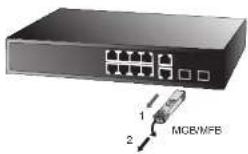
Figure-2 Pull Out the SFP transceiver
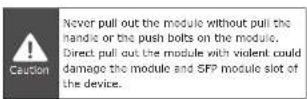
-9
APPENDIX A
A.1 Fiber Optical Cable Connection
Parameters
The wiring details are as below:
Fiber Optical patch Cables:
| Standard Fiber Type Cable Specification | ||
| 100Base-FX(1310nm) | Multi-mode | 50/125μm or62.5/125μm |
| 100Base-FX(1310nm) | Multi-mode | 50/125μm or62.5/125μm |
| Single-mode | 9/125μm | |
| 100Base-SX-U(TX:1310/RX:1550)100Base-SX-D(TX:1550/RX:1310) | Single-mode | 9/125μm |
-10-

Plug & Play 100Base-FX SFP
MFB-Series Fast Ethernet Transceiver

natural_image
Black-and-white photo of five electronic components labeled 'LAN SUTCHES' on a plain background (no readable text or symbols on the components)User's Manual



Brand : Planet
Model : MFB-TF20
Category : Uncategorized