
CA 100 - Car radio HYUNDAI - Free user manual and instructions
Find the device manual for free CA 100 HYUNDAI in PDF.


| Product Type | Car Stereo |
| Brand | Hyundai |
| Model | CA 100 |
| Dimensions (W x H x D) | 178 x 50 x 150 mm (1-DIN) |
| Weight | 0.5 kg |
| Power Supply | 12V DC (negative ground) |
| Power Output | 4 x 20W RMS |
| Radio Bands | FM, AM |
| Playback | CD, CD-R/RW |
| Audio Input | Front AUX (3.5mm) |
| USB Port | Yes (front, for MP3/WMA) |
| Tuner Features | RDS, 30 presets |
| Display | LCD with white backlight |
| Remote Control | Included (wired or IR) |
| Security Code | Anti-theft code (refer to manual) |
| Material | Plastic front panel, metal chassis |
| Maintenance | Clean with soft, dry cloth; no solvents |
| Operating Temperature | -10°C to 60°C |
| Mounting Type | 1-DIN sleeve installation |
Frequently Asked Questions - CA 100 HYUNDAI
User questions about CA 100 HYUNDAI
0 question about this device. Answer the ones you know or ask your own.
Ask a new question about this device
Download the instructions for your Car radio in PDF format for free! Find your manual CA 100 - HYUNDAI and take your electronic device back in hand. On this page are published all the documents necessary for the use of your device. CA 100 by HYUNDAI.
USER MANUAL CA 100 HYUNDAI
Car Stereo Player with FM Tuner and RDS (Radio Data System)
Please read this instruction manual carefully and familiarize yourself with your new Radio before using it for the first time.
Please retain this manual for future reference.
TABLE OF CONTENTS
(A). Location of Controls
(B). Features
(C). Maintenance
(D). Operating Instructions
(E). Specifications
(F). Trouble Shooting
(A) LOCATIONS OF CONTROLS
- POWER ON/OFF
- FUNCTION SELECT BUTTON: BASS/TREBLE/BALANCE/FADER/TA SEEK MASK DPI/AUDIO DSP/LOUDNESS/BEEP/SEEK/STEREO/LOCAL/VOL LAST (SEL)
- VOL UP/VOL DOWN FOR BASS/TREBLE/BALANCE/FADER(+,-)
- PRESET STATIONS(1,2,3,4,5,6)
- AF" FUNCTION(ALTERNATIVE FREQUENCIES)
- TA" FUNCTION(TRAFFIC ANNOUNCEMENT)
- PTY" FUNCTION (PROGRAM TYPE)
- DISPLAY/CLOCK BUTTON(CLK)
- MUTE BUTTON(MU)
- BAND BUTTON(BND)
- AUTOMATIC OR MANUAL TUNING (FREQ UP ▶ OR FREQ DOWN ◀)
- LCD DISPLAY
- A/PS BUTTON
- RESET BUTTON
(B) FEATURES
The unit is with an undetachable front control panel, FM stereo player and the following features:
- The best stations memory automatically memorizes the best (strongest) station in the order their strength(AS)
• Electronic Volume, Bass, Treble, Fader and Balance control
• Precision electronic tuning with phase-lock loop (P.L.L.) Circuitry
• Programmable 36 preset memory tuning (6 each for FM/1/FM2/FM3) - Loudness control Manual/Auto (Seek)/up and down tuning control
• Band selector for FM1/FM2/FM3
• Display control (Frequency, Station Name, Program Type, Clock)
• Clock F unction in RDS - Lighting system
- RDS Function:
PI (Program Identification) TA (Traffic Announcement) PS (Program Service Name) PTY (Program Type) AF (List of Alternative Frequencies) TP (Traffic Program)
ISO CONNECTOR
Battery Section (A)
7-Yellow (Back Up) 8-Black (Ground)
5-Auto Antenna Output 6-N/A
3-N/A 4-Red (ACC)
1-N/A 2-N/A
Speaker Section (B)
7-Green (RL+) 8-Green /Black(RL-)
5-White (FL+) 6- White/Black (FL-)
3-Grey (FR+) 4-Grey/Black (FR-)
1-Violet (RR+) 2-Violet/Black(RR-)

Note:
The Pin 7 connector A must be connected by car ignition key in order to avoid that car battery becomes weak when the car will be not used for long period.
(C) MAINTENANCE
FUSE REPLACEMENT
If the fuse blows, check the power connection and replace the fuse. If the fuse blows again after the replacement, there may be an internal malfunction. In this case, consult your nearest repairing center.
Warning
Use the specified amperage fuse for each lead. Use of a higher amperage fuse may cause serious damage.
LOCATION AND FUNCTION OF CONTROLS
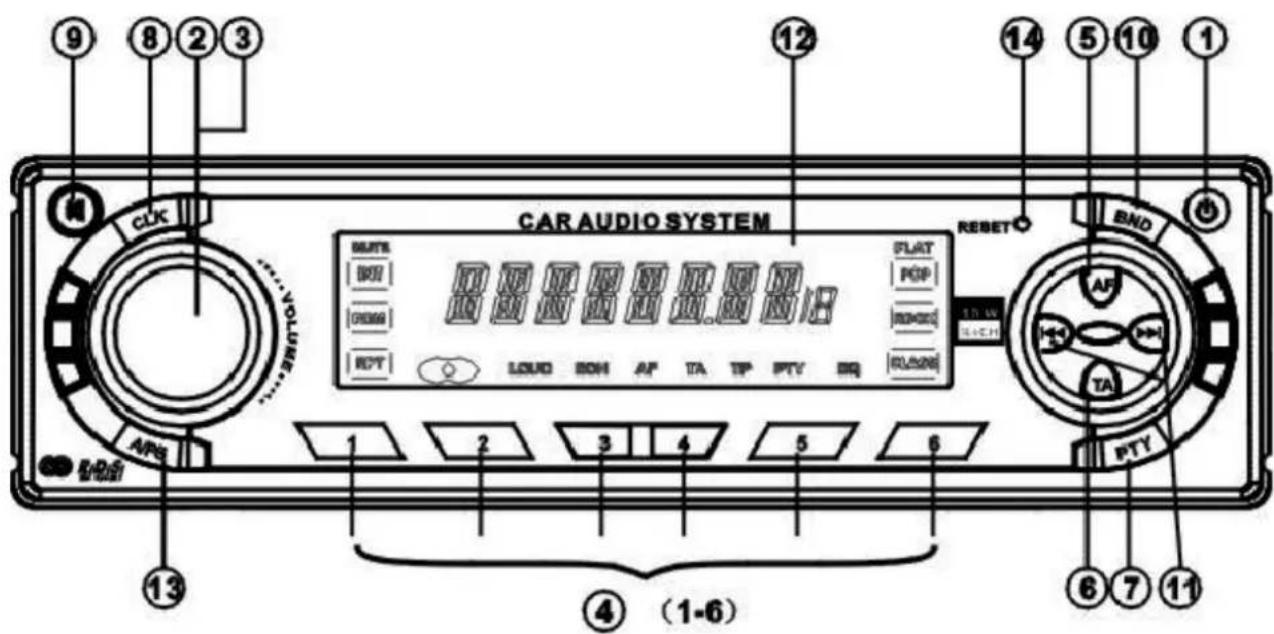
- POWER ON/OFF
- FUNCTION SELECT BUTTON: BASS/TREBLE/BALANCE/FADER/TA SEEK MASK DPI/AUDIO DSP/LOUDNESS/BEEP/SEEK/STEREO/LOCAL/VOL LAST (SEL)
- VOL UP/VOL DOWN FOR BASS/TREBLE/BALANCE/FADER(+,-)
- PRESET STATIONS(1,2,3,4,5,6)
- AF@ FUNCTION(ALTERNATIVE FREQUENCIES)
- TA@ FUNCTION(TRAFFIC ANNOUNCEMENT)
- PTY@FUNCTION (PROGRAM TYPE)
- DISPLAY/CLOCK BUTTON(CLK)
- MUTE BUTTON(MU)
- BAND BUTTON(BND)
- AUTOMATIC OR MANUAL TUNING (FREQ UP ▶ OR FREQ DOWN ◀)
- LCD DISPLAY
- A/PS BUTTON
- RESET BUTTON
(D) OPERATING INSTRUCTIONS
1. POWER ON/OFF (PWR)
By pressing this key (1), the unit is switched on and off.
This unit is turned on by pressing any key.
2. SELECT (SEL)
3. VOLUME UP/DOWN (+/-)
Rotate the VOL.UP (+) and VOL.DOWN (-) knob (3) to control the VOLUME to Select other functions, press the SEL (2) button shortly until the desired Functions are shown on the display. Figure 1 shows how control functions are selected using the SEL button.

flowchart
graph LR
    A["1"] --> B["2"]
    B --> C["3"]
    C --> D["1"]
    D --> E["4"]
    E --> F["2"]
    F --> G["5"]
    G --> H["2"]
    H --> I["6"]
    I --> J["2"]
Fig. 1 Selection of sound control functions
- VOLUME 2. SELECT 3. BASS 4. TREBLE 5. BALANCE 6. FADER VOL.UP Button(+) and VOL.DOWN(-). Increase or decrease the volume by rotating + or -. These buttons can be used to adjust the BASS, TREBLE, BALANCE AND FADER.
TA SEEK/TA ALARM (2)
When press the SEL button (2) for more than 2 seconds, it is activated as selecting mode of these function. TA SEEK Mode or TA ALARM mode is selected by VOL + or VOL - knob.

flowchart
graph LR
    A["SEL"] --> B["TASEEK"]
    B --> C["SEL"]
    C --> D["MASK DPI"]
    D --> E["VOL"]
    E --> F["MASK DPI\MASK ALL"]
TA SEEK mode:
When newly turned station does not receive TA information for 5 sec, the radio retunes to next station which has not the same station(PI) as the last station, but has the TA information. In TA seek mode, the current station can be changed to the completely different station because the unit searches TA station when the field strength of the current station is very weak, or the current station has no TP signal.
TA ALARM mode:
Any automatic retune mode is not activated, just can be heard Beep sound.
MASK DPI (2)
When press the SEL button for more than 2 seconds, it is activated as selecting mode of these function.

flowchart
graph LR
    A["SEL"] --> B["TA SEEK"]
    B --> C["SEL"]
    C --> D["MASK DPI"]
    D --> E["+VOL"]
    E --> F["MASK DPI/MASK ALL"]
MASK DPI: masked only the AF which has different PI.
MASK ALL: masked the AF which has different PI and NO RDS signal with field strength.
AUDIO DSP CONTROL (2)
When press the SEL button for more than 2 seconds, it is activated as selecting mode of these function.

flowchart
graph LR
    A["SEL"] --> B["TA SEEK"]
    B --> C["SEL"]
    C --> D["MASK DPI"]
    D --> E["SEL"]
    E --> F["DSP"]
    F --> G["+ vol"]
    G --> H["Output"]
    style A fill:#f9f,stroke:#333
    style H fill:#f9f,stroke:#333
DSP can be selected by VOL UP and DOWN knob.
POP M---ROCK M---CLASS---FLAT M---DSP OFF
LOUDNESS CONTROLS (2)
When press the SEL button for more than 2 seconds, it is activated as selecting mode of these function.

flowchart
graph LR
    A["SEL"] --> B["TASEEK"]
    B --> C["SEL"]
    C --> D["MASK DP"]
    D --> E["SEL"]
    E --> F["DSP"]
    G["SEL"] --> H["LOUD"]
    H --> I["VOL"]
    I --> J["ON/OFF"]
LOUD ON/OFF mode is selected by VOL UP and DOWN key. The bass and treble response will be boosted.
BEEP MODE (2)
When press the SEL button for more than 2 seconds, it is activated as selecting mode of these function.

flowchart
graph LR
    A["2SEC"] --> B["SEL"]
    B --> C["TA SEEK"]
    C --> D["SEL"]
    D --> E["MASK DPI"]
    E --> F["SEL"]
    F --> G["DSP"]
    H["SEL"] --> I["LOUD"]
    I --> J["SEL"]
    J --> K["BEEP"]
    K --> L["+VOL"]
    L --> M["ON/OFF"]
BEEP ON: BEEP sound can be heard from speaker when the buttons are pressed.
SEEK MODE (2)
When press the SEL button for more than 2 seconds, it is activated as selecting mode of these function.

flowchart
graph LR
    A["SEL"] --> B["TASEEK"]
    B --> C["SEL"]
    C --> D["MASK DPI"]
    D --> E["SEL"]
    E --> F["DSP"]
    F --> G["SEL"]
    G --> H["LOUD"]
    I["SEL"] --> J["BEEP"]
    J --> K["SEL"]
    K --> L["SEEK"]
    L --> M["VOUT"]
    M --> N["SEEK1/SEEK2"]
SEEK 1: When SEEK 1 mode is activated, AUTO SEEK SCAN is stopped when station is detected even user still push SEEK button.
SEEK 2: AUTO SEEK SCAN is not stopped even station is detected if user push SEEK button. When releases this SEEK button, then stop when station is defected.
STEREO/MONO (2)
When press the SEL button for more than 2 seconds, it is activated as selecting mode of these function.

flowchart
graph LR
    A["2 SEC"] --> B["SEL"]
    B --> C["TA SEEK"]
    C --> D["SEL"]
    D --> E["MASK DPI"]
    E --> F["SEL"]
    F --> G["DSP"]
    G --> H["SEL"]
    H --> I["LOUD"]
    I --> J["+"]
    J --> K["BEEP"]
    K --> L["SEL"]
    L --> M["SEEK"]
    M --> N["SEL"]
    N --> O["STEREO"]
    O --> P["+VOL"]
    P --> Q["STEREO/MONO"]
When FM stations are weak and are disturbed, listening can be improved by selecting MONO.
LOCAL/DX(2)
When press the SEL button for more than 2 seconds, it is activated as selecting mode of these function.

flowchart
graph LR
    A["SEL"] --> B["TA SEEK"]
    B --> C["SEL"]
    C --> D["MASK DPI"]
    D --> E["SEEL"]
    E --> F["DGP"]
    F --> G["SEL"]
    G --> H["LO U D"]
    I["SEL"] --> J["BEEP"]
    J --> K["SEL"]
    K --> L["SEEK"]
    L --> M["SEO"]
    M --> N["STEREO"]
    N --> O["SEL"]
    O --> P["LOCAL"]
    Q["LOG AUDX"] --> R["+"]
Local position in areas with strong signals to let radio stop at only strong stations during manual tuning (LOC appears). Press to distant position in areas with weak signals to listen to all stations.
VOL LAST/ADJUST (2)
When press the SEL button for more than 2 seconds, it is activated as selecting mode of these function.
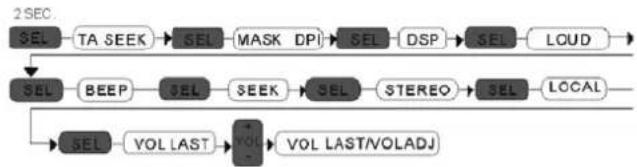
flowchart
graph TD
    A["2SEC"] --> B["SEL"]
    B --> C["TA SEEK"]
    C --> D["SEL"]
    D --> E["MASK DPI"]
    E --> F["SEL"]
    F --> G["DSP"]
    G --> H["SEL"]
    H --> I["LOUD"]
    I --> J["SEL"]
    J --> K["BEEP"]
    K --> L["SEL"]
    L --> M["SEEK"]
    M --> N["SEL"]
    N --> O["STEREO"]
    O --> P["SEL"]
    P --> Q["LOCAL"]
    Q --> R["SEL"]
    R --> S["VOL LAST"]
    S --> T["VOL LAST/VOLADJ"]
VOL LAST: The volume level which user adjust lately is selected whenever power is ON and OFF. VOL ADJ: The initial volume level (user can adjust) is selected whenever power is ON and OFF.
4. PRESET STATIONS (1,2,3,4,5,6)
When press short, these keys select a preset station directly. When press longer than 1 sec., current station is stored in preset memory bank. When PTY mode is selected, the PTY switch is shared as follows:
PTY music group---PTY speech group---OFF
MUSIC
- POP M, ROCK M
- EASY M, LIGHT M
- CLASSICS, OTHER M
- JAZZ, COUNTRY
- NATION M, OLDIES
- FOLK M
MLUVENÉ SLOVO
- NEWS, AFFAIRS, INFO
- SPORT, EDUCATE, DRAMA
- CULTURE, SCIENCE, VARIED
- WEATHER, FINANCE, CHILDREN
- SOCIAL, RELIGION, PHONE IN
- TRAVEL, LEISURE, DOCUMENT (Cestování, volný čas, dokumentární pořady)
USING THE RDS FUNCTION
What is RDS?
The RDS (Radio Data System) is a digital information system developed by the EBU (European Broadcast Union). Piggy-backed on normal FM broadcasts, RDS offers a variety of information services and automatic retuning functions for RDS-compatible car stereos.
In1988, RDS became available in the United Kingdom, France, West Germany,
Ireland and Sweden. Test transmissions are being conducted in many other European countries.
It is expected that RDS will be available in most western European countries in the near future.
5. AF/REG" Function (ALTERNATIVE FREQUENCIES)
When press short, AF/REG switching mode is selected.
When AF/REG switching mode is selected, the radio checks the signal strength of the AF all the time. When press long, it is activated as regional mode ON/OFF.
- Regional mode ON:
AF switching or PI SEEK is implemented to the station which have all PI codes same as current station. REG segment is turned on in LCD display. - Regional mode OFF
The regional code in the format of PI code is ignored when AF switching or PI SEEK is implemented.
6. TA" Function (TRAFFIC ANNOUNCEMENT)
When press short, it is activated as TA mode on or off.
When TA mode is on and traffic announcement is transmitted.
- If the volume level was under the threshold point, it will be raised to the threshold point.
- When TA station is received, TA segment is turned on in LCD display.
7. PTY" Function (PROGRAM TYPE)
PTY MUSIC---PTY SPEECH---PTY OFF
While selecting PTY type, its selection is implemented by preset buttons as described in preset key. When PTY is selected, the radio starts to search corresponding PTY information, and stops if the corresponding PTY information is detected.
8. DISPLAY (CLK)
When in RDS station, press this button, the unit will display present station frequency and time. If in case of non-RDS, you can adjust time you desired.
9. MUTE (MU)
By pressing this button, the unit will mute the sound at once.
Press again to return to previous volume level.
10. BAND BUTTON (BND)
Each band is toggled cyclically by pressing this key FM1-FM2-FM3.
11. AUTOMATIC OR MANUAL TUNING (FREQ UP ▶ OR FREQ DOWN ◀)
When press short, these keys are operated as MANUAL tuning mode.
When press longer than 1 sec., they are operated as SEEK tuning mode.
12. LCD DISPLAY
The liquid Crystal Display will display the current state of the unit.
13. AUTO SEEK SEARCH TUNING (A/PS)
By pressing shortly, the radio searches for each preset station.
When field strength level is bigger than the threshold level of stop level, the radio is holding at that preset number for 5 sec. With releasing mute, and then searches again.
By pressing longer than 1 sec, and then 6 strongest stations are preset to the corresponding preset number. When AS operation is finished, the radio executes the preset scan.
RESET
Reset button (14) is placed on the front panel.
The reset button is to be activated for the following:
Initial installation of the unit when all wiring is completed.
All the function button do not operate.
Error symbol on the display.
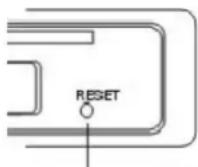
RESET BUTTON⑭
(E) SPECIFICATIONS
TUNER
Sensitivity 2 μV
Stereo separation 35 dB
Signal to noise radio 55 dB
Frequency range FM: 87,5 – 108 MHz
Channel step 50 kHz
Intermediate Frequency 10,7 MHz
GENERAL
Power Supply Voltage DC 13.2 Volts Negative Ground
Speaker Impedance 4 or 8 ohm
Max Current Consumption 6 A
Max Output power 15 W x 4 k.
Note: Specifications and the design are subject to possible modification without notice due to improvement.
(F) TROUBLE SHOOTING
| SYMPTOM CAUSE SOLUTION | ||
| No Power The car ignition is not | on. If the power supply is pro- | perly connected to the car accessory terminal, switch the ignition key to “ACC”. |
| The fuse is blown. Replace the fuse. | ||
| No Sound Volume is in minimum | Adjust volume to a desired level. | |
| Wiring is not properly con- nected. | Check wiring connection. | |
| The operation keys do not work | The built-in microcomputer is not operating properly due to noise. | Press the RESET button (14). |
| Sound Skips | The installation angle is not more than 30 degrees. | Adjust the installation angle to less than 30 degrees. |
| The radio does not work. The radio station automatic selection does not work. | The antenna cable is not con- nected. | Insert the antenna cable firmly. |
| The signals are too weak. | Select a station manually. |
NOTES:
We reserve the right to make technical changes without notice in the interest of improvement.
WARNING: Do not use this product near water, in wet areas to avoid fire or injury of electric current. Always turn off the product when you don't use it or before a revision. There aren't any parts in this appliance which are reparable by consumer. Always appeal to a qualified authorized service. The product is under a dangerous tention.
Disposal of used electrical & electronic equipment

The meaning of the symbol on the product, its accesory or packaging indicates that this product shall not be treated as household waste. Please, dispose of this equipment at your applicable collection point for the recycling of electrical & electronic equipments waste. In the European Union and Other European countries which there are separate collection systems for used electrical and electronic product. By ensuring the correct disposal of this product, you will help prevent potentially hazardous to the environment and to human health, which could otherwise be caused by unsuitable
waste handling of this product. The recycling of materials will help conserve natural resources. Please do not therefore dispose of your old electrical and electronic equipment with your household waste. For more detailed information about recycling of this product, please contact your local city office, your household waste disposal service or the shop where you purchased the product.
HP Tronic Ústí nad Labem s.r.o. is registered by Asekol s.r.o. under number AK-051447. Proton SK a.s. is registered by Sewa under number EZ 0000213.

- Car Stereo Player with FM Tuner and RDS (Radio Data System)
- TABLE OF CONTENTS
- LOCATIONS OF CONTROLS
- FEATURES
- ISO CONNECTOR
- Note:
- MAINTENANCE
- FUSE REPLACEMENT
- Warning
- LOCATION AND FUNCTION OF CONTROLS
- OPERATING INSTRUCTIONS
- POWER ON/OFF (PWR)
- SELECT (SEL)
- VOLUME UP/DOWN (+/-)
- TA SEEK/TA ALARM (2)
- TA SEEK mode:
- TA ALARM mode:
- MASK DPI (2)
- AUDIO DSP CONTROL (2)
- LOUDNESS CONTROLS (2)
- BEEP MODE (2)
- SEEK MODE (2)
- STEREO/MONO (2)
- LOCAL/DX(2)
- VOL LAST/ADJUST (2)
- PRESET STATIONS (1,2,3,4,5,6)
- MUSIC
- MLUVENÉ SLOVO
- USING THE RDS FUNCTION
- What is RDS?
- AF/REG" Function (ALTERNATIVE FREQUENCIES)
- TA" Function (TRAFFIC ANNOUNCEMENT)
- PTY" Function (PROGRAM TYPE)
- DISPLAY (CLK)
- MUTE (MU)
- BAND BUTTON (BND)
- AUTOMATIC OR MANUAL TUNING (FREQ UP ▶ OR FREQ DOWN ◀)
- LCD DISPLAY
- AUTO SEEK SEARCH TUNING (A/PS)
- RESET
- SPECIFICATIONS
- TUNER
- GENERAL
- TROUBLE SHOOTING
- NOTES:
- Disposal of used electrical & electronic equipment
Brand : HYUNDAI
Model : CA 100
Category : Car radio