
CLX-DIN-AP3 - Processor Crestron - Free user manual and instructions
Find the device manual for free CLX-DIN-AP3 Crestron in PDF.


| Brand | Crestron |
| Model | CLX-DIN-AP3 |
| Product Type | Control Processor |
| Form Factor | DIN Rail Mount |
| Width (DIN modules) | 4 |
| Depth | 90 mm |
| Height | 105 mm |
| Weight | 0.5 kg |
| Power Supply | 24 VDC, 0.5 A |
| Power Consumption | 12 W |
| Processor | ARM Cortex-A9, 1.2 GHz |
| Memory | 1 GB RAM, 4 GB Flash |
| Ethernet Ports | 2x 10/100/1000 Mbps (PoE+ supported on port 1) |
| Serial Ports | 2x RS-232 |
| IR Ports | 2x IR output |
| Relay Ports | 2x relay (7 A each) |
| Digital I/O | 4x digital input/output |
| Operating Temperature | 0 to 50 °C |
| Mounting | DIN EN 60715 rail |
| Certifications | CE, FCC, UL |
| Included Accessories | Mounting clips, power connector |
| Programming Software | Crestron Toolbox, SIMPL Windows |
| Warranty | 2 years |
Frequently Asked Questions - CLX-DIN-AP3 Crestron
User questions about CLX-DIN-AP3 Crestron
0 question about this device. Answer the ones you know or ask your own.
Ask a new question about this device
Download the instructions for your Processor in PDF format for free! Find your manual CLX-DIN-AP3 - Crestron and take your electronic device back in hand. On this page are published all the documents necessary for the use of your device. CLX-DIN-AP3 by Crestron.
USER MANUAL CLX-DIN-AP3 Crestron
The Crestron ^® CLX-DIN-AP3 3-Series Control System ^® is designed for CAEN, CAEN-MLO, and CAENIB Automation Enclosures. There are two models. The CLX-DIN-AP3 model includes a DIN-AP3 3-Series ^® Automation Processor and DIN-PWS30-277 Cresnet ^® Power Supply prewired and mounted on a CAEN-UMP1X2 Universal Mounting Plate. Model CLX-DIN-AP3-HUB includes the DIN-HUB Cresnet Distribution Hub as well.
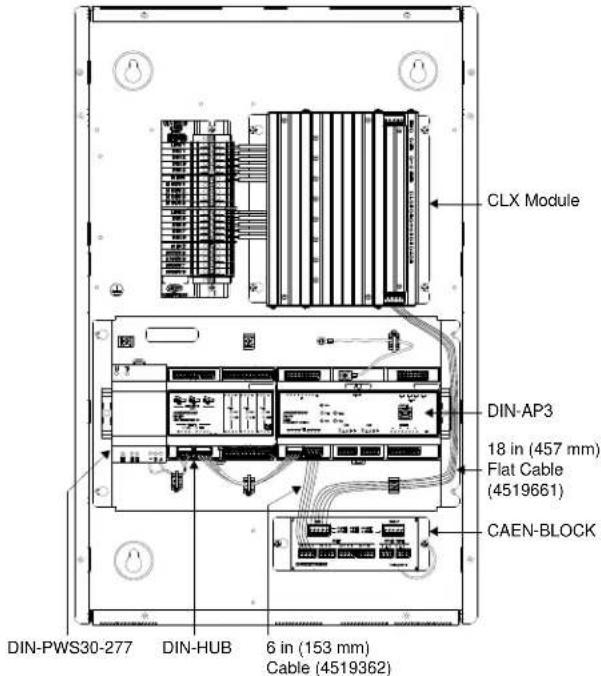
Refer to the illustration on this page for an example of mounting location and orientation within a single-wide enclosure. The table beneath the illustration lists the dimensions and weight.
The CLX-DIN-AP3 and CLX-DIN-AP3-HUB install in an identical manner. For simplicity within this guide, the term "CLX-DIN-AP3" is used except where noted.
Installation
The CLX-DIN-AP3 must be mounted in accordance with all national and local codes.
NOTE: Adhere to Class 1 and Class 2 wiring requirements when considering the equipment attached to the CLX-DIN-AP3 in an enclosure.
Use the four screws (8B x 1/4", supplied) to attach the CLX-DIN-AP3 to a CAEN, CAEN-MLO, or CAENIB Automation Enclosure. Mount the CLX-DIN-AP3 as shown in the illustration on this page. The flanges of the plates should not overlap other plates or lighting modules that are mounted in the enclosure.
Once the CLX-DIN-AP3 is mounted to the automation enclosure, two cables (supplied) must be connected as shown in the illustration on this page. The 6 in (153 mm) cable (4519362) connects the CAEN-BLOCK Cresnet port to the DIN-AP3 Cresnet port. The 18 in (457 mm) flat cable (4519661) connects the CAEN-BLOCK to the CLX module connector.
For wiring of the CLX-DIN-AP3, refer to the DIN-AP3 Installation and Operations Guide (Doc. 7491) and DIN-HUB Installation and Operations Guide (Doc. 6671) at www.crestron.com/manuals.
Example of CLX-DIN-AP3-HUB Location and Orientation
CLX-DIN-AP3 Specifications
| SPECIFICATION | DETAILS |
| Height | 7 3/8 in (188 mm) |
| Width 14 in (356 mm) | |
| Depth | 3 in (77 mm) |
| Weight | |
| CLX-DIN-AP3 | 2.3 lb (1.1 kg) |
| CLX-DIN-AP3-HUB | 2.7 lb (1.3 kg) |
Further Inquiries
To locate specific information or resolve questions after reviewing this guide, contact Crestron's True Blue Support at 1-888-CRESTRON [1-888-273-7876] or, for assistance within a particular geographic region, refer to the listing of Crestron worldwide offices at www.crestron.com/offices.
To post a question about Crestron products, log onto Crestron's Online Help at www.crestron.com/onlinhelp. First-time users must establish a user account to fully benefit from all available features.
Return and Warranty Policies
Merchandise Returns / Repair Service
- No merchandise may be returned for credit, exchange, or service without prior authorization from Crestron. To obtain warranty service for Crestron products, contact an authorized Crestron dealer. Only authorized Crestron dealers may contact the factory and request an RMA (Return Merchandise Authorization) number. Enclose a note specifying the nature of the problem, name and phone number of contact person, RMA number, and return address.
- Products may be returned for credit, exchange, or service with a Crestron Return Merchandise Authorization (RMA) number. Authorized returns must be shipped freight prepaid to Crestron, 6 Volvo Drive, Rockleigh, N.J. or its authorized subsidiaries, with RMA number clearly marked on the outside of all cartons. Shipments arriving freight collect or without an RMA number shall be subject to refusal. Crestron reserves the right in its sole and absolute discretion to charge a 15% restocking fee plus shipping costs on any products returned with an RMA.
- Return freight charges following repair of items under warranty shall be paid by Crestron, shipping by standard ground carrier. In the event repairs are found to be non-warranty, return freight costs shall be paid by the purchaser.
Crestron Limited Warranty
Crestron Electronics, Inc. warrants its products to be free from manufacturing defects in materials and workmanship under normal use for a period of three (3) years from the date of purchase from Crestron, with the following exceptions: disk drives and any other moving or rotating mechanical parts, pan/tilt heads and power supplies are covered for a period of one (1) year; touch screen display and overlay components are covered for 90 days; batteries and incandescent lamps are not covered.
This warranty extends to products purchased directly from Crestron or an authorized Crestron dealer. Purchasers should inquire of the dealer regarding the nature and extent of the dealer's warranty, if any.
Crestron shall not be liable to honor the terms of this warranty if the product has been used in any application other than that for which it was intended or if it has been subjected to misuse, accidental damage, modification, or improper installation procedures. Furthermore, this warranty does not cover any product that has had the serial number altered, defaced, or removed.
This warranty shall be the sole and exclusive remedy to the original purchaser. In no event shall Crestron be liable for incidental or consequential damages of any kind (property or economic damages inclusive) arising from the sale or use of this equipment. Crestron is not liable for any claim made by a third party or made by the purchaser for a third party.
Crestron shall, at its option, repair or replace any product found defective, without charge for parts or labor. Repaired or replaced equipment and parts supplied under this warranty shall be covered only by the unexpired portion of the warranty.
Except as expressly set forth in this warranty, Crestron makes no other warranties, expressed or implied, nor authorizes any other party to offer any warranty, including any implied warranties of merchantability or fitness for a particular purpose. Any implied warranties that may be imposed by law are limited to the terms of this limited warranty. This warranty statement supersedes all previous warranties.
The specific patents that cover Crestron products are listed at patents.crestron.com.
Crestron, the Crestron logo, 3-Series, 3-Series Control System, and Cresnet are trademarks or registered trademarks of Crestron Electronics, Inc. in the United States and/or other countries. Other trademarks, registered trademarks, and trade names may be used in this document to refer to either the entities claiming the marks and names or their products. Crestron disclaims any proprietary interest in the marks and names of others. Crestron is not responsible for errors in typography or photography.
This document was written by the Technical Publications department at Crestron. ©2014 Crestron Electronics, Inc.

Brand : Crestron
Model : CLX-DIN-AP3
Category : Processor