
MixMate MX153 - Blender ROLLS - Free user manual and instructions
Find the device manual for free MixMate MX153 ROLLS in PDF.


| Product Type | Audio Mixer |
| Brand | Rolls |
| Model | MX153 MixMate |
| Microphone Inputs | 2 x XLR balanced (600 Ohms) |
| Source Inputs | 3 x Stereo RCA (22K Ohms), plus front panel 1/8" stereo for Source 3 |
| Output | Stereo RCA |
| Phantom Power | +12 VDC, switchable per microphone channel |
| Max Input Level (Mic) | -14 dBV |
| Max Input Level (Source) | 24 dBV |
| Max Gain (Mic) | 60 dBV |
| Max Gain (Source) | 26 dBV |
| Tone Controls | Bass ±12 dB at 100 Hz, Treble ±12 dB at 11 kHz (for Mic 1/2 and Source 1/2) |
| Signal-to-Noise Ratio | 96 dB |
| Power Requirement | 12VDC / 200 mA (via included PS27 adapter) |
| Dimensions | 5.4" x 1.7" x 5.5" (137 x 43 x 140 mm) |
| Weight | 2 lbs (0.9 kg) |
| Priority Functions | Mic 1 Priority (talk over mutes Mic 2, Source 1/2); Source 3 Priority (mutes Source 1/2) |
| Output Mode | Selectable Mono or Stereo via DIP switch |
| Source 3 Mono Sum | DIP switch sums Source 3 left/right to mono |
| Cleaning | Wipe with dry cloth; do not use liquids or solvents |
| Safety | Use only supplied power adapter; avoid moisture and extreme temperatures |
| Spare Parts / Service | Contact Rolls or visit www.rolls.com for support |
Frequently Asked Questions - MixMate MX153 ROLLS
User questions about MixMate MX153 ROLLS
0 question about this device. Answer the ones you know or ask your own.
Ask a new question about this device
Download the instructions for your Blender in PDF format for free! Find your manual MixMate MX153 - ROLLS and take your electronic device back in hand. On this page are published all the documents necessary for the use of your device. MixMate MX153 by ROLLS.
USER MANUAL MixMate MX153 ROLLS
flowchart
graph TD
    A["Power Source"] --> B["Resistors"]
    B --> C{Control Logic}
    C -->|Yes| D["Resistor 1"]
    C -->|No| E["Resistor 2"]
    D --> F["Resistor 3"]
    E --> G["Resistor 4"]
    F --> H["Output"]
    G --> H
    H --> I["Feedback to Resistor"]
    I --> J["Resistor 5"]
    J --> K["Resistor 6"]
    K --> L["Output"]
    style A fill:#f9f,stroke:#333
    style B fill:#ccf,stroke:#333
    style C fill:#cfc,stroke:#333
    style D fill:#fcc,stroke:#333
    style E fill:#cff,stroke:#333
    style F fill:#ffc,stroke:#333
    style G fill:#cfc,stroke:#333
    style H fill:#fcc,stroke:#333
    style I fill:#ffc,stroke:#333
    style J fill:#fcc,stroke:#333
    style K fill:#ffc,stroke:#333
    style L fill:#fcc,stroke:#333

CE
ROLLS
ROLLS CORPORATION SALT LAKE CITY, UTAII 11/08
ROLLS
MX153 MixMate Mic/Line Mixer
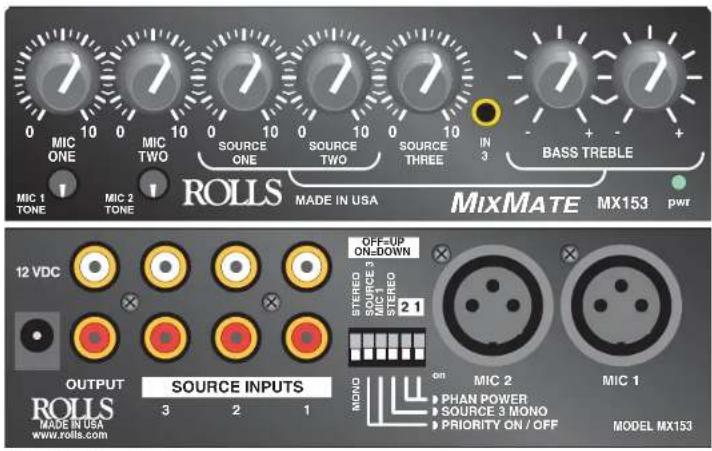
SPECIFICATIONS
Input Impedance: Mic: 600 Ohms XLR balanced
Source: 22K Ohms RCA
Max Input Level: Mic: -14 dBV Mic level Max
Source: 24 dBV
Connectors: 2: XLR, 8: Stereo RCA
Phantom Power: +12 VDC
Max Gain: Mic: 60 dBV
Source: 26 dBV
Tone Controls: +/-12 dB 100 Hz Bass
+/-12 dB 11kHz Treble
- 80 dB
S/N Ratio: 96 dB
n: 60 dB
Power: 12VDC / 200 mA
Size: 5.4" x 1.7" x 5.5"
Weight: 2 lbs
Start Guide
INTRODUCTION
Thank your for your purchase of the Rolls MX153 MixMate. The MX153 is a two microphone, three source stereo mixer designed for restaurants, schools, churches, clubs etc. The unit provides a compact and efficient way to mix sources such as AM/FM tuners, CD players, and video players with dynamic or condenser microphones. Priority talk over is provided on Microphone One for paging, and on Source Three for a jukebox, telephone, etc.
NOTE: THIS MANUAL ASSUMES THE USER HAS A WORKING KNOWLEDGE OF AUDIO ELECTRONICS, BALANCED AND UNBALANCED CONNECTIONS, AND PROPER SIGNAL LEVEL SETTING.
INSPECTION / WARRANTY
- Unpack and inspect the MX153 box and package.
If obvious physical damage is noticed, contact the carrier immediately to make a damage claim. We suggest saving the shipping carton and packing materials for safely transporting the unit in the future.
- Please visit our web site at www.rolls.com and click on the Register Your Warranty Here button, or complete the Warranty Registration Card and return it to the factory.
DESCRIPTION
FRONT PANEL
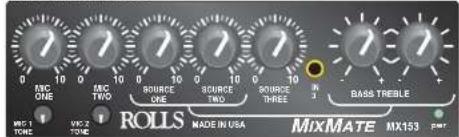
Mic 1, 2: Adjust the level of signal from the corresponding Mic Input.
TONE 1, 2: Adjusts the frequency content of the microphone signal in the channel. When the control is turned counter-clockwise, the high frequencies are cut, when the control is turned clockwise, the low frequencies are cut.
Source 1 - 3: Adjust the volume of input from the RCA Source Inputs. IN 3: Front panel 1/8" stereo input, linked to source 3.
Bass: Adjusts the low frequencies of the Source 1 and 2 signals only. Treble: Adjusts the high frequencies of the Source 1 and 2 signals only.
pwr: LED indicating power is applied to the MX152 and the unit is on.
REAR PANEL
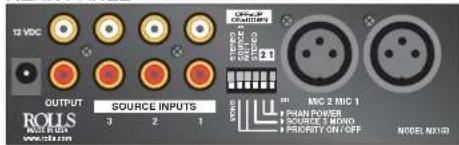
12VDC / 200 mA: Power input connector. Connects to the Rolls PS27 Power Adapter. OUTPUT: Stereo RCA jacks, contains all mixed signals. SOURCE INPUTS: Stereo RCA jacks, Channels 1 - 3, for connection to stereo sources such as AM/FM tuners, cassette players, cd players, or video players. DIP SWITCH: Contains the small switches for engaging Mic 1, 2 phantom power, Source 3 Stereo or Mono, the priority (Talk Over) functions, and the Mono/Stereo select. MICROPHONE ONE and TWO: Balanced XLR inputs to be connected to dynamic or
condenser microphones.
CONNECTION
Inputs
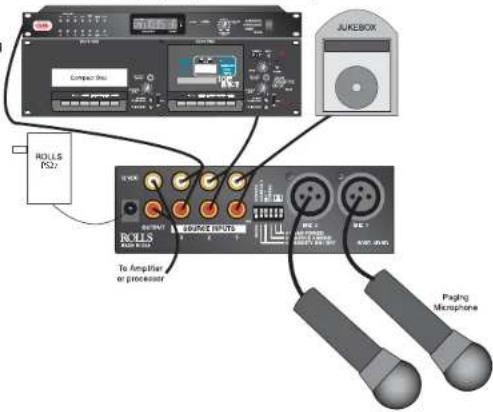
Connect low impedance microphones to the Mic XLR inputs. If a paging microphone is being used, connect it to Mic Input 1 so it may be used with the Talk Over function. Connect source signals such as CD players, cassette players or video players to the RCA Source Inputs. If a jukebox is being connected, and you want its signal to mute the other source signals, connect it to Source input 3.
Output
Connect a stereo RCA cable to the main Output jack, and to an amplifier or the next device in your signal chain.
Shown here is a connection example for the MX153.
OPERATION
DIP SWITCH SETTINGS (From left to right)
- The Mono/Stereo switch selects the output mode. When the switch is up, the unit is in stereo mode. When the switch is down, the stereo signals are mixed to mono and sent to both the Right and Left Main output jacks. Either jack can be used as a mono output.
- Source 3 Priority: when in the down position, Source 1, and 2 will be "ducked" or muted by the signals at Source 3.
This function is for jukebox priority. With a jukebox connected to Source input 3, and the Talk over switch 2 on (down), the other Source input signals such as background music, will be muted and only the jukebox will be heard. - Mic 1 Priority; when in the down position, all program material on Mic 2, Source 1 and 2 inputs will be "ducked" or muted when a signal is present at Mic 1. Source 3 is left unmuted. This function is used for paging.
- Source 3 Mono; this switch sums the Right and Left inputs of Source 3 to a mono signal.
- If a microphone requires phantom power, move the Mic channel's corresponding PHAN DIP switch to the down position. This applies 12 volts dc phantom power to the indicated microphone.


Brand : ROLLS
Model : MixMate MX153
Category : Blender