
RM67 - Blender ROLLS - Free user manual and instructions
Find the device manual for free RM67 ROLLS in PDF.


| Product Type | Blender |
| Brand | Rolls |
| Model | RM67 |
| Motor Power | 600 W |
| Jar Capacity | 1.5 L |
| Jar Material | Plastic (BPA-free) |
| Blade Material | Stainless steel |
| Speeds | 2 speeds + pulse |
| Dimensions (H x W x D) | 40 cm x 20 cm x 20 cm |
| Weight | 2.2 kg |
| Power Supply | 220-240 V, 50/60 Hz |
| Cord Length | 1.2 m |
| Functions | Blending, mixing, crushing ice, pureeing |
| Safety Features | Locking lid, non-slip base, overload protection |
| Cleaning & Maintenance | Removable blades, dishwasher-safe jar (top rack) |
| Spare Parts Availability | Replacement jar and blades available |
| Warranty | 2 years |
| Noise Level | ~85 dB |
Frequently Asked Questions - RM67 ROLLS
User questions about RM67 ROLLS
0 question about this device. Answer the ones you know or ask your own.
Ask a new question about this device
Download the instructions for your Blender in PDF format for free! Find your manual RM67 - ROLLS and take your electronic device back in hand. On this page are published all the documents necessary for the use of your device. RM67 by ROLLS.
USER MANUAL RM67 ROLLS
- Three XLR balanced inputs with phantom power
- Four stereo Source inputs, including a resistor-mixed front panel 3.5mm input
- Tone controls for each Microphone input
- Clip indicators for each Microphone input
- Bass and Treble controls for the Source inputs
- 1/4" input for remote volume control
- RCA Record Out
- Master Output Level control
- 1/4" TRS balanced outputs
- Ducking with adjustable Sensitivity control
SPECIFICATIONS
| Input Impedance: Mic: 600 Ohms XLR balanced | |||||
| Line: Source: | 22K Ohms gold plated RCA | ||||
| Mic Insert: 22K Ohms 1/4" TS unbal. | |||||
| Max Input Level: Mic: -14 dBV Mic level | |||||
| +20 | dB | Line | levl | ||
| Source: | 24 | dBV | |||
| Connectors: | 3: | XLR, 6: Stereo RCA, 3: 1/4" TRS, 1: 1/4" TS, 1: 3.5mm | |||
| Phantom Power: | +12 | VDC | |||
| Output Level: +17 dBV max | |||||
| Output Impedance: 51 Ohms | |||||
| Max Gain: | Mic: 60 | dB | |||
| Source: | 26 | dB | |||
| Tone Controls: +/-12 dB 100 Hz Bass | |||||
| +/-12 | dB | 11kHz | Treble | ||
| Nose Floor: -80 dB, THD: <.025%, S/N Ratio: 96 dB | |||||
| Size: 19" x 1.75" x 6" (48.3 x 4.5 x 15 cm) | |||||
| Weight: | 5 | Ibs. | (2.3 | kg) | |
NOTE: THIS GUIDE ASSUMES THE USER HAS A WORKING KNOWLEDGE OF AUDIO ELECTRONICS, BALANCED AND UNBALANCED CONNECTIONS, AND PROPER SIGNAL LEVEL SETTING.
Quick Start Guide
INTRODUCTION
Thank your for your purchase of the Rolls RM67 Microphone/Source Mixer. The RM67 is a single rack space audio mixer with three XLR inputs and four stereo RCA source inputs. Talkover features have been included on Mic 1 and Source 4 for paging and music priority functions.
INSPECTION
- Unpack and inspect the RM67 box and package.
If obvious physical damage is noticed, contact the carrier immediately to make a damage claim. 2. For warranty information, and to register your warranty, please visit our website at www.rolls.com and click on the Register Your Warranty Here button.
DESCRIPTION
FRONT PANEL

Mic 1 - 3: Adjust the level of signal from the corresponding Mic Input.
clip 1 - 3: LED indicating overload in the channel. The LED lights 3dB below clipping.
TONE 1 - 3: Adjusts the frequency content of the signal in the channel. When the control is turned counter-clockwise, the high frequencies are cut, when the control is turned clockwise, the low frequencies are cut.
IN 1: 3.5mm Input jack - resistor mixed to Source Input 1.
Source 1 - 4: Adjust the volume of input from the RCA Source Inputs, and the 3.5mm in.
Bass: Adjusts the low frequencies of the Source signals only.
Treble: Adjusts the high frequencies of the Source signals only.
Master Level: Adjusts the overall volume of the RM67 Main Outputs.
pwr: LED indicating power is applied to the RM67 and the unit is on.
REAR PANEL

Mic 1 - 3: XLR inputs for dynamic or condenser microphones, or balanced line-level signals.
Mic/Line Switch: Pads the XLR Mic input by 30 dB when pressed in.
DIP SWITCH: Contains the small switches for engaging Mic 1 - 3 phantom power, the priority
(Talk Over) functions, and the Mono/Stereo select.
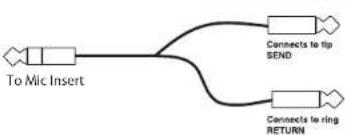
MIC INSERT: 1/4" TRS insert jack for adding external processing to the Mic signals. Tip = send, ring = return.
SOURCE INPUTS: Stereo RCA jacks, Channels 1 - 4, for connection to stereo sources such as AM/FM tuners, cassette players, cd players, or video players.
RECORD OUT: Stereo RCA jacks, contains all mixed signals before the Remote Volume jack, and Master Level control.
SPARE: This RCA jack is not connected.
MUTE: RCA jack for connection to a tip-to-ground muting circuit.
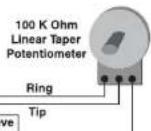
REMOTE VOLUME: 1/4" TS jack for connection to a remote potentiometer for master volume
control. 20K Ohm audio taper potentiometer is recommended.
MAIN OUTPUTS: 1/4" TRS balanced Right and Left Outputs.
DUCK SENSITIVITY: Adjusts the level of input signal required for ducking to occur. NOTE: The release time is effected by this setting, plus the level of input signal - the higher the input signal, the longer the release time.
IEC POWER INPUT: Connect to the IEC power cable - and properly grounded ac outlet.
CONNECTION
Connect low impedance microphones to the Mic inputs. If a paging microphone is being used, connect it to Mic Input 1 so it may be used with the Talk Over function. Connect source signals such as CD players, cassette players or video players to the RCA Source Inputs. If a jukebox is being connected, and you want its signal to mute the other source signals, connect it to Source input 4. Connect 3.5mm sources to the front panel input.
Remote Volume Control
To control the overall volume of the RM67 in a remote location, wire a 100K ohm Linear Taper potentiometer to a 1/4" Tip-Ring-Sleeve plug as shown here.
Mic Insert
To connect a signal processor to the RM67 microphone signal(s), use an insert plug, or cable wired as shown here.
flowchart
graph LR
    A["To Mic Insert"] --> B["Connects to lip SEND"]
    A --> C["Connects to ring RETURN"]
Connect the Main Right and Left outputs to your
power amplifiers. The RM67 output jacks will ac-
commodate balanced or unbalanced connections. For unbalanced operation use 1/4" Tip Sleeve jacks, for balanced operation use 1/4" Tip Ring Sleeve jacks. If a 1/4" TRS to XLR cable is needed, wire the Tip of the 1/4" jack to pin 2 of the XLR, the Ring to pin 3, and the Sleeve to pin 1 or the shield.
Mute
To mute all audio, connect an RCA plug to your muting circuitry. When the tip is shorted to the ground - all audio is muted.
Connect the RM67 to a properly grounded AC outlet.
DIP SWITCH SETTINGS
- If a microphone requires phantom power, move the Mic channel's corresponding PHAN DIP switch to the down position. This applies 12 volts dc phantom power to the indicated microphone.
- Talkover switch 1 (T.O. 1), when in the down position, all program material on all source inputs will be "ducked" or muted when a signal is present at Mic 1. NOTE: MIC ONE WILL NOT TALK OVER MIC2 OR MIC3. ONLY THE SOURCE INPUTS WILL BE TALKED OVER. This function is used for paging.
- Talkover switch 2 (T.O. 2), when in the down position, Source 1,2, and 3 will be "ducked" or muted by the signals at Source 4.
This function is for jukebox priority. With a jukebox connected to Source input 4, and the Talkover switch 2 on (down), the other Source input signals such as background music, will be muted and only the jukebox will be heard.
- The Mono/Stereo switch selects the output mode. When the switch is up, the unit is in stereo mode. When the switch is down, the stereo signals are mixed to mono and sent to both the Right and Left Main output jacks. Either jack can be used as a mono output.
Adjust the Microphone levels for maximum input signal without clipping, and for a comfortable listening level. Adjust each Source level for a desired listening level.


Brand : ROLLS
Model : RM67
Category : Blender