
Parametric Equilizer RPQ160b - Blender ROLLS - Free user manual and instructions
Find the device manual for free Parametric Equilizer RPQ160b ROLLS in PDF.


| Product Type | Parametric Equalizer |
| Model | RPQ160b |
| Brand | Rolls |
| Dimensions | 19" x 4" x 1.75" (rack mountable) |
| Weight | 4 lbs |
| Power Supply | AC powered (standard IEC cord) |
| Frequency Response | 16 Hz – 30 kHz ±3 dB |
| Total Harmonic Distortion | < 0.03% |
| Signal-to-Noise Ratio | > 90 dB |
| Maximum Input Level | +22 dB |
| Maximum Output Level | +22 dB |
| Input Impedance | 10 kΩ (20 kΩ balanced) |
| Output Impedance | 50 Ω |
| Shelving Slope | 12 dB/octave |
| Number of EQ Bands | 4 fully parametric bands |
| Band Frequency Ranges | Band 1: 70 Hz – 1.5 kHz Band 2: 150 Hz – 3 kHz Band 3: 300 Hz – 10 kHz Band 4: 600 Hz – 20 kHz |
| Bandwidth (Q) Control | 0.3 to 3 octaves per band |
| Band Level Control | –15 dB to +15 dB per band |
| Master Level Control | –12 dB to +12 dB with center detent |
| Low Shelf Filter | 16 Hz – 500 Hz (high-pass) |
| High Shelf Filter | 1 kHz – 30 kHz (low-pass) |
| EQ Bypass | Active switch bypasses all EQ; shelf filters bypassed at extreme settings |
| Input Connectors | Balanced XLR, balanced 1/4", RCA |
| Output Connectors | Balanced XLR, balanced 1/4", RCA |
| Indicators | Power LED, Clip LED |
| Applications | Studio, live sound, feedback elimination, instrument EQ |
| Maintenance | Clean with dry cloth; do not use liquids or solvents |
Frequently Asked Questions - Parametric Equilizer RPQ160b ROLLS
Band 2: 150 Hz – 3 kHz
Band 3: 300 Hz – 10 kHz
Band 4: 600 Hz – 20 kHz.
User questions about Parametric Equilizer RPQ160b ROLLS
0 question about this device. Answer the ones you know or ask your own.
Ask a new question about this device
Download the instructions for your Blender in PDF format for free! Find your manual Parametric Equilizer RPQ160b - ROLLS and take your electronic device back in hand. On this page are published all the documents necessary for the use of your device. Parametric Equilizer RPQ160b by ROLLS.
USER MANUAL Parametric Equilizer RPQ160b ROLLS
Salt Lake City, UT 06/09
Thank you for your purchasing the RPQ160 Parametric Equalizer. The RPQ160 uses T filters for equalization circuits to avoid the complexity and distortion of state-variable filters. The RPQ160 is a four-band parametric equalizer designed for years of reliable use. Please read this manual carefully to get the best results from your RPQ160.
INSPECTION
- Unpack and inspect the RPQ160 box and package.
If obvious physical damage is noticed, contact the carrier immediately to make a damage claim. We suggest saving the shipping carton and packing materials for safely transporting the unit in the future.
SPECIFICATIONS
CONTROLS MAIN SECTION
| Master Level: | -12 to +12 dB |
| Low Shelf: | 16 to 500 Hz High-pass filter |
| High Shelf: | 1 to 30 kHz Low-pass filter |
| Active Switch: | Activates/bypasses equalization circuitry |
CONTROLS FREQUENCY SECTIONS
| Frequency Controls: | 70Hz to 1.5kHz |
| 150Hz to 3kHz | |
| 300Hz to 10kHz | |
| 600Hz to 20kHz | |
| Width: | .3 to 3 Octaves each band |
| Level: | -15 to +15 dB each band |
| Frequency Response: | 16 Hz to 30 kHz +/-3 dB |
| THD: | <.03% |
| S/N Ratio: | >90 dB |
| Max Input: | +22 dB |
| Max Output: | +22 dB |
| Input Impedance: | 10KΩ (20K balanced) |
| Output Impedance: 50Ω |
| Shelving Slope: | 12 dB / Octave |
| Size: | 19" x 4" x 1.75" |
Weight: 4 lbs.
REAR PANEL

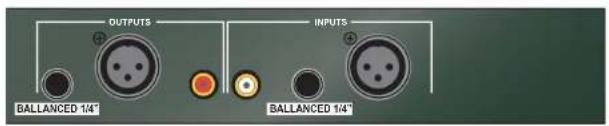
OUTPUT: Balanced XLR and balanced 1/4" and RCA jacks for connection to a mixing board, power amplifier or recording device.
INPUT: Balanced XLR and balanced 1/4" and RCA jacks for connection to the output of a mixing board, instrument, or other device with the signal to be processed.
CONNECTION
Turn off all equipment before making any connections. Mount the RPQ160 in a properly grounded rack, and make sure the rack is properly ventilated. Ambient temperatures should not exceed 113 degrees F (45 degrees C) when the equipment is in use. Connect your RPQ160 using XLR, RCA or 1/4" connectors.
Connect the AC power cord to a properly grounded AC outlet. Route the AC power cord away from audio lines.
FRONT PANEL


LOW SHELF: High Pass Filter control; adjusts the amount of low frequency rolloff from 500 Hz down to 16Hz for the entire output of the RPQ160. HIGH SHELF: Low Pass Filter control; adjusts the amount of high frequency rolloff from 1 kHz up to 20 kHz for the entire output of the RPQ160.
NOTE: THERE IS NO BYPASS SWITCH FOR THE LOW OR HIGH SHELF FILTERS - SIMPLY TURN THE LOW SHELF COMPLETELY COUNTERCLOCKWISE, AND THE HIGH SHELF COMPLETELY CLOCKWISE TO BYPASS THESE CIRCUITS.
LEVEL: Adjusts the overall signal level of the RPQ160.
NOTE: The following three descriptions are identical for all four bands of equalization.
FREQUENCY: Selects the frequency to be boost or cut. The band frequency ranges are listed below:
Band 1: 70 Hz to 1.5 kHz
Band 2: 150 Hz to 3 kHz
Band 3: 300 Hz to 10 kHz
Band 4: 600 Hz to 20 kHz
WIDTH: (Q): Varies the shape or width of the equalization being boost or cut from .3 to 3 octaves wide.
LEVEL: Boosts or cuts the signal of the indicated band from -15 to +15 dB. Power Switch: Applies power to the RPQ160 when the unit is connected to a properly grounded ac outlet. The Power LED will light when the RPQ160 is on.
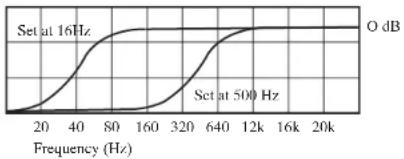
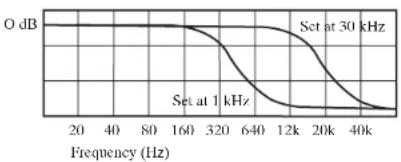
The two shelving filters are designed to roll off the frequency response of the Signal; the Low Shelf cuts the frequencies 3 dB at the control's indicated setting and rolls off below, and the High Shelf cuts the frequencies 3 dB at the indicated setting and rolls of above. The Low Shelf Sweep Diagram shows the response curve of the Low Self filter at its minimum and maximum setting.
line
| Frequency (Hz) | Set at 16Hz (O dB) | Set at 500Hz (O dB) | | -------------- | ------------------ | ------------------- | | 20 | 0 | 0 | | 40 | ~1.5 | ~0.5 | | 80 | ~3.5 | ~1.5 | | 160 | ~5.5 | ~3.5 | | 320 | ~7.5 | ~6.5 | | 640 | ~9.5 | ~9.5 | | 12k | ~10.5 | ~10.5 | | 16k | ~10.5 | ~10.5 | | 20k | ~10.5 | ~10.5 |LOW SHELF SWEEP DIAGRAM
The High Shelf Sweep Diagram shows the response curve of the High Self filter at its minimum and maximum setting.
line
| Frequency (Hz) | O dB | |---|---| | 20 | | | 40 | | | 80 | | | 160 | | | 320 | | | 640 | | | 12k | | | 20k | | | 40k | |HIGH SHELF SWEEP DIAGRAM
Please note that when the Low Shelf is set fully counterclockwise (16 Hz), the filter is essentially bypassed. Similarly, when the High Self control is set fully clockwise (30 kHz), that filter is essentially bypassed.
The Level control has a detente at the center (0 dB) position. if the Clip LED is lighting, the Level control may be turned counterclockwise to reduce the gain of the RPQ160, thereby reducing the clipping. If a weak signal is present, the Level control may be turned up (clockwise) to increase the gain. To achieve the maximum signal to noise ratio, the Level should be set 3 dB below the clipping level. This is done by adjusting the Level control with a normal signal present until the Clip LED lights, then turning the Level down to just below the point when the LED goes out.
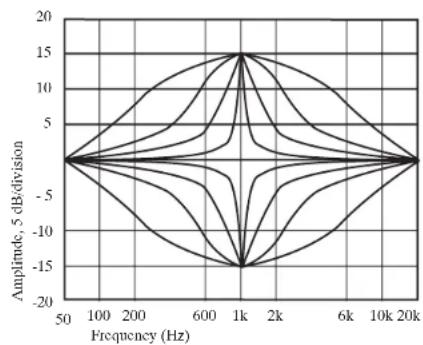
Shown below is the typical symmetrical response curve of a swept parametric band filter with the Frequency control set at 1 kHz, the Level set at +15 and -15 dB, and the Octave control set at .3, .5, 1, and 3. These curves remain consistent over the frequency spectrum, they simply shift to whatever frequency setting is indicated by the Frequency control.
The shape is most narrow when the OCT control is set at .3, and is widest at the 3 setting.
line
| Frequency (Hz) | Amplitude, 5 dB/division | | -------------- | ------------------------ | | 50 | 0 | | 100 | 0 | | 200 | 0 | | 600 | 0 | | 1k | 15 | | 2k | 0 | | 6k | 0 | | 10k | 0 | | 20k | 0 |APPLICATIONS
The RPQ160's precise equalization has many applications including school or church gymnasiums, home or professional recording studios, live sound, or musical instruments.
When coupled with a spectrum analyzer, the RPQ160 can match exactly the properties of typical acoustic resonances and reflections, and make immediate improvements to any installed system's amplitude and phase response.
Live applications include equalizing trouble spots where a mix may be muddy, too harsh, flat, and even eliminate feedback precisely without affecting the flavor of the overall sound.
Recording studios benefit from the RPQ160's precise equalization in notching out trouble frequencies that need to be removed, or by re-equalizing a final mix


Brand : ROLLS
Model : Parametric Equilizer RPQ160b
Category : Blender