
StageBug SB-6 - Audiozubehör Radial Engineering - Kostenlose Bedienungsanleitung
Finden Sie kostenlos die Bedienungsanleitung des Geräts StageBug SB-6 Radial Engineering als PDF.


| Produkttyp | Passiver Stereo-Line-Isolator |
| Marke | Radial Engineering |
| Modell | StageBug SB-6 |
| Kategorie | Audio-Isolator / DI-Box |
| Kanäle | 2 unabhängige Kanäle (Dual Mono oder Stereo) |
| Eingänge | 2x 1/4" Klinke (TS/TRS), kompatibel mit RCA-Adapter und 3,5-mm-Stereo-Y-Kabel |
| Ausgänge | 2x 1/4" Klinke (TS/TRS) |
| Signalart | Automatische Erkennung und Umschaltung zwischen unsymmetrisch und symmetrisch |
| Stromversorgung | Passiv, keine externe Stromversorgung erforderlich |
| Dämpfung | -15 dB Pad-Schalter (pro Kanal) |
| Masseabhebung | Ground-Lift-Schalter (pro Kanal) |
| Phasenumkehr | 180° Polaritätsumkehr für linken Kanal |
| Gehäusematerial | Robustes Metallgehäuse |
| Garantie | 3 Jahre übertragbare Garantie |
| Anwendungen | Beseitigung von Brummschleifen, Interface zwischen unsymmetrischen und symmetrischen Geräten |
Häufig gestellte Fragen - StageBug SB-6 Radial Engineering
Benutzerfragen zu StageBug SB-6 Radial Engineering
0 Frage zu diesem Gerät. Beantworten Sie die, die Sie kennen, oder stellen Sie Ihre eigene.
Eine neue Frage zu diesem Gerät stellen
Laden Sie die Anleitung für Ihr Audiozubehör kostenlos im PDF-Format! Finden Sie Ihr Handbuch StageBug SB-6 - Radial Engineering und nehmen Sie Ihr elektronisches Gerät wieder in die Hand. Auf dieser Seite sind alle Dokumente veröffentlicht, die für die Verwendung Ihres Geräts notwendig sind. StageBug SB-6 von der Marke Radial Engineering.
BEDIENUNGSANLEITUNG StageBug SB-6 Radial Engineering
StageBug™ SB-6 Stereo Line Isolator
USER GUIDE
Thank you for purchasing your very own StageBug SB-6 signal line isolator! Although the SB-6 is easy to use, please take a minute to read this short manual. It will give you insight on how to get the most out of your Radial product. If you have any questions, feel free to drop us a note at info@radialeng.com and we will do our best to reply in short order.
The SB-6 is a passive audio isolator designed to be inserted into the signal chain to block hum and buzz caused by ground loops. The SB-6 accepts both unbalanced or balanced signals and is equally suitable for electric guitar, stereo keyboard, consumer electronics and professional line-level devices. The two channels operate independently for dual mono or stereo and since the circuit is passive, no power is required. Whether you are connecting an unbalanced or balanced signal, the SB-6 will automatically convert the signal depending on the type of cable and connector you are using. You simply plug in and start enjoying!
MAKING CONNECTIONS
As with any audio system, it is good practice to turn volume levels down or audio systems off to prevent plug-in transients from damaging more sensitive components such as loudspeakers and headphones. Begin by setting all four SB-6 switches to their outward positions.
Depending on the type of cable you use, the SB6 will automatically enter into either a balanced or unbalanced mode.
- When interfacing musical instruments such as guitars, keyboards and other unbalanced signals, connect to-and-from the SB-6 using standard 14 " TS (tip/sleeve) cables.
- When connecting consumer audio devices such as CD or DVD players, connect to-and-from the SB-6 using an RCA to 14 adaptor cable.
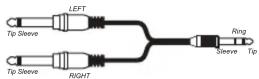
- If using the headphone output from a laptop smart phone or tablet, connect to-and-from the SB-6 using an a stereo 'Y' cable with 3.5 mini TRS jack at one end and left/right 1/4 jacks at the other.
- Balanced signals usually come in the form of XLR or 14 TRS connectors. If you wish to retain the balanced format, the SB-6 requires 14 TRS input and output connectors.




USING THE -15dB PAD SWITCH
A pad is essentially a resistive circuit that reduces the sensitivity at the input to enable more powerful signals to be used without causing the transformers to saturate and add distortion. If you hear distortion, try depressing the PAD switch. This will reduce the sensitivity by -15 dB.
USING THE GROUND LIFT
The SB-6 is equipped with a ground lift switch that disconnects the audio signal ground between the input and output for full isolation. If you encounter noise, try pushing the left/right ground lift switches to the inward position.
USING THE LEFT PHASE REVERSE
The SB-6 is equipped with a 180^ polarity reverse switch that inverts the phase of the LEFT channel when depressed. You can use it to phase align a stereo signal or prevent phase cancellation when driving two guitar amps.
CONNECTING THE UNBALANCED OUTPUT FROM A DJ MIXER TO A CONSOLE
Unbalanced DJ mixers can often introduce hum and buzz when connected to a balanced PA system due to ground loops and long cables. To eliminate the noise connect the output of the DJ mixer to the SB-6 with unbalanced cables. To run long cables to the PA system connect the output of the SB-6 to the PA system with balanced cables up to 100 meters (300').
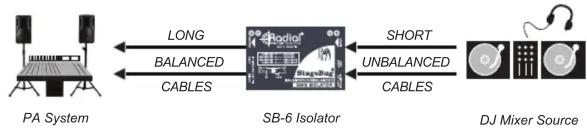
flowchart
graph LR
    A["PA System"] -->|LONG BALANCED CABLES| B["SB-6 Isolator"]
    B -->|SHORT UNBALANCED CABLES| C["DJ Mixer Source"]
USING THE SB-6 TO ISOLATE BALANCED LINES
Often when interfacing equipment that is distanced far apart, such as a mixer and digital audio recorder, the devices will derive their AC power from different legs on the AC distribution box. This can often lead to ground loops and excessive system noise. Use the SB-6 to isolate the two devices by inserting it in between with balanced cables. The SB-6 introduces a magnetic bridge that blocks stray DC current (noise) and isolates the ground loop.

flowchart
graph LR
    A["Recorder"] -->|BALANCED| B["SB-6 Isolator"]
    B -->|BALANCED| C["PA Mixing Console"]
SENDING A BALANCED LINE OUTPUT TO A LAPTOP
A common challenge is interfacing a professional balanced audio device with an unbalanced device like a laptop or hand-held recorder. These kind of consumer devices are easily overloaded and running long unbalanced cables to them can introduce noise. To convert the signal use balanced cables to connect the output of the mixer to the SB-6 and unbalanced cables to connect the input of the digital recorder. To deliver a safe signal level to your unbalanced device depress the -15dB PAD switch. The PAD reduces the input sensitivity and prevents overload.

flowchart
graph LR
    A["Recorder"] -->|SHORT UNBALANCED CABLES| B["SB-6 Isolator"]
    B -->|LONG BALANCED CABLES| C["PA Mixing Console"]
USING THE SB-6 TO ISOLATE HI-Z GUITAR SIGNALS
Connecting two guitar amps to a stereo effect pedal often causes severe hum and buzz caused by ground loops. To eliminate the noise insert the SB-6 after the stereo effect pedal with standard 1/4" guitar cables. The SB-6 will isolate the ground loop and eliminate the problem.

flowchart
graph LR
    A["Amp-1"] -->|ISOLATED| B["High-Z Stereo Effect PedalsSB-6 Isolator"]
    C["Amp-2"] -->|UNBALANCED| B
    B --> D["180° PHASE"]
To view the 3-year transferable warranty details and product specifications please visit www.radialeng.com


- StageBug™ SB-6 Stereo Line Isolator
- USER GUIDE
- MAKING CONNECTIONS
- USING THE -15dB PAD SWITCH
- USING THE GROUND LIFT
- USING THE LEFT PHASE REVERSE
- CONNECTING THE UNBALANCED OUTPUT FROM A DJ MIXER TO A CONSOLE
- USING THE SB-6 TO ISOLATE BALANCED LINES
- SENDING A BALANCED LINE OUTPUT TO A LAPTOP
- USING THE SB-6 TO ISOLATE HI-Z GUITAR SIGNALS
Marke : Radial Engineering
Modell : StageBug SB-6
Kategorie : Audiozubehör