
StageBug SB-5 - Boîtier audio professionnel Radial Engineering - Kostenlose Bedienungsanleitung
Finden Sie kostenlos die Bedienungsanleitung des Geräts StageBug SB-5 Radial Engineering als PDF.


| Produkttyp | Stereo-DI-Box (passiv) |
| Hersteller | Radial Engineering |
| Modell | StageBug SB-5 |
| Eingang | 3,5-mm-Klinkenstecker (Mini-TRS) |
| Ausgänge | 2x 6,3-mm-Klinke (TRS) symmetrisch |
| Übertrager | Zwei maßgefertigte Trenntransformatoren |
| Ground Lift | Schalter zur Unterbrechung der Masseverbindung |
| Pad (Dämpfung) | -15 dB schaltbar |
| Auto-Merge | Summiert Stereo auf Mono bei Verwendung eines XLR-Kabels |
| Stromversorgung | Passiv, keine Batterie oder Netzteil erforderlich |
| Kabellänge | Integriertes Kabel, ca. 1,5 m |
| Zubehör | Sidewinder-Kabelaufwicklung, optionaler Tischmontagebügel (L-Bügel) |
| Garantie | 3 Jahre übertragbar |
| Einsatzbereich | Laptop, Tablet, Smartphone, Musikplayer |
| Kompatibilität | Mischtonsysteme mit Mikrofoneingängen |
Häufig gestellte Fragen - StageBug SB-5 Radial Engineering
Benutzerfragen zu StageBug SB-5 Radial Engineering
0 Frage zu diesem Gerät. Beantworten Sie die, die Sie kennen, oder stellen Sie Ihre eigene.
Eine neue Frage zu diesem Gerät stellen
Laden Sie die Anleitung für Ihr Boîtier audio professionnel kostenlos im PDF-Format! Finden Sie Ihr Handbuch StageBug SB-5 - Radial Engineering und nehmen Sie Ihr elektronisches Gerät wieder in die Hand. Auf dieser Seite sind alle Dokumente veröffentlicht, die für die Verwendung Ihres Geräts notwendig sind. StageBug SB-5 von der Marke Radial Engineering.
BEDIENUNGSANLEITUNG StageBug SB-5 Radial Engineering
StageBug™ SB-5 stereo direct box
USER GUIDE
Thank you for purchasing your very own StageBug SB-5 Laptop direct box! The SB-5 is a super compact DI that is able to comfortably fit inside your tool kit for quick and easy deployment in just about any situation. Although the SB-5 Laptop is designed to be plug & play easy to use, please take a minute to read this short manual. It will give you insight on how to best use your Radial direct box and get the most out of it.
OVERVIEW
The StageBug SB-5 is a stereo direct box that has been specifically designed to interface your laptop, tablet, smart phone or music player with professional audio systems. It features an integral cable that is terminated with a standard mini TRS connector along with a cable cleat for easy storage. Using the SB-5 reduces noise, enables long cable runs and improves the sound quality by properly matching the impedance and optimizing the signal level of your mobile device to work with a PA system. The cool thing about the SB-5 is that it does not require any power whatsoever to make it work. It is passive. The magic comes from two custom made isolation transformers that do all the work. You simply plug in and hit play!
CONNECTING TO THE PA SYSTEM
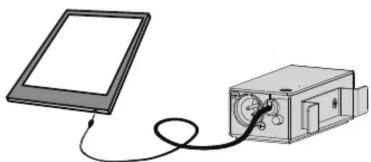
Before making connections, always turn audio levels down or the PA off. This will help eliminate turn-on transients that can damage more sensitive components like tweeters. Unwrap the SB-5's cable from the Sidewinder cable cleat and connect the 3.5mm (1/8") mini TRS connector to the stereo output on your mobile device. For best results ensure the volume level of the device is turned up so that you get maximum signal to noise.
natural_image
Illustration of a flatboard connected to a small electronic device with a coiled cable (no text or symbols)For stereo operation, connect the left and right 14 " TRS balanced outputs from the SB-5 to two mic inputs on the PA system. In most cases you will find that using a pair of 14 " TRS to XLR-M adaptor cables to be the best choice. The SB-5's output is mic level and therefore should be connected to a microphone input. Set the two PAN controls on the mixer hard left and hard right for full stereo performance. Adjust the level to suit.

In many instances, a mono or single channel audio works perfectly well. An example is in a venue where the PA system is feeding a wide audience. Stereo signals are often impossible to enjoy unless seated in the center of the room. The SB-5 is equipped with an auto-merge function that sums the left and right inputs to mono and delivers the signal at the XLR. A standard XLR to XLR mic cable is of course used in this case.

flowchart
graph LR
    A["Laptop"] -->|Mono out| B["StageBug"]
    C["Stereo in"] -->|Mono out| B
    B --> D["Up to 100m (300)"]
    B --> E["5"]
    B --> F["2"]
    B --> G["5"]
    B --> H["5"]
    B --> I["5"]
    B --> J["5"]
    B --> K["5"]
    B --> L["5"]
    B --> M["5"]
    B --> N["5"]
    B --> O["5"]
    B --> P["5"]
    B --> Q["5"]
    B --> R["5"]
    B --> S["5"]
    B --> T["5"]
    B --> U["5"]
    B --> V["5"]
    B --> W["5"]
    B --> X["5"]
    B --> Y["5"]
USING THE GROUND LIFT
Sometimes when connecting your device to the PA via the SB-5 direct box you can encounter noise like hum and buzz caused by ground loops. Computers are particularly troublesome. If you encounter noise after connecting try using the ground LIFT switch. The SB-5 outputs are transformer isolated and pushing in the LIFT switch disconnects the audio ground between the SB-5 input and the PA system. This breaks the ground loop and eliminates the ground loop noise.
USING THE PAD TO PREVENT DISTORTION
High output devices like laptops and MP3 players can sometimes overload certain pieces of equipment and cause distortion. The SB-5 is equipped with a -15dB PAD that can be inserted to reduce the input sensitivity and reduce distortion. If you encounter distortion, try reducing the source output level. If this does not solve the problem, simply depress the pad. It is important to note that the sound quality from a mobile device will often deteriorate as the battery runs low. To get the best audio from your mobile devices ensure the batteries are fully charged or powered with an AC adaptor.
DESK MOUNT BRACKET
An optional desk-mount L-bracket is available for permanent installations where the SB-5 may need to be affixed to a desk top, podium, AV cart or inside a 19" rack. Simply remove the SB-5's cable cleat and attach the L-bracket. The symmetrical design can be used to flush-mount with the top surface or back-mounted if need be.

To view the 3-year transferable warranty details and product specifications please visit www.radialeng.com



Marke : Radial Engineering
Modell : StageBug SB-5
Kategorie : Boîtier audio professionnel