
StageBug SB5W - Amplificateur audio mural Radial Engineering - Kostenlose Bedienungsanleitung
Finden Sie kostenlos die Bedienungsanleitung des Geräts StageBug SB5W Radial Engineering als PDF.


| Produkttyp | Stereo-DI-Box zur Wandmontage |
| Marke | Radial Engineering |
| Modell | StageBug SB5W |
| Frequenzgang | 20 Hz – 18 kHz (±0,5 dB) |
| Klirrfaktor (THD) | < 0,01 % (20 Hz – 20 kHz) |
| Eingänge | 2× RCA (Cinch), 1× 3,5-mm-Klinke (TRS) |
| Ausgänge | 2× symmetrische Mikrofonpegel über Schraubklemmen |
| Eingangsimpedanz | Hochohmig, unsymmetrisch, -10 dB |
| Ausgangsimpedanz | 600 Ohm symmetrisch (AES-Standard) |
| Stromversorgung | Passiv, keine externe Stromquelle erforderlich |
| Gehäuse | Stahlgehäuse mit Pulverbeschichtung, schützt vor elektromagnetischen Störungen |
| Rahmen | 14-Gauge-Stahl-L-Rahmen, pulverbeschichtet |
| Montage | Passend für Standard-Einzelunterputzdose (Single-Gang) |
| Bedienelemente | Lautstärkeregler (LEVEL), Mono-Schalter (MONO), Ground-Lift-Schalter (LIFT) |
| Zugentlastung | Kabelbinder-Halteösen im Stahlrahmen |
| Kabellänge (empfohlen) | Bis zu 8 Zoll (20 cm) Abisolierung für einfache Installation |
| Reinigung | Mit einem trockenen, fusselfreien Tuch abwischen; keine Lösungsmittel verwenden |
| Sicherheit | Nur für Niederspannung; nicht in derselben Dose wie Hochspannungsgeräte installieren; California Proposition 65 Warnung beachten |
| Garantie | 3 Jahre übertragbare Garantie auf Material- und Verarbeitungsfehler |
Häufig gestellte Fragen - StageBug SB5W Radial Engineering
Benutzerfragen zu StageBug SB5W Radial Engineering
0 Frage zu diesem Gerät. Beantworten Sie die, die Sie kennen, oder stellen Sie Ihre eigene.
Eine neue Frage zu diesem Gerät stellen
Laden Sie die Anleitung für Ihr Amplificateur audio mural kostenlos im PDF-Format! Finden Sie Ihr Handbuch StageBug SB5W - Radial Engineering und nehmen Sie Ihr elektronisches Gerät wieder in die Hand. Auf dieser Seite sind alle Dokumente veröffentlicht, die für die Verwendung Ihres Geräts notwendig sind. StageBug SB5W von der Marke Radial Engineering.
BEDIENUNGSANLEITUNG StageBug SB5W Radial Engineering
FEATURES


- LEVEL: Let's you adjust the volume level of your source device.
- MONO: Mixes the left and right inputs together and outputs a mono signal to the PA system.
- LIFT: Disconnects the audio ground of both channel outputs to eliminate hum and buzz created by ground loops.
- 3.5MM INPUT: Stereo mini-phone jack lets you connect mobile devices such as laptop computers, MP3 players or tablets. Plugging in here will deactivate the RCA connectors.
- RCA INPUT: A stereo pair of RCA inputs lets you connect a wide range of consumer electronics such as CD/DVD players and digital players/recorders.
- STEEL ENCLOSURE COVER: Protects the audio circuit from electro-magnetic and radio interference.
- HEAVY DUTY FRAME: The PCB and cover mount to a ridgid 14-guage steel L-frame that's powder-coated for long life.
- OUTPUT TERMINALS: Balanced left and right mic-level outputs connections are made via two screw-down terminals.
- TIE-WRAP HOLD-DOWNS: Slots cut in the steel frame for tie-wraps (included) help secure the cable and provide strain relief for the connectors.

True to the Music
RADIAL SB5W WALL MOUNT DIRECT BOX SPECIFICATIONS
| Frequency response | 20Hz to 18kHz +/- .5dB |
| Total harmonic distortion | 0.01% THD 20Hz to 20kHz |
| Stereo input | Unbalanced high-Z -10dB |
| Input connections | RCA and 3.5mm TRS |
| Stereo output | AES standard balanced 600-Ohm, mic-level, pin-2 hot |
| Output connection | Screw terminals |
| Input level | Variable from infinity |
| Power requirement | None, completely passive |
| Mounting | Fits single gang electrical junction box |
To meet the requirements of California Proposition 65, it is our responsibility to inform you of the following: WARNING: This product contains chemicals known to the State of California to cause cancer, birth defects or other reproductive harm. Please take proper care when handling and consult local government regulations before discarding.
RADIAL ENGINEERING 3 YEAR
TRANSFERABLE LIMITED WARRANTY
RADIAL ENGINEERING LTD. ("Radial") warrants this product to be free from defects in material and workmanship and will remedy any such defects free of charge according to the terms of this warranty. Radial will repair or replace (at its option) any defective component(s) of this product (excluding finish and wear and tear on components under normal use) for a period of three (3) years from the original date of purchase. In the event that a particular product is no longer available, Radial reserves the right to replace the product with a similar product of equal or greater value. In the unlikely event that a defect is uncovered, please call 604-942-1001 or email service@radialeng.com to obtain a RA number (Return Authorization number) before the 3 year warranty period expires. The product must be returned prepaid in the original shipping container (or equivalent) to Radial or to an authorized Radial repair center and you must assume the risk of loss or damage. A copy of the original invoice showing date of purchase and the dealer name must accompany any request for work to be performed under this limited and transferable warranty. This warranty shall not apply if the product has been damaged due to abuse, misuse, misapplication, accident or as a result of service or modification by any other than an authorized Radial repair center.
THERE ARE NO EXPRESSED WARRANTIES OTHER THAN THOSE ON THE FACE HEREOF AND DESCRIBED ABOVE. NO WARRANTIES WHETHER EXPRESSED OR IMPLIED, INCLUDING BUT NOT LIMITED TO, ANY IMPLIED WARRANTIES OF MERCHANTABILITY OR FITNESS FOR A PARTICULAR PURPOSE SHALL EXTEND BEYOND THE RESPECTIVE WARRANTY PERIOD DESCRIBED ABOVE OF THREE YEARS. RADIAL SHALL NOT BE RESPONSIBLE OR LIABLE FOR ANY SPECIAL, INCIDENTAL OR CONSEQUENTIAL DAMAGES OR LOSS ARISING FROM THE USE OF THIS PRODUCT. THIS WARRANTY GIVES YOU SPECIFIC LEGAL RIGHTS, AND YOU MAY ALSO HAVE OTHER RIGHTS, WHICH MAY VARY DEPENDING ON WHERE YOU LIVE AND WHERE THE PRODUCT WAS PURCHASED.
Radial® engineering
True to the Music
SB5W
Wall Mount
Direct Box

USER GUIDE
Thank you for purchasing the Radial SB5W stereo direct box. This innovative direct box is designed to fit a standard single-gang electrical wall plate and provides the A/V integrator with an elegant means of connecting a stereo audio source such as a laptop computer, CD player or tablet to a professional audio system. Although the SBSW is designed to be plug & play easy to use, please take a minute to read this short manual. It will give you insight on how to best use the Radial SB5W direct box and get the most out of it.
INSTALLATION
The SB5W fits a standard single gang electrical wall plate and should be installed in accordance with the electrical codes in your region. It is the responsibility of the installing contractor to comply with electrical codes and regulations with regards to installing and terminating the SB5W. The SB5W is classified as a low voltage device and should never be installed in the same electrical junction box alongside high-voltage class-1 electrical power devices. Please consult your local electrical authority before installing.
The SB5W is completely passive and no power source is required. Signal connections are made using standard twisted pair audio cable. This usually comes in a shielded format with two insulated conductors (18AWG to 26AWG) and a ground conductor often called the drain wire. The cable itself should comply with all electrical codes as regulated in your area.

Shielded twisted pair audio cable with drain wire.
Run two twisted pair cables from the PA mixer/amplifier to the location where the SB5W is to be installed. Mark one of the cables with tape or magic marker. This will help to indicate one cable as the left channel. Pull about 20cm (8") of cable through the electrical junction box to allow easy manipulation while installing. Strip back the cable insulation by 1cm ( 12 ) and tin the bare wire ends with solder to prevent corrosion.
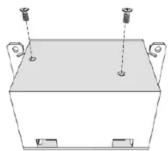
Next, remove the protective metal cover from the SB5W using a Phillips screwdriver and locate the audio output terminals on either side and labeled 'LEFT' and 'RIGHT'. The output terminals are balanced and have three screw-down connections, one labeled negative (-); another labeled ground (G); and a third labeled positive (+).
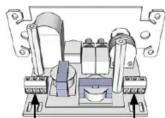
Left output Right output
CONNECTIONS
Starting with the left channel terminal, push the BLACK wire into the negative connection and screw down tight using a small slotted screwdriver. Insert the other color wire (sometimes white or red) into the positive connection and screw it down tight. The drain wire or shield is inserted into the ground connection and tightened. Repeat for the right channel.
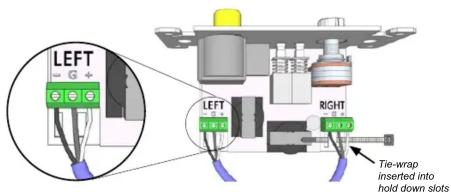
The included tie-wraps are used with hold-down slots cut into the frame to secure the twisted pair cable and provide strain relief. Once secure, replace the cover and fit into the electrical junction box.


You will need to terminate the cables at the mixer/amplifier using the same polarity. The following diagrams show balanced terminations for standard XLR and 14 " TRS phone connectors.

flowchart
graph TD
    A["+ G"] --> B["SHIELD/DRAIN"]
    B --> C["RING (C)"]
    C --> D["SLEEVE (G)"]
    E["WHITE (+) BLACK (-)"] --> F["SHIELD/DRAIN"]
    F --> G["PIN 2 (+)"]
    H["WHITE (+) BLACK (-)"] --> I["SHIELD/DRAIN"]
    I --> J["PIN 3 (-)"]
    style A fill:#f9f,stroke:#333
    style E fill:#f9f,stroke:#333
    style H fill:#f9f,stroke:#333
    style B fill:#ccf,stroke:#333
    style F fill:#ccf,stroke:#333
    style I fill:#ccf,stroke:#333
    style G fill:#ccf,stroke:#333
    style J fill:#ccf,stroke:#333
The SB5W's output is mic level and therefore should be connected to a microphone preamp input. At the mixer/amplifier, connect the left and right cables from the SB5W to two mic inputs on the PA mixer/amplifier system. If there is only one mic input available or if the PA system operates in mono you can connect the left channel and set the SB5W to mono mode by depressing the MONO switch on the front panel.
USING THE SB5W DIRECT BOX
Before connecting a device to the SB5W, turn the audio level control fully counterclockwise to the off position. This will help avoid loud transients that can damage more sensitive components like tweeters and startle your audience.

The SB5W features stereo RCA and 3.5mm TRS input jacks to connect an unbalanced audio source. The RCA jack allows consumer electronics like CD/DVD players to connect to the PA system while the 3.5mm jack works well with mobile devices like smart phones and tablets.

After connecting your device, start playback and slowly turn up the level control on the SB5W to a comfortable listening volume. Be aware your device may also have its own volume control that you may need to adjust. It is very difficult to overload the SB5W, however it is possible to overload the input on the mixer/amplifier. If you hear distortion, turn the level control down or adjust the volume on your device.
USING THE GROUND LIFT
Sometimes when connecting your device to the PA system via the SBSW direct box you can encounter noise like hum and buzz caused by ground loops. If you encounter noise after connecting depress the ground LIFT switch on the front panel. This disconnects the signal ground between the source device and the PA system eliminating ground loop noise. The LIFT switch is recessed to prevent tampering. Use a small screwdriver to access the switch.
USING THE MONO SUM
The MONO switch on the front panel sums the left and right inputs together. When this switch is fully depressed the SB5W will output the same mono signal at both screw terminal outputs. This can be used to connect a stereo device like a CD/DVD player to a mono only sound system or when only one input at the mixer is available. The MONO switch is recessed to prevent tampering. Use a small screwdriver to access the switch.


Marke : Radial Engineering
Modell : StageBug SB5W
Kategorie : Amplificateur audio mural