
381320-14 - Auto-Kit PIONEER - Kostenlose Bedienungsanleitung
Finden Sie kostenlos die Bedienungsanleitung des Geräts 381320-14 PIONEER als PDF.


| Produkttyp | Autoradio / Kfz-Kit |
| Marke | Pioneer |
| Modell | 381320-14 |
| Abmessungen (ca.) | 18 cm x 5 cm x 18 cm (Einbaumaße) |
| Gewicht (ca.) | 0,5 kg |
| Stromversorgung | 12 V Gleichstrom (Fahrzeugbatterie) |
| Hauptfunktionen | AM/FM-Radio, USB-Wiedergabe, AUX-Eingang, Bluetooth (Freisprechen & Audiostreaming) |
| Audioausgangsleistung | 4 x 50 Watt (max.) |
| Kompatible Medien | USB-Speicher, Smartphones, MP3-Player |
| Display | LCD mit Hintergrundbeleuchtung |
| Bedienung | Tastenfeld, Drehregler, optional Fernbedienung |
| Sicherheitsmerkmale | Abnehmbares Frontpanel (Diebstahlschutz), Überhitzungsschutz |
| Reinigung und Pflege | Staubwischen mit trockenem Tuch; keine aggressiven Reinigungsmittel |
| Ersatzteile und Reparatur | Ersatzteile über Pioneer-Kundendienst oder autorisierte Händler |
| Allgemeine Informationen | Maximale Lautstärke beachten; Gehörschäden vermeiden |
Häufig gestellte Fragen - 381320-14 PIONEER
Benutzerfragen zu 381320-14 PIONEER
0 Frage zu diesem Gerät. Beantworten Sie die, die Sie kennen, oder stellen Sie Ihre eigene.
Eine neue Frage zu diesem Gerät stellen
Laden Sie die Anleitung für Ihr Auto-Kit kostenlos im PDF-Format! Finden Sie Ihr Handbuch 381320-14 - PIONEER und nehmen Sie Ihr elektronisches Gerät wieder in die Hand. Auf dieser Seite sind alle Dokumente veröffentlicht, die für die Verwendung Ihres Geräts notwendig sind. 381320-14 von der Marke PIONEER.
BEDIENUNGSANLEITUNG 381320-14 PIONEER
Pioneer
sound.vision.soul
Installation Manual
Double DIN Kit
Standard: 381320-14
Rubber-Touch: 391320-14
• Audi A3 2003 →
• Audi A3 2007 →
Compatible with these Pioneer double DIN devices
Pioneer Navigation

natural_image
Exploded view diagram of a device's internal components, including housing, connectors, and display panels (no text or labels visible)Double DIN Kit contents
• (1) Metal Frame
• (2) Facia Plate
Installation Kit (3)
Trim Frame (4)
All installation work must be performed by a qualified professional installer only.
The manufacturer / dealer is not liable for any kind of incidental or indirect damages.
Installation Manual Double DIN Kit 381320-14
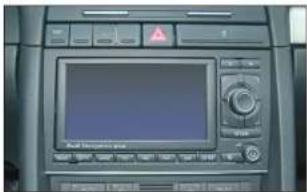
- „Audi Navigation Plus“ OEM head unit
natural_image
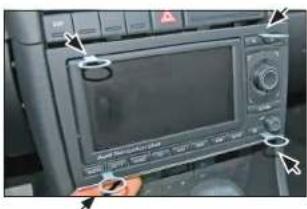
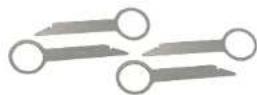
Close-up of a device control panel with a hand adjusting the screen (no visible text or symbols)- Use 4 radio release keys to dismount the OEM radio.

natural_image
Interior view of a car showing internal components and dashboard (no visible text or symbols)- Remove the OEM radio.

natural_image
Exterior view of a rectangular glass enclosure with internal compartments and a small scale on the side (no text or symbols visible)- Push the metal frame into the facia plate
Place it on the dashboard. Press the facia plate, until it snaps in.

natural_image
Interior view of a mechanical or electronic device with multiple ports and mounting holes (no visible text or symbols)Mount the metal brackets with the double DIN head unit

natural_image
Close-up of a metallic electronic component with multiple circular holes and internal measurement markings (no visible text or symbols)The position of the copper coloured holder can be adjusted to your needs for perfect fit. (see sample)

- Connect alle required circuit points and push the double DIN head unit until it snaps in.
Place the trim frame to finish installation.




Marke : PIONEER
Modell : 381320-14
Kategorie : Auto-Kit