
Metal Zone MT-2W - Nicht kategorisiert BOSS - Kostenlose Bedienungsanleitung
Finden Sie kostenlos die Bedienungsanleitung des Geräts Metal Zone MT-2W BOSS als PDF.


| Produkttyp | Effektpedal (Metall-Verzerrer) |
| Modell | Metal Zone MT-2W |
| Marke | BOSS |
| Serie | WAZA CRAFT |
| Abmessungen (B x T x H) | 73 x 129 x 59 mm |
| Gewicht (inkl. Batterie) | 440 g |
| Stromversorgung | 9-V-Alkalibatterie (6LR61) oder Kohle-Zink-Batterie (6F22) oder Netzadapter (BOSS PSA-Serie, optional) |
| Stromaufnahme | 35 mA |
| Batterielebensdauer (Alkali) | ca. 18 Stunden |
| Batterielebensdauer (Kohle-Zink) | ca. 7 Stunden |
| Eingangsimpedanz | 1 MΩ |
| Ausgangsimpedanz | 1 kΩ |
| Nennpegel (Eingang) | -20 dBu |
| Nennpegel (Ausgang) | -20 dBu |
| Empfohlene Lastimpedanz | 10 kΩ oder größer |
| Bedienelemente | LEVEL, DIST, EQUALIZER LOW/MID/MID FREQ/HIGH, Mode-Schalter, Fußschalter |
| Klänge | Original MT-2 (Normal) und fein abgestimmter Custom-Modus |
| Anschlüsse | 1/4"-Eingang (INPUT), 1/4"-Ausgang (OUTPUT), Gleichspannungsbuchse (DC IN) |
| Stromschalter | Eingangsbuchse (EIN bei Stecker, AUS bei gezogenem Stecker) |
| Zubehör (mitgeliefert) | 9-V-Alkalibatterie, Blatt mit Sicherheitshinweisen |
| Optionen | Netzadapter (BOSS PSA-Serie) |
| Entsorgung | Altgeräte und Batterien ordnungsgemäß entsorgen (siehe örtliche Vorschriften) |
Häufig gestellte Fragen - Metal Zone MT-2W BOSS
Benutzerfragen zu Metal Zone MT-2W BOSS
0 Frage zu diesem Gerät. Beantworten Sie die, die Sie kennen, oder stellen Sie Ihre eigene.
Eine neue Frage zu diesem Gerät stellen
Laden Sie die Anleitung für Ihr Nicht kategorisiert kostenlos im PDF-Format! Finden Sie Ihr Handbuch Metal Zone MT-2W - BOSS und nehmen Sie Ihr elektronisches Gerät wieder in die Hand. Auf dieser Seite sind alle Dokumente veröffentlicht, die für die Verwendung Ihres Geräts notwendig sind. Metal Zone MT-2W von der Marke BOSS.
BEDIENUNGSANLEITUNG Metal Zone MT-2W BOSS
Before using this unit, carefully read the sections entitled: "USING THE UNIT SAFELY" and "IMPORTANT NOTES" (supplied on a separate sheet). After reading, keep the document(s) where it will be available for immediate reference.
Main Features
- This is a WAZA CRAFT series effect pedal crafted with a high-quality analog original circuit design.
- This unit produces a wide range of harmonically rich and powerful high-gain distortion sounds.
This unit produced a trade range of maximically wide and powerful high-gain distortion solution. This unit also includes a Custom setting providing an even broader range of dynamics and response.
Panel Descriptions
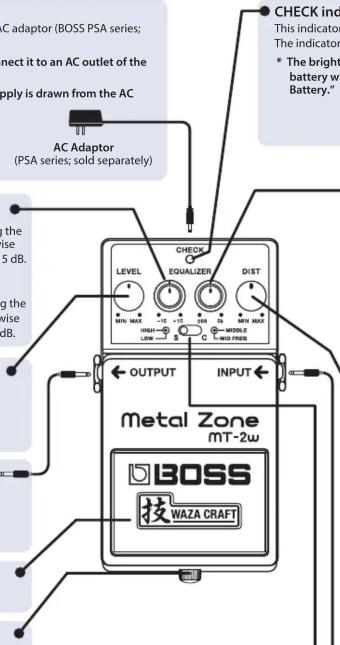
DC IN jack
In addition to 9-volt battery operation, this unit can also operate on a 9-volt AC adaptor (BOSS PSA series; sold separately).
* Use only the specified AC adaptor (PSA series; sold separately), and connect it to an AC outlet of the correct voltage.
* If the AC adaptor is connected while a battery is installed, the power supply is drawn from the AC adaptor.

(PSA series; sold separately)
EQUALIZER LOW knob
This knob controls the tone of the effect sound at lower frequencies. Rotating the knob clockwise boosts the lower frequencies, while rotating it counterclockwise cuts the lower frequencies. The lower frequencies have a variable range of ±15 dB.
EQUALIZER HIGH knob

This knob controls the tone of the effect sound at higher frequencies. Rotating the knob clockwise boosts the higher frequencies, while rotating it counterclockwise cuts the higher frequencies. Higher frequencies have a variable range of ±15 dB.
LEVEL knob
This knob adjusts the volume of the effect sound.
* No sound will be heard when this knob is rotated completely counterclockwise.
OUTPUT jack
Use this 1/4" output jack to connect to the input of your guitar amplifier or the input of additional effect unit.

Guitar Amplifier
Pedal switch
This switch turns the effects ON/OFF.
Thumbscrew
When this screw is loosened, the pedal will open, allowing you to change the battery.
* For instructions on changing the battery, refer to "Changing the Battery."
ator
CHECK indicator
This indicator shows whether an effect is ON/OFF, and doubles as the Battery Check indicator. The indicator lights when an effect is ON.
* The brightness of the CHECK indicator (LED) will dim as the battery lowers. Replace the battery when the LED is dim or does not light. For instructions, refer to “Changing the Battery.”
EQUALIZER MID FREQ knob

This knob adjust the frequency of the Middle knobs gain. Rotating the knob clockwise increases the frequency center point. At Max the frequency center is 5 kHz. Rotating the knob counterclockwise decreases the frequency center point. At Minimum the frequency center is 200Hz .
EQUALIZER MIDDLE knob

This knob boosts or cuts the frequency you set with the EQUALIZER MID FREQ knob. Rotating the knob clockwise boosts the level of the middle frequencies, while rotating it counterclockwise cuts the level of the middle frequencies.
* When the EQUALIZER MIDDLE knob is set to the center position, the EQUALIZER MID FREQ knob does not affect the sound.
DIST knob
Rotating the knob clockwise increases the gain and distortion effect.
* If you set this knob too high, the noise will increase and oscillation may occur.
INPUT jack
This jack accepts input signals (coming from a guitar, some other musical

instrument, or another effects unit).
The INPUT jack doubles as the power switch. Power to the unit is turned on when you plug into the INPUT jack; the power is turned off when the cable is unplugged. To prevent unnecessary battery consumption be sure to disconnect the plug from the INPUT jack when not using the effects unit.
- Mode switch
Switches the sound variation.

S (Standard)

C (Custom)
Reproduces the original MT-2 sound by a newly crafted all analog circuit.
Produces a custom sound which is fine-tuned for broader range of dynamics and response.
Precautions When Connecting
- To prevent malfunction and equipment failure, always turn down the volume, and turn off all the units before making any connections.
- Once the connections have been completed, turn on power to your various devices in the order specified. By turning on devices in the wrong order, you risk causing malfunction and/or damage to speakers and other devices.
When powering up: Turn on the power to your guitar amp last. When powering down: Turn off the power to your guitar amp first. - Before turning the unit on/off, always be sure to turn the volume down. Even with the volume turned down, you might hear some sound when switching the unit on/off. However, this is normal and does not indicate a malfunction.
Use of Battery
- The life of the included battery may be limited as its primary purpose was for testing during assembly.
- If you handle batteries improperly, you risk explosion and fluid leakage. Make sure that you carefully observe all of the items related to batteries that are listed in "USING THE UNIT SAFELY" and "IMPORTANT NOTES" (supplied on a separate sheet).
- When operating on battery power only, the unit's indicator will become dim when battery power gets too low. Replace the battery as soon as possible.
- Batteries should always be installed or replaced before connecting any other devices. This way, you can prevent malfunction and damage.
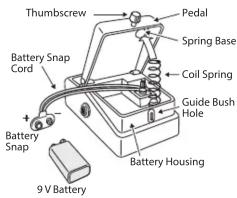
Changing the Battery
- Hold down the pedal and loosen the thumbscrew, then open the pedal upward.
* The pedal can be opened without detaching the thumbscrew completely.
-
Remove the old battery from the battery housing, and remove the snap cord connected to it.
-
Connect the snap cord to the new battery, and place the battery inside the battery housing.
* Be sure to carefully observe the battery's polarity (+ versus -).
- Slip the coil spring onto the spring base on the back of the pedal, and then close the pedal.
* Carefully avoid getting the snap cord caught in the pedal, coil spring, and battery housing. - Finally, insert the thumbscrew into the guide bush hole and fasten it securely.
Main Specifications
| Nominal Input Level -20 dBu | |
| Input Impedance 1 MΩ | |
| Nominal Output Level -20 dBu | |
| Output Impedance 1 kΩ | |
| Recommended Load Impedance | 10 kΩ or greater |
| Power Supply | Alkaline battery (9 V, 6LR61) orCarbon-zinc battery (9 V, 6F22)AC adaptor (sold separately) |
| Current Draw | 35 mA* Expected battery life under continuous use:Alkaline battery: Approx. 18 hoursCarbon-zinc battery: Approx. 7 hoursThese figures will vary depending on the actual conditions of use. |
| Dimensions | 73 (W) x 129 (D) x 59 (H) mm2-7/8 (W) x 5-1/8 (D) x 2-3/8 (H) inches |
| Weight (including battery) | 440 g1 lb |
| Accessories | Leaflet (“USING THE UNIT SAFELY,” “IMPORTANT NOTES,” and “Information”)Alkaline battery (9 V, 6LR61) |
| Option (sold separately) | AC adaptor (PSA-series) |
* 0 dBu = 0.775 Vrms
* This document explains the specifications of the product at the time that the document was issued. For the latest information, refer to the Roland website.
Trademarks
- Roland, BOSS, METAL ZONE, and 技WAZA CRAFT are either registered trademarks or trademarks of Roland Corporation in the United States and/or other countries.


- Main Features
- Panel Descriptions
- DC IN jack
- EQUALIZER LOW knob
- EQUALIZER HIGH knob
- LEVEL knob
- OUTPUT jack
- Pedal switch
- Thumbscrew
- ator
- CHECK indicator
- EQUALIZER MID FREQ knob
- EQUALIZER MIDDLE knob
- DIST knob
- INPUT jack
- - Mode switch
- Precautions When Connecting
- Use of Battery
- Changing the Battery
- Trademarks
Marke : BOSS
Modell : Metal Zone MT-2W
Kategorie : Nicht kategorisiert