
GKC-AD - Nicht kategorisiert BOSS - Kostenlose Bedienungsanleitung
Finden Sie kostenlos die Bedienungsanleitung des Geräts GKC-AD BOSS als PDF.


| Produkttyp | GK-Konverter |
| Marke | BOSS |
| Modell | GKC-AD |
| Abmessungen | 115,90 x 12,00 x 36,90 mm |
| Gewicht | 100 g (ohne Netzadapter) |
| Stromversorgung | Netzadapter (im Lieferumfang enthalten) |
| Stromaufnahme | 140 mA |
| Anschlüsse | GK IN, GK OUT, GUITAR IN, GUITAR OUT, DC IN, Erdungsklemme, USB (nur Programmupdate) |
| Anzeigen | POWER-Anzeige, GK CONNECT-Anzeige |
| Funktionen | Konvertiert GK-Signale, unterstützt geteilte Pickups, Gitarrensignal-Durchschleifung |
| Zubehör | Netzadapter, Bedienungsanleitung |
| Optionen (separat erhältlich) | GK-Kabel (z. B. GKC-10, GKC-15) |
| Sicherheitshinweise | Nur mitgelieferten Netzadapter verwenden, Erdungsklemme vorsichtig behandeln |
| Wartung und Reinigung | Mit weichem, trockenem Tuch reinigen; keine Lösungsmittel verwenden |
| Kompatible Geräte | Gitarren mit hexaphonischem Pickup (z. B. GK-3), GK-fähige Geräte |
Häufig gestellte Fragen - GKC-AD BOSS
Benutzerfragen zu GKC-AD BOSS
0 Frage zu diesem Gerät. Beantworten Sie die, die Sie kennen, oder stellen Sie Ihre eigene.
Eine neue Frage zu diesem Gerät stellen
Laden Sie die Anleitung für Ihr Nicht kategorisiert kostenlos im PDF-Format! Finden Sie Ihr Handbuch GKC-AD - BOSS und nehmen Sie Ihr elektronisches Gerät wieder in die Hand. Auf dieser Seite sind alle Dokumente veröffentlicht, die für die Verwendung Ihres Geräts notwendig sind. GKC-AD von der Marke BOSS.
BEDIENUNGSANLEITUNG GKC-AD BOSS
BOSS
GKC-DA
GK CONVERTER
GKC-AD
GK CONVERTER
Owner's Manual
English
© 2022 Roland Corporation
Before using this unit, carefully read "USING THE UNIT SAFELY" a document(s) where it will be available for immediate reference.
Panel Descriptions
GKC-DA
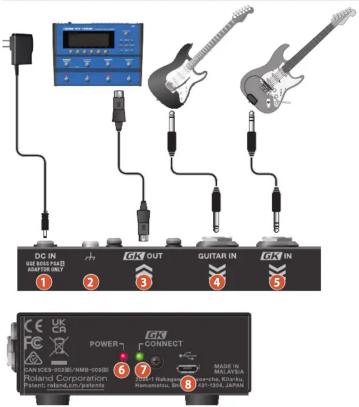
GKC-AD
Name Explanation
| 1 | DC IN jack | Connect the included AC adaptor to this jack.* The DC IN jack also serves as the power switch. The power turns on when you insert a plug into the DC IN jack, and the power turns off when you unplug the cable. |
| 2 | Ground terminal | Connect this to an external earth or ground if necessary. |
| 3 | GK OUT connector | Connect devices that have a GK IN connector (13-pin DIN type).* Never use a cable other than the dedicated GK cable (13-pin DIN type) for this unit. |
| 4 | GUITAR IN jack | Use this jack to input a normal guitar signal.The signal inputted here is output through the GK OUT connector. |
| 5 | GK IN jack | Connect a guitar or bass guitar that has a BOSS divided pickup such as a GK-5 or GK-59.* Never use a cable other than the dedicated serial GK cable for this unit. |
| 6 | POWER indicator | This lights up when the unit turns on. |
| 7 | GK CONNECT Indicator | Shows the connection status for the GK IN jack (1/4-inch TRS phone type). |
| Lit Connected | ||
| Blink Not connected | ||
| 8 | USB port(for program updates only) | Connect your computer using a commercially available USB cable that supports USB 2.0.* Do not use a USB cable that is designed only for charging a device. Charge-only cables cannot transmit data.* This is used only for program updates. |
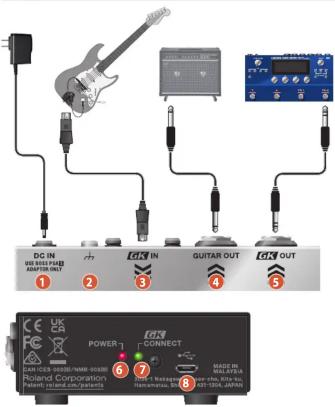
Name Explanation
| 1 | DC IN jack | Connect the included AC adaptor to this jack. * The DC IN jack also serves as the power switch. The power turns on when you insert a plug into the DC IN jack, and the power turns off when you unplug the cable. | |
| 2 | Ground terminal | Connect this to an external earth or ground if necessary. | |
| 3 | GK IN connector | Connect a guitar or bass guitar that has a Roland divided pickup such as a GK-3 or GK-3B, or a GK-compatible guitar such as the Roland V-Guitar GC-1. * Never use a cable other than the dedicated GK cable (13-pin DIN type) for this unit. * Set the switch on your GK-3/GK-3B or other instrument to the center position (MIX). | |
| 4 | GUITAR OUT Jack | This jack is for outputting the normal guitar signal input from the GK IN connector. | |
| 5 | GK OUT jack | Connect compatible devices that have a GK IN connector (1/4-inch TRS phone type) to this jack. * Never use a cable other than the dedicated serial GK cable for this unit. | |
| 6 | POWER indicator | This lights up when the unit turns on. | |
| 7 | GK CONNECT indicator | Shows the connection status for the GK OUT jack (1/4-inch TRS phone type). | |
| Lit | Connected | ||
| Blink | Not connected | ||
| 8 | USB port (for program updates only) | Connect your computer using a commercially available USB cable that supports USB 2.0. * Do not use a USB cable that is designed only for charging a device. Charge-only cables cannot transmit data. * This is used only for program updates. | |
* To prevent malfunction and equipment failure, always turn down the volume, and turn off all the units before making any connections.
Main Specifications
| Power supply | AC adaptor |
| Current draw | GKC-DA: 390 mAGKC AD: 240 mA |
| Dimensions | 115 (W) x 92 (D) x 36 (H) mm4-17/32 (W) x 3-5/8 (D) x 1-7/16 (H) inches |
| Weight (excluding AC adaptor) | 340 g12 oz |
| Accessories | AC adaptorOwner's ManualLeaflet "USING THE UNIT SAFELY" |
| Options (sold separately) | Serial GK cable: BGK-15 (15 ft./4.5 m), BGK-30 (30 ft./9 m) |
^9 This document explains the specifications of the product at the time that the document was issued. For the latest information, refer to the Roland website.
USING THE UNIT SAFELY
WARNING
Use only the supplied AC adaptor and the correct voltage Be sure to use only the AC adaptor supplied with the unit. Also, make sure the line voltage at the installation matches the input voltage specified on the AC adaptor's body. Other AC adaptors may use a different polarity, or be designed for a different voltage, so their use could result in damage, malfunction, or electric shock.
CAUTION
Handle the ground terminal carefully If you remove the screw from the ground terminal, be sure to replace it; don't leave it lying around where it could accidentally be swallowed by small children. When refastening the screw, make that it is firmly fastened, so it won't come loose.
IMPORTANT NOTES
Placement
- Depending on the material and temperature of the surface on which you place the unit, its rubber feet may discolor or mar the surface.
Additional Precautions
- Do not use connection cables that contain a built-in resistor.
Intellectual Property Right
This product includes third party open source software. Copyright © 2009-2019 Arm Limited. All rights reserved. Licensed under the Apache License, Version 2.0 (the "License"), You may obtain a copy of the License at http://www.apache.org/licenses/LICENSE-2.0 Copyright © 2018 STMicroelectronics. All rights reserved. This software component is licensed by ST under BSD 3-Clause license, the company you may obtain a copy of the License at https://opensource.org/licenses/BSD-3-Clause Roland, BOSS are either registered trademarks or trademarks of Roland Corporation in the United States and/or other countries. Company names and product names appearing in this document are registered trademarks or trademarks of their respective owners.
- For the USA
SUPPLIER'S DECLARATION OF CONFORMITY
Compliance Information Statement
Model Name: GKC-DA, GKC-AD
Type of Equipment: GK Converter
Responsible Party: Roland Corporation U.S.
Address: 5100 S. Eastern Avenue Los Angeles, CA 90040-2938
Telephone: (323) 890-3700
Telephone: (323) 890-3700


Marke : BOSS
Modell : GKC-AD
Kategorie : Nicht kategorisiert