
HC30WB5R1 - Sicherheitskamera HONEYWELL - Kostenlose Bedienungsanleitung
Finden Sie kostenlos die Bedienungsanleitung des Geräts HC30WB5R1 HONEYWELL als PDF.


| Produkttyp | WDR 5 MP IR Bullet Sicherheitskamera |
| Modell | HC30WB5R1 |
| Marke | Honeywell |
| Auflösung | 5 Megapixel (max. 2592x1944) |
| Objektiv | Festbrennweite, IR-fähig |
| Nachtsicht | Infrarot-LEDs, Reichweite ca. 30 m |
| Videokomprimierung | H.264, H.265 (H.265 nicht in Chrome) |
| WDR (Weitdynamikbereich) | Ja, 120 dB |
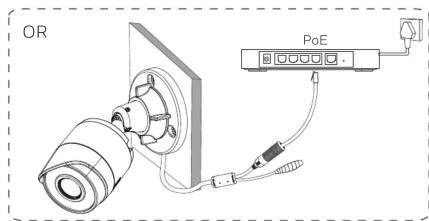
| Netzwerkanschluss | Ethernet 10/100 Base-T, PoE (IEEE 802.3af) |
| Stromversorgung | PoE oder DC 12V (Adapter nicht im Lieferumfang) |
| Leistungsaufnahme | ca. 4 W (PoE) |
| Betriebstemperatur | -30 °C bis 60 °C |
| Schutzart | IP67 (wetterfest) |
| Abmessungen (ca.) | 150 mm x 70 mm x 70 mm (L x B x H) |
| Gewicht (ca.) | 0,8 kg |
| Gehäusematerial | Aluminium, wetterfest |
| Farbe | Weiß |
| Montage | Wand/Decke, inkl. Halterung, kompatibel mit HBS2-BB und HQA-PM2 |
| Anschlüsse | RJ45, Reset-Taste, Mikrofon (nicht angegeben) |
| Protokolle | IPv4, DHCP, HTTP, RTSP, ONVIF (nicht angegeben) |
| Standardkonfiguration | IP 192.168.1.108 (wenn kein DHCP), Benutzer: admin, Passwort: 1234 |
| Kompatibilität | Honeywell Config Tool, Webbrowser |
| Lieferumfang | Kamera, Kurzanleitung, CD mit Software, Montagematerial |
| Zertifizierungen | FCC Klasse B, CE, RoHS, WEEE |
| Garantie | 2 Jahre (Herstellergarantie) |
Häufig gestellte Fragen - HC30WB5R1 HONEYWELL
Benutzerfragen zu HC30WB5R1 HONEYWELL
0 Frage zu diesem Gerät. Beantworten Sie die, die Sie kennen, oder stellen Sie Ihre eigene.
Eine neue Frage zu diesem Gerät stellen
Laden Sie die Anleitung für Ihr Sicherheitskamera kostenlos im PDF-Format! Finden Sie Ihr Handbuch HC30WB5R1 - HONEYWELL und nehmen Sie Ihr elektronisches Gerät wieder in die Hand. Auf dieser Seite sind alle Dokumente veröffentlicht, die für die Verwendung Ihres Geräts notwendig sind. HC30WB5R1 von der Marke HONEYWELL.
BEDIENUNGSANLEITUNG HC30WB5R1 HONEYWELL
Honeywell
THE POWER OF CONNECTED
30 Series
WDR 2 MP/5 MP IR Bullet Camera HC30WB2R1 HC30WB5R1
Quick Installation Guide







1
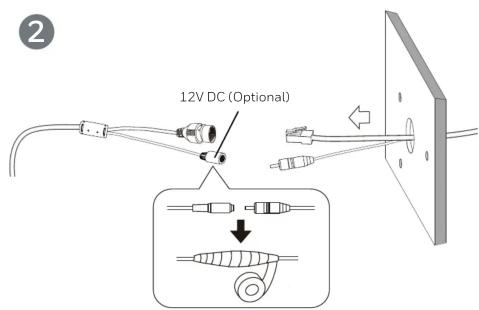
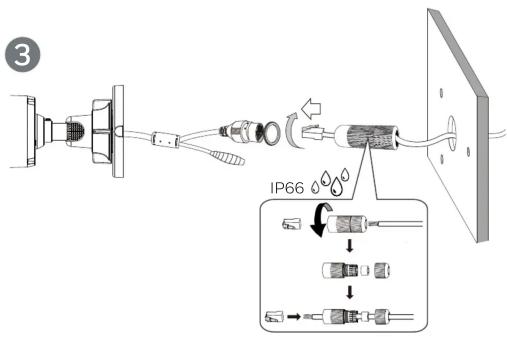
4
(Optional)
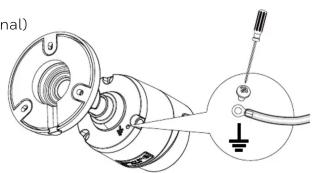
natural_image
Technical diagram of a mechanical assembly with no visible text or symbols5
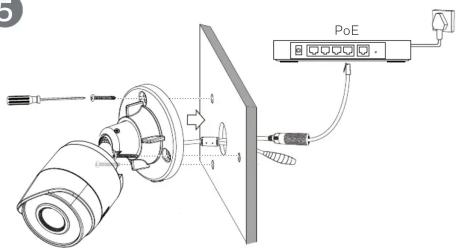
6
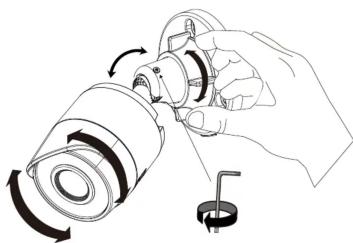
natural_image
Line drawing of a hand holding a cylindrical device with rotating components and a small inset showing a ring (no text or symbols)Logging On to the Camera
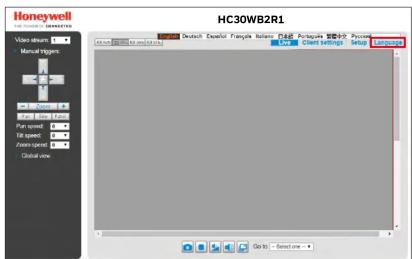
If logging on the camera remotely from a PC, install the Honeywell Config Tool from the software and documentation CD, find the camera on the network, and then open the web browser with the Honeywell Config Tool. The default user name is admin (case-sensitive) and the default password is 1234.
Note
- Chrome 71 (or later) is supported for H.264 video. Chrome is not supported for H.265 video.
- IP address of the device is assigned automatically by DHCP server. If the DHCP server is not available, the device will acquire 192.168.1.108 as the default IP address.
Support Brackets
| HBS2-BB | Junction Box |
| HQA-PM2 with HBS2-BB | Pale Mount |

Cautions and Warnings
| ! | THIS SYMBOL INDICATES THAT DANGEROUS VOLTAGE CONSTITUTING A RISK OF ELECTRIC SHOCK IS PRESENT WITHIN THE UNIT. | |
| CAUTION: TO REDUCE THE RISK OF ELECTRIC SHOCK DO NOT REMOVE COVER (5Y BACK).NO USER SERVICEABLE PARTS INSIDE REFER SERVICING TO QUALIFIED SERVICE PERSONNEL. | THIS SYMBOL INDICATES THAT IMPORTANT OPERATING AND MAINTENANCE INSTRUCTIONS ACCOMPANY THIS UNIT. |
WARNING To ensure compliance with electrical safety standards, CSA Certified/UL Listed LPS or Class 2 power adapters are required. Power over Ethernet (PoE) shall be provided by listed Information Technology Equipment meeting the IEEE 802.3af PoE standard. The PoE is not intended to be connected to exposed (outside plant) networks.
Important Safeguards
- Read and keep these instructions.
- Please ensure that your installation area can safely support the weight of the camera.
- Do not aim the camera toward a bright light source for extended periods to prevent
damage to the imager. Avoid operating the unit under or close to unstable light sources (may serve flickering), or close to fluorescent lamps or objects reflecting light.
(may cause flickering), or close to fluorescent lamps of objects reflecting light. Do not touch the camera lens
Do not touch the camera lens. - Do not drop the camera or subject it to physical shock.
- Do not use a strong or abrasive detergent when cleaning the camera.
- Avoid operating or storing the unit in extremely humid, dusty, hot/cold environments, where the operating temperature is outside the recommended range of -22^ to 140^ (-30^ to 60^) .
- Avoid operating the unit close to sources of powerful electromagnetic radiation, such as radio or TV transmitters.
- If powered by a power adapter, the adapter should be properly grounded.
Consult Honeywell for the recommended adapter or check it in Honeywell DOC.
Regulatory Statements
FCC Statement of Compliance
Information to the User: This equipment has been tested and found to comply with the limits for a Class B digital device, pursuant to part 15 of the FCC Rules. These limits are designed to provide reasonable protection against harmful interference when the equipment is operated in a commercial environment. This equipment generates, uses, and can radiate radio frequency energy and, if not installed and used in accordance with the instruction manual, may cause harmful interference to radio communications. Operation of this equipment in a residential area is likely to cause harmful interference in which case the user will be required to correct the interference at his own expense.
Note Changes or modifications not expressly approved by the party responsible for compliance could void the user's authority to operate the equipment.
Manufacturer's Declaration of Conformance
The manufacturer declares that the equipment supplied with this guide is compliant with the European Parliament and Council Directive on the Restrictions of the use of certain hazardous substances in electrical and electronic equipment (2011/65/EU), General Product Safety Directive (2001/95/EC), and the essential requirements of the EMC Directive (2014/30/EU), conforming to the requirements of standards EN 55032 for emissions, EN 50130-4 for immunity, and EN 62368-1 for electrical equipment safety.
Waste Electrical and Electronic Equipment (WEEE)

Correct Disposal of this Product (applicable in the European Union and other European countries with separate collection systems).
This product should be disposed of, at the end of its useful life, as per applicable local laws, regulations, and procedures.
Honeywell
www.honeywell.com/security
+1 800 323 4576 (North America only)
Document 800-25041 - Rev B - 05/2019
© 2019 Honeywell International Inc. All rights reserved. No part of this publication may be reproduced by any means without written permission from Honeywell. The information in this publication is believed to be accurate in all respects. However, Honeywell cannot assume responsibility for any consequences resulting from the use thereof. The information contained herein is subject to change without notice. Revisions or new editions to this publication may be issued to incorporate such changes. For patent information, see www.honeywell.com/patent.



Marke : HONEYWELL
Modell : HC30WB5R1
Kategorie : Sicherheitskamera