
ELVOX 46522.036B - Kamera Vimar - Kostenlose Bedienungsanleitung
Finden Sie kostenlos die Bedienungsanleitung des Geräts ELVOX 46522.036B Vimar als PDF.


| Produkttyp | IR-Dome-Überwachungskamera (AHD 1080p) |
| Modell | ELVOX 46522.036B |
| Marke | Vimar |
| Sensor | 2-Megapixel-CMOS (1080p) |
| Effektive Pixel | 1920 × 1080 |
| Videoauflösung | 1080p bei 25/30 fps |
| Objektiv | 3,6 mm HD-Festbrennweite |
| IR-Reichweite | 20 m (Smart-IR) |
| IR-LED | Langlebige IR-LEDs mit hoher Helligkeit |
| Schutzart | IP66 (staubdicht und strahlwassergeschützt) |
| Videoausgang | CVBS / AHD (umschaltbar) |
| Minimale Beleuchtung | 0 Lux (mit IR eingeschaltet) |
| Signal-Rausch-Verhältnis | > 50 dB (AGC aus) |
| Spannungsversorgung | 12 V Gleichstrom |
| Stromverbrauch | 250 mA (IR ein) / 100 mA (IR aus) |
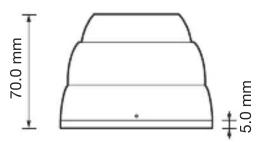
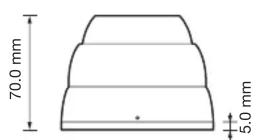
| Abmessungen (H × Ø) | 70 mm × 94 mm |
| Gewicht | 570 g |
| Betriebstemperatur | -10 °C bis 50 °C |
| Lagertemperatur | -20 °C bis 70 °C |
| Maximale Übertragungsentfernung | 300 m (mit Kabel 46364.500) |
| Videoformat | PAL / NTSC (umschaltbar) |
| Weißabgleich | ATW / AWB |
| Gegenlichtkompensation | BLC (ein-/ausschaltbar) |
| Rauschunterdrückung | 2DNR (digital) |
| Wartung und Reinigung | Gehäuse mit trockenem Tuch reinigen; Sensor vorsichtig mit alkoholgetränktem Wattestäbchen |
| Sicherheitshinweise | Nur an geeignete 12V-Stromversorgung anschließen; nicht zerlegen; vor starken Stößen schützen |
Häufig gestellte Fragen - ELVOX 46522.036B Vimar
Benutzerfragen zu ELVOX 46522.036B Vimar
0 Frage zu diesem Gerät. Beantworten Sie die, die Sie kennen, oder stellen Sie Ihre eigene.
Eine neue Frage zu diesem Gerät stellen
Laden Sie die Anleitung für Ihr Kamera kostenlos im PDF-Format! Finden Sie Ihr Handbuch ELVOX 46522.036B - Vimar und nehmen Sie Ihr elektronisches Gerät wieder in die Hand. Auf dieser Seite sind alle Dokumente veröffentlicht, die für die Verwendung Ihres Geräts notwendig sind. ELVOX 46522.036B von der Marke Vimar.
BEDIENUNGSANLEITUNG ELVOX 46522.036B Vimar
Manuale per l'installazione e l'uso Installation and operation manual
natural_image
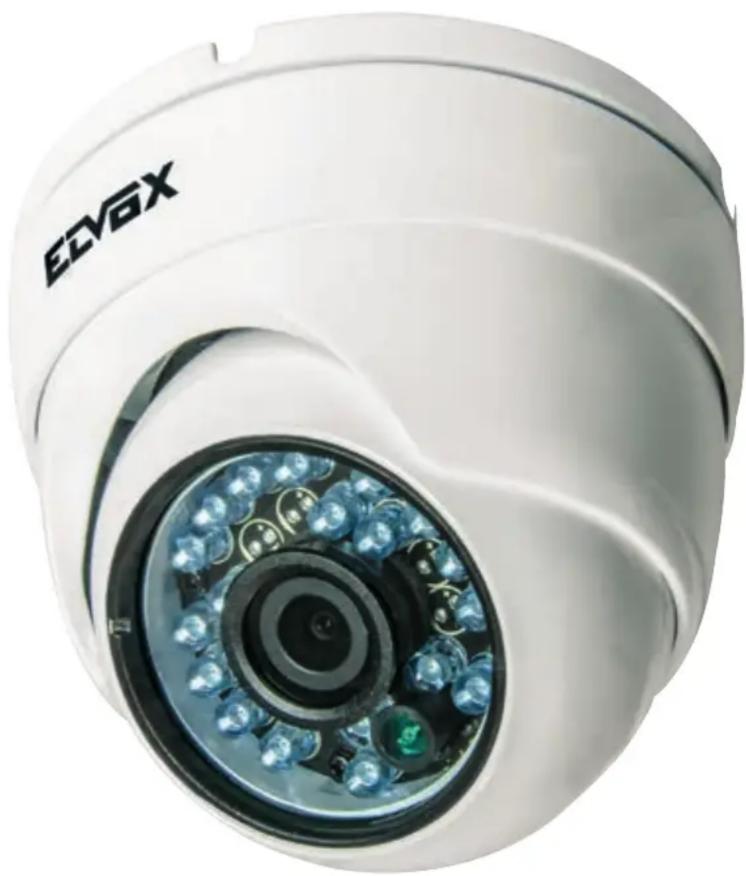
Close-up of a white surveillance camera with LED-lit security camera (no text or symbols visible)46522.036B
Telecamera Dome IR AHD 1080p, obiettivo 3,6 mm, OSD
1080p AHD IR Dome camera, 3.6 mm lens, OSD
DESCRIZIONE
La telecamera IR impermeabile adotta un sensore AHD ad elevate prestazioni da 2 megapixel 1080P a 25/30fps. La telecamera utilizza un nuovo materiale con classe di impermeabilità IP66, filtro IR-CUT, controllo Smart-IR. Design moderno e professionale.
ATTENZIONE
Grazie per aver acquistato questo prodotto. Prima di cercare di collegare o utilizzare il prodotto, leggere attentamente le istruzioni e conservare il manuale per consultazione futura.
- Utilizzare una rete di alimentazione appropriata.
La tensione di ingresso della telecamera è 12 Vdc. Assicurarsi di collegarla a una sorgente di alimentazione idonea. Una connessione errata può causare malfunzionamenti e/o danneggiare la telecamera.
- Non cercare di smontare la telecamera.
Per evitare il rischio di scosse elettriche, non rimuovere viti o coperchi. All'interno non vi sono parti che possono essere riparate dall'utente. Per l'assistenza rivolgersi a un tecnico qualificato.
- Maneggiare la telecamera con cura.
Non utilizzare la telecamera in modo improprio. Evitare colpi, scossoni e simili. La telecamera potrebbe riportare danni a seguito di utilizzo o conservazione non idonei.
- Non utilizzare detergenti aggressivi o abrasivi per pulire il corpo della telecamera.
Se la telecamera è sporca, passare un panno asciutto. Se lo sporco risulta difficile da rimuovere, utilizzare un detergente delicato e strofinare leggermente.
- Pulire la piastra anteriore del sensore con cautela.
Per pulire il pannello del sensore, non utilizzare detergenti aggressivi o abrasivi. Utilizzare carta per la pulizia di obiettivi o la punta di un bastoncino cotonato inumidito con alcol.
- Non cercare di puntare la telecamera verso il sole
Non cercare di puntare la telecamera verso il sole o altri oggetti molto luminosi che farebbero comparire macchie anche se la videocamera non è in uso.
Si potrebbe danneggiare il sensore.
- Non collocare la telecamera in luoghi soggetti a interferenza.
Quando la telecamera è installata vicino ad apparecchiature come dispositivi che comunicano in wireless, che emettono forti campi elettromagnetici, potrebbero verificarsi alcune irregolarità quali rumore sullo schermo del monitor.
FUNZIONI
- Sensore CMOS a prestazioni elevate da 2 Megapixel con 25/30 fps a 1080P.
- IR-CUT incorporato, assicura che la telecamera funzioni correttamente di giorno e di notte.
- Classe di impermeabilità IP66.
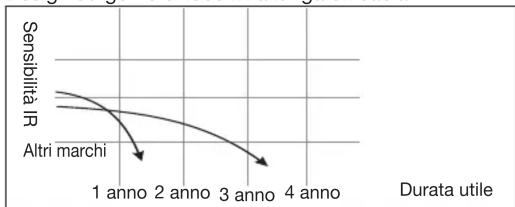
- Design LED IR a lunga durata, con luminosità molto superiore e durata utile molto più lunga rispetto ai normali LED.
- Smart-IR, range IR di 20 metri
- Trasmissione immagine fino a 300 metri.
Design sorgente di luce IR a lunga efficacia
line
| Durata utile | Sensibilità IR | | :--- | :--- | | 1 anno | Altri marchi | | 2 anno | Altri marchi | | 3 anno | Altri marchi | | 4 anno | Altri marchi |DESCRIPTION
The waterproof IR camera adopt 2 megapixels 1080P@25/30fps high performance AHD sensor. The camera adopt new material with IP66 waterproof standard, IR-CUT filter, Smart-IR control. Fashionable and professional design.
ATTENTION
Thank you for your purchasing this product. Before attempting to connect or operate this product, please read these instructions carefully and save this manual for future use.
- Use the Appropriate Power Supply
The input power for the camera is 12 Vdc. Be sure to connect it to the appropriate power. Wrong connection may cause malfunction and/or damage to the video camera.
- Do not attempt to disassemble the camera.
To prevent electric shock, do not remove screws or covers. There are no user serviceable parts inside. Ask a qualified service person for servicing.
- Handle the camera with care.
Do not abuse the camera. Avoid striking, shaking, etc. The camera could be damaged by improper handling or storage.
- Do note use strong or abrasive detergents when cleaning the camera body.
Use a dry cloth to clean the camera when dirty. In case the dirt is hard to remove. Use a mild detergent and wipe gently.
- Clean the sensor faceplate with care.
When cleaning the sensor panel, do not use strong or abrasive detergents. Use a piece of lens tissue or cotton tipped applicator and ethanol.
- Do not attempt to aim the camera at the sun
Do not attempt to aim the camera at the sun or other extremely bright-objects that causes mear to appear irrespective of whether the camera is operating or not.
This can damage the sensor.
- Do not put the camera in a place with interference.
When this camera is installed near the equipment like wireless communication device which emits strong electromagnetic field, some irregularity such as noise on monitor screen may happen.
FEATURES
- 2 Megapixel high performance CMOS sensor with 25/30fps@1080P.
- Built in IR-CUT, ensure the camera work properly both day and night.
- IP66 waterproof standard.
- Long-life IR LED design, whose brightness is several times higher and service life longer than ordinary LED's
- Smart-IR, 20 meters IR range
- Image transmission up to 300 meters.
Long-effective IR Light Source Design
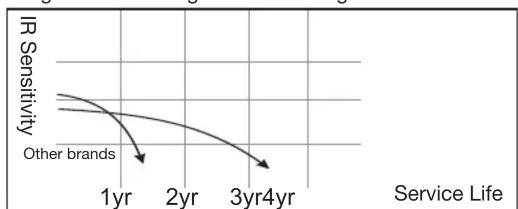
line
| Service Life | IR Sensitivity | | ------------ | -------------- | | 1yr | 0.8 | | 2yr | 0.6 | | 3yr | 0.4 | | 4yr | 0.2 |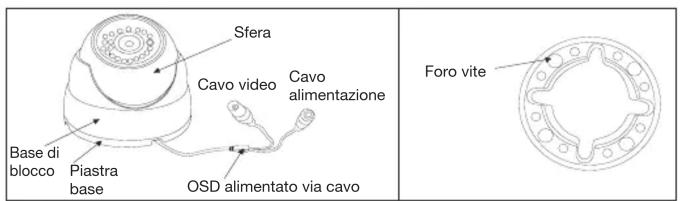
- Separare la piastra di base dalla base di blocco.
- Utilizzare le viti per fissare la piastra di base nel punto desiderato.
- Inserire quindi la sfera e la base di blocco nell'apposita sede.
- Regolare la lunghezza focale.
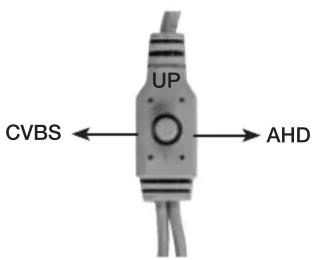
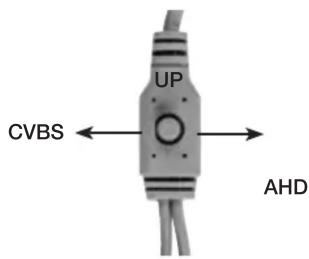
Tenere premuto verso destra per settare la telecamera in AHD, tenere premuto verso sinistra per settare la telecamera in CVBS.
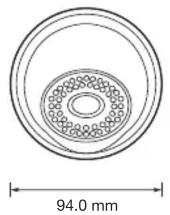
DIMENSIONI (mm)
SPECIFICHE
| Modello | 46522.036B |
| Sensore Sensore 1080P | |
| Pixel effettivi | 1920(H) x 1080(V) |
| Frame rate video | 25/30fps a 1080P |
| Distanza massima trasmissione | 300 m, con 46364.500 |
| Formato video | PAL/NTSC |
| Illuminazione min. | 0 Lux (con IR ON) |
| Rapporto S/N | Più di 50 dB (con AGC OFF) |
| OSD Inglese/Cinese/ITA | |
| AGC 0-15 | |
| Bilanciamento del bianco | ATW/AWB |
| Controluce BLC/OFF | |
| NR (Riduzione rumore) | 2DNR (Riduzione rumore digitale) |
| Spec Fun (Funzioni speciali) | D-WDR |
| Velocità otturatore | AUTO |
| Codice Sync | Interno |
| Tensione | 12 Vdc |
| Corrente | 250 mA ± 15% (IR ON);100 mA ± 10% (IR OFF) |
| DAY/NIGHT (Giorno/Notte) | EXT/COLORE/B/N |
| Obiettivo | Obiettivo HD da 3,6 mm |
| Portata IR | 20 m |
| Classe di impermeabilità | IP66 |
| Uscita video CVBS/AHD | |
| Temperatura di stoccaggio | -20°C ~70°C |
| Temperatura di esercizio | -10°C~50°C RH 90% MAX |
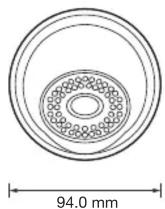
| Dimensioni | 70 mm (H) x 94 mm (ø) |
| Peso | 570 g |
*Le specifiche sono soggette a modifiche senza preavviso.
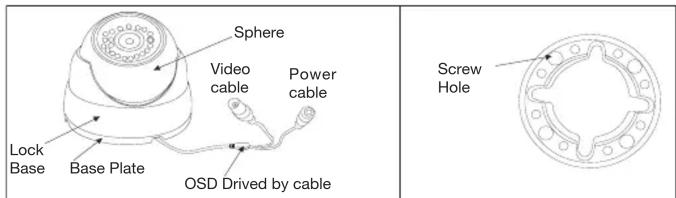
- Separate the base plate from the lock base.
- Use screws to fix the base plate to the needed place.
- Then put the sphere and the lock base.
- Adjust Lens focal length.
Hold to the right to set the camera in AHD, hold to the left to set the camera in CVBS.
DIMENSIONS (mm)
SPECIFICATIONS
| Model 46522.036B | |
| Sensor 1080P Sensor | |
| Effective Pixels 1920(H) x 1080(V) | |
| Video Frame Rate 25/30fps@1080P | |
| Max.transmission distance | 300 m, with 46364.500 |
| Video format PAL/NTSC | |
| Mini-illumination 0 Lux (IR ON) | |
| S/N Ration More than 50 dB (with AGC OFF) | |
| OSD English/Chinese/ITA | |
| AGC 0-15 | |
| White Balance ATW/AWB | |
| Backlight BLC/OFF | |
| NR 2DNR | |
| Spec Fun D-WDR | |
| Shutter Speed AUTO | |
| Sync code Internal | |
| Voltage 12 Vdc | |
| Current | 250 mA±15% (IR ON);100 mA±10% (IR OFF) |
| DAY/NIGHT EXT/COLOR/B/W | |
| Lens | 3.6 mm HD Lens |
| IR range | 20 m |
| Waterproof standard | IP66 |
| Video output | CVBS/AHD |
| Storage temperature | -20°C ~70°C |
| Operate Temperature | -10°C~50°C RH90% MAX |
| Size | 70 mm (H) x 94 mm (ø) |
| Weight | 570 g |
*Specifications subject to change without notice.
MENU OSD / OSD MENU
Set Up (Configurazione)
Premere il tasto nel menu principale “Set Up” in cui è possibile impostare i parametri seguenti.
Press the menu button into the main menu "Set Up", can set the following parameters.
| SET UP | |
| AE | |
| WB | |
| DAY-NIGHT | |
| VIDEO SETTING | |
| LANGUAGE ENGLISH | |
| RESET | |
| SAVE-EXIT | |
| EXIT | |
1. Exposure (Esposizione)
Spostare il cursore su “AE”, quindi premere il tasto menu nel sottome-nu “Exposure”, impostare i parametri seguenti nel modo desiderato.
Move the cursor to "AE", and press the menu button into the sub-menu "Exposure", set the following parameters as needed.
| EXPOSURE | |
| BRIGHTNESS | 10(1-10) |
| EXPOSURE MODE | GLOBE(BLC ) |
| GAIN | OFF(HIGH,MIDDLE,LOW) |
| RETURN | |
| BLC | |
| LV | 3(0-8) |
2. WB (Bilanciamento del bianco)
Spostare il cursore su “WB”, quindi premere il tasto menu nel sottomenu “WB” “MWB”, impostare i parametri seguenti nel modo desiderato.
Move the cursor to "WB", and press the menu button into the submenu "WB" "MWB", set the following parameters as needed.
| WB | |
| MODE | ATW(MWB) |
| RETURN | |
| MWB | |
| RGAIN | 16(1-20) |
| BGAIN | 18(1-20) |
3. Day&Night (Giorno/notte)
Spostare il cursore su “Day&Night”, quindi premere il tasto menu nel sottomenu, impostare i parametri seguenti nel modo desiderato.
Move the cursor to "Day&Night", and press the menu button into the submenu, set the following parameters as needed
| DAY/NIGHT | |
| MODE | SMART(COLOR,B/W) |
| RETURN | |
4. Video Setting (Impostazione video)
Spostare il cursore su “Video Setting”, quindi premere il tasto menu nel sottomenu, impostare i parametri seguenti nel modo desiderato.
Move the cursor to "Video Setting", and press the menu button into the submenu, set the following parameters as needed.
| VEDIO SETTING | |
| CONTRAST | 3(1-10) |
| SHARPNESS | 1(1-10) |
| COLOR GAIN | 7(1-10) |
| DNR | 8(1-10) |
| FORMAT | PAL(NTSC) |
| WDR | OFF (ON) |
| RETURN | |



Marke : Vimar
Modell : ELVOX 46522.036B
Kategorie : Kamera