
TCC-9210 - Autoradio LG - Kostenlose Bedienungsanleitung
Finden Sie kostenlos die Bedienungsanleitung des Geräts TCC-9210 LG als PDF.


| Produkttyp | Autoradio |
| Marke | LG |
| Modell | TCC-9210 |
| Einbaugröße | 1-DIN |
| Abmessungen (B x H x T) | ca. 180 x 50 x 160 mm |
| Gewicht | ca. 0,5 kg |
| Spannungsversorgung | 12 V Gleichstrom (Fahrzeugbordnetz) |
| Stromaufnahme | max. 10 A |
| Ausgangsleistung | 4 x 50 W (max.) |
| Impedanz Lautsprecher | 4 - 8 Ohm |
| Radiofunktionen | AM/FM, RDS, Senderspeicher |
| Wiedergabemedien | CD, CD-R/RW, MP3 via USB, AUX |
| Bluetooth | Freisprecheinrichtung, Audio-Streaming |
| USB-Anschluss | voraussichtlich (Typ A, 5V/1A) |
| Equalizer | voreingestellte EQ-Modi |
| Display | LCD, beleuchtet |
| Fernbedienung | im Lieferumfang enthalten |
| Reinigung und Pflege | Staub und Fingerabdrücke mit weichem, fusselfreiem Tuch entfernen |
| Sicherheit | Diebstahlsicherung (abnehmbares Bedienteil) |
| Ersatzteile und Reparierbarkeit | Sicherung (z.B. 10A Flachsicherung), Bedienteil als Ersatz erhältlich |
| Allgemeine Informationen | CE-gekennzeichnet, RoHS-konform |
Häufig gestellte Fragen - TCC-9210 LG
Benutzerfragen zu TCC-9210 LG
0 Frage zu diesem Gerät. Beantworten Sie die, die Sie kennen, oder stellen Sie Ihre eigene.
Eine neue Frage zu diesem Gerät stellen
Laden Sie die Anleitung für Ihr Autoradio kostenlos im PDF-Format! Finden Sie Ihr Handbuch TCC-9210 - LG und nehmen Sie Ihr elektronisches Gerät wieder in die Hand. Auf dieser Seite sind alle Dokumente veröffentlicht, die für die Verwendung Ihres Geräts notwendig sind. TCC-9210 von der Marke LG.
BEDIENUNGSANLEITUNG TCC-9210 LG

LG
Abnehmbare Front
Panel-Autoradio
BEDIENUNGSANLEITUNG
MODELL: TCC-9210
Nehmen Sie sich Zeit, diese BEDIENUNGSANLEITUNG gründlich zu lesen. Die Vertrautheit mit Installations- und Bedienungsabläufen hilft Ihnen, die beste Leistung aus Ihrem Autoradio herauszuholen.

□ Vorsichtsmaßnahmen:
▶ Achten Sie darauf, die Rückseite des Geräts nicht zu berühren, wenn Sie es aus der Einbaurahmen entfernen, da sie heiß sein kann. Auf dieser Seite befinden sich die Kühlrippen.
Das Gerät ist nur für den Betrieb mit 12-Volt-Gleichstrom mit negativer Masse ausgelegt.
Wenn Sie die Sicherung ersetzen, verwenden Sie unbedingt eine Sicherung mit der angegebenen Stromstärke für jedes Kabel, wie im Kapitel "Anschlüsse" erwähnt. Die Verwendung einer Sicherung mit höherer Stromstärke kann zu schweren Schäden am Gerät führen.
☐ Reset-Taste Falls es zu einer Fehlfunktion kommt, stecken Sie einen Hebel oder einen dünnen Stahlgegenstand in das Reset-Loch, das sich hinter der Frontplatte befindet.
(Überbrücken Sie den Draht im Reset-Loch) Durch Betätigen der Reset-Taste werden alle Einstellungen gelöscht.

□ Montage des Geräts
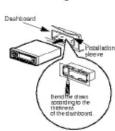
Hinweise:
▶ Verwenden Sie nur die im Lieferumfang enthaltenen Teile, um eine ordnungsgemäße Installation zu gewährleisten. Die Verwendung von nicht autorisierten
Kunststoffe können Fehlfunktionen verursachen.
- Wenden Sie sich an Ihren nächsten Car-Audio-Händler, wenn für die Installation Bohrungen oder andere Änderungen am Fahrzeug erforderlich sind.
- Verwenden Sie das Frontpanel nicht als Griff, um das Gerät während der Installation und Verkabelung zu halten. Das Frontpanel könnte sich lösen und das Gerät auf den Boden fallen.
▶ Wischen Sie die Kontakte auf der Rückseite des Frontpanels regelmäßig mit einem mit Alkohol befeuchteten Wattestäbchen ab.

□ Wenn Sie das Gerät aus der
Gerät aus der Einbaurahme Wenn Sie das Gerät aus der Einbaurahme entfernen müssen, gehen Sie wie folgt vor. □ Entfernen Sie die hintere Stütze vom Gerät.
□ Entfernen Sie das Frontpanel
vom Gerät. □ Führen Sie den Hebel ● in das Loch auf einer Seite des Geräts ein und ziehen Sie den Hebel zu sich hin. Wiederholen Sie den Vorgang auf der anderen Seite und ziehen Sie das Gerät aus der Einbaurahme.
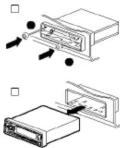
□ Hauptanschluss
Verbinden Sie den Hauptanschluss mit dem Buchsenanschluss auf der Rückseite des Geräts.
□ Antennenanschluss
Anschluss Stecken Sie den Stecker des Autoantennenkabels in die Buchse an der Rückseite des Geräts. Position. Wenn dieser Anschluss falsch oder gar nicht hergestellt wird, funktioniert das Gerät nicht. ☐ Line Out
□ Masse
Anschluss (Schwarz) ▶ Verbinden Sie das Massekabel (schwarz) mit einem Metallteil des Fahrzeugs und befestigen Sie es mit der dafür vorgesehenen Schraube am Fahrzeug.
▶ Wenn diese Verbindung locker ist oder das Kabel mit etwas anderem als einem Metallteil des Autos verbunden ist, können Geräusche oder Fehlfunktionen auftreten.
□ Stromversorgungskabel (rot)
Schließen Sie das rote Stromversorgungskabel an die 12V + Klemme an, die über den Zündschalter des Fahrzeugs gesteuert wird.
□ Speicher-Backup
Kabel (gelb) Schließen Sie das gelbe Speicher-Stromversorgungskabel an eine 12V + Klemme an, die unabhängig vom Zündschalter des Fahrzeugs immer mit Strom versorgt wird.
Position. Wenn diese Verbindung falsch hergestellt wird oder gar nicht erfolgt, funktioniert das Gerät nicht. □ Line-Out
Buchsen (optional)
Schließen Sie diese an die Line-In-Cinch-Buchsen des Verstärkers an.
Antennensteuerkabel/Externer
Verstärker-Fernbedienungs-
Einschaltkabel
Sie finden ein separates Kabel, blau mit einem männlichen Anschluss, das für viele automatische Antennen geeignet ist. Dieses Kabel darf nicht mit nicht-automatischen Antennen verwendet werden. Wenn eine automatische Autoantenne verwendet wird, wird beim Anschließen des Kabels die
Steuerung des Kabels: Die Antenne wird automatisch ausgefahren, wenn der Hauptschalter eingeschaltet wird. Dies kann auch als Fernbedienungs-Einschaltkabel für Verstärker verwendet werden, die über einen Remote-Sensing-Eingang verfügen. Durch diese Verbindung können Radio und externer Verstärker gleichzeitig ein- und ausgeschaltet werden.
□ Vorsichtsmaßnahmen
▶ Bringen Sie die Verbindungskabel nicht in die Nähe von Teilen, deren Temperatur ansteigt, wenn das Fahrzeug
wird angetrieben. ▶ Sichern Sie die Steckverbinder
fest, sodass sie eingerastet sind. Eine unsachgemäße Verbindung kann zu Störgeräuschen führen oder den Betrieb beeinträchtigen.
Dieser Autoradio ist nicht
dafür ausgelegt, die Fahrzeugkarosserie als elektrischen Rückleiter von den Lautsprechern zum Radio zu nutzen. Verwenden Sie immer
ein zweiadriges Kabel zwischen jedem Lautsprecher und
Ihrer Stereoanlage.
□ Anschluss von 4 Lautsprechern Verwenden Sie Lautsprecher mit 4-8 Ohm Impedanz.
Verwenden Sie Lautsprecher mit 4-8 Ohm Impedanz. Beachten Sie das folgende Anschlussdiagramm.
Die Frontplatte dieses Geräts kann zur Diebstahlsicherung abgenommen werden.
kann abgenommen werden, um Diebstahl zu verhindern.
□ Abnehmen der Frontplatte
□ Drücken Sie die RELEASE-Taste (▲), um die Frontplatte zu öffnen.

□ Ziehen Sie die Frontplatte zu sich hin.
□ Ziehen Sie die Frontplatte zu sich hin.
A
Hinweise:
Hinweis: Achten Sie darauf, keinen Druck auszuüben.
Achten Sie darauf, keinen Druck auf das Display oder die Bedientasten auszuüben und lassen Sie die Front nicht fallen.
Achten Sie darauf, keinen Druck auf das Display oder die Bedientasten auszuüben und lassen Sie die Front nicht fallen.
□ Schließen Sie den Innendeckel
A
√5.2
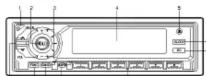
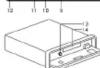
□ POWER/MUTE (O) Taste □ MODELOUD (MD/LD) Taste □ TUNE/AMS AUF/AB (+/-)
Taste
(FF/REW, CLOCK-Einstellung)
□ LCD-Anzeige
□ RELEASE-Taste
-
□ Drücken Sie die CLOCK-Taste einmal kurz, um die Uhrzeit anzuzeigen.
□ Drücken Sie die CLOCK-Taste länger als 2 Sekunden. Die Uhrzeitanzeige erscheint für 5 Sekunden. Stellen Sie die Uhr innerhalb dieser 5 Sekunden ein.
▶ Drücken der TUNE/AMS +
Taste stellt die Stunde ein. ▶ Drücken der TUNE/AMS
▶ Drücken der TONE/AMS-Taste stellt die
Minute ein.
□ CLOCK-Taste □ EQUALIZER(EQ)-Taste □ PRESET-Taste □ AS/PS AMS ON/OFF-Taste
□ BAND, RICHTUNG(◀▶)
Taste
□ FUNCTION(FUNC)-Taste
□ CONTROL UP/DOWN
[X/V] Taste □ ELECT/▲1Buttes
□ CASSETTE-Schacht

□ Drücken Sie die CLOCK-Taste,
das Display kehrt zu den
vorherigen Sekunden zurück
SINJECTS
Ein- und Ausschalten
▶ Drücken Sie die POWER/MUTE(○)-Taste
oder eine beliebige andere Taste, um
das Gerät einzuschalten.
▶ PBO POWER/MUTE, O; Taste für mehr als 2
Sekunden gedrückt halten, um das Gerät auszuschalten!
SACS102 bis 1071-107
Hinweis:
Jedes Mal, wenn Sie das Gerät einschalten, wird es mit der Lautstärke
arbeiten, die gespeichert wurde.
-
□ Loudness-Funktion
Drücken Sie die MODELOUD(MDLD)-Taste
für mehr als 2 Sekunden, aktiviert die Loudness-Schaltung,
die anhebt, um den Mangel an
Empfindlichkeit des menschlichen Ohrs
für tiefe Frequenzen bei niedrigen Lautstärken auszugleichen.
□ Stummschaltungsfunktion
POWER/MUTE(Ω)
Die Taste wird betätigt als
Schaltzustand "Stumm" ein/aus.
▶ Der Freigabemodus Stumm
Zustand ist, wenn eine beliebige Taste
erneut gedrückt wird.
□ MODE/LOUD (MD/LD)
Taste
Drücken Sie die MODE/LOUD (MD/LD)
Taste, um die Steuerung von
Lautstärke, Bass, Höhen, Balance
und Fader zu ändern.
Hinweis:
Das Gerät kann Bass und Höhen im 50-cm-Modus nicht einstellen.
und Höhen im EQ-Ein-Modus.
CONTROL AUF/AB
Taste (∧∨)
Nachdem Sie den
gewünschten Modus mit der MODELLOOD(MWLD)-Taste ausgewählt haben, steuern Sie die gewünschte
Funktion durch Drücken dieser
Tasten innerhalb von 5 Sekunden.
Nachdem Sie die Auswahl der
Modi abgeschlossen haben, kehrt das Gerät
in den Ausgangsmodus zurück.
Betriebsanzeige in allen
Modi: Eine numerische Anzeige wird
Eine numerische Anzeige wird durch Drücken dieser
Tasten umgeschaltet.
Tasten
FUNKTION(FUNC)
Taste
Diese Taste dient zum Umschalten
zwischen den Audioquellen Kassette/Kassette
Kassette (Classa Radio)
(1)
EQUALIZER (EQ)
Taste
Jeder Druck auf die EQ-Taste
schaltet das Gerät in den anderen Equalizer-Modus wie folgt um:
B→CLASSIC→ROCK
Release → POP .....
OP: Optimiert für B&B
Soul und Country
Musik.
CLASSIC: Optimiert für
orchestral music.
OK: Optimiert für harte
Rock- und Heavy-
Metal-Musik
□ Grundbedienung
□ Öffnen Sie die Frontblende.

Abb. 1
Abb. 1
AUSLÖSER-Taste Frontblende
- 1. Januar 2017
mehr als 30 Sekunden vergangen sind,
nachdem die Frontblende geöffnet und das Gerät ausgeschaltet wurde.
Valent
biomatisch.
□ Legen Sie eine Kassette ein. Die Kassette wird
Die Kassette wird automatisch eingelegt und langsam, weil
eingelegt und abgespielt

freiliegende Seite
☐ Die Bandrichtung kann
durch Drücken der
Taste DIRECTION ( ◀▶ ) umgekehrt werden.
□ Die Bandrichtung wird automatisch
umgekehrt, wenn das Bandende
erreicht wurde.
Zum Stoppen der Wiedergabe drücken Sie die
Taste EJECT( ■ ) und
entfernen Sie die Kassette.
- Schnellvorlauf und Rücklauf des Bandes
* Schnellvorlauf der Bänder
Drücken Sie die Taste TUNE/AMS +
Taste.
* Rücklauf der Bänder
Drücken Sie die Taste TUNE/AMS -
Taste.
Umschalten zwischen
Audioquellen
Verwendung der Taste FUNCTION
(FUNC). Diese Taste dient zum
Umschalten zwischen Kassetten-
und Radiobetrieb, auch wenn die
Kassette eingelegt bleibt. Wenn
Sie auf Radiobetrieb umschalten,
wird das Kassettendeck gestoppt.
□ Auto Music Search
□ Auto Music Search (AMS)
(AMS)
▶ Ihr Autoradio hat die
Fähigkeit (durch Suchen von Titellücken) schnell den
Anfang des nächsten oder vorherigen
Titels auf einer Kassette zu finden.
Während der Wiedergabe drücken Sie
die AMS AUF/AB (+/-)
Taste. Das Kassettenlaufwerk
sucht und spielt den
nächsten (vorherigen) Titel.
Während der Suche erscheint "AMS" im Display.
erscheint im Display.
▶ Die Musicsuche funktioniert möglicherweise nicht
einwandfrei für die folgenden Arten von beendeten
folgenden Arten von Aufnahmen Dies liegt an der
Dies liegt an der Aufnahme und ist keine Fehlfunktion
und ist keine Fehlfunktion des Geräts
- Es gibt Geräusche in den
Zwischenräumen zwischen den Titeln
TITEL
F
1
(二)
2.1.1
TRACK
[图]
1
[NO TEXT]
□ Auswerfen eines Gehäuses
□ Auswerfen einer Gasse □ Öffnen Sie die Frontblende
ist Experte und guter Vater.
-
1
[Nicht-Text]
[KEIN TEXT]
□ Drücken Sie die Taste EFFECT (▲)
□ Drücken Sie die Taste ELEC (■)
(1)
Th
(1)
[Non-Text]
[Non-Text]
[Non-Text]
[Non-Text]
[Non-Text]
[Non-Text]
[Non-Text]
[Non-Text]
[Non-Text]
[Non-Text]
[Non-Text]
[Non-Text]
[Non-Text]
[Non-Text]
[Non-Text]
[Non-Text]
[Non-Text]
[Non-Text]
[Non-Text]
[Non-Text]
[Non-Text]
[Non-Text]
[Non-Text]
[Non-Text]
[Non-Text]
[Non-Text]
[Non-Text]


Marke : LG
Modell : TCC-9210
Kategorie : Autoradio