
HEN08121 - Sicherheitskamera HONEYWELL - Kostenlose Bedienungsanleitung
Finden Sie kostenlos die Bedienungsanleitung des Geräts HEN08121 HONEYWELL als PDF.


| Produkttyp | Sicherheitskamera (IP-Kamera) |
| Modell | HEN08121 |
| Marke | Honeywell |
| Auflösung | 1920 x 1080 (Full HD) |
| Nachtsicht | IR-LEDs, Reichweite bis zu 30 m |
| Blickwinkel | 85° horizontal |
| Video-Kompression | H.265/H.264 |
| Stromversorgung | PoE (Power over Ethernet) oder 12 V DC |
| Schutzart | IP66 (wetterfest) |
| Betriebstemperatur | -30 °C bis +60 °C |
| Abmessungen (B x H x T) | 70 mm x 170 mm x 70 mm |
| Gewicht | ca. 400 g |
| Bewegungserkennung | Ja, einstellbar |
| Audio | Integriertes Mikrofon |
| Speicher | MicroSD-Karte (bis 128 GB) |
| Netzwerk | 10/100 Base-T Ethernet |
| Protokolle | IPv4, TCP/IP, HTTP, RTSP |
| App-Unterstützung | Honeywell HonView Touch (iOS/Android) |
| Reinigung | Staub und Schmutz mit trockenem Tuch entfernen; keine aggressiven Reiniger |
| Sicherheit | Verschlüsselung, Passwortschutz |
| Ersatzteile und Reparatur | Ersatzteile über Honeywell Service; Reparatur nur durch Fachpersonal |
| Allgemeine Informationen | Einfache Einrichtung über PoE; kompatibel mit NVR-Systemen |
Häufig gestellte Fragen - HEN08121 HONEYWELL
Benutzerfragen zu HEN08121 HONEYWELL
0 Frage zu diesem Gerät. Beantworten Sie die, die Sie kennen, oder stellen Sie Ihre eigene.
Eine neue Frage zu diesem Gerät stellen
Laden Sie die Anleitung für Ihr Sicherheitskamera kostenlos im PDF-Format! Finden Sie Ihr Handbuch HEN08121 - HONEYWELL und nehmen Sie Ihr elektronisches Gerät wieder in die Hand. Auf dieser Seite sind alle Dokumente veröffentlicht, die für die Verwendung Ihres Geräts notwendig sind. HEN08121 von der Marke HONEYWELL.
BEDIENUNGSANLEITUNG HEN08121 HONEYWELL
Honeywell
Performance Series IP NVR Quick Networking Guide
Document 800-16861V1 - Rev A - 07/2014
natural_image
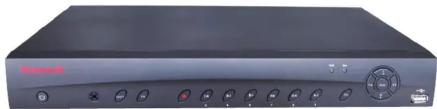
Front view of a black electronic device with control buttons and a display (no visible text or symbols)This guide shows how to set up your Performance Series IP NVR system for connecting with the Internet, and for using a PC, Smartphone, or Tablet computer.
Before you begin, ensure that you have
• A router and high-speed Internet access
- The NVR connected to a router or switch on your network, using an Ethernet cable. (See the Performance Series IP NVR Quick Connection Guide for instructions.)

Local Network Setup

Configure the network setting as either Fixed IP or DHCP.

Ensure that the NVR can
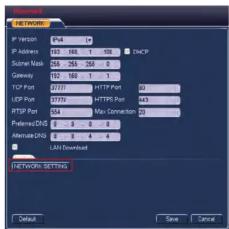

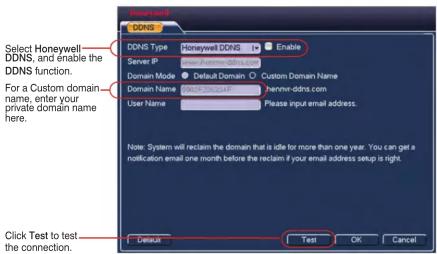
Choose the DDNS option in Advanced Settings, by clicking Setting > Network> Network Setting >DDNS (double click).

Router Port Mapping Setup
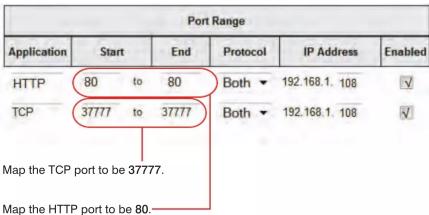
NOTE: The IP Address should be the NVR's IP address.

Web Access
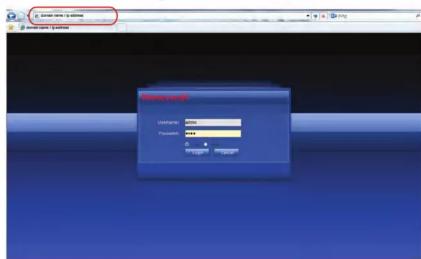
Enter your domain name or IP address in the address field in a web browser.
Honeywell
North America: +1 800 323 4576 www.honeywell.com/security
Asia Pacific: +86 21 2219 6888 www.asia.security.honeywell.com
Europe: +44 (0) 844 8000 235 www.honeywell.com/security/uk
Document 800-16861V1 - Rev A - 07/2014

Mobile App Setup

Install the Honeywell HonView Touch app

Find the free app in Apple's App store (IOS) or the Google Play store (Android OS).

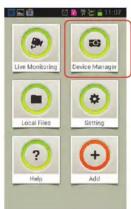
Tap Device Manager

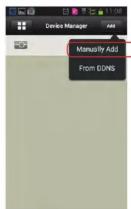
Tap Add, and then tap Manually Add.

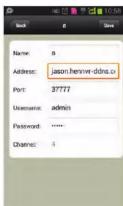
Enter your user information, then click Save.

Tap to select a Live View channel.
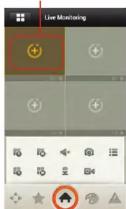

Tap to add channels.
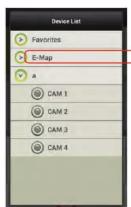

Tablet App Setup

Install, then open, the HonView Touch HD Plus app for free from the App Store or Google Play store.

The Main window opens.

Tap the Configuration icon in the Menu window.
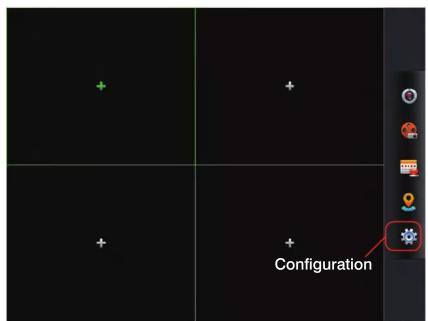
The Configuration window appears.

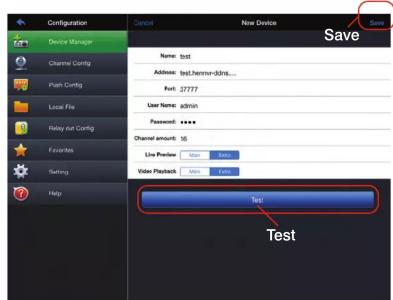
Enter the following in the New Device interface:
• Name: Enter a name for your NVR.
- Address: Enter either your NVR's DDNS address or IP address.
- User Name: Enter the NVR's user name (default: admin).
• Password: Enter the NVR's password (default: 1234)

Tap the Menu icon in the Main window.
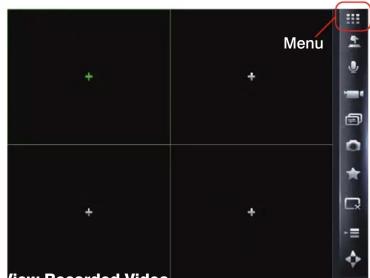
The Menu window appears.

Tap Device Manager, and then select Add.
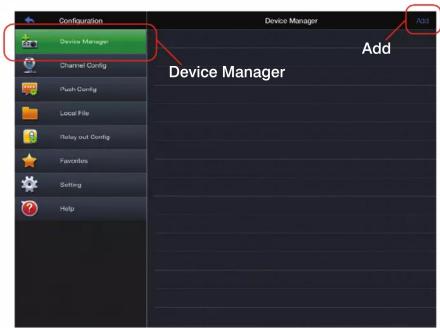
The New Device interface appears.

Tap Save, and then tap Test.
The Main menu returns.

Select a Live View channel.
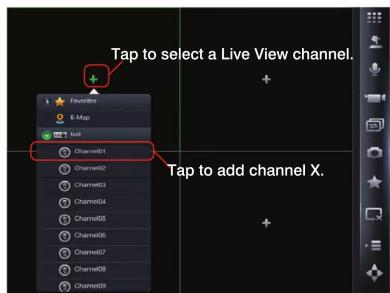
You can now start using the NVR.
© 2014 Honeywell International Inc. All rights reserved. No part of this publication may be reproduced by any means without written permission from Honeywell. The information in this publication is believed to be accurate in all respects. However, Honeywell cannot assume responsibility for any consequences resulting from the use thereof. The information contained herein is subject to change without notice. Revisions or new editions to this publication may be issued to incorporate such changes.
Honeywell
Document 800-16861V1 - Rev A - 07/2014